
Choosing between a blistering 500Hz OLED and a high-resolution 4K panel is the central tension of the premium monitor market right now, and the wrong decision can leave you with blurry motion or a hole in your wallet. The to $800 sweet spot is crowded with options that look similar on paper but deliver wildly different real-world performance in competitive shooters versus single-player epics. You need to know which spec—refresh rate, response time, panel type, or resolution—actually matters for the games you play most.
I’m Mohammad Maruf — the founder and writer behind Drink4Good. I’ve spent years deep-diving into display hardware, analyzing panel technologies from budget VA to flagship QD-OLED, and mapping real-world gaming performance to the specifications that matter.
The investment in a new screen demands clarity, so I’ve broken down the eleven most compelling options to help you find your perfect gaming monitor under $800 without chasing marketing specs that don’t translate to better gameplay.
How To Choose The Best Gaming Monitor Under $800
The to $800 range is where monitor technology makes its biggest leap—moving from standard IPS and VA panels to premium OLED displays. The key is understanding which features improve your specific gaming experience rather than just inflating the price tag. Competitive esports players need raw refresh rates and low response times, while single-player enthusiasts benefit more from higher resolution, better color accuracy, and deeper contrast. Your graphics card’s capability is the final gatekeeper: a 500Hz monitor is wasted on a system that can only push 120 frames per second in your main titles.
Panel Type: IPS, VA, or OLED
IPS panels offer reliable color accuracy and wide viewing angles, making them a strong mid-range choice for mixed-use gamers who also edit photos or watch media. VA panels deliver better native contrast, around 3000:1, which improves dark scene visibility but can suffer from slower pixel response times. OLED is the current peak, with near-infinite contrast, 0.03ms response times, and per-pixel lighting that makes HDR content genuinely transformative—though you must manage burn-in risk with built-in pixel refresh tools and variable refresh rate care.
Refresh Rate and Resolution Trade-offs
At this budget, the choice often comes down to QHD at 240Hz-500Hz versus 4K at 240Hz. For competitive shooters like Valorant, Overwatch, or Apex Legends, 360Hz or 500Hz at 1440p gives a measurable reaction-time advantage. For immersive RPGs and visually driven titles, 4K at 240Hz offers sharper detail at a higher pixel count, though you need a powerful GPU to maintain high frame rates. Mid-range options at 180Hz are perfectly playable for most gamers and cost significantly less, freeing up your budget for a better graphics card.
Adaptive Sync and Connector Standards
G-Sync Compatible and FreeSync Premium are standard across most monitors in this class, reducing screen tearing and stutter. The real differentiator is connector bandwidth: DisplayPort 2.1 enables 480Hz at QHD without compression, while HDMI 2.1 is essential for console gaming at 120Hz+. DisplayPort 1.4 with DSC (Display Stream Compression) works well but adds a short delay when alt-tabbing out of games, which competitive players notice.
Quick Comparison
On smaller screens, swipe sideways to see the full table.
| Model | Category | Best For | Key Spec | Amazon |
|---|---|---|---|---|
| LG 27GX790A-B | Premium OLED | Competitive 480Hz gaming | 480Hz, 0.03ms, DP 2.1 | Amazon |
| Alienware AW2725DF | Superior OLED | Balanced high-refresh gaming | 360Hz, 0.03ms, QD-OLED | Amazon |
| MSI MAG 271QPX | OLED Value | Budget-conscious OLED | 360Hz, 0.03ms, QD-OLED | Amazon |
| ASUS ROG Strix XG27AQDMG | Premium OLED | Glossy screen preference | 240Hz, 0.03ms, Glossy OLED | Amazon |
| Samsung Odyssey G6 G60SF | Flagship OLED | Maximum 500Hz speed | 500Hz, QD-OLED, HDR 500 | Amazon |
| INNOCN GA27M1Q | Value OLED | 500Hz on a budget | 500Hz, QD-OLED, 0.03ms | Amazon |
| Samsung Odyssey G50D | Mid-Range IPS | Reliable 180Hz performance | 180Hz, 1ms, Fast IPS | Amazon |
| LG 27GR83Q-B | Mid-Range IPS | High refresh 1440p | 240Hz, 1ms, IPS | Amazon |
| CRUA 32″ 4K Curved | Budget 4K VA | 4K 240Hz at entry price | 240Hz, 4K, VA, 1500R | Amazon |
| ASUS ROG Strix XG49VQ | Ultrawide VA | Super ultrawide immersion | 144Hz, 49″, 3840×1080 | Amazon |
| KOORUI S3241XO | Budget OLED | 4K OLED on a budget | 240Hz, 4K, 0.03ms | Amazon |
In‑Depth Reviews
1. LG 27GX790A-B Ultragear OLED

The 27-inch QHD resolution hits the sweet spot where pixel density is sharp enough for detailed textures while being manageable for modern graphics cards to push high frame rates. Its anti-glare surface handles ambient room light better than most OLED panels, reducing reflections during daytime sessions.
The almost borderless design and full ergonomic stand—height, tilt, swivel, and pivot adjustments—make it easy to integrate into any desk setup without an aftermarket arm. The 480Hz refresh rate is genuinely transformative for fast-twitch shooters, where each frame arrives faster than the human eye can perceive flicker, creating motion clarity that feels like looking through a window. The 2-year OLED panel warranty also provides necessary burn-in coverage for peace of mind.
Color performance reaches 98.5% DCI-P3 coverage with a 1.5 million-to-1 contrast ratio, so single-player games look just as stunning as competitive titles. The built-in DTS Headphone:X spatial audio processing adds value for headset users who want positional accuracy without an external DAC. The 4Hz headphone jack simplifies the cable management for gaming headsets.
Why it’s great
- 480Hz refresh rate with 0.03ms response for elite competitive gaming
- DisplayPort 2.1 enables full bandwidth without display compression
- Excellent 2-year OLED panel warranty for burn-in protection
Good to know
- WOLED panel requires pixel refresh cycles that can interrupt gameplay
- Matte coating slightly reduces perceived sharpness on static bright backgrounds
2. Alienware AW2725DF QD-OLED

The Alienware AW2725DF uses Samsung’s third-generation QD-OLED panel to deliver rich, quantum-dot-enhanced colors alongside a 360Hz refresh rate that covers the vast majority of competitive players. The 27-inch QHD resolution is the standard for esports tournaments, and when combined with the near-instant 0.03ms response time, motion blur is effectively eliminated. The factory calibration reports a Delta E of less than 2, meaning colors out of the box are highly accurate for both gaming and creative work.
Alienware includes a 3-year burn-in warranty, which is a significant vote of confidence in the QD-OLED technology and a practical safety net for buyers who worry about permanent image retention. The VESA DisplayHDR True Black 400 certification ensures deep blacks and bright highlights coexist in the same frame, making HDR scenes in titles like Cyberpunk 2077 or Forza Horizon genuinely impactful. The stand offers full ergonomic adjustment, including pivot for vertical monitor setups.
The anti-glare coating is less aggressive than the LG’s matte layer, preserving more of the OLED’s natural contrast in darker rooms. Color coverage hits 99.3% DCI-P3, which is reference-grade for video editing and content consumption. The 16:10 aspect ratio option gives a small extra vertical space for productivity tasks.
Why it’s great
- 360Hz and 0.03ms response for elite motion clarity
- 3-year burn-in warranty provides excellent long-term protection
- Factory-calibrated Delta E under 2 for accurate color reproduction
Good to know
- Text clarity is slightly softer than IPS panels due to OLED subpixel layout
- Beware of minor shipping damage reports; inspect packaging carefully
3. MSI MAG 271QPX QD-OLED

The MSI MAG 271QPX brings QD-OLED performance to a price point often reserved for high-end IPS monitors, delivering 360Hz at 1440p with the same 0.03ms response time as more expensive competitors. It uses a third-generation QD-OLED panel that improves brightness and reduces the purple tint sometimes seen on earlier OLED generations. The HDMI 2.1 port supports full 48 Gbps bandwidth, making it a strong companion for PS5 or Xbox Series X users who want VRR at high refresh rates.
MSI’s OLED Care 2.0 suite includes pixel shifting, panel refresh, and taskbar detection to minimize burn-in risk proactively. The Delta E rating of under 2 ensures color accuracy for both gaming and light creative work, while the 98% DCI-P3 coverage makes HDR games pop with vibrancy. The adjustable stand is more basic than the Alienware, offering only height and tilt adjustments, but the panel itself punches above its price bracket.
The build quality is solid with a thin bezel design that looks clean in multi-monitor setups. The 0.03ms response time is genuinely noticeable when transitioning from a previous generation IPS panel—ghosting and trailing are completely absent in fast-moving scenes. The three-year warranty on the OLED panel provides a similar level of protection to the Alienware, which is rare at this price tier.
Why it’s great
- 360Hz QD-OLED performance at a mid-range price point
- Full 48 Gbps HDMI 2.1 for console gaming at high refresh rates
- 3-year OLED panel warranty for burn-in coverage
Good to know
- Stand is basic with limited ergonomic adjustments
- DSC required for 360Hz operation, causing slight delay in alt-tab transitions
4. ASUS ROG Strix XG27AQDMG

The ASUS ROG Strix XG27AQDMG takes a different approach by using a glossy WOLED panel that produces noticeably more vibrant colors and deeper blacks in a controlled lighting environment. The 240Hz refresh rate is a step down from the 360Hz and 500Hz competitors, but the glossy coating eliminates the matte grain that can wash out OLED contrast, creating a more film-like image quality. The custom heatsink design allows for higher sustained brightness without aggressive thermal throttling.
ASUS has included anti-flicker technology specifically for OLED panels, which reduces flicker during VRR dips that are common in demanding game scenes. The uniform brightness setting maintains consistent luminance across the entire screen, fixing the common OLED issue where bright windows dim automatically. The three-year warranty with burn-in coverage is standard for premium OLED monitors and protects your investment.
The 99% DCI-P3 coverage and DisplayWidget software for quick OSD adjustments make this monitor suitable for both competitive and cinematic use. The integrated cable management system and RGB lighting add to the premium desk aesthetic. The glossy screen is a double-edged sword: it looks incredible in dim rooms but reflects ambient light more than matte options.
Why it’s great
- Glossy WOLED delivers superior vibrancy and contrast compared to matte panels
- Custom heatsink enables sustained high brightness without throttling
- Anti-flicker OLED technology reduces VRR flicker
Good to know
- 240Hz is slower than competitors in the same price tier
- Glossy coating reflects ambient light in bright rooms
5. Samsung Odyssey G6 G60SF
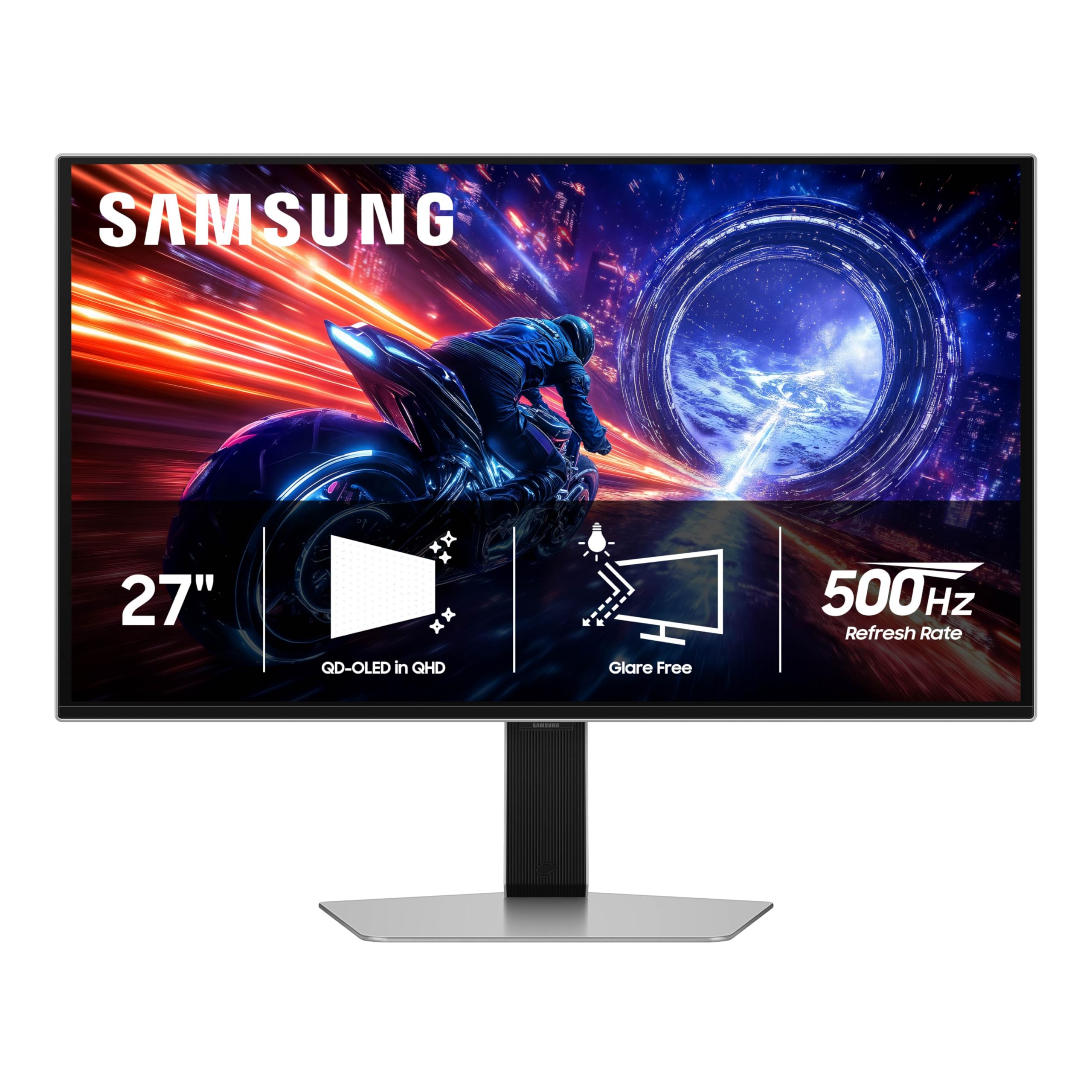
The Samsung Odyssey G6 G60SF holds the record for the fastest refresh rate in this lineup at 500Hz, using Samsung’s own QD-OLED technology to combine motion clarity with vibrant color reproduction. The 27-inch QHD panel is purpose-built for esports professionals and competitive gamers who can push frame rates high enough to utilize the full 500Hz. The VESA DisplayHDR TrueBlack 500 certification delivers peak brightness of 1000 nits for HDR highlights while maintaining deep black levels.
The Glare Free technology is Samsung’s marketing name for their anti-reflection coating, which effectively diffuses ambient light without the graininess of traditional matte coatings. The 0.03ms GtG response time means motion blur is virtually nonexistent, making tracking fast-moving targets feel instantaneous. The three-year warranty covers the OLED panel, giving buyers a solid safety net.
Color coverage reaches 99% DCI-P3 with the quantum dot layer enhancing reds and greens for a more saturated, lifelike image in HDR content. The ergonomic stand includes height, tilt, and pivot adjustments, plus a 178-degree viewing angle that maintains color accuracy from off-center positions. The built-in Game Bar overlay and core lighting add to the gaming aesthetic without being distracting during play.
Why it’s great
- World-class 500Hz refresh rate for ultimate competitive advantage
- QD-OLED with 1000 nits peak brightness for stunning HDR
- Glare Free coating reduces reflections without matte grain
Good to know
- Requires top-tier GPU to realistically push 500 FPS in games
- Burn-in management requires proactive pixel refresh cycles
6. INNOCN GA27M1Q

The INNOCN GA27M1Q is a dark horse in this category, offering a 500Hz QD-OLED panel at a price that undercuts the big-name competitors by a significant margin. The 27-inch QHD display delivers 99% DCI-P3 coverage and a 1.5 million-to-1 contrast ratio, putting its image quality in the same league as monitors costing considerably more. The 0.03ms response time is standard for OLED, ensuring no motion blur or ghosting in fast-paced games.
The connectivity suite includes dual DisplayPort 1.4 and dual HDMI 2.1 ports, making it easy to switch between PC and console inputs. The built-in speakers are surprisingly usable for casual use, saving desk space for gamers who don’t want a separate audio setup. The HDR 500 certification ensures adequate brightness for HDR gaming, though it doesn’t reach the peak 1000 nits of the Samsung G6.
INNOCN includes a MAC-VIEW mode that optimizes color matching for Mac users, which is an unusual feature at this price point. The white chassis and three-sided narrow bezel design stand out visually from the sea of black gaming monitors. The adjustable stand offers height, tilt, and swivel adjustments, with a 100x100mm VESA mount for custom arm setups.
Why it’s great
- 500Hz QD-OLED at a budget-friendly price point
- Dual HDMI 2.1 and DP 1.4 for versatile connectivity
- MAC-VIEW mode for color-accurate work with Apple devices
Good to know
- Newer brand with less established support infrastructure
- Built-in speakers are functional but not audiophile-grade
7. Samsung Odyssey G50D

The Samsung Odyssey G50D is the anchor of the mid-range category, delivering a 32-inch QHD Fast IPS panel with a 180Hz refresh rate—perfect for gamers who want a large screen size without stepping into the OLED price bracket. The 1ms GtG response time is fast enough to eliminate noticeable ghosting in most games, while the VESA DisplayHDR 400 certification provides decent contrast and brightness for HDR content. The 178-degree viewing angle is a hallmark of IPS technology, so colors stay accurate even in multi-player viewing scenarios.
The ergonomic stand is a highlight at this price, offering height, tilt, swivel, and pivot adjustments for maximum flexibility. AMD FreeSync Premium and G-Sync compatibility ensure tear-free gameplay across both NVIDIA and AMD graphics cards. The Eye Saver Mode reduces blue light emission for extended gaming sessions without a harsh yellow tint.
The 99% sRGB color gamut is fine for gaming, though it doesn’t reach the wider DCI-P3 coverage of more premium panels. The default calibration leans slightly oversaturated, which many gamers prefer, but professionals may want to spend time tweaking settings. The build quality is solid for the price with clean lines and small bezels.
Why it’s great
- 32-inch QHD Fast IPS with 180Hz for a large, smooth gaming experience
- Full ergonomic stand with height, tilt, swivel, and pivot adjustments
- G-Sync Compatible and FreeSync Premium for tear-free gaming
Good to know
- Default calibration is oversaturated and requires manual adjustment
- HDR 400 is basic; don’t expect transformative HDR performance
8. LG 27GR83Q-B Ultragear

The LG 27GR83Q-B is a pure performance monitor that strips away OLED complexity in favor of a proven 27-inch QHD IPS panel running at 240Hz with a 1ms response time. For esports players who don’t need infinite contrast, this monitor offers a lower total cost of ownership with no burn-in management required. The HDMI 2.1 support ensures 4K console gamers can also use this display at 120Hz, though 1440p remains the native sweet spot.
The 95% DCI-P3 color coverage is better than typical IPS panels in this range, providing vibrant colors that compete with budget OLED options. The DisplayHDR 400 certification adds a modest HDR boost that works well in games with artistic HDR implementation. The adjustable stand includes height, tilt, and pivot adjustments for multi-monitor setups.
G-Sync Compatible certification and AMD FreeSync Premium provide comprehensive tear-free support across all major graphics cards. The 4-pole headphone jack with DTS Headphone:X delivers surprisingly accurate spatial audio for a monitor. The main compromises are the HDR performance, which doesn’t match OLED panels, and the potential for dead pixels in some units.
Why it’s great
- 240Hz QHD IPS for a high-refresh experience without OLED burn-in risk
- HDMI 2.1 support for 4K 120Hz console gaming
- DTS Headphone:X provides excellent spatial audio for competitive play
Good to know
- Some units have reported dead or stuck pixels out of the box
- HDR 400 is underwhelming compared to OLED HDR performance
9. CRUA 32″ 4K Curved

The CRUA 32-inch 4K Curved monitor takes a bold position in the market by offering 4K UHD resolution at 240Hz on a VA panel for an exceptionally low entry price. The 1500R curvature provides a natural field of view on the 32-inch screen, making it feel more immersive than flat alternatives. The 3000:1 native contrast ratio of the VA panel delivers deeper blacks than IPS for dark room gaming and media consumption.
The color performance reaches 120% sRGB coverage, which translates to punchy, vibrant colors that look great in content consumption and gaming. The built-in speakers are a mixed bag—some users find them acceptable while others note they are cosmetic-only in some units. The RGB backlighting adds to the gaming aesthetic, though the effect is subtle through the white chassis.
The connectivity includes HDMI 2.1 and DisplayPort 1.4, with PIP/PBP support for multitasking setups. The 75x75mm VESA mount compatibility and tilt adjustment provide basic ergonomics. The main considerations are the VA panel’s slower pixel response compared to IPS or OLED, and the fact that hitting 240 FPS at 4K resolution requires an exceptionally powerful GPU.
Why it’s great
- 4K 240Hz at a budget-friendly price point
- 1500R curvature adds immersion to the 32-inch screen
- VA panel delivers 3000:1 contrast ratio for deep blacks
Good to know
- VA panel has slower response times than IPS or OLED
- Building 240 FPS at 4K requires top-tier GPU hardware
10. ASUS ROG Strix XG49VQ

The ASUS ROG Strix XG49VQ is a unique entry in this roundup, offering a 49-inch super ultrawide 32:9 aspect ratio panel that essentially replaces two 27-inch monitors for immersive gaming and multifunction productivity. The 3840×1080 resolution keeps pixel density manageable, so a mid-range graphics card can drive the 144Hz refresh rate effectively. The 1800R curvature wraps around your peripheral vision for a cockpit-like experience in racing and flight simulators.
The VA panel provides good contrast at 1000:1 with 90% DCI-P3 coverage, delivering cinematic color performance for media consumption. DisplayHDR 400 certification ensures adequate brightness for HDR content, though the overall HDR experience is basic compared to OLED displays. The FreeSync 2 HDR support works well with AMD graphics cards, though G-Sync compatibility can introduce ghosting with some NVIDIA configurations.
The stand offers height, tilt, and swivel adjustments, plus VESA 100x100mm mount support for custom arm setups. ASUS Eye Care technology reduces eye strain during long sessions. The main trade-offs are the lower 1080p vertical resolution, which can show pixel structure on the large 49-inch screen, and the monitor’s age in the product lineup.
Why it’s great
- 49-inch super ultrawide creates an immersive cockpit-style gaming experience
- 32:9 ratio effectively replaces a dual-monitor productivity setup
- VA panel provides good contrast for film and game content
Good to know
- 1080p vertical resolution shows pixel structure on the large 49-inch screen
- G-Sync compatibility can cause ghosting with some NVIDIA graphics cards
11. KOORUI S3241XO

The KOORUI S3241XO pushes the boundaries of what’s possible at this price point by delivering a 32-inch 4K OLED panel with a 240Hz refresh rate and 0.03ms response time. The 1500000:1 infinite contrast ratio and HDR True Black 400 certification provide the deep blacks and vivid highlights that make OLED gaming truly special. The 99% DCI-P3 color coverage ensures vibrant, accurate colors for both gaming and content creation.
The connectivity is future-proofed with dual HDMI 2.1 ports, DisplayPort 1.4, USB Type-C, and USB-A/B ports for a fully integrated cable setup. The ergonomic stand offers full adjustability with tilt, swivel, pivot, and height adjustments, plus 100x100mm VESA mount compatibility. Adaptive Sync technology ensures tear-free gameplay across the entire refresh rate range.
KOORUI provides a 1-year warranty on the display screen and 3 years on accessories, which is reasonable for the price but shorter than premium brands. The control interface takes some time to get accustomed to, but the image quality out of the box is excellent with no light bleed or dead pixel reports from users. The 32-inch 4K resolution offers noticeably sharper text and image detail than 27-inch QHD panels, making it a strong choice for mixed gaming and work use.
Why it’s great
- 4K 240Hz OLED with 0.03ms response for premium image quality
- Dual HDMI 2.1 and USB Type-C connectivity for modern setups
- Fully adjustable stand with pivot, tilt, swivel, and height controls
Good to know
- Brand has a shorter warranty period than major competitors
- OSD control system takes time to learn and navigate
FAQ
Can my graphics card handle a 500Hz gaming monitor?
Is OLED worth the extra cost over IPS for gaming?
What is the ideal screen size for 1440p gaming monitors?
Should I use DisplayPort or HDMI for high-refresh-rate gaming?
Will a 4K gaming monitor work well with consoles?
Final Thoughts: The Verdict
For most users, the gaming monitor under $800 winner is the LG 27GX790A-B because it combines a future-proof DisplayPort 2.1 connection with a blazing 480Hz WOLED panel and strong burn-in warranty coverage. If you want the best color-accurate OLED experience with a 3-year warranty, grab the Alienware AW2725DF. And for maximum value on a budget, nothing beats the MSI MAG 271QPX, which delivers 360Hz QD-OLED performance at a price that undercuts the competition.