
That monthly charge on your cable bill for “equipment rental” is a silent drain on your wallet, often adding over a hundred dollars a year for a device you could own outright. A modern gigabit modem replaces that rented box, delivers faster and more reliable DOCSIS 3.1 performance, and pays for itself within your first year of ownership.
I’m Mohammad Maruf — the founder and writer behind Drink4Good. I’ve spent years analyzing hardware specifications across hundreds of networking products, focusing on DOCSIS chipset versions, channel bonding configurations, and real-world throughput to separate marketing claims from actual performance.
Choosing the right gigabit modem depends on matching your internet plan speed to the modem’s rated capabilities, understanding DOCSIS 3.1 versus 3.0 benefits, and confirming carrier compatibility to avoid provisioning headaches.
How To Choose The Best Gigabit Modem
Not every modem delivers the gigabit speeds your plan promises. The key lies in the DOCSIS version, channel bonding count, and the Ethernet port’s data rate. Overlooking even one of these can leave you paying for speeds your hardware cannot reach.
DOCSIS 3.1 Is Non-Negotiable
DOCSIS 3.1 uses OFDM (Orthogonal Frequency Division Multiplexing) channels that bundle more data into each signal. It supports downstream speeds well beyond 1 Gbps, while DOCSIS 3.0 tops out near 1 Gbps under ideal conditions. A 3.1 modem also brings lower latency and better noise immunity, critical for gaming and video calls.
Ethernet Port Speed Matters
A gigabit modem with a 1 Gbps Ethernet port will cap your wired connection at roughly 940 Mbps. For plans exceeding 1 Gbps, look for a modem with a 2.5 Gbps port. This ensures your modem doesn’t become the bottleneck when your ISP delivers full multi-gig speeds.
ISP Compatibility Is Specific
Cable providers maintain whitelists of approved modems to ensure network stability. Before purchasing, visit your ISP’s support page and search their approved device list. Xfinity, Spectrum, and Cox all maintain separate databases. A modem certified for one may not provision on another.
Chipset and Thermal Design
Broadcom-based modems generally offer better driver stability and longer operational life than those using Intel Puma chipsets, which have historically suffered from latency spikes. A cool-running chassis with adequate venting extends the modem’s lifespan, especially if it lives in a cramped media cabinet.
Quick Comparison
On smaller screens, swipe sideways to see the full table.
| Model | Category | Best For | Key Spec | Amazon |
|---|---|---|---|---|
| Hitron CODA56 | Multi-Gig | Plans up to 2.5 Gbps | 2.5 Gbps Ethernet port | Amazon |
| ARRIS S33-RB | Renewed | 2.5 Gbps future-proofing | 2.5 Gbps Ethernet, 4 OFDM | Amazon |
| NETGEAR CM3000 | High-Split | Fast uploads on Xfinity | Mid/High-Split technology | Amazon |
| ARRIS SB8200 | Established | Reliable dual 1Gb ports | 2× 1 Gbps Ethernet port | Amazon |
| NETGEAR CM1000 | Broadcom | 1 Gbps plans, stable chip | 1 Gbps Ethernet port | Amazon |
| Motorola MB8600 | Budget | 1 Gbps, entry-level price | 1 Gbps, Broadcom, AQM | Amazon |
| Hitron CODA | Entry | Budget 1 Gbps modem | 1 Gbps, DOCSIS 3.1 | Amazon |
In‑Depth Reviews
1. Hitron CODA56

The Hitron CODA56 brings a 2.5 Gbps Ethernet port that matches multi-gig cable plans from Xfinity, Spectrum, and Cox, making it the most future-proof option in this roundup. Its DOCSIS 3.1 chipset with OFDM channels delivers consistent low latency for streaming and gaming, and the white chassis stays cool even under sustained load.
Setup takes about ten minutes — connect coax, power up, and activate through your ISP’s app. The unit is modem-only, so you will need a separate WiFi router, preferably one with a 2.5 Gbps WAN port to avoid throttling your wired connection. Real-world throughput tests show it reliably hits provisioned speeds up to 1.4 Gbps on Xfinity.
Hitron backs this with a 7-day technical support line and warranty coverage on its 30-plus years of networking hardware manufacturing. For a sub- price point, you get multi-gig readiness, stable Broadcom-based internals, and a simple, effective user interface that prioritizes function over flash.
Why it’s great
- 2.5 Gbps port handles future plan upgrades
- Low latency, stable with Xfinity and Spectrum
- Compact footprint with good thermal design
Good to know
- Modem only — requires separate router
- No 2.5 Gbps port on router will cap speeds
- Basic UI lacks advanced configuration options
2. ARRIS S33-RB

The ARRIS SURFboard S33-RB is a renewed modem that often looks brand new out of the box, offering a 2.5 Gbps Ethernet port and four OFDM channels for maximum cable spectrum utilization. It supports internet plans up to 2.5 Gbps and is approved on Xfinity, Spectrum, Cox, and several regional cable providers, making it one of the most versatile multi-gig modems available.
Setup uses the SURFboard Central app for streamlined activation, and the web interface gives you a clear view of signal-to-noise ratio and downstream/upstream power levels — useful for troubleshooting line health. Users report consistent ~977 Mbps on gigabit LAN connections and full 2.5 Gbps throughput when paired with a compatible router.
The renewed unit saves roughly 30% off the new price while including a 1-year warranty. Some network engineers have noted the read-only web UI prevents advanced DHCP or security tweaks, but for the vast majority of users, the S33 delivers reliable multi-gig speeds without fuss. The Broadcom chipset inside avoids the Intel Puma latency issues that plagued older modems.
Why it’s great
- 2.5 Gbps port for true multi-gig plans
- Four OFDM channels improve signal stability
- Renewed pricing with full warranty
Good to know
- Web UI is read-only, no DHCP config
- Some providers may not support full mid-split upload speeds
3. NETGEAR Nighthawk CM3000

The NETGEAR Nighthawk CM3000 is engineered specifically for mid/high-split DOCSIS 3.1, which unlocks upload speeds up to 1 Gbps when your ISP supports it. This makes it the top performer for Xfinity customers on the 2 Gbps download / 200 Mbps upload tier, as well as Spectrum and Cox subscribers who need faster upstream for video conferencing or large file transfers.
It features a single 2.5 Gbps Ethernet port plus two Gigabit Ethernet ports that can be link-aggregated to reach up to 2 Gbps on routers that support bonding. The Broadcom chipset and Active Queue Management keep latency low even under heavy multi-device loads. Installation is straightforward — call your ISP, give them the MAC, and the modem provisions within minutes.
The build quality matches the Nighthawk reputation: a matte black chassis with tall rubber feet for airflow. A handful of users reported connection drops after firmware updates, but the majority experience rock-solid stability. It is the priciest option here, but if your ISP offers high-split speeds, this modem is the only way to access them.
Why it’s great
- Mid/high-split technology enables 1 Gbps uploads
- Link aggregation for up to 2 Gbps bonded connection
- Broadcom chipset with AQM for low latency
Good to know
- Higher upfront cost than standard DOCSIS 3.1 modems
- Requires ISP mid-split support for full upload speeds
- Some firmware updates caused connection instability
4. ARRIS SURFboard SB8200
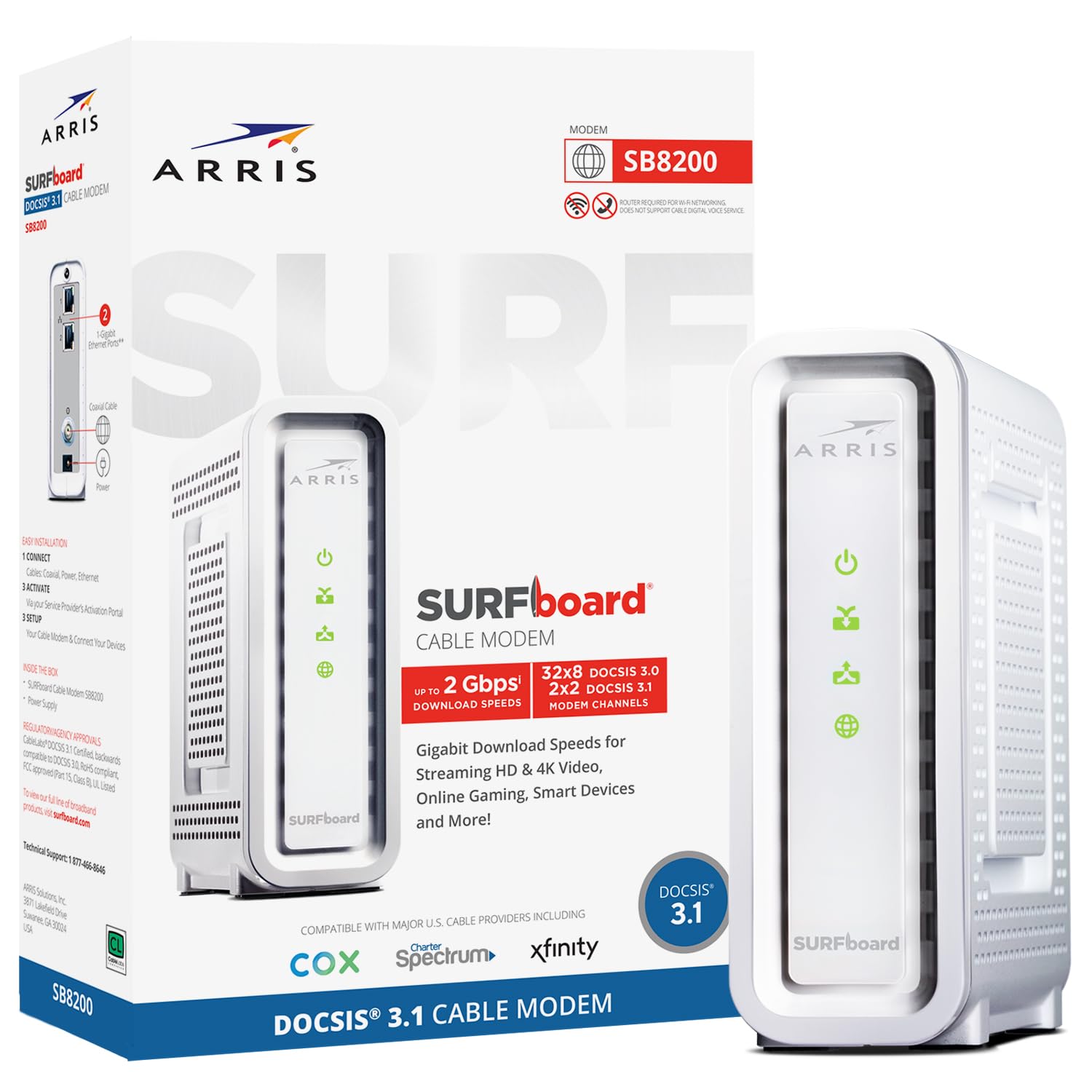
The ARRIS SURFboard SB8200 is one of the most widely deployed DOCSIS 3.1 modems on the market, trusted by millions of subscribers across Xfinity, Spectrum, and Cox. Its dual 1 Gigabit Ethernet ports support link aggregation, allowing connection to a bonded router for up to 2 Gbps throughput, though you will need a router that explicitly supports 802.3ad or similar bonding.
The modem uses a Broadcom chipset with 3 GB of RAM and a 32×8 SC-QAM / 2×2 OFDM channel configuration, giving it plenty of headroom for gigabit cable plans. Real-world tests show it consistently delivers 950+ Mbps downstream on standard gigabit Ethernet connections, and its compact footprint (5.13 x 5.25 inches) fits easily on a shelf.
Where the SB8200 falls short is sensitivity to T3/T4 timeouts — if your cable line has noise or signal issues, the modem may reset more frequently than newer models. That said, when paired with a clean signal, it runs for months without a hitch. The white plastic casing feels slightly budget, but the performance is anything but.
Why it’s great
- Broadcom chipset with 3 GB RAM
- Dual 1Gb ports for link aggregation
- Widely compatible with major ISPs
Good to know
- Requires clean line signal to avoid resets
- No multi-gig (2.5 Gb) port
- White casing feels less premium
5. NETGEAR CM1000

The NETGEAR CM1000 is a straightforward, Broadcom-based DOCSIS 3.1 modem that handles cable internet plans up to 1 Gbps without any frills. It is compatible with Xfinity, Spectrum, and Cox, and its single 1 Gigabit Ethernet port delivers the full wired throughput of most consumer gigabit plans. The black chassis runs relatively warm but maintains stable connection over extended periods.
Setup requires a call to your ISP with the MAC address — the online auto-provisioning often fails on the first attempt, but a quick phone call resolves it in under ten minutes. Once provisioned, the CM1000 delivers consistent speeds without the random reboots that plagued some ARRIS SB8200 units. Users pairing it with an Orbi mesh system report seamless handoffs and no drops.
The downside is the lack of a multi-gig port — there is no way to exceed 1 Gbps on this modem, so if your ISP offers 1.2 or 2 Gbps plans, you would need a different model. Documentation from Netgear is minimal, but the hardware itself is reliable. For anyone on a standard gigabit plan who just wants something that works, the CM1000 is a dependable, no-hassle pick.
Why it’s great
- Broadcom chipset eliminates Intel Puma issues
- Stable, no random reboots
- Simple setup after ISP call
Good to know
- No multi-gig port — maxes out at 1 Gbps
- Runs noticeably warm
- Poor documentation from Netgear
6. Motorola MB8600

The Motorola MB8600 brings Active Queue Management (AQM) to the budget segment, reducing internet latency significantly compared to older 32×8 DOCSIS 3.0 modems. This translates to faster page loads and smoother video conferencing, making it a strong value pick for gigabit cable plans from Xfinity, Cox, and CableOne. The Broadcom chipset provides solid Denial of Service protection.
The renewed unit ships in like-new condition with a generic power adapter and Cat 5e cable. Setup via the Xfinity app takes about ten minutes, and users consistently report achieving their full provisioned speeds — 500+ Mbps on mid-tier plans and the full gigabit downstream on higher tiers. The single open Gigabit Ethernet port plus three masked ports are technically for connection to a router that can bond multiple ports for over-1Gbps speeds, not for connecting separate devices.
The main drawback reported by some users is intermittent connection drops — typically caused by line signal issues rather than the modem itself, but worth noting. For its price point, the MB8600 offers excellent value, especially if you are moving from a rented DOCSIS 3.0 unit. The 32×8 upstream channel bonding ensures strong upload performance for remote work and streaming.
Why it’s great
- AQM reduces latency for gaming and video calls
- Broadcom chipset for security and stability
- Budget-friendly price for gigabit performance
Good to know
- Some units experience intermittent drops
- Renewed packaging may vary
- No 2.5 Gbps port for multi-gig plans
7. Hitron CODA

The Hitron CODA is a no-frills DOCSIS 3.1 modem designed for users who want to stop renting without paying a premium. It supports cable internet plans up to 1 Gbps and is certified for Comcast Xfinity, Charter Spectrum, Cox Gigablast, and several regional ISPs. The compact white unit uses 2 downstream and 2 upstream OFDM channels to reduce latency in DOCSIS 3.1 mode.
Setup is as simple as it gets: connect the power and coax cables, plug in the Ethernet to your WiFi router, and call your ISP to provision. Users report it easily matches their provisioned speeds — one Spectrum customer noted full speed delivery after an initial downgrade concern from the ISP. The renewed option comes well-packaged and includes a power supply and Ethernet cable.
The biggest complaints involve the lack of a printed manual or separate MAC/serial sticker, which makes it slightly harder to activate without the box. The user interface requires a static IP in the 192.168.100.x subnet and does not expose an error log. For the price, though, it delivers reliable gigabit speeds and pays for itself within a year versus renting.
Why it’s great
- Very low cost to eliminate rental fees
- Easy 3-step setup
- Works with major ISPs including Xfinity and Spectrum
Good to know
- No manual or separate MAC sticker included
- Web UI needs static IP config, no error log
- Renewed unit may arrive DOA (replacements work)
FAQ
Will a DOCSIS 3.1 modem work on a DOCSIS 3.0 network?
Why does my ISP charge a rental fee when I own my modem?
Can I use a gigabit modem with a fiber optic internet connection?
What is the difference between a modem and a router?
Final Thoughts: The Verdict
For most users, the gigabit modem winner is the Hitron CODA56 because it combines a 2.5 Gbps port, stable Broadcom internals, and broad ISP compatibility at a price just above entry-level, making it future-proof for multi-gig plans. If you want the proven reliability of a dual-link bonded connection for 2 Gbps throughput, grab the ARRIS SURFboard SB8200. And for high-split upload speeds on Xfinity or Spectrum, nothing beats the NETGEAR Nighthawk CM3000.