
Every gamer knows the enemy: a tangled mess of cables snaking behind the monitor, choking the airflow, and killing the visual aesthetic of an otherwise pristine battle station. You spend hours tweaking your RGB and monitor angles, but the cables remain a cluttered eyesore that collects dust and frustrates every time you swap a peripheral. The right desk doesn’t just hold your gear—it actively manages that chaos, turning a messy corner of the room into a clean, focused command center.
I’m Mohammad Maruf — the founder and writer behind Drink4Good. I’ve spent months analyzing the structural engineering, cable routing channels, power delivery systems, and storage configurations of modern gaming desks to identify which models actually solve the wire management problem instead of just claiming to.
This guide breaks down the best options for taming cable clutter so you can stop wrestling with zip ties and get back to gaming. After researching dozens of models, I’ve compiled the definitive list of the best gaming desk cable management desks on the market right now.
How To Choose The Best Gaming Desk Cable Management
Not all so-called “cable management” desks actually deliver. A built-in power hub is useless if it sits on top of the desk and forces wires across your mouse pad. The key is looking at three structural elements: where the outlets are mounted, how the desktop channels are cut, and whether the frame allows you to clip or weave cables underneath without sagging.
Power Outlet Placement
The best desks embed the outlet block into the frame or the underside of the desktop, not on top. Look for models that place the power strip inside a dedicated shelf compartment or along the steel crossbar. This lets you plug everything into the hub and then drop the cables straight down into a hidden tray, keeping the desk surface completely clear.
Desktop Thickness and Material
Cable management trays, clips, and brush grommets all rely on a desk edge that is thick enough to hold them securely. Thinner particleboard tops under 0.6 inches often crack under the pressure of a clamp-on tray. Look for tops that are at least 0.75 inches thick and made from P2-grade engineered wood or solid MDF for clean drilling and lasting grip.
Under-Desk Storage and Routing Channels
Consider how the frame allows you to run cables from your PC tower to your monitor. Open-frame designs with crossbars give you natural pathways to zip-tie cables along. Desks with lower shelves or CPU stands should include cutouts that let cables pass through instead of wrapping around the edge. A dedicated cable management tray bolted to the underside of the main surface is a major time-saver versus buying separate kits.
Quick Comparison
On smaller screens, swipe sideways to see the full table.
| Model | Category | Best For | Key Spec | Amazon |
|---|---|---|---|---|
| SIAGO Electric Standing Desk | Sit-Stand | Height adjustability with cable tray | Integrated under-desk cable tray + hooks | Amazon |
| AODK 79″ L-Shaped | Ultra-Large | Massive surface + dual power hubs | Two built-in power hubs (6 outlets each) | Amazon |
| Bestier 71″ LED L-Shaped | Premium L-Shape | Large setup with corner routing | Adjustable metal grid for cable weaving | Amazon |
| ODK 66″ L-Shaped | Mid-Size L-Shape | Monitor stand with hidden storage | Full-length monitor riser with power | Amazon |
| AODK 61″ L-Shaped | Mid-Range L-Shape | Fabric drawers for cable accessories | 4-tier drawers + monitor shelf | Amazon |
| SEDETA L-Shaped Desk | Compact L-Shape | Small spaces with drawer storage | Fabric drawers + storage cabinet door | Amazon |
| Huuger 63″ L-Shaped | Thick Desktop | Extra-thick top for clamp-on trays | 0.95-inch thick desktop panel | Amazon |
| Bestier 51″ L-Shaped | Budget L-Shape | Entry-level with magnetic cable clips | Magnetic pieces + binder clips included | Amazon |
| SEDETA 70.8″ Gaming Desk | Value Straight Desk | Budget-friendly with PC shelf routing | 3-tier storage shelf for CPU + cables | Amazon |
In‑Depth Reviews
1. AODK 79 inch L Shaped Desk with 5 Drawers

AODK’s 79-inch behemoth is the desk you buy when you want to end cable clutter forever without ever needing to think about it again. The standout feature is the dual built-in power hubs — two separate units, each housing 3 AC outlets and 2 USB ports, positioned on opposite sides of the L-shape. This eliminates the need for extension cords and lets you route your PC and monitor cables directly into the nearest hub, keeping wire runs short and invisible.
The 5 fabric drawers include a dedicated file drawer that fits letter, A4, and legal documents, but for cable management, the real value is the 6-tier open shelving. You can stash your power strip, networking gear, and excess cable loops on the lower shelves, completely out of sight behind the desk’s structure. The reversible left-or-right layout means you can orient the long side toward your wall outlet for the shortest possible cord path.
The desktop itself provides 79 inches of primary surface width with 18.9 inches of depth — enough for triple monitors plus a laptop without crowding. The frame is all powder-coated steel, and users consistently report zero wobble even under heavy equipment. Assembly is the biggest time commitment here, but the labeling system is thorough enough that one person can manage it with patience.
Why it’s great
- Two separate power hubs eliminate peripheral cord span
- 79-inch surface accommodates any multi-monitor setup
- 5 drawers provide dedicated storage for cable accessories
- Reversible layout optimizes wall outlet proximity
Good to know
- Assembly is lengthy and requires careful reading
- Large footprint may not fit smaller rooms
- LED light diffuser is milky white for softer glow
2. SIAGO Electric Standing Desk Adjustable 48×24
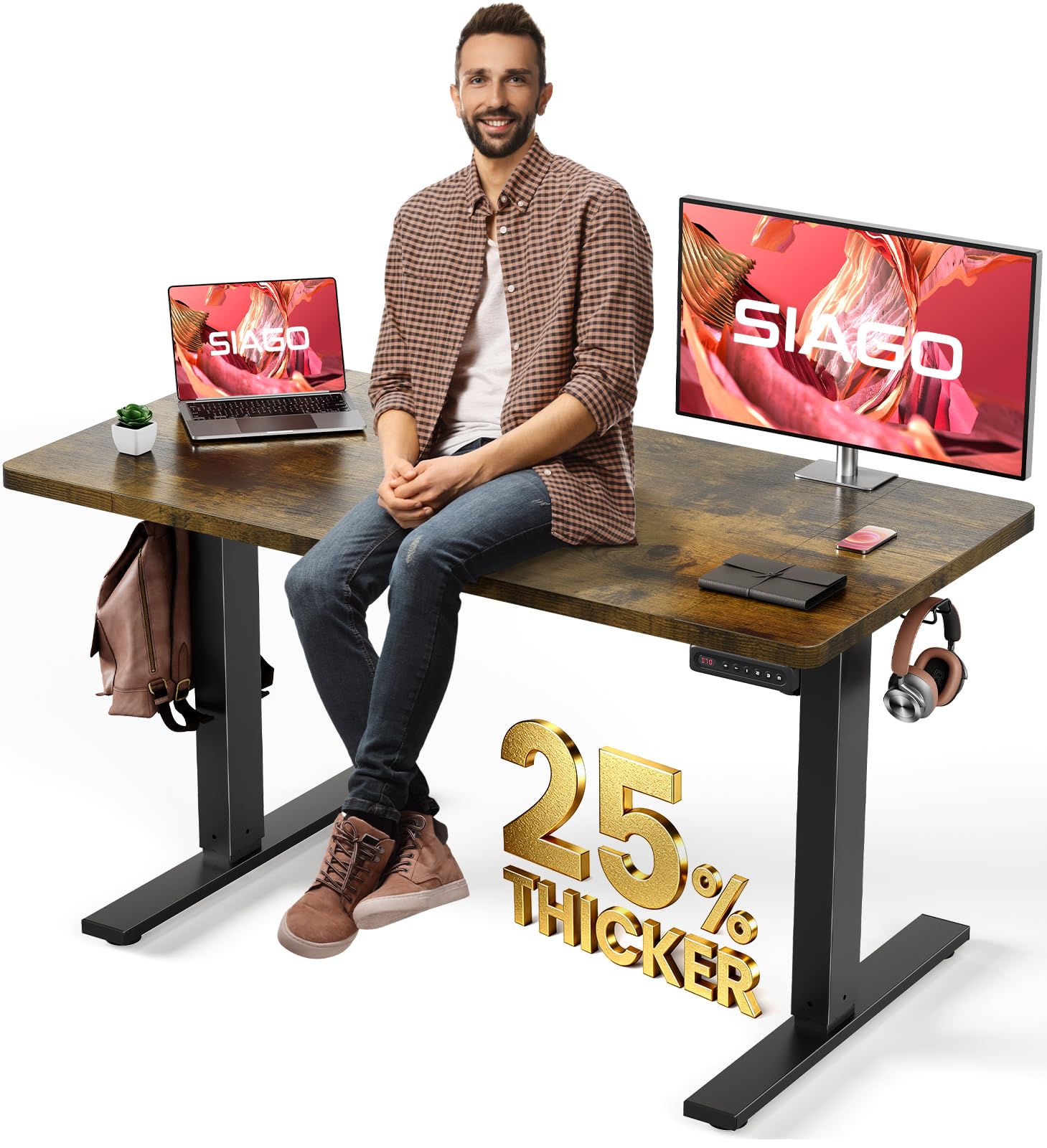
For gamers who also work from home and need height variability, the SIAGO Electric Standing Desk brings a dedicated cable management tray that is bolted directly to the underside of the desktop. This tray provides a designated channel to coil excess cable length and route wires from the monitor to the floor. The desk also includes integrated hooks for hanging headphones or bags, which helps keep peripheral cables off the surface.
The 48×24-inch desktop is a single piece (no seams), and the motor operates under 45 dB — quiet enough that you won’t hear it during a game. The frame uses a larger connection area at full height to minimize wobble, meaning your cable management stays securely in place when the desk is raised to standing position. The 200-pound lifting capacity handles even a heavy PC case plus dual monitors without straining the motor.
The control panel provides three memory presets and a child lock. The rustic brown finish with black metal legs gives it a more mature look that blends into an office environment while still serving gaming needs. The pre-drilled holes and labeled parts allow for a 30-minute assembly window, which is fast for an electric desk with cable management built in.
Why it’s great
- Under-desk cable tray is pre-installed and ready to use
- Motor runs under 45 dB for distraction-free gaming
- 200-pound capacity handles heavy setups
- Quick 30-minute assembly with clear labeling
Good to know
- Desktop comes in three pieces (not one solid slab)
- Memory presets only store three height positions
- Some users report a gap at the desktop seams
3. Bestier 71 inch LED L Shaped Desk with Power Outlets
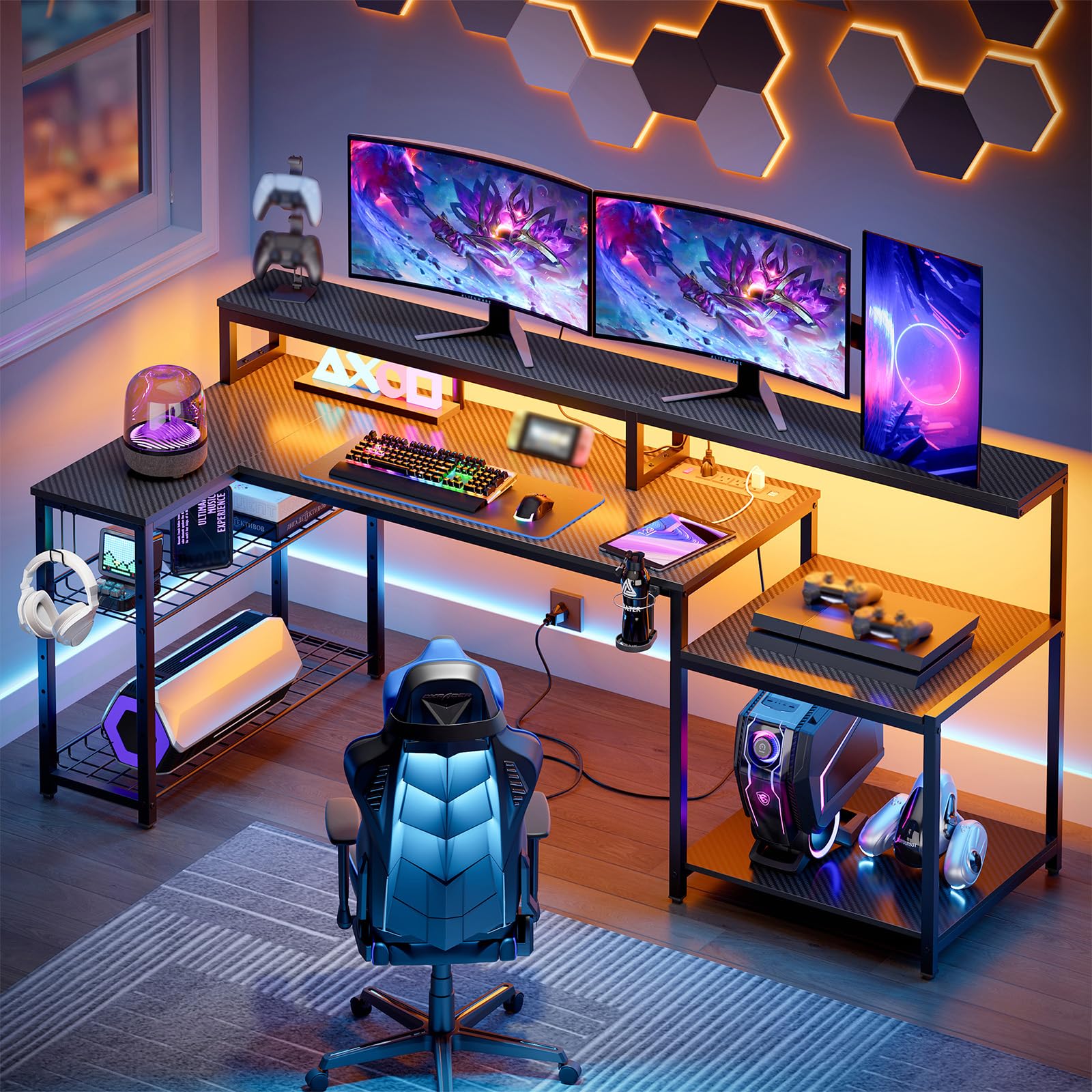
The Bestier 71-inch model earns its spot through a clever structural detail: an adjustable metal grid that sits under the monitor stand on the right side. This grid allows you to weave cables through the metal openings and secure them with included zip ties or Velcro straps — keeping monitor, keyboard, and mouse wires directly off the desktop and hidden behind the riser. The entire setup stays looking clean even if you swap peripherals weekly.
Power delivery comes from 4 AC sockets and 2 USB ports, all built into the frame at a position that encourages routing down through the grid rather than out across the surface. The included foldable cup holder and headphone hook provide three installation positions, which means you can position them exactly where they won’t interfere with your cable pathways. The 3D carbon fiber texture on the desktop is scratch-resistant and easy to wipe clean of dust and cable grime.
The monitor stand itself is 5.9 inches tall, providing enough clearance underneath to stash a keyboard or small accessories when not in use. At 71.5 inches total length, this desk fits comfortably in a corner and gives plenty of legroom for tall gamers over 6 feet. Assembly takes about an hour with two people, and the instructions clearly distinguish between left-hand and right-hand configurations.
Why it’s great
- Metal cable-weaving grid keeps wires hidden behind monitor riser
- 4 AC outlets + 2 USB built directly into frame
- Scratch-resistant carbon fiber surface withstands heavy use
- Foldable cup holder and hook don’t obstruct cable paths
Good to know
- LED strip remembers last setting but no dedicated on/off button
- Top shelf clearance listed as 14 inches but actual is 10 inches
- Monitor shelf back has no bar for c-clamp mounts
4. ODK 66″ L Shaped Gaming Desk with Power Outlet and LED Lights

The ODK 66-inch L-shaped desk focuses on one cable management solution that is often overlooked: the full-length monitor riser. Unlike short standalone monitor stands, this riser runs the entire length of the main desktop section, creating a 36-inch-wide elevated shelf. You can run all your monitor and keyboard cables through the gap underneath this riser, completely hiding them from view while still keeping the ports accessible.
Below the main surface, the 2-tier bookshelf and PC tower stand give you structured compartments to park your surge protector, router, and cable excess. The power block includes 3 standard plug outlets and 2 USB ports, and it is mounted low on the frame so you can plug everything in before routing the wires upward through the riser cavity. The reversible design allows the storage shelves to go on either side, so you can orient the desk to bring the power hub closest to your wall outlet.
The desktop uses premium MDF with a carbon fiber finish that resists scratches and daily wear. The center of the main desktop is 36 inches long — 10 inches longer than many competing L-shaped designs — which means fewer cables stretched across the surface. Assembly can take 3 to 4 hours solo, but the included instructions cover both left and right configurations clearly.
Why it’s great
- Full-length monitor riser hides all front-facing cables
- 36-inch main desktop center reduces peripheral wire stretch
- Dedicated PC tower shelf with accessible power block
- Reversible layout for flexible outlet placement
Good to know
- Actual dimensions slightly smaller than product page suggests
- LED lights have 10 colors but lack a convenient on-off switch
- Assembly time is longer than average
5. AODK 61″ L Shaped Desk with Drawer and Power Outlets

AODK’s 61-inch model is a compact but feature-packed desk that uses its drawer system to solve cable clutter problems. The 4-tier fabric drawers provide dedicated compartments for storing excess cables, power bricks, and small peripherals like mice and controllers. Keeping these items off the desktop and inside a drawer is one of the simplest cable management strategies, and this desk executes it well with smooth metal slides.
The power hub includes 3 outlets and 2 USB ports, positioned on the front edge of the desk for easy access. While the outlet placement is less invisible than frame-mounted options, it compensates by including a 5.9-inch monitor stand that elevates your screens and creates a cable pass-through zone underneath. The LED light strip offers 7 colors and 20 modes with a memory function that keeps your last setting active after power cycles.
Construction uses alloy steel legs and a painted finish that resists rust and scratches. The included CPU stand and 2 open shelves provide additional routing points for wires. Assembly requires attention to detail — the instructions are picture-only — but the parts are clearly labeled. At 61 inches of main width, this desk fits well in standard bedrooms and dorm rooms without overwhelming the space.
Why it’s great
- Fabric drawers absorb cable clutter and keep desk clear
- Monitor stand creates hidden pass-through zone
- Alloy steel frame with rust-resistant coating
- LED memory function maintains your lighting preference
Good to know
- Fabric drawers not suited for heavy items or thick power bricks
- Power outlet sits on desktop edge, not hidden under frame
- Picture-only instructions require careful study
6. SEDETA L Shaped Gaming Desk with Fabric Drawers

SEDETA’s reversible L-shaped desk brings a different kind of cable management tool: a top hutch. The raised shelf above the main surface creates a dedicated zone for monitors and laptops, with the desk’s power outlet block located directly underneath it. This lets you run all your display cables up into the hutch and keep them off the main desktop area entirely. The integrated 4-outlet and 2-USB charging station includes an on-off switch, so you can kill power to everything with one button without unplugging.
The 2 fabric drawers and storage cabinet door provide covered storage for cable adapters, chargers, and excess wire loops. The reversible design lets you configure the full 86.6-inch span as a two-person desk or compress it into a 62.2-inch corner setup, giving you flexibility in how you route cables around the room. The FSC-certified engineered wood desktop is P2-grade with a scratch-resistant laminated finish.
Assembly takes 1.5 to 3 hours depending on experience, and the tools are included. The RGB LED strip offers 60,000 colors and 29 modes with music sync via an adjustable microphone — a nice touch for atmosphere, though the real draw here is the structural cable concealment through the hutch and cabinet storage.
Why it’s great
- Top hutch provides dedicated cable concealment above monitors
- Power outlet includes on-off switch for one-click power kill
- Reversible to 86.6-inch two-person desk for flexible routing
- Fabric drawers and cabinet door keep accessories out of sight
Good to know
- Desktop height may feel slightly low for taller users
- White desktop top needs a plastic guard for easy cleaning
- Some users report difficulty aligning storage cabinet door
7. Huuger 63 Inch L Shaped Desk with Power Outlets and USB-C
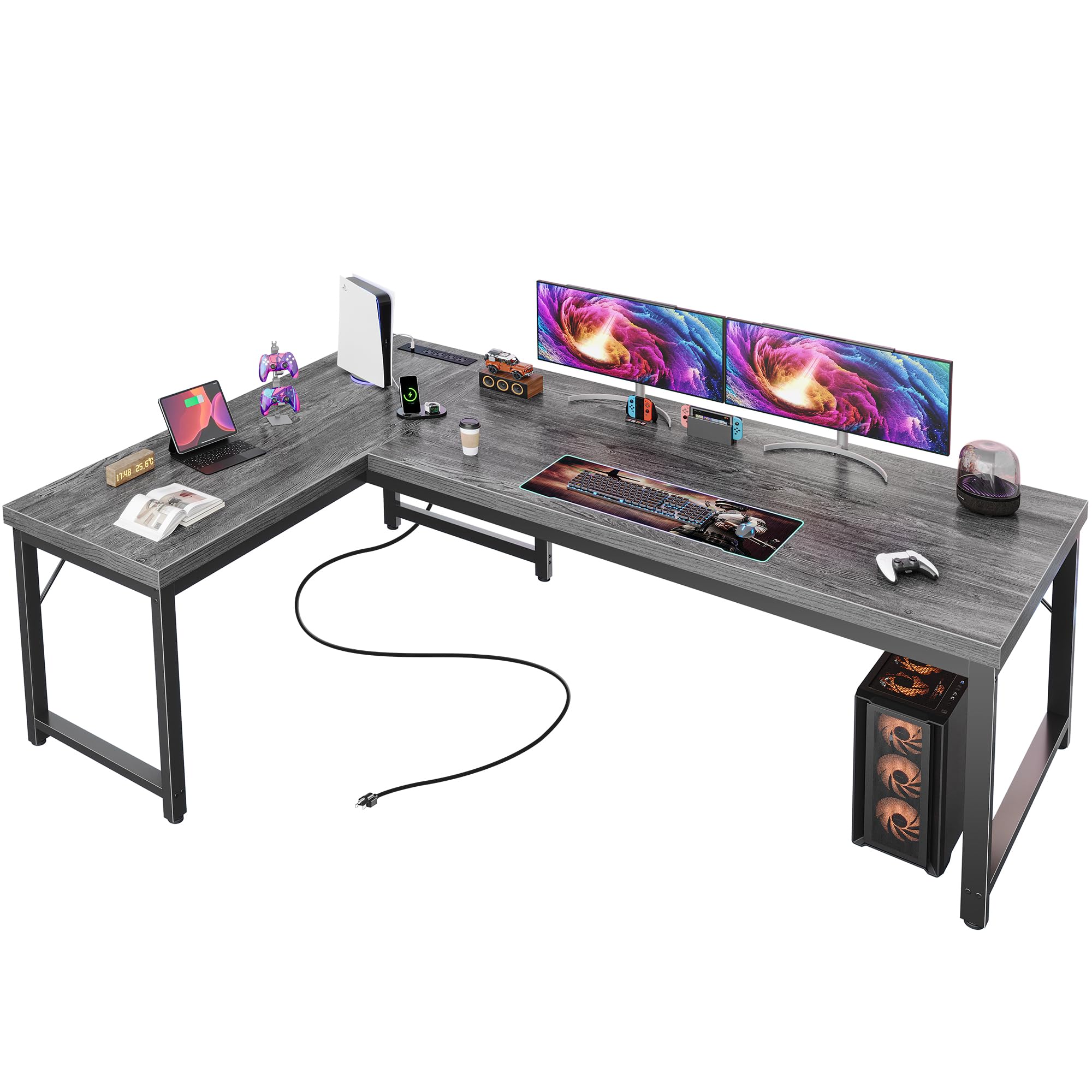
Huuger’s 63-inch L-shaped desk stands out for its unusually thick desktop panel: 0.95 inches of high-density material that provides a solid surface for attaching clamp-on cable management trays, adhesive cable channels, and monitor arms. Thinner desks often crack or sag when you mount these accessories, but the Huuger’s thicker construction handles the pressure without flexing. The reinforced steel frame with thickened legs and crossbars further supports the 220-pound weight capacity.
The built-in power block includes 4 AC outlets, 1 standard USB port, and 1 USB-C port — a welcome addition for modern chargers. The USB-C port eliminates the need for a separate brick, keeping one more cable off your desk. The reversible design works as a corner desk or can combine two units for a seamless 2-person workstation, though the primary value for cable management is the thick edge that holds aftermarket accessories like cable raceways and grommet kits.
Assembly is straightforward with numbered parts and clear instructions, taking roughly 30 minutes for one person. The powder-coated metal frame resists scratches and rust. Adjustable foot pads level the desk on uneven floors, preventing wobble that can loosen cable clips over time.
Why it’s great
- 0.95-inch desktop supports heavy clamp-on cable trays without cracking
- USB-C port reduces brick clutter on the desk surface
- 220-pound weight capacity handles heavy setups
- Adjustable foot pads prevent wobble and cable clip loosening
Good to know
- Included assembly tools are mediocre quality
- No dedicated cable management tray built in
- Larger corner setup may require two people for alignment
8. Bestier 51″ L-Shaped Gaming Desk with Power Outlets & LED Lights
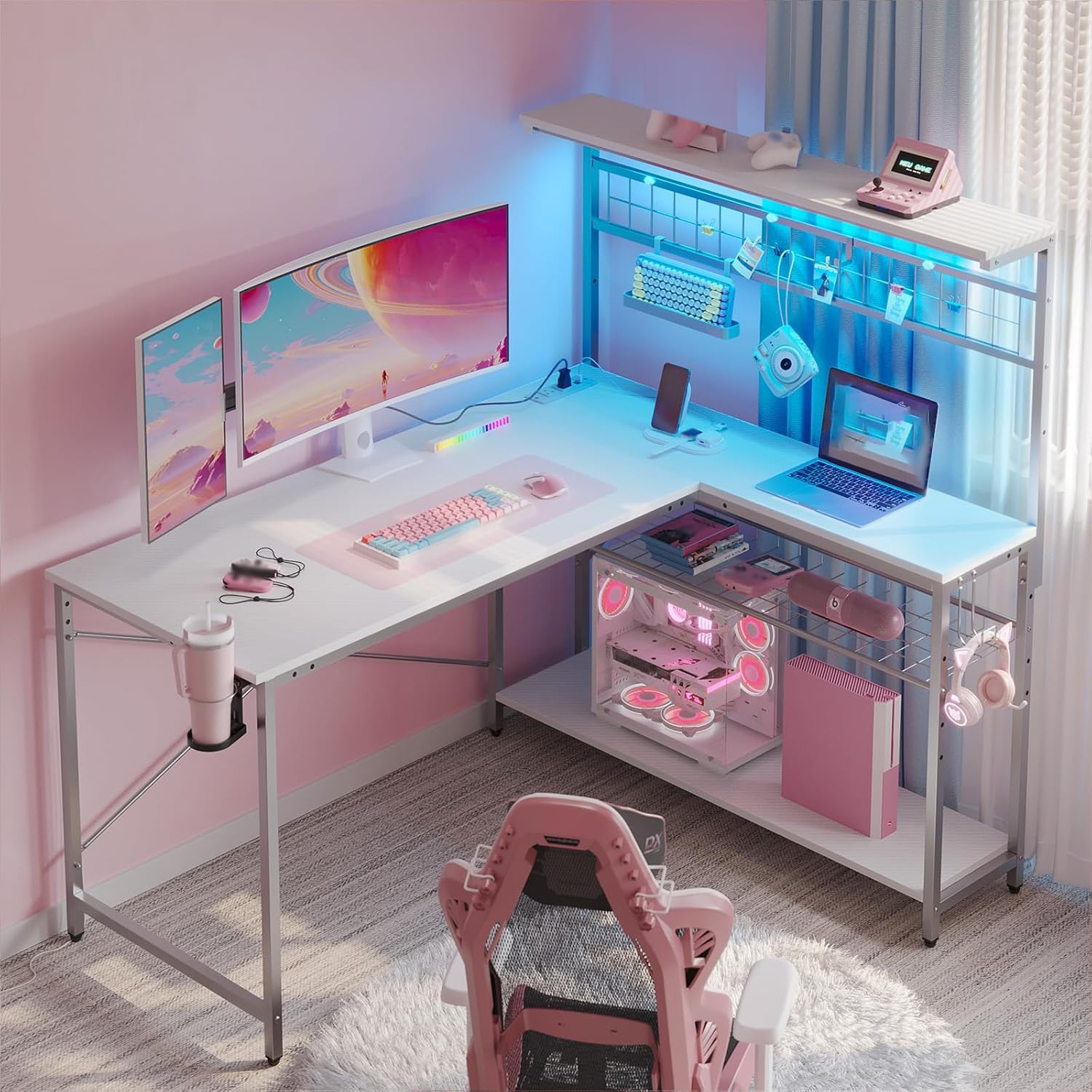
The Bestier 51-inch L-shaped desk is the most accessible entry point on this list, delivering a surprising level of cable management consideration for its price tier. It comes with magnetic pieces and binder clips specifically intended to hold cables along the desk frame. While not as robust as a built-in tray, these accessories let you route peripheral cables along the steel legs and keep them off the floor for a cleaner look.
The 2 power outlets and 2 USB ports are located on the desktop surface, which is less ideal for hiding wires, but the 4-tier shelving system provides multiple platforms to stash your power strip and excess cable bundles. The reversible design includes a 2-tier open shelf on the left for a CPU stand and a right side with a hook and foldable cup holder. The carbon fiber white finish with RGB LED lighting gives it a bright, modern look that stands out in a bedroom setup.
The X-shaped crossbar frame provides solid stability for a 51-inch desk, and the adjustable foot pads prevent wobble. Assembly requires attention to screw usage — using the wrong screw can damage the top shelf — but the numeric labeling system keeps things organized. At this size, it fits well in smaller rooms where cable clutter is more noticeable because of limited space.
Why it’s great
- Magnetic clips and binder clips help organize peripheral wires
- 4-tier shelves provide multiple surface spots for hiding power strips
- X-shaped crossbar frame with adjustable foot pads
- Reversible design offers four configuration options
Good to know
- Power outlets on desktop surface don’t hide cables
- Wrong screw use can damage the thin top shelf
- Some unused frame holes are visible after assembly
9. SEDETA Gaming Desk 70.8” with LED Lights and Storage Shelves

The SEDETA 70.8-inch straight desk delivers the most straightforward cable management solution at the lowest investment: a 3-tier storage shelf built into the frame. This shelf can accommodate your CPU tower, power strip, and all the excess cable loops that normally dangle below the desk. By placing the PC on the lower tier and running cables up through the open back, you can achieve a near-wireless appearance on the desktop without any aftermarket kits.
The desk includes 2 power outlets and 2 USB ports mounted into the frame, and a monitor stand elevates the screens to create cable pass-through space underneath. The 55×21.6-inch desktop handles dual monitors, and the cup holder and headphone hook keep peripheral wires from tangling with your mouse cord. The P2-grade engineered wood top is waterproof and scratch-resistant, so adhesive cable channels will stick securely without damaging the surface.
Assembly is straightforward with pre-drilled holes and an included hex driver. Users report a 1-hour assembly time on average, which is fast for a 70-inch desk. The LED strip with music sync and app control is a bonus for atmosphere, but the real value is the structural cable concealment provided by the 3-tier shelving system.
Why it’s great
- 3-tier shelf hides CPU, power strip, and cable excess
- P2-grade waterproof desktop holds adhesive cable channels securely
- Fast assembly with pre-drilled holes
- Monitor stand creates cable pass-through space underneath
Good to know
- Power outlet block is mounted on the desktop surface
- Engineered wood top can be damaged by incorrect screw use
- LED strip requires USB power source
FAQ
Do I still need aftermarket cable management trays if my desk has built-in power?
Can I mount a monitor arm on a desk that has a thick monitor riser?
How much desktop depth do I need for good cable management behind monitors?
Which desk in this list is best for a full-size ATX tower with cable management?
Final Thoughts: The Verdict
For most users, the best gaming desk cable management winner is the AODK 79″ L-Shaped Desk because its dual power hubs, five-drawer storage system, and massive surface give you complete control over every cable in your setup. If you want height adjustability with a pre-installed cable tray, grab the SIAGO Electric Standing Desk. And for a compact entry-level L-shape that cleans up wires with magnetic clips and shelving, nothing beats the Bestier 51″ L-Shaped Desk.