
Every frame drop, every stutter, every sudden fan ramp in a critical match can be traced back to one thing: a laptop that’s cooking itself alive. Gaming laptops pack desktop-class hardware into tight chassis where heat has no place to go. Without an effective cooling pad, your CPU and GPU hit thermal limits, clock speeds tumble, and performance crashes. The right pad doesn’t just blow air — it seals against the intake vents and forces heat out, letting your hardware run at its full potential.
I’m Mohammad Maruf — the founder and writer behind Drink4Good. I’ve spent over 15 years analyzing laptop thermal solutions, from cheap fan arrays to industrial-grade turbo pads, comparing static pressure, noise curves, and real-world temperature drops across dozens of models.
Whether you game on a slim 14-inch machine or a chunky 18-inch powerhouse, finding the ideal gaming cooling pad means understanding fan pressure, seal integrity, and noise trade-offs — not just counting fans or chasing flashy RGB lights.
How To Choose The Best Gaming Cooling Pad
Not all cooling pads are created equal. The thin, multi-fan stands you see everywhere often push air in every direction without creating the pressure needed to force it through your laptop’s narrow intakes. For real temperature drops, you need a pad that builds pressure and seals the gap between the fans and your chassis.
Static Pressure vs. Airflow Volume
A fan’s CFM rating only tells half the story. What matters more is static pressure — the ability to push air *through* a restriction like a laptop’s bottom vents. Large single fans (120mm to 140mm) and dedicated turbo fans generate far higher static pressure than an array of small 60mm fans. For high-wattage gaming laptops, a sealed foam chamber paired with a single high-pressure fan consistently outperforms multi-fan designs.
Seal and Fitment
If the pad doesn’t seal against your laptop’s intake, much of the airflow escapes out the sides and never reaches the heat sinks. Premium pads use magnetic memory foam or interchangeable frames to create a tight seal. Check dimensions carefully — a 17-inch laptop on a pad rated for 15 inches will leave large gaps that destroy cooling efficiency.
Noise Tolerance and Fan Control
High-performance turbo fans can reach 55-65 dB at max RPM — that’s louder than a normal conversation. If you game without headphones, look for pads with granular speed control (RPM presets or adjustable curves) so you can find a quiet-but-cool balance. Many premium pads offer effective cooling at 1000-1500 RPM where noise is manageable.
Quick Comparison
On smaller screens, swipe sideways to see the full table.
| Model | Category | Best For | Key Spec | Amazon |
|---|---|---|---|---|
| IETS GT600 RGB | Turbo Fan | High-wattage 19-inch laptops | 5.5-inch fan, 71.9 mmH2O | Amazon |
| llano V12 Ultra | Smart Turbo | AI-controlled cooling curves | 5.5-inch fan, 2800 RPM | Amazon |
| Razer Laptop Cooling Pad | Smart Adaptive | Razer ecosystem & custom curves | 140mm fan, 3000 RPM | Amazon |
| llano V10 | Turbo Fan | Mid-size 14-17 inch gaming | 4.72-inch fan, 3500 RPM | Amazon |
| AICHESON K1-2RG | Single 140mm | Big laptops needing seal foam | 140mm fan, 2200 RPM | Amazon |
| AICHESON 15-Fan | Multi-Fan | Entry-level 15-18 inch systems | 15 fans, 2800-3200 RPM | Amazon |
| KeiBn 15-Fan | Multi-Fan | Budget 10-17.3 inch laptops | 15 fans, 2200-2300 RPM | Amazon |
In‑Depth Reviews
1. IETS GT600 RGB Laptop Cooling Pad

The IETS GT600 uses a 5.5-inch industrial-grade turbofan generating 71.9 mmH2O of static pressure — enough to push air through even the most restrictive bottom vents. Combined with magnetic sealed foam that creates a 360-degree airtight connection, this pad prevents any cool air from escaping around the edges. Owners of MSI Raiders and Lenovo Legions report 10-15°C CPU drops at moderate fan speeds, while full 2600 RPM performance eliminates thermal throttling entirely on RTX 4060 and higher systems.
The front panel features a digital display for fan RPM and RGB control, along with a 3-port USB hub for accessories. Seven height adjustments (up to 45 degrees) and adjustable fixed buckles keep any 14-19 inch laptop secure. The metal body adds weight for stability but the trade-off is justified by the cooling power. Noise hits 65 dB at max speed — roughly the level of a vacuum cleaner — so this pad is best paired with a gaming headset.
The bottom air intake design addresses a common flaw with rear-exhaust gaming laptops: heat recirculation. By pulling fresh air from below, the GT600 prevents the pad from sucking in hot exhaust air from the laptop’s rear vents. The touch-start operation and memory function for lighting modes add polish, though some users note the buttons can feel slightly unresponsive at times.
Why it’s great
- Highest static pressure in class at 71.9 mmH2O
- Magnetic sealed foam prevents air leakage
- Bottom intake eliminates heat recirculation
- Seven height settings and adjustable buckles
Good to know
- Noise hits 65 dB at max RPM
- RGB LED quality is average with visible diodes
- Requires dedicated wall power
2. llano V12 Ultra Laptop Cooling Pad
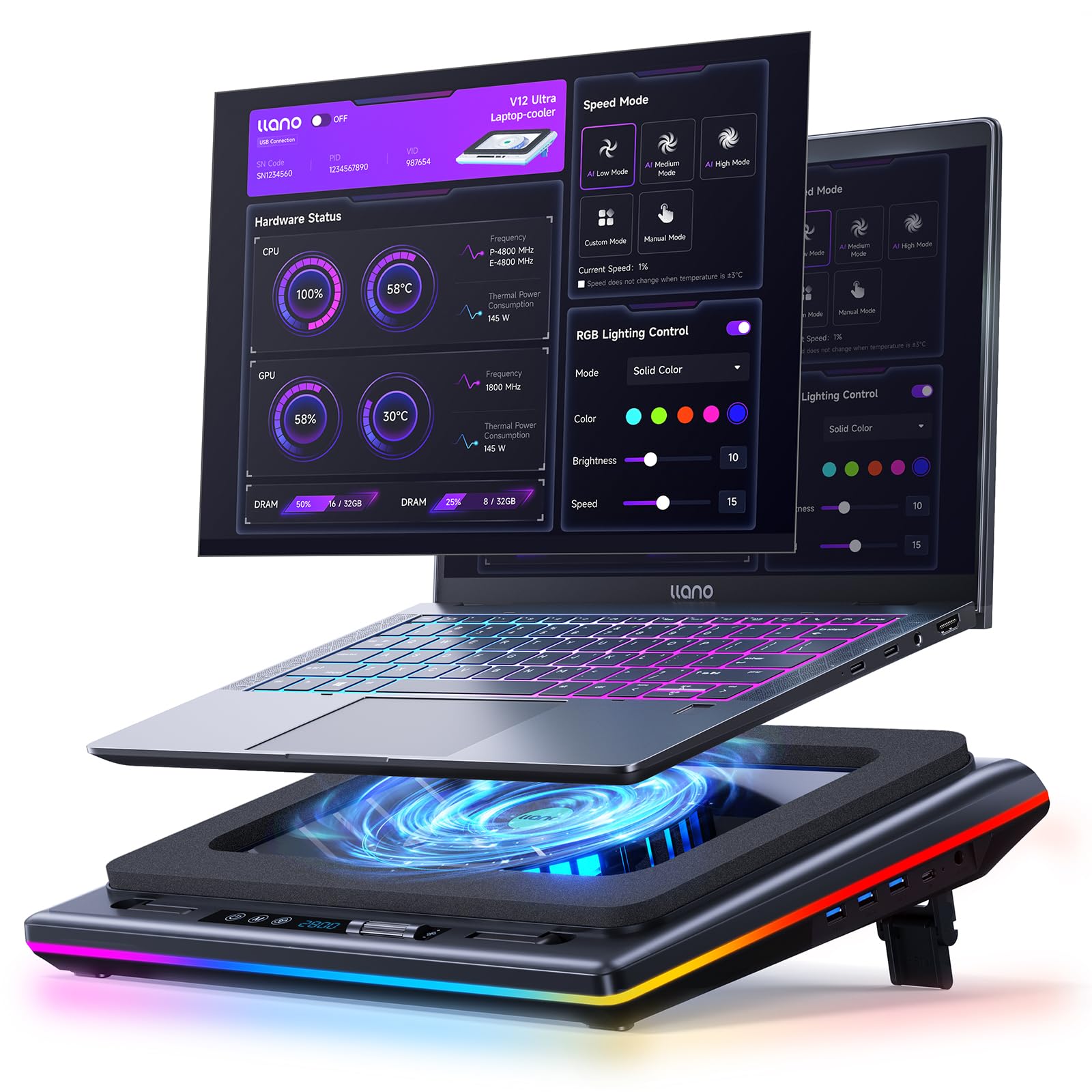
The llano V12 Ultra stands apart with its Myth.cool software that introduces AI-driven temperature control. The 5.5-inch turbo fan spins up to 2800 RPM and, in lab tests, reduced CPU and GPU temperatures by 22°C within 90 seconds. Three smart cooling modes (Low, Medium, High) automatically adjust fan speed based on workload, so you don’t have to fiddle with manual controls mid-game. For users who prefer manual operation, a simple scroller provides direct RPM adjustment.
Designed specifically for 15.6-19 inch laptops, the V12 Ultra features a 360-degree airflow design with a memory foam seal. Three ergonomic tilt angles (3°, 12°, 15°) give flexibility for desk or table use. The integrated 1-in-3 USB 3.0 hub delivers 5 Gbps data transfer for peripherals like mice and keyboards. A removable dust filter traps debris without tools, extending the lifespan of the fan and your laptop.
Owners of Lenovo Legion 7i and Framework 16 laptops report 10-20°C temperature drops at medium fan speeds. The 36W power adapter provides ample juice for sustained high-RPM operation. Noise is noticeable at max speed but manageable around 800-1500 RPM, where most users find the sweet spot between cooling and acoustics. The haptic power button can be accidentally pressed during transport, so position it carefully in a bag.
Why it’s great
- AI software auto-adjusts fan curves for balance
- 22°C temp drop in 90 seconds
- USB 3.0 hub with 5 Gbps throughput
- Tool-free removable dust filter
Good to know
- Software required for full AI control
- Loud at max RPM
- No Linux software support
3. Razer Laptop Cooling Pad

Razer’s first cooling pad introduces adaptive smart cooling that automatically adjusts fan speed based on system temperature. A long-lasting 140mm brushless fan spins up to 3000 RPM inside an airtight pressure chamber sealed by three interchangeable magnetic frames (for 14-inch, 16-inch, and 18-inch laptops). This design ensures zero cool air leakage, forcing every bit of airflow directly into the laptop’s intakes. The result: users of Acer Predator Helios 18 and Asus TUF 16 see 10-15°C temperature drops.
The pad integrates with Razer Synapse software for preset and custom fan curves, allowing you to calibrate for silence or maximum cooling. Remappable multi-function buttons let you adjust fan speed, Chroma RGB lighting, or even launch apps on the fly. A 3-port USB Type-A hub provides convenient passthrough for peripherals, and the included dust filter keeps the internals clean. The 2-year manufacturer warranty adds confidence.
At 2.61 kg, the Razer pad is hefty but stable. The plastic enclosure feels lighter than its metal competitors, though the build quality is solid. Noise is a known trade-off — the fan is loud at higher settings, comparable to a microwave. The RGB lighting only appears on the front edge, not on the fan itself. For users outside the Razer ecosystem, the premium price may be harder to justify, but for Razer Blade owners, the Hyperboost feature unlocks sustained power limits.
Why it’s great
- Adaptive smart cooling auto-adjusts fan curves
- Three magnetic frames for universal fit
- Deep Razer Synapse integration
- 2-year manufacturer warranty
Good to know
- Loud at high fan speeds
- Plastic build feels lighter than metal rivals
- Expensive outside Razer ecosystem
4. llano V10 Gaming Laptop Cooling Pad

The llano V10 packs a 4.72-inch turbo fan with a pure copper motor that hits up to 3500 RPM. This combination delivers the highest peak RPM in this roundup, translating to massive airflow that can drop laptop temperatures by up to 38°C in minutes. The copper motor handles sustained high-speed operation better than standard brushed motors, making this pad suitable for marathon gaming sessions on 13-17.3 inch laptops.
Physical buttons replace touch-sensitive controls, giving you precise, no-accident adjustments during gameplay. Twelve RGB lighting modes with memory recall keep your lighting consistent across sessions. The 3-level ergonomic stand and front anti-slip baffles secure the laptop while improving typing angle. Dual USB ports (one USB-A, one USB-C) provide convenient connectivity without sacrificing laptop ports.
Users report that at 1000-1500 RPM, the V10 effectively cools a 14-inch Alienware without excessive noise. At high RPM, the fan is loud — comparable to a desk fan on high. The foam border that seals against the laptop is not adhesive, meaning it can shift if bumped. Idle temps drop from 42-48°C to 29-35°C, and gaming loads go from 80-95°C down to 55-75°C. The RGB cannot be fully turned off (a long press changes to dark mode), which may bother users in dark rooms.
Why it’s great
- Pure copper motor for sustained high RPM
- Up to 38°C temperature drop
- Physical buttons prevent accidental changes
- USB-A and USB-C dual ports
Good to know
- Loud at full 3500 RPM
- Foam border not adhesive
- No documentation included
5. AICHESON K1-2RG Gaming Laptop Cooling Pad

The AICHESON K1-2RG takes a different approach from the multi-fan pads: a single 140mm central fan spinning up to 2200 RPM, paired with magnetic memory foam that seals the airflow directly under the laptop. This design forces all cool air through the intake vents instead of letting it spill out the sides. For a mid-range pad, this is a smart engineering choice that delivers meaningful temperature drops for 15-19 inch gaming laptops without the noise of a turbo fan.
Ten RGB modes controlled via an LCD display provide synchronized lighting around the central fan. Seven ergonomic angles (20° to 40°) give broad adjustability for neck relief. A phone holder that mounts on either side and dual USB 2.0 ports add convenience. The anti-slip metal baffles and magnetic memory foam keep the laptop stable even during intense gaming sessions.
Positive reviews from Lenovo Legion Pro owners confirm that the K1-2RG keeps high-end hardware cool. The touch controls and 22 speed levels (100 RPM increments) give fine-grained control over noise and airflow. At 600 RPM the pad is nearly silent, while max speed is loud but manageable. Some users report durability concerns after a few months, though the seller provides responsive support. The removable dust filters are a welcome maintenance feature.
Why it’s great
- Magnetic memory foam seals airflow
- 22 speed levels for fine RPM control
- Removable dust filters
- Seven height angles for ergonomics
Good to know
- Some units fail after a few months
- Plastic and ABS construction feels less premium
- USB 2.0 ports rather than USB 3.0
6. AICHESON 15-Fan Gaming Laptop Cooling Pad

The 15-fan AICHESON is the classic multi-fan design: an array of small 60mm fans each spinning at 2800-3200 RPM, spread across the entire surface area of the pad. This creates broad but shallow airflow — enough to keep a laptop from overheating under light to moderate gaming loads. The metal mesh surface measures 15.74 x 11.38 inches, accommodating laptops from 15 up to 18 inches. Four adjustable stands let you tilt the pad between 4.3 and 7.5 inches high.
Ten RGB modes add visual flair to your setup, and the two hidden anti-slip mats protect the laptop from sliding. The pad is also billed as useful for set-top boxes, routers, and DJ controllers thanks to its wide surface. The 3-year warranty from AICHESON is a standout feature at this tier, offering long-term peace of mind that many competitors don’t match.
Real-world cooling performance is modest compared to sealed turbo pads — users report drops of around 6-7°F on average. The LEDs reset to default RGB mode on power loss, meaning they don’t remember your last setting. The metal feet can break after months of use, and this pad is not suitable for actual lap use (it needs a hard surface). For the price, it works, but the small fans lack the static pressure needed for high-wattage gaming laptops.
Why it’s great
- 15 fans provide broad coverage
- 3-year warranty exceeds category norm
- Fits laptops up to 18 inches
- Quiet operation under light loads
Good to know
- Low static pressure — limited cooling for high-wattage GPUs
- LEDs don’t remember settings on power loss
- Feet may break after months of use
7. KeiBn 15-Fan Laptop Cooling Pad

The KeiBn pad brings 15 fans spinning at 2200-2300 RPM each, arranged in three banks across a 15.75 x 11.4 inch metal mesh surface. What sets this entry-level pad apart from the AICHESON 15-fan model is the integrated LCD display that shows current fan speed and RGB mode — a rare spec readout at this tier. Touch buttons on the front panel let you cycle through 10 RGB lighting modes and control fan speed without software.
Four height adjustments provide basic ergonomic flexibility, and two anti-slip baffles (17mm high, 60mm wide) prevent the laptop from sliding forward. The dual USB-A ports add peripheral connectivity, though the included cable is USB-A only — check your laptop’s ports before buying. Compatibility spans 10 to 17.3 inch laptops, making this the most flexible sizing option in the budget tier.
Owners of 17-inch HP and Dell G16 laptops confirm the pad fits with slight overhang. Fan speed 3 keeps things cool while remaining near-silent, which is a strong advantage over noisier budget pads. However, some users report that the airflow feels weak and does not meaningfully reduce temperatures. The RGB lighting does not remember the last setting on power cycle, requiring manual re-selection each time. The build is sturdy for the price, but the LCD display adds minimal practical value beyond novelty.
Why it’s great
- LCD display shows RPM and RGB mode
- Near-silent at lower fan speeds
- Wide compatibility from 10 to 17.3 inches
- Dual USB-A ports for accessories
Good to know
- Airflow is weak — limited cooling effect
- RGB does not remember last setting
- LCD display adds little practical value
FAQ
Do more fans on a cooling pad mean better cooling?
Can a cooling pad damage my laptop battery or internal components?
What is the ideal fan speed range for quiet gaming?
Final Thoughts: The Verdict
For most users, the gaming cooling pad winner is the IETS GT600 because it combines the highest static pressure in its class (71.9 mmH2O) with magnetic sealed foam that works with any laptop from 14 to 19 inches. If you want AI-driven software control and a 22°C temperature drop in 90 seconds, grab the llano V12 Ultra. And for Razer ecosystem users who need adaptive smart cooling with interchangeable magnetic frames, nothing beats the Razer Laptop Cooling Pad.