
Crashing a real quad after a single battery is the fastest way to turn a hobby into an expensive regret pile. A dedicated controller for simulator training lets you burn through hundreds of packs worth of stick time without replacing a single motor, frame arm, or prop. The gap between a mushy plastic toy and a radio with smooth, centering gimbals is the difference between building muscle memory and learning bad habits you’ll have to unlearn later.
I’m Mohammad Maruf — the founder and writer behind Drink4Good. I’ve spent years dissecting FPV radio hardware, comparing gimbal resolution, protocol latency, and EdgeTX workflow across the entire value chain so you know exactly where your money buys real performance.
This guide focuses exclusively on transmitters that work natively with simulators like Liftoff, VelociDrone, and DRL, cutting through the noise to deliver a tightly curated list of the best fpv controller for simulator practice that will save your wallet and sharpen your thumbs.
How To Choose The Best FPV Controller For Simulator
Choosing a simulator transmitter is not just about price — it’s about finding a platform that feels right in your hands, connects instantly to your PC, and offers a realistic stick response that mirrors real-world flight. Buyers often over-invest in channel count or under-value gimbal quality, leading to frustration down the line.
Gimbal Type: Hall-Effect vs. Potentiometer
The gimbals are your primary interface. Hall-effect sensors use magnets to detect stick position, delivering zero physical wear, no drift over time, and silky smooth movement. Potentiometer gimbals, common in entry-level transmitters, use wipers that degrade with use, causing jitter and dead zones. For simulator practice, where minor stick inconsistencies become ingrained muscle memory, hall-effect gimbals are the clear choice for serious pilots.
Connectivity: USB Simplicity vs. Full Radio Flexibility
Some controllers are dedicated sim boxes with a simple USB plug that Windows recognizes immediately. Others are full-featured radios you can also use with real drones. A dedicated USB controller offers zero-configuration convenience, while a radio like the RadioMaster Pocket opens up EdgeTX, model memories, and real-world flying later. Choose based on whether you want a practice-only tool or a radio that grows with you.
Protocol and Firmware Ecosystem
ExpressLRS (ELRS) is the dominant protocol for modern FPV due to its long range, low latency, and open-source nature. EdgeTX firmware powers most modern hobby radios, offering limitless customization of mixes, switches, and voice alerts. If you plan to transition from sim to real builds, selecting a radio in the ELRS/EdgeTX ecosystem ensures seamless compatibility with the largest selection of receivers available today.
Quick Comparison
On smaller screens, swipe sideways to see the full table.
| Model | Category | Best For | Key Spec | Amazon |
|---|---|---|---|---|
| RadioMaster Pocket ELRS (Charcoal) | Mid-Range | Best Overall Sim-to-Real Transition | Hall-effect gimbals, EdgeTX, ELRS 2.4GHz | Amazon |
| RadioMaster Pocket ELRS (Black) | Mid-Range | Portable Sim & Whoop Controller | Foldable antenna, 16 max channels | Amazon |
| Spektrum Interlink DX | Premium | Zero-Config Plug-and-Play Sim | 14 buttons, USB plug, ergonomic design | Amazon |
| DTXMX FS-i6X | Budget | Entry-Level Affordability | 10 channels, 2.4GHz AFHDS 2A | Amazon |
| FS-i6X 10CH | Budget | Budget with Telemetry | Bidirectional 2.4GHz protocol | Amazon |
| DJI RC 2 | Premium | Integrated FPV Sim for DJI Ecosystem | 5.5″ FHD screen, 20km O4 transmission | Amazon |
| Thrustmaster Sol-R2 HOSAS | Premium | Space Sim & Complex Twin-Stick Setup | Hall-effect, 88 buttons, HOSAS layout | Amazon |
In‑Depth Reviews
1. RadioMaster Pocket Portable Remote Controller Hall Gimbal (Charcoal, ELRS)

The RadioMaster Pocket is the modern standard for pilots who want one radio for sim practice and real flying. Its hall-effect gimbals deliver a smooth, drift-free feel that immediately improves throttle control and cornering accuracy in Liftoff and VelociDrone. Pre-installed EdgeTX firmware gives you access to advanced mixes, voice callouts, and unlimited model memories — a setup that would have cost three times as much a few years ago.
Built-in LED lights let you visualize switch inputs on camera, and the backlit LCD screen is crisp and readable even in bright rooms. The compact form factor with a folding antenna makes it easy to stash in a backpack, and the 3000mAh 18650 battery configuration provides several hours of simulator sessions per charge. The box includes a custom carry pouch and a USB-C cable for firmware updates and PC connection.
Reviewers consistently highlight the surprising build quality and how the Pocket feels larger in hand than its size suggests, accommodating thumb and pinch grip equally well. The only adjustment is the gimbals may feel slightly stiff out of the box, but they break in quickly after a few hours of stick time.
Why it’s great
- Hall-effect gimbals for wear-free precision
- EdgeTX firmware with deep customization
- Exceptional battery life with dual 18650 cells
- Compact, portable design with folding antenna
Good to know
- Batteries not included — requires two 18650 cells
- Gimbal centering may need initial break-in
- Pouch included is snug for some users
2. Radiomaster Pocket ELRS Hall Gimbal Transmitter (Black Mode 2)

This variant of the RadioMaster Pocket offers the same hall-effect gimbal hardware and EdgeTX operating system but ships with ExpressLRS 3.0 firmware pre-installed, ensuring compatibility with the latest generation of ELRS receivers. The foldable antenna and detachable joystick design prioritize portability for pilots who travel between sim setups or fly whoops at local parks.
The 128×64 monochrome LCD display provides clear telemetry readouts and menu navigation, and the built-in LED lights help you confirm switch assignments at a glance. The USB-C port at the bottom handles both charging and direct simulator connection — simply plug in, power on, and your PC recognizes it as a game controller without extra drivers for most sims.
User feedback notes the gimbals feel adequate for beginner to intermediate practice but may not match the buttery smoothness of higher-end units like the TX16S. The smaller form factor is a trade-off: it’s less cumbersome for transport but can feel cramped for pilots with larger hands. The lanyard loop placement is an ergonomic oversight, but overall the value proposition is hard to beat.
Why it’s great
- Pre-loaded ELRS 3.0 for modern receiver support
- Foldable antenna for easy transport
- Lightweight and ergonomic for long sessions
- USB-C charging and PC connectivity
Good to know
- Gimbals feel adequate, not premium
- Lanyard loop location is inconvenient
- Batteries not included
3. Spektrum Interlink DX Simulator Controller (SPMRFTX1)
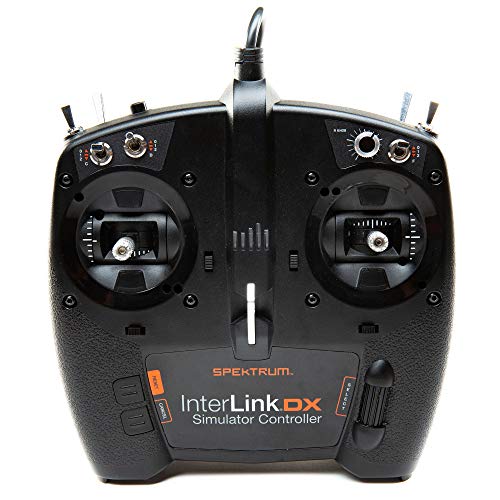
The Spektrum Interlink DX is the ultimate plug-and-play simulator controller, designed specifically for FPV simulators like Liftoff. It connects via a single USB cable with zero driver installation on Windows or Linux — you plug it in, launch your sim, and fly. The 14-button layout includes switches, sliders, and a two-position mode toggle, giving you physical controls that mimic a real radio without the complexity of EdgeTX.
The build quality is impressive for a dedicated sim controller: the chassis is rigid with no creak or flex, and the gimbals are adjustable for throttle tension, ratchet, and spring pressure without disassembly. The ergonomic shape fits comfortably in both pinch and thumb grips, and the adjustable hand rest accommodates different palm sizes.
Reviewers praise its reliability across multiple sims including neXt and AccuRC, but note that the left gimbal on early units could catch at the extremes. The stick feel is not as refined as hall-effect radios, but for a dedicated training tool that requires zero configuration, the Interlink DX remains a top choice for beginners who just want to fly immediately.
Why it’s great
- True plug-and-play USB — no drivers needed
- Adjustable throttle, ratchet, and spring tension
- Sturdy, creak-free construction
- Works with Liftoff, neXt, AccuRC, Heli-X
Good to know
- Gimbals not hall-effect — potentiometer-based
- Some switches non-functional in current sim configs
- Left gimbal can bind at extremes in some units
4. DJI RC 2 Remote Controller

The DJI RC 2 is a premium integrated controller designed primarily for the DJI ecosystem, but it also functions as a competent simulator transmitter when paired with compatible DJI flight sim software. Its standout feature is the built-in 5.5-inch FHD 700-nit touchscreen, which eliminates the need for a phone mount and provides a vivid, lag-free display for both sim and real flight.
Powered by a 6nm next-gen processor and O4 video transmission with 20km range, the RC 2 delivers exceptionally smooth control feel and ultra-low latency. The 2T4R antenna configuration ensures stable signal even in noisy environments. At just 420 grams, it’s comfortable for extended simulator sessions without causing fatigue.
User reviews consistently highlight the bright screen visibility under direct sunlight and the seamless transition between sim and real flight. The RC 2 is compatible with DJI Flip, Mini 4 Pro, Air 3, Air 3S, and Neo drones. The trade-off is its ecosystem lock-in — it’s an excellent choice for DJI pilots but overkill and incompatible with non-DJI receivers.
Why it’s great
- Integrated 5.5″ FHD touchscreen — no phone needed
- Fast 6nm processor for smooth sim performance
- Lightweight 420g design for comfort
- Excellent O4 video transmission stability
Good to know
- Locked to DJI ecosystem — no ELRS or Crossfire
- Premium price point for a sim-only tool
- Screen may need sunshade in very bright conditions
5. Thrustmaster Sol-R2 HOSAS Dual Flight Joysticks

The Thrustmaster Sol-R2 HOSAS system is a specialized twin-stick setup built for space sims like Elite Dangerous and Star Citizen, but its 16-bit hall-effect gimbals make it an extraordinary FPV simulator controller for pilots who want to practice advanced maneuvers with zero dead zone. Each stick delivers 16-bit resolution across X, Y, and Z axes, meaning microscopic stick movements translate flawlessly into sim flight.
The dual-stick configuration — one for each hand — provides independent control of thrust and attitude, a setup that mimics the control scheme of high-end FPV builds with separate pitch/roll and yaw/throttle axes. The 88 programmable buttons, two hat switches per stick, and thumbwheels give you more physical controls than you’ll ever need for sim flying, but the flexibility is unmatched.
Build quality is excellent with metal internals and sturdy bases that stay planted during aggressive inputs. The T.A.R.G.E.T. software is powerful but has a learning curve. Users report the Z-axis twist requires more force than expected, and a small number of units have experienced twist sensor issues after extended use. For dedicated sim enthusiasts who want the ultimate precision setup, the Sol-R2 delivers.
Why it’s great
- 16-bit hall-effect sensors — zero drift and zero dead zone
- HOSAS layout for independent axis control
- Metal internal construction for durability
- Customizable ergonomic wrist and thumb rests
Good to know
- May be overkill for standard FPV sim training
- T.A.R.G.E.T. software has steep learning curve
- Twist sensor durability concerns in some units
6. DTXMX FS-i6X 10CH Radio Transmitter and Receiver

The DTXMX FS-i6X is the classic budget entry point for FPV simulator training. It offers 10 channels and the reliable FlySky AFHDS 2A protocol with bidirectional communication, allowing the transmitter to display receiver battery voltage and signal strength on its built-in LCD. The omni-directional gain antenna provides solid range even in dense indoor environments where sim practice happens.
The transmitter ships with the FS-iA10B receiver, which is useful if you later build a real quad. The multi-channel hopping frequency system spreads across 135 channels and hops between 16 per session to avoid interference. Unique ID recognition prevents accidental connection to other receivers — a useful safety feature when multiple pilots are practicing in the same space.
Users consistently note that the programming manual is poorly translated and the initial learning curve for setting up model memories is steep. The switch screws are known to loosen during shipping, so a quick pre-flight tightening is recommended. For the price, the build quality is acceptable, but the potentiometer gimbals lack the smoothness of hall-effect units.
Why it’s great
- Very affordable entry into FPV sim training
- 10 channels with telemetry support
- Bidirectional communication for battery monitoring
- Reliable range with omni-directional antenna
Good to know
- Potentiometer gimbals — may develop drift over time
- Poorly translated programming manual
- Switch screws may loosen during shipping
7. FS-i6X 10 Channels RC Transmitter and Receiver (Mode 2)

This Alaohu-branded FS-i6X is functionally identical to the DTXMX version, offering the same 10-channel AFHDS 2A protocol and Mode 2 left-hand throttle layout. It’s a proven entry-level transmitter that works with FlySky receivers and connects to simulators via a standard USB dongle (not included). The transmitter runs on 4 AA batteries, which is a step down from rechargeable Li-ion solutions but keeps initial cost low.
Build quality is acceptable for the price point, with a comfortable grip and responsive gimbals that feel reasonable for beginner practice. The transmitter can store up to 20 model memories, enough for multiple sim profiles or real builds. The receiver included in the box (FS-iA10B) provides PWM output for traditional ESC connections.
User reviews highlight that configuration is straightforward once you get past the sparse manual, and the radio works well with FlySky’s own simulator software. The main criticisms are the potentiometer gimbals that can feel notchy and the rear plug placement that makes USB connection awkward. For absolute beginners on a tight budget who just want to learn throttle control and basic maneuvers, this is a functional starting point.
Why it’s great
- Lowest cost entry into FPV sim training
- 10 channels and 20 model memories
- Includes receiver for future real builds
- Proven AFHDS 2A protocol reliability
Good to know
- Runs on 4 AA batteries — no rechargeable option
- Potentiometer gimbals with limited precision
- Rear USB plug placement is awkward to access
- Poor manual makes initial setup frustrating
FAQ
Can I use any FPV radio with a simulator on my PC?
Is a hall-effect gimbal necessary for simulator practice?
Will the DJI RC 2 work with third-party FPV simulators?
How many channels do I need for simulator practice?
Final Thoughts: The Verdict
For most users, the best fpv controller for simulator winner is the RadioMaster Pocket (Charcoal, ELRS) because it combines hall-effect gimbal precision, EdgeTX flexibility, and a compact form factor at a mid-range price that dramatically outperforms its cost. If you want a zero-configuration plug-and-play sim controller, grab the Spektrum Interlink DX. And for DJI ecosystem pilots who want an integrated screen experience, nothing beats the DJI RC 2.