
A keyboard that rattles through a late-night raid or a mouse that skips during a clutch shot can wreck hours of progress. For most gamers, the hunt for a balanced Gaming Keyboard And Mouse setup means wrestling with wireless lag, mushy keys, or sensors that feel a step behind your reflexes. The real challenge isn’t finding RGB—it’s finding gear that actually responds when you need it most.
I’m Mohammad Maruf — the founder and writer behind Drink4Good. I analyze market trends, compare switch types, sensor accuracy, and build quality across dozens of combos to separate the practical upgrades from the gimmicks.
After filtering out the noise, I’ve settled on seven combos that offer real performance for different playstyles and budgets. Whether you want a compact tri-mode rig or a full desk setup with a wrist rest, this guide to the best gaming keyboard and mouse combos covers the specs that actually matter for your next session.
How To Choose The Best Gaming Keyboard And Mouse
The right combo balances switch feel, sensor accuracy, and wireless stability. A premium keyboard with a laggy mouse still loses rounds, so looking at the pair as one system helps you avoid mismatched performance.
Switch Type and Key Feel
Mechanical switches (Blue, Red, or Linear) give a tactile click or smooth press that registers precise inputs. Membrane keyboards run quieter and cost less but lack the distinct feedback needed for quick double-taps in competitive titles. For gamers who type long messages between matches, mechanical switches reduce finger fatigue over time.
Mouse Sensor DPI and Polling Rate
DPI (dots per inch) determines how far the cursor moves per inch of physical mouse movement. Higher DPI (4800 to 12800) lets you turn faster with smaller wrist motions, while lower DPI (800 to 1600) suits precision aiming. Polling rate (125Hz to 1000Hz) controls how often the mouse reports its position—1000Hz means virtually no delay between your hand and the screen.
Connectivity and Cable Freedom
Wireless combos with 2.4GHz dongles offer near-zero latency without cable clutter. Bluetooth adds convenience for laptop use but can introduce slight input lag. A shared dongle (one receiver for both keyboard and mouse) saves USB ports and makes setup cleaner. Wired options guarantee consistent response and never need charging.
Quick Comparison
On smaller screens, swipe sideways to see the full table.
| Model | Category | Best For | Key Spec | Amazon |
|---|---|---|---|---|
| Logitech G213 + G203 | Membrane + Optical | Reliable brand value with software customization | 8,000 DPI sensor | Amazon |
| FELICON 3-in-1 Combo | Mechanical Feel + RGB Pad | All-in-one desk setup with wrist rest | 3,200 DPI mouse | Amazon |
| Redragon S136 K628 + M693 | Hot-Swap Mechanical | Compact tri-mode with shared dongle | 7,200 DPI mouse | Amazon |
| Redragon S101M-KS | Tri-Mode Wireless | Budget wireless with multimedia keys | 4,800 DPI mouse | Amazon |
| MSI Forge GK110 Combo | Membrane + Optical | Quiet typing with volume scroll wheel | 12,800 DPI sensor | Amazon |
| Taiahiro Typewriter Style | Mechanical Blue Switch | Retro aesthetic with metal build | 3,200 DPI mouse | Amazon |
| Logitech MK850 Performance | Membrane + Ergonomic | Multi-device office productivity | Hyper-fast scroll wheel | Amazon |
In‑Depth Reviews
1. Logitech G213 Prodigy Keyboard + G203 Mouse Bundle

Logitech’s G213 membrane keyboard delivers a mechanical-like feel with a quiet, cushioned bottom-out that works well in shared spaces. The 8,000 DPI G203 mouse uses a gaming-grade optical sensor with mechanical tensioned buttons, so clicks register firmly even during frantic spray patterns. Both units sync through Logitech G HUB, letting you assign macros per game and per app.
Dedicated media controls on the keyboard let you play, pause, or mute without tabbing out. The spill-resistant body repels crumbs and liquid, a practical upgrade for late-night snack sessions. The G203’s 6-button layout is ambidextrous and lightweight (85g), making it comfortable for claw and fingertip grips.
Some users report the keyboard cable feels thinner than expected, and the lack of a wrist rest can cause fatigue during long sessions. The membrane’s rubber dome lifespan (rated around 5 million keystrokes) trails mechanical switches by a wide margin, so heavy typers may wear it out sooner.
Why it’s great
- Full RGB software customization via G HUB
- Spill-resistant keyboard with media keys
- 8,000 DPI sensor with mechanical button tension
Good to know
- Membrane keys wear faster than mechanical switches
- No included wrist rest
- Some cables feel flimsy
2. FELICON 3-in-1 Gaming Keyboard, Mouse & Large RGB Pad

This wired trio bundles a full-size mechanical-feel keyboard, a 6-button optical mouse, and a large RGB mouse pad. The keyboard uses two-color injection keycaps with a floating key design, so the legends won’t fade after months of use. The aluminum alloy panel adds rigidity—no flex during aggressive key presses.
The magnetic wrist rest snaps on and off easily, supporting your wrists during long gaming or typing sessions. The built-in phone holder and organizer slots keep your desk tidy. The oversized mouse pad has 10 RGB modes, creating consistent backlight across the whole surface without dead spots.
The mouse is capped at 3,200 DPI with only four preset levels (1200 to 3200), which limits high-speed flick shots. The RGB effects on the mouse are fixed to red, blue, and purple—you can’t customize them. Some users found the lighting control instructions hard to locate.
Why it’s great
- Large RGB mouse pad included
- Magnetic wrist rest supports long sessions
- Aluminum alloy keyboard frame
Good to know
- Mouse DPI limited to 3,200
- Mouse lighting cannot be customized
- No software for key remapping
3. Redragon S136 K628 + M693 Hot-Swap Combo

The Redragon S136 pairs a 75% hot-swappable mechanical keyboard with a 7,200 DPI wireless mouse. The keyboard’s hot-swap sockets accept 99.8% of standard 3-pin and 5-pin switches, so you can swap out the linear pre-installed switches for clicky or tactile ones without soldering. The 78-key layout keeps arrow keys and a number row while saving desk space.
Both the keyboard and mouse share a single 2.4GHz dongle, which cuts down on USB port usage and syncs instantly. The mouse has 5 on-board DPI levels (adjustable via software) and a 1000Hz polling rate for 1ms response. The keyboard runs up to 300 hours with RGB off, and the mouse lasts weeks on a single charge with moderate use.
The compact design lacks dedicated F-row keys—you access them via FN combinations, which can feel awkward in games that rely on F1-F4 hotkeys. The software has been flagged by Windows Defender as a false positive, and the lighting controls require some trial and error.
Why it’s great
- Hot-swappable switch sockets
- Shared 2.4GHz dongle
- Long battery life on both units
Good to know
- FN-key F-row access may bother MMO players
- Software has false-positive detection flags
- Small mouse may not suit large hands
4. Redragon S101M-KS Tri-Mode Wireless Combo

This tri-mode combo supports wired, 2.4GHz, and Bluetooth connections, with a single 2-in-1 receiver that controls both devices. The keyboard packs 10 independent multimedia keys plus 12 FN-combo shortcuts, giving quick access to volume, playback, and brightness without alt-tabbing. The full-size layout includes a number pad, making it a practical bridge between gaming and daily productivity.
The mouse offers five DPI levels (800 to 4800) with an indicator light that flashes to show the current setting. The ergonomic shape suits palm and claw grips, though it’s slightly smaller than full-size competition mice. The keyboard’s splash-resistant build and detachable USB-C cable add durability for travel or LAN setups.
Battery life on the keyboard is stellar—up to 300 hours with RGB off—but the mouse requires more frequent charging. The mouse’s red LED (monochromatic) doesn’t match the keyboard’s RGB, which may bother aesthetic-minded users. Some customers report a 5-10 second reconnect delay when the keyboard wakes from sleep.
Why it’s great
- Tri-mode connectivity (wired/2.4G/BT)
- 10 dedicated multimedia keys
- Excellent keyboard battery life
Good to know
- Mouse LED is red only, not RGB
- Mouse charges more frequently
- Keyboard sleep reconnect delay
5. MSI Forge GK110 Combo
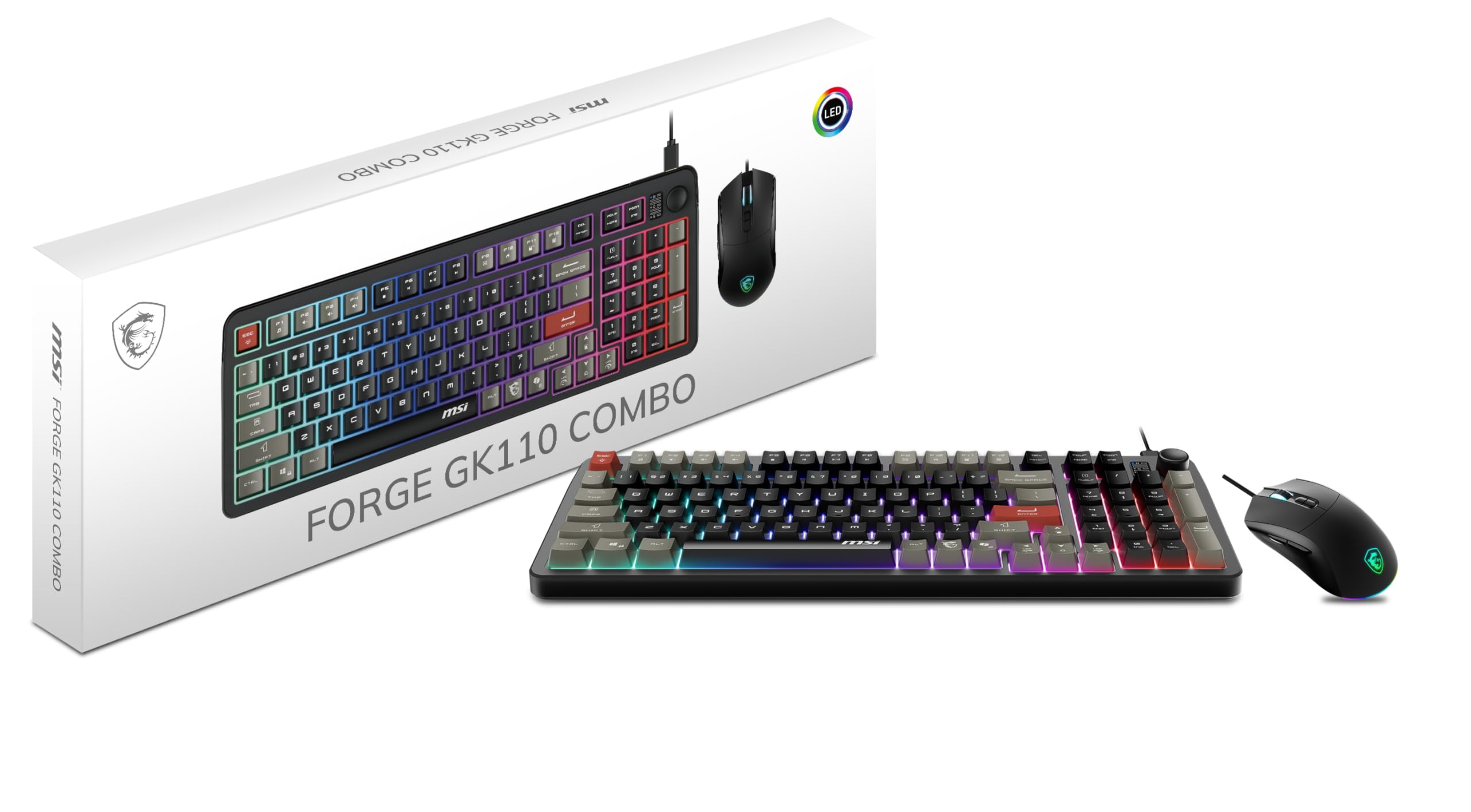
The MSI Forge GK110 uses a quiet membrane keyboard with a dedicated volume scroll wheel on the top right—a feature rarely seen at this level. The mouse houses an optical sensor rated up to 12,800 DPI, offering high sensitivity for twitch shooters. Both devices connect via USB and work immediately without software.
The keyboard’s 26-key anti-ghosting handles common key combinations during FPS and MOBA matches. The low-profile keys produce minimal noise, making this a solid choice for shared rooms or late-night gaming. The mouse uses switches rated for 20 million clicks, so durability holds up over multiple years of regular play.
The membrane feel lacks the tactile feedback many competitive gamers prefer, and the RGB effects are controlled via hotkeys rather than software—so you can’t fine-tune per-key colors. The combo doesn’t include a wrist rest, which can lead to fatigue during extended sessions.
Why it’s great
- 12,800 DPI mouse sensor
- Dedicated volume scroll wheel
- 20 million click-rated mouse switches
Good to know
- Membrane keys lack tactile feedback
- No per-key RGB software
- No wrist rest included
6. Taiahiro Typewriter Style Mechanical Combo

The Taiahiro combo stands out with a retro typewriter aesthetic: round, double-shot ABS keycaps on a full aluminum alloy panel. The Blue mechanical switches produce a loud, satisfying click with tactile feedback that helps avoid typos during typing. The 104-key layout includes anti-ghosting for all keys, so simultaneous presses in games like OSU or fighting titles register cleanly.
The mouse offers 4 adjustable DPI levels (800 to 3200) with 7-color breathing RGB that cycles automatically. The ergonomic shape keeps the mouse comfortable for palm grips, though the side buttons lack customization options. The kit also includes a mouse pad, making it a complete desk package out of the box.
The Blue switch noise may disturb roommates or teammates on voice chat. The keyboard’s round keycaps, while stylish, have a smaller surface area that can lead to more frequent typos when touch-typing fast. The mouse’s RGB is not synchronized with the keyboard, and the DPI settings aren’t adjustable via software.
Why it’s great
- Distinctive retro typewriter design
- Full aluminum alloy keyboard frame
- Durable double-shot injection keycaps
Good to know
- Blue switches are very loud
- Round keycaps may cause typos
- Mouse RGB not synchronized with keyboard
7. Logitech MK850 Performance Wireless Combo

The Logitech MK850 is built for multi-device productivity, not twitch gaming. The full-size membrane keyboard pairs with a contoured, right-handed mouse that features a hyper-fast scroll wheel—spinning through long documents or webpages with a single flick. Both devices support Bluetooth and 2.4GHz, switching between three paired devices (PC, tablet, phone) with a button press.
The cushioned palm rest and carefully sculpted key wells reduce wrist strain during 8-hour workdays. The mouse’s ergonomic shape supports palm grips with a thumb rest, and the DuoLink software (via Logitech Options) links keyboard and mouse functions for custom commands. Battery life stretches months on two AA batteries for the keyboard and one AA for the mouse.
The keyboard lacks any backlighting, which makes late-night typing difficult without a desk lamp. The membrane switches offer a quiet, mushy feel that some users describe as imprecise for fast-paced gaming. A few reports mention random unresponsiveness or stuck keys after a few months, though these appear to be isolated cases.
Why it’s great
- Seamless multi-device switching (3 devices)
- Hyper-fast scroll wheel
- Long battery life (months on one set)
Good to know
- No backlit keys
- Membrane feel not ideal for competitive gaming
- Some reliability concerns reported
FAQ
Is a wireless gaming keyboard laggy compared to wired?
What is anti-ghosting and why does it matter for gaming?
Can I use a hot-swappable keyboard without soldering?
Final Thoughts: The Verdict
For most users, the best gaming keyboard and mouse winner is the Logitech G213 + G203 bundle because its reliable membrane feel, 8,000 DPI optical sensor, and full RGB software customization provide a consistent experience for both casual and competitive play. If you want a compact, future-proof setup with switch swapping and shared wireless dongle, grab the Redragon S136 K628 + M693. And for a complete desk refresh with a wrist rest, RGB pad, and phone holder, nothing beats the FELICON 3-in-1 Combo.