
The difference between a good stream and a great one often comes down to the hardware hiding behind your monitor. A capture card that adds latency, drops frames, or compresses your video into a grainy mess will sabotage even the most polished commentary and gameplay. Whether you are tracking onto a pixel in an esports match or broadcasting a single-player narrative in 4K, the right card for your setup is the invisible backbone of your entire production pipeline.
I’m Mohammad Maruf — the founder and writer behind Drink4Good. I have spent years analyzing the hardware specifications, real-world benchmark data, and long-term reliability reports of dozens of capture cards to separate marketing claims from genuine performance.
From budget-friendly USB dongles to premium internal PCIe solutions that handle 8K passthrough, the market is full of choices that can feel overwhelming. This guide breaks down everything you need to confidently choose the best game capture card for your specific console, PC, and streaming goals.
How To Choose The Best Game Capture Card
Selecting the right capture card depends on your output goals and hardware ecosystem. A streamer aiming for 1080p 60 FPS on Twitch has very different requirements than a creator building a library of 4K HDR gameplay for YouTube. Understanding a few core specs will keep you from overpaying for features you will never use or undershooting your quality targets.
Passthrough vs. Capture Resolution
Passthrough is the video signal that travels from your console to your monitor through the card. Capture is the resolution and frame rate the card records internally. A card can pass through 4K at 60Hz but only capture 1080p. That is fine if you want to play on a 4K screen while streaming in 1080p. If you need to record native 4K 60FPS for post-production, you must check that the card supports that resolution in its capture engine, not just its passthrough.
Interface: PCIe vs. USB 3.0
Internal PCIe cards connect directly to the motherboard and generally offer the lowest latency and highest bandwidth, making them ideal for uncompressed 1080p or 4K recording. External USB 3.0 or USB-C cards are far more portable and work with laptops, but they can introduce slightly higher latency and are more susceptible to bandwidth contention from other USB devices. For a dual-PC setup, an internal PCIe card is often the preferred choice for stability.
HDR and VRR Support
High Dynamic Range (HDR) passthrough preserves the expanded color gamut and contrast your console outputs, so your monitor shows the game as intended. Variable Refresh Rate (VRR) passthrough eliminates screen tearing by synchronizing the console’s frame output with your display’s refresh rate. Both are essential for modern consoles like the PS5 and Xbox Series X, but not all capture cards support them, especially at resolutions beyond 1080p.
Quick Comparison
On smaller screens, swipe sideways to see the full table.
| Model | Category | Best For | Key Spec | Amazon |
|---|---|---|---|---|
| Elgato 4K Pro | Internal PCIe | Ultra-low latency dual-PC streaming | 8K60 passthrough, 4K60 HDR10 capture | Amazon |
| ASUS TUF Gaming CU4K30 | External USB-C | 4K HDR passthrough for serious streamers | 4K30 capture, 120 FPS 1080p capture | Amazon |
| AVerMedia Live Gamer Ultra GC553 | External USB-C | Console gaming with 4K60 HDR passthrough | 4K30 capture, 1080p120 capture | Amazon |
| OREI VC-8KTUSB3 | External USB 3.0 | Pro capture with 8K input and audio mixing | 4K60 capture, 8K60 input, loop-out | Amazon |
| PORTTA DX20R | External USB 3.0 | High-refresh passthrough with on-device display | 4K60 capture, 1080p240 passthrough | Amazon |
| DiamondTiger YZ-F019 | External USB-C | Mobile streaming with fast charging | 4K60 HDR passthrough, 240Hz 1080p capture | Amazon |
| AVerMedia Live Gamer HD 2 GC570 | Internal PCIe | Uncompressed 1080p60 with multi-audio input | 1080p60 uncompressed capture, PCIe x4 | Amazon |
| UGREEN 25173 | External USB 3.0 | Versatile setup with triple audio jacks | 4K60 capture, 1080p240 recording | Amazon |
| MYPIN PCI-E Card | Internal PCIe (Budget) | Entry-level internal capture on a budget | 4K30 capture, 1080p60, PCIe x1 | Amazon |
In‑Depth Reviews
1. Elgato 4K Pro

The Elgato 4K Pro sets the standard for internal capture cards with its HDMI 2.1 interface handling 8K60 passthrough and 4K60 HDR10 capture simultaneously. This card fits into a PCIe x4 or x16 slot and provides ultra-low latency for dual-PC streaming setups, making it the first choice for serious broadcasters who demand uncompressed video fidelity from consoles like the PS5 Pro and Nintendo Switch 2.
The card supports 1080p240 capture for high-FPS esports titles, and its VRR passthrough eliminates screen tearing entirely during gameplay. The built-in 4K Capture Utility includes a Flashback mode that lets you record up to four hours of retroactive footage, which is invaluable for content creators who want to clip moments after they happen without pre-planning every stream session.
Users report that the card is very picky about HDMI cables — using an incorrect or low-quality cable can cause signal splitting or intermittent disconnects. The installation is straightforward on Windows 10 and 11, but Linux support is nonexistent. Once properly set up, the card delivers true-to-console video quality with no perceptible delay between the source and the recording.
Why it’s great
- HDMI 2.1 supports 8K60 passthrough and 4K60 HDR capture.
- Ultra-low latency for dual-PC streaming without frame drops.
- Flashback recording captures up to 4 hours of retroactive footage.
Good to know
- Requires specific high-bandwidth HDMI 2.1 cables to function reliably.
- No official macOS or Linux driver support.
- Windows Explorer may need a restart after extended gaming sessions.
2. ASUS TUF Gaming CU4K30

ASUS brings military-grade build quality to the external capture card market with the TUF Gaming CU4K30. Its durable alloy outer shell protects the internals during transport, and the box is compact enough to fit into a tech pouch alongside cables. It passes through 4K HDR at 60Hz while capturing 4K30 or 1080p120, which suits streamers who want 4K gaming on their monitor but broadcast at high-FPS 1080p.
Certified OBS Studio compatibility means you can plug the USB-C cable into a PC and immediately see the source in OBS without installing proprietary software. The card also features a controller and headset input jack, allowing team audio to be shared with the audience without complex routing. This makes it a strong choice for multiplayer streamers who rely on game chat.
Some users have reported intermittent signal dropouts that require unplugging and replugging the device. The audio output can also present a crackly left channel on certain setups, which may need OBS gain adjustments to resolve. Despite these quirks, the CU4K30 offers a premium-feeling hardware experience for those who want ASUS reliability in a portable form factor.
Why it’s great
- Solid metal chassis built for travel and daily use.
- Certified OBS Studio support for true plug-and-play streaming.
- Controller headset jack integrates team chat into the stream.
Good to know
- Some users experience intermittent signal dropouts.
- Audio channel imbalance may require software tuning.
- Customer support response has been described as unhelpful by some buyers.
3. AVerMedia Live Gamer Ultra GC553

The AVerMedia Live Gamer Ultra GC553 is a well-established external card that delivers reliable 4K30 capture alongside 4K60 HDR passthrough. It connects via USB 3.1 Type-C and supports high-refresh-rate capture at 1080p120 for smooth slow-motion editing. The card is compact, USB-powered, and runs cool even during extended streaming sessions, making it a dependable workhorse for console gamers.
On macOS, the GC553 works well with QuickTime Player for 1080p60 capture and with third-party apps like SwiftCapture for 4K30 H.264 recording. The card also supports 1440p60 passthrough, which is a sweet spot for many PC monitors. Owners report that it requires a powerful PC to handle 4K capture without dropped frames, particularly when using OBS in YUY2 mode.
The USB-C connector on the GC553 has a tendency to feel loose over time, and using any cable other than the one provided can cause connection issues. The RECentral software has stability problems on some systems, and audio desync can occur when switching consoles. However, for users who stick to the recommended setup, the card delivers consistent, high-quality video.
Why it’s great
- Reliable 4K60 HDR passthrough for console gaming.
- 1080p120 capture for smooth high-FPS editing.
- Compact, USB-powered design stays cool during long streams.
Good to know
- Firmware updates can fail and require a recovery utility.
- Loose USB-C connector may cause intermittent disconnects.
- Requires a powerful PC to avoid dropped frames at 4K.
4. OREI VC-8KTUSB3
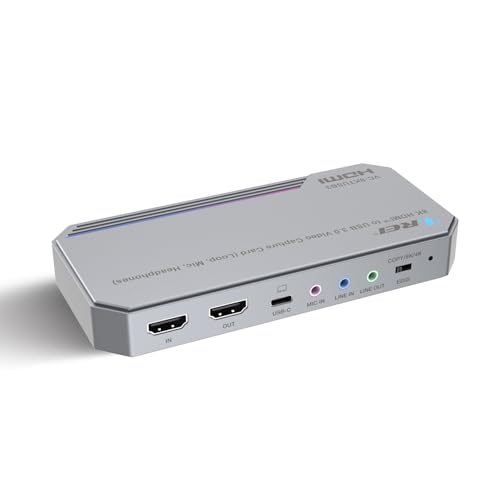
The OREI VC-8KTUSB3 stands out by accepting an 8K60 input signal while capturing up to 4K60 via MJPEG. This makes it an interesting choice for future-proofing, as it can handle the highest-resolution sources currently available. It uses a USB 3.2 Gen 1 interface with 5Gbps bandwidth, and its integrated audio mixing engine accepts both a microphone and a line-in source, giving streamers hardware-level audio control.
The card includes an HDMI loop-out port for zero-delay monitoring, meaning you can watch your source on a separate display without any latency. It is UVC/UAC compliant, so no driver installation is needed on Windows, macOS, or Linux. The metal body is well-constructed but has no rubber feet, so it slides on smooth surfaces, and the bright blue LED cannot be dimmed.
User reports confirm that the card delivers clean video at 4K60 with vibrant colors and minimal artifacts. It runs warm but remains stable during extended sessions if airflow is adequate. The 3.5mm jacks work well for integrating commentary audio in OBS, but the short included USB cable may require a longer replacement depending on your desk layout.
Why it’s great
- Accepts 8K60 input for future-proofing.
- Hardware-based audio mixing with mic and line-in ports.
- Zero-delay HDMI loop-out for real-time monitoring.
Good to know
- No rubber feet; the card slides on hard desks.
- Bright blue LED has no dimming option.
- Requires good airflow as it runs warm over time.
5. PORTTA DX20R
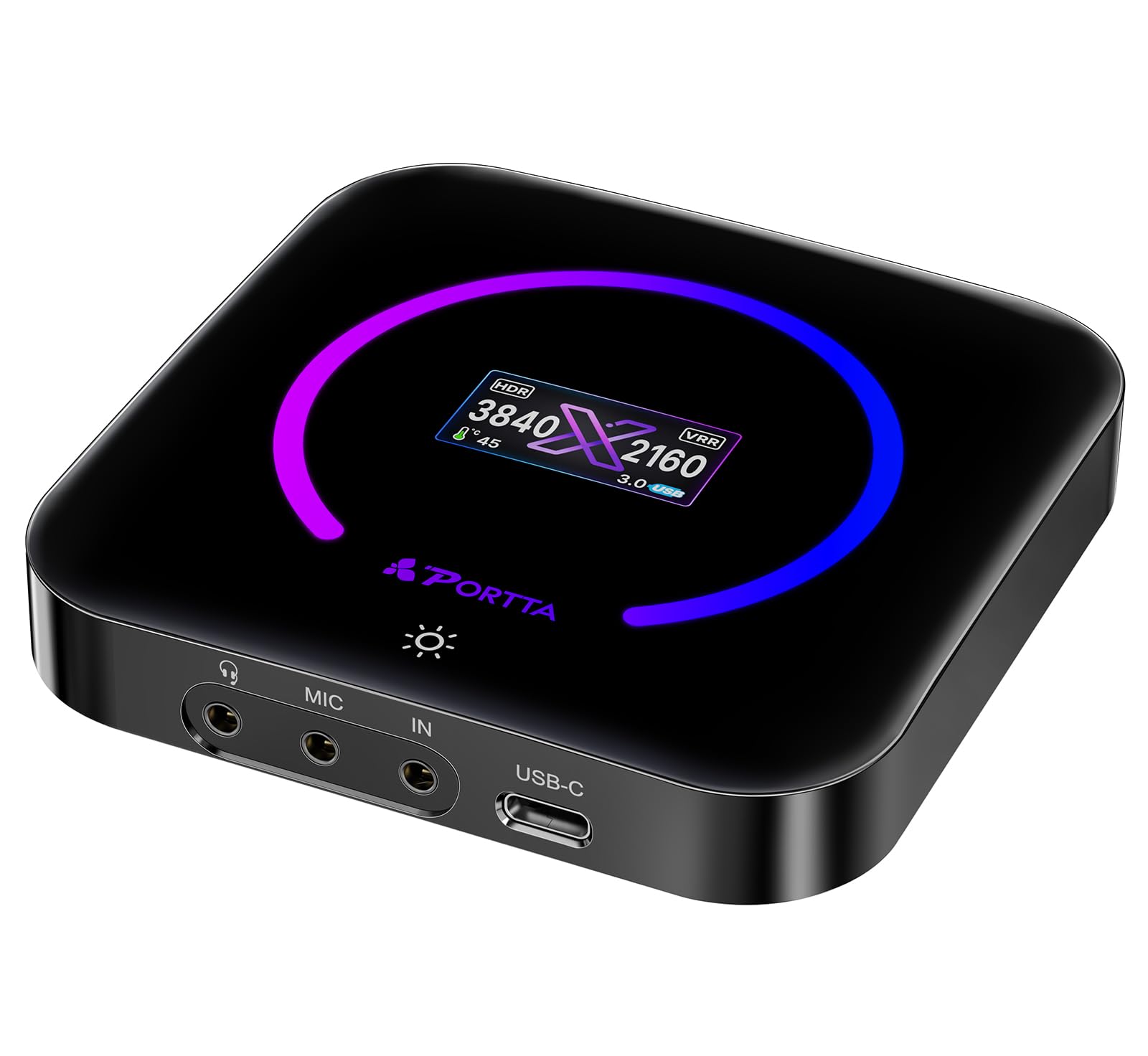
The PORTTA DX20R brings a unique quality to the table: a built-in OLED display that shows real-time signal resolution, temperature, and streaming status. This eliminates the guesswork of whether your source is being recognized correctly. The card captures 4K60 while supporting 1080p240 passthrough, which is excellent for competitive gamers who need high-refresh-rate gameplay on their monitor.
It supports HDR and VRR passthrough, preserving both extended color and smooth frame pacing from modern consoles. The PORTTA CapHub Utility software lets you customize video settings, adjust audio mixing, update firmware, and manage EDID and VRR modes for fine-tuned control. The card is plug-and-play with OBS and works across Windows, macOS, and Linux without drivers.
The body is made of sturdy plastic with passive cooling, and the built-in display shows the card temperature, which can get warm during prolonged 4K60 capture. The CapHub utility was reported broken on macOS 26 Tahoe at the time of writing, though it functions correctly on Windows. For the feature set, the DX20R offers a competitive balance of advanced functionality and usability.
Why it’s great
- Built-in OLED display shows resolution, temperature, and status.
- 1080p240 passthrough for high-refresh-rate competitive play.
- CapHub utility offers EDID and VRR management.
Good to know
- CapHub utility does not work on macOS 26 Tahoe.
- Passive cooling; the card gets warm during long 4K sessions.
- Large 4K60 capture files require significant storage space.
6. DiamondTiger YZ-F019

The DiamondTiger YZ-F019 is a well-speced external capture card that supports 4K60 HDR passthrough and captures at 1080p240 or 2K144 via MJPEG. It includes a dedicated fast-charging USB-C port for mobile streaming, which is a rare feature that lets you keep a smartphone or tablet powered while broadcasting. The card uses a premium chip to deliver VRR passthrough with under 50ms latency.
It is plug-and-play on Windows, macOS, Linux, and iOS 17 and 18, meaning mobile streamers can connect it directly to a recent iPad or iPhone for on-the-go streaming. The 3.5mm audio ports support both microphone input and headphone output, allowing live commentary without a separate mixer. The included kit contains a USB-C to USB-A charging cable and a dedicated USB-C cable for the host port.
Some users have reported compatibility issues where the card is not recognized by certain computers, and OBS may require default resolution settings to avoid freezing. The card also will not capture HDCP-encrypted content from Blu-ray players or streaming sticks, so it is strictly for gaming and non-encrypted video sources. Overall, it offers an impressive feature set for a mid-range price.
Why it’s great
- Fast-charging USB-C port for extended mobile streaming.
- Supports 1080p240 and 2K144 capture for high-FPS content.
- VRR passthrough with under 50ms latency for smooth play.
Good to know
- Some PCs may not recognize the card on first connection.
- OBS requires default resolution settings to avoid crashes.
- Does not capture HDCP-protected content from streaming devices.
7. AVerMedia Live Gamer HD 2 GC570

The AVerMedia Live Gamer HD 2 is an internal PCIe x4 card that excels at capturing uncompressed 1080p60 video, which is ideal for streamers who want the highest possible quality at standard HD resolutions. It offers flexible audio input options with multiple 3.5mm jacks for external microphones and mixers, and its driver-free installation works with any UVC/UAC compliant software like OBS or XSplit.
The card supports both compressed and raw uncompressed recording modes, giving users flexibility between bandwidth savings and video fidelity. The adjustable logo LED lighting is a small aesthetic touch for PC builders who care about interior looks. It works with PS4, Xbox One, and Nintendo Switch at 1080p60 with ultra-low latency.
User feedback indicates that the card is no longer actively supported by AVerMedia, which means software updates are nonexistent. The RECentral software has been described as having a cluttered interface, and some users report needing to unplug the source cable weekly to maintain recognition. Linux users should note there is no driver support, potentially rendering the card unusable on that platform.
Why it’s great
- Captures uncompressed 1080p60 for maximum video fidelity.
- Multiple 3.5mm audio jacks for flexible audio routing.
- Driver-free installation with UVC/UAC compliance.
Good to know
- No longer actively supported by AVerMedia; no new updates.
- RECentral software has a cluttered user interface.
- Not compatible with Linux due to missing drivers.
8. UGREEN 25173

The UGREEN 25173 is a versatile external capture card that captures 4K60 via MJPEG and records 1080p240 for high-frame-rate analysis. It features a unique triple 3.5mm jack design with dedicated ports for headphones, a microphone, and a line-in source, which enables sophisticated audio mixing without a separate audio interface. The aluminum casing with cooling holes helps manage heat during long streams.
It supports 4K60 HDR passthrough and VRR passthrough, reducing screen tearing on compatible monitors. The card also has seven customizable RGB lighting modes for visual flair. It works on Windows, macOS, Linux, iOS 17, and Android, and is compatible with OBS, XSplit, and Potplayer out of the box.
Some users have reported poor audio quality on certain units, with a noisy signal that is approximately 15dB down from the source. Linux support is not as thorough as Windows or MacOS, with some video formats and resolutions not fully accessible. For the price, the card offers a well-rounded feature set, but audio performance can be a gamble.
Why it’s great
- Triple 3.5mm audio jacks for complex audio routing.
- Aluminum body with cooling holes for heat management.
- 4K60 HDR passthrough with VRR support.
Good to know
- Audio quality may be poor on some units, with signal noise.
- Linux support is limited; not all formats work.
- Some users report a large audio signal drop of around 15dB.
9. MYPIN PCI-E Card

The MYPIN PCI-E card is an entry-level internal capture solution that brings the latency advantages of a direct motherboard connection without a premium price tag. It captures 4K30 and passes through 4K video with zero-delay HDMI loop-out via a PCIe x1 interface that offers up to 500MB/s bandwidth. This makes it a sensible choice for gamers on a tight budget who still want internal capture stability.
Installation is straightforward with plug-and-play recognition on Windows 7 and above, as well as macOS. The card comes with both standard and low-profile brackets, so it fits into small-form-factor cases without modification. It supports popular streaming software including OBS, VLC, and Potplayer, and it can handle 1080p60 uncompressed video for reliable Twitch streaming.
Customer feedback reveals that the metal shell may interfere with GPU fans in cramped cases, so physical clearance should be checked before purchase. Some units have been reported to fail after about one month of use, with the card ceasing to capture video and displaying a “Please Connect a Video Source” error in OBS. For users comfortable with the risk, it offers impressive value for the price.
Why it’s great
- Internal PCIe x1 connection offers lower latency than USB alternatives.
- Includes low-profile bracket for small-form-factor builds.
- Zero-delay HDMI loop-out for local monitoring.
Good to know
- Metal shell may conflict with GPU fans in tight cases.
- Some units fail after a month of use.
- Customer support may be unresponsive when issues arise.
FAQ
Can I use a capture card for streaming without a separate PC?
Does HDCP prevent my PS5 or Xbox from working with a capture card?
Why does my capture card show a black screen in OBS?
Final Thoughts: The Verdict
For most users, the best game capture card winner is the Elgato 4K Pro because it delivers uncompromised 8K60 passthrough and 4K60 HDR capture with the lowest possible latency via PCIe, making it the standard for serious dual-PC streamers. If you want a portable external solution with certified OBS plug-and-play, grab the ASUS TUF Gaming CU4K30. And for budget-conscious internal capture, nothing beats the value of the MYPIN PCI-E Card.