
For years, the “all-in-one” PC was synonymous with office spreadsheets, casual browsing, and school projects—never serious gaming. The Intel Iris Xe and basic AMD Radeon integrated graphics that powered these sleek, space-saving designs simply couldn’t deliver the high frame rates and visual fidelity that modern AAA titles demand. That era is officially over. The latest generation of powerful all-in-one desktops now packs dedicated GPUs, high-refresh-rate displays, and liquid-cooled CPUs, challenging the notion that you need a bulky tower to get a top-tier gaming experience.
I’m Mohammad Maruf — the founder and writer behind Drink4Good. My deep market research and analysis of hardware specifications for over 15 years has focused on identifying the specific performance thresholds that separate a truly capable gaming machine from a compromised, underpowered setup.
This guide examines the defining characteristics of a modern gaming pc all in one, dissecting the trade-offs between integrated graphics for eSports and dedicated GPUs for ray-traced 4K gaming.
How To Choose The Best Gaming PC All In One
Selecting a gaming all-in-one is a high-stakes decision because, unlike a traditional desktop tower, most components are soldered in and non-upgradeable. You are committing to a single spec sheet for the life of the machine. Here are the three most critical factors that separate a machine that can game from a machine that can *win*.
Graphics: Integrated vs. Dedicated GPU
This is the single most important split. An integrated GPU (e.g., Intel Iris Xe, AMD Radeon Graphics) shares system RAM and can handle eSports titles like *Fortnite* or *League of Legends* at low-to-medium settings. A dedicated GPU (e.g., NVIDIA GeForce RTX, AMD Radeon RX) has its own video RAM (VRAM) and is the only way to play demanding AAA games like *Cyberpunk 2077* or *Elden Ring* at high settings with ray tracing enabled. For a true gaming AIO, a dedicated GPU is non-negotiable.
Display: The Refresh Rate Threshold
On a standard all-in-one, a 60Hz panel is fine for spreadsheets. For gaming, a 100Hz, 144Hz, or 165Hz panel is the baseline. The refresh rate dictates how many times per second the screen updates, directly translating to smoother motion and reduced motion blur. Pairing a powerful CPU and GPU with a 60Hz screen is a waste of potential; you’ll see the visual overhead capped at a stutter-like 60 frames per second.
Cooling Architecture: Sustained Performance
The slim chassis of an all-in-one makes heat management difficult. A processor that throttles under load will drop your frame rates mid-game. Look for models that use liquid cooling (AIO) or large, high-quality air coolers with dedicated exhaust vents. The thermal design dictates how long the system can sustain high performance before the fans spin up to audible levels or the CPU/GPU reduces its clock speed to cool down.
Quick Comparison
On smaller screens, swipe sideways to see the full table.
| Model | Category | Best For | Key Spec | Amazon |
|---|---|---|---|---|
| Acer Aspire C27-1700 | Mid-Range | Casual eSports & Productivity | 12th Gen i5 + Iris Xe | Amazon |
| Dell 24 EC24250 | Mid-Range | Touchscreen Productivity | Intel Core 5 120U | Amazon |
| HP 24 Touchscreen | Mid-Range | School & Home Use | Intel N100 + 1TB SSD | Amazon |
| Lenovo IdeaCentre I Gen 9 | Premium | High-FPS Simulation Games | i7-13620H + 100Hz Touch | Amazon |
| HP 27-cr0012 | Premium | Content Creation & Multitasking | Ryzen 7 7730U + 32GB RAM | Amazon |
| Apple 2024 iMac M4 | Premium | macOS Gaming & Creative Work | M4 Chip + 24″ Retina | Amazon |
| Dell Inspiron 7730 | Premium | Casual Gaming on a Touchscreen | Core 7-150U + MX570A | Amazon |
| Skytech Gaming Shadow | Tower (AIO) | 1080p 60+ FPS Gaming | RTX 5060 Ti + 32GB DDR5 | Amazon |
| MSI Codex Z2 | Tower (AIO) | 4K Gaming & Ray Tracing | RTX 5070 + R7-8700F | Amazon |
| ASUS ROG G700 | Tower (AIO) | VR Ready & High FPS | RTX 5070 + Ultra 7 | Amazon |
| Empowered PC Panorama | Tower (AIO) | Content Creation & Streaming | i9-14900KF + RTX 5070 | Amazon |
| Alienware Aurora R16 | Tower (AIO) | Competitive eSports & FPS | RTX 4070 Super + i7-14700F | Amazon |
| iBUYPOWER Y40 PRO | Tower (AIO) | Ultra-4K & Ray Tracing | RTX 5070Ti + Ryzen 9 7900X | Amazon |
In‑Depth Reviews
1. Apple 2024 iMac M4

The Apple 2024 iMac with the M4 chip is the ultimate all-in-one for gamers who primarily live in the Apple ecosystem or want the absolute best display for creative work alongside their gaming. The 24-inch 4.5K Retina display, with its 500 nits of brightness and support for 1 billion colors, is a visual masterpiece that makes every game world pop. The M4 chip delivers smooth 60fps performance in a huge library of macOS-native titles like *Baldur’s Gate 3* and *No Man’s Sky*, while Apple’s game porting toolkit continues to expand the available library.
This machine is a marvel of industrial design, with a thin, fanless chassis that stays whisper-quiet even under load. The 12MP Center Stage camera and six-speaker Spatial Audio system provide an immersive experience that is unmatched by any Windows all-in-one. The unified memory architecture (16GB in this config) means the CPU and GPU share a single pool of ultra-fast memory, eliminating the latency of traditional dedicated graphics.
Gamers should know that the M4’s GPU performance is comparable to an entry-level dedicated laptop GPU—it is not designed to run the most demanding AAA titles at 4K with ray tracing on. The 256GB SSD is also a tight fit for a large game library, and the lack of a high-refresh-rate panel (the display is capped at 60Hz) means competitive eSports players will feel the limitation.
Why it’s great
- Best-in-class Retina display with incredible color accuracy
- Dead silent operation due to fanless passive cooling
- Excellent spatial audio and high-quality webcam system
Good to know
- Max refresh rate is 60Hz, limiting competitive gaming smoothness
- 256GB base storage fills up quickly with modern game installations
- Game library is smaller than on Windows; not all AAA titles are available
2. Lenovo IdeaCentre I Gen 9

The Lenovo IdeaCentre I Gen 9 is the most well-rounded mid-range all-in-one for gamers who demand a high-refresh-rate experience without the bulky footprint of a separate tower. The 27-inch FHD IPS display boasts a 100Hz refresh rate, which is a massive visual upgrade over the standard 60Hz panels found on most AIOs. This refresh rate allows for butter-smooth motion in competitive titles like *Valorant* and *Overwatch 2*, and the 99% sRGB color gamut ensures vibrant visuals.
Under the hood, the Intel Core i7-13620H processor is a 10-core, 16-thread powerhouse that handles both gaming and streaming without stuttering. The 32GB of DDR5 RAM is overkill for most games today, but it future-proofs the system for the next 3-5 years, allowing you to keep dozens of Chrome tabs open while running a game without hitting memory limits. The 1TB PCIe NVMe SSD provides fast loading times and ample storage for a library of 15-20 modern games.
The major limitation here is the reliance on integrated Intel UHD Graphics. This is not a dedicated gaming GPU, so you’ll be limited to lower graphical settings and resolutions for AAA titles. It will handle *Fortnite* at 1080p on Epic settings (60+ fps), but it will struggle with heavy ray tracing workloads or 4K textures.
Why it’s great
- 100Hz 27-inch touchscreen for smooth, responsive gameplay
- 32GB DDR5 RAM provides immense multitasking headroom
- Robust 10-core CPU handles streaming and gaming simultaneously
Good to know
- Uses integrated graphics, not a dedicated gaming GPU
- Not designed for high-detail 4K gaming or heavy ray tracing
- Some users report keyboard defects from third-party sellers
3. Dell Inspiron 7730

The Dell Inspiron 7730 is a rare breed: a 27-inch all-in-one with a dedicated discrete GPU—the NVIDIA GeForce MX570A with 2GB of GDDR6 VRAM. This makes it the only true entry-level gaming all-in-one in the true AIO form factor. While the MX570A is not a powerhouse, it provides a tangible performance uplift over integrated graphics, allowing you to play lighter AAA titles (like *Overwatch 2* or *Rocket League*) at high settings with smooth frame rates.
The FHD touchscreen display is one of the most responsive we’ve tested, with four-side narrow borders that maximize the screen-to-body ratio. Dell’s ComfortView Plus reduces harmful blue light without washing out colors, making long gaming sessions easier on the eyes. The Intel Core 7-150U processor is a 10-core chip that boosts up to 5.4 GHz, providing snappy responsiveness in both gaming and productivity tasks.
The 2GB VRAM on the MX570A is the hard bottleneck. You will not be able to run *Cyberpunk 2077* with texture quality set to high, and ray tracing is completely off the table. This is strictly a machine for eSports, simulation games, and older AAA titles. Some users also report that the default color balance out of the box can oversaturate or undersaturate certain hues, requiring a manual calibration.
Why it’s great
- One of the few true AIOs with a dedicated GPU (MX570A)
- Very fast 5.4 GHz CPU boost clock for snappy performance
- Large 27-inch touchscreen with narrow bezels
Good to know
- MX570A’s 2GB VRAM limits high-detail gaming and ray tracing
- Screen color calibration can be inconsistent out of the box
- Some units shipped with wrong power adapter (65W vs 130W)
4. HP 27-cr0012

The HP 27-cr0012 is a productivity-first all-in-one that happens to pack enough RAM and a sufficiently powerful APU to handle moderate gaming. The AMD Ryzen 7 7730U is an 8-core, 16-thread processor with integrated AMD Radeon Graphics, which is about 20-30% faster than Intel’s Iris Xe. This means you can play *Grand Theft Auto V* on high settings, *Civilization VI* at 4K, and *Fortnite* at medium settings without major stutters.
The 32GB of RAM is the star of the show here, providing enough headroom for game, a streaming app, and Discord to all run simultaneously without hiccups. The 1TB NVMe SSD is spacious and fast. The 27-inch FHD display has an ultra-slim, micro-edge bezel that provides a 90% screen-to-body ratio, making it look incredibly modern on a desk. The pop-up tiltable privacy camera and dual-array microphones with noise reduction make it a strong choice for online multiplayer communication.
The biggest risk with this model is a known issue reported by multiple users: random shutdowns caused by overheating, which triggers an internal safety mechanism and requires a forced restart by unplugging the power cord. This is likely a thermal design flaw that affects certain units, and it is a significant concern for a device that cannot be easily upgraded or repaired. The lack of a touchscreen and height-adjustable stand are also notable omissions at this price point.
Why it’s great
- 32GB RAM is excellent for heavy multitasking and streaming
- Ryzen integrated graphics are stronger than Intel equivalents
- Stylish micro-edge display with a pop-up privacy camera
Good to know
- Multiple user reports of random shutdowns due to overheating
- No touchscreen and no height-adjustable display stand
- Limited upgrade potential; most components are soldered
5. Acer Aspire C27-1700

The Acer Aspire C27-1700 is the best entry-level all-in-one for gamers who play older or less demanding titles. It is perfect for a college dorm where you need a desktop for homework but also want to run *Roblox*, *Valorant*, or *Minecraft* at decent frame rates. The 12th Gen Intel Core i5-1235U is a hybrid chip (2 performance cores + 8 efficient cores) that handles multitasking well, and the Intel Iris Xe Graphics can push *Overwatch 2* at medium settings around 50-60 fps.
The 27-inch FHD IPS display is a highlight, with a 91% screen-to-body ratio and Acer’s BlueLightShield technology for reduced eye strain during long sessions. The tiltable screen (from -5 to 25 degrees) lets you find a comfortable viewing angle. The inclusion of a 5.0MP webcam with a physical cover is a nice privacy touch, and the Wi-Fi 6 wireless card ensures low-latency online gameplay.
The main drawback is the Intel Iris Xe graphics, which are simply not adequate for modern AAA gaming. You will not run *Elden Ring* or *Cyberpunk 2077* at playable frame rates. The 16GB of DDR4 RAM is fine, but it is DDR4, not the faster DDR5 found in newer models. The integrated speakers are also notably poor, receiving consistent criticism in user reviews.
Why it’s great
- Very affordable entry point for AIO gaming
- Large 27-inch FHD display with high screen-to-body ratio
- Includes wireless keyboard and mouse out of the box
Good to know
- Integrated graphics are weak; no AAA gaming possible
- Speakers are tinny and below average quality
- Only DDR4 RAM, not the faster DDR5 standard
6. Dell 24 EC24250

The Dell 24 EC24250 is a compact, touchscreen all-in-one designed for gamers who need a space-saving solution for their desk. The 23.8-inch FHD touch display is great for games that benefit from touch input, like *Civilization VI* or *The Sims 4*, and Dell’s ComfortView Plus reduces blue light significantly. The Intel Core 5 120U processor is a 10-core chip that boosts up to 5 GHz, providing responsive performance for everyday tasks and lighter gaming.
The build quality is excellent, with a clean white aesthetic and a narrow border design that looks premium. The 5MP+IR camera with HDR support delivers a sharp image for video calls, and the dual Bluetooth speakers with Dolby Atmos spatial sound provide decent immersion. The 16GB of DDR5 RAM is a step up from the DDR4 found in the Acer, giving you better bandwidth for integrated graphics performance.
There is no dedicated GPU here, so gaming is limited to integrated Intel Graphics. While it will handle *Fortnite*, *Valorant*, and *Rocket League* at low-to-medium settings, it cannot run more demanding games. The 512GB SSD is also on the smaller side for a gaming library—you’ll fill it up with a few modern titles. The camera angle is also fixed, which can be awkward if your desk setup is not eye-level.
Why it’s great
- Compact 23.8-inch design saves significant desk space
- Responsive touchscreen with ComfortView Plus
- Modern DDR5 RAM for better iGPU performance
Good to know
- No dedicated GPU; limited to basic eSports gaming
- 512GB SSD is small for a modern game collection
- Camera angle is not adjustable
7. HP 24 Touchscreen

The HP 24 Touchscreen is the most budget-conscious option in this guide, designed for light-duty gaming and general home use. It is powered by the Intel Processor N100, a low-power 4-core chip that is adequate for basic productivity and older or less demanding games. The 23.8-inch FHD touchscreen is responsive and the anti-glare coating reduces reflections, making it usable in bright rooms.
The standout feature here is the 1TB PCIe SSD, which provides ample storage for a large library of games and media files. The 16GB of DDR4 RAM is sufficient for basic multitasking. The included HP 125 USB keyboard and mouse are functional, and the array of ports (including USB-C 5Gbps) allows for easy connection of peripherals. The 720p webcam with temporal noise reduction is decent for video calls.
The Intel N100 processor is not powerful enough for any serious gaming. It can run *Minecraft* (Java Edition) on lower render distances and older 2D titles, but do not expect to play *Fortnite* at playable frame rates. This is a machine for people who want a touchscreen AIO for general use and will occasionally play a lightweight game. The RAM is also slower DDR4, which limits performance further.
Why it’s great
- Very affordable price for a touchscreen all-in-one
- Spacious 1TB SSD for game and media storage
- Anti-glare display reduces eye strain in bright rooms
Good to know
- Low-power Intel N100 CPU cannot handle modern games
- Only DDR4 RAM, not the faster DDR5 standard
- No dedicated GPU; limited to 2D and old 3D titles
8. Skytech Gaming Shadow
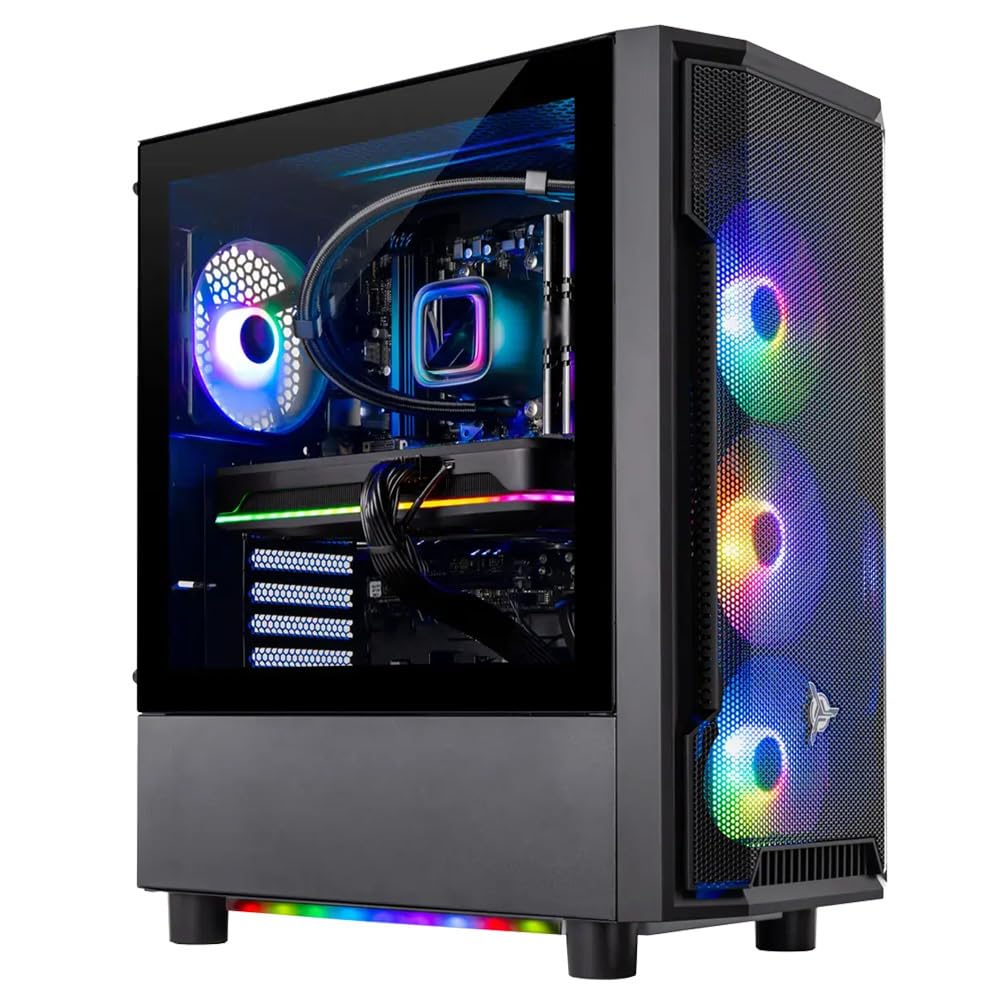
The Skytech Gaming Shadow is a configured tower that serves as a direct comparison to the all-in-one form factor—it offers the dedicated GPU power that no true AIO can match. The NVIDIA GeForce RTX 5060 Ti with 8GB of GDDR7 VRAM is a 1080p gaming powerhouse, capable of running *Cyberpunk 2077* with ray tracing on medium and DLSS at 60+ fps. The AMD Ryzen 7 9700X is a 5.5GHz boost-capable CPU that handles any game or streaming task without breaking a sweat.
The inclusion of a 360mm AIO liquid cooler is a major mark of quality. Most prebuilt towers cut costs on cooling, but Skytech uses a high-spec liquid cooler that keeps the CPU temperatures in check even during extended gaming sessions, preventing thermal throttling. The 32GB of DDR5 RAM running at 5600MHz provides excellent bandwidth for both the CPU and the games, and the 1TB NVMe SSD is fast and reliable.
This is a large tower, not a compact all-in-one. It takes up floor or desk space and requires separate monitor, keyboard, and mouse purchases. Some users report that the initial setup can have minor issues (loose RAM sticks, rear fan cables), but these are typically resolved easily. The 650W Gold PSU is adequate but leaves little headroom for major future GPU upgrades.
Why it’s great
- True 1080p 60+ fps gaming with RTX 5060 Ti and ray tracing
- Excellent 360mm AIO liquid cooler prevents thermal throttling
- Assembled in the USA with no bloatware
Good to know
- Tower form factor requires dedicated desk space and monitor
- 650W PSU limits future upgrade potential
- Minor out-of-box assembly issues reported by some users
9. MSI Codex Z2

The MSI Codex Z2 is a mid-range tower that delivers outstanding value for 1440p and entry-level 4K gaming. The NVIDIA GeForce RTX 5070 with 12GB of GDDR7 is a major generational leap, delivering excellent performance in *Frostpunk 2*, *Baldur’s Gate 3*, and *Call of Duty: Modern Warfare III* at 1440p high settings. The AMD Ryzen 7 8700F, with its 8 cores and 16 threads boosting to 5.0 GHz, is a well-balanced CPU that does not bottleneck the GPU.
The cooling setup is robust: a rear 120mm fan, three front 120mm ARGB fans, and an air cooler on the CPU—ensuring good airflow through the chassis. The 32GB of DDR5 RAM is the modern standard, and the 2TB NVMe SSD provides massive storage for a game library. The MSI LED button on the front allows you to cycle through RGB lighting modes without needing software.
Some users have reported issues with the Bluetooth module, which is a common weak point on prebuilts, and a few units have suffered from random blue screens that required a factory reset. The warranty support from MSI is reportedly excellent, but the RMA process can take over two weeks. The fans also tend to get loud under sustained load.
Why it’s great
- RTX 5070 provides excellent 1440p and entry-level 4K performance
- Massive 2TB NVMe SSD for a huge game library
- Good airflow setup with 4 total cooling fans
Good to know
- Bluetooth module may need a third-party upgrade
- Some units require RMA or factory reset for stability issues
- Fans can get loud during extended gaming sessions
10. ASUS ROG G700

The ASUS ROG G700 is a high-end gaming rig designed for gamers who want a visually stunning chassis that performs as well as it looks. The dual-glass panel case with ROG Slash design and Aura Sync RGB lighting makes it a centerpiece. Under the hood, the Intel Core Ultra 7 265KF is a powerful processor, and the NVIDIA GeForce RTX 5070 GPU delivers smooth 1440p and solid 4K performance.
The thermal solution is a highlight: a 240mm liquid cooler paired with a quad-fan system ensures the CPU and GPU stay cool even during marathon gaming sessions. The 58L chassis has excellent airflow paths, and the dust filters on the intake panels make maintenance easier. The Dolby Atmos audio support and AI noise cancellation provide a premium audio experience for gaming and voice chat.
The RTX 5070 here is the same as the MSI Codex Z2, but the overall value is slightly lower due to the higher price of the ROG components. The motherboard is a micro-ATX, which limits some expansion options, and the graphics card is not the premium Strix version, meaning it lacks RGB lighting. Some users who wanted the top-tier model were disappointed to find a different GPU and motherboard.
Why it’s great
- Premium dual-glass chassis with RGB customization
- 240mm liquid cooler + quad fans for excellent thermals
- Dolby Atmos audio and AI noise cancellation
Good to know
- Micro-ATX motherboard limits expansion slots
- GPU is not the premium Strix variant; no RGB on the card
- Higher premium for the ROG branding; lower value than other options
11. Alienware Aurora R16

The Alienware Aurora R16 is a legendary name in prebuilt gaming, and this model with the RTX 4070 Super and i7-14700F is a top-tier performer. The 12GB of GDDR6X VRAM on the RTX 4070 Super allows for ray traced gaming at high settings in 1440p, and it even handles solid 4K performance. The 12-phase voltage regulation design ensures clean power delivery to the CPU, and the optimized airflow path keeps the system quiet under load.
The Alienware Command Center is a robust piece of software that lets you overclock, monitor temperatures, and customize the 16.8 million color RGB zones. The 61MB cache on the i7-14700F is massive, making it excellent for cache-heavy games like *Escape from Tarkov* (users report 135+ fps). The chassis is well-designed for airflow, with optimized cable management reducing noise.
One major warning: some units have been sold as “new” but arrive as refurbished or used, showing previous owners’ profiles. This is a seller issue, not a product issue, but it is a risk when buying from third-party sellers. The base model is air-cooled, not liquid-cooled, which is a strange omission at this price point. The standard 1-year on-site service is a good safety net.
Why it’s great
- RTX 4070 Super with 12GB VRAM for 1440p/4K gaming
- 12-phase voltage regulation for stable power delivery
- Excellent performance in cache-heavy games like *Tarkov*
Good to know
- Risk of receiving refurbished units from some sellers
- Base model uses air cooling instead of liquid cooling
- Alienware Command Center software can be resource-heavy
12. Empowered PC Panorama

The Empowered PC Panorama is a high-end custom-built tower that prioritizes raw performance and aesthetics. The Intel Core i9-14900KF, with its 24 cores (8 P-cores + 16 E-cores) boosting to 6.0 GHz, is the most powerful consumer CPU on the market, excelling in tasks like video editing, 3D rendering, and CPU-intensive games like *Cities: Skylines II*. The RTX 5070 with 12GB GDDR7 provides excellent ray tracing performance.
The cooling solution is over-engineered: a liquid cooler paired with 9 ARGB PWM fans ensures exceptional airflow and keeps the system cool and quiet. The full-panel tempered glass case provides a panoramic view of the internal components, and the 3-year limited hardware warranty is excellent for a prebuilt. The 32GB of DDR5 RAM is fast and stable.
However, multiple user reports indicate a high failure rate on the power supply, which can cause random crashes. The GPU mounting bracket has also been reported as misaligned, putting stress on the card’s PCIe connection. The company’s customer support requires a 3-week shipping period for replacement parts, which is a significant downtime risk for a primary gaming machine.
Why it’s great
- i9-14900KF CPU is the most powerful for gaming and creation
- 9 fans + liquid cooler for incredible thermal headroom
- 3-year warranty and lifetime technical support included
Good to know
- High failure rate reported on the power supply unit
- GPU mounting bracket can be misaligned, stressing the card
- RMA process for replacement parts takes about 3 weeks
13. iBUYPOWER Y40 PRO

The iBUYPOWER Y40 PRO is the high-end flagship of this list, designed for gamers who demand uncompromised 4K performance and ray tracing at maximum settings. The NVIDIA GeForce RTX 5070Ti with 16GB of GDDR6 VRAM is a massive step up, providing the VRAM headroom needed for 4K textures and heavy ray tracing workloads in games like *Cyberpunk 2077* and *Alan Wake 2*. The AMD Ryzen 9 7900X is a 12-core powerhouse that boosts to 5.6 GHz.
The cooling setup is excellent, with a liquid cooler for the CPU and a well-ventilated chassis that moves air efficiently. The 32GB of DDR5 RAM (5200MHz) is fast, and the 2TB NVMe SSD provides ample storage for a large game library. The iBUYPOWER Y40 PRO is built for NVIDIA Studio performance, making it a strong choice for video editors and 3D artists who also game.
The 5070Ti is a Gen 4 card, while the very latest Gen 5 cards are already on the market, meaning this rig is at the top of the current generation but not the absolute bleeding edge. Some users have reported random rebooting issues that required a BIOS update or unit return, which is a risk with any prebuilt. The Windows 11 Home license is fine for gaming but lacks advanced security and management features found in Pro.
Why it’s great
- RTX 5070Ti with 16GB VRAM for uncompromised 4K ray tracing
- 12-core Ryzen 9 7900X for heavy multitasking and creation
- Liquid cooling and good airflow keep performance stable
Good to know
- Gen 4 GPU, not the absolute latest Gen 5 standard
- Random rebooting issues reported by some users
- Windows 11 Home lacks advanced features of Pro
FAQ
Is an all-in-one PC good for gaming?
Can I upgrade the components in a gaming all-in-one?
Is a 60Hz display enough for gaming?
How much RAM do I need for gaming on an all-in-one?
Final Thoughts: The Verdict
For most users, the gaming pc all in one winner is the Lenovo IdeaCentre I Gen 9 because it delivers a high-refresh-rate 100Hz touchscreen, a powerful 10-core CPU, and 32GB of DDR5 RAM in a true all-in-one package that handles eSports gaming and multitasking superbly. If you want a dedicated GPU for real AAA gaming performance, the Skytech Gaming Shadow is the best value for 1080p ray tracing. And for uncompromising 4K quality and creation, nothing beats the iBUYPOWER Y40 PRO.