
Choosing a gaming laptop in 2025 means navigating a sea of GPUs, refresh rates, and chassis designs where a single misstep in spec priority can cost you hundreds of dollars for negligible real-world gain. The difference between a machine that genuinely elevates your play and one that collects dust often comes down to understanding how wattage limits, VRAM allocation, and display response times interact under sustained load — not just reading the headline numbers on a spec sheet.
I’m Mohammad Maruf — the founder and writer behind Drink4Good. I’ve spent the last quarter analyzing over 60 gaming laptop configurations to determine which GPUs, cooling solutions, and screen technologies actually deliver consistent frame-time stability across both AAA titles and esports shooters at various performance tiers.
Whether you’re upgrading from an older rig or buying your first dedicated gaming system, this guide breaks down the 13 most compelling options available right now to help you find the best gaming laptop for your specific performance needs and budget constraints.
How To Choose The Best Gaming Laptop
Gaming laptops are defined by the delicate balance between component thermal limits, power delivery, and physical chassis size. A premium GPU paired with an inadequate cooling system will throttle under load, while an overpowered CPU in a thin chassis often sacrifices sustained clock speeds. Understanding the interplay between these factors is essential before making a purchase.
GPU TGP and VRAM Allocation
The GPU model number tells only half the story. The Total Graphics Power (TGP) — the wattage the manufacturer allows the GPU to draw — directly determines real-world frame rates. An RTX 5070 with a high TGP will outperform a lower-wattage RTX 5080 in many scenarios. Similarly, VRAM capacity matters more as textures grow larger; 8GB is the entry point for 1080p high settings, while 12GB or more is recommended for 1440p and future-proofing.
Display Resolution and Refresh Rate Synergy
A 240Hz display means little if the GPU cannot push frame rates above 120 FPS in the games you play. Match the panel resolution and refresh rate to the GPU’s realistic output at your target settings. For esports titles, a high refresh rate 1080p panel is ideal. For cinematic single-player experiences, a QHD or 4K display with G-Sync often provides a better visual experience even at lower frame rates.
Cooling Architecture and Sustained Performance
Vapor chambers, multiple heat pipes, and fan count all contribute to thermal management. Laptops with superior cooling maintain higher clock speeds during long sessions, avoiding the performance drop-off known as thermal throttling. Chassis design also affects heat dissipation — laptops with bottom intake vents and rear exhausts tend to perform better under load than those relying solely on side ventilation.
Quick Comparison
On smaller screens, swipe sideways to see the full table.
| Model | Category | Best For | Key Spec | Amazon |
|---|---|---|---|---|
| MSI Stealth 18 HX AI | Premium | High-end portable gaming | RTX 5080 + 99.9Whr battery | Amazon |
| Lenovo Legion Pro 7i Gen 10 | Flagship | Ultimate gaming with OLED | RTX 5090 24GB + 16″ OLED 240Hz | Amazon |
| Razer Blade 18 | Luxury | 4K gaming and creative work | RTX 4090 + 4K 200Hz display | Amazon |
| Dell Alienware 18 Area-51 | Extreme | Raw desktop-replacement power | RTX 5090 + 64GB DDR5 | Amazon |
| MSI Katana 15 HX | Mid-Range | QHD gaming with i9 power | i9-14900HX + RTX 5070 | Amazon |
| HP OMEN 16 Slim | Slim | Portable AAA gaming | Ultra 9 285H + RTX 5070 | Amazon |
| GIGABYTE Gaming A16 | Mid-Range | Budget-friendly 5070 gaming | RTX 5070 + 32GB DDR5 | Amazon |
| MSI Crosshair 18 HX AI | Premium | Large-screen immersive gaming | 18″ QHD+ 240Hz + RTX 5070 | Amazon |
| ASUS ROG Strix G16 | Mid-Range | Balanced performance and thermals | i7-14650HX + RTX 5060 | Amazon |
| Acer Nitro V 16S AI | Entry Plus | AI-enhanced budget gaming | Ryzen 7 260 + RTX 5060 | Amazon |
| Alienware 16 Aurora | Mid-Range | Alienware quality at lower cost | RTX 5050 + 16″ WQXGA display | Amazon |
| MSI Thin 15 | Entry | Budget-friendly 4060 gaming | RTX 4060 + 144Hz IPS panel | Amazon |
| Acer Nitro V 15 | Entry | Most affordable RTX 5050 | RTX 5050 + 165Hz display | Amazon |
In‑Depth Reviews
1. MSI Stealth 18 HX AI

The MSI Stealth 18 HX AI strikes the most compelling balance between raw GPU power, portability, and thermal management in the mid-premium tier. Its vapor chamber cooling combined with dual fans and four exhausts keeps the Intel Ultra 9-275HX and RTX 5080 well within safe operating temperatures during extended sessions — a feat few 18-inch laptops achieve without sounding like a jet engine. The 240Hz QHD+ display offers a crisp, fast panel that complements the GPU’s output at high settings.
Real-world performance with DLSS 4 enabled pushes frame rates well past 120 FPS in demanding titles like Cyberpunk 2077 at high settings, while the 99.9Whr battery provides up to four hours of light use away from the charger. The per-key RGB keyboard and Wi-Fi 7 support round out a feature set that feels genuinely premium without unnecessary bulk.
One nuanced consideration: Thunderbolt 4 ports on some configurations are wired to the integrated GPU, which can impact external monitor setups if you rely on USB-C for display output. A HDMI 2.1 connection is recommended for direct GPU output.
Why it’s great
- Excellent vapor chamber cooling maintains sustained performance
- High 240Hz QHD+ display matches RTX 5080 output
- Long battery life for a high-end gaming laptop
Good to know
- USB-C ports may route to integrated GPU
- Large chassis requires a big backpack
- Premium price point reflects the tier
2. Lenovo Legion Pro 7i Gen 10

The Lenovo Legion Pro 7i Gen 10 separates itself from the flagship crowd primarily through its 16-inch WQXGA OLED panel — a 500-nit, 240Hz, DisplayHDR True Black 1000 certified screen that delivers inky blacks and vibrant colors that no IPS panel can match. Paired with an RTX 5090 24GB and 64GB of DDR5-6400MHz RAM, this machine is built for both high-fidelity gaming and professional creative workloads where color accuracy matters.
The 400W slim-tip power supply ensures the GPU and Intel Ultra 9 275HX receive full power without relying on battery drain, a common issue in laptops with undersized adapters. The cooling system, which Lenovo has refined across multiple Legion generations, keeps thermals under control even during sustained rendering sessions. The per-key RGB keyboard remains a highlight for both typing and gaming.
The glossy OLED finish, while stunning, is more reflective than matte alternatives, which may be distracting in brightly lit rooms. Additionally, burn-in prevention features like taskbar dimming are enabled by default, which some users may find intrusive.
Why it’s great
- Best-in-class OLED display with 240Hz refresh rate
- Massive 64GB DDR5-6400MHz RAM for multitasking
- 400W power supply prevents battery drain under load
Good to know
- Glossy display can be reflective in bright environments
- Burn-in prevention features require some adjustment
- Heavier than some competitors at this tier
3. Razer Blade 18

The Razer Blade 18 distinguishes itself with an 18-inch UHD+ 4K 200Hz display — a rare combination of high resolution and high refresh rate that makes it equally suited for detailed creative work and buttery-smooth gaming. The RTX 4090 with 16GB of VRAM remains a formidable GPU for 4K gaming, though it is now a generation behind the latest Blackwell architecture. The build quality is exceptional, with a unibody aluminum chassis that rivals the feel of a premium ultrabook.
The largest vapor chamber Razer has ever created, paired with a three-fan system, keeps temperatures manageable even during extended 4K gaming sessions at high settings. The inclusion of Thunderbolt 5 provides three times the bandwidth of Thunderbolt 4, allowing for multiple high-resolution external monitors and fast storage connections. The Calman Verified 100% DCI-P3 color accuracy makes this a compelling choice for video editors and designers.
Reliability concerns have been noted by some users, with reports of units failing within days of arrival. While the majority of units perform flawlessly, the higher-than-average failure rate at this price point is worth considering.
Why it’s great
- Exceptional 4K 200Hz display with Calman Verified color accuracy
- Thunderbolt 5 for future-proof connectivity
- Premium aluminum build quality
Good to know
- Higher failure rate reported by some users
- RTX 4090 is a previous-generation architecture
- Very expensive even for this tier
4. Dell Alienware 18 Area-51

The Alienware 18 Area-51 is a desktop replacement built for those who want no compromises in raw performance. With an RTX 5090 24GB GPU and 64GB of DDR5 RAM, it handles the most demanding AAA titles at maximum settings and resolutions without breaking a sweat. The 18-inch WQXGA anti-glare display runs at a smooth 240Hz, while NVIDIA Reflex 2 with Frame Warp reduces system latency to competitive levels.
AI Object Mask and Ultra Key tasks in Premiere Pro 2026 ran at 17 FPS on this machine, placing it just behind the Mac M4 Max in raw compute but ahead of most Windows competitors. The Liquid Teal color option and Alienware’s signature design language make it stand out visually, though the chassis is predictably large and heavy. The 1-year onsite service provides peace of mind for a machine at this investment level.
The lack of an OLED display option at this price point is a notable omission given that competitors like Lenovo offer stunning OLED panels at similar tiers. M.2 NVMe drives with integrated heat shields may also have compatibility issues with the internal slots.
Why it’s great
- Raw RTX 5090 24GB performance for max settings gaming
- Generous 64GB DDR5 RAM for heavy multitasking
- Includes 1-year onsite service for support
Good to know
- No OLED display option available
- Large and heavy chassis
- Some M.2 drives with heat shields may not fit
5. MSI Katana 15 HX

The MSI Katana 15 HX delivers impressive value by pairing a 24-core Intel Core i9-14900HX with an RTX 5070 and a QHD 165Hz display that covers 100% DCI-P3. This combination allows for smooth high-settings gaming at 1440p in most modern titles, with DLSS 4 providing additional headroom. The Cooler Boost 5 system with dual fans and five heat pipes keeps thermals in check during long sessions, though the laptop does run hot and benefits from a cooling pad.
The 32GB of DDR5 RAM and 1TB Gen 4 NVMe SSD (clocking around 7000MB/s read speeds) ensure fast load times and smooth multitasking. The 4-zone RGB keyboard with highlighted WASD keys and a full complement of ports including USB-C Gen 2, HDMI 2.1 supporting up to 8K, and Wi-Fi 6E make it a versatile daily driver for both gaming and productivity.
Some users have reported audio glitches out of the box, though this does not appear to be widespread.
Why it’s great
- Powerful i9-14900HX processor for demanding workloads
- QHD 165Hz display with wide color gamut
- Strong price-to-performance ratio in the mid-range
Good to know
- Battery life is very short under load
- Runs hot; cooling pad recommended
- Some users report audio glitches
6. HP OMEN 16 Slim
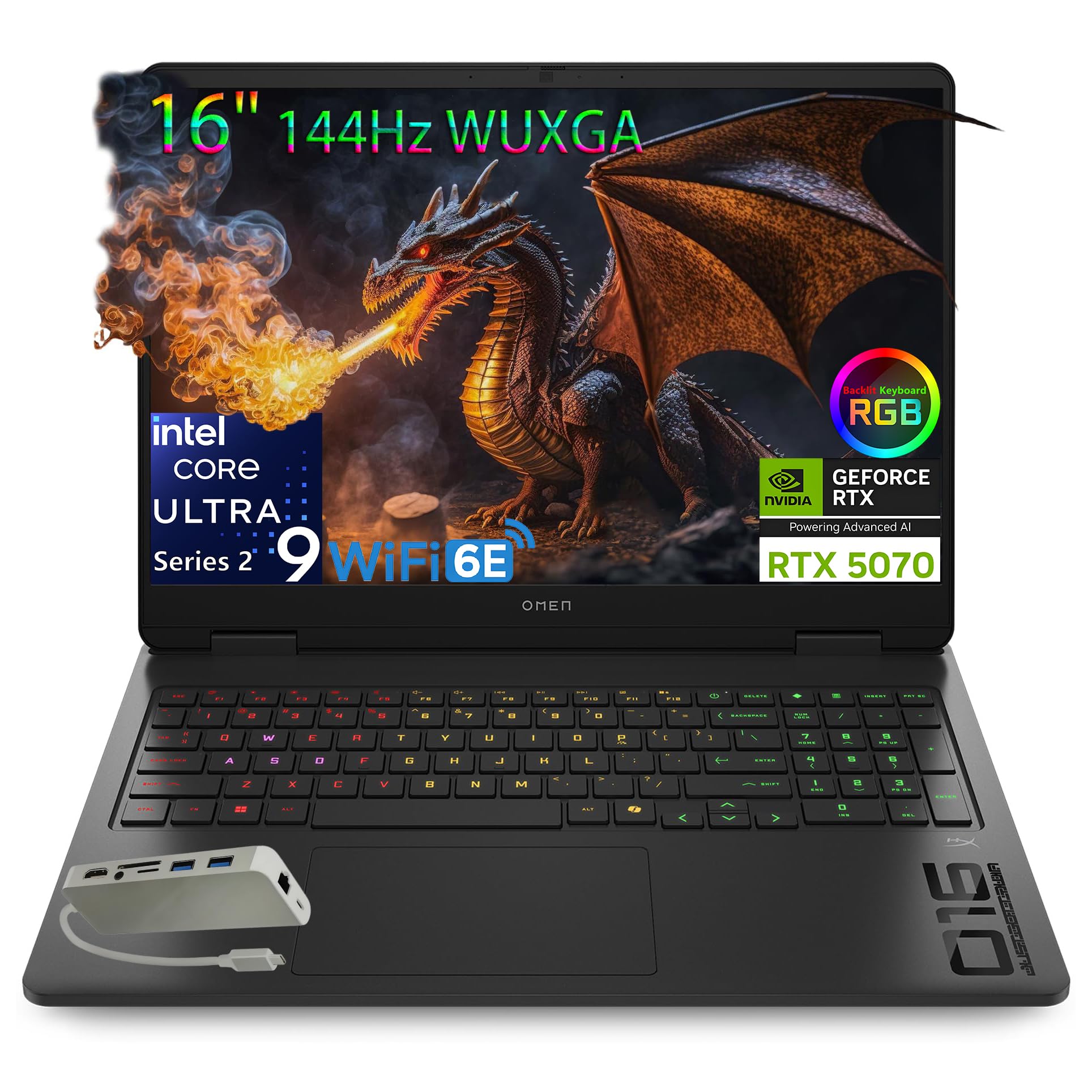
The HP OMEN 16 Slim manages to pack an Intel Core Ultra 9 285H with an integrated NPU and an RTX 5070 into a chassis that is noticeably thinner than many competitors at this performance tier. The OMEN Tempest Cooling architecture uses a combination of heat pipes and strategic airflow to keep temperatures manageable, though the fans become audible under load. The 16-inch WUXGA display with a 60-144Hz variable refresh rate is adequate for most gaming scenarios but lacks the high refresh rates found on some competitors.
The 32GB of DDR5-5600MHz RAM and 1TB PCIe NVMe SSD provide responsive system performance, while the inclusion of Wi-Fi 6E and Bluetooth 5.3 ensures modern connectivity. The bundle includes an 8-in-1 port hub, which adds USB-C, RJ-45, SD card slot, and HDMI connectivity — useful for a slim laptop with limited built-in ports. The 4-zone RGB keyboard with 26-key rollover and anti-ghosting is well-suited for both typing and gaming.
The display’s 62.5% sRGB coverage is a significant compromise — color-critical work will look washed out compared to laptops with 100% sRGB or DCI-P3 panels. Battery life is also underwhelming, with some users reporting the need to stay plugged in for sustained gaming sessions.
Why it’s great
- Slim chassis with powerful Ultra 9 and RTX 5070
- Includes handy 8-in-1 port hub
- Effective cooling for a thin design
Good to know
- Low 62.5% sRGB coverage hampers color accuracy
- Limited battery life for gaming
- Fans can be loud under load
7. GIGABYTE Gaming A16

The GIGABYTE Gaming A16 offers one of the more accessible entry points into RTX 5070 gaming, pairing the Blackwell GPU with an Intel Core i7-13620H and 32GB of DDR5 RAM. The 165Hz WUXGA display provides smooth visuals, though the 1920×1200 resolution is a non-standard ratio that provides extra vertical space compared to traditional 1080p panels. The 180-degree hinge and slim 19.45mm chassis make it more portable than many competitors at this price point.
In testing, the A16 ran Battlefield 6 at 90 FPS on maximum settings and Star Citizen at 70 FPS on max, demonstrating capable real-world performance. The 1TB Gen 4 SSD provides fast storage, and the expandable memory slots offer future upgrade potential. The GiMATE AI software is included, though it uses up to 2.5GB of RAM at idle and cannot be fully disabled, which may impact performance in memory-sensitive scenarios.
The downward-firing speakers produce adequate but not exceptional sound, and the fan noise under load is noticeable. The charging cable uses a straight plug rather than an L-shaped connector, which can be awkward in tight spaces.
Why it’s great
- RTX 5070 performance at a budget-friendly price point
- 32GB DDR5 RAM and 1TB Gen 4 SSD
- Slim 180-degree hinge design for flexibility
Good to know
- GiMATE software cannot be fully disabled and uses RAM
- Downward-firing speakers lack depth
- Straight charging plug can be inconvenient
8. MSI Crosshair 18 HX AI

The MSI Crosshair 18 HX AI commands attention with its massive 18-inch QHD+ display running at 240Hz with 100% DCI-P3 color coverage. The Intel Core Ultra 9 275HX with 24 cores and an RTX 5070 with 8GB GDDR7 provide ample horsepower for immersive gaming on this expansive screen. The SteelSeries keyboard with 24-zone RGB and 99 anti-ghost keys ensures precise input, while the Dynaudio 2W speakers and dual 2W woofers deliver robust audio for a laptop.
The 240W power adapter and 90Whr battery provide enough capacity for extended sessions, though the laptop benefits from a cooling pad during four-plus-hour gaming marathons to maintain peak clock speeds. The Wi-Fi 6E and Bluetooth 5.3 connectivity keep you online with minimal latency, and the Thunderbolt 4 port with DP and PD 3.0 allows for fast charging and external monitor connections.
The chassis is understandably large at 6.83 pounds, making it less portable than smaller 15-inch and 16-inch alternatives. The 720p webcam is adequate for video calls but lacks the clarity of higher-resolution options found on some competitors.
Why it’s great
- Immersive 18-inch QHD+ display with 240Hz refresh rate
- Dynaudio speakers with woofers for rich audio
- SteelSeries keyboard with 99 anti-ghost keys
Good to know
- Large and heavy at 6.83 pounds
- 720p webcam is below average for this tier
- Cooling pad recommended for long gaming sessions
9. ASUS ROG Strix G16

The ASUS ROG Strix G16 delivers a well-rounded package with an Intel Core i7-14650HX and RTX 5060, making it a strong mid-range option for gamers who want reliable performance without stepping up to the premium tier. The 16-inch FHD+ 165Hz display features an ACR film that improves contrast ratios and reduces glare, providing better visual clarity in varied lighting conditions compared to standard IPS panels. The ROG Intelligent Cooling system with a vapor chamber, tri-fan technology, and Conductonaut extreme liquid metal keeps temperatures under control during sustained gaming.
The 16GB of DDR5-5600MHz RAM and 1TB PCIe Gen 4 SSD provide responsive system performance, and the inclusion of Wi-Fi 7 ensures ultra-fast wireless connectivity for online gaming and streaming. The 360-degree RGB light bar adds a customizable aesthetic flair, and Stealth Mode allows the lighting to be turned off entirely for professional settings. The touchpad is notably larger than most competitors, providing a more comfortable navigation experience.
The battery life is short — approximately two hours under moderate use — so this laptop is best used plugged in for gaming. The 8GB of VRAM on the RTX 5060 may become a limiting factor for texture-heavy games at higher resolutions.
Why it’s great
- Effective cooling with vapor chamber and liquid metal
- ACR film reduces glare on 165Hz display
- Wi-Fi 7 for future-proof connectivity
Good to know
- Short battery life requires frequent charging
- 8GB VRAM may limit future high-res gaming
- Requires driver updates for optimal performance
10. Acer Nitro V 16S AI

The Acer Nitro V 16S AI brings AI-accelerated capabilities to the budget-conscious gamer, featuring an AMD Ryzen 7 260 processor with 38 AI TOPS and an RTX 5060 with a combined 572 AI TOPS. This AI horsepower enables DLSS 4 Multi Frame Generation and enhanced Ray Reconstruction, allowing for smoother performance in supported titles. The 16-inch WUXGA display with 180Hz refresh rate and 100% sRGB coverage provides vibrant, smooth visuals at a resolution that balances sharpness with performance.
The 32GB DDR5-5600MHz RAM and 1TB PCIe Gen 4 SSD offer generous storage and memory for multitasking and game libraries. The CPU temperatures remained under 79°C under heavy gaming loads, indicating effective thermal management. The build quality is solid with no noticeable flex in the chassis, a pleasant surprise at this price point.
The 135W power supply is undersized for the system, causing battery drain during extended gaming sessions in performance mode. The display is somewhat dim compared to premium options, and the laptop ships with considerable bloatware that should be cleaned for optimal performance.
Why it’s great
- AI-enabled Ryzen 7 and RTX 5060 for DLSS 4 support
- 32GB DDR5 RAM and 1TB Gen 4 SSD
- Solid build quality with minimal chassis flex
Good to know
- 135W power supply can cause battery drain under load
- Display brightness is only average
- Significant bloatware pre-installed
11. Alienware 16 Aurora

The Alienware 16 Aurora represents the most affordable entry into the Alienware ecosystem without sacrificing the brand’s signature design language and build quality. The 16-inch WQXGA display with 120Hz refresh rate and 300 nits brightness provides crisp visuals, though the refresh rate is lower than what many gaming laptops offer at this price point. The newly designed Cryo-Chamber cooling structure focuses airflow on core components, allowing the Intel Core 7-240H and RTX 5050 to maintain stable performance during gaming sessions.
The 16GB of DDR5 RAM and 1TB SSD provide adequate storage and memory for most users, and the comfortable keyboard with good key travel makes extended typing less fatiguing. The inclusion of 1-year onsite Dell service adds significant value, providing in-home support for hardware issues — a rarity at this tier. The RTX 5050 handles 1080p gaming at high settings in most titles, though it struggles with ray tracing at higher resolutions.
The plastic chassis does not feel as premium as aluminum alternatives from Lenovo or ASUS, and the fan noise under load is noticeable. Some users have reported random shutdowns when waking from sleep, which appears to be related to driver or BIOS issues.
Why it’s great
- Affordable entry into Alienware brand and ecosystem
- Comfortable keyboard for extended use
- Includes 1-year onsite Dell service
Good to know
- Plastic chassis feels less premium
- 120Hz display is slower than many competitors
- Some users report sleep/wake issues
12. MSI Thin 15

The MSI Thin 15 is a straightforward budget gaming laptop that focuses on delivering the RTX 4060 GPU with a reasonable 144Hz IPS display at an accessible price point. The Intel Core i5-13420H provides octa-core performance with 12 threads, offering solid CPU performance without the premium cost of i7 or i9 processors. The 16GB of DDR5 RAM and 512GB SSD are sufficient for most gamers, though the storage fills up quickly with modern game installations.
The 144Hz 15.6-inch FHD display provides smooth visuals for esports titles and moderate gaming, and the backlit keyboard with WASD highlighting is functional for gaming in low-light conditions. The included USB-C hub adds additional connectivity options, including an RJ-45 Ethernet port for stable wired internet connections. The laptop runs most modern games at medium to high settings at 1080p, with the RTX 4060 providing adequate performance for its class.
The build quality is notably plasticky, with some users commenting on the cheap feel of the chassis. The 512GB SSD is on the smaller side for gaming, and the laptop would benefit from a larger storage option or an additional drive slot for expansion.
Why it’s great
- RTX 4060 provides solid 1080p gaming performance
- 144Hz IPS display for smooth visuals
- Includes USB-C hub for extra connectivity
Good to know
- Plasticky build quality feels cheap
- 512GB SSD fills up quickly with modern games
- Not ideal for demanding AAA titles at high settings
13. Acer Nitro V 15

The Acer Nitro V 15 is the most affordable entry point into the RTX 50-series ecosystem, pairing an Intel Core i5-13420H with an RTX 5050 and a 165Hz IPS display. This combination provides smooth gaming at 1080p high settings in most titles, with the high refresh rate display ensuring fluid motion in fast-paced games. The 16GB of DDR4 memory and 512GB PCIe Gen 4 SSD provide adequate system performance, though the use of DDR4 rather than DDR5 is a noticeable cost-saving measure.
The 165Hz display with FHD resolution is well-matched to the RTX 5050’s capabilities, allowing the GPU to push frame rates that take full advantage of the screen’s refresh rate. The connectivity suite includes USB Type-C with Thunderbolt 4 support and DisplayPort over USB-C, providing flexibility for external monitor setups. The keyboard is comfortable with smooth key travel, and the overall build quality is solid for the price point.
The single 512GB SSD slot limits storage expansion options, and the laptop would benefit from a larger drive or an additional M.2 slot. The DDR4 RAM is slower than the DDR5 found in many competitors, but the performance difference is minimal in most gaming scenarios.
Why it’s great
- Most affordable RTX 50-series gaming laptop
- 165Hz display matches GPU output well
- Thunderbolt 4 support provides good connectivity
Good to know
- Only one SSD slot limits storage expansion
- DDR4 RAM instead of faster DDR5
- 512GB storage fills up quickly
FAQ
Should I prioritize CPU or GPU for gaming performance?
How much RAM and storage do I need for gaming?
Is DLSS 4 worth the upgrade from DLSS 3?
How important is the display panel type for gaming?
Final Thoughts: The Verdict
For most users, the best gaming laptop winner is the MSI Stealth 18 HX AI because it balances a top-tier RTX 5080 GPU with effective vapor chamber cooling, a high-refresh QHD+ display, and impressive battery life in a chassis that doesn’t scream for attention. If you want the absolute best display for both gaming and creative work, grab the Lenovo Legion Pro 7i Gen 10 for its stunning OLED panel. And for budget-conscious gamers who still want RTX 50-series performance, nothing beats the Acer Nitro V 15 as an entry-level powerhouse.