
Finding a mechanical keyboard that delivers a satisfying, quiet typing experience without sacrificing the responsive feedback needed for gaming is harder than it sounds. Many gaming boards are built for speed and noise, leaving typists with harsh, clacky keys that cause fatigue over long writing sessions.
I’m Mohammad Maruf — the founder and writer behind Drink4Good. I’ve spent years analyzing keyboard switch technologies, sound dampening layers, and build materials to find the models that genuinely balance work and play.
After reviewing dozens of options, I’ve curated a list of the very best options that fit the best gaming keyboard for typing category, focusing on creamy acoustics, hot-swappable switches, and gasket-mounted frames for a superior feel.
How To Choose The Best Gaming Keyboard For Typing
Choosing a keyboard that excels at typing while retaining gaming performance comes down to the switch type, the mounting structure, and the acoustic profile. A board that feels mushy or sounds harsh will ruin long writing sessions, while one that is too stiff will make rapid key presses in games feel unresponsive.
Switch Type: Linear vs. Tactile vs. Clicky
Linear switches, like Cherry MX Red or Mint Mambo, offer a smooth, uninterrupted keystroke ideal for gaming and fast typists who prefer a consistent feel. Tactile switches (like Cherry MX Brown) provide a slight bump to confirm actuation, which many find helpful for reducing typos during long-form writing. Clicky switches offer an audible click and tactile feedback, but they can be loud in shared spaces. For typing, lubricated linear or tactile switches in a gasket-mounted board produce the most pleasing “creamy” or “thocky” sound.
Sound Dampening and Mounting
A gasket-mounted keyboard uses soft silicone or foam gaskets to suspend the plate between the top and bottom case, isolating vibration and creating a softer, deeper typing sound. Combined with multiple layers of sound-absorbing foam (poron, IXPE, PET, silicone), this design eliminates the hollow ping and metallic ring common in older, tray-mounted gaming boards. This directly impacts typing comfort and acoustics more than any other single feature.
Keycaps and Hot-Swappability
PBT keycaps are more resistant to shine and wear than ABS, and they produce a deeper sound profile. Look for double-shot PBT for legends that won’t fade. Hot-swappable sockets allow you to change switches without soldering, letting you customize the feel and sound over time. This is essential for finding your perfect typing weight and sound signature without buying a new board.
Quick Comparison
On smaller screens, swipe sideways to see the full table.
| Model | Category | Best For | Key Spec | Amazon |
|---|---|---|---|---|
| Logitech MX Mechanical | Premium | Multi-device productivity | Clicky low-profile switches | Amazon |
| Cherry KC 200 MX | Premium | Quiet office typing | MX2A Silent Red switches | Amazon |
| Redragon K745 PRO | Mid-Range | Creamy stock feel | 5-layer dampening + gasket | Amazon |
| RK R98 Pro | Mid-Range | Compact with numpad | Pre-lubed cream switches | Amazon |
| Kisnt KN104 | Mid-Range | Full-size creamy typing | 4000mAh battery | Amazon |
| Womier M87 Pro | Value | Retro aesthetic + OLED | OLED display + knob | Amazon |
| Logitech K950 | Premium | Quiet membrane typing | Laptop-style scissor keys | Amazon |
In‑Depth Reviews
1. Logitech MX Mechanical

The Logitech MX Mechanical delivers the most refined low-profile mechanical typing experience available. Its clicky switches provide a gratifying tactile and audible bump with each keystroke, reminiscent of classic blue switches but in a shallower, more ergonomic package. The backlit keys automatically illuminate when your hands approach, adjusting to ambient light, which is a huge convenience in low-light rooms.
Pairing with up to three devices via Bluetooth or the Logi Bolt receiver is seamless, and the full-size layout includes a number pad. The metal top case adds rigidity, and the USB-C quick charging keeps the keyboard running for up to 15 days with backlighting on or up to 10 months with it off. This is a board built for heavy daily typing and multi-device workflows.
The main trade-off is the fixed clicky switch — you cannot swap them for a quieter linear alternative since the switches are soldered. Also, the keycaps are prone to fingerprint smudges. For pure typing bliss with a premium wireless package, this is the top choice, but it comes at a premium price point.
Why it’s great
- Excellent tactile feedback and satisfying click sound
- Smart backlighting with proximity sensor
- Long battery life and fast USB-C charging
Good to know
- Switches are not hot-swappable
- Keycaps show fingerprints easily
2. Cherry KC 200 MX

The Cherry KC 200 MX is the ultimate keyboard for those who need a silent, focused typing environment without sacrificing mechanical quality. Equipped with Cherry’s MX2A Silent Red switches, this wired board offers a smooth, linear feel with a dampened bottom-out that is remarkably quiet — around 70 dB at most, but muffled compared to any clicky board. The anodized aluminum top plate gives it a solid, premium weight that stays planted on any desk.
Cherry’s 50-million-actuation rating per key ensures extreme durability, and the laser-etched PBT keycaps will not fade over years of use. The full 108-key layout includes dedicated volume and calculator keys, plus white status LEDs for Caps, Num, and Scroll lock. The NZKB anti-ghosting guarantees every keypress registers accurately, whether you are typing at 100 WPM or gaming under pressure.
Some buyers note the rubber feet are small and can slide on polished surfaces, and the fixed USB-A cable may limit placement. Also, the lack of hot-swappability means you are locked into the Silent Red switch forever. If you value near-silent typing and a build that could outlast your PC, this wired classic is hard to beat.
Why it’s great
- Extremely quiet linear switches ideal for open offices
- Solid aluminum frame and PBT keycaps
- 50 million keystroke durability rating
Good to know
- Switches are not hot-swappable
- Rubber feet can slide on smooth desks
3. Redragon K745 PRO

The Redragon K745 PRO hits a sweet spot that few keyboards in this price range achieve: it sounds and feels like a much more expensive enthusiast board right out of the box. The Mint Mambo linear switches are pre-lubed and offer a silky, creamy travel with a muted thocky sound, thanks to the 5-layer dampening system and gasket mount. The 108-key full-size layout with extra hotkeys is practical for both gaming and work.
Wireless connectivity via 2.4GHz, Bluetooth, or USB-C works flawlessly, and the hot-swappable sockets allow you to experiment with tactile or clicky switches later. The round PBT keycaps have a pleasant matte texture that resists fingerprints, and the two-stage adjustable feet help with ergonomics. RGB is vivid and can be controlled via onboard shortcuts or Redragon’s software.
The main downsides are the non-shine-through keycaps, which make the RGB less visible in the dark, and a battery life around 20-40 hours with backlighting on — manageable but not class-leading. For the price, the typing experience is stunning: creamy, quiet, and deeply satisfying for both long documents and competitive gaming sessions.
Why it’s great
- Outstanding creamy typing sound and feel stock
- Hot-swappable switches and gasket mount
- Tri-mode wireless with reliable 2.4GHz
Good to know
- Keycaps are not shine-through
- Battery life moderate with RGB on
4. RK Royal Kludge R98 Pro

The RK R98 Pro offers a near-perfect out-of-the-box typing experience for a remarkably low price. The pre-lubed cream linear switches produce a creamy, thocky sound that rivals custom builds, and the 98-key layout saves desk space while retaining a full number pad. The MDA profile PBT keycaps are a standout — they are sculpted to cradle your fingertips, reducing fatigue during all-day typing.
The gasket mount and five layers of sound-absorbing foam eliminate hollow noise entirely. The detachable aluminum volume knob is a welcome tactile addition, and the four indicator lights for Caps, Num, Win Lock, and Mac Mode keep you informed. The RK online driver allows key remapping and macro programming on Windows and Mac.
The main drawbacks are that the RGB backlight is dimmer than some competitors — the legends are not as bright in daylight. Also, some users report durability concerns over time, although the build feels solid initially. For the price, the R98 Pro delivers a typing sound and feel that punches far above its weight class.
Why it’s great
- Incredible creamy sound stock
- MDA keycaps provide excellent ergonomic support
- Compact 98-key layout with numpad
Good to know
- RGB backlight is on the dim side
- Long-term durability uncertain for heavy use
5. Kisnt KN104
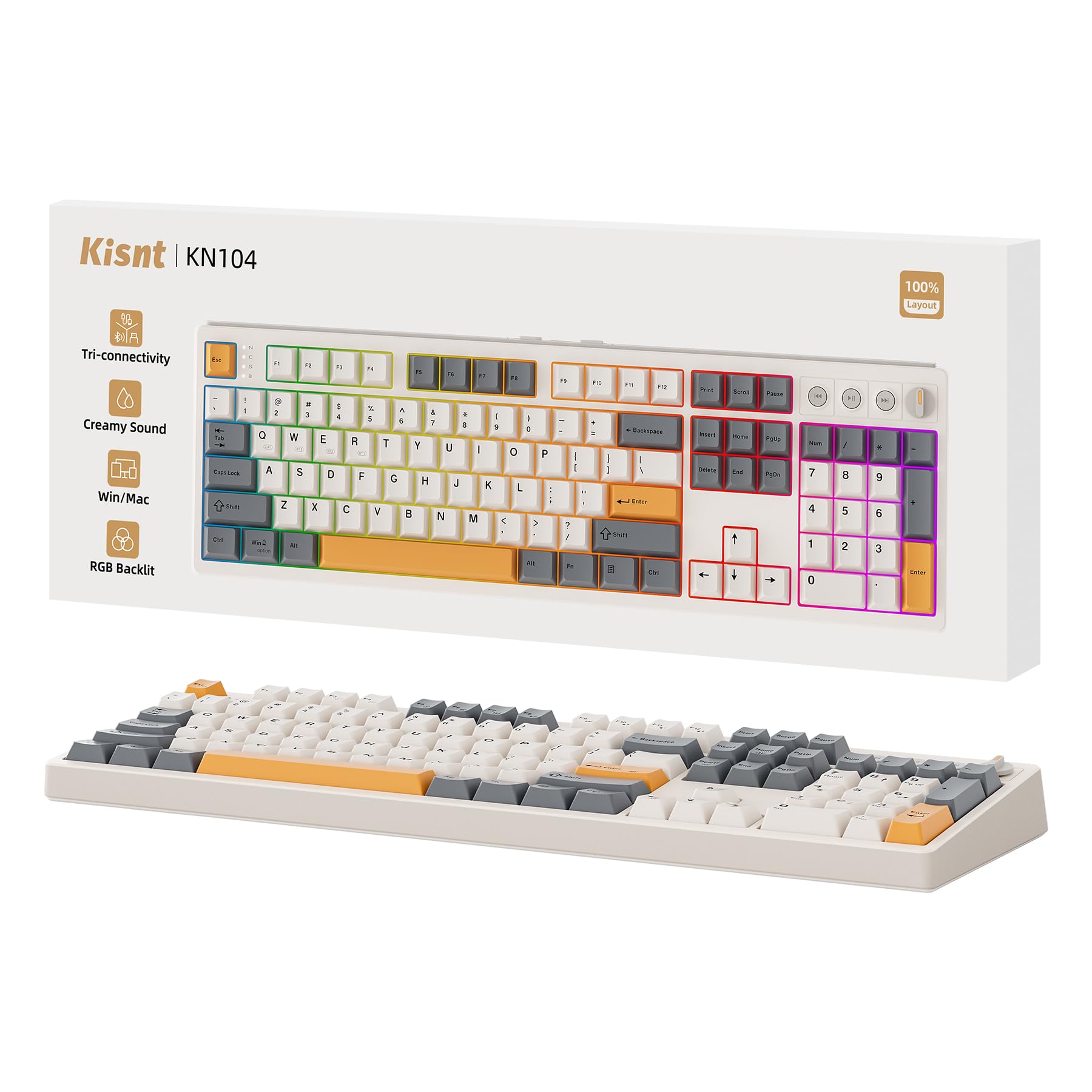
The Kisnt KN104 is a full-size wireless mechanical keyboard that excels in both typing feel and battery endurance. Its pre-lubed Bsun linear switches produce a buttery-smooth, marbly thock sound right out of the box, supported by a gasket mount and five layers of dampening foam. The 104-key layout includes a dedicated volume knob and media keys, making it ideal for data entry, coding, and heavy spreadsheet work.
The 4000mAh battery is one of the largest in its class, offering weeks of wireless use on a single charge. Tri-mode connectivity (USB-C, 2.4GHz, Bluetooth 5.0) is reliable with low latency, and switching between three connected devices is seamless. The hot-swappable PCB accepts 3- or 5-pin switches, so you can customize the feel later.
Some users note the software driver feels a bit rough and had to be downloaded from a Google Drive link, which may raise trust concerns. The RGB backlight is also somewhat dim due to the opaque switch housings. However, for anyone who needs a full-size board with a creamy typing sound and a battery that lasts, the KN104 is a top contender.
Why it’s great
- Massive 4000mAh battery for extended wireless use
- Buttery smooth Bsun switches with thocky sound
- Full 104-key layout with media knob
Good to know
- Software download feels less polished
- RGB brightness is limited by switch design
6. Womier M87 Pro

The Womier M87 Pro stands out visually with its retro grey colorway, integrated OLED display, and a mechanical knob that can control volume, RGB modes, and connection settings. The Outemu White switches deliver a heavy, thunky thump that is audible but not harsh — a unique typing sound that enthusiasts enjoy. The 75% layout (87 keys) saves significant desk space while keeping arrow keys and F-row.
Tri-mode connectivity works well, and the hot-swappable PCB supports both 3- and 5-pin switches, making it easy to swap to a lighter linear switch if desired. The triple absorption layers (EVA foam, IXPE pad, and case foam) reduce hollow noise effectively. The software allows custom GIFs on the OLED and full RGB customization, though the Chinese-language interface is a hurdle for some.
Quality control is a concern — multiple reviews mention unresponsive keys right out of the box. The battery lasts only about 2-2.5 days with backlighting on, which is below average. If you get a good unit and enjoy tinkering, this is a fun, affordable entry point into enthusiast features like an OLED screen and a rotary knob.
Why it’s great
- Unique OLED display and knob interface
- Thunky, satisfying typing sound
- Hot-swappable with extensive foam dampening
Good to know
- Spotty quality control on key switches
- Short battery life with RGB on
7. Logitech Signature Slim K950

The Logitech K950 is not a mechanical keyboard, but it is included here because it is one of the best typing keyboards for those who prefer laptop-style scissor switches with a quiet, low-profile feel. The full-size layout includes a number pad, and the battery life on two AAA batteries is exceptional — lasting many months even with heavy daily use. The sleek Graphite design fits well in any professional workspace.
It pairs with up to three devices via Bluetooth or Logi Bolt, and switching between them is instantaneous. The quiet typing sound is barely audible, making it ideal for shared offices, libraries, or late-night writing sessions. Customizable Fn keys via Logi Options+ add productivity shortcuts like mute/unmute and snipping tool access.
The main compromise is that the typing feel lacks the tactile feedback and acoustic warmth of mechanical switches. Some users report accidental volume key presses due to their placement near the backspace. For pure typing comfort in a silent, wireless, multi-device package, the K950 is a top-tier choice — but it is fundamentally a membrane board, not a mechanical gaming keyboard.
Why it’s great
- Extremely quiet and comfortable laptop-style typing
- Amazing battery life on simple AAA batteries
- Seamless multi-device switching
Good to know
- Not a mechanical keyboard
- Volume keys placed near backspace can cause errors
FAQ
What switch type is best for typing on a gaming keyboard?
Can I use a gaming keyboard for work typing all day?
Final Thoughts: The Verdict
For most users, the best gaming keyboard for typing winner is the Redragon K745 PRO because it delivers an incredible creamy typing sound and feel out of the box at a mid-range price, with tri-mode wireless and hot-swappable switches. If you want a quieter, premium wired typing experience, grab the Cherry KC 200 MX with its silent MX2A Red switches. And for multi-device productivity with the best battery life, nothing beats the Logitech MX Mechanical.