
Building a home simulator setup that delivers actionable swing feedback hinges on one piece of hardware: the launch monitor. Choosing the wrong one can mean skewed spin rates, phantom shot shapes, or a unit that simply refuses to read your swing indoors.
I’m Mohammad Maruf — the founder and writer behind Drink4Good. I’ve spent months dissecting Doppler radar architectures, photometric camera speeds, and software ecosystems to separate real performance from marketing noise in this category.
The best way to avoid costly trial and error is to start with a clear understanding of sensor technology and your space constraints, which is exactly what this guide to the best golf launch monitor for simulator use will provide.
How To Choose The Best Golf Launch Monitor For Simulator
Simulator performance hinges on three pillars: sensor technology, software integration, and physical space. A unit that shines on the open driving range can become nearly useless when confined to a garage hitting bay. Understanding these constraints first will save you from a frustrating return process.
Sensor Technology: Doppler Radar vs Photometric
Doppler radar units like those from FlightScope and Voice Caddie measure the ball’s velocity and spin by bouncing radio waves off the flight path. These generally require at least 8 to 10 feet of ball flight to calculate spin axis accurately. Photometric units—such as the SkyTrak and Uneekor lines—use high-speed cameras to capture the ball at impact and immediately after, making them far more forgiving in tight indoor spaces because they need only a few feet of travel. The trade-off is that camera-based systems often demand specific golf balls or reflective stickers to read every dimple pattern.
Software Ecosystem & Subscription Traps
The monitor itself is only half the investment. Premium simulation software—GSPro, E6 Connect, TGC 2019, or Home Tee Hero—usually requires a separate annual or monthly fee. Some monitors ship with a handful of free courses but lock the library of 30,000+ tracks behind a subscription. Budget models often advertise “no fees,” but that typically means the included driving range and basic practice modes are free, while full-course simulation still requires a paid plan. Calculate two years of software costs before you decide on a hardware tier.
Space Requirements and Setup Realities
Indoor simulator accuracy depends heavily on consistent lighting and a level hitting surface. Radar-based units placed too close to walls can pick up reflected signals and misread spin. Camera units need bright, even light over the hitting zone to freeze the ball at impact—dim garages produce missed reads. Measure your room’s depth, ceiling height, and light availability before committing to a sensor type. A unit that needs 15 feet of flight will be useless in a 10-foot bay.
Quick Comparison
On smaller screens, swipe sideways to see the full table.
| Model | Category | Best For | Key Spec | Amazon |
|---|---|---|---|---|
| Garmin Approach R10 Bundle | Mid-Range | Portable simulator starter | 10-hour battery, 43k courses | Amazon |
| Voice Caddie SC4 PRO | Mid-Range | No-subscription indoor/outdoor | Prometrics engine, built-in screen | Amazon |
| Rapsodo MLM2PRO | Mid-Range | Tour-level data, dual cameras | 15 metrics, 30k+ courses | Amazon |
| Swinora GX-03 | Budget | Zero-subscription training | 13 metrics, metal body, OLED | Amazon |
| PHIGOLF2 Flex | Budget | Compact living-room play | 9.8g sensor, 38k courses | Amazon |
| Izzo Swami Launch Master Pro | Budget | Full-swing data on a budget | Doppler radar, 420-yard range | Amazon |
| SkyTrak Original | Premium | Photometric accuracy, tight spaces | Camera-based, 4-hour battery | Amazon |
| Uneekor EYE MINI CORE | Premium | Camera-based, no ball stickers | 15 data points, 2-yr warranty | Amazon |
| FlightScope Mevo Gen2 | Premium | Doppler+fused camera, no fees | 18 data parameters, 6-hr battery | Amazon |
| SkyTrak+ | Premium | Photometric+Doppler hybrid | Club path data, 100k+ courses | Amazon |
| Garmin Approach R50 | Premium | All-in-one premium simulator | 3-camera, 10″ built-in screen | Amazon |
In‑Depth Reviews
1. Garmin Approach R10 Portable Launch Monitor & Simulator Bundle

The Garmin Approach R10 remains a benchmark in the mid-range simulator space because it balances comprehensive metrics—club head speed, ball speed, swing tempo, spin, launch angle—with a robust software ecosystem. The bundle adds a PlayBetter power bank, tripod, phone mount, and carry case, so you can take it from the garage net to the range without re-packing. The 10-hour battery life means you won’t be tethered to a wall outlet during long practice sessions.
Home Tee Hero unlocks over 43,000 virtual courses, though it requires a /month membership. The R10’s Doppler radar needs about 8 feet of ball flight for reliable spin axis readings, so it works best in a bay of at least 10 feet deep. Users consistently praise the accuracy of ball direction data—a feature rarely found at this tier—and the Garmin Golf app makes exporting stats to a spreadsheet effortless for tracking progress.
The R10 lacks a built-in display, so you must pair it with a smartphone or tablet. Some Android users report needing to sideload the app, but once connected, the interface is intuitive. For anyone building their first dedicated simulator setup, this package delivers the best balance of accuracy, portability, and course variety without jumping into four-figure territory.
Why it’s great
- Excellent battery life for all-day sessions
- Ball direction tracking rare at this price
- Includes all essential accessories out of the box
Good to know
- Needs phone/tablet for display—no built-in screen
- Home Tee Hero requires monthly subscription for full course access
2. Voice Caddie SC4 PRO Golf Launch Monitor

The Voice Caddie SC4 PRO is a rare mid-range monitor that includes a built-in OLED screen, allowing you to review data without a phone. Its Prometrics engine combines Doppler radar with proprietary algorithms to deliver ball speed, carry, spin, launch angle, and club head data. The unit includes free access to the E6 Connect simulation platform with five courses, plus a 3D driving range—no recurring subscription is required for the base simulator experience.
Indoor performance requires careful setup: the unit must sit 5 feet behind the ball and 5 feet from the net, with at least 10 feet of ball flight. Some users report that wedge distances can read 10–15 yards short indoors, while outdoors on the range the data aligns closely with pro-grade units. The SC4 PRO works with standard golf balls, so you don’t need to buy special marked sleeves.
The voice feedback and multiple training modes—Speed Training, Target Mode, and Practice—make it versatile for both focused drills and casual play. The OLED panel shows carry distance, ball speed, and club speed at a glance, which is a huge convenience when you don’t want to unlock a phone mid-session. If you want a capable simulator without annual fees, this is the strongest contender in the sub- bracket.
Why it’s great
- No subscription needed for included 3D range and courses
- Built-in OLED screen eliminates phone dependency
- Works with any standard golf ball
Good to know
- Indoor wedge distances can read short
- Requires 10+ feet of ball flight for best accuracy
3. Rapsodo MLM2PRO Launch Monitor Golf Simulator

The MLM2PRO packs a dual-camera system alongside Doppler radar to capture 15 metrics including spin rate, spin axis, club path, and face angle. The built-in camera records high-speed impact video so you can see exactly where the ball meets the clubface. It includes a 45-day trial of the premium membership, which unlocks over 30,000 simulated courses through E6 Connect and full access to target range, Combine, and speed training modes.
Accuracy is very close to Trackman—within 2–3% on ball speed and carry distance according to user comparisons. The unit requires the use of Callaway RPT Chrome Soft X balls or Rapsodo’s marked balls for spin readings, and the dot alignment on the balls wears off after a few rounds. Connectivity is the main friction point: the MLM2PRO creates its own Wi-Fi network, but some users experience dropouts on crowded wireless channels. Rapsodo support is responsive and pushes frequent firmware updates to address these issues.
The monthly subscription ( or lifetime at ) is a necessary expense to access the full course library, and chipping inside 10 yards is not tracked. For those willing to accept the subscription model and ball-specific requirement, the MLM2PRO delivers the closest thing to tour-level data in a portable, sub- package.
Why it’s great
- Impact video with slow-motion club/ball contact
- Data accuracy within 2-3% of Trackman
- 30,000+ courses available with premium membership
Good to know
- Requires specially marked balls for spin readings
- Wi-Fi connection stability can be inconsistent
- Annual subscription needed for full simulator access
4. Swinora GX-03 Golf Launch Monitor

The Swinora GX-03 is an entry-level Doppler radar monitor that prioritizes zero annual fees above all else. It tracks 13 metrics including attack angle, launch angle, spin rate, and clubface data, and it includes a built-in distance compensation slider that lets you adjust carry yardage from 80% to 120% per club. The metal housing and OLED display give it a premium feel that contradicts its budget-friendly positioning.
Indoor use requires a specific layout: 5 feet behind the ball and 10 feet of ball flight. The ambient sensors automatically adjust for temperature, humidity, and barometric pressure, which helps maintain consistency between indoor and outdoor sessions. The app pairs via Bluetooth and offers a 3D driving range with 45° and 90° viewing angles. Reviewers note that the distance data can be calibrated to match real-world results, but ball speed accuracy may deviate 3-5 mph from higher-end units.
The unit emits a beep pattern—one long and one short—when it detects a shank or miss, preventing skewed data from recording. This is a thoughtful feature that many budget monitors lack. Some users experienced app freezing and Bluetooth dropouts, and the included tripod is basic. For a sub- investment with no subscription risk, the GX-03 is a solid entry point for indoor practice data.
Why it’s great
- No subscription required for full app access
- Aluminum body with OLED display
- Distance compensation feature per club
Good to know
- Ball speed can read 3-5 mph off from high-end units
- App connectivity and freezing reported by some users
- Requires 15 feet total indoor space
5. PHIGOLF2 Flex Home Golf Game Simulator
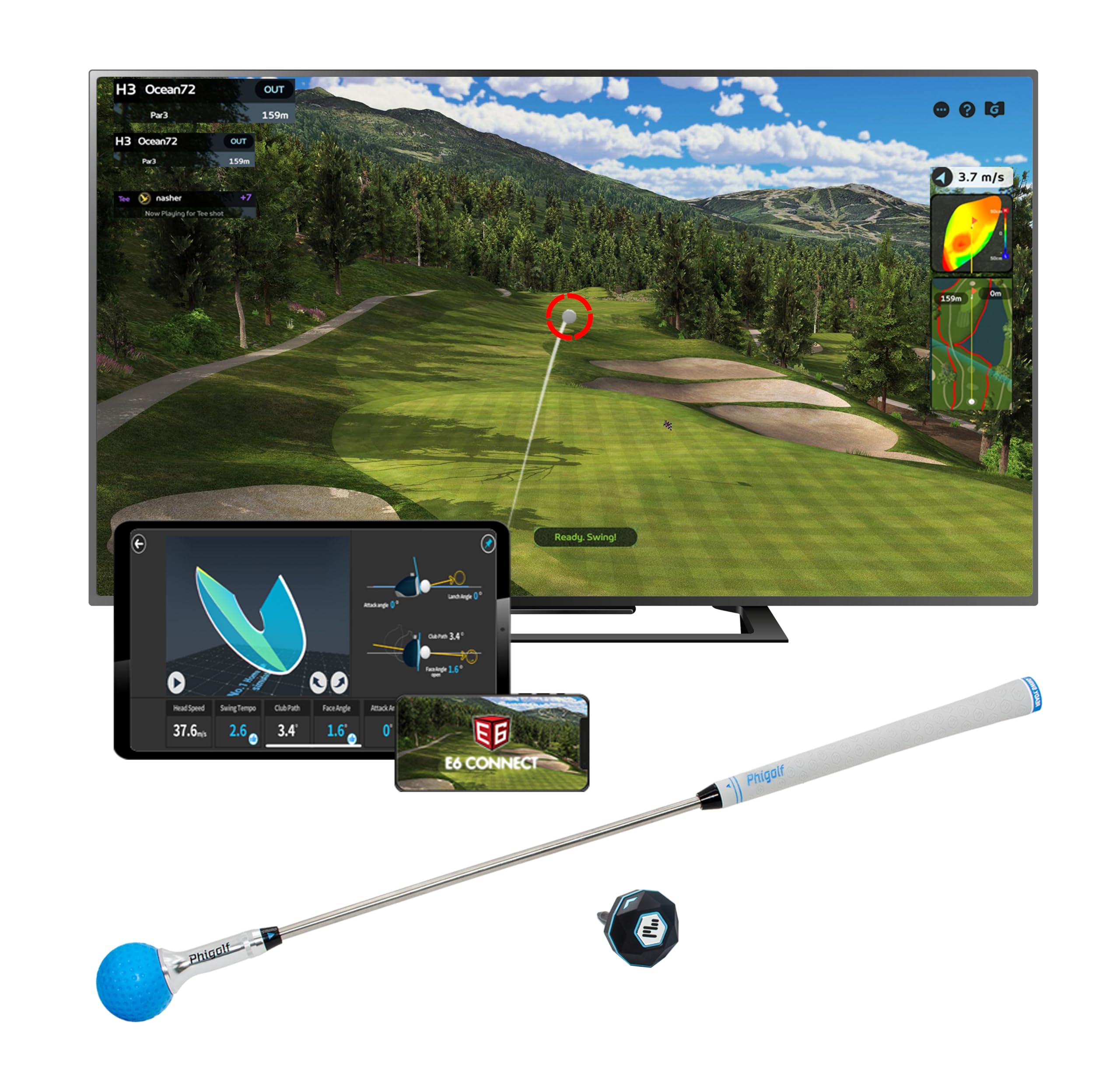
The PHIGOLF2 Flex is not a launch monitor in the traditional sense—it uses a 9.8-gram motion sensor attached to a swing stick or your own club to measure swing speed, angle of attack, and tempo. It maps those inputs onto over 38,000 virtual courses within the Phigolf app and is compatible with E6 Connect. The system requires no ball or net, making it a true living-room solution for golfers who want to play simulated rounds in tight spaces.
The included 27.6-inch steel swing stick mimics a real club’s weight (500g) and has a replaceable grip. You can also insert the sensor into your own clubs and hit real balls outdoors for a more authentic feel. The multiplayer mode supports up to 4 players, and the USB-C sensor charges quickly. Reviews consistently describe it as more of a gamified training aid than a serious swing analyzer, with putting requiring a significant learning curve.
The Phigolf app includes 9 classic courses and 8 HD courses for free, but accessing the full library of 38,000 courses requires a separate /month subscription. Some users reported the sensor stopped charging after two weeks and found the software janky with frequent disconnects. If you want a pure simulator for entertainment and basic swing feedback in a small apartment, the Phigolf2 Flex fills that niche, but it cannot replace a radar or camera-based launch monitor for serious data.
Why it’s great
- No ball or net needed—works in tight spaces
- Lightweight sensor fits in a suitcase for travel
- Up to 4-player multiplayer mode
Good to know
- Not a true launch monitor—lacks ball data metrics
- Software stability and build quality can be inconsistent
- /month subscription needed for full course library
6. Izzo Golf Swami Launch Master Pro

The Izzo Swami Launch Master Pro uses Doppler radar to measure total distance, carry, swing speed, ball speed, smash factor, launch angle, attack angle, spin rate, and apex across a measuring range of 30 to 420 yards. It includes integrated weather sensors that adjust for temperature, humidity, and altitude, giving you real-world analysis whether you’re in a humid indoor bay or dry outdoor range. The customizable club and loft settings allow you to fine-tune data per club type.
Setup is straightforward: place the unit 5 feet behind the ball and ensure clear ball flight. Users who compared it directly to Toptracer found distance readings about 5–10 yards longer, though some believe the Izzo is more accurate. A minority of reviewers reported distances reading 10–15 yards short with irons, and while Izzo support was responsive, the issue may require unit replacement. The audible voice feedback is loud and clear, but the unit lacks data recording for tracking progress over time.
The plastic body feels less substantial than the Swinora’s metal construction, but the price point is similarly aggressive. For a golfer who wants a wide measuring range and live environmental compensation without a subscription, the Swami Launch Master Pro delivers usable data for both driver and wedge practice. Just be aware that distance consistency can vary between individual units.
Why it’s great
- Integrated weather sensors adjust for temperature and altitude
- Measures up to 420 yards, covering driver to wedge
- Customizable club and loft settings
Good to know
- Plastic body feels less premium than metal competitors
- No data recording for historical progress tracking
- Distance accuracy can vary between units
7. SkyTrak Original Golf Launch Monitor

The original SkyTrak remains a popular entry into photometric monitoring because it requires only a small hitting zone—the camera captures the ball within inches of impact, so you don’t need the long ball flight that Doppler units demand. This makes it ideal for tight garages or spare rooms where 10 feet of depth is unavailable. It measures ball speed, launch angle, spin rates, and shot shape with the included Game Improvement software.
The unit communicates wirelessly via Wi-Fi to iOS, Android, or PC devices. The rechargeable battery lasts up to 4 hours, enough for most practice sessions. SkyTrak’s biggest limitation is the software tier system: the base unit only includes the driving range. To play simulated courses, you need either the Play & Improve plan (WGT by TopGolf) or a third-party subscription like E6 Connect or GSPro. The HLA readings can occasionally misread, pulling a shot 30–40 yards left if the unit isn’t perfectly level.
Accuracy is generally excellent for carry distance and ball speed, though total distance and spin axis can drift on mis-hits. Some long-time owners report needing to replace units every few years due to internal component wear. For a dedicated indoor simulator build where space is at a premium, the SkyTrak’s camera-based system is far more forgiving than radar alternatives.
Why it’s great
- Works in very tight indoor spaces—no long ball flight needed
- Accurate ball speed and carry data
- Wireless and portable with 4-hour battery
Good to know
- Base unit includes only driving range—courses require additional subscription
- Occasional HLA misreads if not leveled properly
- Some users report needing hardware replacement after 3-5 years
8. Uneekor EYE MINI CORE Golf Launch Monitor

The Uneekor EYE MINI CORE brings photometric precision to a compact form factor with a key advantage: its Dimple Optix technology reads any dimple pattern without requiring stickers or marked balls. The dual high-speed cameras and infrared sensors deliver near-zero latency, so the ball flight animation on screen matches your actual swing timing. It outputs 15 ball data points through the included VIEW software, and you can upgrade to Club Optix for real-time clubface visuals at impact.
This is a tethered unit—it connects via CAT6 Ethernet to a PC and requires a dedicated monitor or projector setup. There is no battery or wireless mode. The hardware is built like a tank with a metal casing weighing 8.4 pounds, and Uneekor backs it with a 2-year warranty. It works with GSPro, E6 Connect, TGC2019, and Creative Golf 3D, though each requires a separate subscription. The free 3-month Ultimate Package trial includes the GameDay simulation software with 35 championship courses.
Accuracy is flawless according to users who have taken thousands of swings—every shot registers correctly, and the data matches on-course yardages within a few yards. The major caveats are the PC requirements (i7 Gen12/Ryzen7+, 32GB RAM, RTX 4070 for simulation) and the need for two monitors if you want to run both VIEW and the simulator simultaneously. For a dedicated home simulator builder who wants camera-grade precision without ball restrictions, the EYE MINI CORE is a standout premium choice.
Why it’s great
- No stickers or marked balls needed—reads any dimple pattern
- Near-zero latency for real-time simulation
- 2-year manufacturer warranty
Good to know
- Requires powerful PC and Ethernet connection—no wireless or battery
- Heavy unit (8.4 lbs) not designed for frequent portability
- Third-party simulator software requires separate subscriptions
9. FlightScope Mevo Gen2 Portable Launch Monitor
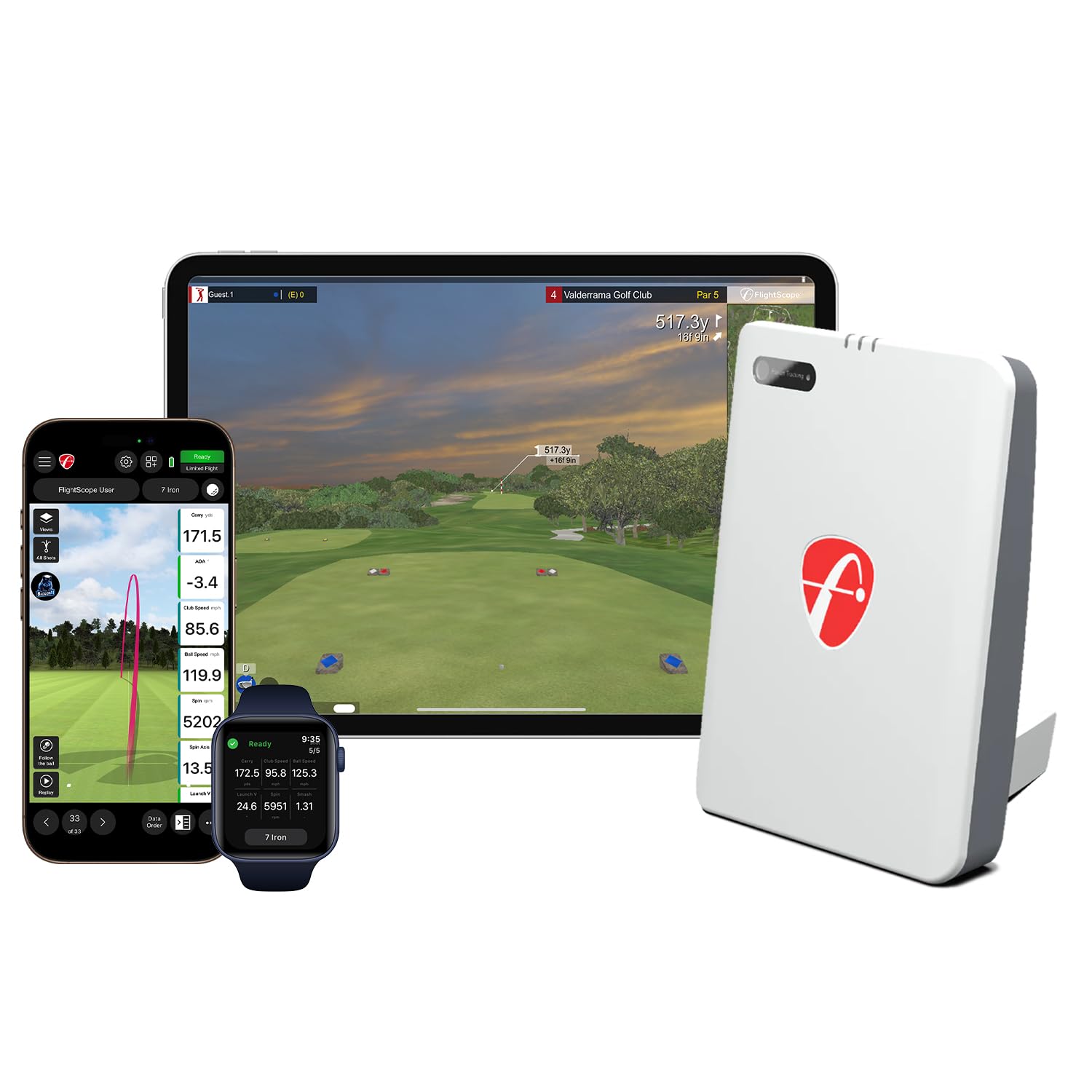
The FlightScope Mevo Gen2 uses Fusion Tracking, combining 3D Doppler radar with synchronized high-speed image processing to deliver 18 swing data parameters. Unlike the original Mevo, the Gen2 includes a front-facing camera for swing video recording with full data overlay, including ball flight tracer and GPS overview. It ships with 8 E6 Connect courses—including Kiawah Ocean Course and Torrey Pines—with no subscription or annual license fees, a rare value at this tier.
The unit is small (5.5″ x 6.88″ x 1″) and lightweight at 1.1 pounds, with a 6-hour battery. Setup requires a direct Wi-Fi connection to an iOS device (iPad or iPhone recommended), and the FS Golf app handles all data display and video capture. The range ball setting adjusts calculations for the lower compression of practice balls, which improves accuracy at the driving range. The shot tracer overlays club speed, ball speed, and carry distance directly onto each swing video frame.
Initial setup can be finicky—some users needed to update firmware and adjust elevation settings to get accurate distances. Once dialed in, the carry distance matches real-world yardage within a few yards. The putting module works but requires tapping a club icon to trigger on certain courses. For anyone who wants pro-level data metrics, built-in video analysis, and no recurring fees, the Mevo Gen2 is a compelling premium investment.
Why it’s great
- 18 data parameters including attack angle and club path
- No subscription fees—8 free E6 courses included
- Front-facing camera with data overlay on swing video
Good to know
- Initial setup can be difficult and may require firmware updates
- Only one device can connect via Wi-Fi at a time
- Elevation settings must be calibrated for accurate distances
10. SkyTrak+ Launch Monitor & Golf Simulator

The SkyTrak+ upgrades the original with a dual-sensor system: an improved photometric camera for ball data plus a Doppler radar module for club data, including club head speed, smash factor, club path, and face angle. This hybrid approach covers the strengths of both sensor types, giving you accurate ball flight metrics with the addition of meaningful club delivery numbers. It connects via Wi-Fi and USB-C to iOS and PC devices.
The Play & Improve plan provides access to over 100,000 courses through WGT by TopGolf and TruGolf E6 Connect, though it requires a paid subscription. The unit also includes advanced training features like Wedge Matrix, Shot Optimizer, and Skill Assessment. The build is compact and lightweight at about 1 pound, making it easy to move between garage and range, though the battery drains faster when connected to a PC via USB-C rather than using network mode.
Accuracy is strong for carry distance and ball speed, but some users report spin axis and total distance data occasionally showing incorrect shot shapes—a pull registered as a fade for example. Connection drops during WGT or E6 sessions after 3-5 holes have been reported, requiring an app reboot. For (new) or (refurbished), the SkyTrak+ offers the most comprehensive feature set in the sub- bracket if you can tolerate its software quirks.
Why it’s great
- Combines photometric and Doppler sensors for full ball and club data
- Access to 100,000+ courses through WGT and E6 Connect
- Advanced training tools: Wedge Matrix, Shot Optimizer
Good to know
- Subscription required for full course library
- Spin axis data reliability can be inconsistent
- Connection drops reported during simulator play
11. Garmin Approach R50 Premium Golf Launch Monitor

The Garmin Approach R50 is a floor-standing, all-in-one simulator with a 10-inch built-in color touchscreen, a 3-camera system, and a Doppler radar module. It measures ball speed, launch angle, face to path (requires included club stickers), spin rate, and spin axis, and it records high-speed impact video for instant visual feedback. The unit includes a built-in barometer to adjust carry distances for atmospheric pressure, and it runs Home Tee Hero for virtual rounds on 43,000+ courses (/month membership required).
The R50 is designed to sit beside the ball rather than behind it, which introduces a learning curve for left-handed players who need to reposition the unit. The 4-hour battery is shorter than the R10’s, but the unit can stay plugged in during use. The built-in screen eliminates the need for a phone or tablet, though you can connect via HDMI to a monitor or projector for a larger display. The carrying case is included, making it portable despite its size.
User feedback is overwhelmingly positive for accuracy and ease of setup, especially compared to competitive units like SquareGolf. The R50’s putting function works well, and the multiplayer mode supports four players. The main drawbacks are the cost—the highest in this list—and the fact that it needs ample lighting over the hitting area after dark to consistently track club swings. For the golfer who wants a turnkey premium simulator with zero phone dependency, the R50 is the ultimate all-in-one solution.
Why it’s great
- 10-inch built-in touchscreen for phone-free operation
- 3-camera system with high-speed impact video
- Includes carrying case and 43,000+ courses via Home Tee Hero
Good to know
- Significant investment—the most expensive unit reviewed
- Requires bright lighting for accurate night-time tracking
- Side-position design less convenient for left-handed golfers
FAQ
Can I use a budget launch monitor for a serious home simulator build?
Do I need special golf balls for a launch monitor to work indoors?
How much indoor space is required for a launch monitor simulator?
Will a launch monitor work with a projector and impact screen?
What is the difference between carry distance and total distance in launch monitor data?
Final Thoughts: The Verdict
For most users, the best golf launch monitor for simulator winner is the Garmin Approach R10 Bundle because it nails the balance of accuracy, portability, and course variety with a reasonable monthly subscription and strong community support. If you want zero annual fees and a built-in screen, grab the Voice Caddie SC4 PRO. And for camera-grade precision without ball restrictions, nothing beats the Uneekor EYE MINI CORE.