
Finding a gaming controller that delivers responsive analog sticks, tactile buttons, and low-latency connectivity for under $50 means sifting past plenty of cheap plastic shells that degrade after a few weeks.
I’m Mohammad Maruf — the founder and writer behind Drink4Good. I’ve analyzed hundreds of sub-$50 gamepads for PS5, PS4, Xbox, and PC, focusing on joystick accuracy, battery real-world capacity, and feature depth beyond the official options.
In this guide, I’ve pared the field down to the controllers that offer distinct advantages — from Hall-sensing anti-drift sticks to programmable macro triggers — in the gaming controllers for under $50 bracket, where the line between a smart buy and a disposable purchase comes down to a few critical engineering decisions.
How To Choose The Best Gaming Controllers For Under $50
Not every budget-friendly gamepad is built the same. The sub-$50 bracket is crowded with controllers that look identical on the shelf but diverge sharply in joystick longevity, wireless stability, and button feel. Focus on three core differentiators.
Joystick Technology: Hall Effect vs. Analog Potentiometers
The most common failure point in any controller is stick drift — a gradual or sudden offset caused by worn physical contacts. Standard analog sticks rely on potentiometers that wear down over time. Hall-effect sensors, by contrast, use magnets to detect position with zero physical contact, eliminating drift entirely. In the under-$50 segment, Hall-effect sticks are rare but transformative when present.
Battery Capacity and Charge Time
Most wireless controllers in this tier pack a 600mAh to 1000mAh battery. A 1000mAh cell typically delivers 12 to 20 hours of continuous play, while lower-capacity units might need a top-up mid-session. Charge time also matters — 2 to 4 hours is standard for a full recharge. If you play on PC with USB-C, a wired connection bypasses battery anxiety entirely.
Platform Compatibility and Feature Set
Multi-platform support (PS5, PS4, PC, and sometimes iOS/Android) simplifies your setup. Turbo functions, programmable macro buttons, and adjustable RGB lighting add genuine utility for fighting games, shooters, and aesthetic personalization. Licensed controllers like the NACON for PS4 guarantee full native compatibility, while third-party options often require DS4Windows for PC use. Always check whether a wired or wireless connection is your primary mode — some budget controllers show input lag over Bluetooth.
Quick Comparison
On smaller screens, swipe sideways to see the full table.
| Model | Category | Best For | Key Spec | Amazon |
|---|---|---|---|---|
| Xbox Wireless + USB-C Cable | Premium | Native Xbox & PC play | 40-hr battery (AA) | Amazon |
| Nonbliep LED for PS5 | Premium | Hall-sensor anti-drift | Hall-effect joysticks | Amazon |
| Gamrombo LED Wireless | Mid-Range | PS5 & PC wireless | 1000mAh battery | Amazon |
| NACON Wired for PS4 | Premium | Zero-latency wired | 3-meter USB cable | Amazon |
| Dinosoo RGB for PS5 | Mid-Range | Style & macro features | 7-color RGB lights | Amazon |
| Ubsvaky Wireless for PS4 | Budget | PS4 + PC value | 1000mAh / 33ft range | Amazon |
| DEFNDR 2-Pack RGB for PS4 | Budget | 2-player / emulation | Spider RGB pattern | Amazon |
In‑Depth Reviews
1. XBOX Wireless Gaming Controller + USB-C Cable
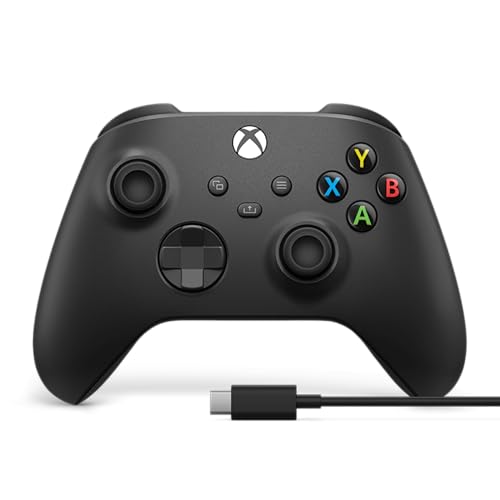
Microsoft’s official Xbox Wireless Controller remains the benchmark for ergonomics and build quality in the sub-$50 bracket. The sculpted grips, textured triggers, bumpers, and back case provide a tactile hold that reduces slip during intense sessions. The hybrid D-pad — a disc-like cross with a slightly recessed center — delivers clean directional inputs for fighting games and platformers alike.
Wireless battery life hits up to 40 hours on standard AA batteries, and the included 9-foot USB-C cable doubles as a zero-latency wired option for PC or console. Bluetooth pairing works seamlessly with Xbox consoles, Windows PCs, Android, and iOS devices, and the 3.5mm audio jack passes game audio and chat through a single cable. The share button and remappable controls via the Xbox Accessories app add further utility without cluttering the chassis.
Some users report stick drift appearing after several months of heavy use — a known limitation of the analog potentiometer design. If you want Hall-effect anti-drift, you’ll need to step away from first-party hardware. For immediate plug-and-play reliability across the Xbox ecosystem and PC, this controller sets the standard.
Why it’s great
- Industry-leading ergonomics with textured grip surfaces
- 40-hour battery life on standard AA batteries
- Includes 9-ft USB-C cable for instant wired play
Good to know
- Analog sticks can drift over extended use
- No rechargeable battery pack included
2. Nonbliep LED for PS5 Controller

The Nonbliep LED controller for PS5 stands out in this price tier for one reason: Hall-effect joysticks. By replacing physical potentiometers with magnetic sensors, this gamepad eliminates stick drift at the hardware level. The joysticks also offer a 40% wider dead-zone reduction compared to standard sticks, giving you finer aim control in shooters like Apex Legends and Call of Duty.
Beyond anti-drift, the controller packs nine RGB lighting modes — breathing, strobe, and static — with an auto-save memory that retains your last color across sessions. Turbo mode converts single presses into rapid auto-fire, while macro programming lets you chain complex combos like R2+Triangle+L3 to a single button. The 3.5mm audio jack and built-in speaker support game audio without a headset, though the microphone functionality is limited compared to the official DualSense.
Build quality feels solid for the price, with a comfortable grip that mirrors the official PS5 shape. A small number of units have reported a “not supported” error after a few months, indicating QC variations. For the Hall-effect reliability and macro depth, the Nonbliep offers features usually reserved for + controllers.
Why it’s great
- Hall-effect joysticks eliminate drift permanently
- 9 RGB modes with color memory retention
- Macro programming and turbo for competitive play
Good to know
- Microphone does not match DualSense quality
- Occasional “not supported” error reported
3. Gamrombo LED Wireless Controller for PS5

The Gamrombo Wireless Controller matches official PS5 ergonomics while adding customizable LED lighting around the analog sticks and touchpad area. The circuit-board-inspired light patterns are controlled via a dedicated button, with color memory that keeps your preference after power-off. The textured handles provide a secure grip during marathon sessions.
Behind the flashy exterior, the controller uses a 1000mAh battery that delivers long play sessions between charges. Dual vibration motors and a 6-axis gyro provide responsive feedback and motion control for games like Astro’s Playroom and racing titles. Macro and turbo functions are accessible through a simple button combination, making competitive combos easier without third-party software.
The built-in speaker produces adequate game sound but introduces static hiss at higher volumes, and there is no integrated microphone. A small subset of units have encountered early button failure, pointing to QC inconsistency. For the feature-to-price ratio and visual customization, the Gamrombo is a strong mid-range candidate.
Why it’s great
- Vibrant RGB with color memory function
- 1000mAh battery supports extended sessions
- Turbo and macro for fighting and shooting games
Good to know
- Speaker has static hiss at high volume
- No built-in microphone
4. NACON Wired Controller for PS4 / PC

NACON’s officially licensed PS4 wired controller strips away wireless complexity for pure low-latency performance. The 3-meter integrated USB cable gives you room to sit back while maintaining a rock-solid connection — no Bluetooth pairing, no input lag, and no battery anxiety. Dual vibration motors provide punchy haptic feedback during explosions and impacts.
The rubber-coated body offers a distinct tacky feel that stays planted in your palms, even during sweat-heavy sessions. Larger face buttons sit close together for rapid thumb movements, and the D-pad delivers crisp, accurate diagonals for fighting games. The controller supports PS4 and PC natively via XInput, though non-Steam games on PC may require DS4Windows for full compatibility.
The touchpad surface feels less premium than official Sony pads, and the slightly smaller profile may feel cramped for larger hands. Some users report needing to re-pair the controller after a console reset. For competitive players who prioritize zero-latency wired performance over wireless convenience, the NACON provides a reliable, comfortable experience.
Why it’s great
- Zero-latency wired connection with 3-meter cable
- Officially licensed for PS4 with full button mapping
- Rubber coating enhances grip over long sessions
Good to know
- Touchpad feels less premium than official controllers
- May require re-pairing after PS4 system reset
5. Dinosoo RGB Wireless Controller for PS5
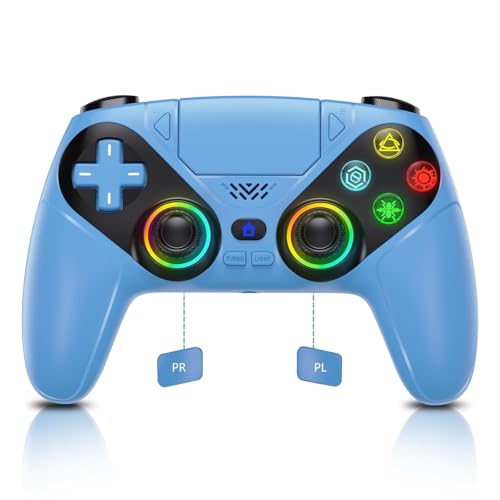
The Dinosoo RGB controller brings seven adjustable lighting colors to the PS5/PC ecosystem, with a translucent blue shell that lets the LEDs bleed through for a striking visual effect. The controller connects via Bluetooth or USB-C, with one-touch wake-up for the PS5 console. The 1000mAh battery supports extended sessions between charges.
Under the lights, it features dual vibration motors, a 6-axis gyro, and a touchpad that mirrors official DualSense functionality. Turbo mode aids rapid-fire in shooters, and programmable macro buttons — assignable via button combos — streamline complex inputs in fighting games like Street Fighter 6. The built-in speaker delivers game audio, though it lacks a microphone — use the 3.5mm headphone jack for voice chat.
Some units experience significant input lag and unresponsiveness when used wirelessly on PS5, effectively making the controller a wired-only device for certain users. Recalibration helps temporarily but does not permanently fix the issue. For , the feature set is impressive, but the wireless instability is a notable compromise.
Why it’s great
- Seven RGB color modes with striking blue translucent shell
- Turbo and macro buttons for enhanced control
- 1000mAh battery with USB-C charging
Good to know
- Wireless performance can be unreliable on PS5
- No built-in microphone
6. Ubsvaky Wireless Controller for PS4/Pro/Slim (White)
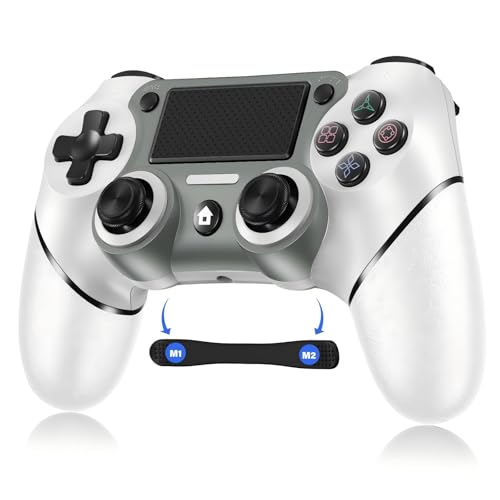
Ubsvaky’s wireless PS4 controller delivers the fundamentals at an entry-level price point. The 1000mAh rechargeable battery provides 15 to 20 hours of play on a full charge, with a 33-foot Bluetooth range that covers most living room setups. Dual vibration motors and a 6-axis motion sensor deliver the rumble and tilt controls expected in PS4 games.
The high-refresh-rate joysticks respond quickly to inputs, and multiple users report zero stick drift after extended use — a strong sign for a budget-tier controller. The glossy finish and non-slip edging give it a more premium feel than the price suggests. Programmable M1/M2 back buttons, activated via a Share+Option combo, add paddle-like functionality for advanced mapping without increasing the cost.
Full PC support requires DS4Windows for non-Steam games, and the gyro does not work consistently across all PC titles. The included USB-C cable is short, so a longer replacement may be needed for wired PC play. For PS4 users who want a reliable wireless backup or primary controller without spending official Sony money, the Ubsvaky delivers solid performance.
Why it’s great
- 1000mAh battery delivers 15-20 hours of gameplay
- Programmable M1/M2 back buttons for extra control
- No reported stick drift after extended use
Good to know
- Gyro support is inconsistent on PC
- Included USB-C cable is short
7. DEFNDR 2 Pack Wireless RGB Controller for PS4
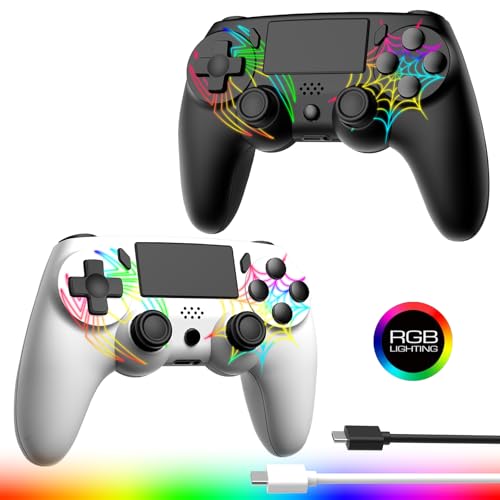
The DEFNDR 2-pack delivers two fully featured wireless PS4 controllers for the price of one official Sony pad — a compelling proposition for multiplayer households or emulation setups. Each controller features a spider-web pattern on the front shell with hidden RGB LEDs that shine through, offering adjustable red, green, and blue intensities for a customized glow.
Both controllers pack 1000mAh batteries rated for over 12 hours of play with RGB lighting active. Dual vibration motors and a 6-axis gyro provide standard haptic and motion controls, while the 360-degree anti-slip joystick design reduces drift risk. The ergonomic shaping mirrors the official PS4 layout, and Bluetooth connectivity includes both PS4/Pro/Slim and Windows PC support.
Some units arrive with one controller failing to light up properly, and button response can feel less precise in fighting games like Mortal Kombat compared to shooters such as Call of Duty. The lack of button labels (X, O, S, T) on the face buttons may confuse new users. For the price of a single budget controller, the DEFNDR 2-pack offers unbeatable value for co-op gaming.
Why it’s great
- Two full-featured wireless controllers at a low combined price
- Hidden RGB spider-web pattern with adjustable colors
- 1000mAh battery per controller for extended sessions
Good to know
- Some units have one non-functional RGB light
- Face buttons lack X/O/S/T labels
FAQ
Will a PS4 controller work on my PS5 console?
What does turbo mode do on a gaming controller?
Do I need DS4Windows for a third-party PS4 controller on PC?
Final Thoughts: The Verdict
For most users, the gaming controllers for under $50 winner is the Xbox Wireless Controller because its proven ergonomics, 40-hour battery life, and seamless cross-platform support make it the safest, most reliable purchase in the bracket. If you want Hall-effect anti-drift sticks and macro programming for competitive play, grab the Nonbliep LED for PS5. And for households needing two controllers for co-op or emulation, nothing beats the value of the DEFNDR 2-Pack.