
The difference between a good print and a gallery-grade giclée often comes down to the lightfastness of the pigment binders and the precision of the droplet placement. For artists, photographers, and fine-art publishers, the printer itself becomes the final brush—determining whether a reproduction captures the full tonal range of the original or falls flat in the midtones. Navigating the technical claims around ink sets, color gamuts, and media handling is essential before committing to a machine that can define your studio’s output for years.
I’m Mohammad Maruf — the founder and writer behind Drink4Good. I’ve spent years analyzing the hardware specifications of archival print systems, from the chemical composition of dye-based vs. pigment-based inks to the mechanical tolerances of roll-feed assemblies in pro-level wide-format devices.
Breaking down the nuances of archival print workflows requires filtering through a dense landscape of ink-channel counts and Dmax claims. This guide unpacks the real-world trade-offs found in the best giclee printer category, focusing on what actually determines print longevity and color fidelity.
How To Choose The Best Giclee Printer
A giclée printer is defined by its ability to produce museum-quality archival prints, but the term itself is often misapplied to any high-resolution inkjet. True giclée requires a specific combination of pigment-based ink, high color gamut, and precise media handling that galleries and fine-art publishers demand.
Pigment vs. Dye Ink Architecture
Pigment inks encapsulate color particles in a resin binder, creating prints that resist fading for decades under glass. Dye inks dissolve color into liquid, producing brighter initial saturation but significantly shorter display life. For any print intended for sale or exhibition, pigment-based systems like Epson’s UltraChrome PRO10 or Canon’s LUCIA PRO II are the only viable choice.
Media Path and Substrate Compatibility
Fine-art papers—especially heavy cotton rag and canvas—require a straight paper path that minimizes bending. Entry-level models often use a curved path that limits media thickness. Professionals should look for a rear or front sheet feed that bypasses the roller system, accommodating papers up to 1.5 mm thick without jamming.
Total Cost of Ownership per Print
The initial purchase price is only a fraction of the long-term cost. Ink consumption during the initial setup cycle can waste nearly a full set of cartridges in some models. High-yield ink tanks and EcoTank systems from Epson dramatically lower the per-print cost, while cartridge-based systems from Canon and HP tend to have higher ongoing expenses for high-volume studios.
Quick Comparison
On smaller screens, swipe sideways to see the full table.
| Model | Category | Best For | Key Spec | Amazon |
|---|---|---|---|---|
| Epson SureColor P900 | Premium | Fine-art 17″ prints | UltraChrome PRO10, 10-channels | Amazon |
| Canon imagePROGRAF Pro-4100 | Premium | Studio 44″ production | LUCIA PRO pigment, 18,432 nozzles | Amazon |
| Canon imagePROGRAF PRO-310 | Mid-Range | Gallery-quality 13″ prints | 9-color + Chroma Optimizer | Amazon |
| Epson EcoTank Photo ET-8550 | Mid-Range | Budget-conscious photographers | EcoTank, 6-color Claria ET | Amazon |
| Epson SureColor P700 | Mid-Range | 13″ fine art prints | UltraChrome PRO10, violet ink | Amazon |
| Canon PIXMA PRO-200S | Mid-Range | Vibrant photo prints | 8-color dye-based, 48 bpp | Amazon |
| Canon imagePROGRAF TM-240 | Mid-Range | 24″ technical & poster | 5-color LUCIA, 15,360 nozzles | Amazon |
| HP DesignJet T630 | Mid-Range | Architectural 24″ plots | 4-color pigment, 24 bpp | Amazon |
| Epson SureColor T2170 | Mid-Range | CAD & poster 24″ prints | PrecisionCore, XD2 pigment | Amazon |
| HP DesignJet T210 | Entry-Level | Budget 24″ plotter | 4-color pigment, 500 MB RAM | Amazon |
| HP DesignJet T650 | Premium | 36″ production plots | 6-color pigment, 1 GB RAM | Amazon |
In‑Depth Reviews
1. Epson SureColor SC-P900

The Epson SureColor SC-P900 is built around the 10-channel UltraChrome PRO10 ink set, which adds a Violet channel to the traditional CMYK gamut for significantly expanded color reproduction in the blue-to-purple range. Owners report that reproductions of original artwork are so accurate that distinguishing the print from the source becomes genuinely difficult when using Epson’s Legacy paper line. The dedicated nozzles for Photo Black and Matte Black eliminate ink switching waste, a common frustration in earlier-generation models.
At 17 inches wide, this printer handles rolls and sheet media up to 1.5 mm thick, making it compatible with most fine-art cotton rag papers and canvas substrates. The 4.3-inch customizable touchscreen and interior LED improve workflow visibility in dim studio environments.
The single caveat concerns regional warranty fulfillment—some units sold through third-party Amazon listings are Latin American models with support limited to Panama, so buyers should verify the region code before purchase. The initial ink pack included in the box is modest; expect to purchase a full replacement set shortly after setup.
Why it’s great
- Violet ink channel extends color gamut beyond standard CMYK
- Dedicated Photo/Matte Black nozzles eliminate switching delay
Good to know
- Regional warranty restrictions on some seller listings
- Initial ink pack has limited yield; replacement set adds cost
2. Canon imagePROGRAF Pro-4100

The Canon imagePROGRAF Pro-4100 is a 44-inch production-grade printer designed for studios that output large-scale fine-art prints, posters, and photographic reproductions at volume. Its 1.28-inch wide PF-10 printhead deploys 18,432 nozzles across a 12-channel LUCIA PRO II pigment ink system, enabling extremely fine droplet placement at 4 picoliters. Users report that prints up to 44 by 60 inches retain vibrant blacks and accurate color separation even on heavyweight fine-art media.
The roll-feed system includes a multifunction roll unit and a built-in rotary cutter, which streamlines unattended printing of multiple copies. The sub-ink tank system reduces the frequency of cartridge swaps during long sessions. A 1-year on-site warranty from Canon provides peace of mind for studios that depend on daily uptime, but the printer is not designed for frequent sheet-fed use—loading individual cut sheets is a deliberate, multi-step process that some users find cumbersome.
After two years of weekly use, owners report consistent printhead performance with regular maintenance cycles. The internal 320 GB hard drive stores print jobs, though file naming is limited to the control panel. For studios producing gallery editions or large-format reproductions, the Pro-4100 delivers archival quality at a scale that smaller models cannot match.
Why it’s great
- 44-inch width supports oversized fine-art and poster prints
- 18,432-nozzle printhead delivers precise droplet placement
Good to know
- Sheet-fed workflow is slow and fussy; optimized for roll media
- Requires dedicated floor stand and substantial studio space
3. Canon imagePROGRAF PRO-310

The Canon imagePROGRAF PRO-310 brings nine pigment ink channels plus a dedicated Chroma Optimizer into a compact 13-inch chassis. The Chroma Optimizer applies a clear coating over the printed surface, improving gloss uniformity and scratch resistance—a feature typically reserved for larger pro models. In side-by-side tests, users note that the printer’s output matches calibrated monitor brightness and color closely, especially on Canon’s Pro Luster and Matte Photo papers, with the Matte Black channel delivering noticeably deeper blacks than its predecessor.
Setup is straightforward with 5 GHz WiFi, and the Anti-Clogging System runs automated maintenance cycles that keep the printheads viable even during idle periods. After 16 prints mixing A3+ and letter sizes, the ink cartridges still showed roughly 65% remaining, indicating reasonable efficiency for a cartridge-based system. The printer is larger and heavier than average desktop models, so a sturdy stand is recommended.
The primary criticism from production-oriented users is that the PRO-310 is slower than the older Pro-100 it replaces, and the driver software offers fewer customization options. The ink replacement process requires navigating button sequences on the 3.0-inch LCD screen rather than the more intuitive cartridge-swap mechanism found in the PRO-200S. For artists seeking gallery-quality 13×19 prints with enhanced gloss control, however, this model delivers exceptional results.
Why it’s great
- Chroma Optimizer improves gloss uniformity and scratch resistance
- Deep blacks and wide color gamut on fine-art papers
Good to know
- Slower print speed than the older Pro-100 model
- Ink cartridge replacement requires multi-step button interface
4. Epson EcoTank Photo ET-8550

The Epson EcoTank Photo ET-8550 redefines cost efficiency for the fine-art printer category by replacing cartridges with high-yield ink bottles. Each bottle set is equivalent to roughly 100 individual cartridges, and after 500 prints over six months, owners report the included ink set is still going strong. The 6-color Claria ET Premium ink system delivers vivid gloss prints that rival traditional cartridge-based models, especially on Epson’s Premium Glossy Photo Paper.
Borderless printing up to 13×19 inches is supported, and the wide-format scanner/copier adds utility for studios that need to digitize artworks. The refill process uses a keyed bottle system that makes spills virtually impossible, a thoughtful design detail for the artist’s workspace. Users transitioning from older Epson inkjets describe the ET-8550 as the first printer that makes them forget about ink costs entirely.
Two recurring issues should temper expectations. The manual rear feed can be unreliable with certain paper types, and the front cassette occasionally fails to advance paper during print jobs. The dye-based ink, while brilliant, is not as lightfast as pigment-based alternatives—prints should be displayed behind UV-protective glass. For photographers and artists who print frequently and prioritize low per-print cost, the ET-8550 is a compelling investment.
Why it’s great
- Massive ink yield; included bottles last hundreds of prints
- Dye-ink prints have exceptional gloss and color vibrancy
Good to know
- Dye ink fades faster than pigment under direct light
- Rear manual feed is prone to paper jams with thick media
5. Epson SureColor P700

The Epson SureColor P700 is a dedicated 13-inch fine-art printer that uses the same UltraChrome PRO10 pigment ink set as its larger sibling, the P900. The addition of Violet ink expands the gamut for richer blues and purples, making it an excellent match for fine-art reproductions and landscape photography. The dedicated Photo Black and Matte Black nozzles eliminate ink switching waste, and the Carbon Black Driver mode increases Dmax on glossy papers for denser blacks.
The 4.3-inch touchscreen provides intuitive control over paper settings, and the interior LED light helps users monitor print progress in dim rooms. The integrated roll feeder supports canvas and fine-art rolls, while the straight-through rear path handles thick media up to 1.5 mm. The printer is 23 percent smaller than the predecessor model, which helps it fit on a standard desk.
A significant cost consideration is the initial setup cycle: users report that roughly 80% of the ink in the included cartridges is used for priming the system, leaving minimal ink for actual prints. The total effective startup cost including replacement cartridges pushes the real investment higher than the purchase price suggests. Additionally, the paper path is not designed for heavy or thick sheets—users of 300 gsm cotton rag papers report frequent “out of paper” errors that require manual intervention.
Why it’s great
- Violet ink channel delivers superior blue and purple reproduction
- Carbon Black Driver achieves best-in-class black density on gloss
Good to know
- Initial ink set is mostly consumed during setup priming
- Thick fine-art papers cause frequent paper-feed errors
6. Canon PIXMA PRO-200S

The Canon PIXMA PRO-200S uses an 8-color dye-based ink system that produces exceptionally vibrant prints with smooth gradations—ideal for hobbyist photographers who prioritize immediate visual impact over archival permanence. The printer supports borderless output from 3.5×3.5 inches up to 13×19 inches, and it prints a bordered A3+ sheet in about 90 seconds. The 3.0-inch color LCD provides quick access to ink levels and printer status.
Users consistently praise the print quality, describing it as “gallery-ready” for everyday photo printing. The printer operates quietly and setup is manageable, though the WiFi configuration requires temporarily disabling other Canon printers on the network. After the initial ink pack is consumed, the cartridge-based system runs at a higher cost per print than the EcoTank alternatives, but the color output is noticeably punchier than pigment-based systems.
The main limitations are the lack of automatic duplex printing and the relatively low cartridge yield—owners report replacing the black cartridge after roughly 30 8.5×11 prints. Third-party ink cartridges are not compatible, forcing users to purchase Canon OEM replacements. For photographers who prioritize color brilliance over cost per page and do not require thick fine-art paper handling, the PRO-200S delivers stunning results at a mid-range entry point.
Why it’s great
- Exceptional color vibrancy from 8-color dye system
- Fast print speeds for a 13″ prosumer printer
Good to know
- High per-print ink cost due to low-capacity cartridges
- No automatic duplex; WiFi setup can be tricky
7. Canon imagePROGRAF TM-240
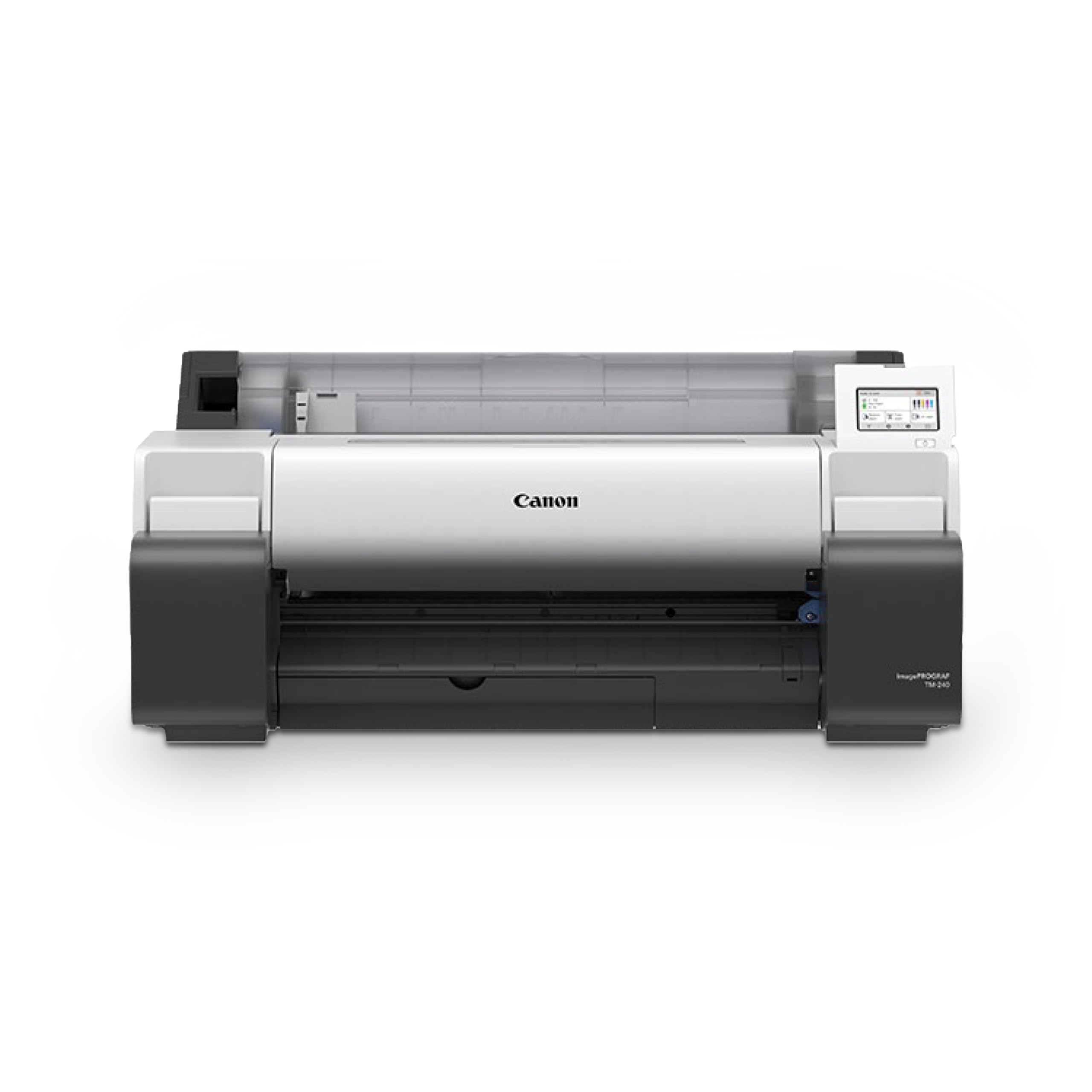
The Canon imagePROGRAF TM-240 is a 24-inch large-format printer built for professionals who need consistent color across multiple print runs. The L-COA PRO II processor drives the 6-channel PF-06 printhead with 15,360 nozzles at 2400 x 1200 dpi, producing clean text and smooth gradients. The newly-formulated magenta in the 5-color LUCIA ink set resists water and UV damage, making it suitable for outdoor signage and construction-site documents.
The automatic media sensor detects paper type, length, and width, loading settings automatically onto the LCD interface. The optional calibration module ensures color consistency across multiple TM-series units, a critical feature for studios running multiple printers. The roll-feed system is fast, and users report excellent quality on Canon and third-party media, including glossy, satin, and matte finishes.
The sheet-fed workflow is a notable bottleneck: the TM-240 does not support multi-page sheet printing, requiring manual paper-type re-selection for each single sheet. The minimum sheet size is A4, so smaller prints like 4×6 and 8×10 require cutting from larger media. For architects, sign-makers, and printers who primarily work from rolls, the TM-240 offers impressive speed and color accuracy at a competitive mid-range price.
Why it’s great
- Fast 24″ prints with UV- and water-resistant LUCIA ink
- Color calibration module ensures consistent output across units
Good to know
- Sheet feeding is slow and requires manual paper-type re-selection
- Minimum sheet size is A4; no smaller cut-sheet support
8. HP DesignJet T630

The HP DesignJet T630 is a 24-inch large-format plotter that combines roll and sheet feeding with an automatic sheet/roll switch and a media bin—all included in the box. The HP Click software simplifies printing workflows by auto-nesting multiple files, checking for PDF errors, and pre-defining print settings for repeat jobs. The printer supports Gigabit Ethernet, USB 2.0, and dual-band WiFi, making it easy to integrate into office networks.
Users praise the crisp text and accurate line quality on architectural plans, blueprints, and detailed maps, with the 24-inch width handling standard architectural and engineering roll sizes. The included starter ink cartridges provide enough yield for initial setup and testing, though the ongoing cost of HP 712 and 713 OEM cartridges is a consideration for high-volume users. The automatic cutter and media bin reduce hands-on time during production runs.
Some users report quality control issues, including units that arrived with hardware defects requiring replacement, and the printer relies entirely on HP-branded cartridges, which can be difficult to source quickly in remote areas. For architects, engineers, and small printing businesses that need reliable 24-inch output, the T630 offers strong software integration and media handling versatility.
Why it’s great
- Auto sheet/roll switch with included media bin and stand
- HP Click software streamlines file management and nesting
Good to know
- Quality control incidents reported by some buyers
- Requires hard-to-find HP OEM ink cartridges
9. Epson SureColor T2170
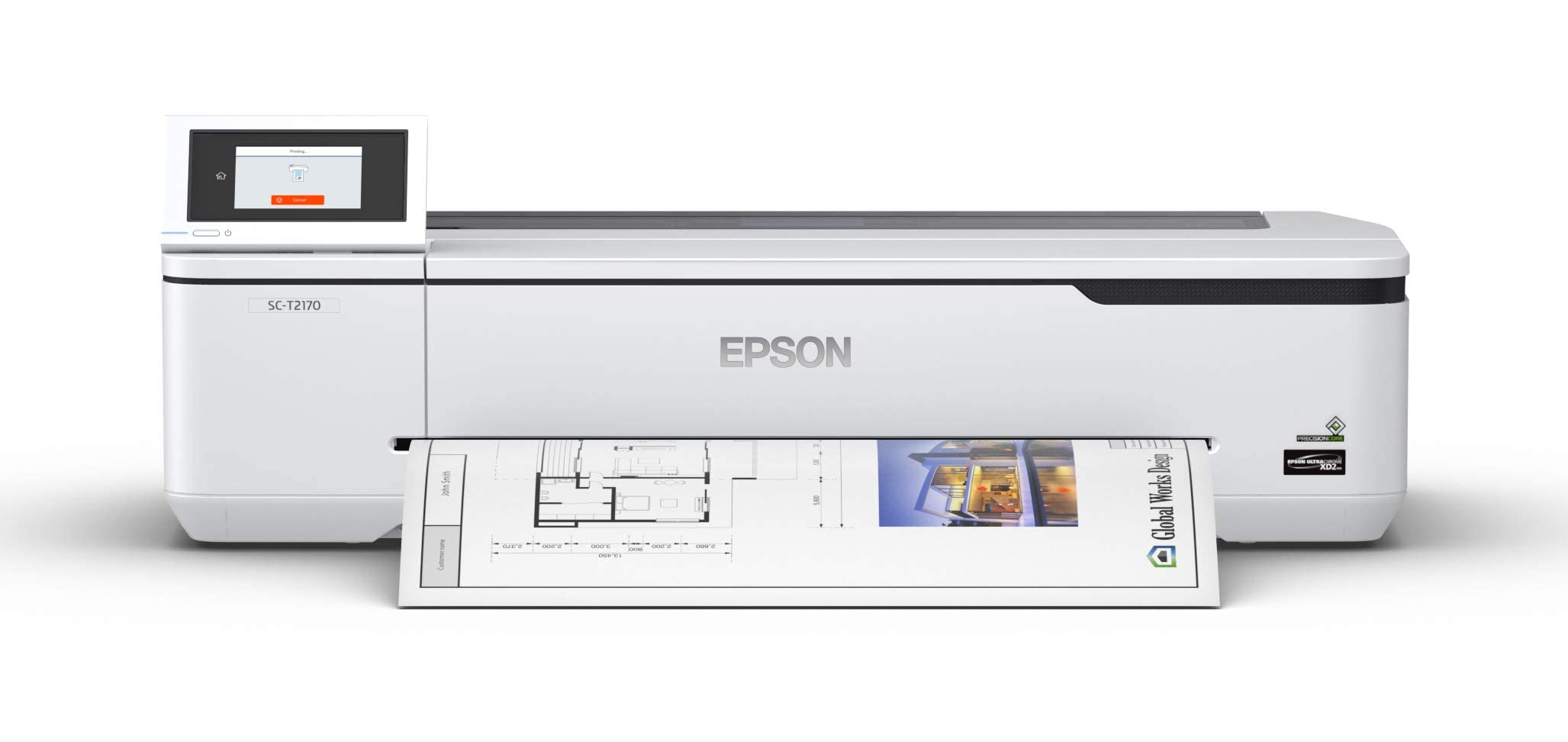
The Epson SureColor T2170 is a 24-inch desktop wide-format plotter that uses the PrecisionCore MicroTFP printhead for consistent droplet control at 2400 dpi. The UltraChrome XD2 all-pigment ink set produces durable, instant-dry prints that resist UV fading—ideal for blueprints, line drawings, and posters that need to last. The 4.3-inch color touchscreen simplifies job management, and integrated wireless plus Wi-Fi Direct allows printing from mobile devices without a router.
Users who print separation films for screen printing report that the XD2 pigment inks block UV light effectively, enabling crisp burns with LED exposure units. The compact footprint fits on a desktop, though the optional stand offers a more permanent setup. The high-capacity cartridges (50 mL for color, 80 mL for black) reduce replacement frequency compared to standard desktop models.
A known farm-out issue: after approximately four years of infrequent use, the T2170 may display a “Replace parts 0000C000” error requiring mainboard replacement, effectively expiring the printer regardless of printhead condition. The ink cost for a full set of four cartridges runs roughly , which is reasonable for users who go through cartridges slowly. For CAD drafters and small-scale sign makers who need a reliable 24-inch plotter, the T2170 delivers solid results with an expected service life of several years.
Why it’s great
- Instant-dry XD2 pigment ink is UV-resistant and durable
- Compact desktop footprint with large-format capability
Good to know
- Printer may have a firmware-based expiration after ~4 years
- Ink set costs ~ for a full replacement
10. HP DesignJet T210

The HP DesignJet T210 is a budget-friendly 24-inch plotter that provides entry-level access to large-format printing for architects, engineers, and DIY enthusiasts. The printer supports media rolls up to 24 inches wide and sheet sizes up to 13×19 inches via the optional automatic sheet feeder. The automatic horizontal cutter handles roll-to-sheet conversion without manual trimming.
Users who previously paid for outsourced large-format prints report significant cost savings, with the T210 paying for itself after a few dozen print jobs. The included HP Click software provides PDF error checking, auto-nesting, and pre-set print profiles that simplify workflow from CAD and design applications. The 2-year extended warranty includes onsite support and next-business-day service, which adds value for professional users who cannot tolerate downtime.
The print speed is adequate for small offices—up to 45 seconds per A1/D page—but not competitive with higher-tier models for production volumes. The reliance on HP OEM ink cartridges (712 and 713 series) is a recurring complaint; in some locations, cartridges take over a week to arrive. For home-based businesses and small architecture firms that need occasional 24-inch prints, the T210 offers a low-cost path to in-house production.
Why it’s great
- Low entry cost for 24-inch large-format capability
- Included 2-year on-site warranty with next-day support
Good to know
- Slow print speeds for production-level output
- Cartridge supply chain can be slow in remote areas
11. HP DesignJet T650

The HP DesignJet T650 is a 36-inch production plotter engineered for high-throughput environments that demand wide-format output at speed. With 1 GB of memory and a print speed of up to 82 A1/D-size sheets per hour, it comfortably handles production runs for construction firms and large engineering departments. The automatic sheet feeder, media bin, and stand are included, eliminating the need for expensive add-ons.
The printer offers triple connectivity via Gigabit Ethernet, USB 2.0, and dual-band WiFi, and the HP Click software provides drag-and-drop printing with auto-nesting and PDF error checking. The reduced maintenance mode uses 95% less ink than competitor plotter printers, keeping operational costs lower over time. The 2-year on-site warranty provides comprehensive coverage for high-use devices.
Quality control reports are mixed: while most users praise the printer’s speed and print quality, some units have arrived with broken plastic components or fail to print altogether. The HP-branded cartridge requirement means users must maintain a ready stock of HP 712 and 713 cartridges to avoid workflow interruptions. For large architecture and engineering firms that need reliable 36-inch output at volume, the T650 delivers professional-grade performance when it works properly.
Why it’s great
- Fast 82 A1/D prints per hour with 1 GB memory
- Included stand, sheet feeder, and media bin
Good to know
- Some units arrive with broken assembly parts
- Requires HP OEM cartridges; alternative supply limited
FAQ
What does giclée mean compared to regular inkjet printing?
How many ink colors do I need for professional fine-art prints?
Can I print on canvas or thick fine-art paper with these printers?
Why is the ink so expensive for cartridge-based giclée printers?
How do I clean and maintain a pigment-based printer to avoid clogs?
Final Thoughts: The Verdict
For most users seeking the best giclee printer, the winner is the Epson SureColor SC-P900 because its 10-channel UltraChrome PRO10 ink set, dedicated black nozzles, and 17-inch width provide the ideal balance of color fidelity and media flexibility for professional fine-art reproduction. If you want a high-volume, low-cost-per-print studio solution, grab the Epson EcoTank Photo ET-8550 for its massive ink yield and vibrant dye-based output. And for large-format gallery editions exceeding 17 inches, nothing beats the Canon imagePROGRAF Pro-4100 with its 44-inch width and 18,432-nozzle precision.