
For palm grippers, the entire hand rests on the mouse — a design that demands a high, broad arch that fills the hollow of the palm without cramping the fingers or forcing the wrist into a strained angle. The wrong shape leads to hand fatigue mid-match and a constant repositioning that kills reaction time.
I’m Mohammad Maruf — the founder and writer behind Drink4Good. I’ve spent thousands of hours cross-referencing peripheral sensor specs, switch durability ratings, chassis contours, and button mapping architectures across dozens of gaming mice to isolate the handful that truly accommodate a full palm rest.
To build this guide, I analyzed grip-width measurements, rear-hump height, button placement for relaxed fingers, and wireless latency data. The result is a tight edit of the gaming mouse for palm grip that spares you the wrist ache and the regret of a shape that almost works but doesn’t.
How To Choose The Best Gaming Mouse For Palm Grip
Palm grip is the most relaxed hand posture in gaming, but it’s also the most shape-dependent. You need a mouse that supports the base of the palm and lets the fingers drape naturally over the buttons. The wrong profile forces you into a claw or fingertip hold within minutes, negating the comfort you paid for. Here are the three non-negotiable criteria.
Rear Hump Height and Width
The rear of the mouse must rise high enough to fill the cup of your palm. Low-profile “sleek” designs leave a gap between the mouse and your hand, causing micro-adjustments to maintain control. Look for a pronounced arch that sits between 40mm and 44mm tall and spans at least 60mm at the back. This prevents the palm from collapsing and keeps your wrist in a neutral, straight position.
Button Accessibility for Relaxed Fingers
When your hand is fully planted, your thumb and ring finger should not have to stretch or curl to reach side buttons. The best palm-grip mice place the forward side button directly under the thumb joint, not ahead of it. On the right side, the button should either wrap around the edge or sit flush with the thumb-rest contour. Rearward buttons that require a bend in the thumb are a common source of fatigue.
Weight and Glide Balance
A palm grip uses the entire arm to move the mouse, so weight matters more than it does for fingertip or claw styles. Ultra-light mice under 65 grams can feel unstable when you apply downward palm pressure during flicks. Heavier mice around 85 to 100 grams provide a planted feel that is easier to control with arm movements. The key is consistent glide — look for large, pure PTFE feet that let the heavy chassis slide smoothly without catching on cloth pads.
Quick Comparison
On smaller screens, swipe sideways to see the full table.
| Model | Category | Best For | Key Spec | Amazon |
|---|---|---|---|---|
| Corsair IRONCLAW Wireless SE | Premium Wireless | Large hands, marathon sessions | Up to 285h battery life (2.4GHz) | Amazon |
| GLORIOUS Model D Wireless | Lightweight Ergonomic | Medium-large hands, competitive FPS | 69g weight, BAMF 19K DPI sensor | Amazon |
| ASUS ROG Keris Wireless Aimpoint | Customizable Wireless | Switch tinkerers, right-hand users | 75g weight, hot-swappable switch sockets | Amazon |
| Logitech G502 Hero | Wired Performance | Mixed productivity and gaming | Adjustable weight system (up to 18g) | Amazon |
| Razer Basilisk V3 | Wired Custom | MMO and MOBA macro users | 11 programmable buttons, HyperScroll | Amazon |
| Redragon M901P-KS | MMO Wireless | Budget MMO, macro-heavy play | 12 side buttons, 70h battery (RGB off) | Amazon |
| Logitech G305 Lightspeed | Budget Wireless | Portable travel, casual gaming | 250h battery on single AA battery | Amazon |
In‑Depth Reviews
1. Corsair IRONCLAW Wireless SE
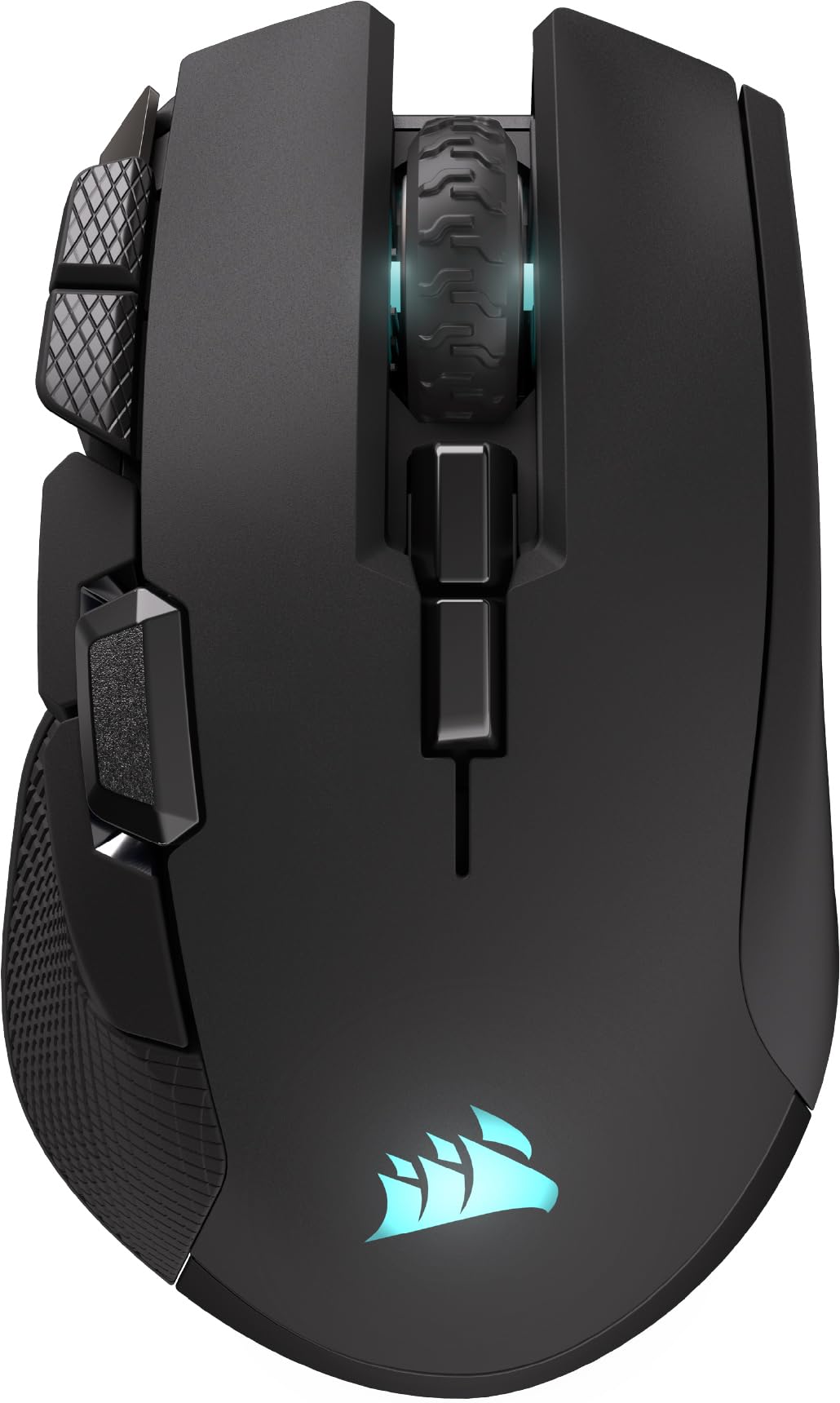
The IRONCLAW Wireless SE is purpose-built for large hands that demand a full palm fill. Its asymmetric shape rises to a pronounced rear hump that cradles the metacarpal area, while the right-side contour extends outward to give the ring and pinky fingers a natural resting ledge. The 26,000 DPI CORSAIR MARKSMAN sensor tracks cleanly across the full speed range, and surface calibration in iCUE lets you fine-tune lift-off distance for your specific pad material.
Battery life is the standout metric here — up to 285 hours over 2.4GHz wireless means you can game daily for weeks without seeing a charging cable. The ten programmable buttons are arranged with the two primary side buttons sitting directly under the thumb joint, not ahead of it, so you never have to curl your thumb to hit a macro. The front-grill RGB lighting is gimmicky, but the three-stage DPI indicator on the side is genuinely useful for mid-game profile swaps.
At roughly 105 grams, the IRONCLAW is heavier than the ultralight trend, but that weight works in its favor for palm grippers: the added mass dampens micro-jitter and gives arm movements a stable, grounded feel. The PTFE feet are generously sized and glide with low initial friction on hard pads. The only real compromise is the lack of a dedicated storage slot for the USB receiver, so the dongle is easy to misplace during travel.
Why it’s great
- Class-leading wireless battery life for extended sessions
- Asymmetric shape fills large palms completely without hand fatigue
- Surface calibration tool adapts sensor behavior to any mouse pad weave
Good to know
- No onboard dongle storage, receiver can be lost during travel
- Weight is on the higher side for ultra-light enthusiasts
2. GLORIOUS Model D Wireless

The GLORIOUS Model D Wireless proves that an ergonomic palm-filler does not have to be heavy. At just 69 grams, it is one of the lightest right-handed contoured mice on the market, yet its rear hump still provides enough vertical support to keep the palm from sinking. The honeycomb shell reduces weight without introducing flex — the chassis feels rigid during aggressive flick shots, and the matte white finish offers a dry, grippy texture that resists sweat buildup over long sessions.
The BAMF sensor is a rebranded top-tier optical with 19,000 max DPI and a 1,000 Hz polling rate. In practice, tracking is flawless on both cloth and hybrid pads, and the 2.4 GHz wireless connection consistently delivers sub-1ms latency. Battery life is rated at 71 hours with RGB off, though a few users report closer to 48 hours in real-world use. The included USB-C paracord is flexible enough to feel wireless when charging, and the receiver dongle plugs directly into the cable adapter for convenient pairing.
For palm grippers, the Model D excels in medium-to-large hand sizes, but users with truly massive hands may find the hump slightly low compared to dedicated palm-first designs like the Corsair IRONCLAW. The six-button layout is minimalist, with two side buttons that are easy to reach but lack the satisfying tactility of mechanical switches found on pricier competitors. The stock skates are serviceable, though aftermarket pure PTFE feet from GLORIOUS themselves are a worthwhile upgrade for smoother glide.
Why it’s great
- Extremely light (69g) without sacrificing palm support structure
- Flexible USB-C charging cable feels wireless when plugged in
- Wide availability of aftermarket accessories and replacement feet
Good to know
- Side buttons feel slightly mushy compared to premium competition
- Battery life varies; heavy RGB use reduces runtime significantly
3. ASUS ROG Keris Wireless Aimpoint

The ROG Keris Wireless Aimpoint is a right-handed ergonomic shape that prioritizes palm comfort with a gently sloping rear hump and a pronounced thumb rest. The 75-gram weight hits a sweet spot — light enough for quick flicks but substantial enough to feel planted under a full palm. The ROG AimPoint 36,000 DPI optical sensor tracks with zero smoothing up to 650 IPS, and the 1,000 Hz polling rate is standard for competitive play.
What sets the Keris apart is the Push-Fit Switch Socket II system. You can swap the main button switches without soldering — the mouse ships with ROG Micro Switches rated for 70 million clicks, but it accepts any 3-pin mechanical or 5-pin optical switch. For palm grippers who wear out left clicks faster due to the constant downward pressure of the whole finger, this is a game-changer: you can replace faulty switches in seconds rather than buying a new mouse. The included extra mouse feet and grip tape extend the customization further.
Battery life sits around 50 hours with RGB on, and the tri-mode connectivity (Bluetooth, 2.4 GHz, wired) gives you flexibility across multiple devices. The white colorway looks clean but shows dirt faster than darker finishes. The five-button layout is minimalist, meaning macro-heavy MMO players will have to rely on keyboard binds. The side buttons are placed slightly rearward, which may require a small thumb stretch for users with shorter thumbs.
Why it’s great
- Hot-swappable switch sockets extend mouse lifespan indefinitely
- Tri-mode connectivity works with PC, Mac, and mobile devices
- Generous accessory pack includes extra feet and grip tape
Good to know
- Only five buttons; limited macro capacity without keyboard binds
- White finish is prone to visible staining over extended use
4. Logitech G502 Hero

The Logitech G502 Hero is the most customizable palm-grip mouse in terms of weight and balance. The chassis comes with five removable 3.6-gram weights that fit into a tray under the shell, letting you dial in a preferred mass from a baseline of 121 grams up to 139 grams. For palm grippers who find ultralight mice too twitchy, this adjustable weight system allows you to achieve a deliberate, planted feel that tracks smoothly with arm movements.
The HERO 25K sensor tracks at up to 25,600 DPI with zero smoothing, and Logitech’s mechanical switch tensioning system gives the left and right clicks a crisp, tactile snap that resists accidental double-taps. The dual-mode HyperScroll wheel toggles between a notched scroll for weapon switching and a free-spin mode for rapid document browsing. The 11 programmable buttons are laid out generously, including a sniping DPI-shift button that sits under the thumb — a feature that palm grippers will appreciate for fast sensitivity drops during ADS moments.
The wired-only connection is the biggest trade-off. The braided Micro-USB cable is durable but creates noticeable drag on cloth pads, and the 121-gram base weight is too heavy for high-sensitivity wrist-aimers. The right-handed sculpt features a prominent thumb rest and a wide palm shelf, but users with smaller hands may find the G502’s length and bulk force their fingers past the main buttons. The G Hub software has a mixed reputation for stability, though the onboard memory saves profiles reliably once configured.
Why it’s great
- Adjustable weight system lets you fine-tune momentum and balance
- HyperScroll wheel offers both tactile and free-spin scrolling modes
- 11 programmable buttons with a dedicated thumb-mounted DPI shift
Good to know
- Wired-only design; cable drag can hamper low-sensitivity play
- Heavy base weight may cause fatigue during long, fast-paced sessions
5. Razer Basilisk V3

The Razer Basilisk V3 is a wired right-handed ergonomic mouse built around a pronounced thumb rest that locks the palm into a stable position. The rear hump is moderate in height, making it suitable for medium to large hands. The Focus+ 26,000 DPI optical sensor is one of the most accurate on the market, with intelligent motion sync that eliminates jitter at high speeds. The 1,000 Hz polling rate is standard, but the optical mouse switches actuate at 0.2ms — noticeably quicker than mechanical alternatives.
The HyperScroll tilt wheel is the defining feature: it free-spins for fast browsing or clicks into tactile mode for precise weapon scrolling. The wheel also tilts left and right for two additional input channels. With 11 programmable buttons total, including a dedicated DPI clutch on the thumb rest, this mouse is ideal for MMO and MOBA players who want to offload spell rotations and item binds from the keyboard. The 11-zone Chroma RGB lighting is extensive, but the software (Razer Synapse) is required for customization and has a reputation for bloat — profiles can be stored onboard after configuration.
The wired connection is the clear limitation for wireless enthusiasts, though the Razer Speedflex cable is light and reduces drag compared to standard braided cords. The ergonomic shape is asymmetrical, making it a right-hand-only design. Left-handed palm grippers will need to look elsewhere. Users with smaller hands report that the front buttons extend too far forward, forcing a slight claw-like extension of the index finger.
Why it’s great
- HyperScroll wheel with tilt inputs adds two extra programmable functions
- Optical switches actuate faster than mechanical for competitive edge
- Thumb rest design is one of the most comfortable for full palm contact
Good to know
- Razer Synapse software is required for full customization and can feel bloated
- Cable drag is reduced but still present compared to wireless alternatives
6. Redragon M901P-KS

The Redragon M901P-KS is an MMO-focused wireless mouse that packs 16 programmable buttons — 12 of them arranged in a grid on the left side — into a chassis that still supports a full palm grip. The mouse is slightly larger and wider than typical gaming mice, which works to its advantage for palm users with medium to large hands. The textured rubberized sides prevent the hand from sliding during extended macro sessions, and the wavy side-button layout reduces accidental presses compared to flat-grid designs.
The UP 16,000 DPI optical sensor is adequate for most gaming scenarios, though the maximum DPI is lower than premium competitors. The adjustable polling rate (125-1,000 Hz) lets you balance responsiveness and battery life. The built-in 1,000 mAh battery delivers over 70 hours of use with RGB off, and the USB-C charging cable allows simultaneous wired play. The software lets you remap all 16 buttons, including the previously locked “Power” button, and save up to five onboard profiles.
The trade-offs are typical for the budget-friendly tier: the scroll wheel has loose detents that can feel imprecise during rapid weapon swaps, and the 16,000 DPI ceiling is noticeable if you play at extreme sensitivity settings. The overall weight is moderate, but the presence of 12 side buttons shifts the center of gravity slightly forward, which can feel top-heavy during fast lifts. For gamers who want a high-button-count palm grip mouse without spending premium money, the M901P-KS is a solid contender.
Why it’s great
- 16 fully programmable buttons including a 12-button side grid for MMO macros
- Long battery life with USB-C connectivity for uninterrupted play
- Textured rubber grip prevents hand slippage during extended use
Good to know
- Scroll wheel detents feel loose and lack tactile feedback
- Lower DPI ceiling (16K) compared to premium sensor competitors
7. Logitech G305 Lightspeed

The Logitech G305 Lightspeed is the budget-friendly wireless entry that sacrifices some palm-filling support for portability and price. The symmetrical shape is compact and low-profile, making it better suited for smaller hands or for gamers who prefer a hybrid palm-claw hold. The rear hump is moderate but does not extend as far back or as high as dedicated palm-first designs. For users with hands under 18cm in length, the G305 can work as a palm grip mouse; larger hands will likely find their fingers overhanging the front edge.
The HERO sensor is the star of the show — it delivers 12,000 DPI tracking with 400 IPS and is renowned for its power efficiency. A single AA battery lasts up to 250 hours in performance mode, which means months of daily gaming without a battery swap. The 1 ms report rate via Lightspeed wireless is indistinguishable from wired in practice. The six-button layout includes two well-placed side buttons that sit directly under the thumb, though they lack the crispness of higher-end mechanical switches.
At 99 grams with the AA battery installed, the G305 is heavier than many modern ultralight mice, but the weight distribution is even due to the centered battery position. The plastic shell feels durable but has a slightly hollow echo when tapped. There is no RGB lighting, which keeps battery life high and avoids unnecessary distraction. The G305 is not ideal for pure palm grippers with large hands, but for budget-conscious gamers or those who need a reliable wireless mouse for travel and casual gaming, it remains a fantastic value.
Why it’s great
- Exceptional 250-hour battery life on a single AA battery
- HERO sensor delivers reliable, low-latency tracking at this price point
- Lightweight and compact, perfect for travel and smaller hands
Good to know
- Low-profile shape lacks the rear hump needed for larger hand palm support
- No RGB lighting or adjustable weight system for personalization
FAQ
What is the difference between palm grip and claw grip for a mouse?
How do I measure my hand size to choose the right palm grip mouse?
Is a heavier mouse better for palm grip than a lightweight one?
Final Thoughts: The Verdict
For most users, the gaming mouse for palm grip winner is the Corsair IRONCLAW Wireless SE because its broad, asymmetric shell and class-leading battery life combine to deliver genuine palm support without wires. If you want an ultralight ergonomic shape, grab the GLORIOUS Model D Wireless. And for hot-swappable switch longevity and a premium sensor, nothing beats the ASUS ROG Keris Wireless Aimpoint.