
The difference between a gaming gift that lands and one that gets returned often comes down to a single question: does it make their setup better or just busier? A thoughtful accessory can reduce cable clutter, improve audio accuracy, or add a dynamic visual layer to a desk that already sees twelve-hour sessions. The wrong one sits in a drawer.
I’m Mohammad Maruf — the founder and writer behind Drink4Good. After sorting through hundreds of best-selling units and analyzing build materials, driver sizes, connection types, and lighting capabilities, I’ve narrowed down the seven pieces of gear that actually earn their desk space.
Whether you are buying for a console loyalist, a PC tactician, or someone who simply wants their battlestation to look polished, finding the right best gaming gifts means matching the hardware to how they actually play and how their current rig is set up.
How To Choose The Best Gaming Gifts
Not every piece of gaming gear serves the same purpose. A controller upgrade focuses on haptic immersion, a headset centers on driver precision, and a desk accessory prioritizes cable organization and visual tone. Before clicking buy, consider three key factors that separate a useful gift from a shelf filler.
Match the platform and port setup
A PC gamer with a dedicated sound card benefits from a different headset than a console-only player who relies on a 3.5mm jack. Check whether the gift requires USB-C, Bluetooth, analog, or a splitter. Controllers need native compatibility with the console generation; an older DualSense may lack haptic trigger support for specific PlayStation 5 titles.
Prioritize material durability and weight
Items that live on a desk — stands, displays, keyboard and mouse combos — benefit from solid materials like walnut wood or aluminum frames rather than thin plastics. Lightness matters for headsets that get worn for hours, but for stationary items, heavier construction prevents tipping and feels more intentional.
Evaluate secondary functionality
The best gaming gifts pull double duty. A headphone stand that includes a USB or Type-C charging port saves a power brick slot. An LED pixel display with Wi-Fi app control offers custom animation beyond static RGB. A controller with a built-in mic eliminates the need for a separate headset in casual voice chat. Every extra function should feel additive, not gimmicky.
Quick Comparison
On smaller screens, swipe sideways to see the full table.
| Model | Category | Best For | Key Spec | Amazon |
|---|---|---|---|---|
| HyperX Cloud III | Headset | All-day comfort & spatial audio | 53mm angled drivers | Amazon |
| PlayStation DualSense | Controller | Immersive PS5 / PC haptics | Adaptive triggers | Amazon |
| Razer BlackShark V2 X | Headset | Competitive FPS positional audio | 50mm Triforce Titanium | Amazon |
| Divoom Pixel Display | Desk Decor | Custom pixel art & music sync | 16×16 LED matrix | Amazon |
| UPERGO Walnut Stand | Organizer | Wooden desk organization | Solid black walnut | Amazon |
| CoolGift Mart Acrylic Stand | Organizer | RGB ambiance & charging hub | 16-color LED, 2 USB ports | Amazon |
| Redragon S101-3 Pro | KB + Mouse | Budget entry-level combo | 7200 DPI mouse | Amazon |
In‑Depth Reviews
1. HyperX Cloud III – Wired Gaming Headset
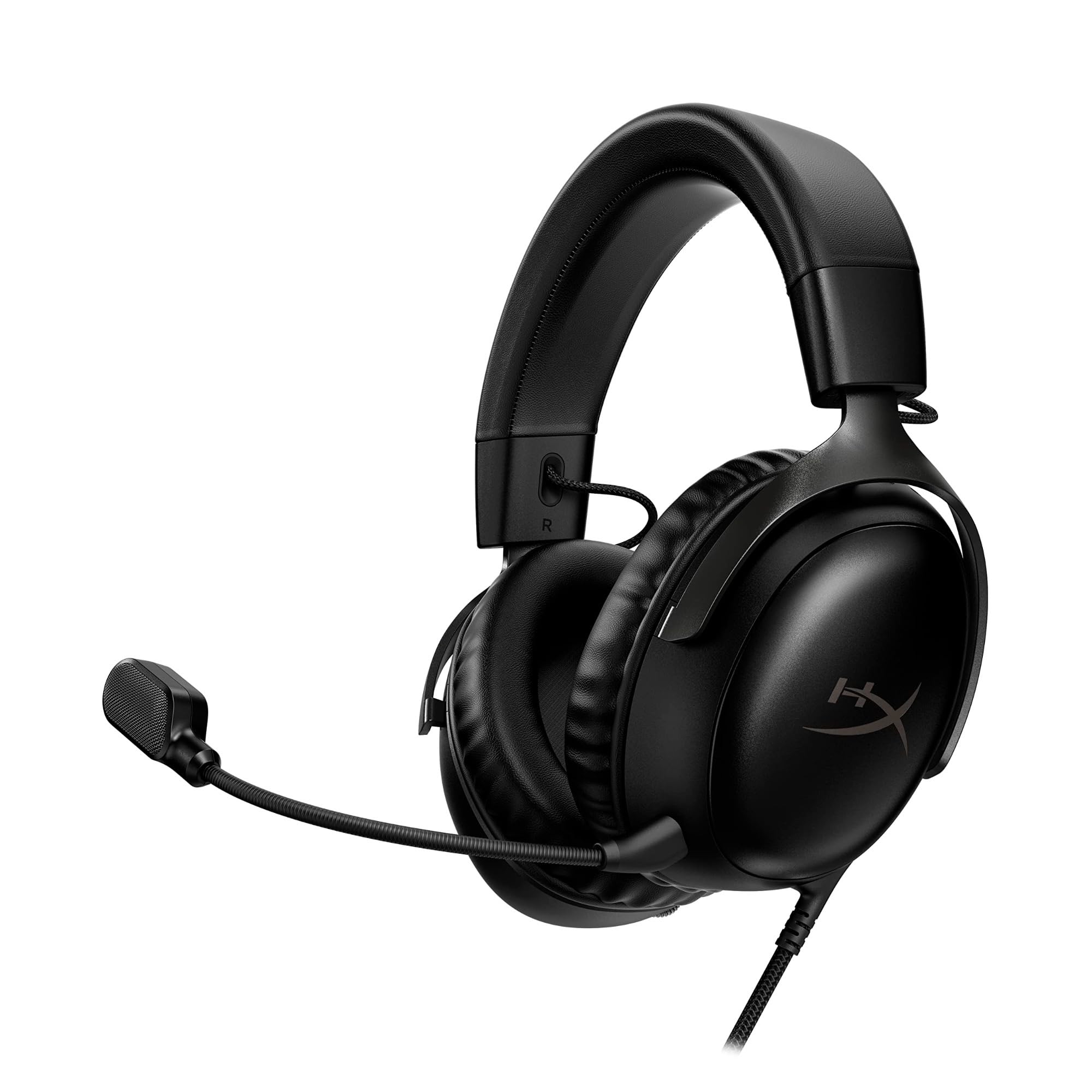
The HyperX Cloud III refines everything the Cloud II built its reputation on. The angled 53mm drivers, tuned specifically by HyperX audio engineers, deliver a wider soundstage that makes footsteps and environmental cues feel directional without bloat. Spatial audio via DTS Headphone:X adds virtual 3D positioning that actually improves game awareness rather than muddying the mix. At 53mm, the driver size is noticeably larger than the standard 40mm or 50mm units found in most mid-range headsets, translating to more headroom for explosive game audio without distortion.
Comfort is the clear standout. The memory foam ear cushions and padded headband distribute weight evenly, and the aluminum frame provides flexibility without feeling brittle. The detachable 10mm microphone features a built-in mesh filter and LED mute indicator, so there is no confusion during live chat. Connectivity covers USB-C, USB-A, and 3.5mm, making it compatible with PC, PlayStation 5, Xbox Series X|S, and mobile devices right out of the box.
What keeps this headset from feeling like a premium splurge is its realistic feature set. The microphone is slightly quiet compared to dedicated streaming mics, and the non-removable cable limits replacement options. But for a gamer who needs one reliable headset for every platform, the Cloud III delivers the most consistent audio and comfort in this price tier.
Why it’s great
- Larger 53mm drivers produce cleaner separation for gaming and music
- DTS Spatial Audio adds genuine 3D immersion on compatible titles
- Aluminum frame and memory foam cushions survive daily wear
Good to know
- Mic sensitivity picks up keyboard clicks in quiet environments
- Attached cable cannot be replaced if damaged
2. PlayStation DualSense Wireless Controller – Gray Camouflage
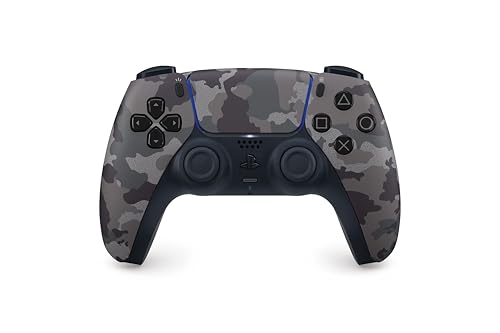
The DualSense remains the benchmark for controller immersion because of two hardware features that no third-party pad has fully replicated: haptic feedback and adaptive triggers. The haptic motors deliver nuanced vibration textures — every rain drop, gear shift, or surface change feels distinct rather than a single buzz. The adaptive triggers apply variable tension, so drawing a bow or accelerating a vehicle requires actual finger resistance. These elements transform reactive gameplay into physical feedback.
This Gray Camouflage edition keeps the same internal hardware as the standard model — 16 buttons, Bluetooth and USB-C connectivity, a built-in microphone, and a 3.5mm jack for wired headsets. The updated stick texture and grip pattern reduce thumb slip during extended sessions. Compatibility extends beyond PlayStation 5 to Windows PC and Mac, where select titles now support the advanced haptics natively.
The catch is battery life. Average play sessions hover around eight to ten hours per charge, and the controller does not include a dedicated charging dock. For heavy users, a second controller or a charging station becomes necessary. Still, for anyone who plays on PS5 or wants the most precise first-party console experience on PC, the DualSense is the essential upgrade.
Why it’s great
- Haptic feedback and adaptive triggers offer unmatched physical immersion
- Built-in mic and 3.5mm jack reduce accessory clutter
- Gray Camouflage finish adds visual variety to standard black/white
Good to know
- Battery lasts roughly 8-10 hours before needing a charge
- No charging dock included; must purchase separately
3. Razer BlackShark V2 X Gaming Headset
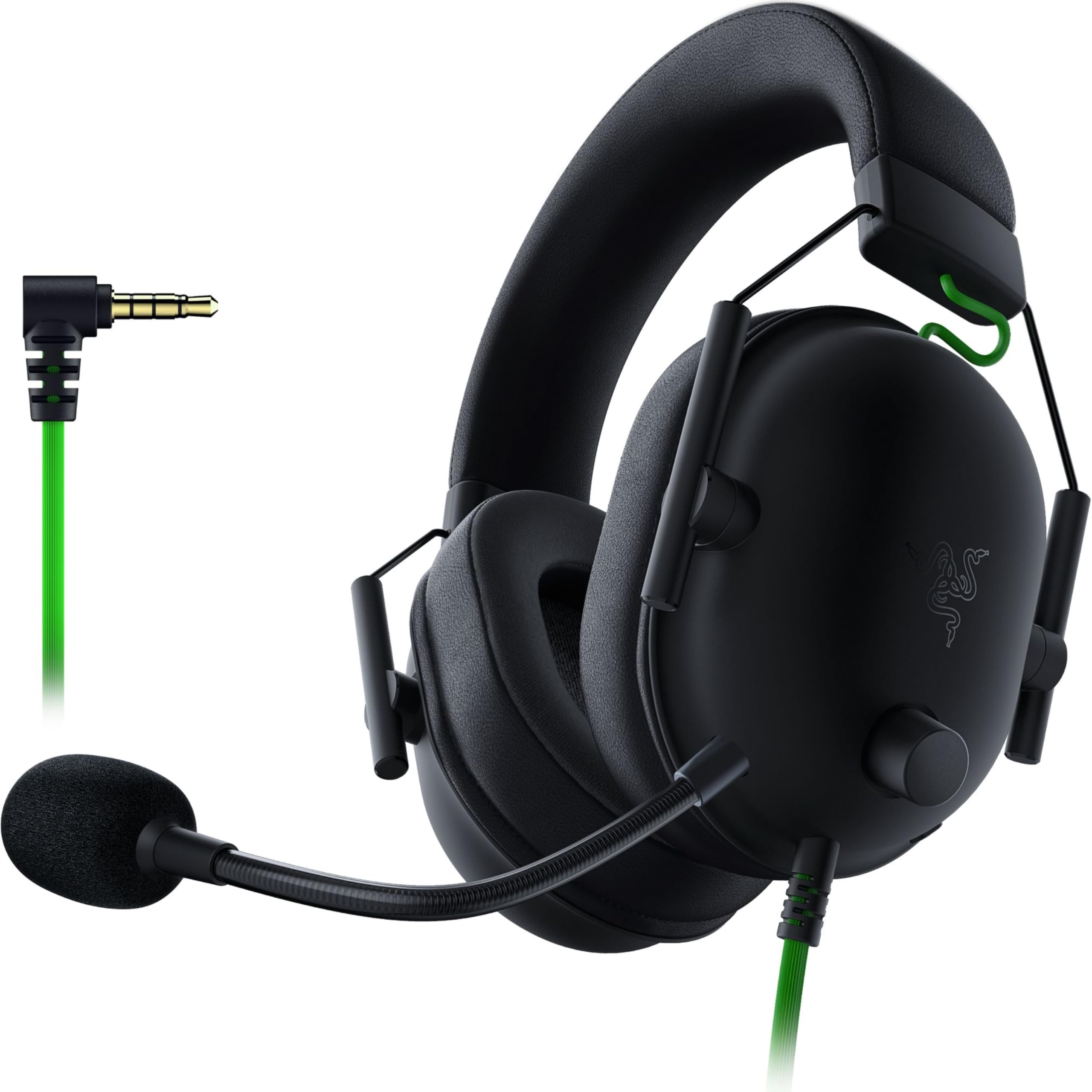
The BlackShark V2 X proves that competitive-grade audio does not require a premium budget. The 50mm Triforce Titanium drivers use a three-chamber design that separates highs, mids, and lows for individual tuning — a feature typically reserved for headsets costing twice as much. The result is clearer treble in gunfire and more controlled bass in explosions, with enough separation to pinpoint enemy positions in tactical shooters. Software-enabled 7.1 surround sound adds spatial awareness on Windows 10 64-bit systems.
At 240 grams, this is one of the lightest gaming headsets on the market. Closed earcups with passive noise cancellation create a decent seal without active electronics, and the breathable foam cushions prevent the heat buildup common with leatherette pads. The Razer HyperClear cardioid mic focuses on the speaker’s voice while rejecting side and rear noise, making it reliable for party chat and basic recording.
The 3.5mm jack limits advanced surround sound to PC only, and the lack of a mute LED on the control dial means you have to test the mic to be sure. The volume knob also rotates counterintuitively — clockwise lowers the volume. But for pure positional audio in an ultra-light frame, the BlackShark V2 X remains the standard for value-driven competitive play.
Why it’s great
- 240-gram design eliminates neck fatigue during long sessions
- Titanium-coated 50mm drivers produce clear, separated audio
- Cardioid mic rejects unwanted background noise effectively
Good to know
- 7.1 surround only works via Windows 10 64-bit software
- Volume knob direction may feel unintuitive at first
4. Divoom LED Light Pixel Display Panel

The Divoom Pixoo panel shifts desk decoration from static RGB strips to an interactive 16×16 pixel art display. The 256 LEDs produce 16 million colors, and the companion app provides access to a massive library of pre-made animations, from retro game characters to real-time clock faces. Users can draw custom frames and upload them via Bluetooth or Wi-Fi, making the display as personal as a screensaver but physically present on the desk.
Build quality is respectable for the price point — the plastic frame feels light but not fragile, and the included charging cable keeps power consistent. The app integration is genuinely useful: music sync mode pulses the LEDs in rhythm with audio output, and the pixel gallery updates daily with community content. For a gamer who already has a solid monitor and peripherals, this fills the aesthetic gap without adding clutter.
Battery life is the limiting factor. The panel performs best when left plugged in; wireless operation drains the cell quickly. The lightweight chassis also lacks the premium heft of a metal desk accessory. But as a gift for someone who enjoys customizing their setup, the Divoom panel offers the most creative flexibility per dollar in the visual decor category.
Why it’s great
- Large user-generated animation library with daily updates
- Music sync and DIY drawing tools add expressive variety
- 16×16 resolution delivers sharp retro-style visuals
Good to know
- Battery drains quickly; best used with constant USB power
- Plastic build feels light relative to the price point
5. UPERGO Headset Stand with Gaming Controller Holder
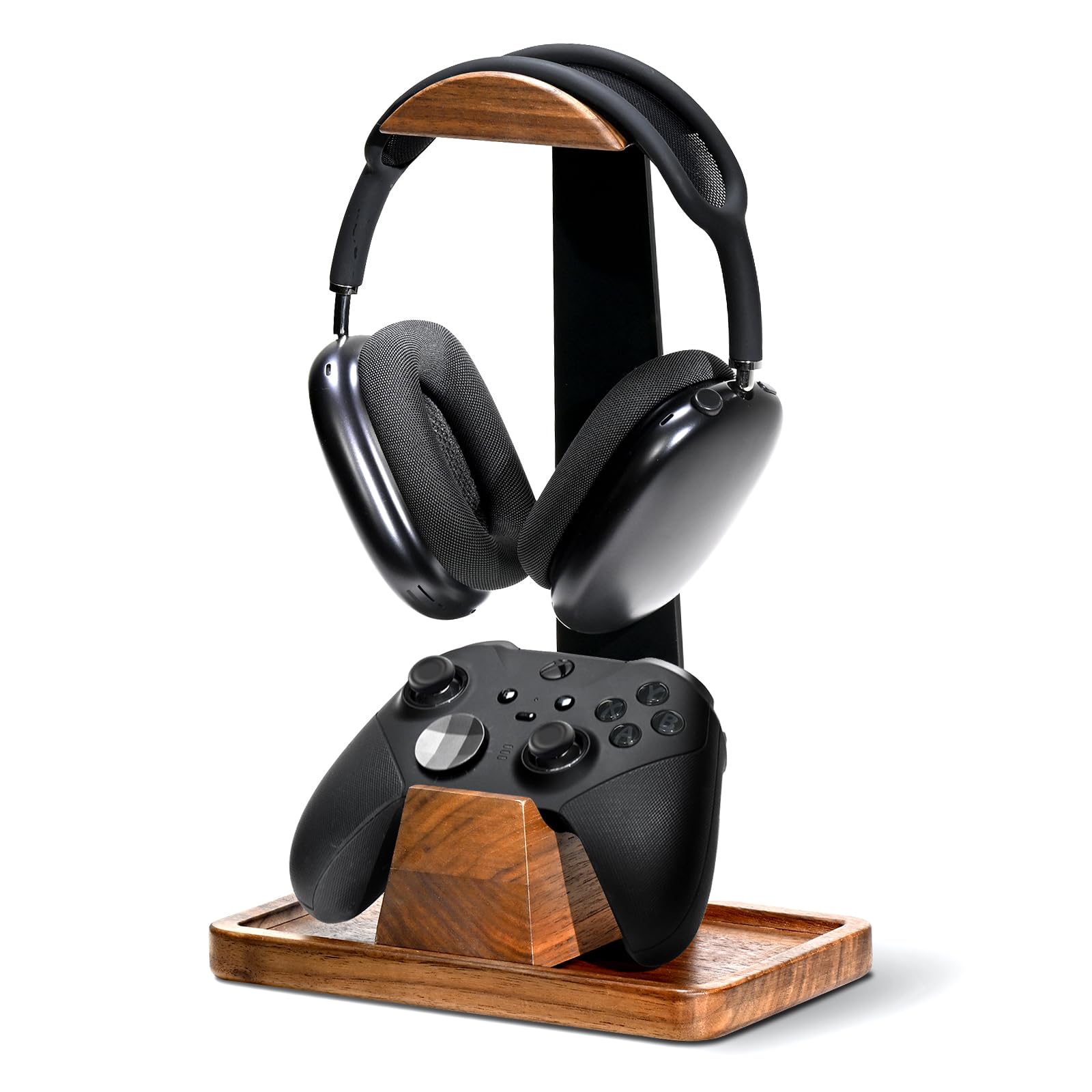
The UPERGO stand solves two common desk problems: where to hang a headset and where to store a controller without stacking them on the mouse mat. The base is machined from solid black walnut with natural grain patterns, finished with food-grade wood wax oil that leaves the surface smooth and odor-free. A separate wooden cradle attaches magnetically or slides laterally to hold a PlayStation, Xbox, or Switch controller, keeping both devices in one organized footprint.
The tower design includes a bottom storage tray for small accessories — charging cables, a power bank, or a dongle. Assembly takes a few minutes with the included hex key and screws, and the stand supports all standard headphone sizes without adjustment options. The walnut and metal construction prevents tipping even with heavier headsets like the Audeze Maxwell or SteelSeries Arctis Pro.
There is no height adjustment on the headphone arm, and the controller cradle does not lock into a single position. The storage tray is also shallow, so only smaller items fit. But for a gamer who values natural wood aesthetics and wants a dedicated spot for two core peripherals, the UPERGO stand offers the most refined material choice in this category.
Why it’s great
- Solid black walnut construction provides stable, premium feel
- Separate controller cradle works with most major console pads
- Hidden base tray stores cables and small accessories
Good to know
- Headphone arm does not adjust in height
- Controller cradle slides laterally but does not lock in place
6. CoolGift Mart Light Up Headphone Stand with Charging Ports

The CoolGift Mart stand distinguishes itself through integrated lighting and charging ports in one slim acrylic frame. The U-shaped design features a printed PCB pattern with 16 single-color and 4 dynamic flash modes controllable via a remote or base button. Two built-in ports — one USB and one Type-C — let the stand double as a charging hub for phones, controllers, or Bluetooth speakers, reducing the need for a separate power strip on the desk.
Assembly is genuinely tool-free: two acrylic parts snap together in under ten seconds. The glossy black finish and compact footprint (4.7 inches wide by 10.4 inches tall) fit well on smaller desks or nightstands. The LED glow works well as a subtle backlight in darker rooms, and the remote makes switching modes easy without reaching behind the monitor.
The snap-together connections rely on tension rather than screws, so the joint feels less secure than solid wood alternatives. The glossy acrylic also attracts fingerprints quickly. But for a gamer who wants an illuminated, functional headset stand with charging capability, this is the most feature-dense option at its price point.
Why it’s great
- Built-in USB and Type-C ports charge devices directly on the desk
- Remote-controlled 16-color and dynamic LED modes add ambiance
- Tool-free assembly takes less than ten seconds
Good to know
- Snap-fit connections lack the rigidity of screw-fastened designs
- Glossy acrylic surface shows smudges and dust easily
7. Redragon S101-3 PRO Gaming Keyboard and Mouse Combo

The Redragon S101-3 PRO delivers a full wired keyboard and mouse set for a price that undercuts most single peripherals. The membrane keyboard uses soft-touch keys with six backlight modes, includes five dedicated macro keys, and comes with an ergonomic wrist rest for long typing and gaming sessions. The mouse features an adjustable 800-7200 DPI optical sensor, ten lighting effects, and on-the-fly sensitivity switching via a dedicated button.
Build quality exceeds expectations for this tier. The keys resist the sticking and paint wear common on cheaper membrane boards, and the mouse feels solid enough for daily gaming across shooters, MOBAs, and MMOs. The software lets users program macros and lighting profiles, with settings saved directly to the hardware so they persist after a system restart. This combo works plug-and-play on Windows 10 and 11 without driver downloads.
The membrane design lacks the tactile snap of mechanical switches, and the mouse’s red LED is monochrome rather than full RGB, which creates a slight mismatch for builders who want cohesive lighting. The cable also adds desk drag compared to wireless alternatives. But as a starter kit or an upgrade from a basic office combo, the S101-3 PRO covers every essential feature without inflating the budget.
Why it’s great
- Complete keyboard and mouse set at an entry-level-friendly price
- Macro keys and custom lighting profiles save to onboard memory
- Mouse DPI adjusts from 800 to 7200 for flexible sensitivity
Good to know
- Membrane keys lack the actuation feel of mechanical switches
- Mouse lighting is red-only, not full RGB
FAQ
Can I use a PlayStation DualSense controller on PC without losing haptic features?
Does the Divoom pixel panel work with Alexa or smart home systems?
Final Thoughts: The Verdict
For most users, the best gaming gifts winner is the HyperX Cloud III because it combines 53mm angled drivers, DTS spatial audio, and cross-platform compatibility in a durable aluminum frame that fits any setup. If you want immersive controller feedback, grab the PlayStation DualSense. And for pure competitive audio value, nothing beats the Razer BlackShark V2 X.