
Selecting the right graphics card is the single most impactful decision you’ll make for your gaming PC build. The wrong choice can bottleneck a powerful CPU, leave performance on the table at your target resolution, or drain your budget on features you won’t use for years. This guide cuts through the noise to focus exclusively on what matters for raw gaming performance, thermal headroom at the specs you actually play at, and the architecture choices that define your experience for the next several upgrade cycles.
I’m Mohammad Maruf — the founder and writer behind Drink4Good. I’ve spent hundreds of hours analyzing benchmark data, parsing thermal performance reports, and cross-referencing real-world user feedback across the latest GPU architectures to build this deep-research buying guide. Every recommendation here is rooted in measured performance, not marketing hype.
Whether you’re targeting 1080p high-refresh, 1440p ultra, or 4K with ray tracing, the best gpu for gaming pc depends on understanding your specific resolution target, the generation of tensor or compute cores you need, and how much VRAM your games actually demand today.
How To Choose The Best GPU For Gaming PC
Choosing a gaming GPU is not about picking the most expensive model on the shelf. It is about matching your specific performance needs with the right architecture, memory configuration, and cooling solution. Here is what to look for.
VRAM Capacity and Memory Bandwidth
Video RAM determines how many high-resolution textures your card can hold without dropping frames or stuttering. For 1080p gaming, 8GB to 12GB is generally sufficient. For 1440p ultra and 4K, 16GB or more becomes critical, especially in modern titles that load entire texture packs into memory. The memory bus width (192-bit vs 256-bit) directly impacts bandwidth, and newer GDDR7 memory offers significantly higher data transfer rates than GDDR6 for the same bus width.
Architecture and Feature Set
NVIDIA’s Blackwell architecture brings DLSS 4 with Multi-Frame Generation and fifth-gen Tensor Cores, giving a massive frame rate boost in supported titles. AMD’s RDNA 4 architecture focuses on raw rasterization performance and FSR upscaling, often offering better raw value at the same price point. If ray tracing and DLSS are priorities, lean toward NVIDIA. If pure rasterization and high VRAM capacity matter more, AMD is usually the stronger play.
Cooling Design and Physical Dimensions
High-performance GPUs generate substantial heat. Triple-fan designs with large heatsinks are quiet under load but require a case that can fit a 300mm+ card and 2.5 to 3.5 slots of width. Smaller dual-fan models fit ITX builds but run hotter and louder at the same power target. Always check your case clearance and your PSU’s available PCIe connectors before buying.
Quick Comparison
On smaller screens, swipe sideways to see the full table.
| Model | Category | Best For | Key Spec | Amazon |
|---|---|---|---|---|
| ASUS Prime RTX 5070 | Premium Mid-Range | 1440p Competitive + AAA | 12GB GDDR7, DLSS 4 | Amazon |
| Sapphire Nitro+ RX 9070 XT | Premium High-End | 4K Rasterization | 16GB GDDR6, RDNA 4 | Amazon |
| PowerColor Red Devil RX 9070 XT | Premium High-End | Ultrawide 1440p High FPS | 16GB GDDR6, 3x 8-pin | Amazon |
| MSI RTX 5070 Ti Ventus 3X | Premium High-End | 4K + AI/Creator Workloads | 16GB GDDR7, 256-bit | Amazon |
| PNY RTX 5070 Epic-X ARGB | Mid-Range | 1440p High FPS with DLSS | 12GB GDDR7, 2685 MHz | Amazon |
| GIGABYTE RTX 5070 WINDFORCE | Mid-Range | 1440p Ultra, No RGB | 12GB GDDR7, SFF Ready | Amazon |
| ASUS Dual RX 9060 XT | Mid-Range | 1440p Silent ITX Builds | 16GB GDDR6, 2.5-slot | Amazon |
| GIGABYTE RX 9060 XT Gaming OC | Mid-Range | 1440p Ultra, Value First | 16GB GDDR6, PCIe 5.0 | Amazon |
| XFX Swift RX 9060 XT | Mid-Range | 1080p/1440p Budget Beast | 16GB GDDR6, 3320 MHz | Amazon |
| ASRock Intel Arc B580 | Budget Entry | 1440p Value, 1080p High | 12GB GDDR6, 2740 MHz | Amazon |
| MSI RTX 3090 Gaming X Trio | Legacy Premium | 4K 60 Hz, Heavy VRAM Load | 24GB GDDR6X, 384-bit | Amazon |
In‑Depth Reviews
1. ASUS SFF-Ready Prime NVIDIA GeForce RTX 5070

The ASUS Prime RTX 5070 hits the sweet spot for 1440p gaming. It pairs NVIDIA’s Blackwell architecture and DLSS 4 with a compact 2.5-slot form factor, making it compatible with both standard ATX cases and small-form-factor builds. The axial-tech fans with a phase-change GPU thermal pad keep temperatures around 67°C under load, while the Dual BIOS switch lets you toggle between Quiet and Performance profiles. Benchmarks from real users show a 3DMark Steel Nomad score of 5839 and excellent frame pacing in competitive titles like R6 Siege and Marvel Rivals.
At 1440p with a high-end CPU like the Ryzen 7 7800X3D, this card delivers over 180 fps in competitive shooters and keeps Cyberpunk 2077 at roughly 60 fps with path tracing enabled. The 12GB of GDDR7 memory is adequate for ultra textures at this resolution, though heavier ray-traced workloads will push its bandwidth. Overlocking headroom is solid: pushing +300 MHz core and +1500 MHz VRAM yields roughly a 10% performance gain without destabilizing the card.
The biggest strength of this ASUS Prime model is its balance of DLSS 4 capability and thermal efficiency in a SFF-friendly package. It runs cool enough that even a modest case with good airflow can handle it without choking. The clean black aesthetic and lack of distracting RGB make it ideal for a stealthy professional build. If you want a 1440p card that does not force you into a full-tower chassis, this is it.
Why it’s great
- Excellent 1440p performance with DLSS 4 Multi-Frame Generation
- Compact 2.5-slot design fits most cases, including SFF
- Low noise and low temperatures even under sustained gaming load
Good to know
- Requires a newer CPU for DLSS 4 frame gen benefits
- 12GB VRAM may limit 4K ultra texture packs in future titles
2. Sapphire 11348-01-20G Nitro+ AMD Radeon RX 9070 XT

The Sapphire Nitro+ RX 9070 XT is a premium high-end card built for 4K rasterization and high-refresh 1440p gaming. It carries 16GB of GDDR6 memory on a 256-bit bus with boost clocks reaching 3060 MHz. The triple-fan cooling solution with a massive heatsink keeps the GPU core cool and quiet even during extended sessions, and the build quality on this Nitro+ model is legendary in the AMD ecosystem. Real-world users report a 60% to 90% performance uplift over the RX 6750 XT, with vastly improved 1% low frame rates.
This card handles 4K at 120 fps in many titles without breaking a sweat, and at 1440p it demolishes anything you throw at it. The 16GB VRAM buffer gives you headroom for high-resolution texture packs and heavy mods. However, the card is large — it occupies 3+ slots and exceeds 300mm in length, so you will need a roomy case and an 850W power supply recommended by the manufacturer. The power connectors and RGB headers are fragile, so careful installation is required.
Where this Sapphire card truly shines is in raw rasterization performance and thermal acoustics. It runs whisper quiet with zero coil whine in most units, and the premium copper backplate helps dissipate heat from the memory modules. If ray tracing is a top priority, NVIDIA cards still hold the edge here, but for pure frame rate per dollar at 4K, especially with FSR upscaling, the Nitro+ is hard to beat.
Why it’s great
- Excellent 4K rasterization performance with 16GB VRAM
- Very quiet operation and no coil whine reported
- Premium build quality with backplate cooling
Good to know
- Large 3+ slot size requires a big case and careful planning
- Ray tracing performance still trails NVIDIA at this price tier
3. PowerColor Red Devil AMD Radeon RX 9070 XT 16GB

The PowerColor Red Devil RX 9070 XT is the most aggressive air-cooled implementation of AMD’s RDNA 4 architecture on this list. It sports a triple-fan design on a massive 340mm PCB, requiring three 8-pin PCIe power connectors and a minimum 900W power supply. The boost clock is factory-tuned for maximum performance, and the card stays cool and quiet under normal gaming loads. Real users report frame rates around 200 fps in Warframe at 3440×1440 ultrawide, and strong performance in Stalker 2 and Cyberpunk 2077.
The 16GB of GDDR6 memory and the high bandwidth from the 256-bit bus make this an excellent choice for ultrawide monitors where high resolutions and wide aspect ratios demand more VRAM. The included addressable RGB lighting is tasteful and controlled by PowerColor’s software. The card also comes with a graphics card holder brace, though some users note it is insufficient for the card’s weight and recommend a separate support bracket.
The Red Devil’s main tradeoff is its sheer size. It requires careful case selection, and vertical mounts in many cases cause overheating because the fans cannot draw air properly. The power draw is high, so you need a robust PSU. If your case can fit this beast and you want the most aggressive factory OC AMD air-cooled card available, this is the one to beat for raw 1440p and 4K rasterization.
Why it’s great
- Highest factory overclock among RX 9070 XT air-cooled cards
- Excellent thermal performance with quiet triple-fan setup
- Massive 16GB VRAM buffer for high-resolution and ultrawide gaming
Good to know
- Extremely long 340mm card — verify case clearance before purchase
- Three 8-pin power connectors require a high-wattage PSU
4. MSI Gaming RTX 5070 Ti 16G Ventus 3X OC

The MSI RTX 5070 Ti Ventus 3X is the price-to-performance king of the high-end segment. With 16GB of GDDR7 memory on a 256-bit bus and a boost clock of 2497 MHz, it delivers roughly 15% lower performance than the RTX 5080 at about 33% less cost. Real-world benchmarks show it outpacing last generation’s RTX 4080 Super in many titles without overclocking. At 4K with DLSS and frame gen, it pushes over 200 fps in Battlefield 6 and stays well under 65°C under load.
The TORX Fan 5.0 design with linked fan blades stabilizes airflow and maintains high static pressure, making the Ventus 3X surprisingly quiet for a card in this performance bracket. The nickel-plated copper baseplate efficiently captures heat from the GPU and memory modules. This card is also excellent for AI and creator workloads — users report strong performance with Hashcat and Llama 3.1 8B model inference, making it a dual-purpose card for work and play.
MSI has packed excellent value into a card that remains largely under the radar. It lacks flashy RGB, which is a plus for many builders who prefer a clean, professional look. The card is SFF-ready, but at 15.2 inches long, it requires a case with proper GPU clearance. If you want a card that can handle 4K gaming and AI workloads without stepping up to 5080 pricing, the Ventus 3X is the clear winner at this tier.
Why it’s great
- Best price-to-performance ratio in the high-end segment
- Strong 4K gaming performance with DLSS 4 and frame gen
- Excellent thermal management with low noise under load
Good to know
- Large physical footprint requires a spacious case
- No RGB lighting for those who want aesthetic customization
5. PNY NVIDIA GeForce RTX 5070 Epic-X ARGB OC

The PNY RTX 5070 Epic-X ARGB OC brings Blackwell architecture with DLSS 4 to a triple-fan design that is both compact and powerful. It features 12GB of GDDR7 memory on a 192-bit bus with a boost speed of 2685 MHz, which is an 8% factory overclock over reference specs. Real users report it is significantly better than the RTX 4070 Super, with all 80 ROPS enabled and excellent 1440p performance. The card sips power compared to older generations, running cool and quiet even under extended gaming sessions.
The Epic-X design includes addressable RGB lighting on the shroud and a metal backplate for rigidity. It uses a 16-pin to dual 8-pin power adapter, making it compatible with most 750W modular PSUs. In 1440p, it handles demanding titles with DLSS and frame gen enabled, delivering high frame rates that few mid-range cards can match. The PNY brand is known for reliability and consistent performance without the premium markup of some other board partners.
The main consideration is the 12GB VRAM limit. While sufficient for 1440p gaming today, heavier ray-traced workloads or future titles with massive texture packs may push it to its limit. The small footprint makes it SFF-ready, fitting in compact cases like the HP Z4 G4 mini tower. If you want the best 1440p DLSS gaming experience without moving to 4K, this PNY card offers tremendous value for the price.
Why it’s great
- Excellent 1440p performance with DLSS 4 and 8% factory OC
- Small footprint fits in compact and SFF cases
- Runs cool and quiet with low power draw
Good to know
- 12GB VRAM is adequate for 1440p but may be a limit at higher resolutions
- Not at MSRP pricing may push it above ideal value threshold
6. GIGABYTE GeForce RTX 5070 WINDFORCE OC SFF 12G

The GIGABYTE RTX 5070 WINDFORCE OC SFF is a purpose-built, no-compromise 1440p gaming card that skips the flashy RGB and focuses on pure performance and cooling. The WINDFORCE triple-fan system keeps the 12GB GDDR7 memory and Blackwell GPU core under 75°C even during extended 1440p ultra sessions. Real users report it is quieter than their older RTX 2080 Super, and it runs all modern AAA titles at max settings without breaking a sweat.
The card is SFF-ready and fits in standard ATX cases easily thanks to its relatively compact 11.1-inch length and 2.4-slot width. The PCIe 5.0 interface ensures compatibility with the latest motherboards without bottlenecking. Users upgrading from an RTX 3080 10GB report temperature drops of around 10°C under load, with idle temps sitting around 42°C. The build quality is excellent, with no reports of DOA units or driver issues.
The main tradeoff is the lack of RGB lighting — the card has a clean, professional black aesthetic that will appeal to builders who prefer a stealthy look. The 12GB GDDR7 memory is a good match for 1440p high-refresh gaming, but 4K gamers should look at the 16GB options above. If you want a reliable, quiet, and powerful RTX 5070 that just works without any extra fluff, this GIGABYTE model is a top-tier choice.
Why it’s great
- Excellent cooling performance with low noise under high load
- Professional, no-RGB design fits any build aesthetic
- Reliable and consistent performance with no known issues
Good to know
- No RGB lighting for users who want customization
- 12GB VRAM is adequate for 1440p but not future 4K
7. ASUS Dual Radeon RX 9060 XT 16GB

The ASUS Dual RX 9060 XT is a compact mid-range powerhouse designed for 1440p gaming with a strong emphasis on silence and small-form-factor builds. It carries 16GB of GDDR6 memory on a PCIe 5.0 interface, with boost clocks reaching 3250 MHz. The axial-tech fans feature a smaller hub and longer blades for increased downward air pressure, while the 0dB technology stops the fans completely under low load for silent operation. The Dual BIOS switch lets you toggle between Quiet and Performance profiles.
This card is ITX-friendly at only 8 inches in length and 2.5 slots thick, making it an excellent choice for compact cases like the NCase T1. Users report temperatures between 60°C and 75°C under load, with very quiet fan operation even in Performance mode. The 16GB VRAM buffer provides generous headroom for 1440p ultra textures and light 4K gaming on older titles. The card also handles video editing and 3D rendering workloads well, making it a solid all-rounder for a compact workstation.
The main downside is the omission of RGB lighting, which many users actually prefer for a clean build. The dual-fan design, while adequate for 1440p, will run hotter and louder than larger triple-fan cards under sustained heavy loads. The software experience via AMD’s Adrenalin suite is well-regarded. For anyone building a compact 1440p gaming PC who values silence and 16GB of VRAM, the ASUS Dual is a well-rounded mid-range pick.
Why it’s great
- Very compact 8-inch length fits most ITX and SFF cases
- Dual BIOS and 0dB silent fan mode for quiet operation
- Generous 16GB VRAM buffer for 1440p ultra textures
Good to know
- Dual-fan design runs hotter than larger triple-fan cards
- No RGB lighting for users who want aesthetic customization
8. GIGABYTE Radeon RX 9060 XT Gaming OC 16G

The GIGABYTE RX 9060 XT Gaming OC delivers excellent 1440p performance at a price that undercuts most RTX 5070 models while offering 16GB of VRAM. The WINDFORCE cooling system with hawk fans and server-grade thermal conductive gel keeps the card cool and quiet, with users reporting stable temperatures even during extended gaming sessions in titles like Cyberpunk 2077 and Hogwarts Legacy at ultra settings. The card supports PCIe 5.0 for future-proofing and includes tasteful RGB lighting on the shroud.
In terms of raw performance, this card competes directly with mid-range NVIDIA offerings for 1440p ultra gaming. The 16GB VRAM buffer is a significant advantage over similarly priced NVIDIA cards with only 12GB, allowing for higher-resolution texture packs and mods without worrying about memory limits. The FSR 4 upscaling is solid, though not as mature as NVIDIA’s DLSS. Users note that ray tracing performance is decent but not a strength, which is consistent with AMD’s current architecture.
The card is large at 11.06 inches, so it requires a standard ATX case with adequate space. The build quality is sturdy with a solid backplate, and installation is straightforward. If you prioritize VRAM capacity and raw frame rates over ray tracing and you game primarily at 1440p, this GIGABYTE card offers fantastic value for the money without sacrificing build quality or cooling performance.
Why it’s great
- Excellent 1440p ultra performance with 16GB VRAM buffer
- Quiet and effective WINDFORCE cooling with RGB
- PCIe 5.0 support for future motherboard compatibility
Good to know
- Ray tracing performance is decent but not a strength
- FSR upscaling is good but lags behind DLSS in visual quality
9. XFX Swift AMD Radeon RX 9060 XT OC Gaming Edition

The XFX Swift RX 9060 XT is the budget beast of the mid-range segment. It packs 16GB of GDDR6 memory and a boost clock of 3320 MHz into a dual-fan design that prioritizes value above all else. Real-world users report TimeSpy scores around 17,000 and temperatures hovering around 60°C during gaming. For 1080p, it can max out 95% of modern AAA titles, including demanding games like Crimson Desert, while also handling 1440p with ease.
The card is power efficient and runs super quiet — users upgrading from older cards like the RX 6650 XT report a significant improvement in noise levels and thermal performance. The build quality is solid with a dual-fan cooling solution that stays effective even after all-day gaming sessions. The card is compatible with standard desktop PCs and uses a PCIe 4.0 x16 interface. It features two DisplayPort and one HDMI output, which is adequate for triple-monitor setups.
The main limitation is the output configuration — with only two DisplayPort and one HDMI, users who require four monitors will need to use the motherboard’s HDMI for a fourth display. The card is slightly larger than expected but still fits most standard mid-tower cases. If you are building a budget 1080p or entry-level 1440p gaming PC and want 16GB of VRAM to future-proof against texture bloat, the XFX Swift is the best value option on this list.
Why it’s great
- Best value for money with 16GB VRAM at entry-level pricing
- Excellent temperatures around 60°C under load
- Runs quiet and power efficient even during extended sessions
Good to know
- Only three display outputs (2x DP, 1x HDMI) limit multi-monitor setups
- Slightly larger than expected for a dual-fan design
10. ASRock Intel Arc B580 Challenger 12GB OC

The ASRock Intel Arc B580 Challenger 12GB OC is the budget entry point into modern gaming GPUs. It uses Intel’s Xe2-HPG architecture with 160 Xe Matrix Engines and 20 compute units, delivering a 2740 MHz boost clock and 12GB of GDDR6 memory on a 192-bit bus. In 1080p, it delivers over 120 FPS on high settings in most titles, and at 1440p it performs surprisingly well for its price tier. Users report excellent 1440p performance with AMD CPUs, achieving smooth frame rates without stuttering or crashes.
The dual-fan design with 0dB Silent Technology stops the fans completely during low loads, making this an extremely quiet card for casual use and light gaming. The power draw is very low, comparable to an RTX 3050 while offering performance near an RTX 3070 in some workloads. The card is compact at 249mm, making it SFF-friendly. It supports Intel XeSS 2 for AI-enhanced upscaling, which helps boost frame rates in supported titles. Build quality is solid with a metal backplate and Super Alloy components.
The main caveat is that the Arc B580 requires Resizable BAR (REBAR) support from a 10th gen Intel CPU or AMD equivalent for optimal performance. Without REBAR, performance suffers significantly. Driver installation is more cumbersome than NVIDIA or AMD, though drivers have matured well over time. For budget-conscious builders who can meet the REBAR requirement, this card offers incredible value for 1080p and entry-level 1440p gaming.
Why it’s great
- Excellent 1080p and entry-level 1440p performance for the price
- Very low power draw and silent operation with 0dB fan mode
- Compact size fits small-form-factor builds easily
Good to know
- Requires REBAR support (10th gen Intel or newer) for full performance
- Driver installation is more involved than NVIDIA or AMD
11. MSI Gaming GeForce RTX 3090 24GB GDRR6X
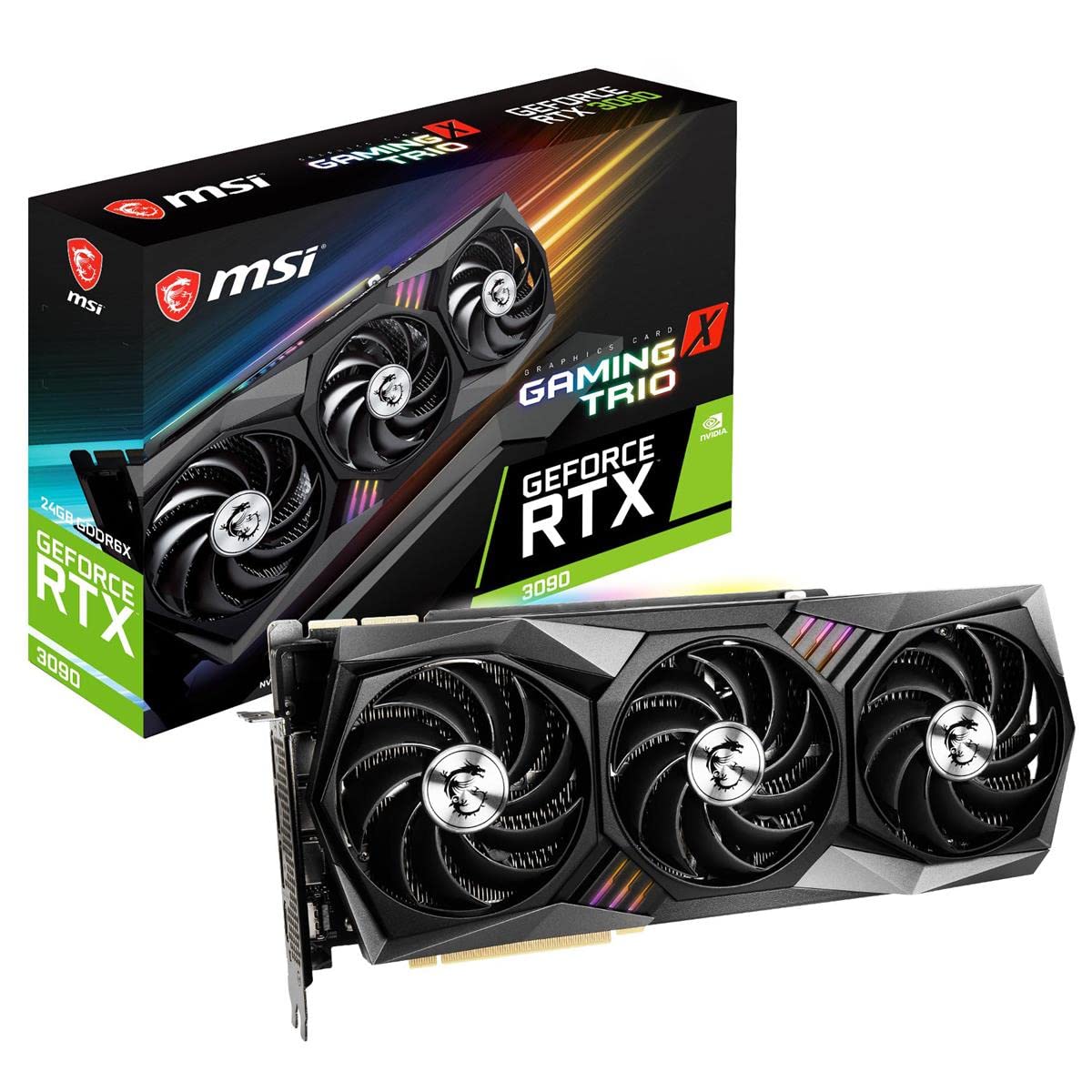
The MSI RTX 3090 Gaming X Trio remains a viable option for specific use cases even years after its release. With 24GB of GDDR6X memory on a massive 384-bit bus, it offers VRAM capacity that still rivals current-generation cards. The Tri-Frozr 2 thermal design with three fans and copper heat pipes keeps the card cool, though the hot air exhaust vents into the case rather than out, which can raise CPU temperatures. Real users report excellent 4K 60 fps performance and whisper-quiet operation for a card of this power class.
The RTX 3090 is still one of the quietest cards in its performance tier, with no coil whine reported in most units. The build quality is outstanding with a metal backplate and copper pipes that cool the GDDR6X memory modules directly. It fits most standard ATX cases at 323mm length, though it barely fits some larger ITX cases. For gaming at 4K 60 fps and for AI or content creation workloads that demand massive VRAM, this card still holds its own.
The major downsides are its age, high power draw, and the fact that newer architectures offer better performance per watt. The card runs hot, with some users reporting high temperatures that require robust case cooling. The included support brace is widely regarded as inadequate for the card’s weight. If you need 24GB of VRAM for professional workloads and can handle the power and heat, this is a legacy option that still delivers. For pure gaming, newer cards at this price point outperform it substantially.
Why it’s great
- Massive 24GB VRAM buffer with 384-bit bus for heavy workloads
- Very quiet operation with no coil whine in most units
- Excellent build quality with dedicated VRAM cooling
Good to know
- Runs hot and vents heat into the case, not out
- Newer architectures offer much better performance per watt
FAQ
Is 12GB of VRAM enough for 1440p gaming in 2025?
Should I get an NVIDIA RTX 5070 or an AMD RX 9060 XT for 1440p gaming?
How important is the cooling solution on a gaming GPU?
Can I use an SFF-ready RTX 5070 in a mid-tower case?
What power supply wattage do I need for a high-end GPU like the RX 9070 XT or RTX 5070 Ti?
Final Thoughts: The Verdict
For most users, the best gpu for gaming pc winner is the ASUS Prime RTX 5070 because it offers the perfect balance of DLSS 4 performance, thermal efficiency, and compact size for 1440p gaming. If you want maximum VRAM and raw rasterization power for 4K, grab the Sapphire Nitro+ RX 9070 XT. And for the best price-to-performance ratio in the high end, nothing beats the MSI RTX 5070 Ti Ventus 3X.