
The AMD Ryzen 7 5700X3D is a sleeper hit for gamers who value raw cache over core count, and pairing it with the wrong graphics card leaves performance on the table. You need a GPU that can keep pace with that massive 3D V-Cache without introducing a frame-time bottleneck at 1440p or 4K.
I’m Mohammad Maruf — the founder and writer behind Drink4Good. I’ve spent countless hours analyzing GPU benchmarks, VRAM bandwidth tests, and power delivery data to find the perfect companions for the 5700X3D platform.
After sorting through a stack of modern cards — from the efficient RTX 5060 to the VRAM-rich RX 9060 XT — I’ve narrowed the field to the strongest contenders for the best gpu for 5700x3d based on real-world gaming data and architectural compatibility.
How To Choose The Best GPU For 5700X3D
Your 5700X3D eliminates CPU-side stutter in most scenarios, so the GPU becomes the primary frame-rate governor. Picking a card with the wrong memory capacity or bandwidth profile can offset the cache advantage. Here’s what matters most for this specific AM4 processor.
VRAM Capacity and Your Target Resolution
At 1080p, an 8GB card like the RTX 5060 handles texture-heavy titles without issue. But if you plan to game at 1440p — where the 5700X3D shines — 12GB or 16GB gives you headroom for modern assets and ray-traced shadows. The 3D V-Cache helps with frame pacing, but it cannot compensate for VRAM overflow once textures spill into system memory.
PCIe Generation and Bandwidth
The 5700X3D sits on the AM4 platform, which supports PCIe 4.0 on B550 and X570 boards. Cards like the RX 9060 XT list PCIe 5.0 support but run perfectly fine at 4.0 x16 — the bandwidth difference is negligible for current games. Avoid a card with a x8 physical interface if you are using a B450 board, as that drops to PCIe 3.0 x8 and can choke performance.
Power Delivery and Transient Loads
The 5700X3D has a modest 105W TDP, but high-end GPUs like the RTX 5070 can spike to 250W or more. A quality 650W to 750W power supply is the practical minimum for mid-range cards. Cards with 8-pin power connectors are easier to cable-manage; models requiring a 12VHPWR adapter need a native ATX 3.0 PSU for clean power delivery.
Quick Comparison
On smaller screens, swipe sideways to see the full table.
| Model | Category | Best For | Key Spec | Amazon |
|---|---|---|---|---|
| PNY RTX 5070 Epic-X | Premium | 1440p High Refresh | 12GB GDDR7 / 250W TDP | Amazon |
| ASUS RTX 5060 Ti 16GB | Premium | 1440p Ultra + VRAM Headroom | 16GB GDDR7 / 2647 MHz | Amazon |
| GIGABYTE RX 9060 XT Gaming OC | Mid-Range | 1440p Max Settings | 16GB GDDR6 / 2700 MHz | Amazon |
| PowerColor Reaper RX 9060 XT | Mid-Range | Small Form Factor Builds | 16GB GDDR6 / 200mm Length | Amazon |
| XFX Swift RX 9060 XT | Mid-Range | 1080p/1440p All-Rounder | 16GB GDDR6 / 3320 MHz Boost | Amazon |
| ASRock RX 9060 XT Challenger | Mid-Range | Budget 1440p / AI Inference | 16GB GDDR6 / 3290 MHz | Amazon |
| Sapphire Pulse RX 9060 XT | Mid-Range | Quiet 1440p Gaming | 16GB GDDR6 / 3290 MHz | Amazon |
| MSI RTX 5060 Shadow 2X OC | Entry-Level | 1080p Ultra Gaming | 8GB GDDR7 / 2535 MHz | Amazon |
| GIGABYTE RTX 5060 Gaming OC | Entry-Level | 1080p Ray Tracing | 8GB GDDR7 / 2595 MHz | Amazon |
| ASUS Dual RTX 5060 OC | Entry-Level | SFF Builds / 1080p | 8GB GDDR7 / 2565 MHz OC | Amazon |
| GIGABYTE RTX 5060 Windforce OC | Entry-Level | Budget 1080p / Creators | 8GB GDDR7 / 2512 MHz | Amazon |
In‑Depth Reviews
1. PNY NVIDIA GeForce RTX 5070 Epic-X ARGB OC Triple Fan

The RTX 5070 is the ideal tier for a 5700X3D build because it provides 12GB of GDDR7 on a 192-bit bus — enough VRAM to handle 1440p texture packs without spilling into system RAM. The Blackwell architecture with DLSS 4 delivers a genuine generational uplift over Ada Lovelace, and the 6,144 CUDA core count ensures the 5700X3D’s cache is never starved for geometry throughput.
PNY’s Epic-X cooler uses a triple-fan design that keeps the 250W TDP in check while maintaining a quiet profile. At stock, the 2,685 MHz boost clock already beats the RTX 4070 Super in rasterization, and the 8% factory overclock provides extra headroom without manual tuning. The included dual 8-pin to 12VHPWR adapter works cleanly with existing 750W PSUs.
Owners report excellent 1440p performance paired with B650 and 5700X3D systems, with low case temps and whisper-quiet operation under max load. The card is SFF-ready at 2.4 slots, making it viable for smaller builds on the AM4 platform. If your budget stretches to this tier, this card extracts the full potential of the 3D V-Cache.
Why it’s great
- Full 80 ROPS confirmed, no cut-down silicon
- 12GB VRAM handles 1440p ray tracing comfortably
- Runs cool and quiet under sustained gaming load
Good to know
- Requires a 12VHPWR adapter or native ATX 3.0 PSU
- Larger footprint may not fit compact B450 cases
2. ASUS SFF-Ready Prime RTX 5060 Ti 16GB

The 5060 Ti with 16GB GDDR7 answers the biggest criticism of the 60-class NVIDIA cards: insufficient VRAM for texture-heavy 1440p titles. The 128-bit bus is partially offset by GDDR7’s high data rate (28 Gbps), yielding 448 GB/s bandwidth — enough to feed the 5700X3D’s cache without causing a memory bottleneck in most AAA games.
Asus equips this card with Axial-tech fans and a Dual BIOS switch, letting you toggle between quiet and performance modes. The 2.5-slot design measures 9 inches long, fitting comfortably in most mATX cases. Owners note that factory OC is modest (+30 MHz), but manual tuning yields up to 10% extra performance, and temps stay in the low 60s under load.
The 16GB buffer is a genuine advantage for AI inference and creative workloads on the same box. If you run local LLMs or edit high-res video alongside your gaming, this card gives you headroom the 8GB variants cannot match. The gap between this and the RTX 5070 is small in rasterization but large in VRAM capacity.
Why it’s great
- 16GB GDDR7 provides future-proof VRAM for 1440p
- Compact 9-inch length fits small AM4 cases
- Dual BIOS switch for silent operation
Good to know
- 128-bit bus limits raw bandwidth at 4K
- Factory OC is minimal, manual tuning required
3. GIGABYTE Radeon RX 9060 XT Gaming OC 16G

GIGABYTE’s Gaming OC variant of the RX 9060 XT uses the WINDFORCE cooling system with Hawk fans and server-grade thermal gel, keeping this 16GB card at stable clocks under prolonged loads. The RDNA 4 architecture delivers improved ray tracing over the previous generation, and FSR 4 brings frame generation closer to DLSS quality levels.
The 2,700 MHz boost clock is competitive with the RX 9060 XT competition, and the PCIe 5.0 interface ensures forward compatibility. Owners report consistent 1440p max-settings performance in Cyberpunk 2077 and Hogwarts Legacy, with the card staying below 70°C. The zero-RPM fan mode makes the card dead silent during desktop work.
At roughly 11 inches long, this card requires a full-size case, so measure your chassis before purchase. The dual-slot profile is relatively compact for a triple-fan design, and the RGB lighting can be controlled via GIGABYTE’s software. For gamers who want a visually cohesive AM4 build with red/black accents, this card fits the aesthetic perfectly.
Why it’s great
- Excellent 1440p ultra performance with RDNA 4
- Quiet cooling with zero-RPM fan mode
- 16GB VRAM handles modern textures at high resolutions
Good to know
- Large card length needs a spacious case
- Ray tracing still trails NVIDIA in some titles
4. PowerColor Reaper AMD Radeon RX 9060 XT 16GB

The PowerColor Reaper RX 9060 XT measures just 200mm in length — a rare compact card with 16GB of VRAM that fits comfortably in small form factor cases like the Fractal Terra or Cooler Master NR200. The single 8-pin power connector keeps cable management clean, and the 500W minimum PSU requirement means most existing AM4 builds can drop this in without a PSU upgrade.
Despite its small size, the dual-fan cooler keeps the GPU at reasonable temperatures. Owners report stable 4K 60fps gaming in titles like Arch Raiders and Battlefield 6, and the card cruises through 1080p Ultra at high frame rates. The 2,620 MHz boost clock is a few percent below the ASRock Challenger, but power efficiency is excellent.
The lack of RGB keeps the card visually understated — ideal for a stealthy build. One owner noted that disabling e-cores on an i5-14600K resolved stuttering in WoW, which is worth checking on your 5700X3D system. This card is purpose-built for users who prioritize chassis compatibility and low power draw over raw clock speed.
Why it’s great
- Only 200mm long, ideal for SFF builds
- Single 8-pin power, low 500W minimum PSU
- Quiet operation and clean, non-RGB design
Good to know
- Boost clock lower than some 9060 XT rivals
- AMD drivers may need tuning for some MMOs
5. XFX Swift AMD Radeon RX 9060 XT OC 16GB

The XFX Swift RX 9060 XT offers the highest factory boost clock in this tier at up to 3,320 MHz, making it the fastest 9060 XT on paper. The 16GB GDDR6 buffer pairs well with the 5700X3D’s cache, especially in open-world games where large texture files are swapped between memory pools.
The dual-fan SWFT cooling solution is more compact than triple-fan alternatives, measuring 10.63 inches long. It fits most mid-tower cases without issue. Owners report Time Spy scores around 17,000 and temperatures around 60°C under load — impressive for a card that draws power efficiently. The card handles 1080p max settings on 95% of modern AAA games without breaking a sweat.
The lack of RGB and a simple black shroud makes the XFX Swift a pragmatic choice for gamers who want raw performance without aesthetic frills. The three display outputs (2x DP, 1x HDMI) are sufficient for a triple-monitor setup, and the power efficiency means you can pair it with a 550W to 650W PSU easily.
Why it’s great
- Highest boost clock among RX 9060 XT cards
- Runs cool (60°C) with quiet dual-fan cooling
- 16GB VRAM at a competitive price point
Good to know
- No RGB lighting for those who want it
- Only 3 display outputs, no USB-C
6. ASRock Radeon RX 9060 XT Challenger 16GB OC

The ASRock Challenger is the budget champion of the RX 9060 XT lineup, offering 16GB GDDR6 and a 3,290 MHz boost clock at the most entry-level price in this tier. The dual-fan design includes 0dB Silent Technology, stopping the fans completely under low load for near-silent operation during everyday use.
This card is PCIe 5.0 x16 ready, so it will saturate any current interface, though it works perfectly at PCIe 4.0 x16 on B550/X570 boards. The 249mm length is manageable for most mid-tower cases, and the single 8-pin connector keeps cabling straightforward. The metal backplate improves rigidity and cooling, and the LED indicator can be toggled off for a stealthy look.
Owners highlight the card’s ability to push 165 fps at 1080p high settings and excellent AI inference performance using ROCm. If you dabble in local LLMs or image generation alongside gaming, the 16GB VRAM is a massive advantage over 8GB competitors. This card is the strongest price-to-performance argument for pairing the 5700X3D with an AMD GPU.
Why it’s great
- Best entry-level price for 16GB VRAM
- 0dB Silent mode for quiet desktop use
- Compact size fits most mid-tower AM4 builds
Good to know
- Dual-fan cooling less aggressive than triple-fan variants
- No RGB for gamers who prefer lighting effects
7. Sapphire Pulse AMD Radeon RX 9060 XT 16GB

Sapphire’s Pulse series has long been known for excellent acoustics and build quality, and the RX 9060 XT continues that tradition. It uses a full PCIe 5.0 x16 interface with 16GB GDDR6 running at 20 Gbps, and the 3,290 MHz boost clock is tuned for consistent frame pacing rather than peak speeds.
The dual-fan cooler is remarkably quiet, with owners reporting edge temps in the mid-50s Celsius under load and the fans barely audible. Undervolting the card yields even lower power draw while boosting clocks — a win for efficiency-focused builds. The small footprint makes it a clean fit in most AM4 systems.
The card excels at 1440p gaming with max settings, and the Linux support is outstanding for open-source drivers. If you run a dual-boot system or prefer a silent operating environment, the Sapphire Pulse is the card to beat. Owners who upgraded from an RX 570 report a massive performance jump without any coil whine or thermal issues.
Why it’s great
- Exceptionally quiet cooling, near-inaudible under load
- Full PCIe 5.0 x16 interface for future-proofing
- Excellent Linux driver support out of the box
Good to know
- No RGB lighting at all
- Small size may look underwhelming in large cases
8. MSI Gaming RTX 5060 Shadow 2X OC 8G

The MSI Shadow 2X OC uses TORX Fan 5.0 technology, where fan blades linked by ring arcs stabilize high-pressure airflow, keeping the compact dual-fan cooler efficient. The 2,535 MHz boost clock is standard for the RTX 5060, but the nickel-plated copper baseplate and square core pipes optimize thermal transfer from the GPU die.
This card excels at 1080p Ultra gaming with DLSS 4 enabled, hitting over 140 fps in competitive titles like Fortnite and maintaining stable frame times in AAA games. The 8GB GDDR7 memory is sufficient for current 1080p titles, and the 150W TDP means you can power it with a 500W PSU without issues. Owners note temps below 53°C under typical loads.
The SFF-ready design makes this card a great drop-in upgrade for existing AM4 builds with limited space. If you are building a dedicated 1080p gaming rig around the 5700X3D, this is the most power-efficient option that still delivers excellent frame rates. It is a pure gaming card — avoid it if you need VRAM for creative work.
Why it’s great
- Very low power draw (150W TDP)
- Runs cool, under 53°C in many cases
- Compact, SFF-ready design
Good to know
- 8GB VRAM limits 1440p texture quality
- Not recommended for 4K or high-end ray tracing
9. GIGABYTE GeForce RTX 5060 Gaming OC 8G
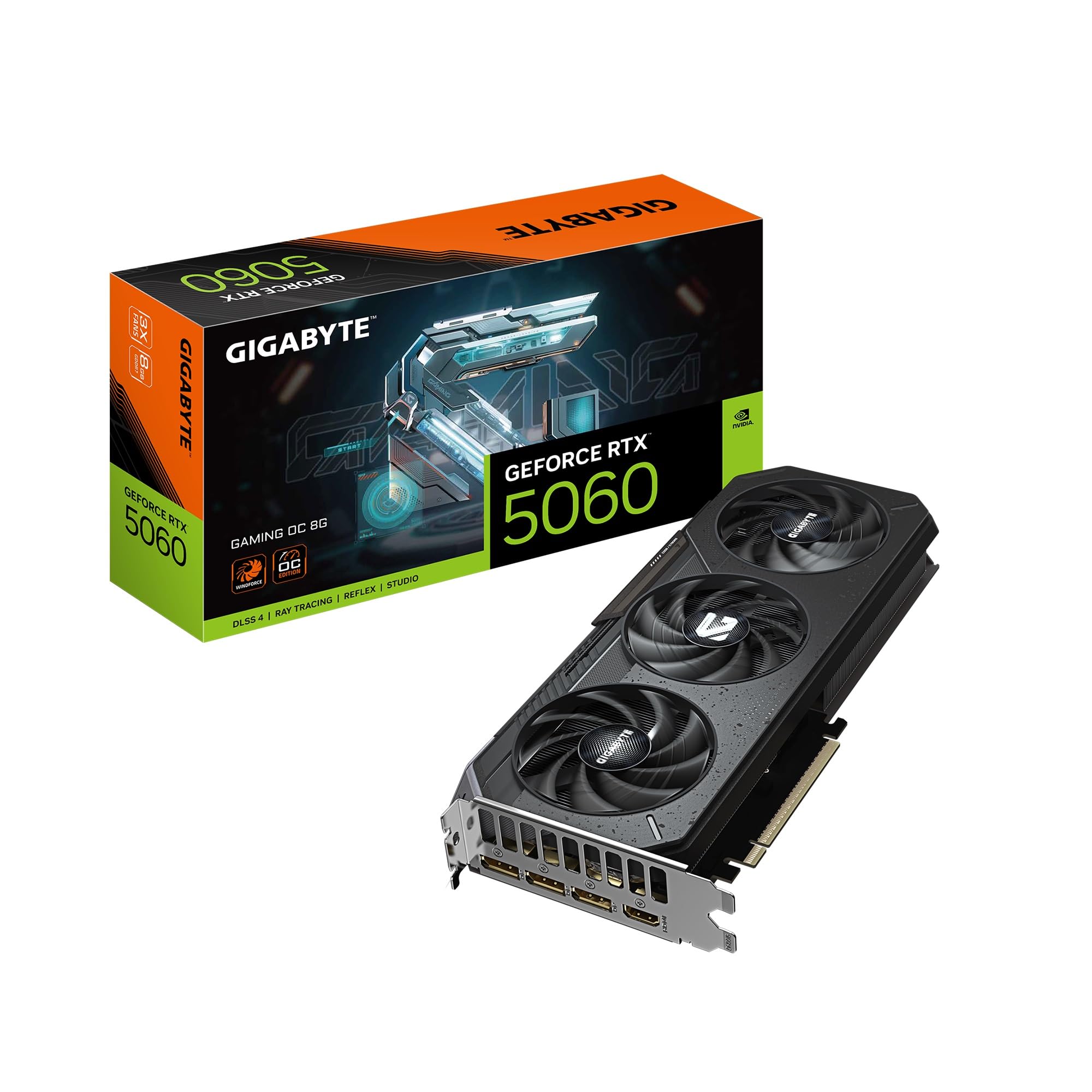
The GIGABYTE Gaming OC RTX 5060 distinguishes itself from the Windforce model with a more aggressive 2,595 MHz clock speed and a triple-fan WINDFORCE cooler. Despite having 8GB GDDR7, the higher factory overclock and superior cooling make it the best-performing RTX 5060 for sustained gaming sessions where thermal throttling could occur.
At 11.06 inches long, this card requires a case that supports triple-fan GPUs. However, the size pays off in thermal performance — owners report the card stays under 60°C even during ray-traced Cyberpunk 2077 sessions at 1080p Ultra. The DLSS 4 upscaling helps offset the 128-bit memory bus limitation in demanding titles.
This card is best for gamers who want the absolute fastest RTX 5060 available and have the case space to accommodate it. The triple-fan design also runs quieter than dual-fan counterparts under equal loads, making it a solid choice for silent 1080p gaming. The 8GB VRAM is a hard limit for future-proofing, but for current titles, the clock speed advantage is real.
Why it’s great
- Highest factory clock among RTX 5060 cards
- Triple-fan cooling stays under 60°C under load
- Quieter than dual-fan alternatives
Good to know
- Long card requires a spacious case
- 8GB VRAM is a hard ceiling for future games
10. ASUS Dual NVIDIA GeForce RTX 5060 8GB OC Edition

The ASUS Dual RTX 5060 OC is an SFF-ready card that fits in compact cases without sacrificing performance. The Axial-tech fan design uses a smaller hub for longer blades, increasing downward air pressure while maintaining quiet operation. The 2,565 MHz OC mode is competitive for the 60-class, and the card draws around 100W under typical gaming loads — extremely efficient for the performance tier.
The 8GB GDDR7 on a 128-bit bus benefits significantly from the GDDR7 bandwidth boost, which alleviated the memory bottleneck seen on the RTX 4060. Owners report the card performs similarly to a desktop RTX 2080 Ti or RTX 3070 in rasterization, making it a strong 1080p card and capable of handling about 80% of titles at 1440p. The 1.4-pound weight and 9-inch length make it one of the most manageable RTX 50-series cards.
This card has no RGB lighting, which is a plus for minimalist builds. The 0dB technology stops fans during light loads, making it ideal for a quiet office or HTPC. The 3-year warranty and plug-and-play stability add peace of mind for builders who want a hassle-free upgrade from an older GTX or RTX 20-series GPU.
Why it’s great
- SFF-ready, fits in compact and HTPC cases
- Low power draw, efficient operation
- Stable drivers, plug-and-play installation
Good to know
- 8GB VRAM limits high-texture 1440p gaming
- No RGB lighting for those who want it
11. GIGABYTE GeForce RTX 5060 Windforce OC 8G

The GIGABYTE RTX 5060 Windforce OC is the entry-level gatekeeper for the Blackwell generation. With a 2,512 MHz boost clock, 8GB GDDR7 on a 128-bit bus, and a dual-fan WINDFORCE cooler, it provides a stable 1080p gaming experience with DLSS 4 access. The 7.83-inch length fits almost any case, making it a trivial drop-in upgrade for aging AM4 builds.
Owners upgrading from a GTX 1660 report roughly double the performance, hitting over 250 FPS in games like Cyberpunk 2077 and DOOM at 1080p. The card is efficient enough to work with a 750W PSU and a Ryzen 5700X3D without power concerns. The dual-fan cooler is quiet under normal loads, and the card supports up to 7680 x 4320 output for multi-monitor productivity setups.
The 8GB VRAM requires careful settings management in modern AAA titles — you may need to drop textures from Ultra to High at 1440p. DLSS 4 helps extend the card’s lifespan, but the 128-bit bus is a hard limit for frame generation buffer space. This card is ideal for budget builders who want RTX 50-series features at the lowest possible investment.
Why it’s great
- Most affordable RTX 50-series entry point
- Compact size fits any case easily
- DLSS 4 improves frame rates in supported games
Good to know
- 8GB VRAM requires texture compromises at 1440p
- 128-bit bus limits bandwidth for 4K gaming
FAQ
Will the RTX 5060 bottleneck my 5700X3D?
Should I choose an 8GB or 16GB card for the 5700X3D?
Do I need a PCIe 5.0 GPU for the 5700X3D?
Can the 5700X3D handle the RTX 5070 without bottlenecking?
Final Thoughts: The Verdict
For most users, the gpu for 5700x3d winner is the PNY RTX 5070 Epic-X because 12GB GDDR7 on a 192-bit bus provides the best frame-time consistency at 1440p, matching the 5700X3D’s cache advantage. If you want maximum VRAM headroom for creative work or AI inference, grab the ASUS RTX 5060 Ti 16GB. And for the strongest value proposition with 16GB GDDR6 at an entry-level price, nothing beats the ASRock RX 9060 XT Challenger.