
A keyboard that feels sluggish in the middle of a triple-editing duel can turn a guaranteed Victory Royale into a trip back to the lobby. The difference between placing mats and eating a pump shotgun blast often comes down to how fast your keystrokes register. For competitive Fortnite, the right keyboard delivers near-instantaneous response and customizable actuation that aligns with your specific build and edit binds.
I’m Mohammad Maruf — the founder and writer behind Drink4Good. I’ve spent hundreds of hours analyzing gaming keyboard hardware, polling rate specifications, switch types, and the measurable performance impact these features have on competitive play within this specific title.
This guide breaks down the essential specs that matter for building and editing speed, compares top-tier options, and presents the definitive list of the best fortnite keyboard choices currently available for serious players seeking a competitive hardware edge.
How To Choose The Best Fortnite Keyboard
Fortnite demands a unique combination of rapid, repeated key presses (for building and editing) and precise single-press inputs (for weapon swaps and pickaxe swings). A keyboard designed for general typing or slower-paced shooters will introduce latency and mis-registrations during high-intensity box fights. Understanding the key metrics below helps you avoid spending money on features that don’t translate to in-game performance.
Switch Type: Hall Effect vs. Mechanical vs. Membrane
Hall Effect magnetic switches are currently the optimal choice for Fortnite. They allow adjustable actuation points (from 0.1mm to 4.0mm), enabling you to set build and edit binds to activate with the lightest tap while keeping movement keys less sensitive to avoid accidental input. Traditional mechanical switches have a fixed actuation point, and membrane switches lack the speed and precision needed for competitive building.
Polling Rate and Response Time
Polling rate measures how often your keyboard reports its status to your computer, measured in Hz. A standard keyboard runs at 125Hz (reporting every 8ms). Gaming keyboards often feature 1,000Hz (1ms). High-end models now offer 4,000Hz (0.25ms) and 8,000Hz (0.125ms). In Fortnite, where a single edit takes roughly 150-200ms from key press to confirmation, shaving even a few milliseconds off the communication delay can mean the difference between hitting a window edit and getting shot through the wall.
Form Factor: 60%, Tenkeyless (TKL), Full Size
Most professional Fortnite players and top competitors use 60% or Tenkeyless (TKL) keyboards. The 60% layout (roughly 60 keys) removes the number pad, function row, and arrow keys, positioning your right hand closer to the mouse for tighter arm movement and reducing unnecessary desk clutter. TKL retains the arrow keys and function row while still saving significant space. Full-size keyboards with numpads often widen your stance and can interfere with low-sensitivity mouse swipes.
Key Rollover and Anti-Ghosting
N-Key Rollover (NKRO) allows every key to be pressed and registered simultaneously, regardless of how many keys are held down. Anti-ghosting ensures no false key presses trigger when multiple keys are pressed at once. For Fortnite, where you might be holding W to move forward, pressing E to edit, and clicking mouse buttons simultaneously, NKRO is essential for ensuring every command is correctly sent.
Quick Comparison
On smaller screens, swipe sideways to see the full table.
| Model | Category | Best For | Key Spec | Amazon |
|---|---|---|---|---|
| SteelSeries Apex Pro TKL Gen 3 | Premium | Pro-Level Competitors | OmniPoint 3.0 0.1-4.0mm Actuation | Amazon |
| ATTACK SHARK X68 HE | Mid-Range | Value Hall Effect Pick | 0.01mm RT accuracy, 8KHz Polling | Amazon |
| EPOMAKER HE68 Lite | Mid-Range | Customization & Sound | 128K scan rate, 5-layer dampening | Amazon |
| Razer Ornata V3 TKL | Mid-Range | Quiet, Low-Profile Typing | Mecha-Membrane Switches | Amazon |
| Aula WIN68 HE | Entry-Level | First HE Switch Experience | 0.02mm-3.44mm Actuation Range | Amazon |
| Aula WIN60 HE | Entry-Level | Ultra-Compact FPS Design | 0.02mm RT Step, LEOBOG Switches | Amazon |
| Redragon K552 | Budget | Durable, Beginner Mechanical | Cherry MX Blue Clone Switches | Amazon |
In‑Depth Reviews
1. SteelSeries Apex Pro TKL Gen 3

The SteelSeries Apex Pro TKL Gen 3 sits at the top of the competitive keyboard hierarchy for a reason. Its OmniPoint 3.0 Hall Effect switches offer a 0.1mm to 4.0mm adjustable actuation range in 0.1mm increments, which is the most granular control available outside of custom firmware configurations. The inclusion of Rapid Trigger and Rapid Tap (SOCD) features directly addresses Fortnite’s need for instantaneous direction changes and rapid editing sequences.
Beyond the switch tech, the build quality is unmistakably premium. The top plate is aircraft-grade aluminum alloy, the PBT keycaps resist shine from heavy use, and the detachable USB-C connection ensures a stable wired signal. The integrated OLED smart display lets you view settings and toggle profiles without alt-tabbing out of a match. The GG QuickSet software provides game-ready presets specifically tuned for titles like Fortnite, so you can immediately start with optimized actuation curves.
This is the keyboard that top-tier Fortnite streamers and tournament competitors gravitate toward. It eliminates the variable of hardware latency, letting you focus purely on mechanics and rotations. The TKL form factor also keeps your mouse hand close for low-sensitivity aim adjustments. If you’re serious about competitive play and have the budget to match, this is the endgame answer.
Why it’s great
- Widest adjustable actuation range for fine-tuning build edits
- Rapid Trigger and Rapid Tap provide instant direction-change recognition
- Premium aluminum build with PBT keycaps ensures long durability
Good to know
- Premium price point makes it a significant investment
- Requires GG software for full actuation customization
2. ATTACK SHARK X68 HE

The ATTACK SHARK X68 HE delivers Hall Effect performance at a price point that challenges the entire entry-level mechanical market. With a 0.01mm rapid trigger accuracy and an 8,000Hz polling rate that yields a theoretical 0.125ms latency, it matches the fastest keyboards on the market for raw communication speed. The adjustable actuation range (0.1mm to 3.4mm) gives you the latitude to make your edit keys feather-light while keeping movement keys safe from accidental presses.
What distinguishes the X68 HE at this price is its construction. It uses a top-mounted aluminium alloy anodized positioning plate with double-layer PORON foam, producing a typing sound that rivals custom keyboards costing three times more. The pre-lubed stabilizers on the larger keys (spacebar, shift, enter) eliminate the rattly sound that often plagues budget gaming boards. The Cherry profile double-shot PBT keycaps ensure the legends won’t fade after months of intense box-fighting practice.
Multiple verified buyers report that this keyboard improved their edit speed immediately compared to older mechanical keyboards. Its 66-key 65% layout retains separate arrow keys, which some Fortnite players prefer for trap placement or weapon slot switching. The web-based QMK driver requires no installation and allows full key remapping, SOCD, and rapid trigger tuning. For players wanting Hall Effect benefits without the premium price, this is the most compelling option.
Why it’s great
- Hall Effect switches with 0.01mm rapid trigger at an entry-level price
- Aluminum plate and foam dampening produce premium typing acoustics
- QMK web driver allows full customization without software installation
Good to know
- Some early units have had QC issues with USB-C cable
- Web driver interface feels less polished than desktop software
3. EPOMAKER HE68 Lite
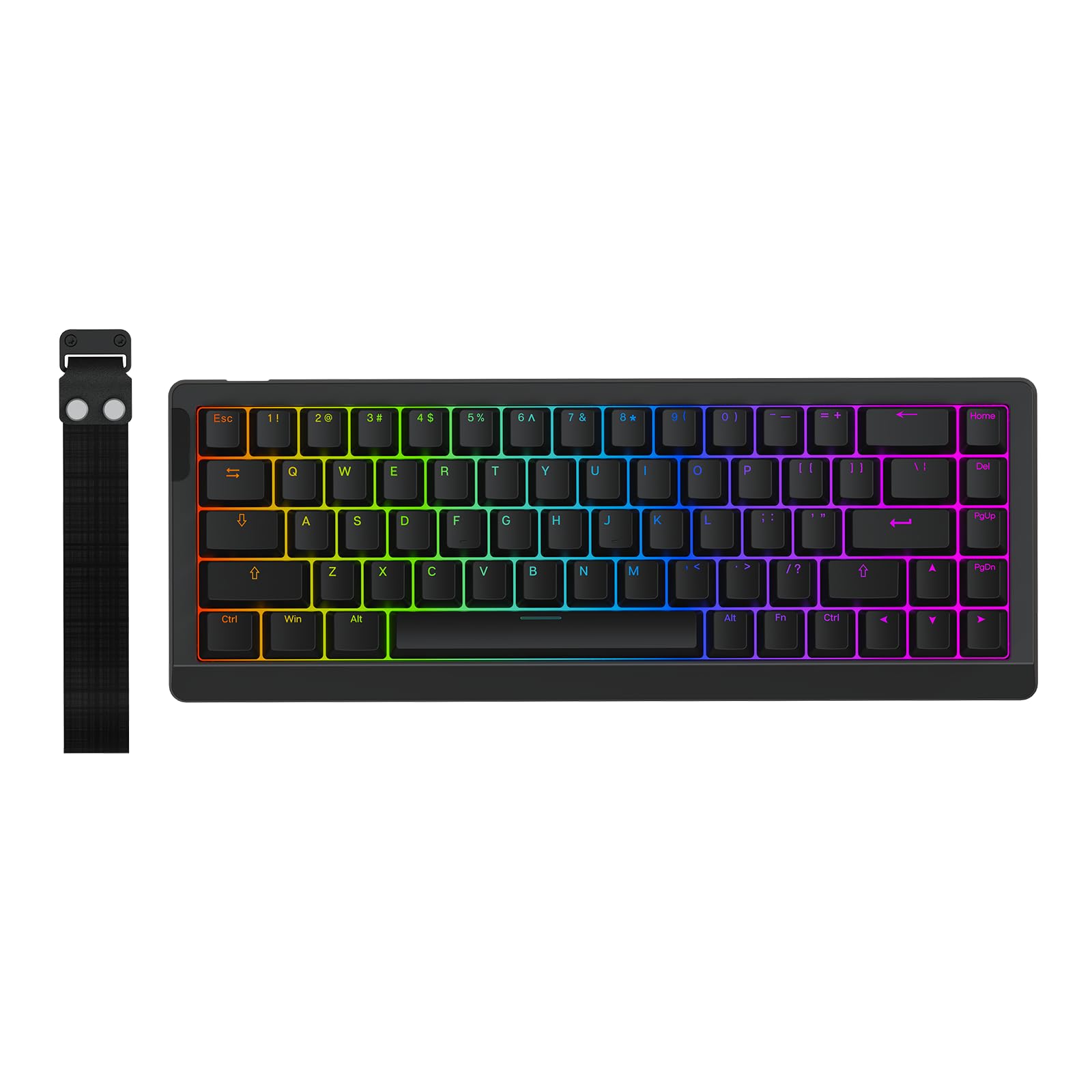
The EPOMAKER HE68 Lite takes a different approach to the Hall Effect contest. While it features the critical rapid trigger tech (adjustable down to 0.005mm), a 128,000Hz per-key scan rate, and 8,000Hz polling rate with 0.125ms latency, its true differentiator is the acoustic engineering. Five layers of sound-dampening material — PRO Sandwich Foam, IXPE Switch Pad, PET Sound-Enhancement Pad, Switch Socket Pad, and Bottom Foam — produce a creamy, thocky typing sound that enthusiasts compare to high-end custom builds.
The board supports Snap Key (SOCD), Dynamic Keystroke (DKS), and Mod Tap (MT), all of which have direct applications in Fortnite. DKS allows you to bind four separate actions to a single physical key based on press depth, useful for combining build and edit functions. The included keycap puller and detachable USB-C cable make it travel-ready, and its compact 65% layout with 68 keys provides a strong balance between desk space savings and arrow key availability.
Buyers consistently note that the build quality feels far above its price category. The PBT keycaps are thick and textured, resisting finger oil. The factory-lubed magnetic linear switches deliver smooth, wobble-free presses. The EPOMAKER software is compatible with both Windows and Mac, which is rare for Hall Effect boards. If you appreciate a satisfying typing feel alongside competitive performance, this does both exceptionally well.
Why it’s great
- Five-layer dampening produces one of the best sound profiles in this price tier
- 0.005mm RT adjustment offers extreme fine-tuning for competitive players
- Mac-compatible software with full DKS, SOCD, and Mod Tap functionality
Good to know
- PBT keycaps are not shine-through, making legends harder to see in the dark
- Non-detachable cable would have been preferable for portability
4. Razer Ornata V3 TKL

The Razer Ornata V3 TKL occupies a unique position in this lineup. It does not use mechanical or Hall Effect switches. Instead, it uses Razer’s Mecha-Membrane technology, which combines a rubber dome base with a mechanical clicker mechanism. This produces a tactile, clicky feel that mimics mechanical switches while being significantly quieter and less fatiguing for long sessions. The low-profile keys also reduce finger travel distance, which some players find increases typing and editing speed.
It features Razer Snap Tap functionality (via Synapse 4), which prioritizes the latest directional input between a pair of assigned keys. This is effectively similar to SOCD found on Hall Effect boards. The 8-zone Chroma RGB lighting integrates with hundreds of games, including Fortnite, automatically reacting to health, kills, and other in-game events. The magnetic soft-touch wrist rest is well-cushioned and snaps securely into the keyboard, providing comfortable support during hours of box fights and Zone Wars.
While it lacks the adjustable actuation and raw polling speed of the Hall Effect competitors, the Ornata V3 TKL remains a strong option for players who prefer a quieter, lower-profile typing experience without sacrificing basic gaming responsiveness. Its UV-coated keycaps are more durable than standard ABS, resisting legend fading. The dedicated backlit media keys also offer convenient volume and playback control without leaving the game.
Why it’s great
- Mecha-Membrane technology provides a satisfying click without full mechanical volume
- Low-profile keys reduce finger travel and hand strain over long sessions
- Razer Snap Tap enables SOCD-like directional priority for competitive movement
Good to know
- No adjustable actuation — fixed actuation point limits fine-tuning
- Non-standard low-profile keycaps make aftermarket replacements harder to find
5. Aula WIN68 HE

The Aula WIN68 HE proves that Hall Effect keyboard technology no longer requires a large investment. At this price point, it delivers magnetic switches with an adjustable actuation range of 0.02mm to 3.44mm, an 8,000Hz polling rate, and a rapid trigger function. The 68-key 60% layout saves significant desk space while retaining arrow keys — a critical feature for many Fortnite players who rely on arrow keys for trap or weapon functions.
The build quality punches above its weight class. The board has a surprisingly heavy build (686 grams) which keeps it planted during intense gameplay. The sound profile is described by buyers as “creamy” and “silky smooth,” which is uncommon at this tier. The RGB backlighting offers 16.8 million colors and 14 preset lighting effects that can be adjusted via FN key combos or the web-based driver. The south-facing LEDs reduce keycap interference with shine-through.
The web driver (accessible from the user manual) allows customization of RT, SOCD, DKS, MT, and TGL functions. Some users noted that finding the driver link initially felt “sketchy,” but once configured, the actuation adjustments work as intended. It supports NKRO and full anti-ghosting. For players wanting to test Hall Effect benefits before committing to a flagship board, this is an excellent entry point with minimal financial risk.
Why it’s great
- Extremely affordable entry to Hall Effect and rapid trigger technology
- Adjustable actuation range gives competitive fine-tuning flexibility
- Heavy, sturdy plastic construction and creamy pre-built sound signature
Good to know
- Web driver is not intuitive to find initially
- No dedicated software for macOS users
6. Aula WIN60 HE

The Aula WIN60 HE takes the Hall Effect formula and shrinks it down to a true 60% layout. With 11 inches width and just 1.1 inches height, it occupies minimal desk real estate, allowing maximum mouse clearance for low-DPI arm aiming. It uses LEOBOG Gray Wood switches, which have a low initial actuation pressure that promotes fast, light typing — beneficial for the rapid-fire key presses needed during build fights.
Like its WIN68 sibling, it offers an 8,000Hz polling rate and 0.02mm rapid trigger step distance. The web-based driver allows customization of actuation points, key remapping, macros, and RGB lighting effects. The south-facing RGB lights illuminate the PBT keycaps effectively, though the keycaps are not shine-through, meaning legends won’t be visible in darkness. The compact design includes a detachable USB-C cable for easy transport to LAN events or friend’s houses.
Buyers consistently highlight how the WIN60 HE competes directly with much more expensive Hall Effect boards like the Wooting 60HE and Razer Huntsman Mini Analog. The build feels robust despite the plastic enclosure, and the sound profile is clean without excessive ping or rattle. The major trade-off is the lack of dedicated arrow keys, which some Fortnite players use for trap placement. If you prefer a minimal layout and prioritize mouse space above all else, this is a strong, affordable contender.
Why it’s great
- Smallest possible footprint maximizes desk space for mouse movement
- LEOBOG Gray Wood switches provide low-pressure, fast actuation ideal for rapid key presses
- Solid build quality with premium sound that belies its budget price
Good to know
- No dedicated arrow keys — requires FN-layer combos for navigation
- Non-shine-through keycaps make legends invisible in dim lighting
- Not compatible with PlayStation or Xbox consoles
7. Redragon K552

The Redragon K552 is a hardware veteran that has introduced countless players to mechanical keyboards. Its 87-key tenkeyless layout features Outemu Blue switches (Cherry MX Blue clones) that provide a distinct tactile bump and audible click with each key press. The metal top plate and steel frame deliver a weighty, rigid feel that resists flex during aggressive typing or gaming sessions. For players who prefer a tactile, clicky switch feel, the K552 has an unmistakable presence.
It supports NKRO and full anti-ghosting across all 87 keys, ensuring simultaneous key presses are registered correctly. The rainbow LED backlighting offers six preset modes (breathing, wave, reactive, ripple, etc.), though it lacks per-key RGB customization and software control. The 12 FN key multimedia functions give quick access to volume, media playback, and lighting adjustments without leaving the game. The braided USB cable adds durability at a budget segment where frayed cables are common.
The key drawback for Fortnite is the fixed actuation point of the blue switches. Without Hall Effect adjustable actuation, you cannot make your edit keys trigger with a lighter press. The switches are also loud, which may be disruptive during late-night sessions. However, the K552 is deeply moddable — many users replace the switches and keycaps over time. For a player on a tight budget who wants a solid foundation to later upgrade, the K552 offers proven durability.
Why it’s great
- Extremely durable metal-framed construction withstands heavy use
- Full NKRO and anti-ghosting ensure all simultaneous key presses register
- Mod-friendly design allows switch and keycap upgrades over time
Good to know
- Outemu Blue switches are loud and not optimized for competitive gaming latency
- Fixed actuation point prevents fine-tuning for different key sensitivities
- No software control for lighting or macro programming
FAQ
Do I need an 8,000Hz polling keyboard to play Fortnite competitively?
What is the advantage of Hall Effect switches over traditional Cherry MX switches for Fortnite?
Should I choose a 60% keyboard or a TKL for Fortnite?
What does Rapid Trigger mean and how does it help in Fortnite?
Final Thoughts: The Verdict
For most users, the fortnite keyboard winner is the SteelSeries Apex Pro TKL Gen 3 because its OmniPoint 3.0 switches offer the widest adjustable actuation range and the most refined rapid trigger implementation currently available. If you want best-in-class Hall Effect performance without the premium price, grab the ATTACK SHARK X68 HE. And for an entry-level Hall Effect experience with creamy sound and excellent switch feel, nothing beats the Aula WIN68 HE.