
Playing a tense ranked match on the couch or grinding through a single-player campaign from bed, the heat soak from a bare laptop on your thighs and the strain of hunching over a stack of pillows turns an immersive session into a literal pain. The wrong lap surface traps heat, forces your wrists into awkward angles, and leaves your lower back aching long after you log off. Building a stable, breathable workstation that actually works on a soft mattress or a plush sofa demands more than just a flat board — it demands a dedicated solution designed around the specific needs of PC and console gaming away from a desk.
I’m Mohammad Maruf — the founder and writer behind Drink4Good. I’ve spent hundreds of hours cross-referencing material specs, cushion densities, fan noise levels, and real user test data to isolate the only lap desks that actually solve the thermal and ergonomic problems gamers face daily.
Whether you need active cooling to keep a high-performance rig from thermal throttling, a deep cushion that won’t dig into your knees during four-hour marathons, or adjustable height to align the screen with your eye level while reclining, this guide breaks down every meaningful spec to help you pick the best gaming lapdesk for your specific setup.
How To Choose The Best Gaming Lapdesk
Not every cushioned tray supports a heavy gaming laptop without sagging, and not every adjustable stand fits comfortably on a lap while you’re reclined. Matching the desk to your specific hardware and typical gaming posture is the only way to avoid wasted money and lingering discomfort.
Cooling Capacity and Airflow
Gaming laptops push hot air through bottom intake vents. A flat, solid surface blocks that airflow, causing thermal throttling, fan noise spikes, and frame drops mid-game. Look for desks with either a raised mesh surface, a cutout area under the laptop, or — best of all — a built-in USB-powered fan that actively pulls heat away. Desks without any ventilation features are only suitable for lightweight casual gaming or non-gaming tasks.
Cushion Density and Surface Stability
A lap desk cushion that flattens under an 8-pound laptop plus your arms creates an unstable, sloped platform that makes mouse aiming and keyboard typing imprecise. High-resilience foam or a thick microbead pillow retains shape and spreads the weight evenly across your lap without sinking. The cushion should also be wide enough to span from knee to knee to prevent the desk from tilting when you shift your legs.
Height and Tilt Adjustability
Keeping the screen at eye level while your hands rest naturally on the keyboard requires either a built-in angled cushion or a mechanical height/tilt adjustment — ideally from about 9 to 14 inches and 0 to 36 degrees of tilt. Fixed flat desks force you to hunch your neck or lean forward. Adjustable legs with auto-lock buttons or hand-tightened knobs provide the most precise fit, especially when moving between a bed, a sofa, and a recliner.
Surface Material and Wrist Support
PVC leather surfaces are easy to wipe clean and double as a usable mouse pad, but some trap heat against the underside of your laptop. Look for a textured or matte finish that provides grip without friction drag on your mouse skates. An integrated memory-foam wrist rest reduces ulnar deviation during long typing sessions, but it must be positioned at the correct height — too low and your laptop slides, too high and your wrists bend upward.
Quick Comparison
On smaller screens, swipe sideways to see the full table.
| Model | Category | Best For | Key Spec | Amazon |
|---|---|---|---|---|
| SAIJI Pink | Active Cooling Stand | High-TDP laptops needing airflow | Built-in USB fan, 9.4″-12.6″ height | Amazon |
| iXTRA White | Active Cooling Stand | Late-night gamers who need a reading light | Built-in fan, 3-level LED light | Amazon |
| SAIJI Black | Premium Cushion Desk | Console PC gamers on couch or recliner | PVC leather surface, 21.3” x 13” | Amazon |
| LapGear Extra Large | Adjustable Cushion Desk | Large 17.3” laptops with mouse space | 23” x 13” surface, 3.8 lbs weight | Amazon |
| L.DOCTOR Large | Cushioned Lap Desk | Work writing on a recliner | Washable zippered cushion, 21.8” x 12.1” | Amazon |
| BirdRock Home Deluxe | Integrated Accessory Desk | Casual gaming with tablet phone management | Built-in USB light, pull-out mouse pad | Amazon |
| QUEEN ROSE Reading Pillow | Lap Support Pillow | Low-profile arm support for console gaming | U-shaped design, cooling polyester cover | Amazon |
In‑Depth Reviews
1. SAIJI Laptop Desk with Cooling Fan
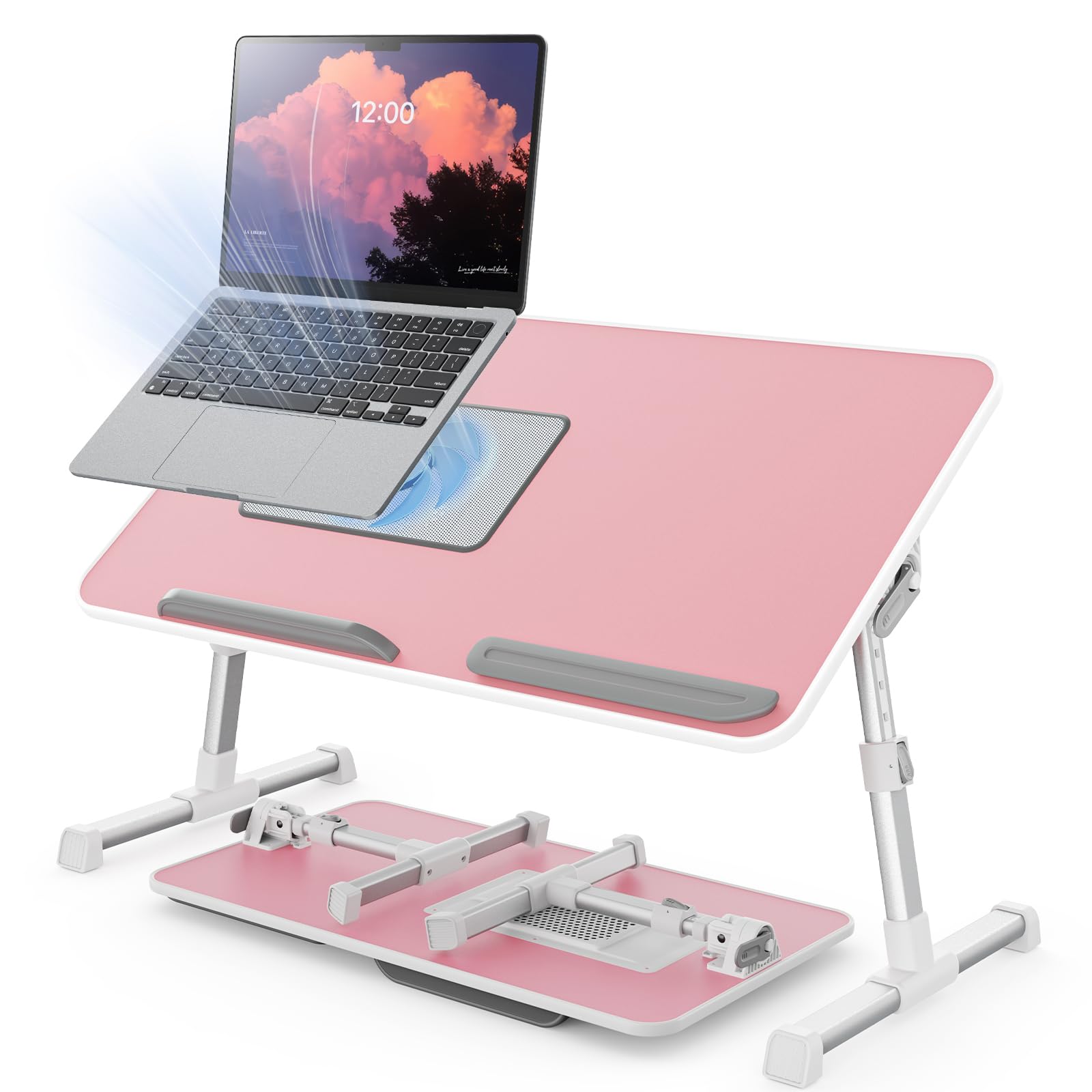
The SAIJI Pink cooling stand is the most balanced solution for gamers who need active heat management without leaving the soft surface of a bed or couch. Its built-in USB fan sits directly under the laptop’s vent area, pulling hot air away so you can play demanding titles without thermal throttling. The metal-tube sled legs support up to 80 pounds and remain stable on a thick mattress — no sinking or wobbling during frantic mouse movements.
Height adjustment ranges from 9.4 to 12.6 inches and the tabletop tilts from 0 to 36 degrees, covering the ideal ergonomic zone for both reclined couch use and upright bed sitting. The desktop measures 20.5 by 11.8 inches, which fits a 17-inch laptop with room for a compact mouse. At 4.2 pounds, it’s light enough to carry between rooms but dense enough to stay planted under load. A retractable blocker at the bottom edge prevents the laptop from sliding forward when the desk is angled.
The fan is powered by USB and the cord tucks into a groove on the underside to avoid clutter. Some users note the fan produces a low hum at full speed, but it’s quieter than most gaming laptop fans would be under load. This is the pick if you want active cooling and full adjustability in a single product.
Why it’s great
- Active USB cooling fan prevents laptop overheating during long sessions
- 5 adjustable heights and 4 tilt angles provide precise ergonomic positioning
- Sturdy metal legs hold up to 80 lbs with no wobble on soft surfaces
Good to know
- Fan produces a low hum that some may notice in a quiet room
- Desktop width may feel tight for both a full-size keyboard and mouse side by side
2. iXTRA Laptop Lap Desk with Cooling Fan
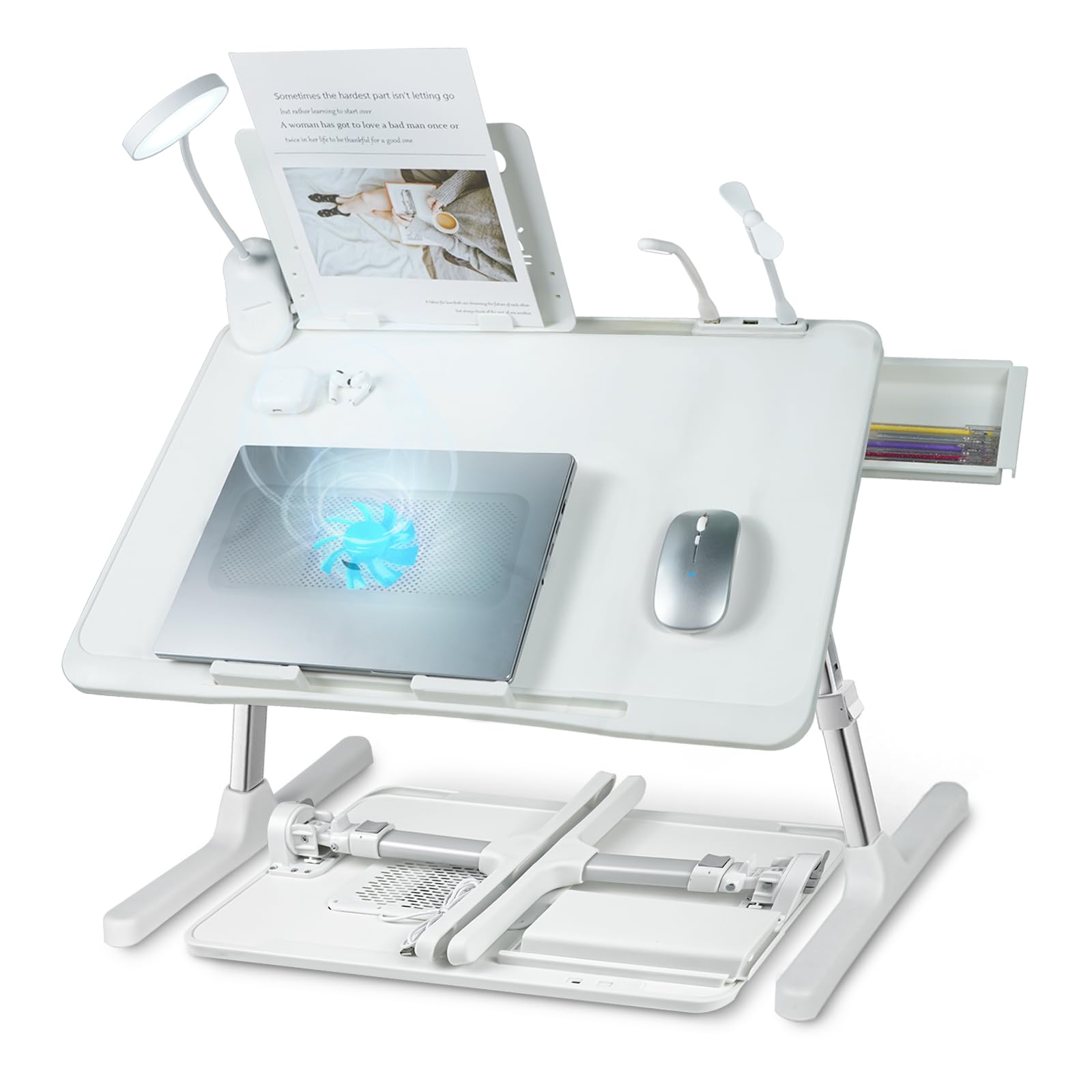
The iXTRA in white takes the active cooling concept further by adding a built-in LED light with three brightness levels, making it a solid choice for late-night sessions when you want to see the keyboard without turning on an overhead lamp. The fan, light, and storage drawer are all powered or housed within the same unit — the fan draws air through the surface while the adjustable lamp angles over the screen.
Height adjustment ranges from 9.84 to 14.17 inches via auto-lock buttons on the sled legs, and the tabletop tilts to several positions. The surface is 22.04 by 12.59 inches — slightly wider than the SAIJI Pink, which gives more real estate for mousing. The side drawer is deep enough for pens, cables, or a small controller. The table supports up to 77 pounds and folds to 2.7 inches for storage.
The main trade-off is that the light and fan cannot be controlled independently — unplugging the USB cable turns both off at once. A few users also report that height adjustment buttons can stick over time, and the only way to power the light is via USB-C with no wall adapter included. For gamers who prioritize an integrated light and drawer over a few ergonomic refinements, this is a compelling option.
Why it’s great
- Integrated 3-level LED light is great for low-light gaming without disturbing others
- Slightly wider surface (22”) provides extra mouse space compared to most competitors
- Handy side storage drawer keeps accessories organized and off the gaming surface
Good to know
- Fan and light share a single USB connection and cannot be controlled separately
- Some units have reported sticky height-adjustment buttons after extended use
3. SAIJI Lap Desk with LED Light

This SAIJI desk takes a different approach — no active cooling, but a thick cushioned base and a premium PVC leather work surface that doubles as a high-friction mouse pad. The 21.3 by 13-inch desk is designed for gamers who play on a recliner or couch where height adjustment isn’t needed, but a stable, comfortable lap platform is critical. The cushion underneath is 30 percent thicker than standard models, which keeps the desk from sinking into your legs even during long sessions.
A built-in wrist rest spans the front edge, reducing strain during typing and aiming. There’s a concealed drawer on the right side for small accessories and a detachable LED lamp that charges separately via USB-C. The lamp’s neck is flexible and holds position well, and its three brightness levels are useful for evening sessions. The desk also has a built-in phone slot on the left side, which faces the user and is accessible through the cushion profile.
The surface is not suited for heavy mousing if you prefer a dedicated mouse pad — the leather texture is grippy but slower than a cloth pad. The unit weighs 4.7 pounds, which is heavier than some padded desks, but the integrated carry handle makes transport between rooms easy. For console gamers or PC players who use a controller and need a stable, soft platform with good lighting, this is the top choice.
Why it’s great
- Thick, high-density cushion prevents sinking and provides stable lap support for hours
- PVC leather surface doubles as a functional mouse pad with good friction control
- Detachable LED lamp with 3 brightness levels and flexible neck for targeted lighting
Good to know
- Leather surface is slower than a standard cloth mouse pad for high-DPI aiming
- Heavier than competing cushion-style desks at 4.7 pounds
4. LapGear Extra Large Adjustable Lap Desk
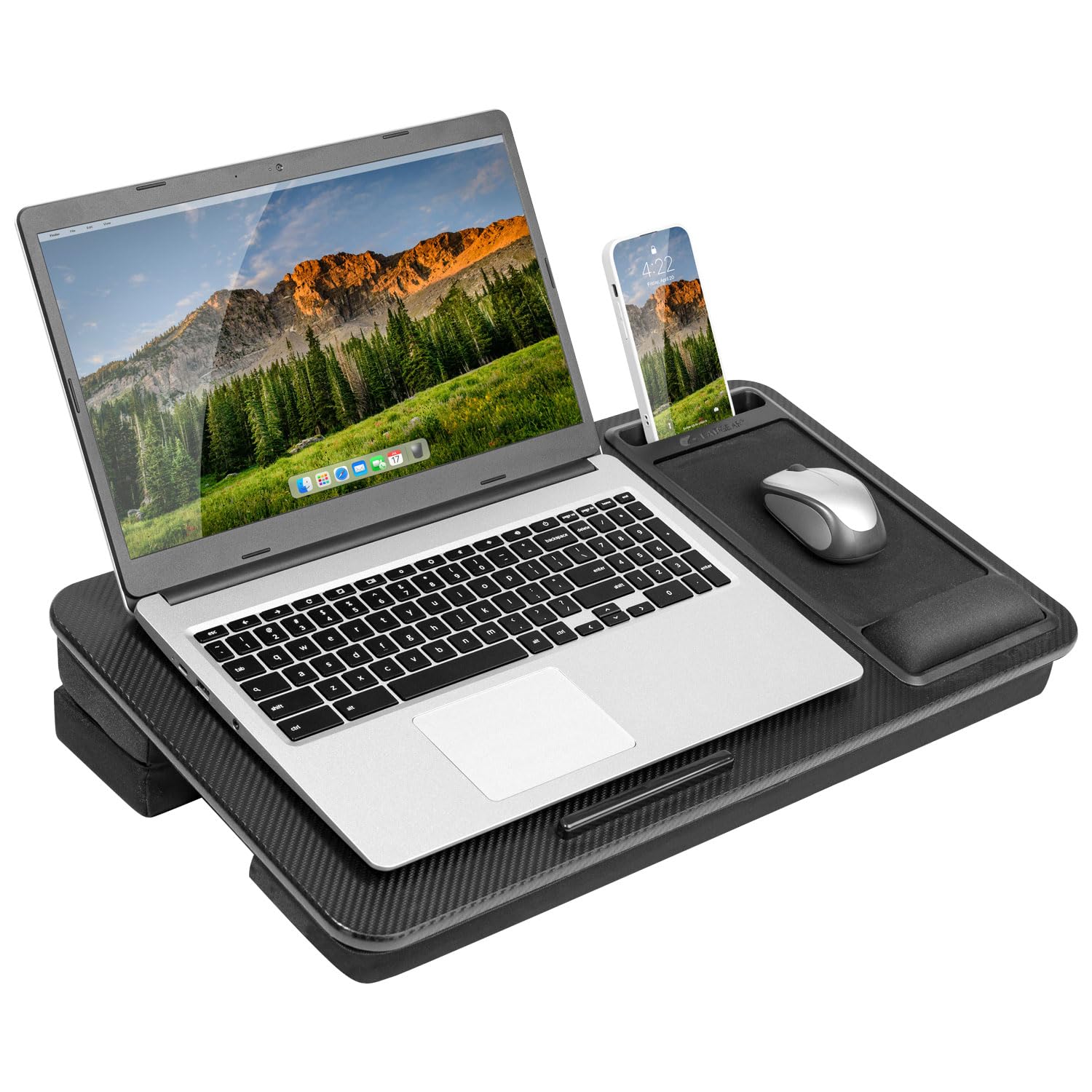
For gamers with a 17.3-inch laptop, the LapGear Extra Large solves the common problem of having zero room for a mouse. Its 23 by 13-inch workspace is the broadest among all the cushioned desks reviewed here, allowing a full-size laptop plus a dedicated mouse area without overlap. The engineered wood core is stiff enough to resist flex even under heavy equipment, and the non-slip surface keeps the laptop from sliding.
The bottom cushion is adjustable via a magnetic flip-out leg that changes the incline angle — from flat to about 15 degrees — which helps tilt the screen upward when the desk rests on your lap. The memory foam wrist rest spans the entire front edge, providing comfortable palm support during long sessions. A built-in phone slot and a device ledge at the top hold small items, and the extra-deep mouse pad is textured for optical sensor tracking.
The desk weighs 3.8 pounds, which is manageable, but some users report the cushion can transfer heat from the laptop to the thighs over time — no active cooling here. The engineering is focused on stability and size, not ventilation. If your priority is having enough surface to run a large laptop and a full-size gaming mouse without compromise, this is the most practical cushioned option.
Why it’s great
- Largest work surface in its class at 23” wide — fits 17.3” laptops and a mouse easily
- Memory foam wrist rest reduces fatigue during extended typing and aiming sessions
- Adjustable cushion incline via magnetic leg provides ergonomic screen tilt on your lap
Good to know
- No active cooling — laptop heat may transfer through the cushion during demanding games
- Surface is non-slip but not optimized for high-speed mouse gliding
5. L.DOCTOR Cushioned Lap Desk

The L.DOCTOR desk is a straightforward cushioned work surface with a useful set of practical features for gamers who also use the desk for writing or drawing. The cushion is the standout feature — it has a removable zippered cover that can be machine-washed, which solves the inevitable issue of sweat, dust, and snack crumbs collecting after repeated lap use. The surface is made from textured PVC leather that acts as a built-in mouse pad with enough friction for precise cursor control.
At 21.8 by 12.1 inches, the desk is slightly narrower than the LapGear, but still fits a 17-inch laptop with a mouse area to the right. The front edge includes an anti-slip bar that stops your laptop from sliding forward, and there’s a deep slot across the top that holds a tablet or phone upright. A small pen holder on the underside keeps a stylus or pencil accessible but out of the way.
The cushion is filled with microbeads that mold to your lap shape, distributing weight evenly. The desk is lightweight at 3.5 pounds and includes a fabric handle for carrying. The downside is the lack of any active cooling — the microbead fill is not designed to dissipate heat, so heavy gaming on a powerful laptop may become uncomfortable after an hour. This is best suited for gamers who alternate between gaming sessions and typing tasks on a couch.
Why it’s great
- Removable, machine-washable cushion cover keeps the desk hygienic over long-term use
- Microbead fill conforms to the shape of your lap for comfortable, stable support
- Deep tablet slot and pen holder provide useful organization for accessories
Good to know
- Microbead cushion retains heat — high-TDP laptops may feel warm through the base
- Surface is slightly narrower than the LapGear for mousing
6. BirdRock Home Deluxe Lap Desk

The BirdRock Home Deluxe is a well-built entry-level lap desk that packs surprising versatility into a compact footprint. Its most distinctive feature is a pull-out mouse pad that can slide out from either the left or right side — a clever solution for ambidextrous use when desk space is tight. The desktop measures 18.5 by 14 inches, which fits a 15-inch laptop comfortably, but leaves less room for a large mouse pad alongside the keyboard.
The desk includes a built-in USB-powered reading light that mounts on a flexible neck, which is useful for evening sessions without turning on room lights. The surface has a grooved slot at the front that holds a phone or tablet, and the bottom cushion is a dense memory foam block that remains stable under moderate weight. The decorative teal-and-brown design is more casual than most gaming peripherals, but the build quality is solid for the category.
The main limitation for serious gaming is the 15-inch laptop fit — a 17-inch machine won’t fit on the main surface. The pull-out mouse pad works well for basic navigation, but active aiming in competitive shooters may feel constrained. This desk is best for casual PC gamers who play with a controller or lighter titles, or for console gamers who need a stable lap surface for a streaming laptop.
Why it’s great
- Pull-out mouse pad slides left or right for flexible mouse placement
- Built-in USB light with flexible neck is great for low-light gaming or reading
- Comfortable memory foam cushion stays stable and supportive on the lap
Good to know
- Surface limited to 15” laptops — no room for 17” machines
- Pull-out pad is small for high-sensitivity mouse aiming
7. QUEEN ROSE Reading Pillow for Gaming

The QUEEN ROSE Reading Pillow is not a traditional lap desk — it’s a U-shaped support pillow designed to cradle your arms and elevate your wrists while gaming or reading on a couch or bed. Rather than providing a hard surface for a laptop, it supports your elbows and forearms, reducing pressure points during long sessions with a controller, handheld device like the Switch, or even a lightweight tablet. The extended U-shaped tail can fold to support your elbows or be tucked behind your back as a lumbar pad.
The cover is made of a cooling polyester fabric that stays cool to the touch even after hours of use, and the filling is a polyester fiber that fluffs up quickly after unpacking. At 1.76 kilograms, it’s light enough to carry between rooms but dense enough to support your arms without collapsing. The shape wraps around the body without straps, so it can be adjusted for different postures — side lying, upright sitting, or semi-reclined.
This is not a surface for a 17-inch gaming laptop — you need a separate table or tray for the hardware. But for console gamers, handheld PC gamers, or anyone who experiences wrist and elbow strain while holding a controller for hours, this pillow directly addresses the support gap that standard flat desks ignore. It’s a specialized solution for a specific pain point, not a replacement for a desktop stand.
Why it’s great
- U-shaped design cradles elbows and wrists, reducing pressure during long controller sessions
- Cooling fabric cover resists heat buildup — comfortable for extended contact on bare skin
- Versatile position — can be used as a backrest, arm support, or side-sleeping pillow
Good to know
- No hard surface — not suitable for holding a laptop; best paired with a separate table or handheld
- May feel bulky for users who prefer a minimalist setup
FAQ
Can a lap desk damage my gaming laptop by blocking the bottom vents?
How much height adjustment do I need for comfortable couch gaming?
Can I use a gaming mouse on a lap desk’s built-in surface?
Final Thoughts: The Verdict
For most users, the gaming lapdesk winner is the SAIJI Laptop Desk with Cooling Fan because it combines active cooling to prevent thermal throttling with 5 height positions and a 36-degree tilt range, all in a stable, 80-pound-capable frame. If you want a larger work surface for a 17-inch laptop plus a full-size mouse, grab the LapGear Extra Large. And for console gamers or handheld PC players who suffer from wrist and elbow pressure, nothing beats the QUEEN ROSE Reading Pillow for targeted arm support without a hard surface.