
Stepping up from a flat 1440p panel to a 4K curved gaming monitor isn’t just about more pixels. It’s about how the 1500R or 1000R arc wraps the image around your peripheral vision, pulling you inward until the bezels vanish. That shift — from watching a screen to being inside the game — is the single biggest upgrade a player can make. The right panel means zero hunt for on-screen targets, richer shadow detail, and a desk that finally feels like a command center.
I’m Mohammad Maruf — the founder and writer behind Drink4Good. I’ve spent years analyzing the engineering behind high‑refresh VA, IPS, and OLED panels, comparing backlight zones, pixel response, color gamut coverage, and the real‑world performance that defines elite tier gaming monitors.
After evaluating dozens of models across every price tier, this guide breaks down the strongest options currently available. Whether you prioritize OLED blacks, maximum refresh rate, or a mid‑range sweet spot, the best 4k curved gaming monitor for your setup comes down to panel type, curvature depth, and adaptive sync compatibility — and we’ve measured every spec that matters.
How To Choose The Best 4K Curved Gaming Monitor
Selecting a 4K curved monitor requires balancing pixel density, curvature radius, panel technology, and refresh rate against your GPU budget and desk space. The wrong combination leaves you paying for features your hardware cannot utilize — or missing immersion you would have valued every session.
Curvature: 1000R, 1500R, or 1800R?
Curvature is measured in millimeters of radius — 1000R means the circle formed by the curve has a 1‑meter radius, creating a tighter wrap. 1000R closely matches the human visual field, reducing eye travel across the screen. 1500R is more relaxed and common in mid‑range VA panels. 1800R offers a gentle arc that works well for productivity but adds minimal immersion for gaming. For pure gaming immersion at 32‑inches, 1500R or tighter is the standard.
Panel Type: OLED vs VA vs Fast IPS
OLED delivers per‑pixel lighting for infinite contrast, true blacks, and sub‑1ms response times. The tradeoff is potential burn‑in and lower peak brightness in some modes. VA panels in this class offer strong native contrast (3000:1) and deeper blacks than IPS, but slower pixel transitions can create dark‑level smearing. Fast IPS eliminates smearing and offers wide viewing angles, but static contrast typically sits at 1000:1. For a curved 4K gaming monitor, VA and OLED dominate the curved segment because IPS curves tend to create more backlight bleed.
Refresh Rate and Your GPU
4K at 144Hz requires a high‑end card — an RTX 3080 or faster — to push competitive frame rates in modern titles. 240Hz is only fully usable with an RTX 4090 or similar, and even then mostly in esports or older games. If your GPU is mid‑range, a 144Hz–160Hz ceiling provides headroom without wasted cost. Many OLED monitors also offer dual‑mode capabilities that let you drop to 1080p at double the refresh rate for competitive play.
Quick Comparison
On smaller screens, swipe sideways to see the full table.
| Model | Category | Best For | Key Spec | Amazon |
|---|---|---|---|---|
| ASUS ROG Swift PG32UCDM | Premium QD‑OLED | Best Overall High‑End Gaming | 240Hz / 0.03ms / 1500000:1 contrast | Amazon |
| Samsung Odyssey Neo G8 G85NB | Mini‑LED VA | High‑Brightness HDR Gaming | 240Hz / 1ms / HDR2000 peak brightness | Amazon |
| Acer Predator X32 OLED | QD‑OLED | Pure Color Accuracy & Contrast | 240Hz / 0.03ms / DCI‑P3 99% | Amazon |
| LG UltraGear 32GX850A-B | Glossy WOLED | Glossy Finish & Dual Mode | 165Hz / 0.03ms / TrueBlack 400 | Amazon |
| MSI MPG 321CURX | 3rd‑Gen QD‑OLED | Best OLED Value & Connectivity | 240Hz / 0.03ms / 98W USB‑C PD | Amazon |
| Alienware AW3425DW | Ultrawide QD‑OLED | Ultrawide Immersion | 240Hz / 0.03ms / 3440×1440 resolution | Amazon |
| Samsung Odyssey OLED G9 G91SD | Super Ultrawide QD‑OLED | Productivity & Immersive Sim Racing | 144Hz / 0.03ms / 32:9 aspect ratio | Amazon |
| ASUS ROG Strix XG32UCG | Fast IPS | Dual Mode Competitive Play | 160Hz (320Hz FHD) / 0.3ms | Amazon |
| GIGABYTE M32UC | Curved VA | Best Mid‑Range KVM Desk Setup | 160Hz(OC) / 1ms / 4x USB 3.2 | Amazon |
| CRUA 32″ 4K Curved | VA Value | Budget‑Friendly Entry 4K | 240Hz / 1500R / 120% sRGB | Amazon |
| Gawfolk 49″ Ultrawide | Ultrawide VA | Budget Ultrawide Desktop | 240Hz / 5120×1440 / 1500R | Amazon |
In‑Depth Reviews
1. ASUS ROG Swift PG32UCDM

The PG32UCDM marries a 32‑inch 4K QD‑OLED panel with a 240Hz refresh rate and 0.03ms response time, making it one of the fastest and most color‑accurate curved monitors available. Its custom heatsink and graphene film manage heat effectively, reducing burn‑in risk while maintaining consistent brightness. The 1500000:1 static contrast ratio delivers per‑pixel black levels that make HDR content genuinely pop — no blooming, no edge light bleed.
Color coverage hits 99% DCI‑P3 with true 10‑bit depth and Delta E < 2 out of the box. The glossy panel finish enhances perceived clarity and contrast in controlled lighting, though it can show reflections in bright rooms. The included DisplayWidget Center lets you tweak OLED Care settings, uniform brightness, and crosshair modes with a mouse rather than the OSD joystick.
Connectivity is generous: DisplayPort 1.4 with DSC, HDMI 2.1, a 90W USB‑C port, and a 1/4‑inch tripod socket for streaming setups. ASUS backs it with a 3‑year warranty including burn‑in coverage — rare for OLED and a strong vote of confidence. For gamers who want the highest image quality floor in a 4K curved package, this is the reference point.
Why it’s great
- 240Hz at 4K with near‑instant 0.03ms response
- Custom heatsink and graphene film for burn‑in prevention
- 99% DCI‑P3 with true 10‑bit color
Good to know
- Glossy finish reflects ambient light
- Requires GPU capable of driving 4K at high refresh
2. Samsung Odyssey Neo G8 G85NB

The Neo G8 uses Quantum Mini‑LED backlighting on a VA panel to achieve a 1000R curvature that closely mirrors the human eye. Peak brightness hits 2000 nits in HDR, with a 1,000,000:1 dynamic contrast ratio that delivers spectacular highlight detail without washing out shadows. The 240Hz refresh rate and 1ms MPRT response keep fast motion clean, though some units exhibit scan lines at full refresh on certain desktop patterns.
Color accuracy is strong after calibration — the sRGB mode tames the aggressive default saturation, and the matte screen eliminates reflections entirely, a major advantage for bright rooms. The stand is robust with height, tilt, and swivel adjustment, and VESA 100×100 mount compatibility is standard. Inputs include DisplayPort 1.4, HDMI 2.1, and USB‑C.
HDR performance is genuinely impressive for a non‑OLED display; Quantum HDR2000 brings out specular highlights in games like Cyberpunk 2077 that even good IPS monitors cannot touch. The tradeoff is that the 1000R curve takes about two weeks to fully adapt to for desktop productivity, and the OSD button placement underneath the bezel is awkward. Still, for HDR‑focused gamers who want OLED‑like contrast without burn‑in worries, this is the top Mini‑LED contender.
Why it’s great
- 2000‑nit peak HDR with Mini‑LED precision
- 1000R curvature matches natural viewing arc
- Matte screen eliminates reflections
Good to know
- Scan line issue on some units at 240Hz
- OSD button placement is difficult to reach
3. Acer Predator X32 OLED

The Predator X32 pairs a 1700R curved QD‑OLED panel with 240Hz and a 0.03ms response time, targeting gamers who value color saturation and OLED depth. The 99% DCI‑P3 gamut produces vibrant, punchy tones that leap off the screen, and VESA DisplayHDR True Black 400 ensures shadow detail remains visible without crushing. The 10‑bit panel handles gradients smoothly, and the 1000‑nit peak brightness in small HDR highlights gives it impressive dynamism.
The stand offers full ergonomic adjustment — height, tilt, swivel — and the 1700R curve is gentle enough for daily productivity while still adding immersion in single‑player titles. Connectivity includes two DisplayPort 1.4 ports, two HDMI 2.1 inputs, and USB‑C with 90W power delivery. The built‑in speakers are functional for casual use, though external audio is still preferred.
Some users report that the monitor periodically prompts for panel refresh, which can interrupt gameplay if not scheduled. The V‑shaped stand base is wide and consumes significant desk real estate, so an aftermarket arm may be worth factoring in. For the price, however, the color performance and OLED contrast make it a compelling alternative to more expensive 4K OLEDs.
Why it’s great
- 99% DCI‑P3 with true 10‑bit QD‑OLED
- Full ergonomic stand (height, swivel, tilt)
- VESA DisplayHDR True Black 400 certified
Good to know
- Periodic panel refresh prompts
- Wide V‑shaped base consumes desk space
4. LG UltraGear 32GX850A-B

The 32GX850A-B uses LG’s WOLED panel with Micro Lens Array+ technology to push typical brightness to 275 nits — noticeably brighter than earlier UltraGear OLEDs. The glossy finish enhances perceived contrast and color vibrancy, though it is more reflective than matte alternatives. The dual‑mode feature lets you switch from 4K at 165Hz to 1080p at 330Hz via a hotkey, making it flexible for both graphically rich adventures and competitive shooters.
Color accuracy is strong with 98.5% DCI‑P3 coverage, and VESA DisplayHDR True Black 400 certification ensures deep, uniform blacks. The 1.5M:1 contrast ratio delivers per‑pixel lighting that eliminates blooming entirely. The stand supports height, tilt, swivel, and pivot adjustments, giving you exceptional desk placement flexibility.
Connectivity includes DisplayPort 1.4, dual HDMI 2.1, and a USB hub. The monitor is three‑times UL‑certified for anti‑glare, flicker‑free, and low blue light, which reduces eye strain during long sessions. The 165Hz ceiling is enough for most AAA gaming, and the glossy WOLED panel is easier to clean than QD‑OLED variants, which can develop a purple tint under direct light.
Why it’s great
- Glossy WOLED with Micro Lens Array+ for higher brightness
- Dual‑mode switching (4K 165Hz / 1080p 330Hz)
- Full ergonomic stand with pivot
Good to know
- Glossy finish reflects strong ambient light
- 165Hz may feel limiting for esports‑first players
5. MSI MPG 321CURX

The 321CURX uses MSI’s 3rd‑generation QD‑OLED panel, offering the latest advances in brightness efficiency and burn‑in resistance. With a 1700R curvature, 240Hz refresh rate, and 0.03ms GtG response, it competes directly with the PG32UCDM at a lower price point. The static contrast ratio of 1,500,000:1 produces the same per‑pixel black levels that make OLED so striking, and VESA DisplayHDR True Black 400 ensures HDR content looks authoritative.
MSI’s OLED Care 2.0 suite includes pixel shift, logo detection, and taskbar dimming to reduce burn‑in risk. The Gaming Intelligence App lets you adjust crosshairs, screen size, and other settings without digging into the OSD. Connectivity is a standout feature: DisplayPort 1.4a, dual HDMI 2.1 with full 48 Gbps bandwidth, and a USB‑C port that delivers 98W power delivery — enough to charge a high‑end gaming laptop.
Color accuracy is factory‑calibrated to Delta E ≤ 2, and the 98% DCI‑P3 gamut covers virtually all modern game content. The built‑in KVM lets you switch between a gaming PC and a work laptop with a single keyboard and mouse. The 3‑year burn‑in warranty provides peace of mind. For buyers who want OLED performance without paying ASUS or Samsung premiums, the 321CURX is the smartest value.
Why it’s great
- 3rd‑gen QD‑OLED with improved efficiency
- 98W USB‑C power delivery for laptops
- Built‑in KVM and 3‑year burn‑in warranty
Good to know
- Firmware update recommended out of box
- Pixel refresh triggers every ~16 hours
6. Alienware AW3425DW

The AW3425DW is a 34‑inch ultrawide QD‑OLED with a 3440×1440 resolution and 1800R curvature, striking a balance between immersive width and pixel density. The DCI‑P3 99.3% coverage and Delta E < 2 accuracy deliver vivid, true‑to‑life colors out of the box. VESA DisplayHDR TrueBlack 400 ensures deep blacks with zero blooming, and the infinite contrast ratio makes every scene feel dimensional.
The 240Hz refresh rate and 0.03ms response time keep motion blur virtually nonexistent, and the monitor supports NVIDIA G‑SYNC Compatible, AMD FreeSync Premium Pro, and VESA AdaptiveSync — making it platform‑agnostic for smooth gameplay. The 21:9 aspect ratio provides extra horizontal real estate for racing sims, flight sims, and wide‑aspect strategy titles, while also being practical for multitasking with two documents side by side.
The stand offers full height, tilt, and swivel adjustments. Connectivity includes DisplayPort 1.4 and HDMI 2.1. Text clarity on the QD‑OLED panel can appear slightly less sharp than a 4K 16:9 panel at normal viewing distances, which is a tradeoff for the ultrawide form factor. For gamers who prioritize ultrawide immersion with OLED quality, the AW3425DW is the default choice.
Why it’s great
- QD‑OLED with 99.3% DCI‑P3 and Delta E < 2
- 240Hz with triple adaptive sync compatibility
- Immersive 21:9 ultrawide format
Good to know
- Lower pixel density than 32‑inch 4K
- Text clarity may appear slightly softer
7. Samsung Odyssey OLED G9 G91SD

The G9 G91SD is a 49‑inch super ultrawide QD‑OLED with Dual QHD resolution (5120×1440) and a 32:9 aspect ratio, effectively replacing two 27‑inch 1440p monitors with a single seamless canvas. The QD‑OLED panel delivers infinite contrast, deep blacks, and vibrant colors across the entire width. The 144Hz refresh rate and 0.03ms response time are well matched to this resolution — driving it at full frame rates is demanding even for high‑end GPUs.
Thermal modulation adjusts brightness dynamically to prevent overheating, and the logo/taskbar detection automatically dims static elements to mitigate burn‑in. The Picture‑in‑Picture mode lets you display two sources simultaneously, making it genuinely useful for productivity. The ergonomic stand supports height and tilt adjustments, and VESA 100×100 mounting is standard.
Connectivity includes DisplayPort 1.4 and dual HDMI 2.1. The 32:9 ratio is transformative for flight simulators, racing games, and any title that natively supports super ultrawide. The main compromise is that many games still require mods or ini tweaks to render correctly at 32:9. For sim‑racing enthusiasts and desktop productivity power users who want OLED quality, the G9 is unmatched.
Why it’s great
- 49‑inch QD‑OLED with 32:9 and infinite contrast
- Picture‑in‑Picture for dual‑source multitasking
- Burn‑in prevention features (logo/taskbar detection)
Good to know
- Many games lack native 32:9 support
- Requires powerful GPU to drive at full resolution
8. ASUS ROG Strix XG32UCG

The XG32UCG uses ASUS Fast IPS technology to achieve a 0.3ms response time and a dual‑mode system that switches between 4K at 160Hz and Full HD at 320Hz. The 32‑inch 16:9 format is familiar and practical, and the 130% sRGB / 95% DCI‑P3 color gamut covers a wide range of content. The Extreme Low Motion Blur Sync (ELMB SYNC) works simultaneously with variable refresh rate, eliminating ghosting and tearing without sacrificing brightness.
Dynamic contrast ratio is rated at 100,000,000:1, though static contrast remains typical for IPS at 1000:1 — meaning blacks appear gray in dark rooms. The stand offers height, tilt, swivel, and a 1/4‑inch tripod socket for streamers mounting a webcam or microphone arm directly to the monitor. The DisplayWidget Center lets you adjust settings with a mouse.
Connectivity includes DisplayPort 1.4, HDMI 2.1, and USB‑C with DP Alt mode. The dual‑mode feature works via a hotkey, making it easy to drop to 320Hz for competitive shooters without digging through menus. For gamers who want both high‑refresh 4K for story titles and extreme smoothness for competitive play, the XG32UCG is a versatile Fast IPS option that avoids OLED burn‑in concerns entirely.
Why it’s great
- Dual‑mode: 4K 160Hz / FHD 320Hz with one button
- 0.3ms Fast IPS with ELMB SYNC
- Built‑in tripod socket for streamers
Good to know
- IPS native contrast limits black depth
- No USB‑C power delivery
9. GIGABYTE M32UC

The M32UC uses a 31.5‑inch SS VA panel with 4K resolution and a 1500R curve, overclocking to 160Hz with a 1ms MPRT response time. The 3000:1 native contrast ratio provides deeper blacks than IPS panels, making dark scenes more immersive without the blooming issues of edge‑lit LEDs. The 123% sRGB and 93% DCI‑P3 color gamut delivery is solid for the mid‑range price bracket.
The standout feature is the built‑in KVM — with one USB‑C upstream, DisplayPort, and HDMI inputs, you can control two devices with a single keyboard and mouse. The OSD Sidekick app lets you adjust settings from Windows rather than the on‑screen menu. Connectivity is generous: DisplayPort 1.4, two HDMI 2.1 ports, a USB‑C port, and a four‑port USB 3.2 hub.
Some units have reported backlight uniformity issues and the need for firmware updates to stabilize DisplayPort handshake. The included stand is basic (tilt only), so budget for a VESA arm if you need height adjustment. For home office and gaming users who want a single monitor to switch between a PC and a laptop with native KVM, the M32UC is the most cost‑effective 4K curved solution with that capability.
Why it’s great
- Integrated KVM for two‑device workflow
- 3000:1 VA contrast for deeper blacks
- 160Hz overclocked refresh rate
Good to know
- Occasional backlight uniformity variance
- Stand only offers tilt; no height adjustment
10. CRUA 32″ 4K Curved

The CRUA 32‑inch 4K VA monitor offers a 1500R curve, 240Hz refresh rate, and AMD FreeSync support at a budget‑friendly price point. The 3000:1 contrast ratio provides solid black levels for a VA panel, and the 120% sRGB coverage delivers acceptable color for casual gaming and media consumption. The 300 cd/m² brightness is adequate for indoor use but will struggle in bright rooms.
The white chassis is a rare aesthetic option that fits clean, bright desk builds, and the monitor includes built‑in speakers, PiP/PbP, HDMI 2.1, and DisplayPort 1.4. The stand provides tilt adjustment only, and VESA 75×75 mounting is supported for arm use. The RGB backlighting on the rear adds a subtle ambient glow that can be customized.
User reports indicate that the stand assembly can be finicky for larger hands, and the OSD can be confusing without a physical remote. Some reviews note that the built‑in speakers are weak. For budget‑conscious buyers who want 4K resolution with a 240Hz refresh rate in a curved form factor, the CRUA delivers the core specs at a price that leaves room for a GPU upgrade.
Why it’s great
- 240Hz and 4K at a budget‑friendly price
- White color option for bright desk builds
- 1500R curve with PiP/PbP support
Good to know
- Stand is tilt‑only and assembly can be tricky
- Built‑in speakers are low quality
11. Gawfolk 49″ Ultrawide
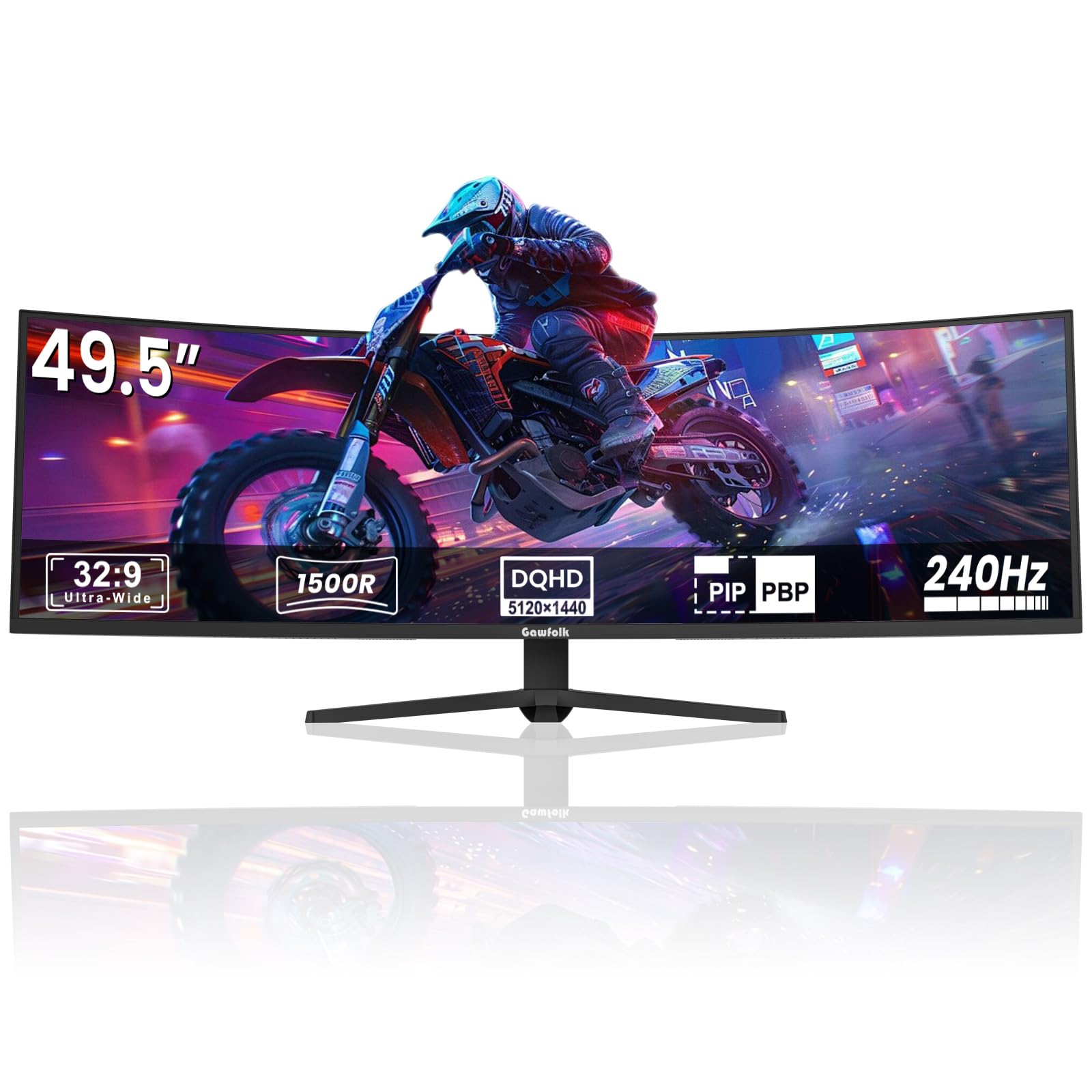
The Gawfolk 49‑inch ultrawide monitor uses a VA panel with DUHD resolution (5120×1440) and a 1500R curve, effectively serving as two 27‑inch 1440p monitors fused together. The 240Hz refresh rate and 1ms response time provide competitive fluidity, and FreeSync support keeps tearing at bay. The 3000:1 contrast ratio delivers deeper blacks than typical IPS ultrawides at this price level.
The 85% NTSC color gamut is acceptable for general use but falls short of the DCI‑P3 coverage offered by premium OLEDs. The built‑in crosshair overlay is a practical tool for shooters. The stand is sturdy and offers basic tilt adjustment, and the 100×100 VESA mount gives you the option to use a heavy‑duty arm.
Some users have reported screen cut‑out issues after a few days of use, and ghosting can appear when the monitor wakes from sleep. The brand customer support is less established than larger manufacturers. For users who want maximum screen real estate at an ultrawide 240Hz refresh rate on a tight budget, the Gawfolk offers a way into the super‑ultrawide format, but reliability should be monitored closely.
Why it’s great
- 49‑inch ultrawide at a budget‑friendly entry price
- 240Hz with 1ms response and FreeSync
- 5120×1440 resolution for multitasking
Good to know
- Reported random screen cut‑out issues
- Ghosting can occur after sleep wake
FAQ
Is 240Hz worth it on a 4K curved gaming monitor?
Does curvature matter for FPS games?
What is the difference between VA and OLED black levels?
Can I use a 4K curved monitor for console gaming?
How do I protect an OLED monitor from burn‑in?
Final Thoughts: The Verdict
For most users, the best 4k curved gaming monitor winner is the ASUS ROG Swift PG32UCDM because it delivers 240Hz QD‑OLED performance with industry‑leading burn‑in protection and a 3‑year warranty. If you want Mini‑LED HDR brightness without OLED burn‑in worry, grab the Samsung Odyssey Neo G8 G85NB. And for the best value OLED with KVM and 98W laptop charging, nothing beats the MSI MPG 321CURX.