
Finding a gaming mouse that treats your left hand as the primary rather than an afterthought is a deeper challenge than most realize. The standard right-handed ergonomic sculpt forces your ring and pinky fingers into a cramped curl, creating fatigue that compounds over long sessions. An ambidextrous design eliminates this asymmetry, offering a mirrored shape that either hand can command with equal authority.
I’m Mohammad Maruf — the founder and writer behind Drink4Good. I’ve spent years dissecting sensor specifications, switch durability ratings, and weight distribution data across hundreds of models to separate genuine ambidextrous engineering from the marketing gloss.
Whether you are left-handed, right-handed but tired of claw-grip strain, or simply want a mouse that swaps between work and gaming without a physical redesign, the right pick hinges on switch type, sensor resolution, and side-button architecture. This guide delivers a clear, feature-focused breakdown of the best ambidextrous gaming mouse options available today.
How To Choose The Best Ambidextrous Gaming Mouse
The main challenge is that a true ambidextrous mouse should not simply be a symmetrical blob. It needs mirrored thumb grooves, accessible side buttons on both flanks, and a sensor that performs identically regardless of grip orientation. Most designs fail one of these tests. Here are the three factors that matter most.
Side Button Architecture
A proper ambidextrous layout offers two side buttons on each side, giving left-handed users the same thumb-button access as right-handed players. Some mice use swappable magnetic buttons that you can remove from the unused side to avoid accidental presses. This is a key detail because a fixed button on your ring-finger side can be a nuisance during intense play.
Sensor and Polling Rate
Look for a native DPI range of at least 16,000 and a polling rate of 1,000 Hz or more. The sensor determines how accurately your hand movements translate to cursor motion. A top-tier optical sensor, like the PixArt PAW 3395, provides zero acceleration and perfect tracking across all surfaces. Avoid mice that only specify interpolated DPI values, as those can introduce tracking inconsistencies.
Switch Durability and Feel
The left and right buttons on an ambidextrous mouse must feel identical on both sides. Optical switches use a light beam to register clicks, eliminating mechanical debounce delay and extending lifespan to 100 million clicks. Mechanical switches, while more tactile, are rated lower and can develop double-click issues over time. For competitive play, optical switches are the safer bet.
Quick Comparison
On smaller screens, swipe sideways to see the full table.
| Model | Category | Best For | Key Spec | Amazon |
|---|---|---|---|---|
| Corsair M75 Wireless | Wireless | FPS precision | 26,000 DPI optical sensor | Amazon |
| Razer Viper Ultralight | Wired | Ultra-light claw grip | 71g / optical switches | Amazon |
| 8Bitdo Retro R8 | Wireless + Dock | Retro aesthetics | PAW 3395 / 8K polling | Amazon |
| Bloody J90s RGB | Wired | Left-handed value | 12 buttons / 8K polling | Amazon |
| Logitech G305 Lightspeed | Wireless | Battery life | 250-hour / 12K DPI Hero | Amazon |
In‑Depth Reviews
1. Corsair M75 Wireless RGB

The Corsair M75 strikes the most balanced compromise between wireless performance, weight, and true ambidextrous ergonomics. At 89 grams it is light enough for fast flicks but still feels solid in the hand, avoiding the hollow or cheap sensation that plagues some ultra-light designs. The stock side buttons are magnetic and swappable, so you can run four buttons on your preferred side and none on the opposite flank if you want to avoid accidental presses.
Its CORSAIR MARKSMAN optical sensor delivers a native 26,000 DPI with 650 IPS tracking and 50G acceleration, putting it in the same class as flagship wired sensors. The QUICKSTRIKE buttons use optical switches rated for 100 million clicks, completely eliminating debounce delay. Battery life reaches 105 hours over a single charge, which translates to roughly two weeks of daily play before you need to plug in the USB-C cable.
On the downside, the DPI button is located on the underside of the mouse, making on-the-fly sensitivity changes awkward during a game. The iCUE software offers deep customization but has a learning curve that casual users may find frustrating. The middle mouse button is also quite sensitive, which is either a blessing for CAD work or a minor nuisance depending on your grip.
Why it’s great
- True swappable side buttons for clean ambidextrous use
- Optical switches rated for 100 million clicks
- Excellent 26K DPI sensor with 105-hour battery
Good to know
- DPI button on underside — not adjustable mid-game
- iCUE software can feel unintuitive at first
- Middle mouse button may be too sensitive for some
2. Razer Viper Ultralight (Wired)

At just 71 grams, the wired Razer Viper is one of the lightest ambidextrous mice available without resorting to honeycomb holes that collect dust and grime. The Mercury White coating has a slightly rough texture that resists the shiny wear marks typical of glossy black mice, keeping its looks fresh over months of use. The symmetrical shape works equally well for claw and fingertip grip styles, with low-profile side buttons on both sides that are easy to reach but hard to press by accident.
The second-generation Razer optical mouse switches use a light beam for actuation, delivering crisp, snappy clicks that feel stiffer and more defined than the original Viper. The 5G optical sensor offers a native 20,000 DPI with flawless tracking on cloth and hard pads alike. The Speedflex cable is braided and extremely flexible, creating minimal drag that approaches wireless freedom during fast swipes.
A few trade-offs: resting a finger on the right button during gameplay can cause unintentional clicks because the switches are so light. The on-board memory does not save lighting profiles, so you need Razer Synapse running to maintain your RGB settings. Some users also note that the main buttons can bump against the keyboard during large horizontal sweeps if your desk setup is tight.
Why it’s great
- Extremely light 71g build without holes
- Optical switches eliminate double-click issues
- Flexible Speedflex cable reduces drag
Good to know
- Light switches can cause accidental clicks
- RGB lighting not saved to on-board memory
- May bump keyboard during wide swipes
3. 8Bitdo Retro R8 Mouse with Charging Dock
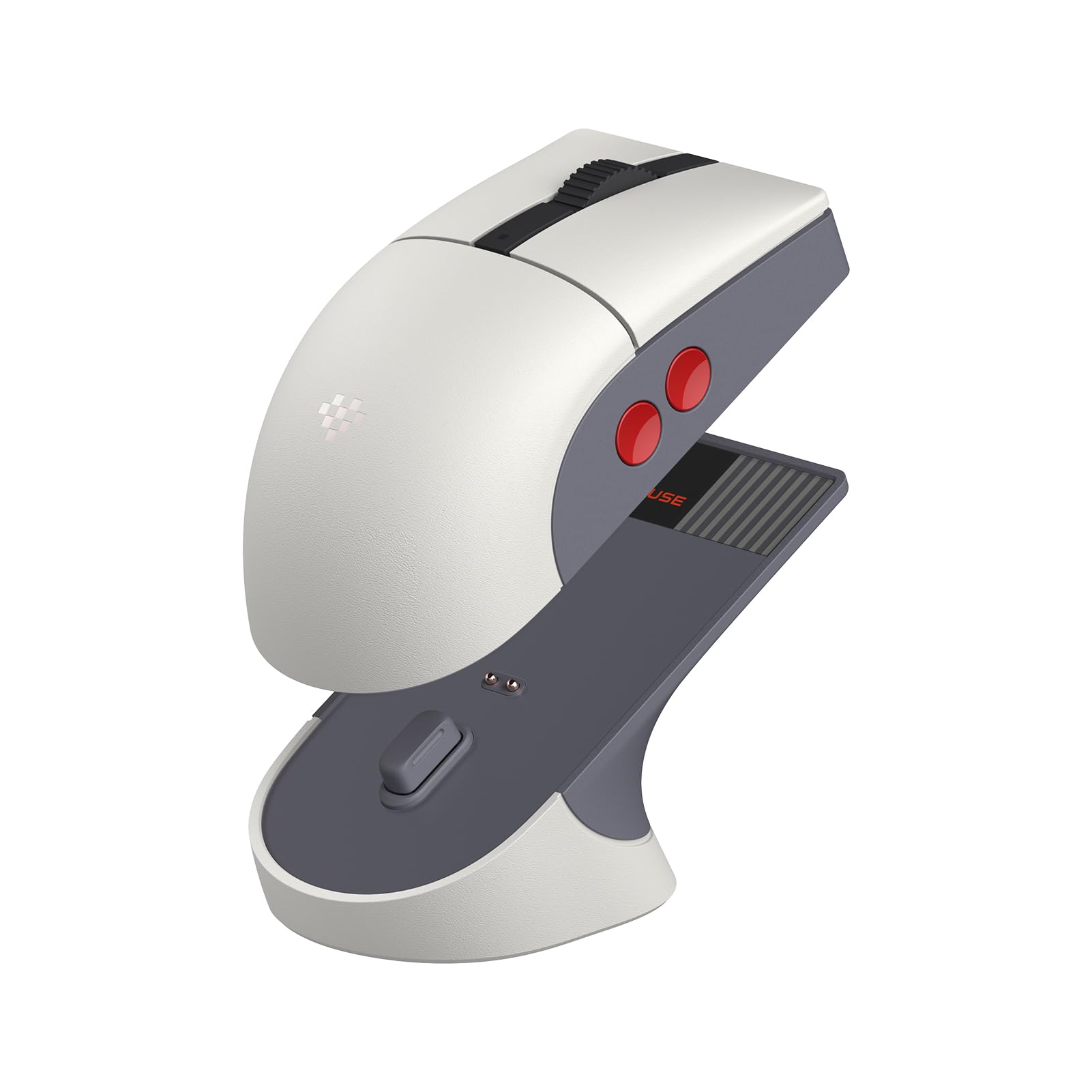
The 8Bitdo Retro R8 blends a genuine NES-era aesthetic with modern flagship internals, making it a standout choice for gamers who want character without sacrificing performance. Its PixArt PAW 3395 optical sensor supports up to 26,000 DPI with a maximum polling rate of 8,000 Hz over wired and 4,000 Hz over 2.4G wireless — numbers that easily match or exceed mice costing twice as much. The Kailh Sword GM X micro switches use a pre-compression system that delivers sharp, tactile feedback with almost zero dead travel.
You get four programmable side buttons, which is excellent for left-handed users who need two buttons on each side. The mouse supports Bluetooth, 2.4G, and wired USB-C connections, making it a versatile option for a multi-device setup.
One significant drawback is the macOS software implementation. If you use a Mac, the Ultimate Software V2 fails to recognize modifier keys properly and produces erratic macro timing. The small ambidextrous sculpt — while faithful to the retro look — may feel cramped for users with larger hands who prefer a palm grip. The software also incorrectly detects the mouse as an Xbox controller in some macOS environments.
Why it’s great
- Flagship PAW 3395 sensor with up to 8K polling
- Magnetic charging dock with adapter storage
- Four programmable side buttons for lefties
Good to know
- macOS software is broken — Windows only
- Small sculpt may not suit larger hands
- Retro shape can feel cramped for palm grips
4. Bloody J90s RGB Gaming Mouse

The Bloody J90s packs a remarkable number of features into a budget-friendly package that left-handed gamers will appreciate. With twelve customizable buttons arranged symmetrically, the mouse offers genuine ambidextrous control without requiring software adjustments to enable side buttons on both flanks. The 8,000 CPI sensor and 2,000 Hz report rate provide response times that outperform many mid-range wired mice, and the 1 ms key response keeps input lag negligible.
The 15-zone RGB lighting gives you granular control over the aesthetic, with 16.8 million colors that can be customized to match your setup. The mouse stores multiple profiles on the device itself, so you can plug it into any PC without needing to reinstall software. The weight is balanced neutrally, avoiding the nose-heavy or tail-heavy feel that can throw off muscle memory in competitive shooters.
Build quality is where the budget price shows. The scroll wheel feels cheap and is positioned slightly too far forward for comfortable reach. The software utility is dark, confusing, and looks like it belongs on a Windows 98 desktop — you can still configure the mouse, but the experience is frustrating. Some users report that the shape is mediocre, with a high back that may not suit all hand sizes.
Why it’s great
- 12 onboard programmable buttons with profile storage
- 2,000 Hz polling for low latency
- Genuine left-handed support out of the box
Good to know
- Software is outdated and difficult to navigate
- Scroll wheel feels cheap and poorly positioned
- Shape may feel mediocre for palm or fingertip grip
5. Logitech G305 Lightspeed Wireless

The Logitech G305 is a proven workhorse that delivers exceptional battery life — up to 250 hours from a single AA battery — without sacrificing wireless performance. Its Hero optical sensor provides native 12,000 DPI with power efficiency that allows this endurance. The Lightspeed wireless technology achieves a 1 ms report rate that feels identical to a wired connection in blind testing.
The shape is a compact symmetrical design that works for both right and left hands, although it only has side buttons on the left side, making it a pseudo-ambidextrous option. It is lightweight without being fragile, and the matte white finish resists fingerprints and shines. The six programmable buttons are easy to configure through Logitech G Hub, and on-board memory means your profiles travel with the mouse.
The main downside is that the G305 is not a true ambidextrous mouse — left-handed users lose the side buttons entirely. The clicks are also fairly sensitive, which can lead to accidental presses if you rest your fingers on the buttons. The micro-USB port is older than the USB-C standard found on newer models, and the lack of RGB lighting may disappoint gamers who want a flashy aesthetic.
Why it’s great
- 250-hour battery life on a single AA
- Hero sensor provides flawless tracking
- Proven durability and build quality
Good to know
- Side buttons only on left side
- Sensitive main buttons can cause accidental clicks
- Micro-USB charging instead of USB-C
FAQ
Can I use a left-handed mouse layout without installing extra software?
Do optical switches feel different from mechanical switches in ambidextrous mice?
What weight range is ideal for a competitive FPS ambidextrous mouse?
Final Thoughts: The Verdict
For most users, the ambidextrous gaming mouse winner is the Corsair M75 Wireless because its swappable side buttons and 26K DPI optical sensor deliver true ambidextrous performance without compromise. If you want an ultra-light wired design with optical switches, grab the Razer Viper Ultralight. And for retro aesthetics with a flagship PAW 3395 sensor, nothing beats the 8Bitdo Retro R8.