
Finding a mechanical gaming keyboard that doesn’t break the bank often feels like a gamble—you either get mushy membrane keys or switches that rattle like a toy. The best budget options now pack real mechanical switches, sturdy frames, and features once reserved for premium boards, all while staying under the radar for cost. The trick is knowing which specs actually matter for competitive play versus flashy marketing you can ignore.
I’m Mohammad Maruf — the founder and writer behind Drink4Good. I’ve spent years analyzing component specs, switch types, and chassis build quality across dozens of budget-tier mechanical keyboards to separate the genuine performance bargains from the plastic disappointments.
After testing polling rates, actuation points, keycap durability, and real-world latency, I’ve narrowed the field to five picks that deliver crisp, responsive keystrokes and long-term reliability. Whether you need a compact travel companion or a full-size daily driver, this guide to the best budget gaming keyboard will help you spend smart without sacrificing the tactile feel that makes mechanical boards worth the investment.
How To Choose The Best Budget Gaming Keyboard
Not every keyboard labeled “gaming” delivers real performance. In the budget tier, small spec differences have an outsized impact on feel, accuracy, and longevity. Focus on these four areas before you click “buy.”
Switch Type and Feel
Linear red switches require less force and make no tactile bump, making them ideal for rapid double-taps in shooters and fast-paced rhythm games. Clicky blue switches provide audible and physical feedback with each press, which helps typists but can annoy teammates in voice chat. Beginners often assume all mechanical switches feel the same—they don’t, and picking the wrong type can ruin the experience more than a cheap chassis.
Polling Rate and Latency
Standard mechanical keyboards report at 1,000Hz, meaning the PC checks for input once every millisecond. Hall-effect magnetic switches in some budget boards now achieve 8,000Hz polling, reducing theoretical latency to 0.125ms. While most casual players won’t notice the difference, competitive gamers playing Valorant or CS2 will see faster peeking and more consistent shot registration. For general use and single-player gaming, 1,000Hz remains perfectly adequate.
Form Factor and Build Quality
A 60% layout removes the number pad and function row, saving desk space and improving ergonomics for mouse-heavy shooters. Tenkeyless (TKL) boards keep the arrow keys and function row while still being compact. Full-size keyboards include everything but take up more room. Budget boards often use plastic frames, but a metal top plate or steel plate adds rigidity and reduces flex during aggressive key presses. Anti-ghosting and N-key rollover ensure simultaneous inputs don’t get dropped—essential for complex combos.
Quick Comparison
On smaller screens, swipe sideways to see the full table.
| Model | Category | Best For | Key Spec | Amazon |
|---|---|---|---|---|
| AULA WIN60 HE | Hall-Effect / 60% | Competitive FPS gaming | 8,000Hz polling, 0.02mm RT | Amazon |
| AULA WIN68 HE | Hall-Effect / 68-Key | Compact gaming with arrow keys | 0.1mm actuation adjust, 8,000Hz | Amazon |
| Redragon K552 | Mechanical / TKL | Typing and general gaming | Metal frame, 87-key, N-key rollover | Amazon |
| TMKB 60% Mechanical | Mechanical / 60% | Portable budget setup | 45g linear red, 61-key rollover | Amazon |
| Redragon S101-3 PRO | Membrane / Full-Size Combo | All-in-one starter kit | Membrane keys + 7,200 DPI mouse | Amazon |
In‑Depth Reviews
1. AULA WIN60 HE

The AULA WIN60 HE brings hall-effect magnetic switch technology to the budget tier, a feature that was limited to premium boards like the Wooting just a year ago. Its 8,000Hz polling rate and rapid-trigger functionality with a 0.02mm step distance give competitive FPS players an undeniable edge in games like Valorant and CS2—every micro-adjustment registers instantly without the physical debounce delay of traditional mechanical switches.
The 60% layout saves significant desk space, and the included LEOBOG Gray Wood switches provide a low actuation force of roughly 40g, making rapid-tapping fatigue-free during long sessions. The South-facing RGB illumination under PBT keycaps looks clean and avoids interference with Cherry-profile aftermarket caps. The web-based driver lets you remap keys, adjust actuation, and set macros without downloading bloated software—though the browser interface can be finicky on certain networks.
Build quality exceeds expectations for the price: the plastic chassis feels dense and durable, stabilizers are pre-lubed and free of rattle, and the detachable USB-C cable makes pack-up easy for LAN events. The biggest trade-off is the lack of wireless connectivity and PlayStation compatibility, but for a dedicated PC gaming keyboard at this price, those omissions are easy to accept.
Why it’s great
- Hall-effect switches with adjustable actuation and rapid trigger
- 8,000Hz polling for ultra-low latency input
- Premium PBT keycaps and lubed stabilizers out of the box
Good to know
- Web-based driver requires internet and can be glitchy
- No Bluetooth or wireless mode
- Not compatible with PlayStation consoles
2. AULA WIN68 HE

The AULA WIN68 HE solves one of the biggest pain points of 60% boards—missing arrow keys—while keeping a compact footprint that still frees up mouse space. Its 68-key layout retains the dedicated arrow cluster and a few navigation keys, making it more practical for both gaming and everyday desktop use without forcing you to rely on function-layer combos.
Equipped with the same hall-effect magnetic switch technology as the WIN60, this model offers individual key actuation adjustment from 0.02mm to 3.44mm in 0.1mm increments. The rapid-trigger mode allows near-instantaneous reset after release, which is especially useful in strafe-heavy games where you need to counter-stroke quickly. The 8,000Hz polling rate matches the WIN60, ensuring every input arrives at the PC with minimal delay.
The black chassis has a clean, understated look, and the RGB lighting is vibrant with 14 preset effects accessible via FN combos. The included detachable USB-C cable and a portable ribbon make it easy to carry. One reviewer noted the software driver required some digging to find, and the web driver only supports Windows—so Mac and Linux users lose customization options. Still, for a budget hall-effect board with arrow keys, the WIN68 HE delivers impressive value.
Why it’s great
- Dedicated arrow keys on a compact 68-key layout
- Adjustable actuation per key for personalized feel
- 8,000Hz polling with rapid-trigger support
Good to know
- Web driver not compatible with macOS or Linux
- Driver URL may be hard to locate
- Heavier than some 60% alternatives at 686g
3. Redragon K552

The Redragon K552 has been a staple of the budget mechanical keyboard space for years, and for good reason. Its tenkeyless layout with 87 keys hits the sweet spot between compactness and functionality, keeping the function row and arrow keys while dropping the numpad. The Outemu blue switches deliver a crisp, clicky feel that many reviewers compare favorably to Cherry MX Blues—each keystroke produces a satisfying audible click and tactile bump.
The metal top plate adds substantial rigidity, preventing the flex that plagues all-plastic budget boards. N-key rollover across all 87 keys ensures every simultaneous press registers correctly during intense gaming sessions. The fixed rainbow LED backlighting offers six dynamic modes—though it’s not per-key RGB and cannot be customized via software, the brightness is adjustable and looks vibrant in low-light rooms.
A common point from long-term owners: the K552 holds up well over years of use, but the stock keycaps are thin and develop a shine with heavy wear. Many owners swap them out for aftermarket PBT sets, and the hot-swappable switch sockets (on newer versions) make it easy to experiment with linear or tactile switches. One consistent downside is the noise—these clicky switches are loud, so this board works best in a private gaming space or with a noise gate on your mic.
Why it’s great
- Sturdy metal top plate prevents chassis flex
- Satisfying clicky feel comparable to Cherry MX
- Tenkeyless layout balances space and functionality
Good to know
- Very loud; not suitable for shared rooms or open offices
- Stock keycaps are thin and wear over time
- Fixed rainbow LEDs, not per-key RGB
4. TMKB 60% Mechanical Gaming Keyboard
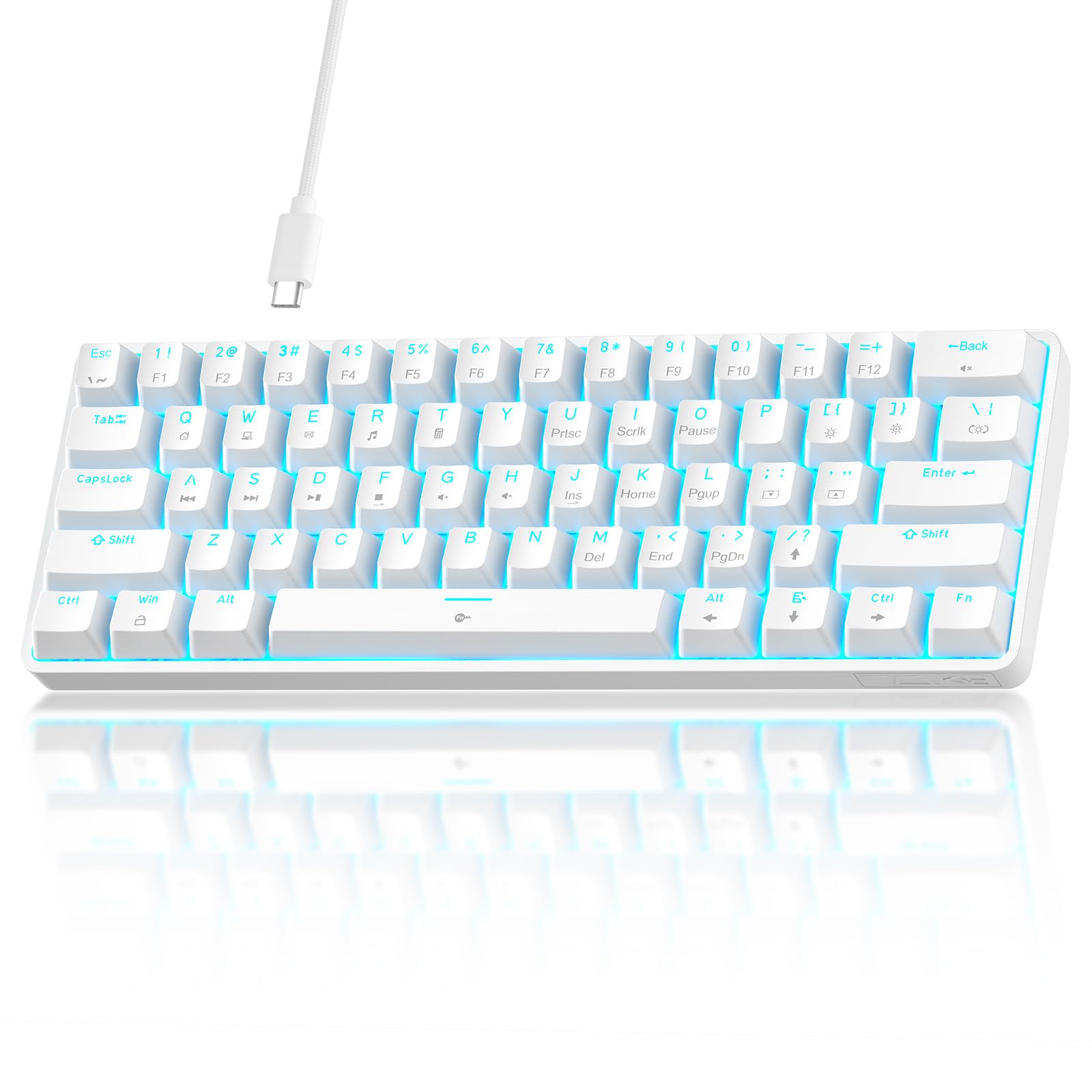
The TMKB 60% board stands out immediately for its clean white aesthetic—a rarity in the budget gaming space where black dominates. Its compact 61-key layout is ideal for minimalists who prioritize mouse-swinging space or need a travel keyboard that slips into a backpack without hogging the entire bag. The pre-installed linear red switches actuate at 45g, providing a smooth, low-resistance feel that works well for both gaming and typing without the fatigue of heavier springs.
Anti-ghosting technology supports 61-key rollover, so every key press registers regardless of how many simultaneous inputs you throw at it. The detachable USB-C cable is a welcome feature at this price—it simplifies storage and lets you replace a damaged cable without soldering. The double-shot keycaps resist fading and maintain consistent backlight transmission even after extended use, though the lighting is single-color blue rather than full RGB.
Reviewers consistently praise the creamy sound profile and light switch feel, with several noting it punches above its weight for the money. The all-plastic construction feels decent but not premium, and the lack of hot-swappable switches means you’re locked into the red linear set unless you desolder. For a beginner looking for a silent, smooth-typing keyboard in a unique color, the TMKB delivers a polished experience without the usual budget compromises.
Why it’s great
- Smooth linear switches with creamy sound profile
- White chassis stands out from typical black budget boards
- Detachable USB-C cable for easy portability
Good to know
- Single-color blue backlight, not RGB
- Switches are not hot-swappable
- Plastic build lacks heft of metal-frame alternatives
5. Redragon S101-3 PRO

The Redragon S101-3 PRO is not a mechanical keyboard—it uses soft-touch membrane keys—but it earns its place here as a complete entry-level bundle that includes both a full-size keyboard and a gaming mouse with adjustable DPI up to 7,200. For someone buying their first gaming setup on a strict budget, this combo provides everything needed to start playing without piecing together separate components. The membrane keys are notably quieter than clicky mechanical switches, making this set suitable for shared dorm rooms or late-night sessions.
The keyboard features six RGB backlight modes and five dedicated macro keys that can be programmed via Redragon’s downloadable software. The mouse offers 10 lighting effects and a comfortable shape with rubberized side grips, though the DPI settings are not saved to the onboard memory—meaning you may need to reset your preferred sensitivity after a reboot. The included ergonomic wrist rest adds comfort for long typing sessions, and the anti-ghosting support ensures reliable multi-key input despite the membrane construction.
Build quality is better than the sub- suggest: the keycaps show no paint wear after months of use, and the braided USB cable resists tangling. The main drawbacks are the lack of true mechanical feedback and the mouse’s DPI memory issue, which can be frustrating for muscle-memory-heavy players. For pure gaming performance, step up to one of the mechanical boards above, but for a versatile office-and-casual-gaming hybrid that leaves room in the budget for a headset, the S101-3 PRO is a practical choice.
Why it’s great
- Complete keyboard and mouse combo in one box
- Very quiet membrane keys ideal for shared spaces
- Programmable macro keys and RGB customization
Good to know
- Membrane keys lack the tactile feedback of mechanical switches
- Mouse doesn’t retain DPI setting after reboot
- Not ideal for competitive FPS due to membrane latency
FAQ
What is the difference between linear red and clicky blue switches for gaming?
Is an 8,000Hz polling rate worth it on a budget keyboard?
Can I replace keycaps on a budget mechanical keyboard?
Final Thoughts: The Verdict
For most users looking for a best budget gaming keyboard, the winner is the AULA WIN60 HE because it brings hall-effect performance, 8,000Hz polling, and rapid-trigger capability at a price that undercuts traditional mechanical boards with fewer features. If you need arrow keys in a compact form, grab the AULA WIN68 HE. For a quiet, all-in-one starter kit for shared spaces, nothing beats the Redragon S101-3 PRO.