
Building or upgrading a gaming PC on a tight budget means every dollar has to pull its weight. The right graphics card can mean the difference between smooth 1080p gameplay and a frustrating, stutter-filled mess. You need a card that delivers solid frame rates in modern titles without breaking the bank, balancing performance, power draw, and longevity.
I’m Mohammad Maruf — the founder and writer behind Drink4Good. I’ve spent years analyzing hardware specifications and market trends to help buyers find the best value in the GPU market, focusing on real-world performance metrics over marketing hype.
This guide breaks down the top contenders for the best budget gpu, covering entry-level options for light gaming all the way up to powerful mid-range cards that can handle modern AAA titles without requiring a second mortgage.
How To Choose The Best Budget GPU
Selecting a budget graphics card isn’t just about finding the lowest price. You need to balance raw compute power with memory capacity, power efficiency, and compatibility with your existing system. Here are the four factors that separate a smart buy from a regretful purchase.
VRAM Capacity and Bandwidth
Modern games are texture-hungry. A card with 4GB of VRAM will struggle to maintain stable frame rates in newer titles, even at 1080p with medium settings. Aim for at least 6GB as a baseline, and 8GB if you want to comfortably handle the current generation of games. The memory type matters too — GDDR6 offers significantly higher bandwidth than older GDDR5, reducing stutter in open-world environments.
Architecture and Feature Support
The underlying architecture determines which modern features you can access. Nvidia’s Ampere and later architectures support DLSS (Deep Learning Super Sampling), which boosts frame rates with minimal visual compromise. AMD’s RDNA 3 architecture brings support for FSR (FidelityFX Super Resolution) and improved ray tracing performance. A card lacking these features may feel obsolete sooner.
Power Connectors and System Compatibility
This is the most overlooked spec. Many budget and small-form-factor builds rely on low-wattage power supplies that lack dedicated PCIe power cables. Some cards are bus-powered — drawing all their energy from the motherboard slot — which makes them compatible with pre-built office PCs and older systems. Others require a 6-pin or 8-pin power connector. Always check your PSU’s available rails before purchasing.
Form Factor and Cooling Solution
Physical size is critical if you’re building inside a compact case. Low-profile (LP) cards with half-height brackets can fit in slim office desktops, while dual-slot cards require more vertical clearance. The cooling solution determines noise levels under load. Cards with zero-RPM fan modes run silently during light use, but tiny single-fan coolers can become loud and thermally constrained during gaming sessions.
Quick Comparison
On smaller screens, swipe sideways to see the full table.
| Model | Category | Best For | Key Spec | Amazon |
|---|---|---|---|---|
| GIGABYTE RTX 5060 | Premium | Next-gen 1080p/1440p gaming | 8GB GDDR7 memory | Amazon |
| ASUS Prime RTX 5060 | Premium | SFF builds and quiet operation | SFF-Ready 2.5-slot design | Amazon |
| XFX Speedster RX 7600 | Mid-Range | 1080p VR and high FPS | 8GB GDDR6, 2655 MHz boost | Amazon |
| ASRock Challenger RX 7600 | Mid-Range | Silent 1080p gaming | 0dB Silent Cooling | Amazon |
| MSI RTX 3050 LP 6G | Mid-Range | Small form factor builds | Low-profile, 6GB GDDR6 | Amazon |
| GIGABYTE RTX 3050 6G | Mid-Range | Entry-level ray tracing | 6GB GDDR6, no power cable | Amazon |
| MAXSUN RTX 3050 6GB | Mid-Range | SFF Optiplex and workstation builds | 6.65-inch low-profile | Amazon |
| ZER-LON GTX 1660 Super | Budget | Casual 1080p and upgrade | 6GB GDDR6, 192-bit bus | Amazon |
| VisionTek RX 550 4GB | Budget | Multi-monitor office work | 4x HDMI, bus-powered | Amazon |
In‑Depth Reviews
1. GIGABYTE GeForce RTX 5060 WINDFORCE OC 8G

The GIGABYTE RTX 5060 WINDFORCE OC 8G is the most forward-looking card in this roundup, powered by the Nvidia Blackwell architecture and featuring 8GB of GDDR7 memory on a 128-bit bus. The jump to GDDR7 provides substantially higher bandwidth than the GDDR6 found on most budget cards, which translates to smoother performance in texture-heavy scenes and future game releases. Its 2512 MHz boost clock and PCIe 5.0 interface ensure it won’t bottleneck modern CPUs.
Real-world testing from buyers shows this card handles Cyberpunk 2077 and DOOM at high settings with ease, delivering over 250 FPS in less demanding titles. The dual-fan WINDFORCE cooling system keeps temperatures in check under load, and the compact 7.83-inch length fits in most mid-tower cases without clearance issues. It requires a standard 8-pin power connector and is happy with a 750W PSU as recommended by owners pairing it with Ryzen 5700-series processors.
While 8GB of VRAM is the current sweet spot, future games with ultra HD texture packs may require lowering settings. DLSS 4 provides a significant performance uplift in supported titles, making this card a strong investment for gamers who plan to keep their build relevant for the next few years. It’s the premium entry point where budget meets future-proofing.
Why it’s great
- GDDR7 memory delivers exceptional bandwidth for the price class
- PCIe 5.0 support ensures compatibility with cutting-edge motherboards
- DLSS 4 provides a major frame rate boost in supported games
Good to know
- 8GB VRAM may require texture compromise at ultra settings
- Requires D Utility (DDU) to remove old drivers for stable install
2. ASUS SFF-Ready Prime GeForce RTX 5060 8GB OC Edition

The ASUS Prime RTX 5060 OC Edition is purpose-built for small form factor (SFF) enthusiasts who refuse to compromise on performance. With its 2.5-slot design and 10.6-inch length, it fits snugly in compact cases that cannot accommodate full-length cards. It’s factory overclocked to 2595 MHz in OC mode and delivers 630 AI TOPS, making it a powerhouse for professional creative workloads and AI-accelerated applications as well as gaming.
Owners report excellent noise levels thanks to the Axial-tech fan design, which uses a smaller hub for longer blades and a barrier ring to push air downward across the heatsink. The Dual BIOS switch lets you toggle between a quiet mode for low-noise environments and a performance mode for maximum cooling. The card’s 8GB of GDDR7 memory and Blackwell architecture handle productivity tasks like video editing and 3D rendering with zero hesitation.
The primary trade-off is the price premium over non-SFF cards, and the 2.5-slot thickness may still be too bulky for ultra-compact cases like the Velka 3. However, for anyone building a sleek workstation or gaming rig in a mini ITX chassis, this is the most capable budget GPU available. It’s a smart pick for professionals who need workstation-grade GPU compute in a desktop footprint.
Why it’s great
- SFF-ready 2.5-slot fits compact cases without adapter brackets
- Axial-tech fans are exceptionally quiet under standard loads
- Dual BIOS and high AI TOPS make it suitable for professional use
Good to know
- 10.6-inch length may not fit the smallest ITX cases
- Premium pricing pushes it toward mid-range territory
3. XFX Speedster SWFT210 Radeon RX 7600 8GB

The XFX Speedster SWFT210 RX 7600 punches above its weight class with an aggressive 2655 MHz boost clock and 8GB of GDDR6 memory on a 128-bit interface. It’s built on AMD’s RDNA 3 architecture, which brings hardware-accelerated ray tracing and FSR 3 support. Where this card truly shines is VR gaming — verified users report smooth performance in Half-Life Alyx, Assetto Corsa, and Project Cars 2 at the highest settings, a feat that eludes many cards in this price bracket.
The dual-fan SWFT cooling solution is both compact and effective, measuring 9.49 inches long and staying cool under prolonged gaming sessions. Owners note that a driver update is mandatory out of the box — initial temperatures can hit the mid-80s Celsius on stock drivers, but a quick update drops peak temps to the upper 70s at 60% fan speed. The card runs silently during light desktop use thanks to AMD’s Zero RPM mode.
Linux support is exceptional, with users reporting seamless plug-and-play on Arch and Ubuntu distributions using the open-source mesa and vulkan-radeon drivers. It also handles CAD work and video production without breaking a sweat. The only catch is that the 8GB VRAM ceiling becomes apparent at 1440p with ultra textures, but for 1080p high-refresh-rate gaming, it’s the best value in the mid-range segment.
Why it’s great
- Excellent VR performance in Half-Life Alyx and other demanding titles
- Great Linux compatibility with open-source drivers
- Silent operation under light load with Zero RPM mode
Good to know
- Out-of-box drivers may cause high temps — update immediately
- 8GB VRAM is a hard limit for 1440p ultra textures
4. ASRock Radeon RX 7600 Challenger 8GB OC

The ASRock Challenger RX 7600 OC is the quietest card in this lineup, thanks to its 0dB Silent Cooling feature that stops fans completely when GPU temperatures are low. During everyday browsing, video streaming, and light productivity, the card is truly silent. When gaming kicks in, the dual striped axial fans ramp up gradually, distributing airflow across an ultra-fit heatpipe that keeps the RDNA 3 GPU cool without aggressive fan curves.
Factory overclocked to a 2695 MHz boost clock with 2048 stream processors, this card delivers buttery-smooth 1080p gaming at high settings. Users report hitting 180 FPS in competitive titles and smooth 60fps in story-driven games. The 8GB GDDR6 memory running at 18 Gbps on a 128-bit bus eliminates the VRAM bottleneck that plagues 6GB cards in modern open-world games. It also handles 1440p admirably in less demanding titles.
The Challenger includes a metal backplate for PCB rigidity and uses ASRock’s Super Alloy components for long-term reliability. It requires just a single 8-pin power connector and a 550W PSU recommendation, making it compatible with most mid-range builds. The 269 mm length means you should measure your case clearance, but once installed, it’s a set-and-forget card that delivers consistent performance with minimal noise.
Why it’s great
- 0dB Silent Cooling makes it virtually inaudible at idle
- High 2695 MHz boost clock delivers strong 1080p performance
- Single 8-pin power connector — no PSU upgrade needed for most builds
Good to know
- 269 mm length requires case measurement for fit
- Ray tracing performance is behind Nvidia’s competitive offerings
5. MSI Gaming RTX 3050 LP 6G OC

The MSI Gaming RTX 3050 LP 6G OC is a specialist tool for the small form factor crowd. Its low-profile design and half-height bracket make it compatible with slim office desktops like the Dell Optiplex 3470 SFF and HP desktops. The card’s 6.9-inch length and 2.7-inch width allow it to slip into cramped cases where full-size GPUs won’t fit, and it draws all its power from the PCIe slot — no external power cable needed.
Despite its slim profile, this card packs a punch. The 1492 MHz boost clock and 6GB GDDR6 memory handle demanding games at 1080p with medium settings, and DLSS Quality mode provides extra headroom in supported titles. Verfied owners report 60fps+ in Dark Souls 3 at high/max settings and smooth gameplay in Fortnite and Minecraft with ray tracing enabled. The Twin Frozr cooling solution keeps temps around 78°C under load, with a zero RPM mode for silent idle operation.
The main limitation is the 96-bit memory interface, which constrains memory bandwidth compared to 128-bit cards. This shows up in texture-heavy games where pop-in can occur. The single-fan design also emits a clattering noise on some units during the first 10 seconds of startup — though owners report this is intermittent and stops quickly. For HTPC builds, office gaming rigs, and budget SFF PCs, this is the most capable low-profile option available.
Why it’s great
- Low-profile design fits SFF cases without modifications
- No external power connector — slot-powered convenience
- Zero RPM mode for silent desktop operation
Good to know
- 96-bit memory interface limits bandwidth in texture-heavy games
- Some units report intermittent fan clattering at startup
6. GIGABYTE GeForce RTX 3050 WINDFORCE OC V2 6G

The GIGABYTE RTX 3050 WINDFORCE OC V2 6G is a unique entry in the budget space because it draws all its power from the PCIe slot — no 6-pin or 8-pin connector required. This makes it a perfect drop-in upgrade for pre-built office PCs with limited PSU capacity. It’s built on the Nvidia Ampere architecture, which brings 2nd Gen RT Cores and 3rd Gen Tensor Cores to the entry-level segment, enabling basic ray tracing and DLSS support.
The 6GB GDDR6 memory on a 96-bit interface is adequate for 1080p gaming at medium settings. Owners report using it successfully in media center PCs and family gaming rigs for Minecraft, Roblox, and Fortnite. The dual-fan WINDFORCE cooling system is overkill for a card that tops out at 75W, keeping it silent even under sustained load. Its 7.5-inch length and standard dual-slot design fit in most cases without clearance issues.
The biggest draw is the near-zero installation friction. You plug it in, install the driver, and it works. For parents building a starter PC for kids, or anyone repurposing an old office Dell or HP desktop into a casual gaming machine, this card is the easiest path to 1080p gaming. It won’t handle ray tracing at playable frame rates in AAA titles, but for the target audience, it’s more than enough.
Why it’s great
- Slot-powered design — no PSU upgrade needed
- Dual-fan cooling keeps it whisper-quiet
- Plug-and-play installation with minimal technical knowledge required
Good to know
- 96-bit memory interface limits bandwidth for modern titles
- Ray tracing is only usable with aggressive DLSS upscaling
7. MAXSUN GeForce RTX 3050 6GB Low Profile

The MAXSUN RTX 3050 6GB Low Profile is the smallest card in this guide at just 6.65 inches long and 2.71 inches tall. It’s engineered for the tightest spaces — fitting inside Dell Optiplex 3060 SFF units and similar compact corporate desktops. The Ampere architecture inside brings DLSS support and RT Cores to builds that previously had no room for a discrete GPU.
Owners report solid 1080p gaming performance at 80+ FPS in Fortnite, Warzone, and Arc Raiders. The card is loud under full load due to its compact single-fan cooler — that’s the price of fitting into an SFF chassis. However, it runs at just 77W max, so thermal throttling is not a concern. The included low-profile bracket makes the swap straightforward, and the card requires no external power cables, which is critical for Optiplex builds with low-wattage PSUs.
The 1470 MHz boost clock is modest compared to full-size cards, and the 96-bit memory interface shows up in complex scenes. For 3D design work using Solidworks, owners report excellent performance after setting up registry edits for realview support. This card is not for high-refresh-rate gaming or 1440p, but for budget SFF workstations and kids’ gaming PCs, it’s the most capable option in its size class.
Why it’s great
- Smallest form factor in the lineup — fits nearly any SFF case
- No external power required, ideal for low-wattage PSUs
- DLSS support boosts FPS in compatible games
Good to know
- Single fan is loud under sustained gaming load
- Limited overclocking headroom due to power constraints
8. ZER-LON GeForce GTX 1660 Super 6GB

The ZER-LON GTX 1660 Super 6GB is a budget legend that continues to deliver value years after its release. Its standout feature is the 192-bit memory interface — wider than the 128-bit or 96-bit buses on newer budget cards — which provides higher memory bandwidth for smooth 1080p gaming. The 6GB of GDDR6 memory running at 14 Gbps handles modern texture loads without stuttering, and the 1530 MHz base clock (with boost) keeps frame rates competitive in esports and AAA titles alike.
Owners report excellent experiences upgrading from older GTX 1060s in pre-built HP Omens and Lenovo workstations. Plex transcoding users praise its ability to handle 4 HD Homerun tuners simultaneously. For parents building a kid’s first gaming PC, the card runs Roblox, Fortnite, and Minecraft at high settings without breaking a sweat. The dual-fan cooling system is quiet, with fans turning off entirely under light load, and the card’s 9-inch length fits comfortably in mid-tower cases.
The key trade-off is the lack of modern features — there is no ray tracing hardware, no DLSS support, and no Tensor Cores. It’s a pure rasterization engine that relies on raw shader performance. The card requires an 8-pin power connector, so ensure your PSU has the appropriate cable. For pure 1080p gaming without ray tracing gimmicks, this remains one of the best performance-per-dollar options on the market.
Why it’s great
- 192-bit memory bus provides excellent bandwidth for 1080p gaming
- Silent operation with fan-off capability at idle
- Proven reliability in budget builds over multiple years
Good to know
- No hardware ray tracing or DLSS support
- Requires 8-pin power connector — not slot-powered
9. VisionTek Radeon RX 550 4GB GDDR5
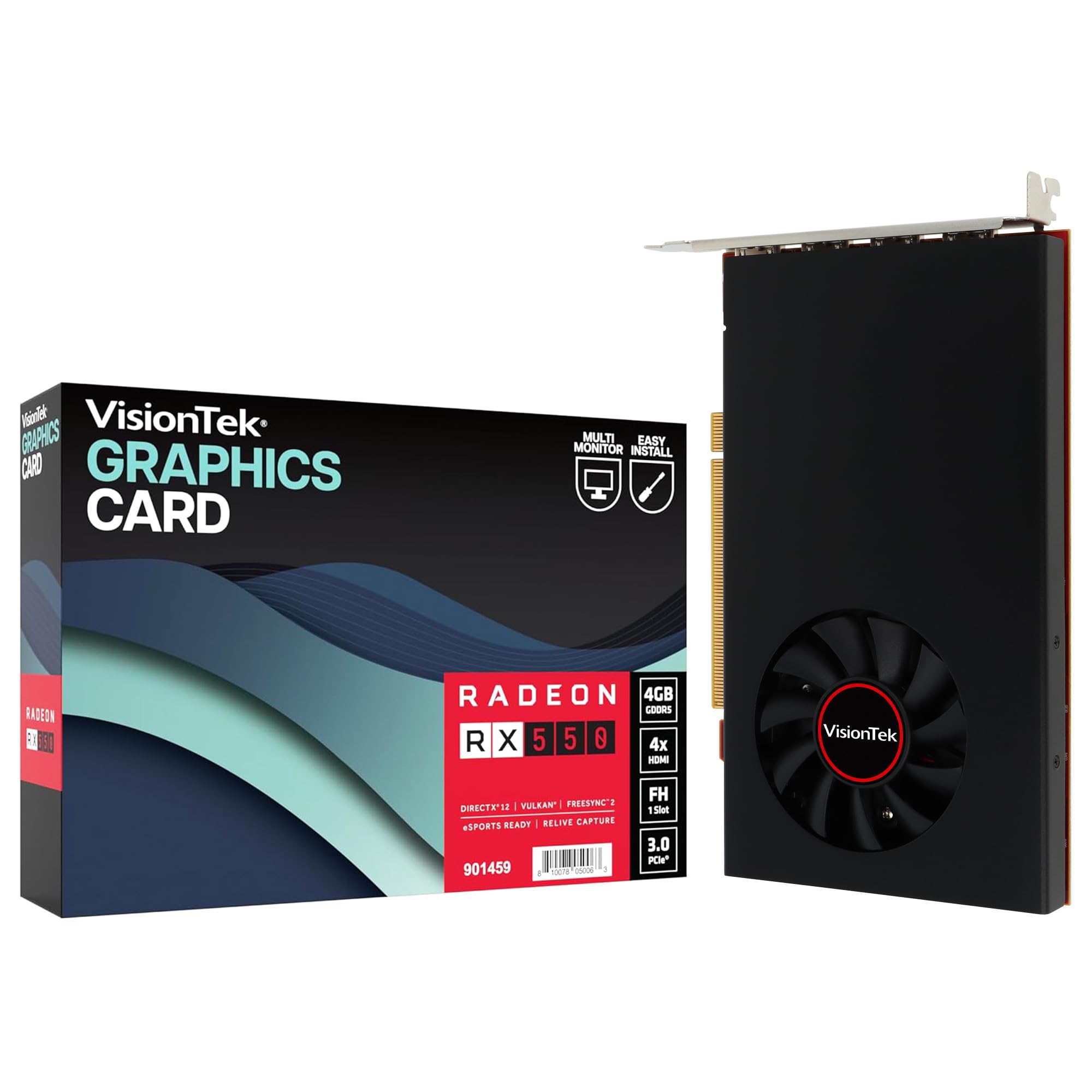
The VisionTek Radeon RX 550 4GB GDDR5 is a specialized tool for multi-monitor productivity rather than gaming. Its defining feature is four HDMI outputs, all capable of driving 4K displays at 60Hz simultaneously. For stock traders, software developers, data analysts, and anyone running a multi-screen workstation, this card eliminates the need for a daisy-chain or multiple GPUs.
The card is entirely bus-powered — it draws all necessary power from the PCIe slot, requiring no external cables. This makes it a drop-in upgrade for pre-built office desktops where the PSU lacks dedicated GPU power connectors. The Radeon RX 550 GPU with 4GB GDDR5 memory and 1071 MHz core clock is adequate for 2D productivity apps and light media consumption. Owners report excellent results on Ubuntu workstations driving four 1080p monitors for development work.
Gaming performance is limited — this is not a card for modern 3D titles or even moderate esports gaming. The 1500 MHz memory clock and compact single-fan cooler are not designed for sustained gaming loads. Additionally, there are reports of card failure within 6-12 months in 24/7 office environments, with symptoms including multi-monitor freezes and artifacting. For cold-spare or short-shift workstation setups, it’s a functional choice, but for reliability-critical deployments, a higher-end card is advisable.
Why it’s great
- Four HDMI ports natively support multi-4K monitor setups
- Bus-powered design works with any PCIe slot, no external cables
- Plug-and-play on Windows 11 and Ubuntu Linux
Good to know
- Not suitable for gaming — 2D productivity only
- Reliability concerns for 24/7 operation based on owner reports
FAQ
Can a budget GPU run modern AAA games at 60 FPS?
What is the minimum VRAM I should look for in a budget GPU in 2025?
Why does my pre-built office PC need a slot-powered graphics card?
Final Thoughts: The Verdict
For most users, the best budget gpu winner is the GIGABYTE RTX 5060 WINDFORCE OC 8G because it combines next-gen GDDR7 memory with DLSS 4 support at a price that doesn’t break the bank. If you need a compact card for a small form factor build, grab the ASUS Prime RTX 5060 OC Edition. And for pure VR performance and excellent Linux support, nothing beats the XFX Speedster RX 7600.