
Nothing kills a clutch play like your teammates hearing every keyboard clack and mouse click instead of your callouts. A dedicated desktop microphone separates your voice from the mechanical chaos of your gaming setup, delivering clear, punchy audio that makes your squad listen. The difference between a headset mic and a proper gamer mic isn’t subtle — it’s the line between sounding like you’re in a wind tunnel and sounding like you’re in the booth.
I’m Mohammad Maruf — the founder and writer behind Drink4Good. This buying guide compiles hundreds of hours of spec analysis across condenser capsules, polar patterns, bit depth, and sample rates to separate the microphones that genuinely improve your audio from those that just add RGB.
After digging through the technical specs and real-world performance data, I’ve narrowed the field to microphones that consistently deliver clean voice capture, effective background rejection, and reliable hardware controls. Use this guide to find the best gamer mic for your desk, your budget, and your streaming ambitions.
How To Choose The Best Gamer Mic
A gamer mic is a precision instrument for your voice channel. The wrong choice leaves you with hollow audio, distracting background bleed, or frustrating mute failures. Focus on four pillars: polar pattern, capsule quality, hardware controls, and build stability.
Polar Pattern — Your Shield Against Desk Noise
Cardioid and supercardioid patterns capture sound primarily from the front while rejecting audio from the sides and rear. For a typical gaming desk setup with a mechanical keyboard, mouse clicks, and possibly a fan, this directional rejection is non-negotiable. Supercardioid offers tighter side rejection than standard cardioid, making it the better choice if your keyboard sits directly beside your mic. Omnidirectional patterns should be avoided unless you stream in a treated, silent room.
Condenser Capsule and Sample Rate — The Voice Clarity Engine
Condenser microphones use a charged diaphragm to capture subtle vocal detail and higher frequencies with greater accuracy than dynamic mics. A 24-bit/96kHz sample rate provides headroom for editing and ensures your voice doesn’t sound compressed or thin. The condenser capsule size — measured in millimeters — influences sensitivity; larger capsules (25mm and up) generally offer richer low-end presence, while smaller capsules focus on clarity and cut through noisy game audio more effectively.
Hardware Controls — Mute, Gain, and Monitoring
Physical mute buttons or tap-to-mute sensors prevent the catastrophe of broadcasting private conversations. An on-board gain knob lets you adjust input sensitivity without alt-tabbing into software menus, which is critical when you need to react in real-time during a match. Headphone monitoring jacks allow zero-latency voice checking so you hear exactly what your stream hears. LEDs that clearly show mute status are a small detail that saves big embarrassment.
Build and Mounting — Stability Under Fire
A weighted base or integrated shock mount keeps the mic planted during intense gameplay. Check for standard 3/8-inch or 5/8-inch thread compatibility so you can attach the mic to a boom arm when the desk stand proves too short or picks up too much vibration. Aluminum or metal-reinforced bodies resist the wear of daily tilting, rotating, and cable tugging that plastic shells cannot survive long-term.
Quick Comparison
On smaller screens, swipe sideways to see the full table.
| Model | Category | Best For | Key Spec | Amazon |
|---|---|---|---|---|
| Elgato Wave:3 MK.2 | Premium | Streamers and content creators who need studio-level clarity | Cardioid capsule with Clipguard 2.0 anti-distortion | Amazon |
| HyperX Quadcast 2 Frost | Premium | Streamers wanting on-board polar pattern control and RGB | Removable shock mount with multiple polar patterns | Amazon |
| Razer Seiren V2 X | Mid-Range | Gamers wanting on-board gain control and mute button | 25mm condenser with integrated digital limiter | Amazon |
| Logitech G Yeti Orb | Premium | Clean desk setups needing LIGHTSYNC RGB integration | Condenser capsule with cardioid pattern | Amazon |
| HyperX SoloCast 2 | Mid-Range | Budget-conscious gamers wanting studio sample rates | 24-bit/96kHz with internal shock mount | Amazon |
| UGREEN RGB Mic | Mid-Range | RGB enthusiasts wanting DSP noise reduction | 24-bit/96kHz with DSP noise reduction algorithm | Amazon |
| Razer Seiren V3 Mini | Budget | Compact setups on a tight budget | Supercardioid pattern with tap-to-mute sensor | Amazon |
In‑Depth Reviews
1. Elgato Wave:3 MK.2
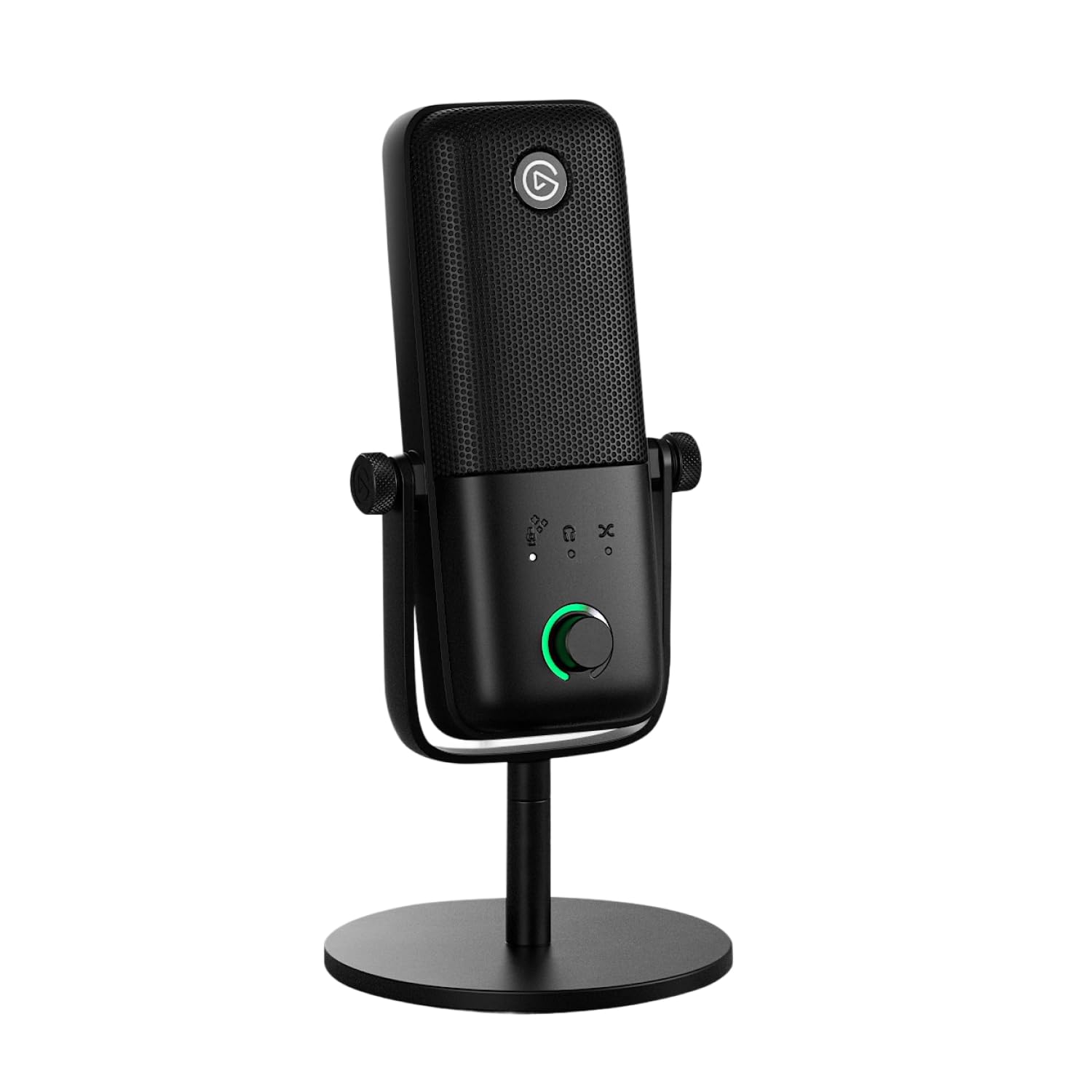
The Elgato Wave:3 MK.2 sets the benchmark for a gamer mic that doubles as a studio tool. Its premium cardioid condenser capsule delivers focused, articulate voice reproduction that cuts through game audio, streaming music, and crowded Discord channels without needing a noise gate. The onboard DSP with Clipguard 2.0 technology eliminates clipping even when you instinctively yell during a clutch moment — the multi-stage anti-distortion system catches peaks before they hit the recording, so your stream never distorts.
The multifunction control dial, tap-to-mute sensor, and real-time LED feedback give you tactile command over your audio without alt-tabbing. The integrated headphone jack enables zero-latency monitoring, and the Wave Link software unifies DSP effects and VST plugins into a single signal chain, offering professional-level voice processing like compressor, EQ, and voice enhancer. At 110 dB maximum SPL handling, this mic handles loud voicework without breaking a sweat.
The Wave:3 MK.2 ships with a desk stand, USB-C cable, and both 3/8-inch and 5/8-inch adapters, making boom arm mounting straightforward. The build uses a combination of metal and plastic that feels dense and stable on the desk. The tall form factor may block a monitor’s bottom edge, so consider a boom arm if screen clearance is tight.
Why it’s great
- Clipguard 2.0 prevents audio clipping during loud moments
- DSP and VST integration for professional-level voice processing
- Clear, articulate sound that friends notice immediately
Good to know
- Premium price reflects the high-end feature set
- Tall design may partially block monitor visibility on some desks
2. HyperX Quadcast 2 Frost

The HyperX Quadcast 2 Frost delivers versatile recording flexibility with multiple selectable polar patterns, including cardioid for solo streaming, bidirectional for interviews, and omnidirectional for capturing room ambience. The removable shock mount effectively decouples the capsule from desk vibrations, so mechanical keyboard thumps and accidental desk bumps don’t pollute your audio stream. The aluminum enclosure gives it a premium, durable feel that matches high-end gaming peripherals.
On-board controls let you adjust gain, monitor volume, and cycle through polar patterns without software, which is a massive convenience during live streams. The tap-to-mute sensor with a bright LED indicator gives you instant visual confirmation of your mute status. The 20 kHz frequency response ensures your voice retains its natural presence in the mix, and the 1-ohm impedance rating means clean signal delivery with minimal noise floor.
The Frost edition features a clean white-and-black aesthetic with a single-color LED that can be adjusted for pulse and dim level. The weighted base keeps the mic stable on the desk, and the included shock mount can be detached if you prefer a boom arm setup. Users report crystal-clear audio right out of the box without needing to tweak software settings, making this a true plug-and-play premium option for streamers.
Why it’s great
- Multiple polar patterns for interview or multi-person setups
- Removable shock mount effectively isolates desk vibrations
- On-board controls for gain, pattern, and mute without software
Good to know
- Single-color LED limits RGB customization options
- Connects via USB-A rather than USB-C
3. Razer Seiren V2 X

The Razer Seiren V2 X uses a 25mm condenser capsule paired with a supercardioid pickup pattern that aggressively rejects sound from the sides and rear. This makes it particularly effective at suppressing mechanical keyboard noise and mouse clicks, which typically live on the desk periphery. The integrated digital limiter automatically prevents clipping when your voice peaks during intense gaming moments, so you don’t need to fiddle with gain settings mid-session.
The on-board gain control knob and mute button are placed on the front of the mic for easy access during gameplay. The USB-C connection offers modern connectivity with the included braided Type-C to Type-A cable, an upgrade over older mini-USB or micro-USB connectors. The built-in shock absorber dampens vibrations from accidental desk knocks, and the desk stand base can be removed for mounting on a standard boom arm via the threaded insert.
Mic monitoring via a headphone jack lets you hear your own voice in real-time, which helps maintain consistent audio levels on chaotic voice channels. The steel mesh grille and plastic body feel solid for the mid-range price tier. Some users note that the gain knob spins freely without hard stops, making it tricky to return to a specific setting without visual confirmation from software.
Why it’s great
- Supercardioid pattern excels at rejecting keyboard noise
- Digital limiter prevents clipping automatically
- On-board gain, mute, and mic monitoring for full control
Good to know
- Gain knob free-spins without hard stop markers
- Requires a pop filter for environments with fan or AC noise
4. Logitech G Yeti Orb

The Logitech G Yeti Orb takes a minimalist, sculptural approach to the gamer mic, with a compact spherical design that sits gracefully on any desk. The cardioid condenser capsule focuses on your voice while rejecting ambient room noise, making it suitable for both gaming and conference calls. The LIGHTSYNC RGB logo and status ring integrate with Logitech G HUB software for customizable illumination effects that sync with your other peripherals for a unified aesthetic.
The USB plug-and-play connectivity gets you up and running instantly without driver installation. G HUB software provides total control over EQ, gain, and RGB settings, plus you can manage other Logitech G devices from the same interface. At 4.53 x 4.53 x 7.72 inches, the spherical footprint takes up minimal desk real estate while the weighted base keeps it planted during intense matches.
The Yeti Orb delivers best-in-class audio performance for its form factor, with clear voice reproduction that sounds natural without excessive sibilance or low-end muddiness. The off-white color option blends into a variety of desk setups, and the built-in stand allows for tilt adjustments. Note that this mic lacks an on-board mute button — you’ll need to mute through Discord, OBS, or the G HUB software, which is an inconvenience during fast-paced gameplay.
Why it’s great
- Compact, minimalist design with LIGHTSYNC RGB sync
- Excellent voice clarity with good background noise rejection
- G HUB software offers deep control and peripheral integration
Good to know
- No on-board mute button forces software-based muting
- Plastic enclosure feels lighter than metal-bodied competitors
5. HyperX SoloCast 2

The HyperX SoloCast 2 packs impressive studio-grade specs — 24-bit depth and 96kHz sampling rate — into a compact, no-fuss form factor at an accessible price. The cardioid pattern and internal suspension system work together to minimize desk vibrations and background noise, delivering clean voice capture that punches above its price point. The built-in foam pop filter eliminates the need for an external pop filter in most environments.
The tap-to-mute sensor with a red LED indicator gives clear visual confirmation of your mute status, while the tiltable stand with a weighted base ensures stability. The SoloCast 2 includes both 3/8-inch and 5/8-inch threads for easy boom arm mounting, and the USB-C to USB-A connection offers modern, reliable connectivity. HyperX NGENUITY software provides customizable audio filters — high-pass, low-pass, and voice enhancement — that you can save directly to the mic’s onboard memory for consistent sound across different computers.
The SoloCast 2 captures voice with natural presence and clarity, though its sensitivity means it will pick up nearby ambient noise like keyboard clacks and desk fans if positioned too close to the source. Some users find the stock desk stand too low for comfortable desktop use and recommend pairing this mic with a boom arm for optimal positioning. The compact footprint makes it ideal for travel or cramped setups.
Why it’s great
- Studio-grade 24-bit/96kHz recording at a value price
- Internal shock mount reduces desk vibrations
- Built-in pop filter and customizable audio filters via NGENUITY
Good to know
- Stock stand is low; a boom arm significantly improves positioning
- Sensitive capsule may pick up nearby ambient noise
6. UGREEN RGB Mic

The UGREEN RGB Mic delivers 24-bit/96kHz audio fidelity with an advanced DSP noise reduction algorithm that actively filters background hum and ambient chatter. This digital processing, combined with a cardioid polar pattern, helps isolate your voice even in less-than-ideal room conditions. The 7 RGB lighting modes — including a dynamic effect, 5 solid colors, and a rainbow cycle — provide visual flair that complements a gaming or streaming setup.
The on-board controls include a function key to toggle between microphone, headphone, and RGB modes, a gain control knob that doubles as volume adjustment, and a top mute button for quick silencing. The 3.5mm headphone jack enables zero-latency audio monitoring, which is critical for streamers who need to hear their own voice in the mix. The microphone is plug-and-play across PC, PS4, PS5, Mac, and even iPhone 15/16 via USB-C, though it does not support speaker output.
The build combines ABS plastic with an aluminum frame for a solid feel that doesn’t slide around the desk. The standard 3/8-inch thread at the bottom allows boom arm attachment. Some users find the volume control dial lacks clear positional indicators, making it hard to return to a specific gain setting without testing in software. The DSP noise reduction works best when the mic is within 3.3 feet of your mouth — distance degrades the algorithm’s effectiveness.
Why it’s great
- DSP noise reduction actively filters ambient hum
- 7 RGB modes add visual customization for streaming
- Wide compatibility including PS4/PS5 and modern iPhones
Good to know
- Gain dial lacks clear positional markings
- DSP effectiveness drops beyond 3.3 feet from your mouth
7. Razer Seiren V3 Mini

The Razer Seiren V3 Mini proves that small size doesn’t mean compromised audio. Despite its ultra-compact footprint, this microphone houses a condenser capsule with a supercardioid pickup pattern that focuses sharply on your voice while rejecting ambient sounds like typing and mouse clicks. The tap-to-mute sensor on the top of the mic is one of the most responsive in its class, with a bright LED indicator that clearly shows when you’re live or muted.
The built-in shock absorber in the tiltable stand dampens noise from accidental desk knocks and bumps, and the stand can be detached for mounting on a boom arm via the threaded insert. The plug-and-play USB design works with Discord, OBS Studio, and XSplit without any driver installation, and Razer Synapse software unlocks advanced customization including studio-level sample rates and separate volume mixes for playback and audience.
The Seiren V3 Mini is notably lightweight and portable, making it a good option for gamers who move between desk setups or travel. The supercardioid pattern does an admirable job of rejecting side noise, but the internal shock absorber has limited effectiveness against aggressive desk thumps — Razer Synapse software filtering helps compensate. There are no on-board volume or gain controls, so all adjustments require the software. The compact size means the mic sits low on the desk, and a boom arm is recommended for optimal positioning.
Why it’s great
- Supercardioid pattern effectively rejects keyboard and mouse noise
- Responsive tap-to-mute sensor with bright LED status
- Ultra-compact and portable design
Good to know
- No on-board volume or gain controls — requires software
- Low desk stand height; boom arm significantly improves comfort
FAQ
How close should my mouth be to a gamer mic for the best sound?
Do I need a boom arm for a gamer mic, or can I use the desk stand?
Will a gamer mic work with a PS4, PS5, or Nintendo Switch?
What is the difference between a gamer mic and a podcasting microphone?
Final Thoughts: The Verdict
For most users, the best gamer mic winner is the Elgato Wave:3 MK.2 because its Clipguard 2.0 anti-distortion system, onboard DSP, and Wave Link software provide professional-grade audio that transforms how your voice sounds to teammates and viewers. If you want multiple polar patterns for streaming versatility with a friend, grab the HyperX Quadcast 2 Frost. And for a compact, budget-conscious setup that still delivers supercardioid rejection, nothing beats the Razer Seiren V3 Mini.