
Diving into PC gaming for the first time is an expensive gamble if you buy the wrong parts or get stuck with a prebuilt that skimps on the one component that actually matters: the graphics card. Every dollar spent on flashy RGB or a gargantuan power supply is a dollar stolen from the frame rate you are trying to play. The goal is straightforward: a system that boots up, runs the games you actually own at smooth settings, and gives you a clear upgrade path for the future without requiring a second mortgage.
I’m Mohammad Maruf — the founder and writer behind Drink4Good. After analyzing dozens of spec sheets, user reports, and thermal performance patterns across this price tier, the real winner for beginners is the machine that delivers a dedicated GPU right out of the box without compromising on memory or storage capacity.
This guide cuts through the marketing noise to identify the most reliable gaming computer for beginners that prioritizes raw playability and future-proof connectivity over flashy gimmicks.
How To Choose The Best Gaming Computer For Beginners
The entry-level gaming market is flooded with machines that rely on marketing buzzwords like “gaming grade” to hide integrated graphics that can’t handle a modern shooter. You need to focus on four pillars that actually determine whether your first rig will feel fluid or frustrating.
Dedicated GPU: The Non-Negotiable Core
Integrated graphics from AMD or Intel are fine for desktop work and indie titles, but they buckle under the load of AAA games at 1080p. A dedicated GPU such as the NVIDIA RTX 3050 or better is the single most important spec. Look for at least 6GB of VRAM — this determines the texture quality and resolution you can sustain without stuttering.
CPU and Core Count for Modern Titles
Most beginner builds use a 6-core, 12-thread processor like the Intel Core i5-12400F or AMD Ryzen 5 5600. This is the sweet spot for gaming without bottlenecking the GPU. Anything with fewer than 6 cores will cause hitches in open-world games and during streaming. Avoid ultra-low-power laptop CPUs repurposed into desktop-like mini PCs unless you are strictly playing esports titles.
16GB RAM as the Floor
8GB of RAM is a hard bottleneck for modern gaming. Windows alone consumes 4GB during normal operation, leaving barely enough headroom for a game. A system with 16GB of DDR4 or DDR5 is the absolute starting point. Verify if the motherboard has two open slots for a future upgrade to 32GB — this is a sign the manufacturer built for longevity.
Storage Speed and Capacity
An NVMe SSD is non-negotiable. Games like Call of Duty and Starfield stream textures directly from the drive; a SATA SSD or mechanical hard drive will cause loading delays and texture pop-in. Look for at least a 512GB drive, though 1TB is the real target for a library of five to eight modern titles.
Quick Comparison
On smaller screens, swipe sideways to see the full table.
| Model | Category | Best For | Key Spec | Amazon |
|---|---|---|---|---|
| CyberPowerPC Gamer Master GMA2900A3 | Prebuilt Tower | Plug-and-Play AAA Gaming | RTX 5060 Ti 8GB + DDR5 | Amazon |
| Thermaltake LCGS Quartz i1460 | Prebuilt Tower | 1080p High Refresh Gaming | RTX 5060 + 1TB NVMe | Amazon |
| NOVATECH Titan Pro | Prebuilt Tower | 1440p Gaming on a Budget | RTX 5060 + Ryzen 5 5500 | Amazon |
| HP Pavilion Gaming TG01-1120 | Prebuilt Tower | Budget with Upgrade Room | GTX 1650 + 256GB SSD | Amazon |
| suevery i5-12400F + RTX 3050 | Prebuilt Tower | White Aesthetics + Smooth 1080p | RTX 3050 6GB + 512GB SSD | Amazon |
| Acer Nitro V ANV15-52-586Z | Gaming Laptop | Portable 1080p Gaming | RTX 4050 + 165Hz Display | Amazon |
| YAWYORE AMD R5 5600GT | Prebuilt Tower | Entry-Level + GPU Upgrade Path | Vega Integrated + 550W PSU | Amazon |
| NINGMEI AMD R5 5600GT | Prebuilt Tower | Quiet Office + Casual Play | Integrated Graphics + 6 RGB Fans | Amazon |
| GEEKOM A7 MAX | Mini PC | Space-Saving 1080p Gaming | Radeon 780M + USB4 | Amazon |
| GMKtec M6 Ultra | Mini PC | Compact Emulation + Esports | Radeon 760M + 32GB DDR5 | Amazon |
| BOSGAME P3 Lite | Mini PC | Productivity + Light Gaming | Radeon 680M + Dual 2.5G LAN | Amazon |
In‑Depth Reviews
1. CyberPowerPC Gamer Master GMA2900A3

This machine is the complete package for a beginner who wants to play modern titles at 1080p without immediately hunting for upgrades. The AMD Ryzen 7 8700F is a current-generation 8-core processor that pairs perfectly with the RTX 5060 Ti, a GPU with 8GB of GDDR7 VRAM that handles ray tracing and high textures comfortably. The 16GB of DDR5 RAM and 1TB PCIe 4.0 SSD mean you never touch that dreaded 512GB limit after installing two Call of Duty titles.
Setup reports consistently mention under-an-hour assembly and boot time, with the case providing excellent airflow through tempered glass side panel. The AM5 socket gives you a future upgrade path to Ryzen 9000 series processors without swapping the motherboard — a rare feature at this price tier. Users running demanding simulators like BeamNG.drive report smooth frame rates at maximum settings with AI traffic enabled, a stress test that would choke lesser systems.
The 1-year parts warranty and free lifetime tech support provide a safety net that direct-to-consumer brands rarely match. The only noticeable friction point involves occasional USB power issues that require a simple BIOS adjustment, and the included keyboard and mouse are functional but entry-level. For the beginner who wants to open the box and play AAA games immediately, this is the safest bet.
Why it’s great
- RTX 5060 Ti delivers 60+ FPS on ultra settings in modern titles
- DDR5 memory and PCIe 4.0 SSD for fast load times
- AM5 socket allows CPU upgrade without new motherboard
Good to know
- Some units need BIOS tweak to fix USB power delivery
- Customer support response can be slow for complex issues
- Included peripherals are basic quality
2. Thermaltake LCGS Quartz i1460

The Intel Core i5-14400F is a 10-core processor that punches well above its weight class, delivering excellent single-core performance for high-refresh-rate gaming. Paired with the RTX 5060 and 16GB of DDR4 3600MHz RGB memory, this system is tuned specifically for fast-paced shooters and competitive titles where every millisecond counts. The 1TB NVMe SSD ensures you never hit a storage bottleneck after installing your game library.
Thermaltake built this with a full-length PSU power cover and a 3mm tempered glass side panel that gives it a clean, professional look without the clutter of visible cables. The ARGB tower air cooler keeps the CPU well within thermal limits under sustained load, and users consistently report quiet operation even during marathon sessions. A common positive note is that the individual components cost more separately than the prebuilt price, making this a rare case where the convenience doesn’t come with a markup.
Fallout 76 runs at the highest settings around 60 FPS out of the box, and lighter esports titles push well past triple digits. The only consistent complaint involves an ASrock motherboard where the built-in WiFi failed in some units, requiring a simple external USB adapter workaround. For the beginner targeting high refresh rates without crossing into premium pricing territory, this build is exceptionally well-balanced.
Why it’s great
- Intel i5-14400F offers best-in-class single-core speed
- Clean cable management and tempered glass design
- Component cost exceeds prebuilt pricing — real value
Good to know
- Built-in WiFi on some motherboards is unreliable
- No dedicated display cables included in the box
- DDR4 memory instead of newer DDR5 standard
3. NOVATECH Titan Pro

This system packs the RTX 5060 alongside an AMD Ryzen 5 5500 and 16GB of DDR4 RAM, giving beginners enough horsepower to push 1440p resolution at playable frame rates. The 1TB M.2 SSD provides the storage headroom that budget desktops often skip, and the RGB fans add visual flair without blocking airflow. Users consistently report that the tower handles multitasking with five to six open tabs and a game running simultaneously without stuttering.
The 1-year warranty from Novatech is straightforward, and their support team has been noted for arranging fast replacements on DOA units. The case design allows easy access to the interior for future upgrades, including swapping the stock GPU or adding extra storage. With the RTX 5060, this rig can run CS2 and Valorant well past 144 FPS at 1080p, making it a solid candidate for competitive play.
The main drawback from user reports is a higher rate of dead-on-arrival units compared to the industry average, though support typically resolves the issue within two weeks. The Ryzen 5 5500 is an older architecture that limits CPU upgradeability without a motherboard swap. For the beginner who wants to game at higher resolutions than 1080p immediately, this system delivers without requiring a premium investment.
Why it’s great
- RTX 5060 capable of smooth 1440p gaming
- Easy interior access for component upgrades
- RGB fans provide good thermal performance
Good to know
- Higher DOA rate than some competitors
- Ryzen 5 5500 uses older AM4 platform
- Included peripherals are basic
4. suevery i5-12400F + RTX 3050

This prebuilt is a rare sight in the beginner space — a fully white-themed tower with five RGB fans and an RTX 3050 6GB graphics card. The Intel Core i5-12400F is a 6-core, 12-thread processor that handles multitasking and modern gaming without creating a CPU bottleneck. With 16GB of DDR4 3200MHz RAM, this system boots into Windows quickly and keeps game load times short.
The RTX 3050 with 6GB of VRAM is enough to run Red Dead Redemption 2 and Apex Legends at 1080p on high settings, though ray tracing should remain off. Users report frame rates above 150 FPS in competitive shooters like Apex with the right settings. The white case and customizable RGB lighting make this a visually cohesive build for anyone coordinating a desk setup around a lighter color scheme.
Driver issues after a fresh Windows install have been noted, particularly with the audio driver causing the rear speaker port to fail. Downloading the correct motherboard drivers from the manufacturer’s website resolves this quickly. The 512GB SSD is the weakest spec here — you will need to add a secondary drive within the first year. For the beginner prioritizing aesthetics alongside capable 1080p gaming, this white build delivers.
Why it’s great
- Unique all-white aesthetic with addressable RGB
- RTX 3050 handles 1080p high settings well
- i5-12400F provides strong single-core performance
Good to know
- Audio drivers may need manual reinstallation
- 512GB SSD fills up fast with modern games
- No dedicated GPU support bracket included
5. HP Pavilion Gaming TG01-1120

This HP Pavilion uses a 10th-gen Intel Core i5-10400F paired with a dedicated GTX 1650 with 4GB of GDDR5 memory. While the processor is older, it still provides six cores and twelve threads that handle multitasking and older game engines without issues. The 8GB of RAM is the biggest bottleneck here — upgrading to 16GB is your first action after unboxing, adding roughly twenty to thirty dollars and transforming the experience.
The GTX 1650 plays Minecraft with shaders, Genshin Impact, and Tower of Fantasy comfortably on medium to high settings at 1080p. The case includes nine USB ports, including a Type-C connector, which is generous for a budget-oriented prebuilt. The shadow black chassis is understated and fits into a home office environment without screaming “gamer.” The included wired keyboard and mouse are basic but functional for immediate setup.
The 256GB SSD is the weakest link for a modern gamer — it can hold two to four AAA titles before filling up. Adding a 1TB SATA SSD or NVMe drive should be factored into the total cost. The power supply is not standard ATX, making future GPU upgrades more difficult than with a standard tower. For the absolute beginner on a tight budget who is willing to learn the basics of RAM and storage upgrades, this is a capable foundation.
Why it’s great
- Dedicated GTX 1650 handles esports and indie titles
- Excellent USB port selection including Type-C
- Compact and unobtrusive case design
Good to know
- 8GB RAM is insufficient for modern gaming
- 256GB SSD fills quickly with large game installs
- Non-standard power supply limits GPU upgrades
6. Acer Nitro V ANV15-52-586Z

This laptop brings dedicated graphics to the table with the RTX 4050, a GPU capable of running Hogwarts Legacy and Cyberpunk 2077 at 1080p with DLSS 3.5 frame generation enabled. The Intel Core i5-13420H is a 13th-gen hybrid processor with eight performance cores that handles streaming and gameplay simultaneously. The 165Hz IPS display provides smooth motion clarity for competitive shooters, and the 82.64 percent screen-to-body ratio minimizes bezel distraction.
The build quality is typical for the Nitro line: plastic chassis that keeps weight reasonable at the cost of some flex. The keyboard includes a per-key RGB backlight, though the spacebar lacks a light. Battery life in eco mode is surprisingly long for a gaming laptop, but performance mode drains the cell quickly. The 8GB of DDR5 RAM is the critical weak point — users report significant stuttering until upgrading to 16GB via an additional 8GB stick.
Thermal performance is acceptable with three fan modes in NitroSense, though the fans become noticeably loud on the performance setting. The Thunderbolt 4 port provides fast data transfer and video output, allowing connection to an external monitor for desktop-style use. For the beginner who needs a portable machine for LAN parties, dorm rooms, or frequent travel, this laptop offers desktop-level graphics performance in a mobile form factor.
Why it’s great
- RTX 4050 with DLSS 3.5 handles modern AAA titles
- 165Hz refresh rate for smooth competitive play
- Thunderbolt 4 for fast charging and external GPU support
Good to know
- 8GB RAM is insufficient — budget for immediate upgrade
- Fan noise is significant in performance mode
- Plastic chassis feels less premium than metal alternatives
7. YAWYORE AMD R5 5600GT

This prebuilt tower uses the AMD Ryzen 5 5600GT with integrated Radeon Vega graphics — the same GPU tech found in budget APUs. Out of the box, it plays Fortnite at around 30 FPS on low settings and handles emulated GameCube and Wii games smoothly. The real value comes from the 550W 80PLUS Bronze power supply and the standard motherboard layout that make adding a dedicated GPU straightforward.
Users report that dropping in a used RX 580 or GTX 1070 Ti takes about fifteen minutes and boosts frame rates to 80 FPS in demanding shooters. The case includes five 120mm ARGB fans that keep temperatures under control even with upgraded components. The included remote control for the fan system is a nice touch for adjusting cooling during extended sessions. The blue LED lighting matches the advertised images closely.
The 16GB of DDR4 3200MHz RAM and 1TB NVMe SSD are solid foundations that don’t need immediate upgrades. The motherboard only has two RAM slots, so upgrading to 32GB requires replacing the existing modules. The Vega graphics cannot handle modern AAA titles at playable settings, so factor in the cost of a dedicated GPU upgrade within the first month. For the beginner who wants to learn the upgrade process and stretch their budget across time, this platform is ideal.
Why it’s great
- 550W PSU and standard layout for easy GPU upgrades
- 16GB RAM and 1TB SSD require no immediate replacement
- Five ARGB fans with remote control for cooling
Good to know
- Integrated Vega graphics are weak for modern gaming
- Only two RAM slots limit future capacity
- GPU power cables are tucked behind a panel
8. NINGMEI AMD R5 5600GT

This prebuilt desktop pairs the AMD Ryzen 5 5600GT with 16GB of DDR4 RAM and a 1TB NVMe SSD — enough for mainstream office work and light gaming on integrated graphics. The six included RGB cooling fans keep the system whisper-quiet during normal operation, though the CPU fan becomes audible under sustained loads like video rendering. The ATX 3.0 power supply provides PCIe 5.0 compatibility for future GPU upgrades.
The case includes a removable magnetic dust filter and an easy-open side panel that simplifies interior access. Users report that installing a dedicated GPU like a GTX 2060 or RTX 3060 is straightforward, with the PSU providing two PCIe 6/8-pin connectors. The built-in AX210 Wi-Fi and Bluetooth module eliminates the need for dongles. The included gaming mouse pad is a nice bonus for the first-time buyer who doesn’t have accessories yet.
The integrated Vega graphics runs Skyrim and Red Dead Redemption 2 on low settings, but Sims 4 with heavy mods causes the system to become quite loud. For the beginner who wants a quiet, ready-to-use computer for work and casual older games, with the clear intention of adding a dedicated GPU later, this is a solid foundation. The ATX 3.0 power supply is a future-proofing detail that many budget prebuilts skip entirely.
Why it’s great
- ATX 3.0 PSU supports PCIe 5.0 GPUs
- Quiet operation with six RGB cooling fans
- Included mouse pad and AX210 Wi-Fi module
Good to know
- Integrated graphics limited to older and indie titles
- Fan becomes loud with demanding games like Sims 4
- Only two RAM slots (both pre-filled)
9. GEEKOM A7 MAX
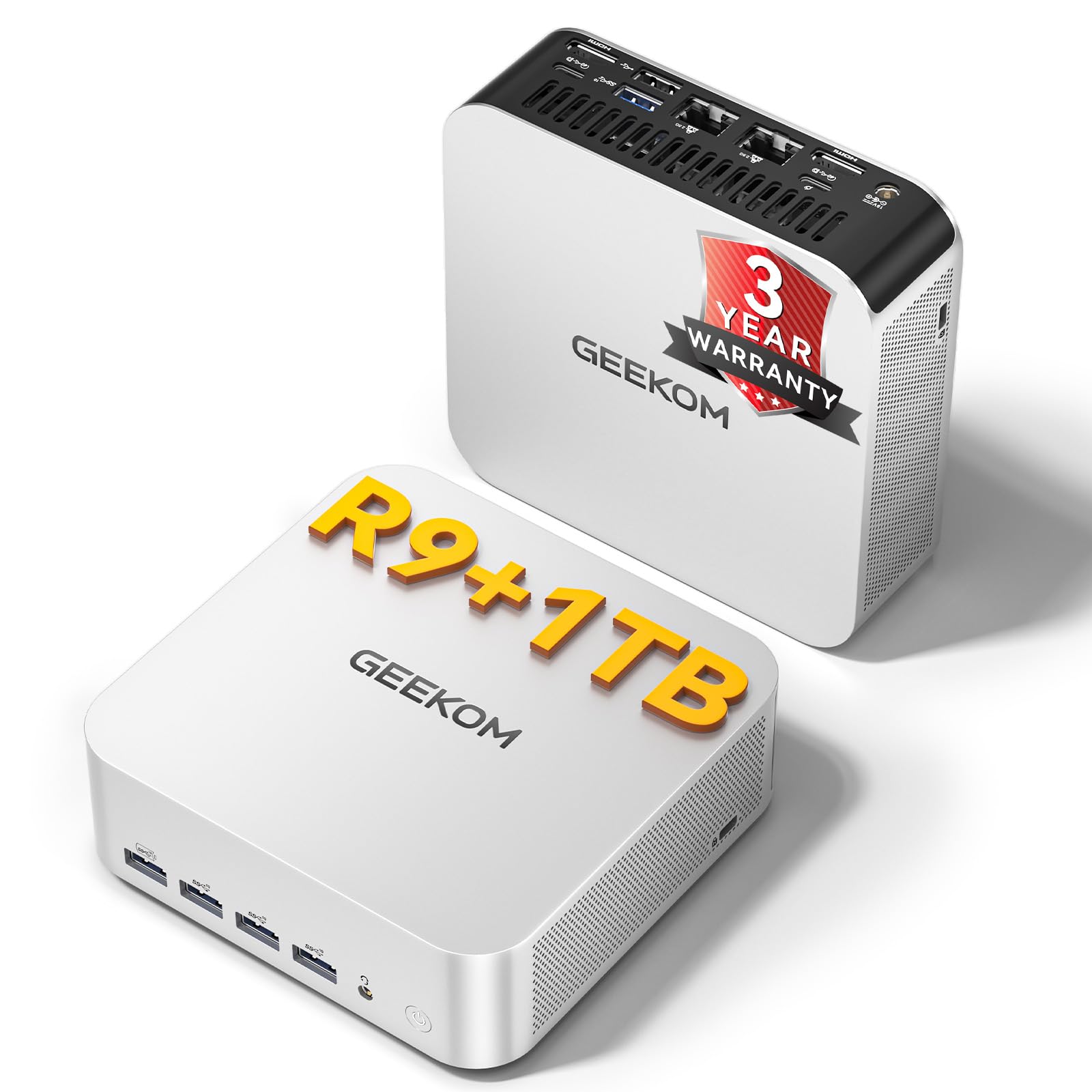
This mini PC packs the AMD Ryzen 9 7940HS with the Radeon 780M integrated GPU, the most powerful integrated graphics on the market before you reach dedicated GPU territory. The Radeon 780M can handle 1080p gaming at medium settings in titles like Fortnite and GTA V, and it excels in video editing workloads through the integrated Ryzen AI engine. The 16GB of DDR5 RAM is single-channel in this configuration, which limits GPU performance by roughly 15 percent compared to dual-channel operation.
The IceBlast 2.0 cooling system keeps noise under 36dB even during sustained workloads, making it one of the quietest options available. The aluminum chassis supports four simultaneous displays via dual USB4 and dual HDMI 2.0 ports, ideal for financial traders or multitaskers who need multiple screens. The dual 2.5G LAN ports provide enterprise-grade network isolation for NAS or home server use cases.
The 1TB NVMe Gen4 SSD delivers fast load times, and the UHS-II SD card slot supports up to 2TB for content creators. The 3-year warranty from GEEKOM is industry-leading for the mini PC space. The single-channel RAM configuration at this price point is a noticeable omission that reduces gaming performance compared to a properly configured dual-channel system. For the beginner who values desk space and quiet operation over raw gaming frame rates, this mini PC is a compelling alternative to a traditional tower.
Why it’s great
- Radeon 780M is the best integrated GPU available
- Whisper-quiet cooling under 36dB under load
- 3-year warranty and dual 2.5G LAN ports
Good to know
- Single-channel RAM limits GPU performance
- No dedicated GPU option for heavy gaming
- First unit failure rates mentioned in user reports
10. GMKtec M6 Ultra
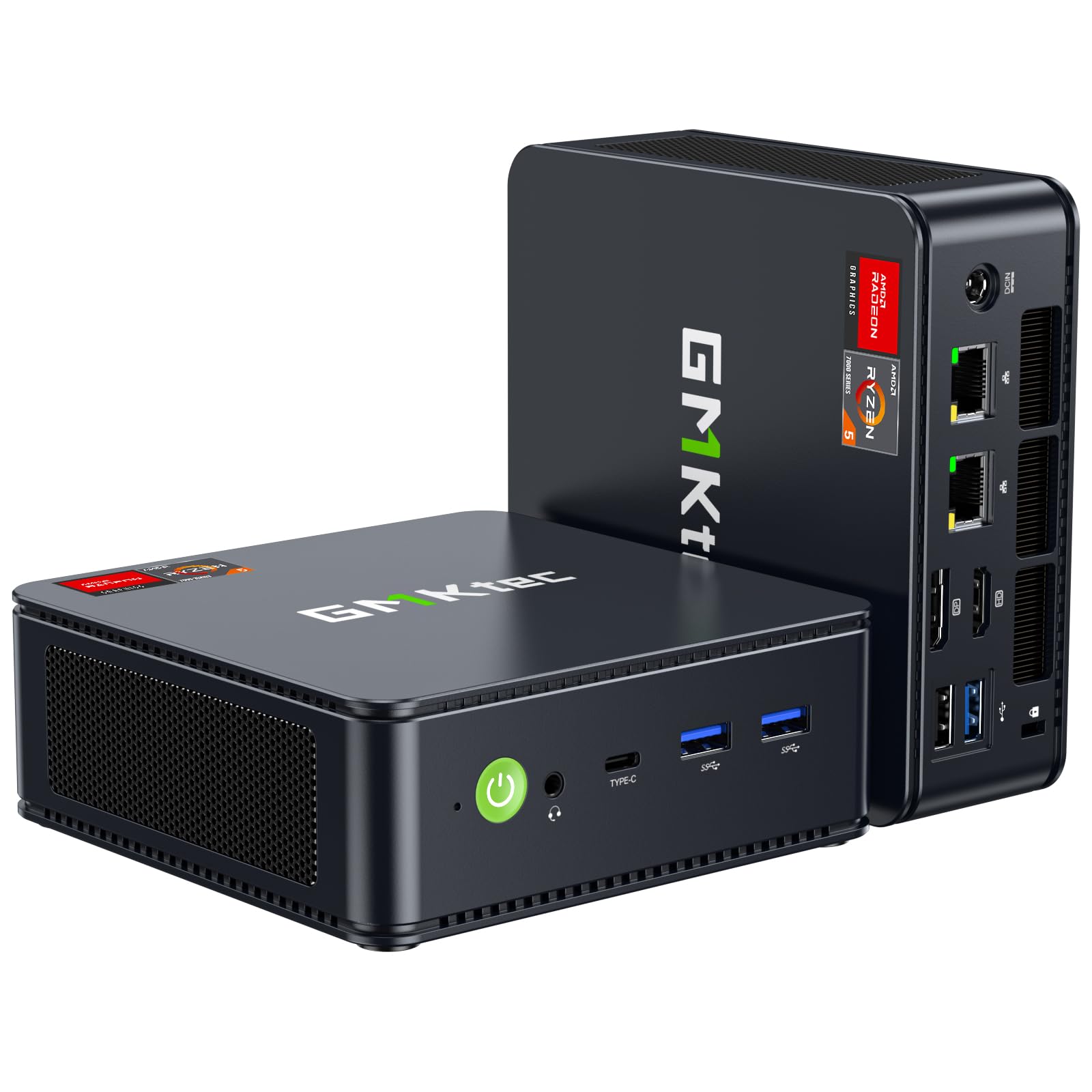
This five-inch cube runs the AMD Ryzen 5 7640HS with the Radeon 760M integrated GPU, a combination that handles older games at high settings and modern titles at 1080p low settings at around 60 FPS. The 32GB of dual-channel DDR5 RAM is a major advantage — most machines at this price level ship with half that amount. The dual 2.5G LAN ports provide excellent network performance for online gaming or home server use.
The triple 4K display support via USB4, HDMI 2.0, and DisplayPort makes this a strong candidate for a multi-monitor workstation. The compact size mounts behind a monitor via the included VESA bracket, completely freeing desk space. Users consistently praise the quiet dual-fan cooling system and the extensive I/O including USB4 with 40Gbps throughput. The SSD expandability to 8TB across two slots provides storage headroom that rivals full-size towers.
The Radeon 760M lacks the VRAM and shading units to handle ray tracing or high-texture modern AAA games at playable frame rates. The single USB 2.0 port on the rear and the absence of a rear audio jack are minor ergonomic annoyances. For the budget-conscious beginner who prioritizes desk space and OS-level tasks over maximum gaming performance, this mini PC offers exceptional value with its generous RAM allocation.
Why it’s great
- 32GB dual-channel DDR5 RAM at a budget price
- Triple 4K display support with USB4 port
- Ultra-compact design with VESA mount included
Good to know
- Integrated GPU cannot handle modern AAA gaming
- Only one rear USB 2.0 port
- No rear audio jack for permanent speaker connection
11. BOSGAME P3 Lite
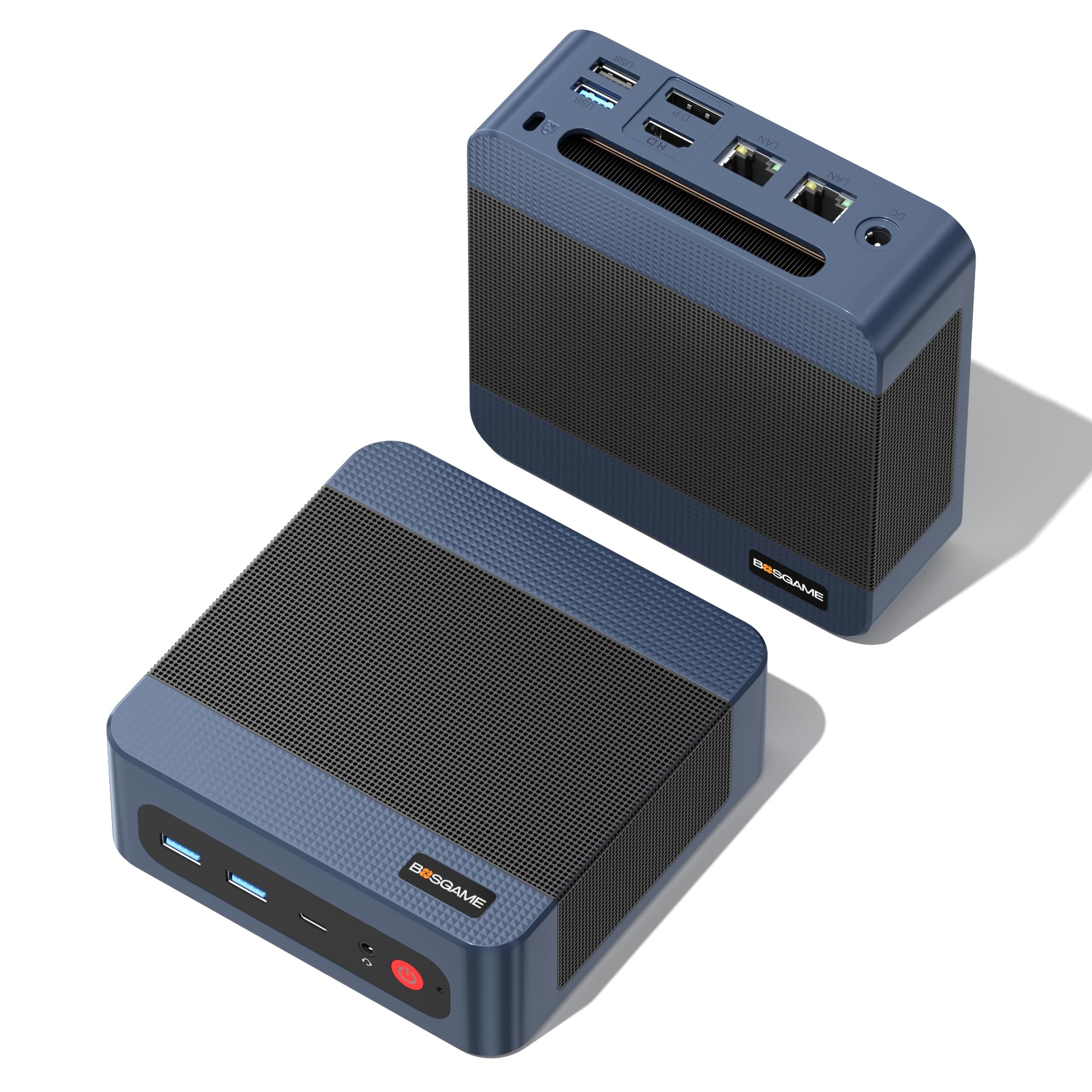
The AMD Ryzen 7 6800H with Radeon 680M graphics provides strong performance for video editing, AI applications, and multitasking with multiple browser windows. The 32GB of DDR5 RAM ensures you never hit a memory ceiling during heavy workloads, and the 1TB NVMe PCIe 4.0 SSD delivers fast boot and load times. The dual 2.5G Ethernet ports support NAS, software routing, and firewall applications that go beyond typical gaming use cases.
Users report that the system runs GOG games and lighter titles without issues, though it is not intended for demanding AAA gaming. The compact form factor mounts behind a monitor via the included VESA bracket, creating a near-invisible setup. The USB4 port supports eGPU attachment, allowing you to add dedicated graphics performance later if you outgrow the integrated GPU. The pre-installed Windows 11 Pro is a professional-grade OS that many budget prebuilts skip.
Customer support quality received mixed reviews, with some users reporting unresponsive service for hardware faults like failing fan or drive issues. The navy blue color may not match all desk aesthetics. For the beginner who needs a capable workstation for productivity tasks plus light gaming, with the potential to add an eGPU later, this mini PC delivers strong value with generous memory and storage specs.
Why it’s great
- 32GB DDR5 RAM and 1TB PCIe 4.0 SSD
- USB4 port supports external GPU upgrades
- Dual 2.5G LAN for professional networking
Good to know
- Integrated GPU not designed for AAA gaming
- Mixed customer support quality reports
- Navy blue color may not suit all setups
FAQ
Do I really need a dedicated graphics card as a beginner?
Is a prebuilt gaming computer worth it for a first-time buyer?
How much storage do I need for a beginner gaming computer?
Final Thoughts: The Verdict
For most users, the gaming computer for beginners winner is the CyberPowerPC Gamer Master GMA2900A3 because it combines a current-generation RTX 5060 Ti GPU with DDR5 memory and an AM5 socket for future CPU upgrades — all at a price that undercuts building it yourself. If you want a compact and quiet gaming setup, grab the GEEKOM A7 MAX. And for the beginner on the tightest budget who wants to learn component upgrades, nothing beats the YAWYORE AMD R5 5600GT as a base platform to build upon.