
Choosing a processor for your gaming rig involves more than just picking the highest core count within a budget. The wrong CPU can leave your high-end graphics card waiting for instructions, creating a bottleneck that no amount of tweaking can fix. This guide cuts through the marketing to focus on what actually matters for in-game frame rates and system responsiveness at this spend level.
I’m Mohammad Maruf — the founder and writer behind Drink4Good. My approach involves hundreds of hours analyzing hardware specifications, comparing real-world benchmarks across multiple silicon generations, and cross-referencing thermal, power, and platform costs to find the gaming cpu under $1000 that delivers zero-compromise gaming.
Whether you’re building a new rig on the latest platform or extracting maximum life from an existing AM4 build, the key is matching cache architecture, clock speed, and core layout to the games you play. This guide breaks down exactly which chips handle high-frame-rate competitive shooters, heavy simulation titles, and streaming workloads equally well without pushing you into unnecessary motherboard or cooler expenses.
How To Choose The Best Gaming CPU Under $1000
At this price ceiling, you have access to nearly every mainstream gaming processor on the market, from the value-focused AMD 7800X3D to the top-bin Intel Core i9 chips. The decision comes down to platform longevity, thermal requirements, and the specific game genres you prioritize.
Cache Architecture vs. Raw Clock Speed
For gaming, the size and layout of the processor’s L2 and L3 cache often matter more than boost clock frequency. AMD’s 3D V-Cache technology stacks additional L3 cache directly onto the chip die, dramatically reducing the time the CPU spends waiting for data from system memory. This translates directly into higher 1% low frame rates, which determine how smooth a game feels during intense scenes. Intel’s approach relies on higher clock speeds and a hybrid P-core/E-core architecture to push maximum throughput, which excels in productivity tasks but can be more sensitive to memory latency in games.
Platform Cost and Upgrade Path
The processor itself is only part of the total expense. AMD’s Socket AM5 supports DDR5 memory and PCIe 5.0, and AMD has committed to supporting this socket for multiple future generations, making it a long-term investment. Intel’s LGA1700 platform supports both DDR4 and DDR5, but the socket will not carry future processor generations, meaning upgrades will eventually require a new motherboard. AM4 remains a cost-effective option if you already own compatible hardware, with the 5800X3D offering a massive gaming uplift without a full platform swap.
Power Draw and Cooling Requirements
High-core-count processors like the Core i9-13900KS can draw over 250 watts under full load, requiring a premium 360mm liquid cooler to avoid thermal throttling. In contrast, the Ryzen 7 7800X3D typically uses around 75–90 watts during gaming and can be effectively cooled by a mid-range air cooler. Factoring in the cost of adequate cooling is essential — a cheaper processor that requires a AIO cooler may end up costing more in total than a slightly pricier chip that runs on a air cooler.
Quick Comparison
On smaller screens, swipe sideways to see the full table.
| Model | Category | Best For | Key Spec | Amazon |
|---|---|---|---|---|
| AMD Ryzen 7 7800X3D | Processor | Ultimate gaming frame rates | 96MB total cache (L2+L3) | Amazon |
| Intel Core i9-14900KF | Processor | Multitasking & productivity | 6.0 GHz max boost | Amazon |
| AMD Ryzen 7 5800X3D | Processor | AM4 platform upgrade | 100MB total cache | Amazon |
| Micro Center Bundle (Ryzen 9 9900X + X870E) | Combo | New build with future-ready mobo | 12 cores / 24 threads | Amazon |
| ALCPOK Gaming PC (Ryzen 7 5700G) | Prebuilt | Immediate plug-and-play gaming | Integrated Radeon Graphics | Amazon |
| suevery Pre-Built Gaming PC (Ryzen 5 + RTX 3050) | Prebuilt | Budget-friendly starter PC | RTX 3050 6GB GPU | Amazon |
| Intel Core i9-13900KS | Processor | Maximum single-thread performance | 6.0 GHz factory boost | Amazon |
| MXZ Gaming PC (i5 12400F + RTX 4060) | Prebuilt | 1080p gaming with ray tracing | RTX 4060 8GB GPU | Amazon |
| YAWYORE Gaming PC (Ryzen 7 5700X + RTX 5060) | Prebuilt | High-FPS 1080p/1440p gaming | RTX 5060 8GB GDDR7 | Amazon |
In‑Depth Reviews
1. AMD Ryzen 7 7800X3D

The Ryzen 7 7800X3D redefines what a gaming CPU can deliver without breaking into enthusiast pricing. Its 8 Zen 4 cores, paired with the 3D V-Cache technology that brings total L2+L3 cache to 96MB, deliver class-leading 1% low frame rates in memory-bound titles like simulators and open-world RPGs. Reviewers consistently report 100%+ FPS uplifts moving from older platforms, and the 120W TDP means a modest air cooler or inexpensive 240mm AIO keeps temperatures below 70°C during extended sessions.
Builders on AM5 benefit from DDR5 support and PCIe 5.0 connectivity, giving this chip room to grow alongside future GPU upgrades. The integrated Radeon Graphics controller is useful for troubleshooting but you will want a dedicated card for gaming. Customers using the chip with an RTX 5070 Ti report zero stuttering and no driver issues, even while streaming, gaming, and running Discord simultaneously.
Running at a 4.2 GHz base clock with a 5.0 GHz boost, the 7800X3D is locked for multiplier overclocking, but its thermal efficiency and out-of-box gaming performance make manual tuning largely unnecessary. If gaming performance is your single priority, this is the most effective use of your spending.
Why it’s great
- Extremely efficient power draw — runs under 75W during gaming.
- 3D V-Cache provides significant uplift in simulation and open-world games.
- AM5 platform supports future CPU upgrades without a new motherboard.
Good to know
- Multi-core productivity performance trails the higher-core-count Intel competitors.
- Cannot be overclocked via multiplier adjustment.
- Requires a dedicated graphics card for gaming.
2. Intel Core i9-14900KF

The Core i9-14900KF is Intel’s fastest gaming chip on the LGA1700 platform, combining 8 P-cores and 16 E-cores to hit a 6.0 GHz thermal velocity boost. In endgame Fortnite scenarios, users report stable 240 FPS without even enabling overclocking. The hybrid architecture shines in multitasking workloads — encoding a stream while gaming at 5.6+ GHz is entirely realistic with a competent 240mm AIO or larger cooler.
This chip plays host to a notable power appetite, drawing 125W at base and significantly more under all-core load. Proper cooling is non-negotiable; idle temperatures hover around 35°C, but all-core stress tests push into the 70–80°C range. Customers report that pairing the 14900KF with a 700-series motherboard and DDR5 memory unlocks the full turbo potential, though older Z690 or B660 boards may require a BIOS update to stabilize the microcode.
The “KF” designation means there is no integrated graphics, so you must pair this with a discrete GPU. Despite this, the chip offers the highest single-threaded performance available on the LGA1700 socket, making it an excellent choice if you split your time between competitive gaming and content creation.
Why it’s great
- Highest single-core boost clock available on the Intel platform.
- Excellent for gaming plus simultaneous streaming or rendering.
- Compatible with both DDR4 and DDR5 motherboards.
Good to know
- LGA1700 socket is a dead end for future processor upgrades.
- Consumes significant power under heavy workloads — requires robust cooling.
- No integrated graphics require a dedicated GPU for any display output.
3. AMD Ryzen 7 5800X3D

The Ryzen 7 5800X3D represents the ultimate gaming life-extension for anyone still on an AM4 motherboard. By stacking an additional 64MB of L3 cache on top of the standard 32MB, the total cache pool reaches 100MB — an architecture that minimizes memory latency and offers massive jumps in frame rate consistency. One user upgrading from a Ryzen 5 3600 reported their Call of Duty: Warzone 1% lows jumping from 15 FPS to 50–65 FPS, with average frames hitting 110–140.
This chip runs warm by nature — the 3D V-Cache layer physically insulates the silicon, making heat dissipation more challenging. Multiple owners emphasize that a 240mm or 360mm AIO liquid cooler is essential for maintaining stable temperatures under gaming loads. With proper undervolting via curve optimizer, idle temps land around 34°C with gaming peaks around 65°C. Overclocking is locked, but the factory 4.5 GHz boost is sufficient to avoid bottlenecking even high-end GPUs like the RTX 4090 in most titles.
For anyone running a B450, B550, or X570 motherboard, this drop-in upgrade transforms gaming performance without requiring new RAM, a new motherboard, or a fresh Windows installation. It is the most cost-effective high-frame rate upgrade path for the mature AM4 ecosystem.
Why it’s great
- Drop-in upgrade for existing AM4 builds — no motherboard or RAM change needed.
- 100MB total cache significantly improves 1% low frame rates.
- Compatible with PCIe 4.0 on B550 and X570 chipsets.
Good to know
- High thermal density requires a quality liquid cooler for optimal performance.
- Overclocking is locked; performance gains come solely from 3D V-Cache.
- Single-core speed trails the Ryzen 7000 series and Intel Raptor Lake.
4. Micro Center AMD Ryzen 9 9900X + MSI X870E Tomahawk

This bundle pairs AMD’s Zen 5-based Ryzen 9 9900X with a premium MSI MAG X870E Tomahawk motherboard, delivering 12 cores, 24 threads, and up to 5.6 GHz boost for performance that spans both gaming and production workloads. The AM5 X870E platform provides PCIe 5.0 support for both graphics and storage, Wi-Fi 7, Bluetooth 5.4, and USB4 connectivity. The motherboard alone retails for a significant portion of the bundle price, making this a strong value for anyone starting a new build.
The 9900X runs a default TDP of 120W but can draw more under heavy all-core loads. MSI’s 14+2+1 Duet Rail power system and large extended heatsinks with 7W/mK thermal pads keep voltage delivery stable and temperatures under control. Dual 8-pin CPU power connectors are recommended for heavy overclocking. The board also features EZ M.2 Shield Frozr II heatsinks for the Gen5 SSD slots, ensuring storage stays cool during extended file transfers.
Customers coming from older Intel builds praise the platform’s responsiveness and stability, though one review flags MSI’s return policy as slow — a risk to consider. For a gamer who also edits video, renders 3D scenes, or runs virtual machines, this bundle offers the most versatile foundation under a grand without sacrificing gaming frame rates.
Why it’s great
- Combines a high-core count Zen 5 CPU with a premium X870E motherboard in one purchase.
- PCIe 5.0 support across GPU and M.2 slots for maximum future bandwidth.
- 12 cores / 24 threads handle game streaming and production work equally well.
Good to know
- Bundle pricing only available through Micro Center storefront.
- Some users reported MSI motherboard quality control issues.
- Requires a dedicated GPU — no integrated graphics in 9900X.
5. ALCPOK Gaming PC Desktop (Ryzen 7 5700G)

The ALCPOK prebuilt centers on the Ryzen 7 5700G APU, an 8-core processor with Radeon Vega 8 integrated graphics that can handle lightweight esports titles like League of Legends, Dota 2, and Counter-Strike 2 at 1080p without a dedicated GPU. This makes it an ideal starter machine for someone who wants a usable gaming PC immediately and plans to add a discrete graphics card later. The 550W 80+ Bronze power supply includes PCIe connectors, supporting that upgrade path.
The system ships with 16GB of DDR4 3200MHz memory and a 1TB NVMe SSD for fast boot times and ample game storage. Multiple ARGB fans keep the 5700G cool during extended sessions, and the case provides room for a full-size GPU and additional drives. Customers report that adding a card like the RTX 3060 transforms the machine into a competent 1080p gaming rig. One potential drawback is the single RAM stick — running dual-channel memory (two 8GB sticks) would improve integrated graphics performance significantly.
For buyers who want a working PC out of the box with the option to upgrade over time, the ALCPOK delivers strong baseline performance. The integrated graphics are not suited for AAA titles at high settings until a dedicated GPU is installed. The 1-year warranty and lifetime tech support provide peace of mind for first-time builders.
Why it’s great
- Playable gaming performance without a dedicated GPU for esports titles.
- Pre-installed 550W PSU with PCIe connectors supports GPU upgrades.
- Large 1TB NVMe SSD for game library storage.
Good to know
- Single-channel RAM limits integrated graphics performance.
- Integrated Vega 8 cannot run modern AAA games at playable framerates.
- No USB-C port on front panel.
6. suevery Pre-Built Gaming PC (Ryzen 5 + RTX 3050)
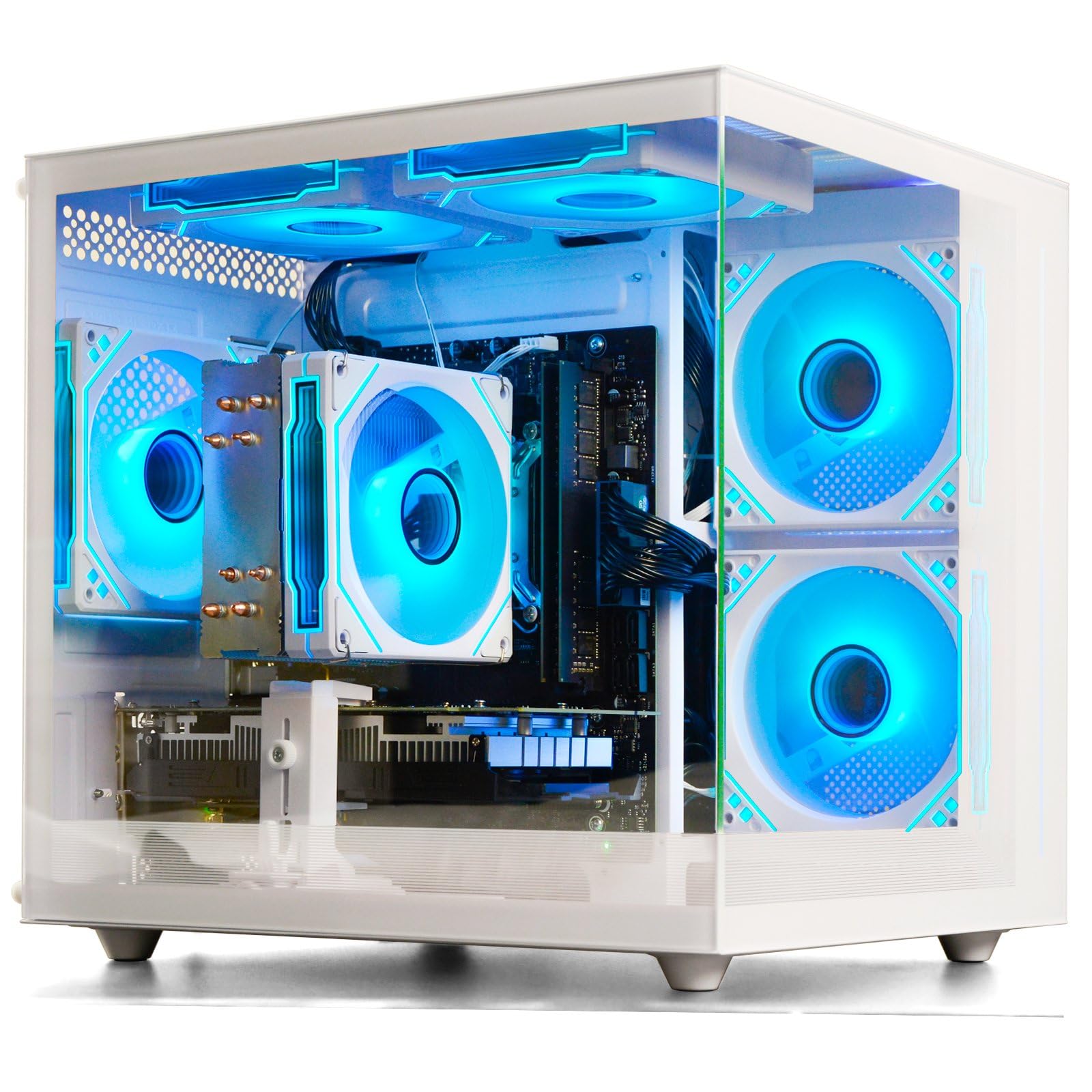
The suevery gaming PC combines an AMD Ryzen 5 6-core processor with an NVIDIA RTX 3050 6GB GPU in a white chassis with customizable RGB lighting. It targets entry-level 1080p gaming, handling titles like Fortnite, Roblox, and Assetto Corsa at playable settings. The RTX 3050 brings NVIDIA’s DLSS and ray tracing support to a budget-conscious build, though frame rates in ray-traced titles will be modest. The 16GB of DDR4 3200MHz RAM and 512GB NVMe SSD cover the basics for loading games and multitasking.
Connectivity includes Wi-Fi 6 for low-latency wireless gaming and multiple USB ports for peripherals. The 512GB SSD is the main bottleneck for users with large game libraries — you will need to add a secondary SATA or NVMe drive relatively soon. One reviewer noted the GPU was not detected out of the box and required a replacement, so testing upon arrival is advisable. The system supports dual monitors via the dedicated GPU outputs.
For a first gaming PC, especially for younger gamers or those on a strict budget, this system offers a low-friction entry point. The white case design appeals to those building a themed setup, and the single RAM stick leaves an upgrade path to dual-channel memory for a performance boost in CPU-bound scenarios.
Why it’s great
- Dedicated RTX 3050 GPU handles 1080p esports and older AAA games.
- White case with RGB appeals to themed desktop aesthetics.
- Wi-Fi 6 and dual monitor support included.
Good to know
- 512GB storage fills quickly — additional drive recommended.
- Single-channel RAM limits CPU performance in some games.
- GPU may require reseating or replacement out of the box for some units.
7. Intel Core i9-13900KS

The Core i9-13900KS represents the binned, top-tier version of Intel’s Raptor Lake platform, guaranteeing a 6.0 GHz boost clock out of the box. Its hybrid layout of 8 P-cores and 16 E-cores, along with Hyper-Threading on the P-cores, gives it a combined 24 cores and 32 threads — enough to excel in both gaming and heavy multi-threaded workloads like 3D rendering and video encoding. Early adopters pushing DDR5 8000MHz report that the chip feels snappier in Windows than competing AMD processors and delivers excellent 4K gaming frame rates when paired with an RTX 4090.
Managing this chip’s thermal output is the primary challenge. Under all-core loads, the 13900KS can hit 100°C rapidly, triggering thermal throttling if the cooling solution is inadequate. Multiple owners state that a high-quality 360mm AIO liquid cooler is the baseline for keeping temperatures under 85°C during sustained workloads, and voltage/frequency tuning is often required to balance performance and heat. Anecdotal evidence suggests the 13900KS runs significantly hotter than the standard 13900K despite being the same chip binned at the factory for higher clock potential.
Reliability has been a concern for some buyers — one reviewer reported a processor failure after six months with a slow Intel RMA process. For the enthusiast who wants the absolute highest single-core frequency and is willing to invest in top-tier cooling and a premium Z790 motherboard, the 13900KS delivers class-leading performance. For most gamers, the less expensive 13900K or 14900K offers similar real-world frames with easier cooling requirements.
Why it’s great
- Factory binned 6.0 GHz boost — highest single-core frequency available.
- Superb multitasking with 24 cores and 32 threads.
- Integrated UHD Graphics 770 provides video output without a separate GPU.
Good to know
- Extremely high power draw requiring a top-tier 360mm liquid cooler.
- LGA1700 socket is a dead-end for future CPU upgrades.
- Some units may require voltage tuning for stability under load.
8. MXZ Gaming PC Desktop (i5 12400F + RTX 4060)

The MXZ prebuilt pairs a 12th Gen Core i5-12400F with an RTX 4060 8GB GPU, striking a strong balance between budget and modern gaming capability. The 12400F’s 6 P-cores and 12 threads operate at a 4.4 GHz boost, which is sufficient to feed the RTX 4060 without bottlenecking at 1080p and 1440p resolutions. Users report frame rates ranging from 144–240 FPS in Apex Legends and Warzone, and the card’s DLSS 3 support provides a significant performance cushion in ray-traced titles.
The system comes with 16GB of DDR4 3200MHz RAM, a 500GB NVMe SSD, and a 550W 80+ power supply. The 500GB drive fills quickly with modern games, so planning for a secondary storage upgrade is wise. The case features 5 ARGB fans and a side window panel, and the pre-installed Windows 11 Pro provides out-of-box functionality. One top USB port reportedly arrived nonfunctional on one unit, but overall customer feedback is positive regarding ease of setup and noise levels.
For a buyer looking to play modern games at 1080p with ray tracing enabled via DLSS, the MXZ delivers a strong value proposition. The lack of a second M.2 slot on the H610M motherboard could complicate long-term storage expansion, but the included 1-year parts and labor warranty and free lifetime tech support mitigate risk for first-time PC owners.
Why it’s great
- RTX 4060 supports DLSS 3 and ray tracing at a competitive price point.
- Quiet operation with ARGB fans and attractive case design.
- Windows 11 Pro pre-installed for immediate use.
Good to know
- 500GB SSD fills quickly — a secondary SATA SSD or HDD is needed.
- H610M motherboard has limited expansion options for M.2 drives.
- Single-channel RAM configuration in some units limits CPU performance.
9. YAWYORE Gaming PC (Ryzen 7 5700X + RTX 5060)

The YAWYORE prebuilt pairs the 8-core Ryzen 7 5700X with an NVIDIA RTX 5060 8GB GDDR7 graphics card, combining strong CPU throughput with next-gen GPU memory bandwidth. With 32GB of dual-channel DDR4 3200MHz RAM and a 1TB NVMe SSD, this system arrives ready for serious gaming and multitasking. The RTX 5060 supports DLSS 4 multi-frame generation, ray tracing, and Reflex 2 latency optimization, delivering high refresh rate experiences in titles like Valorant, CS2, and RDR2.
The MSI B550M-A PRO motherboard provides a stable foundation with PCI Express 4.0 support, and the 650W 80+ Bronze power supply offers headroom for additional upgrades. The ARGB fans and liquid cooler are controllable via the included remote, and the white or black case glass panel showcases the build. Customers note the system is compact and quiet, with fast boot times and stable performance under load in heavily modded games like Arma Reforger multiplayer.
One important consideration is that this system uses DDR4 RAM rather than DDR5. While this does not bottleneck the RTX 5060 in gaming, it limits future upgradability compared to AM5 or LGA1700 DDR5 builds. The no-name brand status makes some buyers hesitant, but user reviews are overwhelmingly positive, praising the price-to-performance ratio and the system’s reliability out of the box. The included 1TB SSD provides generous game storage compared to competitors at this price tier.
Why it’s great
- RTX 5060 with GDDR7 memory delivers excellent 1080p/1440p gaming performance.
- 32GB dual-channel DDR4 RAM and 1TB NVMe SSD out of the box.
- Liquid cooling with controllable ARGB lighting and quiet operation.
Good to know
- DDR4 platform limits future memory upgrade options.
- No-name brand may have limited RMA support if issues arise.
- 650W PSU may need upgrading for future higher-end GPU swaps.
FAQ
Does the Ryzen 7 7800X3D support DDR4 memory?
Is the Intel Core i9-14900KF worth the extra cost over the i9-13900KS for gaming?
Can I use the stock cooler that comes with the Ryzen 7 5800X3D?
What power supply wattage do I need for a high-end gaming build with the Core i9-13900KS and an RTX 4090?
Should I buy a prebuilt gaming PC or build my own with a Ryzen 7 7800X3D?
Final Thoughts: The Verdict
For most users, the gaming cpu under $1000 winner is the AMD Ryzen 7 7800X3D because its 3D V-Cache architecture delivers the highest gaming frame rates and smoothest 1% lows while being power-efficient and easy to cool. If you want the highest single-core clock speeds for competitive gaming and productivity, grab the Intel Core i9-14900KF. And for a drop-in upgrade that extends the life of an existing AM4 motherboard without breaking the bank, nothing beats the AMD Ryzen 7 5800X3D.