
Finding a desk that can handle a triple-monitor setup, a heavy PC tower, and the occasional elbow drop after a victory royale without wobbling or breaking the bank is the real endgame boss. Many desks marketed for gaming sacrifice stability for flashy lights or squeeze your gear onto a surface that’s barely big enough for a single laptop. That trade-off is what this guide is designed to eliminate.
I’m Mohammad Maruf — the founder and writer behind Drink4Good. I’ve spent years analyzing furniture specifications, customer feedback, and material science to separate the truly stable, spacious desks from the ones that only look good in product photos.
Whether you are outfitting a dedicated streaming studio or just want a clean, roomy surface for your PC and peripherals, this breakdown of the best gaming desks for under $1000 will help you match the right frame, surface, and features to your actual needs without blowing your budget.
How To Choose The Best Gaming Desks For Under $1000
Choosing a gaming desk involves more than just matching your RGB peripherals. The frame, desktop material, available depth, and integrated features like power outlets or height adjustability determine whether your setup feels premium or cramped. Here are the key factors to weigh before clicking add to cart.
Desktop Dimensions and Depth
Many budget desks skimp on depth, offering only 20 to 22 inches of usable space. That is tight for a deep monitor arm clamp or a full-size keyboard with a mousepad. Look for a minimum of 24 inches of depth. A 60-inch width fits a dual-monitor setup comfortably, while 70 inches or more accommodates triple monitors or a large PC case on the desktop itself.
Frame Stability and Weight Capacity
A desk that wobbles during intense gaming or typing is a frustration you do not want. Check the frame material — alloy steel or carbon steel is preferable over standard tubular metal. Pay attention to the weight rating. Premium models often support 300 pounds or more, which ensures the frame stays rigid even with multiple monitors, a heavy PC, and peripherals. For standing desks, dual-motor systems are significantly more stable than single-motor units at higher heights.
Surface Material and Finish
Engineered wood (MDF or particleboard) is the standard at this price range, but its density varies. Look for carbon fiber texture finishes or laminated surfaces that resist scratches and are easy to wipe clean. Avoid raw particleboard surfaces in humid environments — they can swell over time. The best options at this tier use a thick, dense MDF core with a durable laminate or textured top layer.
Integrated Features and Build Quality
Built-in power outlets with USB ports are convenient, but check the power rating — 120V/12A is standard. LED light strips should have multiple color modes and brightness control, ideally with a memory function so they do not reset every time you turn them off. Cable management grommets or trays are not a nice extra; they are essential for keeping your setup looking clean. Also verify that the included monitor stand is deep enough for your monitor base or clamp mount.
Quick Comparison
On smaller screens, swipe sideways to see the full table.
| Model | Category | Best For | Key Spec | Amazon |
|---|---|---|---|---|
| ODK 66″ L Shaped Desk | L-Shape | Budget L-Shape with storage | 66″ desktop, LED lights, reversible | Amazon |
| Bestier 71″ L Shaped Desk | L-Shape | Spacious L-Shape with outlets | 71.5″ wide, 4 AC + 2 USB ports | Amazon |
| SEDETA 63″ Desk with Drawers | Rectangular | Multi-function office/gaming | 63″, lockable drawer, file drawer | Amazon |
| AODK 66″/113″ L-Shape Desk | L-Shape | Versatile L-Shape or 2-person Linear | Convertible 113″, fabric drawers | Amazon |
| AODK Electric Standing Desk | Sit-Stand | Affordable height-adjustable gaming | 55″, dual drawer, keyboard tray | Amazon |
| FLEXISPOT Electric Large Desk | Sit-Stand | Extra deep standing desk | 71″x32″, 4 memory presets | Amazon |
| EUREKA ERGONOMIC L60 | L-Shape | Compact L-Shape, easy assembly | 60″x43″, carbon steel frame | Amazon |
| EUREKA ERGONOMIC Aero 72″ | Rectangular | Large streamer/gaming workstation | 72″, wing-shaped, 400 lb capacity | Amazon |
| Desktronic HomePro Standing Desk | Sit-Stand | Premium wobble-free standing desk | 60″x30″, dual motor, 353 lb weight | Amazon |
In‑Depth Reviews
1. Desktronic HomePro Standing Desk 60×30
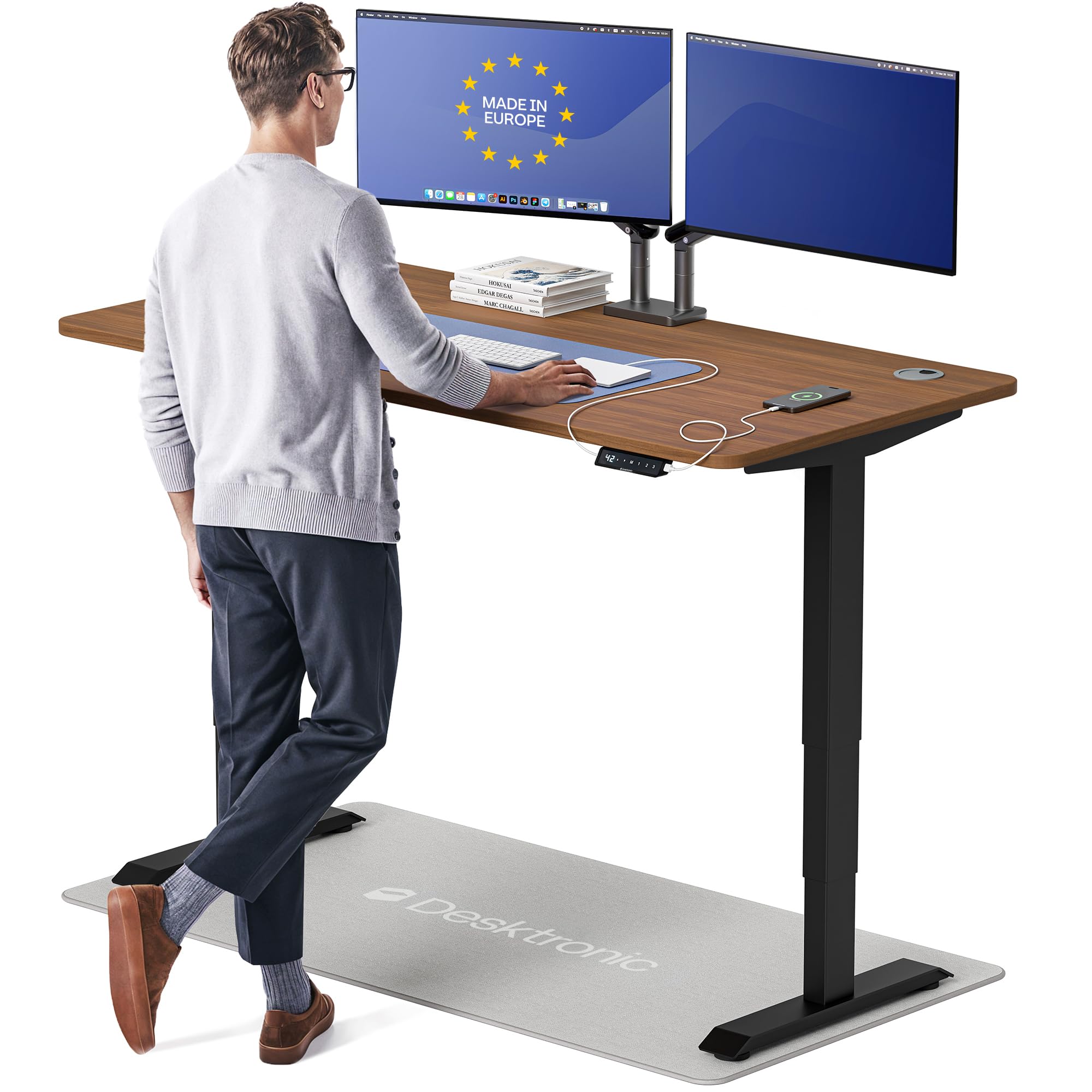
The Desktronic HomePro is the standing desk to beat in this price bracket. It features a dual-motor system that lifts at 2 inches per second and supports an impressive 352.7 pounds with zero wobble at any height. The 60-by-30-inch one-piece desktop is deep enough for triple monitors and a docking station, and the touchscreen controller with three memory presets makes switching between sitting and standing seamless. Built-in USB-A and USB-C ports add convenience without cluttering the surface.
The anti-collision sensor auto-reverses if it contacts an object, which is a safety feature rarely seen at this price point. The height range of 25.4 to 51.2 inches accommodates users from 5-foot to 6-foot-8, and the lacquered finish on engineered wood resists scratches and looks more premium than standard laminate. Assembly time is quoted at under 30 minutes, and the included tools and hardware are well organized. European manufacturing is evident in the tight tolerances and the solid feel of the frame.
Some early units had issues with control panel screws stripping in the solid wood top, though this appears to be an isolated batch problem. Customer support in those cases was not immediately helpful. Still, the overall build quality, stability, and feature set make this the most future-proof option for anyone who prioritizes ergonomics and a rock-solid platform for their gaming or creative work.
Why it’s great
- Dual-motor system delivers smooth, wobble-free height adjustment even at maximum extension.
- 353-pound weight capacity handles triple monitors, a heavy PC case, and peripherals without flex.
- Touchscreen controller with three memory presets and integrated USB/USB-C charging is genuinely convenient.
Good to know
- At 130 pounds, this desk is very heavy — plan for two-person assembly and a sturdy floor.
- Some reports of soft screws in the solid wood top requiring replacement with standard hardware.
2. EUREKA ERGONOMIC Aero 72 Inch Gaming Desk
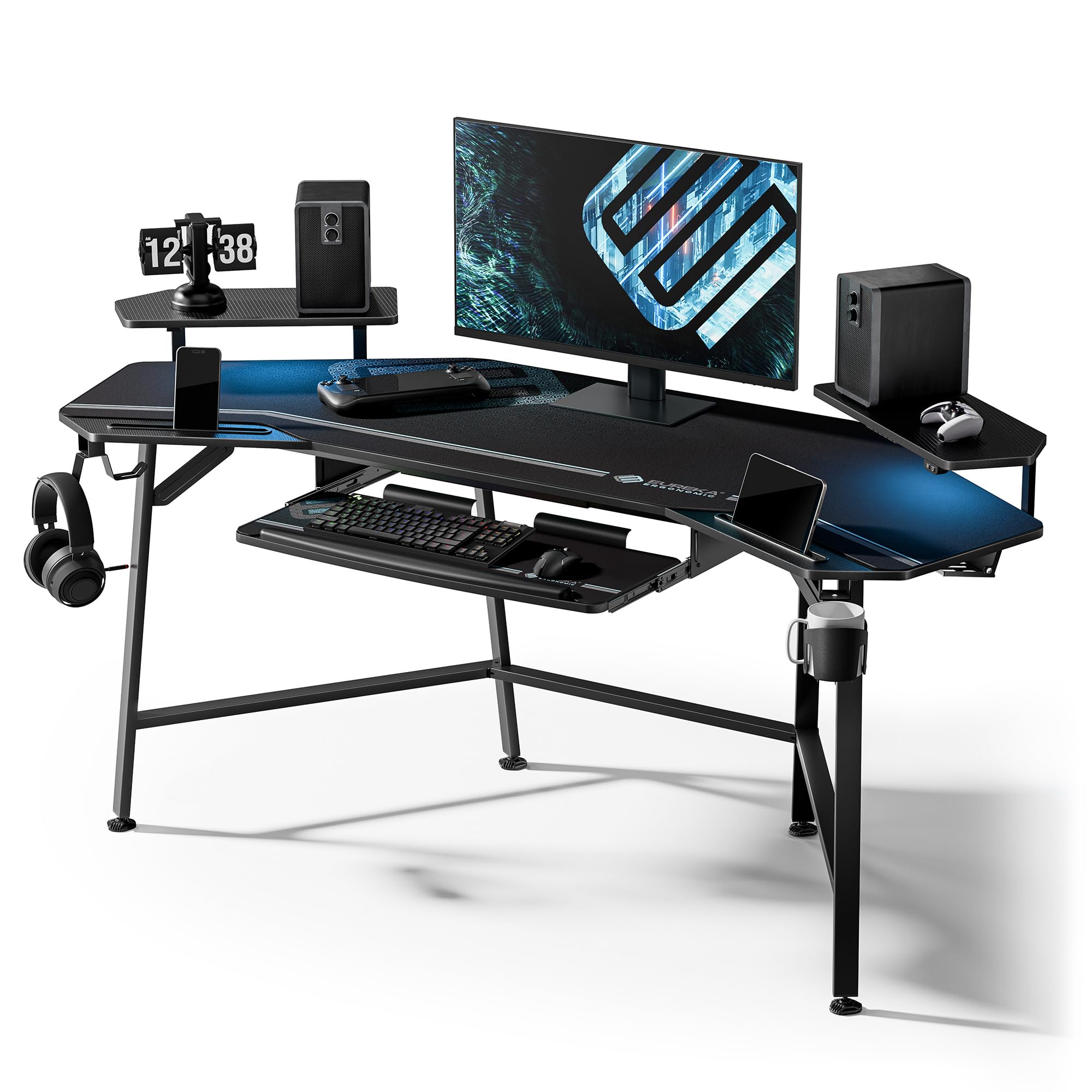
The Eureka Aero is built for the serious streamer or power user who wants every accessory within reach without clutter. Its 72-inch-wide wing-shaped desktop provides a vast 24-inch depth that easily swallows triple monitors, a large keyboard, and a full-desk mousepad. The desk supports up to 400 pounds, so there is no concern about adding a heavy PC tower or multiple monitor arms. The carbon fiber texture surface resists scratches and feels smooth to the touch during long sessions.
This desk comes packed with thoughtful extras: a pull-out keyboard tray with a precision mouse pad, dual headphone hooks, a cup holder, and built-in RGB LED lights under the monitor shelves. The two cable management grommets and dual power socket holders keep wires hidden, and the monitor shelves have grooves for holding a phone or tablet. The included full-coverage mouse pad is a nice touch that protects the entire surface. Assembly is straightforward with labeled parts and a clear manual, though the desk is heavy enough that you will want a second set of hands.
One quirk is that the Aero desk is built at roughly a 110-degree angle rather than 90 degrees, which means it does not fit flush into a corner — it is designed to sit against a flat wall. The LED light strip under the shelves is somewhat dim compared to aftermarket strips, and the included manual for the lights is outdated. Still, for raw surface area, build quality, and integrated features, the Aero is a top-tier choice for anyone with a large room and big ambitions for their setup.
Why it’s great
- 72-inch wide desk with a 400-pound weight capacity is incredibly spacious and stable.
- Wing-shaped design includes a keyboard tray, dual headphone holders, cup holder, and cable management.
- Full-coverage mouse pad and carbon fiber surface provide a premium, scratch-resistant feel.
Good to know
- Desk is 110 degrees, not a true 90-degree corner — it must be placed against a flat wall.
- LED strip brightness is modest, and the light controller manual is not well integrated.
3. EUREKA ERGONOMIC L60 L Shaped Gaming Desk

The Eureka L60 is the answer for gamers who want a corner desk but do not have an enormous room. It measures 60 inches by 43 inches overall, with a 30-inch height that works well for standard desk chairs. The carbon fiber textured desktop feels smooth and resists fingerprints better than the glossier finishes on some competitors. The frame is made from custom-grade carbon steel with a powder-coated finish, giving it a solid feel for a desk in this size class.
Assembly is one of the quickest in this roundup — many users report finishing in under an hour with the included tools. The two-piece desktop design simplifies handling compared to a single large slab. Cable management is integrated via a power strip holder and two grommets, which keep the underside tidy. The desk is also certified to meet EPA TSCA Title VI and CARB Phase II standards for low formaldehyde emissions, which is a nice reassurance for indoor air quality. It supports up to 170 pounds, which is sufficient for a dual-monitor setup and peripherals.
The primary trade-off is stability at the extremes. Some users note that the desk can feel top-heavy and wobble slightly if bumped, especially if a C-clamp monitor arm is mounted. The included power strip holder is also small and does not fit standard surge protectors — you will need to mount it using the extra screws provided. For a compact, well-priced L-shape desk that goes together easily, the L60 is a strong choice, but it is not the most heavy-duty option.
Why it’s great
- Assembly is genuinely fast — many users finish in under one hour with clear instructions.
- Carbon fiber texture surface is scratch-resistant and easy to keep clean.
- Compact L-shape footprint fits smaller rooms without sacrificing dual-monitor space.
Good to know
- Can feel top-heavy and wobble with monitor arms; may need an extra stabilizing leg.
- Built-in power strip holder is too small for standard surge protectors.
4. FLEXISPOT 71×32 Inch Electric Large Standing Desk
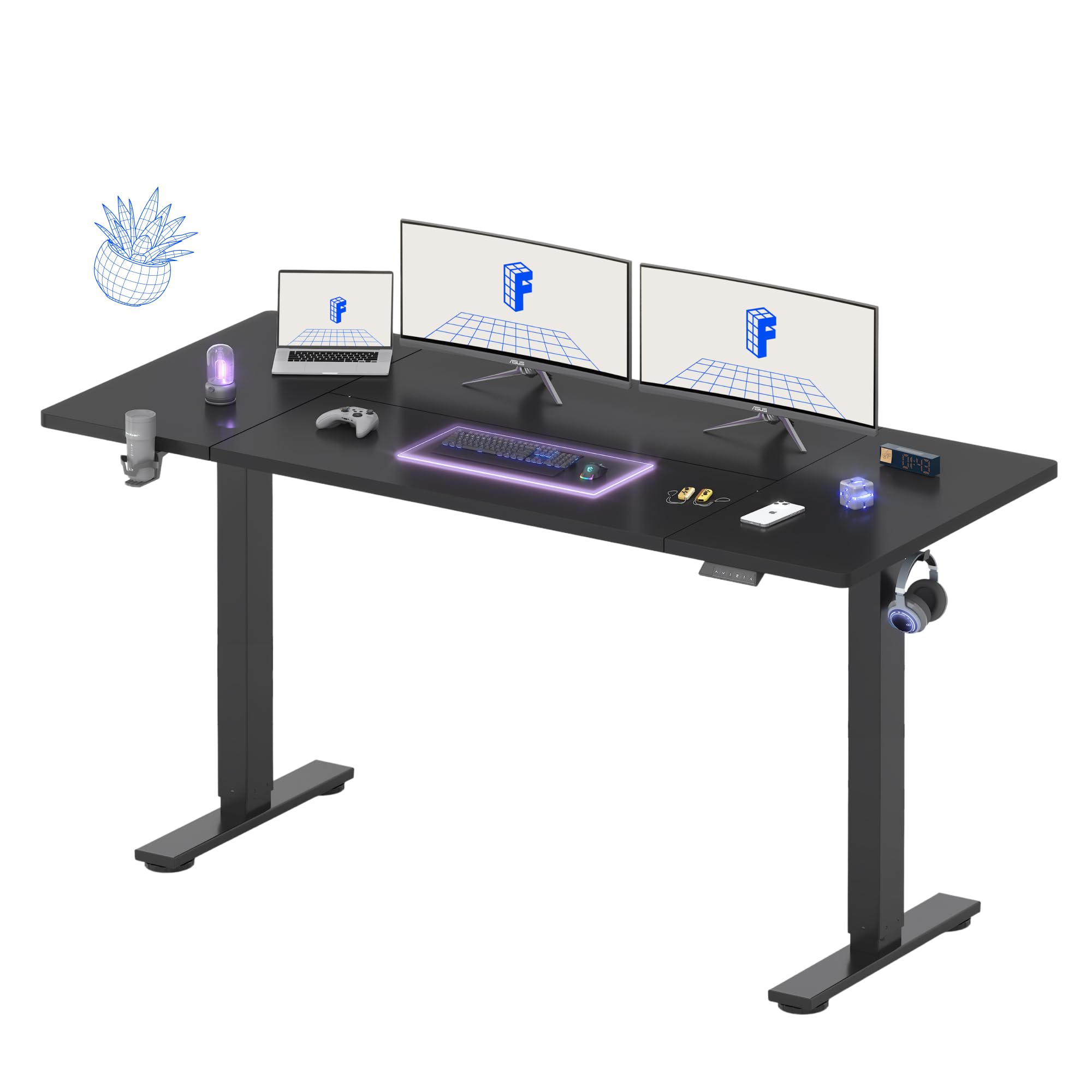
The FLEXISPOT 71×32 is a rarity at this price point: a standing desk with 32 inches of depth. That extra real estate makes a massive difference if you use a deep monitor arm, a large drawing tablet, or just want to push your keyboard forward for better ergonomics. The single motor operates quietly and smoothly across a height range from 28.9 to 46.5 inches, and the four programmable memory presets make it easy to switch between sitting and standing positions throughout the day.
The steel frame and wide feet deliver solid stability during typing and light gaming, though it is not as rock-solid as dual-motor options at maximum height. The included cable management tray and organizer keep the underside of the desk tidy, and there are thoughtful extras like a cup holder and a hook for hanging a headset or bag. Assembly is straightforward with clear instructions, though a power drill is recommended for the frame bolts. The 71-inch width easily accommodates dual 27-inch monitors plus a laptop.
Some units ship with minor cosmetic issues like paint damage on the frame, and the seam on the two-piece desktop can be slightly misaligned if not carefully tightened. The motor is not truly whisper-quiet — there is a mechanical hum during adjustment. Still, for the price, the combination of extra depth, four memory presets, and a large surface area makes this one of the best values for anyone who wants a sit-stand setup without jumping to the premium tier.
Why it’s great
- 32-inch depth is exceptional at this price — accommodates deep monitor arms and large peripherals.
- Four memory presets make height switching effortless for multiple users or daily routines.
- Included cable management tray and organizer keep the workspace clean.
Good to know
- Single motor is not as stable as dual-motor desks at maximum extension.
- Some units arrive with minor paint chips or desktop seam misalignment.
5. AODK Electric Standing Desk with Drawers & Keyboard Tray

The AODK electric standing desk is a smart blend of storage and height adjustability for the budget-conscious gamer or remote worker. It features a 55-inch wide desktop with a full-sized monitor stand, two cloth drawers, and a pull-out keyboard tray with mouse pad. The electric motor offers a height range from 29.9 to 46.1 inches, and three memory presets let you save your preferred sitting and standing positions. The built-in power outlet with 3 AC sockets and 2 USB ports keeps your devices charged without a separate power strip.
The hidden cable management tray at the back is a welcome addition, routing wires out of sight. Assembly is streamlined thanks to the iron-structure drawers that reduce steps by about 80% compared to traditional drawer builds. The rustic brown wood finish gives the desk a warmer look than the typical gamer all-black aesthetic, making it suitable for home offices or shared rooms. Users at 5-foot-11 find the maximum height comfortable for standing use.
The cloth drawers are functional but feel flimsy compared to solid wood alternatives — they are best for lightweight accessories, not heavy binders. The keyboard tray slides out but does not extend very far and lacks a locking mechanism. Some users also note that the included tools are basic, and a power drill speeds up assembly considerably. For an affordable entry into the electric standing desk world with integrated storage, the AODK delivers good value but expects some compromises on drawer quality and keyboard tray depth.
Why it’s great
- Integrated cloth drawers and keyboard tray offer built-in storage without taking up desk space.
- Three memory presets and a quiet motor make transitioning between sitting and standing easy.
- Hidden cable management tray keeps the desk looking clean from all angles.
Good to know
- Cloth drawers feel lightweight and are not suitable for heavy items.
- Keyboard tray has limited pull-out distance and no locking mechanism.
6. AODK 66″ L Shaped Computer Desk with File Cabinet

What makes the AODK L-shape desk stand out is its reversible design that also converts into a 113-inch long linear desk for two-person use. The vintage-finish metal frame and engineered wood top give it a more mature, office-friendly look than the typical RGB-laden gaming desk. It comes with a two-drawer file cabinet for letter/legal/A4 files and a four-tier set of fabric storage drawers, providing substantial under-desk storage. The built-in power outlet offers 3 AC sockets and 2 USB ports, while the upgraded LED light strip uses a milky diffuser shell for softer, more even illumination.
The 47.2-inch monitor stand holds two monitors easily and improves posture by raising the screen to eye level. The adjustable foot pads ensure the desk stays stable even on uneven floors — no wobble during typing. Assembly is manageable with two people, and the instructions are clear with labeled parts. Many users note the desk feels sturdy and looks more expensive than its price suggests. The fabric drawers slide smoothly and are spacious enough for files, cables, and small accessories.
The LED light controller uses a wired remote rather than a wireless one, which some users find less convenient. The storage shelves under the desk are 18 inches deep, which fits most standard PC cases but may be tight for oversized towers. The metal frame also means you cannot directly attach a C-clamp monitor mount without a wood spacer. For anyone who needs both a corner desk layout and the option to reconfigure into a two-person linear setup, the AODK offers unmatched versatility at a budget-friendly price.
Why it’s great
- Converts between a 66-inch L-shape and a 113-inch linear desk for two people.
- File cabinet and fabric drawers provide substantial under-desk storage for a clean workspace.
- Milky diffuser LED strip produces softer, more uniform lighting than bare LED strips.
Good to know
- LED light controller uses a wired remote rather than wireless for convenience.
- Metal frame prevents C-clamp monitor arm mounting without a wood spacer.
7. SEDETA 63″ Computer Desk with Lockable Drawers

The SEDETA desk is a standout for those who want legitimate office-grade storage in a gaming-friendly package. It includes a file drawer that holds letter/legal/A4 files, a lockable small drawer for private documents, a printer cabinet, and a CPU stand — all within a 63-inch wide footprint. The monitor stand is long enough to hold three monitors, and the included keyboard tray frees up desktop space for a wide mousepad. The power outlet provides 4 AC sockets and 2 USB ports with a dedicated switch, and the RGB LED strip is controlled via app with 29 flashing modes and a music sync function.
The desktop surface has a clean wood grain and black metal look that blends well in both home offices and gaming rooms. Users report the desk is very sturdy once assembled, though the racks on the shelves may be too small for oversized PC towers — you may need to remove a shelf for clearance. The lockable drawer operates smoothly with an alloy steel glide mechanism, and the file drawer slides fully out for easy access. The LED strip includes a built-in microphone for music syncing, which adds atmosphere without needing a separate controller.
Assembly is the most involved of any desk in this roundup — expect around six hours with a wireless screwgun, as the instructions are 29 pages long. The instructions have some broken English but are still clear enough to follow. The keyboard tray is somewhat tight for both a full-size keyboard and a mouse in the tray, so you may prefer to keep the mouse on the main desktop. For a desk that doubles as a serious filing station and gaming rig, the SEDETA delivers exceptional value if you have the patience for assembly.
Why it’s great
- Integrated lockable file drawer and printer cabinet offer genuine office-grade storage.
- App-controlled RGB LED strip with music sync adds immersive atmosphere without extra hardware.
- Long monitor stand accommodates three monitors for a truly panoramic setup.
Good to know
- Assembly is lengthy — expect up to six hours with detailed, 29-page instructions.
- Keyboard tray is tight for a mouse, and storage shelves may not fit large PC towers.
8. Bestier 71″ L Shaped Gaming Desk with Power Outlets
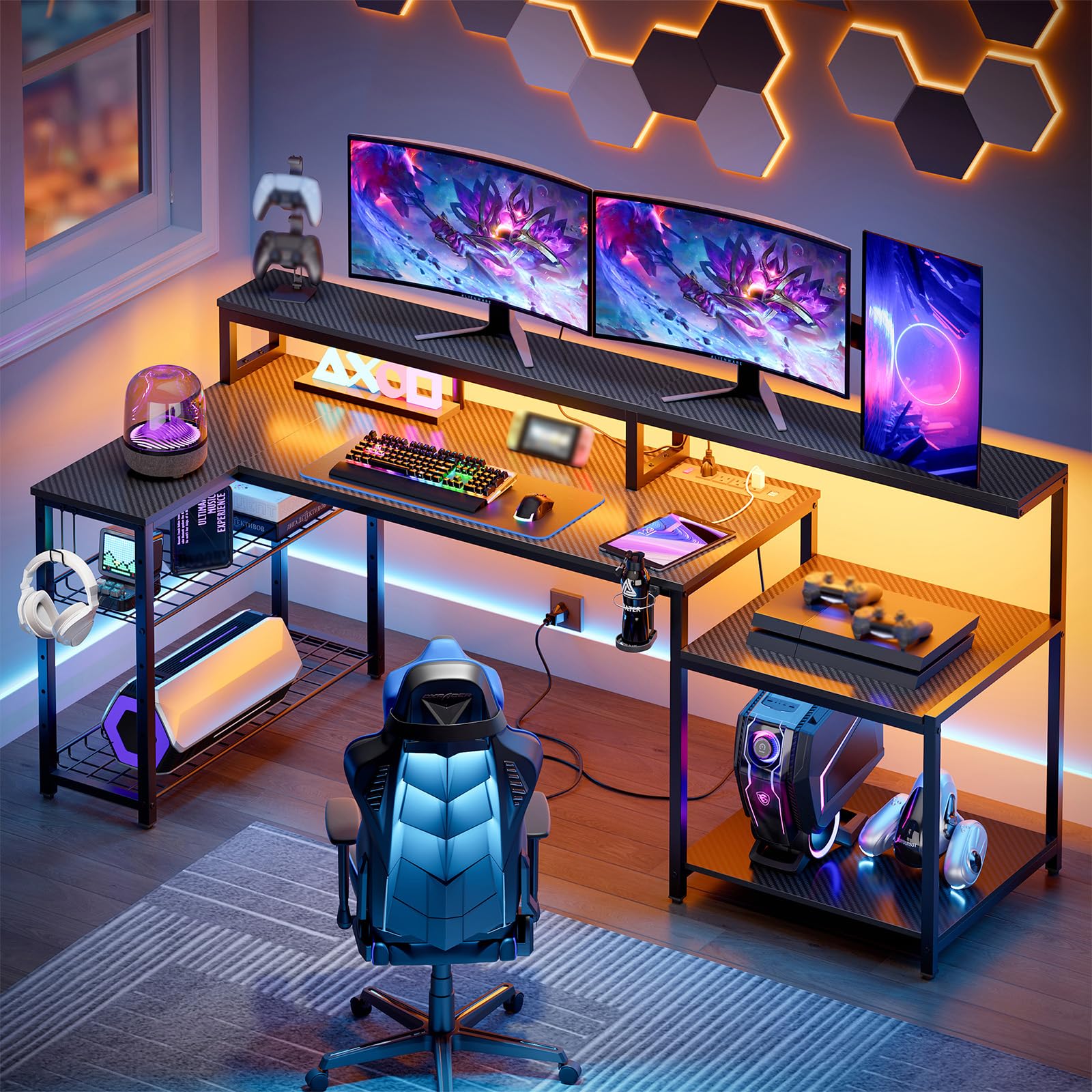
The Bestier 71-inch L-shape desk is designed for maximum surface area and device charging convenience. At 71.5 inches wide, it easily accommodates two monitors and a laptop, and the corner layout keeps everything within easy reach. The built-in power outlet features 4 AC sockets and 2 USB ports rated at 1500W, capable of powering up to six devices simultaneously. The RGB light strip under the monitor stand offers 20 static colors and 22 dynamic modes with adjustable speed and brightness — higher-end than most budget LED implementations.
The desktop uses a P2 particleboard with a 3D carbon fiber texture that is scratch-resistant and easy to clean. The metal grid storage racks on both sides can be adjusted to different heights and angles, and the foldable cup holder and headphone hook have three possible installation positions. Users over 6 feet tall find the desk height comfortable, and the monitor stand at 5.9 inches improves posture. Assembly is manageable solo in about two hours, and the desk feels sturdy with no wobble during normal use.
The product photos can be misleading regarding measurements — the top shelf to monitor shelf height is 10 inches, not the 14 inches some buyers expected, which may force a larger PC case to the bottom shelf. The cup holder is plastic rather than metal, and some users prefer a wireless LED controller over the included wired version. For a spacious L-shape desk with excellent power integration and versatile storage, the Bestier is a solid choice — just double-check your case dimensions before buying.
Why it’s great
- 71.5-inch surface fits dual monitors and a laptop comfortably in an L-shape layout.
- Six-device power station with 4 AC and 2 USB ports eliminates the need for a separate power strip.
- RGB strip offers 22 dynamic modes with adjustable speed and brightness for immersive lighting.
Good to know
- Shelf height (10 inches) may be too short for large PC towers — verify your case size.
- Included cup holder is plastic; LED controller is wired rather than wireless.
9. ODK 66″ L Shaped Gaming Desk with Power Outlet and LED Lights

The ODK 66-inch L-shape desk is the entry-level champion for getting a large, feature-packed gaming desk without a big investment. It includes built-in LED lights with 10 colors and 10 lightning modes that are memory-enabled, a built-in power outlet with 3 standard AC plugs and 2 USB ports, and a full monitor stand that raises your screens to eye level. The desk is reversible — you can set it up as a left or right corner desk to fit your room layout. The main desktop measures 36 inches at the center, providing a generous 66 inches of total workspace.
The desk is constructed from premium MDF board with a carbon fiber texture finish and a sturdy metal frame. Users report it feels solid and stable once assembled, with no significant wobble during typing or gaming. The adjustable 4-tier storage shelf provides flexibility for items of various sizes, and the computer tower stand keeps your PC off the floor. Assembly takes most users between one and three hours solo, though a ratcheting screwdriver speeds things up significantly. The monitor risers are a standout feature, effectively doubling the usable desk space by lifting monitors off the main surface.
The actual top surface measures about 58 inches by 18 inches rather than the full 66 inches — the difference is accounted for by the shelf and monitor stand footprint. The LED lights are controlled by a button placed under the monitor stand, which can be inconvenient to reach, and the lights are quite bright when mounted on the front edge. The USB ports may warm up during use but remain within safe limits. For the price, the ODK delivers surprising storage, stability, and features that make it a strong budget recommendation for anyone starting or upgrading their gaming station.
Why it’s great
- Reversible L-shape design fits both left and right corner layouts for maximum room flexibility.
- Monitor risers effectively double the usable desk space by lifting screens off the surface.
- Four-tier adjustable storage and a dedicated CPU stand keep the setup organized and off the floor.
Good to know
- Actual desktop surface is closer to 58 inches wide, not the full 66-inch total measurement.
- LED control button is placed under the monitor stand, making it awkward to reach during use.
FAQ
Can I attach a monitor arm to a gaming desk with a metal frame?
How much depth do I need for a 27-inch monitor on a monitor arm?
Are carbon fiber surface desks better than wood-veneer ones for gaming?
What power outlet specs should I look for in a gaming desk?
How long does it typically take to assemble a gaming desk under $1000?
Final Thoughts: The Verdict
For most users, the gaming desks for under $1000 winner is the Desktronic HomePro Standing Desk because it delivers dual-motor stability, a spacious 60×30-inch surface, and a 353-pound weight capacity that rivals desks costing twice as much. If you want a massive workstation with integrated accessories and a 400-pound limit, grab the EUREKA ERGONOMIC Aero 72. And for a budget-friendly L-shape desk with storage shelves and a reversible design, nothing beats the ODK 66″ L Shaped Desk for pure value.