
Finding a gaming keyboard and mouse combo that delivers responsive performance, reliable build quality, and customizable lighting without overshooting a strict budget is the defining challenge for value-focused gamers. The market is flooded with membrane-based bundles that market themselves with flashy LEDs but fall apart during extended gaming sessions, especially in shared spaces where loud clicky switches create friction.
I’m Mohammad Maruf — the founder and writer behind Drink4Good. My evaluation process focuses on isolating concrete specs like key rollover count, DPI resolution, switch type (membrane vs. mechanical), and battery capacity in wireless models, then cross-referencing durability against verified user feedback to separate genuine value from marketing hype.
After analyzing dozens of contenders, this guide breaks down the seven options that define the best gaming keyboard and mouse combo under $100, with clear distinctions between membrane entry-level bundles and mechanical upgrades, helping you match the right set to your specific gaming habits and daily workflow.
How To Choose The Best Gaming Keyboard And Mouse Combo Under $100
Within this price cap, every dollar spent on switch quality and sensor accuracy yields disproportionately large returns in gaming performance. The two main fork points are membrane vs. mechanical construction for the keyboard and optical sensor resolution for the mouse. A membrane keyboard with 25-key anti-ghosting can feel adequate for MOBAs, but mechanical switches provide the tactile consistency and key-rollover reliability needed for competitive FPS titles. On the mouse side, look past peak DPI numbers and focus on tracking stability and lift-off distance — a 3200 DPI sensor with consistent tracking beats a 7200 DPI sensor that jitters.
Switch Type and Noise Profile
Membrane keyboars in this segment offer quieter operation and lower upfront cost, but mushy feedback and faster wear over time are tradeoffs. Mechanical blue switches deliver a crisp click and tactile bump that many gamers prefer, though the audible click can be disruptive in shared rooms or late-night sessions. Some combos use “mechanical-feel” membrane switches — these mimic the resistance profile of a mechanical switch without the internal metal contact, offering a middle ground for noise-conscious buyers.
Anti-Ghosting and Key Rollover
Anti-ghosting ensures that simultaneous key presses are registered correctly, which is critical for complex combos in games like Fortnite or Call of Duty. The standard for entry-level combos is 25-key anti-ghosting, which covers the main gaming cluster and is sufficient for most users. Full-key rollover (N-key) is rarer in sub-$100 combos but provides total freedom — every key pressed simultaneously registers without conflict. If you play fighting games or complex MMOs, prioritize combos that advertise 25-plus key anti-ghosting at minimum.
Mouse Sensor and DPI Versatility
The mouse’s optical sensor dictates tracking precision. Combo mice in this price bracket typically offer DPI ranges from 800 to 3200 or 4800, with some premium models reaching 7200 or 12800. More important than the maximum DPI number is the step adjustability — having three or four discrete DPI stages (e.g., 800/1600/2400/3200) lets you toggle between slow sniping precision and fast flick shots. Check whether the mouse has dedicated DPI buttons and if the lighting indicator changes color to reflect the current setting.
Quick Comparison
On smaller screens, swipe sideways to see the full table.
| Model | Category | Best For | Key Spec | Amazon |
|---|---|---|---|---|
| Redragon S101-3 PRO | Mid-Range Wired | Custom macros and RGB software | 7200 DPI / 5 macro keys | Amazon |
| MSI Forge GK110 | Premium Membrane | Brand reliability and volume roller | 12800 DPI / 26-key ghost | Amazon |
| Taiahiro Typewriter | Mechanical Retro | Unique typewriter feel with blue switches | Blue switch / 3200 DPI | Amazon |
| Taiahiro Mechanical Gray | Mechanical Entry | Low-cost mechanical upgrade with pad | Blue switch / 4800 DPI | Amazon |
| Redragon S107 | Value Membrane | Xbox compatibility and quiet keys | 3200 DPI / 25-key ghost | Amazon |
| CHONCHOW 4-in-1 Bundle | All-in-One Kit | Headset and mousepad included | 3600 DPI / splash-proof | Amazon |
| CHONCHOW Wireless | Budget Wireless | Wireless freedom and large battery | 2500mAh / 3600 DPI | Amazon |
In‑Depth Reviews
1. Redragon S101-3 PRO Gaming Keyboard and Mouse

The Redragon S101-3 PRO takes the top spot because it delivers the most complete feature set within the price cap — software-driven RGB customization, five dedicated macro keys, and a mouse sensor that climbs to 7200 DPI. The membrane keyboard uses soft-touch keys that remain notably quiet, making it viable for shared dorm rooms or late-night raiding without disturbing others. The included ergonomic wrist rest and textured mouse surface add genuine comfort for marathon sessions.
Where this combo pulls ahead is the macro programmability. Most bundles at this price offer only media keys, but the S101-3 PRO lets you record complex command sequences and store them directly on the keyboard’s onboard memory. The mouse’s DPI button cycles through four stages (800, 1600, 4800, 7200) with a color indicator — a small but impactful detail that lets you confirm your sensitivity without opening a menu mid-game.
The tradeoff is that the mouse lighting defaults to a monochrome red LED that doesn’t match the keyboard’s RGB zone effects. Some users also report that the lowest DPI setting resets after a cold boot, requiring a quick click to recalibrate. For the combination of quiet operation, genuine macro support, and a mouse capable of high-resolution tracking, this is the most balanced pick in the segment.
Why it’s great
- Software lets you customize RGB lighting and record macros with onboard storage
- Quiet membrane switches reduce noise in shared spaces
- 7200 DPI mouse offers wide sensitivity range for different genres
Good to know
- Mouse lighting is red-only and does not sync with keyboard RGB
- DPI memory can reset after system restart
2. MSI Forge GK110 Combo
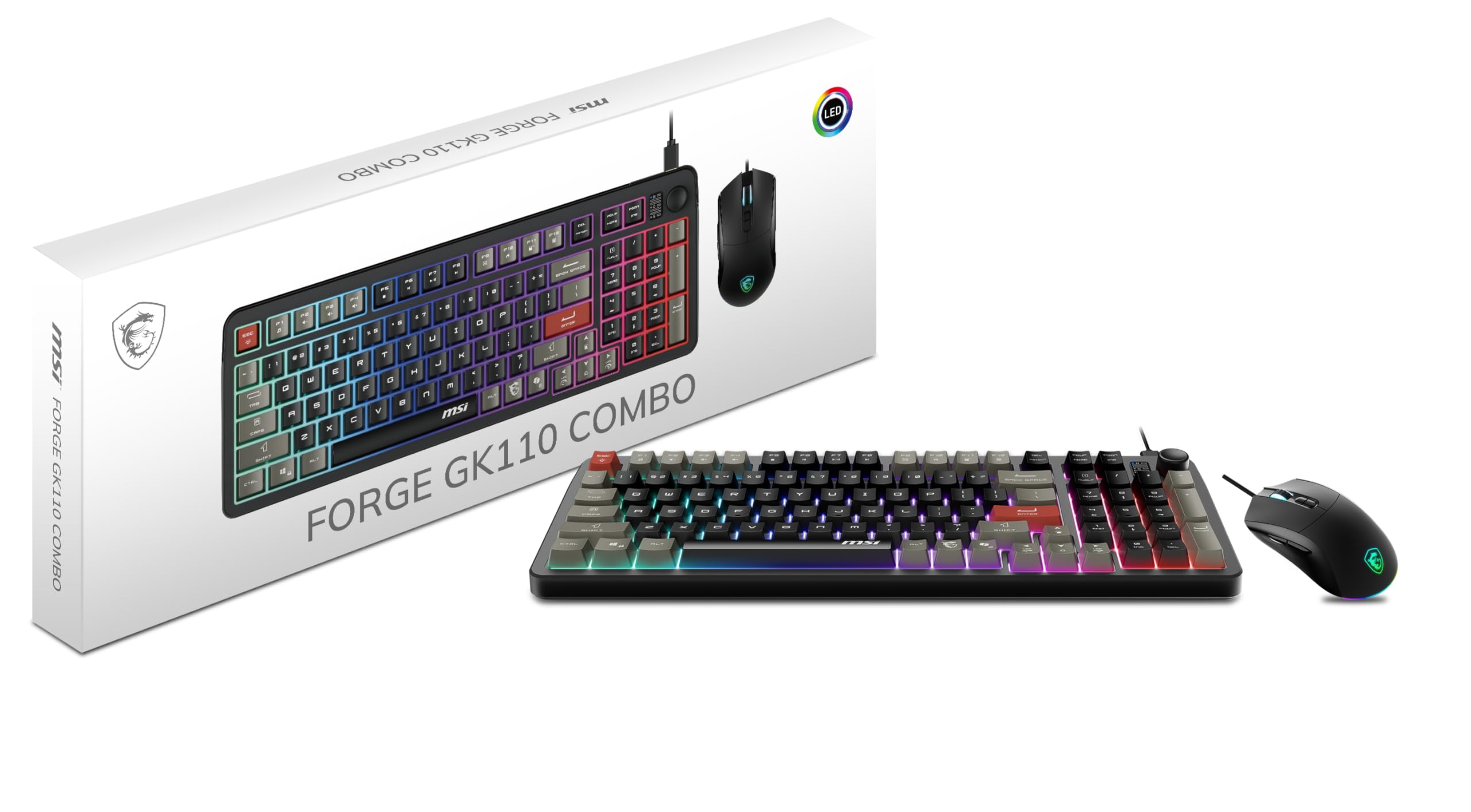
The MSI Forge GK110 stands out as the premium membrane option, backed by MSI’s reputation for durable peripherals and a mouse sensor that reaches 12800 DPI — the highest tracking resolution in this roundup. The keyboard uses a quiet membrane mechanism with a soft, muted feel that works well for both productivity typing and casual to mid-level gaming. The dedicated volume scroll wheel on the top edge is a practical addition that lets you adjust audio on the fly without tabbing out.
The mouse features switches rated for over 20 million clicks, which indicates a longer service life than many budget mice in this category. The RGB lighting on both devices is controlled via hotkeys rather than software, which simplifies setup but limits customization depth. The 26-key anti-ghosting covers the core gaming zones, sufficient for most shooters and battle royales where multi-key combos are common.
The main omission is the lack of an included wrist rest, which some users find necessary for extended sessions. The membrane construction also means the typing feel is less crisp than a mechanical alternative. For buyers who prioritize a trusted brand name, a high-DPI mouse for ultra-sensitive aim, and silent key operation, the MSI Forge GK110 offers a polished experience that justifies its premium position.
Why it’s great
- 12800 DPI optical sensor provides extremely precise tracking for competitive gaming
- Volume scroll wheel is convenient for real-time audio control
- Durable build with 20-million-click rated mouse switches
Good to know
- Membrane keyboard lacks the tactile feedback of mechanical switches
- No wrist rest included in the package
3. Taiahiro Typewriter Style Mechanical Gaming Combo

The Taiahiro Typewriter combo is the most visually distinctive entry — round retro keycaps with an exposed aluminum-alloy metal panel and genuine blue mechanical switches underneath. Every keystroke produces the crisp, audible click that mechanical enthusiasts seek, with satisfying tactile feedback that enhances both typing and gaming. The 4-color RGB backlighting offers 11 modes, including wave and ripple effects that shine through the double-shot injection-molded keycaps.
The optical mouse matches the keyboard’s punk aesthetic and provides 4 adjustable DPI levels (800/1600/2400/3200) with 7-color breathing lighting that cycles continuously. The included mouse pad is basic but functional, giving the bundle a complete out-of-box setup. The 104-key anti-ghosting and 12 multimedia keys add practical utility for MMO keybinding and productivity workflows.
The circular keycaps have a smaller surface area than standard rectangular caps, which can feel cramped for gamers with broader fingers. The mouse’s lighting cannot be customized independently — it remains in a fixed cycling pattern that some find distracting. For those who want a conversation-starting mechanical combo with authentic blue switch acoustics and a premium metal finish, this set delivers strong character at a reasonable entry cost.
Why it’s great
- Genuine blue mechanical switches with loud, tactile click
- Aluminum alloy panel and round retro keycaps stand out visually
- 11-mode RGB lighting with double-shot keycaps for durability
Good to know
- Round keycaps have smaller surface area, less comfortable for some hand sizes
- Mouse lighting cycles automatically with no independent control
4. Taiahiro Mechanical Gray Combo

The Taiahiro Mechanical Gray combo is the cheapest entry point to genuine mechanical switches in this guide, offering blue clicky switches at a price typically reserved for membrane alternatives. The 98-key layout omits the number pad to save desk space, making it a strong choice for gamers with compact setups or frequent LAN travel. The blue LED backlighting offers 18 modes with adjustable brightness and breathing speed, creating a monochromatic look that some prefer over multi-color RGB.
The mouse reaches 4800 DPI with four adjustable stages and features 7-color breathing RGB lighting. The included large mouse pad provides a consistent gliding surface, though reviews note that the cloth surface is better suited for general use than competitive shooter flicks. The keyboard body has a matte finish with a metal top plate that gives it a heftier feel than the price suggests.
The blue switches are loud — there is no damping, so every keypress generates an audible click that may not suit quiet environments. The mouse lighting scheme cannot be changed from the automatic cycling pattern, which is a common limitation at this tier. For gamers who prioritize authentic mechanical feel and don’t mind a compact layout or audible switches, this combo represents the best raw value in the segment.
Why it’s great
- Lowest-priced genuine mechanical blue switch combo available
- Compact 98-key layout saves desk space without losing the main cluster
- Large mouse pad included for smooth tracking out of box
Good to know
- Blue switches are loud, not ideal for shared spaces
- Mouse lighting is fixed in automatic cycling mode
5. Redragon S107 Gaming Combo

The Redragon S107 is one of the most widely reviewed combos in the budget tier, and its enduring popularity stems from consistent build quality and broad platform compatibility — verified by users to work with Xbox Series X via a USB receiver without noticeable input lag. The membrane keyboard with 25-key anti-ghosting covers the essential gaming area, and the floating keycaps with skin-friendly coating improve typing comfort during long sessions. The 12 multimedia function keys provide quick access to volume, play/pause, and other controls.
The mouse offers 3200 DPI with four color-coded stages, making it easy to identify your current sensitivity at a glance. The switch from the included large mouse pad adds value and provides a uniform surface for optical tracking. Reviews consistently highlight the keyboard’s quiet key presses and stable wireless-like feel when wired, making it a solid entry-level option for gamers moving from a basic office keyboard.
The membrane construction means it will never match the crisp actuation of a mechanical board, and some users note that the mouse feels small for larger hands, causing palm fatigue during extended play. The RGB software available from Redragon’s site is functional but clunky to navigate. For Xbox gamers or those who need a quiet, reliable membrane kit with proven console compatibility, the S107 remains a trusted baseline.
Why it’s great
- Confirmed Xbox Series X compatibility with no input lag via receiver
- Quiet membrane keys with skin-friendly coating reduce finger fatigue
- 12 multimedia function keys plus large mouse pad included
Good to know
- Membrane feel is less responsive than mechanical alternatives
- Mouse is on the smaller side, less comfortable for large hands
6. CHONCHOW 4-in-1 Gaming Bundle

The CHONCHOW 4-in-1 Bundle expands beyond just keyboard and mouse by including a wired RGB gaming headset and a cloth mouse pad, making it the most complete out-of-box solution for a new gamer setting up a station from scratch. The keyboard features rainbow LED backlighting with static and breathing modes, plus 19-key anti-ghosting and a disableable Windows key to prevent accidental game exits. The splash-proof membrane design provides a layer of protection against drink spills — a practical safety net for cluttered desks.
The mouse reaches 3600 DPI across four stages, with two side buttons that can be mapped in-game. The headset uses 50mm drivers with 105 dB sensitivity for clear positional audio, though the connection requires both USB (for power/lighting) and 3.5mm (for audio), which can complicate console setup. The mouse pad measures 10 by 7.8 inches and features a waterproof surface with a non-slip rubber base.
The headset audio quality is adequate for casual gaming but lacks the precision needed for competitive soundstage detection. The keyboard’s membrane switches feel softer and less defined than even the Redragon S107’s. If you are outfitting a first gaming PC for a child or need a single-box solution that covers audio, input, and surface, the CHONCHOW bundle eliminates the need for separate purchases.
Why it’s great
- Complete 4-piece kit includes headset, mouse pad — no extra purchases needed
- Splash-proof keyboard design protects against accidental spills
- 19-key anti-ghosting and disableable Windows key for focused gaming
Good to know
- Headset requires dual USB and 3.5mm connections for full functionality
- Membrane switches feel soft and lack tactile feedback
7. CHONCHOW USB Wireless Gaming Combo

The CHONCHOW Wireless combo is the only wireless offering in this guide, using a 2.4GHz RF connection that shares a single USB adapter stored in the mouse’s battery compartment. The keyboard packs a 2500mAh battery while the mouse carries a 500mAh cell, providing roughly 10 hours of continuous RGB-on usage. A smart sleep function kicks in after 5 minutes of inactivity to preserve charge, waking instantly on any keypress or mouse movement.
The keyboard uses mechanical-feel membrane switches with volcano-shaped keycaps that provide a more defined tactile bump than flat membrane boards. Rainbow LED backlighting covers every key with three brightness levels and adjustable breathing speed. The mouse features 7-color cycling backlighting and 3-level DPI adjustment (1600/2400/3200), though the optical sensor maxes out at 3600 DPI with the DPI button held to activate the top setting.
Warranty and longevity are the main concerns — several user reports indicate the keyboard stopped charging after one to two months, and the manufacturer’s warranty process was inconsistent. The 2.4GHz connection requires the dongle to be plugged into a USB port within 10 meters, and the receiver is small and easy to misplace. For wireless convenience on a strict budget, this combo delivers the freedom of cable-free desk operation, but potential durability issues make it a riskier long-term investment than wired alternatives.
Why it’s great
- Wireless 2.4GHz connection eliminates desk cable clutter
- Large 2500mAh keyboard battery supports 10+ hours of gaming with lighting on
- Mechanical-feel volcano keycaps provide better tactile response than flat membranes
Good to know
- Reports of charging failure and inconsistent warranty support
- Single shared USB dongle is small and easy to lose
FAQ
Can a sub-$100 keyboard and mouse combo compete with a mechanical gaming keyboard and separate mouse?
Is wireless latency noticeable in a budget gaming keyboard and mouse combo?
Does the included mouse pad in a combo matter for gaming performance?
Final Thoughts: The Verdict
For most users, the best gaming keyboard and mouse combo under $100 winner is the Redragon S101-3 PRO because it combines software-driven RGB customization, genuine macro recording with onboard storage, and a wide 7200 DPI mouse sensor at a mid-range price that undercuts many alternatives. If you want silent membrane operation and a high-end 12800 DPI sensor from a trusted brand, grab the MSI Forge GK110. And for authentic blue mechanical switches with a compact layout that saves desk space, nothing beats the Taiahiro Mechanical Gray Combo.