
The membrane vs. mechanical debate still dominates gaming circles, but the real battle today is about switch type, actuation speed, and build quality that delivers a precise, satisfying keystroke through hours of play. A poor keyboard introduces input lag, finger fatigue, and missed presses that cost rounds in competitive titles, while a well-chosen one becomes an extension of your reflexes.
I’m Mohammad Maruf — the founder and writer behind Drink4Good. My deep market analysis focuses on switch technology, chassis materials, and connectivity protocols to separate genuine performance upgrades from marketing hype in the gaming peripheral space.
After comparing dozens of models across price tiers, the right choice comes down to matching switch feel, form factor, and wireless reliability to your specific gaming style and desk setup. You need a best gaming keyboard that balances rapid response with long-term comfort, and we break down seven top contenders to help you find that perfect fit.
How To Choose The Best Gaming Keyboard
Finding a gaming keyboard is about matching switch technology, form factor, and connectivity to your dominant game genres. Competitive FPS players prioritize rapid, adjustable actuation and a compact tenkeyless layout, while MMO and strategy gamers often prefer full-size boards with dedicated macro keys and a numpad for complex bindings.
Switch Type and Feel
The switch defines every keystroke. Linear switches offer smooth, uninterrupted travel for rapid double-taps in shooters. Tactile switches provide a noticeable bump for typing accuracy without the noise of clicky variants. Clicky switches give audible feedback but can be disruptive in shared spaces. Magnetic Hall Effect switches offer adjustable actuation points, allowing you to set a hair-trigger for movement keys and deeper travel for typing — a significant advantage in games like Valorant or CS2 where every millisecond counts.
Form Factor and Desk Space
Full-size (100%) keyboards include a numpad and are best for gamers who also use their PC for data entry. Tenkeyless (TKL, 80%) layouts remove the numpad to free mouse space, a priority for low-sensitivity aimers. Compact 75% and 60% boards save even more room but sacrifice dedicated arrow and function keys, which can complicate navigation in some sim or strategy games. Consider your mouse sweep area before choosing.
Wired vs. Wireless Connectivity
Wired USB-C or USB-A connections guarantee zero latency and never need charging. Modern wireless gaming keyboards using 2.4GHz RF or proprietary low-latency protocols like Logitech Lightspeed deliver response times indistinguishable from wired, with battery life ranging from 20 to 80 hours per charge. Bluetooth is convenient for casual play and multi-device use but adds noticeable input lag in competitive scenarios — reserve it for desktop navigation, not ranked matches.
Quick Comparison
On smaller screens, swipe sideways to see the full table.
| Model | Category | Best For | Key Spec | Amazon |
|---|---|---|---|---|
| SteelSeries Apex Pro TKL Gen 3 | Premium | Competitive FPS, adjustable actuation | OmniPoint 3.0 Hall Effect switches | Amazon |
| GravaStar Mercury K1 Pro | Premium | Custom build, thocky sound, aesthetics | 8000mAh battery, aluminum frame | Amazon |
| SteelSeries Apex 7 | Premium | OLED display, tactile clicky feedback | Aircraft-grade aluminum alloy | Amazon |
| Logitech G515 Lightspeed TKL | Mid-Range | Low-profile wireless, clean desk setup | GL Brown tactile switches, PBT keycaps | Amazon |
| RK ROYAL KLUDGE R98 Pro | Mid-Range | Creamy sound, 96% layout with knob | Gasket mount, MDA profile PBT keycaps | Amazon |
| Redragon K745 PRO | Budget-Friendly | Wireless gasket, quiet thocky typing | 5-layer noise dampening, Mint switches | Amazon |
| Corsair K55 CORE | Budget-Friendly | Quiet membrane, spill resistance | 300ml spill resistance, rubber dome | Amazon |
In‑Depth Reviews
1. SteelSeries Apex Pro TKL Gen 3

The Apex Pro TKL Gen 3 is the most technologically advanced keyboard in this lineup, featuring SteelSeries’ OmniPoint 3.0 Hall Effect magnetic switches. The adjustable actuation range from 0.1mm to 4.0mm allows you to set hair-trigger sensitivity for movement keys in Valorant while keeping deeper travel for ability keys to avoid accidental presses. The Rapid Trigger and Rapid Tap features remove the need to fully reset a key before re-pressing, enabling faster strafing and counter-strafing in competitive shooters.
The tenkeyless form factor gives your mouse maximum desk space, and the OLED Smart Display provides on-the-fly stats, Discord notifications, and custom GIFs without alt-tabbing. The RGB lighting per key is vibrant and the PBT double-shot keycaps resist shine from heavy use. The included magnetic wrist rest is comfortable for long sessions, though some users note it lacks dense padding. The plastic chassis feels dense but not as premium as aluminum alternatives from the previous generation.
Software integration through SteelSeries GG provides game-ready presets that automatically adjust actuation profiles per title. For competitive FPS, MOBA, or rhythm gamers who want every possible millisecond advantage and are willing to pay for it, this is the fastest keyboard available today.
Why it’s great
- Adjustable actuation from 0.1mm to 4.0mm per key
- Rapid Trigger + Rapid Tap for faster counter-strafing
- Game-ready presets via SteelSeries GG software
- PBT keycaps, vibrant per-key RGB, OLED screen
Good to know
- Plastic chassis feels less premium than previous gen aluminum
- No dedicated media keys — uses function layer
- Premium price point — aimed at competitive players
2. GravaStar Mercury K1 Pro
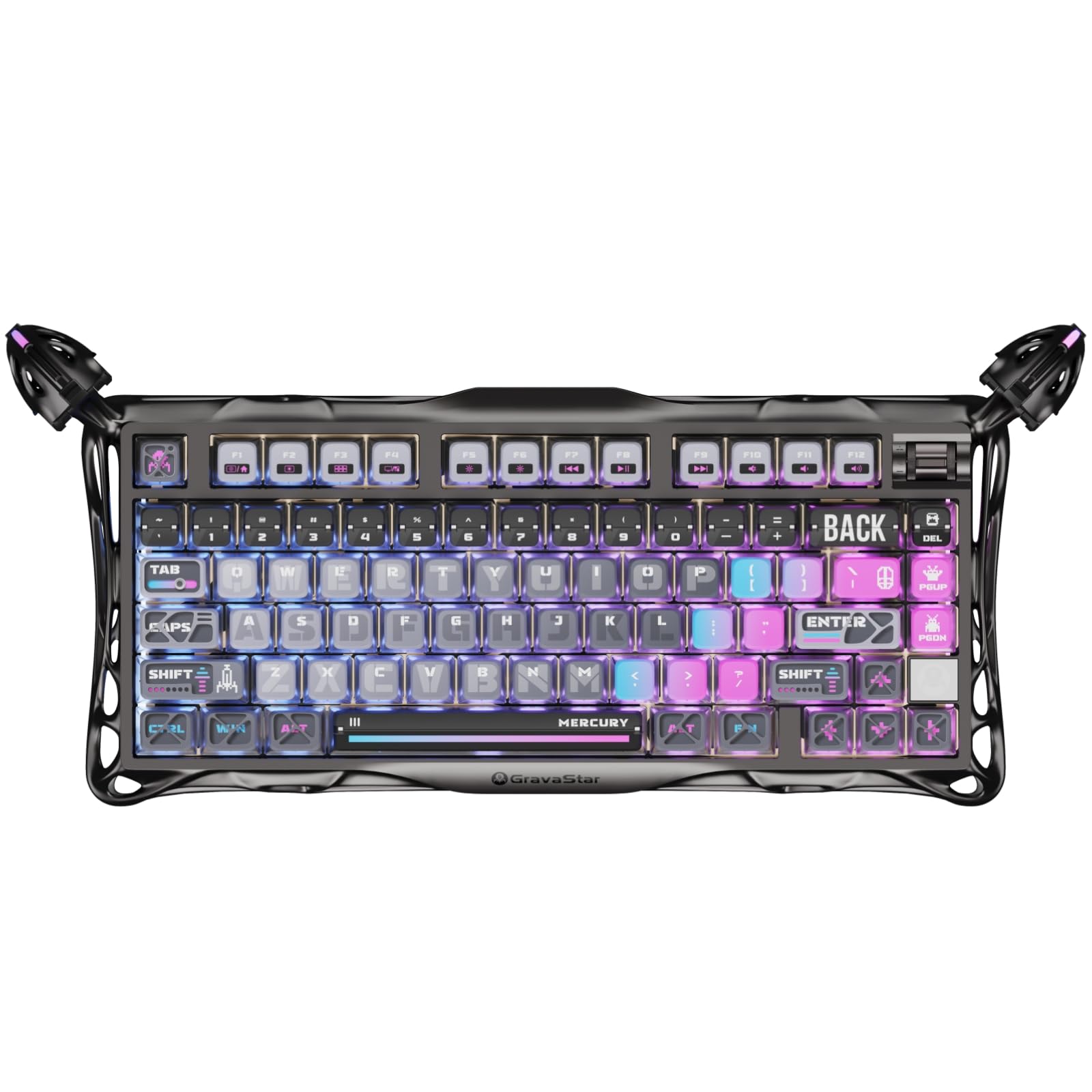
The Mercury K1 Pro makes an immediate visual impact with its electroplated glossy aluminum alloy frame and skeletal design, but the substance matches the style. The custom Kailh Speedy Mint linear switches (45gf actuation, 1.2mm pre-travel) are factory-smooth with POK stems rated for 70 million keystrokes — no lubing required. The gasket-mounted FR4 plate combined with five layers of sound-dampening foam produces a deep, thocky sound signature that enthusiasts crave, but it also has a noticeable clacky top-end that sets it apart from softer gasket boards.
The 75% layout (79 keys) includes a programmable control knob and dedicated arrow keys, saving significant desk space while retaining essential navigation. The 8000mAh battery is the largest in this comparison, providing weeks of use with RGB off and tri-mode connectivity (wired, Bluetooth, 2.4GHz). The south-facing RGB and pudding PBT keycaps create vibrant lighting, but the south-facing LEDs mean legends are not fully illuminated in dark rooms — a common trade-off for smooth keycap compatibility.
Build quality is exceptional for its tier: the aluminum frame is rigid and heavy, the dual independent RGB systems (keyboard and side panel) offer deep customization through GravaStar’s software, and the hot-swappable socket supports standard 3/5-pin switches for future modding. It is an endgame-tier wireless keyboard for anyone who values aesthetics, acoustics, and battery endurance equally.
Why it’s great
- Massive 8000mAh battery for weeks of wireless use
- Deep thocky/clacky sound with gasket mount and 5-layer foam
- Aluminum alloy chassis with stunning electroplated finish
- Hot-swappable with standard 3/5-pin switches
Good to know
- South-facing LEDs reduce legend readability in low light
- Proprietary software lacks some RGB customization depth
- Premium price point for a 75% layout
3. SteelSeries Apex 7

The Apex 7 is a proven full-size keyboard that relies on traditional Cherry MX Blue switches — tactile and clicky with a satisfying audible feedback. The aircraft-grade aluminum alloy top plate provides exceptional rigidity and stability, and the keyboard’s 2.1-pound weight keeps it planted during intense gameplay. The Blue switches require a 50gf actuation force with a 2.2mm actuation point, giving deliberate typists and clicky-switch fans the precise feedback they prefer, but the noise level may be high for shared spaces or open mic environments.
The standout feature is the integrated OLED Smart Display, which shows game stats, Discord messages, Spotify track info, and custom animated GIFs without requiring a second monitor. The per-key RGB backlighting covers 16.8 million colors with SteelSeries Engine software offering deep customization. The magnetic wrist rest provides full palm support but uses a rubberized surface that collects fingerprints and lacks breathable padding for longer sessions.
The USB passthrough port on the side is useful for charging a mouse or connecting a USB headset, though it requires an extra motherboard USB header. The non-braided cable is thick and can feel clunky for cable management. For gamers who love the unmistakable click of a mechanical Blue switch and want a robust, aluminum-clad full-size board with a useful OLED screen, this remains a strong, proven option.
Why it’s great
- Precise tactile clicky feedback with Cherry MX Blue switches
- OLED Smart Display for on-the-fly info and custom GIFs
- Aircraft-grade aluminum alloy chassis for durability
- USB passthrough port for convenient accessory connection
Good to know
- Blue switches are loud — not ideal for shared or quiet spaces
- Rubberized wrist rest attracts fingerprints and dust
- Thick non-braided cable is cumbersome to route
4. Logitech G515 Lightspeed TKL

The G515 Lightspeed TKL brings Logitech’s proprietary low-profile GL Brown tactile switches into a sleek, tenkeyless package. The switches are factory-lubed for a smooth, snappy feel with a discernible tactile bump, and the 36-hour battery life on a single charge is solid for wireless gaming. The PBT double-shot keycaps resist oil and wear far better than the ABS caps on the previous G915 TKL, and the entire board supports tri-mode connectivity via Lightspeed wireless, Bluetooth, and USB-C wired.
The low-profile design reduces wrist strain for many users and creates a clean, minimalist desk aesthetic. The three dedicated hotkeys — Lightspeed, Bluetooth, and Game Mode — provide quick switching without digging into software. However, the absence of dedicated media keys or a volume roller (present on the pricier G915) means volume control requires function key combinations, which can be frustrating during gaming. The all-plastic chassis, while dense and well-built, lacks the premium feel of metal alternatives in its price range.
Logitech G HUB software provides per-key RGB customization and G Shift keybinding for up to 15 functions per key. The 1ms Lightspeed wireless protocol is indistinguishable from wired in latency tests. For gamers who prefer a low-profile form factor, tactile feedback without clicky noise, and reliable wireless performance, this is the best option at its price point. It fixes the key wear issues of the G915 TKL while retaining the same excellent wireless foundation.
Why it’s great
- Low-profile design reduces wrist strain, clean desk look
- PBT keycaps resist oil and wear better than G915 TKL
- Reliable Lightspeed wireless with 36-hour battery life
- Factory-lubed GL Brown switches are snappy and tactile
Good to know
- No dedicated media keys — uses function layer for volume
- All-plastic chassis — less premium than metal-framed rivals
- Clear legends hard to read without backlight on
5. RK ROYAL KLUDGE R98 Pro

The R98 Pro delivers enthusiast-grade typing acoustics at a mid-range price point. Its gasket mount design and five layers of sound-absorbing foam produce a creamy, thocky sound profile that rivals keyboards costing twice as much. The pre-lubed linear cream switches offer smooth, buttery keystrokes out of the box with no modification needed — a significant advantage for users who want premium sound and feel without the hassle of custom lubing or switch swapping.
The 96% layout (98 keys) retains the numpad and arrow keys while saving significant desk width compared to full-size boards. The detachable aluminum CNC volume knob is practical and satisfying to use. The MDA profile PBT keycaps have a matte surface and double-shot legends that resist fading, and their curved shape provides a more natural finger wrap compared to standard OEM or Cherry profiles. The RGB lighting offers over 20 modes, and south-facing LEDs ensure compatibility with popular aftermarket keycap sets — though the legends themselves are not shine-through, which reduces visibility in dark rooms.
The online RK driver supports key remapping, macro creation, and RGB customization for both Windows and Mac. The hot-swappable PCB supports 3/5-pin switches, giving you an upgrade path to try different switch types later. The USB-C port is located on the left side, which some users find awkward depending on desk cable routing. For gamers and typists who prioritize creamy sound, smooth linear feel, and a compact layout with a numpad, this delivers exceptional value.
Why it’s great
- Creamy, thocky sound out of the box with gasket mount and 5-layer foam
- 96% layout with numpad saves desk space over full-size
- Hot-swappable PCB with 3/5-pin switch support
- MDA profile PBT keycaps provide comfortable finger wrap
Good to know
- Legends are not shine-through — hard to see in low light
- USB-C port on left side may interfere with some desk cable runs
- Volume knob feels slightly less reinforced than premium alternatives
6. Redragon K745 PRO

The K745 PRO brings gasket-mounted typing acoustics and wireless connectivity to the budget-friendly segment. The custom Mint Mambo linear switches are thickly lubed from the factory and paired with five layers of noise-dampening foam (including IXPE switch foam and PET sound pad) to deliver a creamy, quiet typing experience that avoids the hollow ping of budget mechanical boards. The gasket structure uses precision-locked covers instead of traditional screw fixing, providing a slight flex that softens the bottom-out impact.
The 108-key full-size layout includes four extra hotkeys above the numpad for added macro functionality, though these are not programmable out of the box and require Redragon’s software for customization. The round, transparent PBT keycaps have a distinctive look that stands out from standard rectangular caps, but the non-shine-through legends mean the RGB lighting illuminates the keycap edges rather than the legends themselves — a trade-off that may frustrate users who rely on backlit letters in dark gaming rooms.
Wireless performance via 2.4GHz RF is stable with no perceived latency during gameplay, and Bluetooth provides convenient multi-device pairing at the cost of slightly higher input lag. The two-stage adjustable feet offer good ergonomic angles, and the included keycap puller, switch puller, and spare switches make hot-swapping accessible. Battery life averages around 40 hours with backlight off and about 20 hours with RGB enabled. For its price point, the K745 PRO is a compelling wireless option for gamers who want a comfortable, quiet, creamy typing feel without mechanical switch noise.
Why it’s great
- Gasket mount with 5-layer foam delivers creamy, quiet sound
- Tri-mode connectivity: wired, Bluetooth, 2.4GHz wireless
- Hot-swappable Mint switches with thick factory lube
- Unique round PBT keycaps with distinctive aesthetic
Good to know
- Non-shine-through keycaps limit RGB legend readability
- Battery life drops to ~20 hours with RGB enabled
- Extra hotkeys need software for full customization
7. Corsair K55 CORE

The K55 CORE is a full-size membrane (rubber dome) keyboard designed for budget-conscious gamers who want RGB lighting and basic gaming features without the cost of mechanical switches. The membrane switches are quiet and responsive compared to entry-level mechanical boards, though they lack the tactile feedback and precise actuation that make mechanical switches faster for competitive play. The ten-zone RGB backlighting is vibrant and customizable through Corsair’s iCUE software, with pre-set effects accessible through function key combinations without software.
The 300ml spill resistance is a practical advantage for gamers who eat or drink at their desk — the K55 CORE can withstand accidental liquid spills that would destroy a standard mechanical board, though it is not fully waterproof. The dedicated media keys (volume up/down, mute, and playback) and Win lock/brightness buttons are convenient for quick adjustments without leaving the game. The included wrist rest is comfortable but uses a rubberized surface that attracts dust and fingerprints.
The 12-key rollover and 1,000Hz polling rate ensure that rapid key combinations register correctly, sufficient for most casual and mid-tier gaming scenarios. The membrane switch feel is softer and mushier than mechanical alternatives, which can lead to slower typing speeds and less satisfying keystroke feedback for experienced users. For casual gamers on a tight budget who prioritize silence, spill resistance, and a full-size layout with media controls over mechanical switch feel, the K55 CORE is a reliable, no-fuss entry point.
Why it’s great
- 300ml spill resistance protects against accidental liquid damage
- Quiet membrane switches — ideal for shared or quiet gaming spaces
- Dedicated media keys and Win lock button for convenience
- Vibrant ten-zone RGB lighting with iCUE customization
Good to know
- Membrane feel is softer and less precise than mechanical switches
- Only 12-key rollover — insufficient for some competitive multi-press scenarios
- Rubberized wrist rest surface gathers dust and fingerprints
FAQ
Are mechanical switches always better than membrane for gaming?
What does adjustable actuation do for gaming performance?
Is wireless gaming keyboard latency acceptable for competitive play?
Final Thoughts: The Verdict
For most users, the best gaming keyboard winner is the SteelSeries Apex Pro TKL Gen 3 because its OmniPoint 3.0 adjustable actuation provides a genuine competitive edge in FPS and MOBA titles. If you want a stunning wireless board with premium acoustics and massive battery life, grab the GravaStar Mercury K1 Pro. And for the best value in creamy typing feel without breaking the bank, nothing beats the RK ROYAL KLUDGE R98 Pro.