
The difference between sounding like a pro and sounding like you’re talking through a tin can often comes down to one piece of hardware sitting on your desk. A gaming headset mic gets the job done in a pinch, but the moment you add mechanical keyboard clatter, a fan in the background, or the rumble of a desktop tower into the mix, your voice gets buried. A standalone microphone isolates your voice with a focused pickup pattern, turning chaotic team chat into crisp communication that your squad actually wants to listen to.
I’m Mohammad Maruf — the founder and writer behind Drink4Good. I’ve spent years tracking the engineering shifts in gaming peripherals, from condenser capsule sensitivity to the real-world impact of digital limiters on preventing blown-out peaks during intense raid callouts.
This guide breaks down the specs that actually matter for clear comms, compares the top contenders, and helps you find the right best gaming mic for your specific setup and budget without the marketing noise.
How To Choose The Best Gaming Mic
Finding the right microphone for your gaming setup isn’t just about picking the most popular name. The wrong pickup pattern or missing shock mount can make a pricey mic sound worse than a budget one. Focus on these three factors to narrow your list quickly.
Pickup Pattern: The Direction of Your Voice
Cardioid and supercardioid patterns are the standard for gaming because they reject sound from the sides and rear. This means your keyboard, mouse clicks, and PC fans stay out of the audio channel. If you stream with a co-host or want to capture room ambience, a multi-pattern mic with an omni or bidirectional setting gives you that flexibility, but for solo gaming, cardioid is all you need.
Build Quality and Isolation Features
A heavy metal body dampens vibrations better than plastic. The internal shock mount — whether built into the mic body or integrated into the stand — prevents desk bumps and accidental knocks from reaching your recorded audio. Look for a mic that includes a pop filter, either built-in or bundled, to stop harsh plosive sounds like “p” and “b” from distorting your voice.
Onboard Controls and Connectivity
Physical mute buttons, gain knobs, and a headphone monitoring jack matter more during a live game than you think. Having to fumble through software settings mid-match is a distraction. USB-C connectivity is the modern standard for clean digital transmission, and a detachable cable makes storage easier. Plug-and-play compatibility with PC is essential, but if you also stream on console, verify the mic works with your platform out of the box.
Quick Comparison
On smaller screens, swipe sideways to see the full table.
| Model | Category | Best For | Key Spec | Amazon |
|---|---|---|---|---|
| ASUS ROG Carnyx | Premium USB | Audiophile-grade clarity | 192kHz/24-bit recording | Amazon |
| HyperX QuadCast | Premium USB | Multi-pattern streaming | 4 polar patterns, red LED | Amazon |
| MAONO PD200W | Wireless Hybrid | Wireless duo podcasting | 82dB SNR, 60hr battery | Amazon |
| Razer Seiren V3 Chroma | Mid-Range USB | RGB-rich streaming builds | Multi-function tap-to-mute | Amazon |
| Blue Yeti | Versatile USB | Multi-user recording | Four configurable pickup patterns | Amazon |
| Razer Seiren V2 X | Compact USB | Minimal desk footprint | Supercardioid, built-in limiter | Amazon |
| HyperX SoloCast 2 | Entry USB | Budget-conscious gamers | 24-bit/96kHz, internal shock mount | Amazon |
In‑Depth Reviews
1. ASUS ROG Carnyx
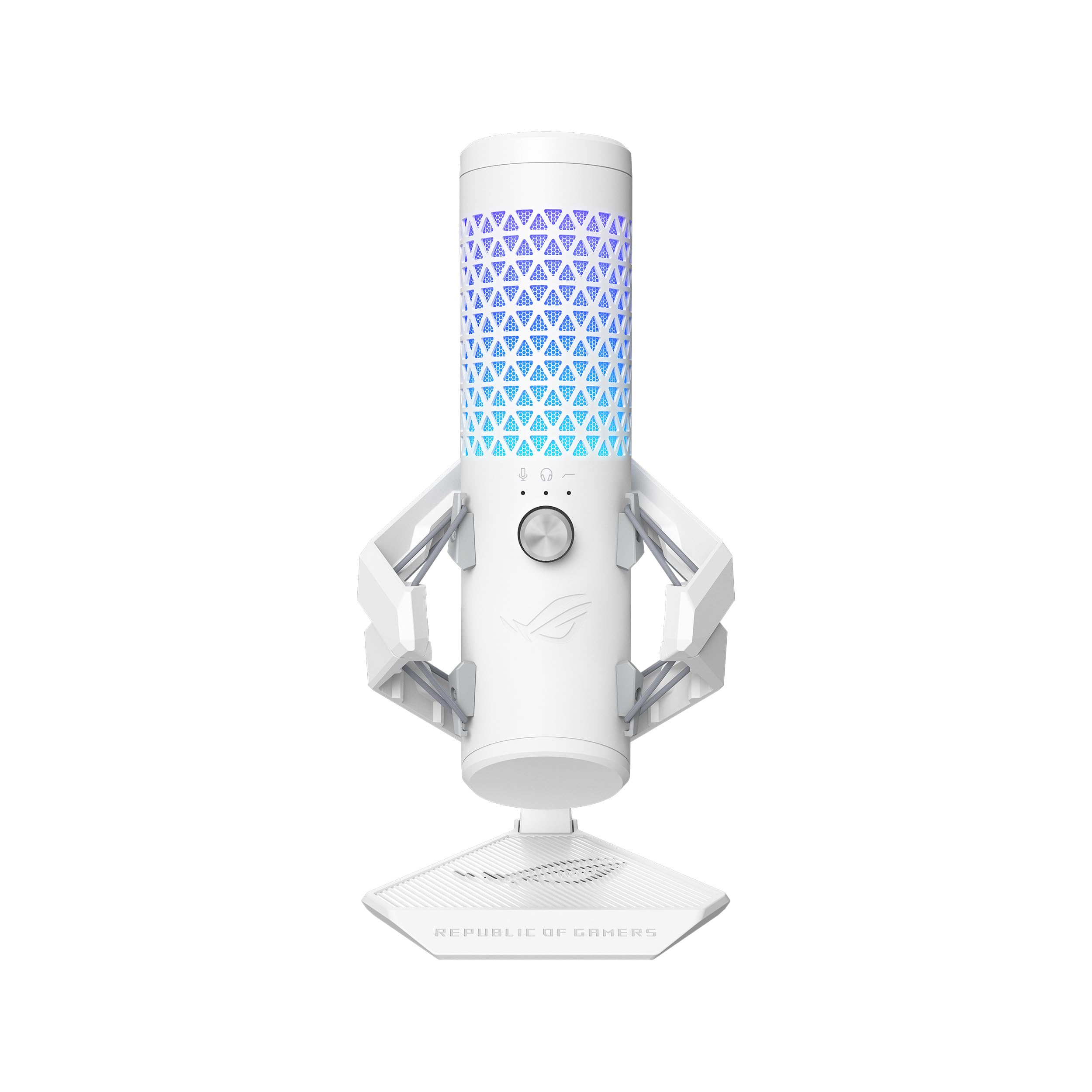
The ASUS ROG Carnyx sets a new bar for USB condenser mics with its 192kHz/24-bit sampling rate, pushing past the 96kHz standard most competitors cap out at. The 25mm capsule delivers warm, detailed vocals that capture the texture of your voice without the harsh edge some cheaper condensers introduce. The built-in high-pass filter is a practical addition — it rolls off low-frequency rumble from desk vibrations and AC units, giving your voice a cleaner presence in the mix without needing post-processing.
The all-metal body and premium metal shock mount work together to isolate the capsule from accidental desk knocks. The one-touch mute button is positioned on the top of the mic, making it easy to find by feel mid-game, and the multi-function control knob handles both mic gain and headphone monitoring volume. Aura Sync RGB allows you to synchronize lighting with other ASUS components for a unified aesthetic, but it never feels like the primary selling point — the audio quality stands on its own.
At this price tier, the Carnyx competes directly with multi-pattern mics that offer more polar options, but if your use case is solo gaming or streaming where cardioid is sufficient, the audio fidelity here is unmatched. The only real caveat is that the supercardioid pickup pattern requires you to speak directly into the top of the mic — stray too far off-axis and the volume drops noticeably. For a gamer who sits stationary at a desk, this is a non-issue.
Why it’s great
- 192kHz/24-bit audio delivers exceptional vocal detail
- High-pass filter effectively cleans up low-end rumble
- Full metal construction with premium shock mount
- One-touch mute and intuitive control knob
Good to know
- Tight supercardioid pattern requires consistent positioning
- Premium price point may be overkill for casual gamers
- No multi-pattern options for co-host setups
2. HyperX QuadCast

The HyperX QuadCast earned its reputation by offering four selectable polar patterns — stereo, omnidirectional, cardioid, and bidirectional — in a single USB mic, giving streamers and content creators the flexibility to switch between solo gameplay capture and co-hosted interviews without swapping hardware. The cardioid pattern is perfect for focused gaming comms, while the stereo and bidirectional modes open up ASMR recording or two-person podcast sessions. The tap-to-mute sensor on top is responsive and intuitive, with the red LED status indicator offering clear visual feedback about your mute state.
The built-in anti-vibration shock mount uses elastic rope suspension to isolate the metal body from the base, effectively dampening desk bumps and accidental nudges. The internal pop filter helps block plosive sounds, although it isn’t as robust as a separate external filter — heavy plosives may still bleed through at close range. The gain control dial sits on the bottom of the mic, which is a slightly awkward placement — you have to tilt the mic to reach it mid-stream. The included mini-USB to USB cable feels dated compared to the USB-C connectors found on newer models.
Despite its age, the QuadCast remains a reliable workhorse for streamers who need pattern variety. The sturdy metal construction has held up well for users who have been running it daily for years. The single red LED color scheme is limiting for those who want RGB customization, but the lighting is consistent and doesn’t distract. For gamers who primarily use cardioid, there are better-sounding options at this price, but for versatility, the QuadCast still holds its ground.
Why it’s great
- Four polar patterns cover solo and co-host scenarios
- Effective anti-vibration shock mount reduces bumps
- Durable metal build with reliable tap-to-mute
- Works on PC, PS4, PS5, and Mac out of the box
Good to know
- Mini-USB connection instead of USB-C
- Gain control knob on bottom is awkward to adjust
- Red LED only — no customizable RGB
3. MAONO PD200W
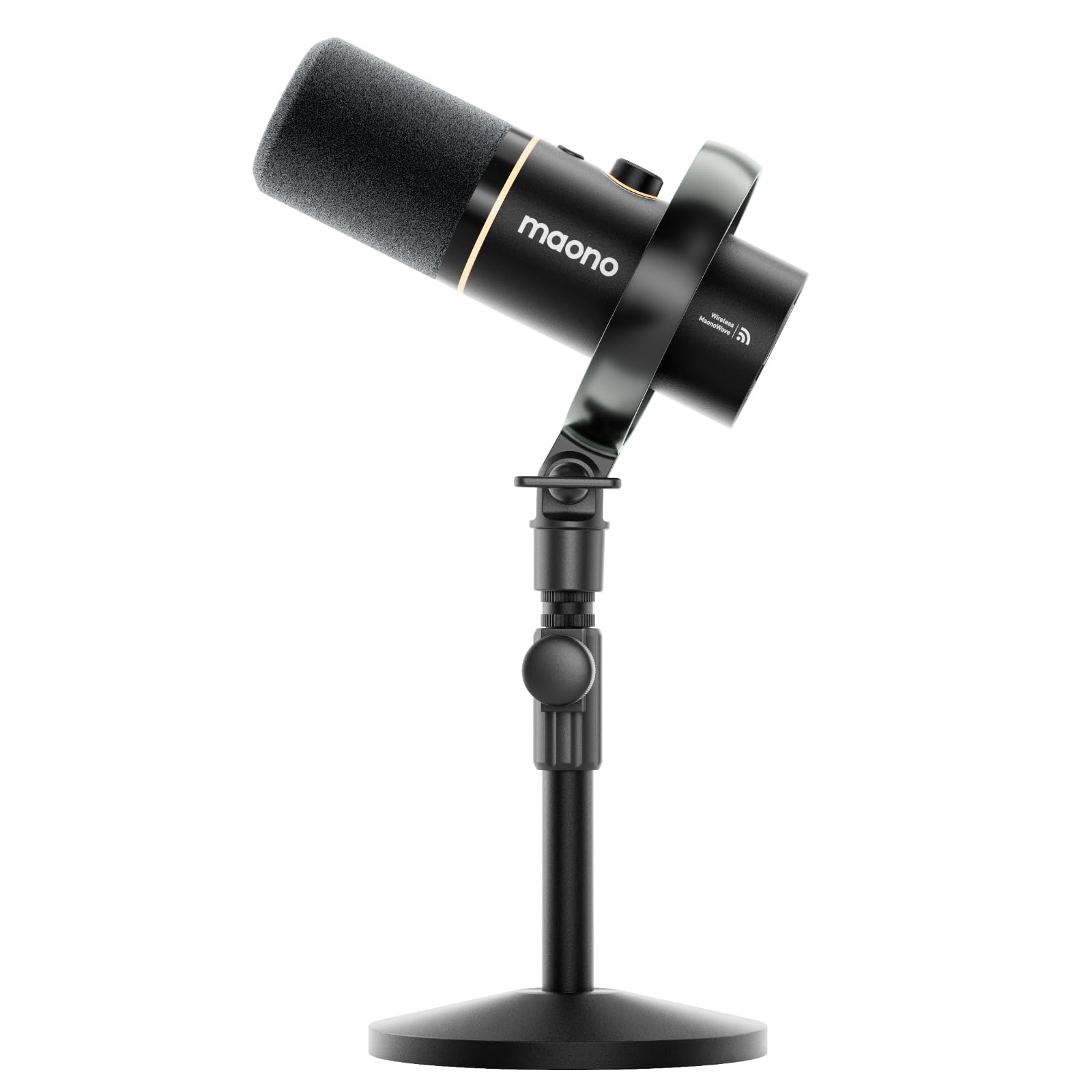
The MAONO PD200W breaks the traditional desktop mold by offering three connection methods — wireless via a USB-C receiver, standard USB, and XLR — giving you the freedom to go completely cable-free or plug into an audio interface for a studio setup. The 30mm dynamic capsule and cardioid design produce broadcast-quality vocals with an 82dB signal-to-noise ratio, which means less background hiss and a cleaner voice signal even before noise gating. The wireless range is rated at 60 meters, which is excessive for a desk mic, but the stability within a typical room is rock solid.
One of the standout features is the ability to connect two PD200W microphones to a single receiver, recording each mic to its own track for duo podcasts or co-streaming. This eliminates the need for a separate audio interface for basic two-person setups. The MaonoLink app gives you access to four master-tuned presets plus manual EQ and reverb adjustments, all controllable from your PC or smartphone. The three-stage noise cancellation does a solid job of reducing room echo and background chatter without making your voice sound processed or hollow.
The battery life on wireless mode is impressive — 60 hours with RGB off — but the RGB lighting itself drains it faster, and users report needing to recharge about twice a week with moderate use. The included desktop stand is sturdy and adjustable, but the instruction manual’s small print and somewhat confusing button modes can require a trip to the MaonoLink app to fully understand. For gamers who want to move around or record in different rooms, the wireless flexibility is a real advantage that few competitors offer.
Why it’s great
- Three connection modes — wireless, USB, and XLR
- Supports dual-mic recording to separate tracks
- Long 60-hour battery life on wireless mode
- MaonoLink app offers detailed EQ and preset control
Good to know
- Button modes can be confusing without the app
- RGB lighting significantly reduces battery life
- Instruction manual print is very small
4. Razer Seiren V3 Chroma

The Razer Seiren V3 Chroma is designed for streamers who want audio performance and visual flair in one package. The supercardioid condenser capsule delivers impressive sensitivity that captures vocal detail with clarity, while the tighter pickup pattern does a better job rejecting room noise than a standard cardioid design. The built-in digital gain limiter automatically prevents peaking and distortion when your voice spikes during intense moments, which removes the need to constantly monitor your input levels. The multi-function tap-to-mute sensor maps single, double, and triple taps to different commands — mute, gain limiter toggle, and lighting adjustments — reducing the need to alt-tab during a stream.
The stream and game reactive RGB lighting is the defining feature here, syncing with Chroma-integrated games and responding to stream events like emotes and alerts. The all-metal enclosure feels substantial and the build quality is a clear step up from plastic-bodied alternatives. The dedicated headphone monitoring jack with real-time audio pass-through ensures zero-latency voice monitoring, which is critical for streamers who need to hear exactly what their audience hears.
Setup is truly plug-and-play — no drivers required for basic functionality, and it works immediately with Discord, OBS Studio, and XSplit. However, the Razer Synapse software, while powerful, has a reputation for needing some tinkering before all features work smoothly. The single supercardioid pattern means this mic isn’t suited for co-host or multi-person recordings; it’s built for a single voice. For the solo streamer who wants reactive lighting and solid vocal capture, this is a strong contender.
Why it’s great
- Stream and game reactive RGB integration
- Digital gain limiter prevents audio peaking
- All-metal build with premium feel
- Multi-function tap-to-mute with programmable commands
Good to know
- Razer Synapse software requires setup tweaks
- Supercardioid pattern limits use to solo vocal capture
- Not ideal for console gaming without additional adapters
5. Blue Yeti

The Blue Yeti has been the benchmark for USB condenser mics for years, and for good reason — its four-pickup-pattern array (cardioid, omni, bidirectional, stereo) makes it one of the most flexible mics in its tier. For a gamer who also podcasts or records music, the Yeti adapts to each scenario without requiring a second mic. The cardioid mode delivers focused vocal clarity for game chat, while the omni mode captures room tone for group recordings or ASMR content. The onboard controls — headphone volume, pattern selection, instant mute, and mic gain — are all physically accessible on the front of the mic, making real-time adjustments easy during a session.
The custom three-capsule array is the core of the Yeti’s sound signature. It produces a full-bodied vocal tone with a slight warmth that many users prefer for streaming and podcasting. The Blue VO!CE software adds another layer of control with broadcast vocal effects, advanced modulation, and HD audio samples, though it runs on Logitech G Hub which can be resource-heavy. The adjustable desktop stand allows you to pivot the mic relative to your mouth, which is important because the Yeti is sensitive — it picks up background noise like keyboard switches and mouse clicks if positioned incorrectly.
The major trade-off is size and weight. The Yeti is large and heavy compared to newer compact USB mics, and its standard stand takes up significant desk real estate. It also lacks a built-in shock mount, so desk bumps transmit directly to the capsule. The micro-USB connection has been a point of criticism for years, and it hasn’t been updated to USB-C in this version. For a gamer who wants versatility and is willing to manage the size, the Yeti remains a solid choice, but newer options offer better isolation and modern connectivity.
Why it’s great
- Four polar patterns cover solo and group recording
- Onboard controls for gain, mute, and pattern selection
- Warm, full-bodied vocal tone appreciated by streamers
- Blue VO!CE software adds effects and modulation
Good to know
- Large footprint uses significant desk space
- No built-in shock mount — desk bumps transmit noise
- Uses micro-USB instead of modern USB-C
6. Razer Seiren V2 X

The Razer Seiren V2 X packs professional-grade features into a compact form factor that doesn’t dominate your desk. The 25mm condenser capsule and supercardioid pickup pattern work together to capture your voice with high accuracy at higher frequencies while aggressively suppressing noise from the back and sides — keyboard clicks and mouse sounds that would bleed into a standard cardioid mic are significantly reduced here. The integrated digital limiter automatically catches audio spikes before they clip, saving you from having to manually adjust gain mid-game.
The built-in shock absorber is embedded inside the mic body rather than being a separate external mount, which keeps the profile low while still dampening accidental desk impacts. The gain control and mute button are positioned on the front of the mic, easily accessible during gameplay. The USB-C connectivity is a welcome upgrade, and the included Type-C to Type-A cable is long enough to route behind a desk. The mic can be mounted on a boom arm using the standard thread, which is the recommended setup because the included desktop stand is relatively small and positions the mic lower than ideal for most seated users.
The all-plastic enclosure is the main point where compromises were made to hit the mid-range price point. It doesn’t feel fragile, but it lacks the premium weight of metal-bodied alternatives. The mic monitoring feature via the headphone jack works well, but the free-spinning gain knob can be a bit loose — it adjusts easily but doesn’t have a firm detent. For a gamer looking for a clean, simple mic that fits in tight spaces and delivers clear vocal isolation, the Seiren V2 X is a smart buy, especially if paired with a boom arm.
Why it’s great
- Supercardioid pattern effectively rejects keyboard noise
- Internal shock absorber dampens desk vibrations
- Compact size fits in small desk setups
- Digital limiter prevents audio clipping automatically
Good to know
- Plastic body feels less premium than metal alternatives
- Desktop stand positions mic too low for most users
- Gain knob is free-spinning without a firm stop
7. HyperX SoloCast 2

The HyperX SoloCast 2 is the entry-level champion that doesn’t cut corners on the fundamentals. It features a 24-bit/96kHz sampling rate — matching mics that cost twice as much — and a built-in suspension system that provides shock mount benefits without the bulky external cage. The cardioid polar pattern captures sound from the front while rejecting side and rear noise, which is sufficient for most solo gaming setups. The compact tiltable stand is weighted for stability and includes standard 3/8-inch and 5/8-inch threads for easy boom arm mounting.
The tap-to-mute sensor is simple — tap the top to mute, tap again to unmute — and the red LED status indicator is clearly visible even in a dark room. The built-in foam pop filter handles plosive reduction adequately, though serious streamers may still want an external filter for cleaner vocal capture. The USB-C to USB-A connection is plug-and-play with no driver installation required, and the HyperX NGENUITY software unlocks customizable audio filters like high-pass, low-pass, and voice enhancement that can be saved directly to the mic’s onboard memory.
There are a couple of practical trade-offs. The USB-C port is located on the lower back of the mic and isn’t secured — an accidental tug on the cable can disconnect it, which is annoying mid-game. The stand is also noticeably low, leaving the capsule below mouth level for most users, making a boom arm a near-essential upgrade. The lack of a physical gain knob means you’ll need to adjust levels through software. For the price, the SoloCast 2 delivers clean audio and modern connectivity, but budget for a boom arm to get the most out of it.
Why it’s great
- 24-bit/96kHz studio-quality recording at an entry price
- Internal shock mount dampens vibrations effectively
- Built-in pop filter and tap-to-mute included
- NGENUITY software allows custom audio filter presets
Good to know
- USB-C port on lower back can disconnect with cable tug
- Desktop stand positions mic too low for optimal use
- No physical gain knob — requires software adjustment
FAQ
Does a gaming mic need a shock mount or is a built-in one enough?
What is the difference between a condenser and a dynamic microphone for gaming?
Final Thoughts: The Verdict
For most users, the best gaming mic winner is the ASUS ROG Carnyx because it delivers the highest audio fidelity with its 192kHz/24-bit capsule, a premium metal build, and practical features like the high-pass filter and shock mount that directly improve vocal clarity in a gaming environment. If you want multi-pattern flexibility for co-hosted streams or content creation, grab the HyperX QuadCast. And for the best value with wireless freedom and dual-mic recording, nothing beats the MAONO PD200W.