
Flick-shot consistency starts at the sensor. Whether you main a 60% keyboard or a full tower, the mouse is the only point of contact where micro-adjustments become kill confirmations. Split-second click latency and sub-micron tracking define the difference between a clean entry and a missed window.
I’m Mohammad Maruf — the founder and writer behind Drink4Good. I’ve spent years parsing optical sensor architecture, switch actuation curves, and wireless polling stability to separate marketing specs from real in-game performance.
Every model reviewed here earns its spot through measurable edge — faster response, cleaner glide, or better endurance. Here is my curated analysis of the best gaming mice under $600 that actually raise your floor without emptying your wallet.
How To Choose The Best Gaming Mice Under $600
Picking a gaming mouse at this wide price band means weighing sensor accuracy against feature density. Raw DPI numbers look impressive but rarely translate to cleaner tracking without a quality optical engine and stable polling. You also need to match weight and shape to your grip style — palm, claw, or fingertip — or fatigue will override any spec advantage.
Sensor Class and Tracking Fidelity
The optical sensor is the brain of the mouse. Older sensors struggle with surface variance and spin-out during fast swipes. Modern options like the PAW3311, TrueMove Core, HERO 25K, and Focus Pro 35K maintain 1:1 tracking across cloth, hard pads, and even glass. Look for zero smoothing above 2000 DPI and native 1000 Hz polling as a baseline.
Switch Durability and Click Response
Mechanical switches (rated 20–60 million clicks) have a tactile snap that players trust, but they degrade over time and can double-click. Optical switches eliminate debounce delay entirely — Razer Gen-3 Optical and Logitech LIGHTFORCE combine 0.2 ms actuation with rated lifespans above 90 million clicks. If you main fast-paced shooters, optical is the tighter choice.
Wireless Reliability and Battery Endurance
Wireless latency below 1 ms is now standard thanks to technologies like Logitech LIGHTSPEED and Razer HyperSpeed. Battery life varies widely — from 250 hours on a single AA (G305) to over 300 hours per cell (G309). Bluetooth modes are useful for productivity but introduce lag; stick to 2.4 GHz for competitive sessions.
Quick Comparison
On smaller screens, swipe sideways to see the full table.
| Model | Category | Best For | Key Spec | Amazon |
|---|---|---|---|---|
| Razer Basilisk V3 35K | Wired Premium | Pixel-level accuracy + HyperScroll | Focus Pro 35K Optical Gen-2 | Amazon |
| Logitech G309 Lightspeed | Wireless Premium | 300+ hr battery + POWERPLAY support | HERO 25K sensor | Amazon |
| Logitech G305 Lightspeed | Wireless Mid-Range | 250-hour endurance on one AA | HERO sensor (12k DPI) | Amazon |
| ATTACK SHARK X11 | Wireless Budget | Ultra-light 62g + RGB dock | PAW3311 (22k DPI) | Amazon |
| SteelSeries Rival 3 Gen 2 | Wired Budget | 1.35ms click latency + paracord | TrueMove Core 8.5K | Amazon |
| Redragon M811 Aatrox | Wired MMO | 15 programmable macro buttons | 10 side macro keys | Amazon |
| JLab JBuds Wireless | Wireless Office Bulk | Multi-device toggle (12-pack) | Ambidextrous / BT + dongle | Amazon |
In‑Depth Reviews
1. Razer Basilisk V3 35K

The Basilisk V3 35K carries Razer’s Focus Pro Gen-2 optical sensor — a 35,000 DPI engine with 1-DPI step adjustments and tracking that holds lock on transparent glass surfaces. The HyperScroll Tilt Wheel is a genuine productivity weapon: flick it into free-spin mode for rapid document scrolling, then auto-switch back to tactile notches for weapon swaps in-game.
Gen-3 optical switches actuate at 0.2 ms with zero debounce delay and are rated for 90 million clicks. The Speedflex Cable is woven and lightweight enough that it barely drags across a mouse bungee. With 13 programmable controls including the multi-function paddle, you can map everything from push-to-talk to grenade pings without lifting your thumb.
Eleven-zone Chroma underglow reacts to over 200 games, and the Synapse software allows per-game profiles stored on-device. Ergonomic right-hand shape with a deep thumb rest feels locked-in for medium-to-large hands — claw and palm grippers both report zero fatigue over eight-hour sessions.
Why it’s great
- Best-in-class 35K Gen-2 optical sensor with glass tracking
- HyperScroll tilt wheel with Smart-Reel auto-switching
- Gen-3 optical switches — 90M lifecycle, 0.2ms actuation
Good to know
- Wired only — no Bluetooth or 2.4GHz option
- Right-hand ergonomic shape only; no ambidextrous support
2. Logitech G309 Lightspeed

The G309 pairs Logitech’s HERO 25K sensor — a sub-micron tracker with zero smoothing across the entire DPI range — with LIGHTFORCE hybrid switches that blend optical speed (0.2 ms) with mechanical click tactility. At 86 g with the included AA battery, it’s light enough for fast flicks but retains enough mass for controlled tracking.
Battery life stretches past 300 hours on a single AA cell; switch to Endurance mode and you’ll forget the mouse even needs power. If you own a POWERPLAY pad, the G309 runs without a battery at 68 g — effectively unlimited charge. The 2.4 GHz LIGHTSPEED connection delivers the same 1 ms report rate as a wired mouse, while Bluetooth 5.2 covers productivity duty.
Six programmable buttons, onboard profile storage, and the included grip tape make it adaptable for both competitive shooters and daily office workflows. The understated white matte finish resists fingerprints, and the receiver slots neatly into the base for transport. Users with medium hands and a claw grip report it as a direct upgrade from the G305.
Why it’s great
- 300+ hour battery on a single AA battery
- HERO 25K — zero smoothing, sub-micron tracking
- LIGHTFORCE switches: optical speed with mechanical feel
Good to know
- G Hub software has a steeper learning curve than competitors
- No HyperScroll wheel; standard notched scroll only
3. Logitech G305 Lightspeed

The G305 is the mouse that proved wireless gaming could be both affordable and tournament-ready. Its HERO sensor runs at 12,000 DPI with 400 IPS tracking and delivers battery life that borders on ridiculous — 250 hours of continuous gameplay from a single AA. Switch to Endurance mode via G Hub and that stretches to roughly nine months of mixed use.
The ambidextrous shell weighs 3.4 oz (96 g) with the battery installed, and the internal nano receiver stores inside the body for travel. Six programmable buttons are enough for core game binds and productivity shortcuts. Onboard memory saves your DPI and button assignments so the mouse performs identically on any PC without software running.
Build quality is classic Logitech: tight tolerances, zero rattle, and PTFE feet that glide smoothly on cloth pads. The shape favors claw and fingertip grips for medium hands. There’s no RGB lighting, which keeps battery fatigue minimal and focus on the game. At this price point, the G305 remains a legitimate recommendation for anyone wanting lag-free wireless without recurring charging.
Why it’s great
- 250-hour gameplay on one AA battery
- LIGHTSPEED wireless with 1 ms report rate
- Onboard memory for portable profiles
Good to know
- No Bluetooth — 2.4 GHz dongle only
- Side buttons have a deeper actuation gap than premium models
4. ATTACK SHARK X11

The X11 uses the PAW3311 optical sensor — a proven 22,000 DPI engine with 300 IPS tracking and 35G acceleration — and wraps it in a 62-gram shell that disappears in your hand. Tri-mode connectivity (2.4 GHz, Bluetooth 5.2, USB-C wired) lets you switch between gaming and office devices instantly, and the included RGB charging dock keeps the receiver stored and the battery topped up.
HUYU switches and a TTC encoder provide 20 million click cycles with a crisp feel. Five programmable buttons are sufficient for core FPS binds, and the included anti-slip grip tape improves stability during sweaty sessions. The ergonomic profile supports palm, claw, and fingertip styles without pressure points.
Build quality exceeds what the price suggests — no creaking, firm clicks, and a matte finish that resists oil. The main trade-off is the limited software for macro customization compared to Logitech or Razer ecosystems.
Why it’s great
- Ultra-light 62g frame with included grip tape
- PAW3311 sensor — accurate 22k DPI with 1000Hz polling
- RGB charging dock with integrated receiver storage
Good to know
- Driver software missing Linux support
- Limited to 5 buttons — no MMO macro row
5. SteelSeries Rival 3 Gen 2
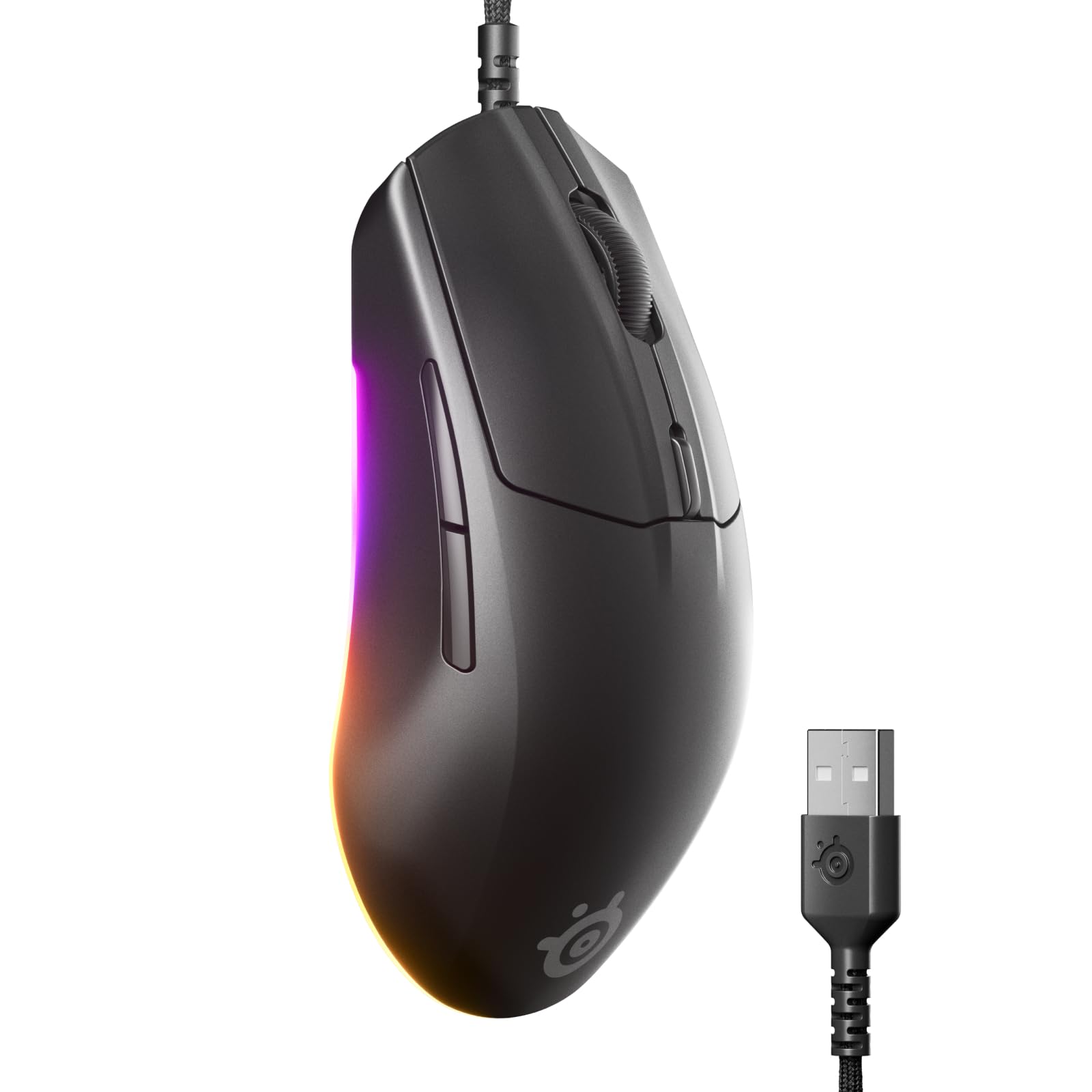
The Rival 3 Gen 2 focuses on the essentials: a TrueMove Core optical sensor with 1:1 tracking and 8500 DPI, combined with a wired connection that registers clicks at 1.35 ms — among the lowest latency figures at its tier. The clicks are rated for 60 million actuations, and the Super Mesh Paracord cable reduces drag dramatically compared to traditional rubber sheathing.
The 77-gram body uses a matte ABS shell that resists fingerprints and is easy to clean. Three-zone RGB lighting (including a large underside glow strip) is configurable through the SteelSeries GG software. Five buttons sit within easy reach, and the 100% PTFE feet glide with minimal friction on both cloth and hard pads.
Shape favors right-hand users with a gentle contoured hump that fills the palm without forcing a grip. It’s not a true ultralight, but the weight is balanced and the cord never drags. For players who want a no-compromise wired mouse that prioritizes click speed and glide over RGB complexity, this is a focused performer.
Why it’s great
- 1.35ms click latency — one of the fastest wired mice
- TrueMove Core sensor — 1:1 accurate tracking
- Super Mesh Paracord cable with low drag
Good to know
- No side-to-side scroll (no tilt wheel)
- Missing a dedicated sniper button
6. Redragon M811 Aatrox

The M811 Aatrox is built for MMO and MOBA players who need more hotkeys than a standard mouse provides. Ten side buttons sit in two rows — two larger thumb paddles plus eight smaller keys — all programmable through Redragon’s software. Combined with five DPI levels (adjustable 500–12400), the total button count reaches 15, enough for full action bar mapping in World of Warcraft or Final Fantasy XIV.
The ergonomic right-hand shell follows the natural palm curve and includes a thumb rest that prevents accidental presses. RGB backlighting offers five distinct modes with 16.8 million colors. The braided USB cable is long enough for desk routing, and the software stores profiles onboard so binds transfer between PCs without reconfiguration.
Build quality holds up well after years of use — reports of 5+ year durability are common. The main compromise is software polish: the macro creator can’t reorder actions, and the UI is less intuitive than Razer Synapse or Logitech G Hub. For the price, this remains one of the fullest MMO-featured wired mice available.
Why it’s great
- 15 programmable buttons with 10 easy-to-reach side keys
- Ergonomic right-hand shape with integrated thumb rest
- Onboard profile storage for portable keybinds
Good to know
- Software interface is unintuitive and limited
- Smooth coating shows oil and wear over time
7. JLab JBuds Wireless Mouse (12-Pack)

The JLab JBuds is a bulk-pack wireless mouse designed for schools, libraries, or office deployments where you need consistent input across multiple workstations. Each unit connects via Bluetooth or USB dongle and can toggle between three paired devices — a useful feature for hot-desking or multi-device workflows. The ambidextrous shell accommodates both left- and right-handed users.
Battery life averages 4 months per mouse, and the USB-C charging port means no disposable batteries to replace across a twelve-pack fleet. Clicks are quiet and soft, and the tracking is accurate enough for productivity use. The smooth plastic finish cleans easily, though it lacks the grip texture you’d want for competitive gaming.
This is not a gaming mouse in the traditional sense — there are no programmable buttons, no adjustable DPI stages, and no RGB lighting. But within the under-$600 category, the twelve-pack fills a specific niche: outfitting an entire LAN center or training room with dependable wireless pointing devices at a predictable per-unit cost.
Why it’s great
- 12-pack at a low per-unit cost for bulk deployment
- Rechargeable USB-C with 4-month battery life
- Multi-device toggle (up to 3 paired devices)
Good to know
- No gaming-grade sensor or adjustable DPI
- Smooth shell offers limited grip for extended sessions
FAQ
What is the best DPI setting for competitive FPS games?
Does wireless latency affect performance in fast shooters?
Final Thoughts: The Verdict
For most users, the best gaming mice under $600 winner is the Razer Basilisk V3 35K because its Focus Pro Gen-2 sensor and HyperScroll tilt wheel cover both competitive and productivity use without compromise. If you want untethered freedom with 300+ hour endurance, grab the Logitech G309 Lightspeed. And for the purest click-speed wired experience at a low entry cost, nothing beats the SteelSeries Rival 3 Gen 2.