
Nothing wrecks a clutch callout like a mic that sounds like it’s underwater or picks up every mechanical keyboard clack in the room. A dedicated gaming microphone is the single upgrade that immediately separates your voice from the background chaos, turning chaotic Discord channels into clean, commanding communication.
I’m Mohammad Maruf — the founder and writer behind Drink4Good. I’ve spent years dissecting audio hardware specs and analyzing real-world user feedback to find the microphones that deliver professional-grade voice clarity without forcing you to become a sound engineer.
Whether you’re grinding ranked matches, hosting a podcast, or streaming to a growing audience, your teammates and listeners deserve broadcast-quality voice capture. This guide breaks down the top contenders for the best gaming microphone for pc, focusing on real-world performance, polar pattern effectiveness, and build quality that survives marathon sessions.
How To Choose The Best Gaming Microphone For PC
Buying a gaming microphone isn’t just about picking the one with the most RGB. The right choice depends on your room acoustics, the hardware you already own, and how much background noise you need to silence. Here are the critical factors that separate a smart buy from a regretful one.
Polar Pattern: Your Shield Against Background Noise
The polar pattern determines which direction the mic hears sound from. Cardioid patterns capture audio from the front while rejecting sound from the sides and rear — perfect for a desk setup with a mechanical keyboard. Supercardioid patterns narrow that focus even further, rejecting more side noise but requiring precise positioning. Omni-directional patterns pick up sound from all directions and are best reserved for solo podcast rooms with zero ambient noise.
Sample Rate and Bit Depth: The Numbers That Matter
Most gaming microphones advertise 24-bit depth and a 96kHz sample rate. Higher bit depth means more dynamic range — the difference between the quietest and loudest sounds your voice produces. A 96kHz sample rate captures more frequency detail, though 48kHz is perfectly sufficient for voice chat and streaming. The real benefit of higher specs is headroom for post-processing, like applying EQ or noise gates without introducing artifacts.
Connectivity and Software: USB Simplicity vs. XLR Flexibility
USB microphones offer true plug-and-play convenience — no audio interface required. Premium USB mics now include software suites (like Razer Synapse or Elgato Wave Link) that let you mix multiple audio sources and apply real-time effects. XLR microphones require an external audio interface but offer superior upgrade paths and analog signal quality. For PC gaming, USB is the most practical choice unless you already own mixing gear.
Quick Comparison
On smaller screens, swipe sideways to see the full table.
| Model | Category | Best For | Key Spec | Amazon |
|---|---|---|---|---|
| Elgato Wave:3 | Premium USB Condenser | Streamers & content creators | 24-bit / 96kHz ADC | Amazon |
| HyperX QuadCast | Premium USB Condenser | Versatile multi-scenario use | Four selectable polar patterns | Amazon |
| Razer Seiren V3 Chroma | Mid-Range USB Condenser | RGB immersion & reactive lighting | Supercardioid condenser capsule | Amazon |
| MAONO PD200W | Premium Hybrid Dynamic | Wireless freedom & duo podcasts | 60m wireless range / 60hr battery | Amazon |
| Razer Seiren V2 X | Mid-Range USB Condenser | Compact desk setups | Supercardioid pickup, 25mm capsule | Amazon |
| Logitech G Blue Yeti | Mid-Range USB Condenser | Multiple pickup patterns | Tri-capsule array / 4 patterns | Amazon |
| HyperX SoloCast 2 | Budget USB Condenser | Entry-level plug-and-play | 24-bit / 96kHz, cardioid pattern | Amazon |
In‑Depth Reviews
1. Elgato Wave:3

The Elgato Wave:3 sits at the top of this list because it solves the one problem every gamer and streamer hates: unexpected clipping during loud moments. Its proprietary Clipguard technology reroutes distorted audio through a secondary signal path before it ever hits the recording, making peaking virtually impossible. The 24-bit/96kHz analog-to-digital converter produces a clean, detailed signal that rivals far more expensive XLR setups.
The Wave Link software is the standout feature here — it lets you mix up to eight separate audio sources into two independent outputs. You can send game audio to your stream while keeping Discord chat in your headphones only, all without a separate mixer. The cardioid capsule delivers exceptional voice clarity from about 6 to 12 inches away, and the built-in high-pass filter removes low-frequency rumble from desk vibrations or HVAC noise.
Build quality is solid with a metal grille and a compact footprint that won’t block your monitor. The desktop stand is weighted and non-slip, and the included boom arm adapter gives you mounting flexibility. The USB-C connection ensures stable data transfer, and the mute button on top is satisfyingly tactile.
Why it’s great
- Clipguard anti-distortion prevents audio clipping during intense moments
- Wave Link software provides pro-level audio mixing without extra hardware
- Clean, studio-grade voice capture with excellent background rejection
Good to know
- Premium price point; no wireless functionality
- Taller profile may block monitor for some desk setups
2. HyperX QuadCast

The HyperX QuadCast remains a favorite because of its unmatched versatility. Four selectable polar patterns — stereo, omnidirectional, cardioid, and bidirectional — let you switch from solo streaming to duo podcasting to full-room recording without swapping mics. The cardioid mode handles gaming chat beautifully, while the bidirectional pattern captures two-person interviews from opposite sides of the mic perfectly.
The built-in anti-vibration shock mount uses elastic rope suspension to isolate the capsule from desk bumps and keyboard vibrations. An internal pop filter blocks plosive sounds (the harsh ‘p’ and ‘b’ bursts) before they hit the capsule. The tap-to-mute sensor on top is intuitive, and the red LED indicator leaves no doubt about your mute status — light on means live, light off means silent.
Build quality is predominantly metal, giving it a reassuring weight on the desk. The gain control dial sits on the bottom, which keeps the profile clean but can be slightly awkward to adjust mid-session. It includes a 3-meter USB cable and a threaded adapter for standard 3/8” and 5/8” boom arms, making it easy to integrate into an existing setup.
Why it’s great
- Four polar patterns handle every recording scenario
- Integrated shock mount and pop filter reduce desk noise and plosives
- All-metal construction for long-term durability
Good to know
- Red LED lighting is fixed; no RGB customization
- Gain dial on bottom is less accessible during use
3. Razer Seiren V3 Chroma

The Razer Seiren V3 Chroma integrates directly into your gaming ecosystem with stream-reactive lighting that responds to emotes, alerts, and Chroma-integrated games. Beyond the visual flair, the supercardioid condenser capsule delivers more focused voice capture than standard cardioid mics, actively suppressing mouse clicks and keyboard chatter from the sides.
The multi-function tap-to-mute sensor is smarter than most: a single tap mutes, a double tap adjusts lighting, and a triple tap toggles the digital gain limiter. The built-in shock absorber handles accidental desk bumps, and the dynamic lighting on the mic body subtly warns you when audio levels are peaking into distortion territory — a clever visual cue that keeps you in control without needing to stare at software meters.
Razer Synapse software unlocks deep customization including studio-level sample and bit rate settings, stream volume mix management, and lighting profiles. The plug-and-play setup works immediately with Discord, OBS Studio, and XSplit. The USB cable is long and braided, and the all-plastic enclosure keeps the weight low while still feeling solid in hand.
Why it’s great
- Stream- and game-reactive RGB adds immersive visual feedback
- Supercardioid pattern provides excellent background noise rejection
- Multi-tap sensor offers quick access to mute, lighting, and limiter
Good to know
- Plastic body may feel less premium than metal alternatives
- Razer Synapse software can be finicky to set up initially
4. MAONO PD200W
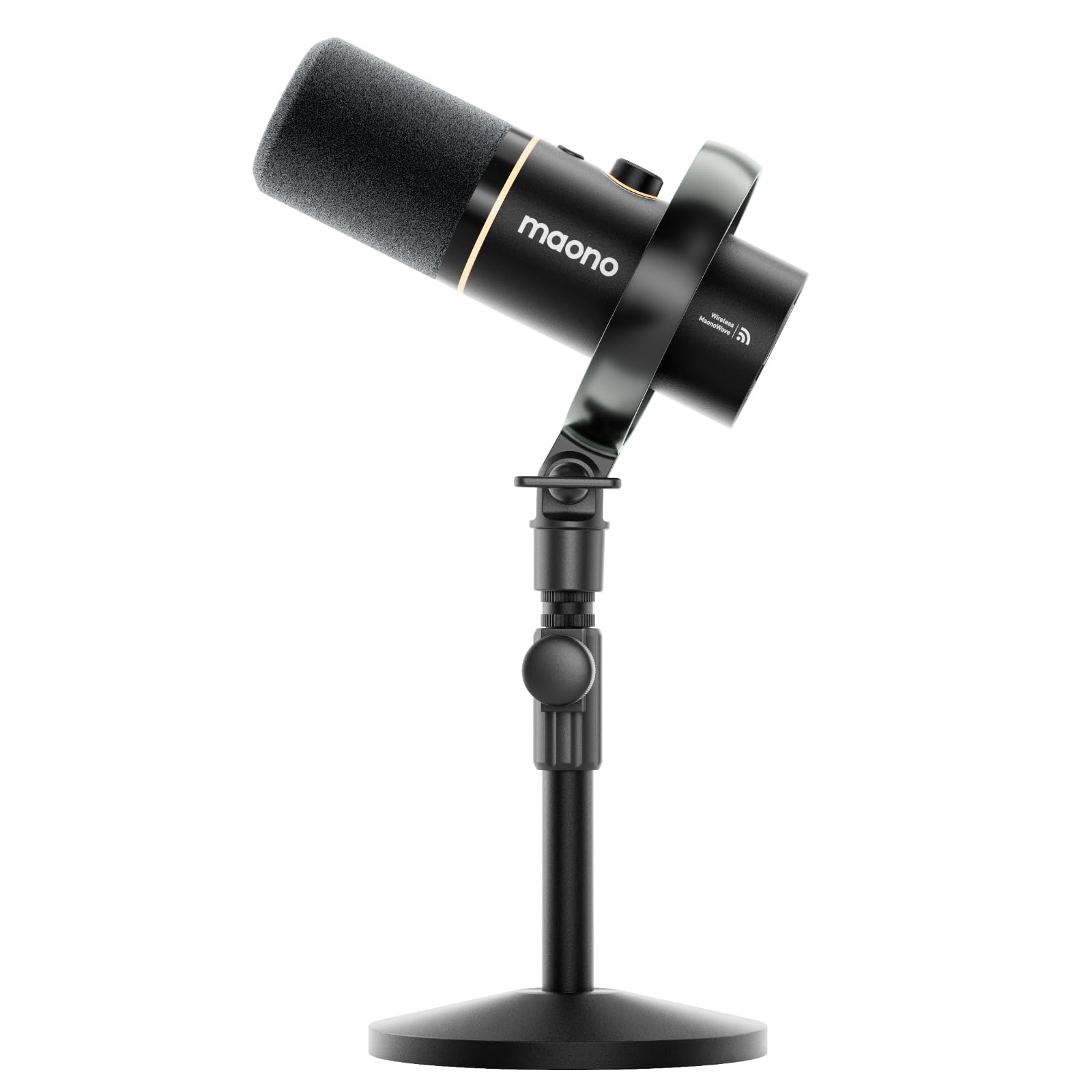
The MAONO PD200W is a hybrid powerhouse that offers three connection modes: wireless, USB, and XLR. This flexibility makes it the only microphone on this list that can seamlessly move from a wired desktop setup to a wireless portable configuration for on-the-go recording. The 30mm dynamic capsule delivers a naturally warm, broadcast-style voice that excels at rejecting room echo without requiring a treated studio.
The wireless mode uses a USB-C receiver and provides a stable 60-meter range with up to 60 hours of battery life (with RGB off). A standout feature is its ability to connect two PD200W mics to a single receiver for duo podcasts, recording each speaker to its own track for precise post-editing. The three-stage noise cancellation in cardioid mode effectively suppresses air conditioner hum and distant traffic without making your voice sound hollow.
The MaonoLink app gives you access to four master-tuned preset modes for different scenarios plus manual EQ and reverb adjustments. The complete creator kit includes a desktop stand, USB-C cable, Type-C receiver, and adapter cable, making it a true out-of-box solution. The metal enclosure feels robust, and the RGB ring on the base adds optional flair.
Why it’s great
- Triple connectivity (wireless, USB, XLR) for ultimate flexibility
- Dynamic capsule naturally rejects background noise and room echo
- 60-hour battery life for extended wireless sessions
Good to know
- Battery needs recharging every few days with normal use
- Button controls can be confusing; often need to reference the app
5. Razer Seiren V2 X

The Razer Seiren V2 X packs professional-grade audio capture into a remarkably compact chassis. The 25mm condenser capsule with a supercardioid pickup pattern is aggressive about rejecting noise from the sides and rear, making it an ideal choice for gamers who sit near a loud PC tower or mechanical keyboard. Its smaller footprint saves crucial desk space without compromising voice clarity.
An integrated digital limiter automatically prevents clipping and peaking, which means you can speak at varying volumes without constant gain adjustments. The built-in shock absorber dampens vibrations from accidental desk knocks, and the headphone monitoring jack lets you hear your own voice in real time with zero latency — critical for maintaining consistent audio levels in chaotic team voice channels.
Onboard gain control and mute buttons are positioned on the front for easy access, and the USB-C connection ensures modern compatibility. The plastic enclosure keeps the weight down for boom arm use, though it lacks the premium feel of all-metal competitors. The free-spinning volume knob takes some getting used to, but the overall audio performance punches well above its positioning.
Why it’s great
- Supercardioid pattern offers superior background noise suppression
- Built-in digital limiter prevents clipping automatically
- Compact design saves desk space and works well on a boom arm
Good to know
- Plastic build feels less durable than metal alternatives
- Free-spinning volume knob lacks physical stops for precise adjustment
6. Logitech G Blue Yeti

The Blue Yeti is the most recognized USB microphone in the gaming world, and for good reason. Its custom three-capsule array enables four pickup patterns — cardioid, omni, bidirectional, and stereo — making it the most versatile single-mic solution for content creators who record voiceovers, stream gameplay, host interviews, and capture room ambience all from one device. The cardioid mode delivers robust vocal presence for gaming chat and Twitch streams.
Blue VO!CE software adds a layer of professional polish with real-time effects, HD audio samples, and advanced modulation capabilities. Onboard controls include headphone volume, pattern selection, instant mute, and mic gain, all positioned on the front face for easy adjustment. The zero-latency monitoring jack lets you hear your mix without delay, essential for maintaining natural speech cadence.
The all-metal enclosure and heavy base give the Yeti a studio-grade feel on the desk, though its size can be imposing on compact setups. The adjustable desktop stand allows you to tilt the mic toward your mouth for optimal sound capture. It’s a proven workhorse that has shipped millions of units for a reason — reliable, adjustable, and backed by a massive community of preset configurations.
Why it’s great
- Four pickup patterns handle every content creation scenario
- Blue VO!CE software offers broadcast-quality vocal effects
- All-metal construction and heavy base feel premium on any desk
Good to know
- Large footprint takes up significant desk real estate
- Picks up background noise easily in untreated rooms
7. HyperX SoloCast 2

The HyperX SoloCast 2 proves you don’t need to spend premium money for clean, reliable voice capture. It records at 24-bit/96kHz — the same studio-grade spec found on mics twice its price — and bundles everything you need into a single compact unit: a built-in foam pop filter, an internal shock mount, and a tiltable stand with a weighted base. The cardioid polar pattern focuses on your voice while reducing unwanted sounds from the sides and rear.
Tap-to-mute functionality with a clear red LED indicator gives you instant visual confirmation of your mute status. The HyperX NGENUITY software unlocks customizable audio filters including high-pass, low-pass, and voice enhancement — letting you dial out low-frequency rumble or soften harsh sibilance. Settings are saved directly to the mic, so your preferred profile travels with you to any PC.
The USB-C connection provides simple plug-and-play setup, and the built-in 3/8” and 5/8” threads make it easy to mount on a boom arm if you prefer that configuration. The compact design won’t crowd your desk, and the build quality feels solid for its class. Some users note the mic is sensitive enough to pick up background noises like fans or fridge hums, so a boom arm positioned closer to your mouth is recommended for the best signal-to-noise ratio.
Why it’s great
- Studio-grade 24-bit/96kHz recording at a value price
- Built-in pop filter and shock mount reduce accessory costs
- Customizable audio filters via NGENUITY software saved onboard
Good to know
- No onboard gain control; requires software adjustment
- Desk stand is low; recommended to use with a boom arm for best results
FAQ
Do I need a condenser or a dynamic microphone for PC gaming?
How do I reduce keyboard and mouse noise from my gaming microphone?
What is the best polar pattern for solo streaming and gaming?
Final Thoughts: The Verdict
For most users, the best gaming microphone for pc winner is the Elgato Wave:3 because its Clipguard anti-distortion technology and Wave Link mixing software offer professional-grade audio control that no other USB mic in this range provides. If you want the versatility of multiple polar patterns for podcasting and streaming, grab the HyperX QuadCast. And for wireless freedom and a dynamic capsule that excels in untreated rooms, nothing beats the MAONO PD200W.