
A mid-tower case under the $100 mark should not force you to choose between good thermals and a clean build — yet many budget options skimp on fan count or radiator clearance. The real challenge is finding a chassis that delivers both mesh airflow and enough room for modern GPU lengths without rattling at load.
I’m Mohammad Maruf — the founder and writer behind Drink4Good. I’ve spent years analyzing PC component specs and thermal testing data to separate cases that merely fit hardware from those that actually optimize cooling and cable routing.
This guide evaluates seven enclosures that balance pre-installed fan configurations, GPU clearance, and build quality so you can buy with confidence. Whether you prioritize panoramic glass or high static pressure fans, the best gaming pc case under $100 is the one that matches your specific hardware layout.
How To Choose The Best Gaming PC Case Under $100
Most buyers in this bracket focus on fan count first, but GPU length and radiator support are the specs that actually limit future upgrades. A case that stops your 360mm AIO or a 400mm GPU is a case you will replace in 18 months. Prioritize clearance over flashy lighting if you plan to keep the chassis through a GPU generation.
Fan Configuration and Airflow Path
The number of pre-installed fans matters less than their size and orientation. Three 140mm fans move roughly 30 percent more air than three 120mm fans at the same RPM, and reverse-blade side intake fans improve GPU thermals by pulling fresh air directly over the graphics card. Look for cases that include at least one exhaust fan at the rear to create negative pressure — otherwise heat stagnates near the CPU cooler.
Motherboard and PSU Compatibility
Back-connect motherboard support (ASUS BTF, MSI Project Zero) is appearing on sub-$100 cases now, but only if the chassis has a cutout behind the CPU tray. Standard ATX builds still dominate, so verify that the PSU shroud is removable and that the HDD cage can shift or detach to accommodate long power supplies. Tight PSU clearance often forces buyers to buy a shorter unit later.
Quick Comparison
On smaller screens, swipe sideways to see the full table.
| Model | Category | Best For | Key Spec | Amazon |
|---|---|---|---|---|
| Montech AIR 903 MAX | Mid Tower | High airflow with 140mm fans | 4x140mm fans pre-installed | Amazon |
| Lian Li V100 | Mini Tower | Display platform & back-connect | 420mm GPU clearance | Amazon |
| Corsair 3500X RS ARGB | Mid Tower | Panoramic glass aesthetics | EATX compatible | Amazon |
| Corsair 4000D RS Frame | Mid Tower | Modular InfiniRail fan mounts | InfiniRail system | Amazon |
| NZXT H7 Flow 2024 | Mid Tower | Bottom fan GPU cooling | 420mm rad support front | Amazon |
| Montech XR-B | Mid Tower | Wood-grain aesthetics | 1500 RPM ARGB fans | Amazon |
| MUSETEX Y6 | Mid Tower | Six pre-installed fans | 270° tempered glass | Amazon |
In‑Depth Reviews
1. Montech AIR 903 MAX

The Montech AIR 903 MAX stands out with its 51 percent ventilation rate metal mesh front and four pre-installed 140mm fans — three ARGB PWM and one standard PWM. The 180mm CPU cooler clearance and 400mm GPU support mean this chassis handles almost any air cooler or liquid cooler setup without obstruction. At 19.4 inches tall, it fits E-ATX boards while still covering the $100 cap.
The included LED/PWM controller offers 21 lighting effects, and the magnetic dust filters at the top and PSU intake make cleaning fast. The HDD cage is removable, which frees up space for longer PSUs or extra cable storage. Some users report that the rear exhaust fan can produce coil whine at higher RPMs, but a custom fan curve or a simple fan swap resolves that quickly.
For builders who want maximum out-of-the-box cooling without adding extra fans, the AIR 903 MAX delivers the best thermal performance per dollar in this bracket. The only real trade-off is the large footprint — it occupies more desk depth than typical mid-towers, so measure your space.
Why it’s great
- Four 140mm fans and a fan hub included
- 180mm CPU cooler height clearance
- Removable HDD cage for cable flexibility
Good to know
- Large footprint requires desk space
- Exhaust fan may need a speed cap
2. Corsair 4000D RS Frame

The Corsair 4000D RS Frame introduces the InfiniRail fan mounting system, which allows you to slide fans anywhere along steel rails in the front and roof. This eliminates fixed mounting holes and lets you shift airflow directly over hot components like the GPU backplate or VRM area. The chassis also supports reverse-connection motherboards from ASUS BTF and MSI Project Zero, hiding all cables for a cleaner front view.
Three RS PWM fans come pre-installed with daisy-chain 4-pin connections and Zero RPM mode for near-silent low-load operation. The 3D Y-pattern steel front panel provides a low-obstruction path for cool air while filtering large dust particles. Internal cable covers can be swapped between a clean routing plate and a side fan mount that accommodates three 120mm fans for extra GPU cooling.
The glass side panel attaches without thumbscrews, though removal requires firm pressure — some users worry about breakage during first disassembly. The front USB-C cable may arrive pinched from shipping, but Corsair support has a strong track record of sending replacements. For builders who value future modularity and quiet operation, this frame is a long-term investment.
Why it’s great
- InfiniRail allows adjustable fan placement
- Reverse-connect motherboard compatible
- Zero RPM mode for silent idle
Good to know
- Glass panel removal is stiff
- Front USB-C cable can be pinched in transit
3. NZXT H7 Flow 2024

The NZXT H7 Flow 2024 focuses on dedicated GPU cooling with support for three bottom-mounted 120mm fans — a feature rarely seen under $100. Three front 120mm fans come pre-installed, and the mesh front panel maximizes intake without restriction. With 420mm radiator support in the front and 360mm in the top, this case handles high-end custom loops without modification.
Cable management is one of the strongest selling points: wide channels, built-in hooks, and included straps let you route power cables behind the motherboard tray without bulging the side panel. The tool-less top, front, and side panels pop off without screws, making component swaps fast. However, the included fans are 3-pin DC (non-PWM), so you cannot control their speed through the motherboard without a separate controller.
At 21.4 inches tall, the H7 Flow is a large mid-tower — it weighs over 25 pounds fully packed. The panel removal method (yank-off with no latch) takes practice. For builders who want bottom fan GPU cooling and clean routing channels, this chassis offers a premium layout at an entry-level cost.
Why it’s great
- Bottom fan mounts for direct GPU cooling
- 420mm radiator support in front
- Excellent cable management channels
Good to know
- Fans are 3-pin DC, not PWM
- Panels pop off without a latch
4. Corsair 3500X RS ARGB
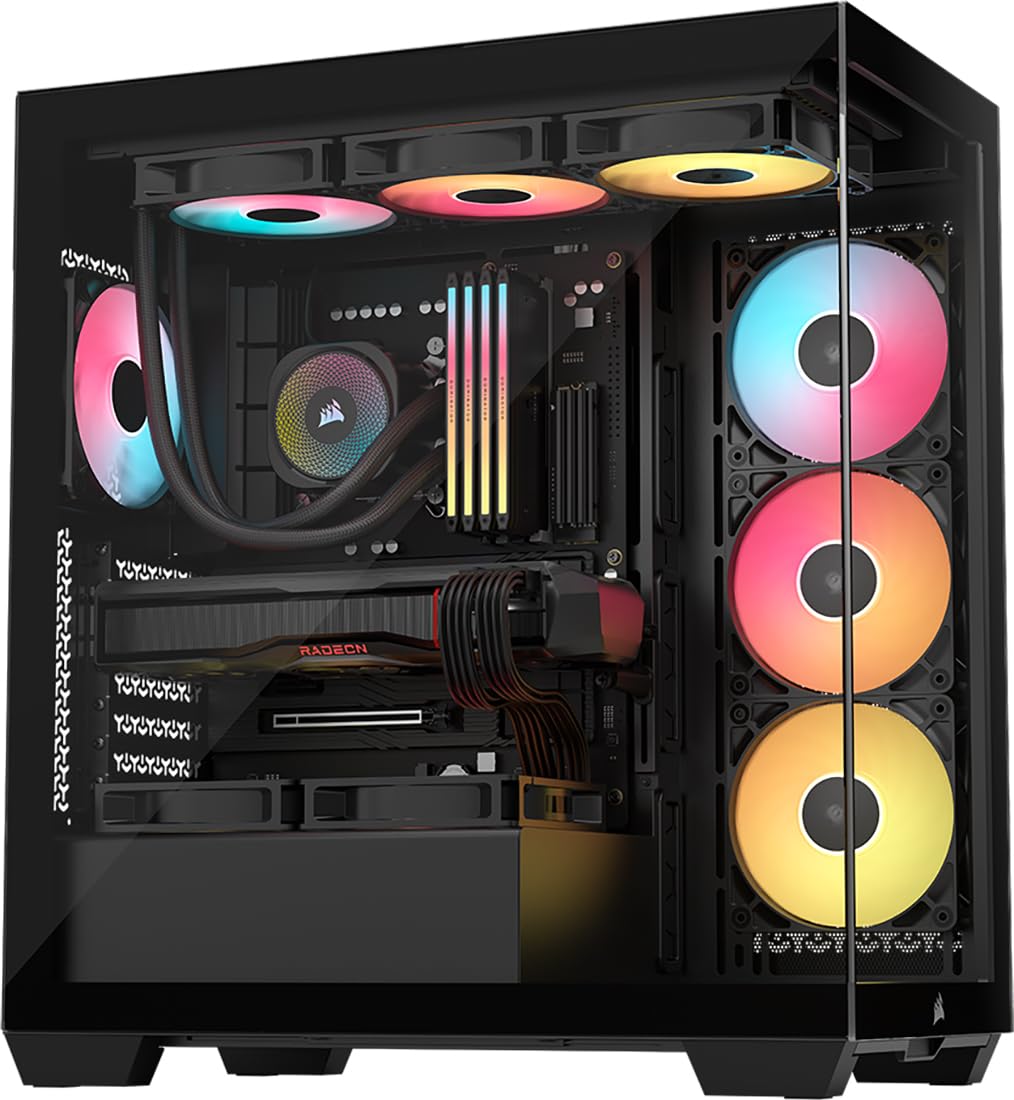
The Corsair 3500X RS ARGB uses a wraparound tempered glass design that gives a panoramic view of your components from side to front. It supports motherboard form factors from Mini-ITX all the way to EATX, and the three pre-installed RS120-R ARGB fans provide high static pressure through the glass front panel. GPU anti-sag bracket is built in, which reduces stress on heavy graphics cards during transport.
This case is validated for reverse-connection motherboards from ASUS BTF, MSI Project Zero, and Gigabyte Project Stealth, allowing you to hide virtually all cables from the main chamber. The removable front and side glass panels simplify installation, and the top panel accommodates up to a 360mm radiator. The side fan mounts support three additional 120mm fans for a total of ten.
Airflow through a glass front is inherently more restricted than mesh, so this case is best suited for air-cooled builds with moderate GPU power (RTX 4070 class and below). The 3-pin fan connectors on the included RS fans limit motherboard control without a separate hub. For pure aesthetics with solid build quality, the 3500X is a visual flagship at this price.
Why it’s great
- Panoramic tempered glass panels
- Built-in GPU anti-sag bracket
- EATX and back-connect compatible
Good to know
- Glass front restricts airflow vs mesh
- Fans use 3-pin connectors
5. Lian Li V100

The Lian Li V100 punches above its size category with support for 420mm GPUs and a unique slanted PSU shroud that doubles as a display platform for figures. Four pre-installed 120mm ARGB PWM fans with hydraulic bearings run up to 1800 RPM and 61.47 CFM each, keeping noise under 31 dBA. An integrated 26-LED ARGB strip syncs with motherboard software for customizable lighting effects.
Tool-less side panels with lock-in mechanisms speed up access, and the case is compatible with back-connect ATX motherboards for cleaner cable management. The GPU sag bracket is included, and CPU cooler height clearance reaches 178mm — enough for most dual-tower air coolers. The rear chamber has ample space for cable bundling, though some users note that the bottom fan mounts can interfere with PSU clearance on longer units.
The V100 is technically listed as a mini-tower due to its compact footprint, but it actually fits full ATX boards. The pre-installed fans can feel wobbly at maximum RPM, and the plastic side panels lack the premium heft of all-metal options. For showpiece builds with collectibles on display, this case offers exceptional visual value.
Why it’s great
- Display platform for collectibles
- High CFM PWM fans with RGB strip
- Tool-less side panel removal
Good to know
- Fans can wobble at high RPM
- Bottom fan mounts may crowd PSU
6. Montech XR-B

The Montech XR-B brings a mature wood-grain I/O panel design to the budget segment, blending natural aesthetics with a dual tempered glass front and side panel. Three 120mm ARGB PWM fans (two reverse-blade on the side, one regular at the rear) spin at 1500 RPM max, creating positive pressure through the chassis. The case supports 360mm radiators at the top and fits 40-series GPUs with ease.
Compact at 17.1 inches deep and 17.7 inches tall, the XR-B leaves little wasted space while still accommodating ATX boards. Dust filters cover the top, bottom, and side panels, which reduces cleaning frequency. The glass panels use push-in clips instead of thumbscrews, making access tool-free — though the clips can feel flimsy on the first removal.
Some units arrive with scratched glass panels, so inspect upon delivery. The side panel is a tight fit and requires careful alignment. For builders who want a stylish, compact mid-tower with good airflow and a unique look, the wood-grain XR-B delivers above its price bracket.
Why it’s great
- Unique wood-grain I/O design
- Reverse-blade fans for GPU airflow
- Compact footprint with ATX support
Good to know
- Glass panel may arrive scratched
- Side panel is a very tight fit
7. MUSETEX Y6

The MUSETEX Y6 White stands out with six pre-installed PWM ARGB fans — two reverse-blade side intakes, three top exhaust, and one rear exhaust — creating a balanced airflow profile without needing additional purchases. The 270-degree dual tempered glass panels provide panoramic visibility of the interior, and the white finish breaks the usual black PC monotony. GPU length support reaches 400mm, and CPU cooler height goes up to 176mm.
The case includes USB 3.2 Type-C and USB 3.0 front ports, plus an HD audio jack. The top and bottom magnetic dust filters trap particles while maintaining airflow. Building inside the Y6 is straightforward: panels pop off easily, and the PSU shroud hides cabling well. However, the fan cables are ribbon-style with 2-pin connectors, which prevents individual color control unless you swap them.
ATX motherboard owners should plan wiring before installing the board — the rear chamber is spacious, but the bottom cable cutouts are limited. Best results come with micro-ATX builds. For users who want maximum fan count out of the box in a white panoramic chassis, the Y6 is the easiest route to a full RGB setup.
Why it’s great
- Six pre-installed ARGB fans
- Panoramic 270-degree glass panels
- USB 3.2 Type-C front port
Good to know
- Fan cables use 2-pin ribbon
- Better suited for micro-ATX boards
FAQ
Is a mid-tower under $100 good enough for an RTX 4090?
Do I need reverse-blade fans in a fishbowl case?
Final Thoughts: The Verdict
For most users, the best gaming pc case under $100 winner is the Montech AIR 903 MAX because its four 140mm fans, 180mm cooler clearance, and 51 percent ventilation rate provide the best out-of-the-box thermal performance at this price. If you want a panoramic glass design with a built-in GPU anti-sag bracket, grab the Corsair 3500X RS ARGB. And for dedicated GPU cooling with bottom fan mounts and 420mm radiator support, nothing beats the NZXT H7 Flow 2024.