
Modern gaming, creative workloads, and AI-assisted development demand a graphics card that can sustain high frame rates, manage complex ray tracing, and handle memory-intensive textures without buckling. The wrong GPU introduces stuttering, forced texture detail drops, and a shortened usable lifespan that no cosmetic upgrade can fix. This guide cuts through the marketing noise to identify which cards actually deliver on their promises at every price tier.
I’m Mohammad Maruf — the founder and writer behind Drink4Good. Over the past several weeks, I have combed through hundreds of technical specifications, benchmark data points, and verified customer reports to assemble a ranking of the models that deliver genuine value rather than just inflated clock speeds and flashy RGB headers.
Whether you are building a new rig or upgrading from an older generation, this comprehensive analysis of the best gfx card options will help you match silicon to your real-world needs, and avoid overspending on features you might never use.
How To Choose The Best GFX Card
A graphics card is a multi-year investment, and the wrong choice can cost you performance, stability, and upgrade options. Focus on four pillars: memory capacity, memory type, cooling architecture, and the software ecosystem that extends the card’s lifespan through features like DLSS and FSR.
Memory Capacity and Bandwidth
8GB of VRAM is the current floor for 1080p gaming, but texture-heavy titles and ray tracing can push past that limit. 12GB offers a comfortable 1440p experience, while 16GB is the sweet spot for 4K gaming, video editing, and running local LLMs. GDDR7 memory — found on NVIDIA 50-series cards — delivers a substantial bandwidth uplift over GDDR6, which directly reduces stutter in open-world games and accelerates compute tasks.
Cooling and Thermal Management
A triple-fan design with a large heatsink is not just about marketing; it dictates sustained clock speeds and noise levels. Cards that idle in the 30-35°C range and peak in the mid-60s under load will hold their boost clock longer and last several years past cards that run in the high 80s. Check the physical dimensions carefully — many premium coolers exceed 12 inches in length and may not fit standard mid-tower cases.
Software Features and Ecosystem
NVIDIA’s DLSS 4 and Reflex 2 offer frame generation and latency reduction that can double performance in supported titles without sacrificing image quality. AMD’s FSR 4 provides a similar uplift on RDNA 4 cards. For productivity, NVIDIA’s CUDA ecosystem remains dominant for AI and rendering, while AMD’s open-source driver support gives Linux users an advantage. Always check which generation of these upscaling technologies a card supports before buying.
Quick Comparison
On smaller screens, swipe sideways to see the full table.
| Model | Category | Best For | Key Spec | Amazon |
|---|---|---|---|---|
| ASUS Prime RX 9070 XT | Mid-Range | 1440p Max Settings / Linux | 16GB GDDR6, 2970 MHz Boost | Amazon |
| RTX 5070 Ti MSI Ventus | Premium | 1440p/4K Ray Tracing | 16GB GDDR7, 2497 MHz Boost | Amazon |
| GIGABYTE RX 9060 XT | Mid-Range | High-FPS 1080p/1440p | 16GB GDDR6, 2700 MHz Boost | Amazon |
| ASUS Dual RTX 5060 | Entry | 1080p Gaming / SFF Builds | 8GB GDDR7, 2565 MHz OC | Amazon |
| GIGABYTE RTX 5070 AERO | Premium | White Builds / Quiet 1440p | 12GB GDDR7, 2600 MHz Boost | Amazon |
| ASRock RX 9070 XT Challenger | Mid-Range | High-End 1440p / 4K Entry | 16GB GDDR6, 2970 MHz Boost | Amazon |
| PNY RTX 5060 Epic-X | Entry | Budget 1080p Gaming | 8GB GDDR7, 2280 MHz Core | Amazon |
| PNY RTX 5070 Ti Epic-X | Premium | Local LLMs / 1440p RT | 16GB GDDR7, 2452 MHz Boost | Amazon |
| ASUS Prime RTX 5070 Ti | Premium | SFF Builds / Silent Operation | 16GB GDDR7, 2.5-Slot Design | Amazon |
| XFX Speedster SWFT210 RX 7600 | Budget | Entry-Level 1080p / VR | 8GB GDDR6, 2655 MHz Boost | Amazon |
| NVIDIA RTX 5080 Founders Edition | Enthusiast | 4K Max Settings / AI Workloads | 16GB GDDR7, 2806 MHz Boost | Amazon |
In‑Depth Reviews
1. ASUS Prime AMD Radeon RX 9070 XT 16GB OC Edition

The ASUS Prime RX 9070 XT strikes a rare balance: 16GB of GDDR6 memory, a boost clock that pushes past 2970 MHz, and a 2.5-slot cooler that keeps core temps in the 55-59°C range under sustained gaming loads. The dual-ball bearing fans with 0dB technology allow silent desktop use, and the phase-change GPU thermal pad ensures heat transfer remains consistent even during long rendering sessions. Linux compatibility is excellent out of the box thanks to AMD’s open-source driver stack.
Paired with a 750W power supply, this card delivers 1440p max-settings performance well above 100 FPS in titles like Red Dead Redemption 2, and handles 4K gaming at medium-to-high presets without choking. The absence of RGB will disappoint some, but the focus on thermal headroom and build quality makes it a workhorse that will outlast flashier alternatives. The warranty support from ASUS is a known weak point, so verify the return window with your seller.
For the user who wants a single GPU for mixed gaming, Linux development, and occasional 4K media work, this is the most future-proof choice at its price tier. The 16GB buffer ensures texture-heavy titles will not force quality drops for several years, and the efficient RDNA 4 architecture keeps power draw around 180-190W under stress — impressive for this performance class.
Why it’s great
- Idle temps of 28-32°C and load temps peaking at 59°C
- 16GB VRAM future-proofs 1440p and 4K gaming
- Excellent Linux support with open-source drivers
Good to know
- Large 311mm length — verify case clearance
- ASUS warranty support is reportedly inconsistent
2. MSI Gaming RTX 5070 Ti 16G Ventus 3X OC

The MSI Ventus 3X OC leverages the Blackwell architecture and DLSS 4 to deliver a 15% performance deficit versus the RTX 5080 at roughly 33% lower cost — a price-to-performance ratio that has reviewers calling it the sweet spot of the current generation. The 16GB GDDR7 frame buffer on a 256-bit bus provides the bandwidth needed for 4K ray-traced gaming, and the Torx Fan 5.0 design with ring arc stabilization maintains high-pressure airflow without excessive noise.
In real-world testing, the card pushes 120-140 FPS at 4K on demanding titles like Escape from Tarkov and DayZ, and exceeds 425 FPS in Valorant at the same resolution. The nickel-plated copper baseplate captures heat from both the GPU die and memory modules, keeping core temperatures under 65°C during extended sessions. The included adjustable support bracket prevents sag, and the card lacks RGB for those who prefer a stealth aesthetic.
This is also a strong option for AI and cybersecurity workloads — users report smooth operation with Llama 3.1 8B models and Hashcat tasks. The only real drawback is physical size: at 15.2 inches long, it will challenge compact cases. If your chassis can accommodate it, the Ventus 3X offers the best price-performance balance in the premium tier.
Why it’s great
- Under 65°C under load with quiet operation
- DLSS 4 enables >200 FPS in 4K with frame gen
- Includes adjustable sag bracket
Good to know
- Long 15.2-inch card; measure your case carefully
- No RGB lighting
3. GIGABYTE Radeon RX 9060 XT Gaming OC 16G

GIGABYTE’s RX 9060 XT Gaming OC makes a compelling argument for AMD fans: a 2700 MHz boost clock, 16GB of GDDR6 memory, and the WINDFORCE cooling system with Hawk fans that deliver high static pressure at low noise levels. The server-grade thermal conductive gel improves heat transfer across the VRMs and memory modules, which helps maintain boost clocks during prolonged gaming sessions. The card handles Cyberpunk 2077 and Hogwarts Legacy smoothly at 1440p with high texture settings.
The 16GB buffer is the headline feature here — it provides headroom for 4K gaming, video editing timelines, and machine learning experiments that would choke 8GB cards. The zero-RPM fan mode ensures silent operation during desktop use, and the PCIe 5.0 interface future-proofs the card for upcoming motherboard generations. Ray tracing performance is decent but not a strength of the RDNA 4 architecture, so NVIDIA cards remain preferable for heavy RT workloads.
The card is physically large at 11.06 inches, and the dual-slot design means it will block access to adjacent PCIe lanes on many motherboards. Still, for pure rasterization performance and VRAM capacity at this price, the RX 9060 XT is a standout option for gamers and creators alike.
Why it’s great
- 16GB VRAM at a mid-range price point
- Quiet WINDFORCE cooling with zero-RPM mode
- AV1 encoding support for content creation
Good to know
- Ray tracing lags behind NVIDIA equivalents
- Large card; verify case clearance
4. ASRock Radeon RX 9070 XT Challenger 16GB OC

The ASRock RX 9070 XT Challenger delivers a 2970 MHz boost clock and 16GB of GDDR6 memory, making it a serious contender for 1440p max-settings gaming. The triple-fan cooler with striped axial fan blades and a 0dB silent mode keeps noise down during light use, and the physical LED switch allows for software-free lighting control — a rare feature that simplifies build aesthetics without driver conflicts.
Users report stable 1440p ultra-settings performance out of the box, with smooth VR experiences in titles like No Man’s Sky. The card also responds well to undervolting via the Adrenaline software, which can improve both temperatures and boost clock stability. The main complaint involves ASRock’s RGB software, which can lose connection to the card and lock color settings — a minor annoyance that does not affect gaming performance.
The card requires a 750W power supply minimum, and its 2.9-slot thickness demands careful chassis planning. If you prioritize raw raster performance and a clean, cool-running system, the Challenger offers strong value for the mid-range segment.
Why it’s great
- Excellent 1440p ultra-settings performance
- Physical LED switch for lighting control
- 0dB silent cooling in low-load scenarios
Good to know
- RGB software can lose connection
- Requires 750W+ PSU
5. GIGABYTE GeForce RTX 5070 AERO OC 12G

The AERO OC is GIGABYTE’s premium white-themed RTX 5070, designed for builders who want a clean aesthetic without sacrificing performance. The 12GB GDDR7 memory on a 192-bit bus provides enough bandwidth for smooth 1440p gaming, and the WINDFORCE cooling system keeps the card at approximately 60°C under load — significantly cooler than previous generations. The OC variant ships with a factory overclock that adds a few percentage points of performance out of the box.
In practice, the 5070 handles Overwatch at 1440p with 300Hz refresh rates and runs Microsoft Flight Simulator 2024 at 90-100 FPS on high settings. The triple-fan design is nearly silent, and the fans remain stationary during idle and light desktop use. The included anti-sag bracket provides additional peace of mind for upright installations. The 12GB frame buffer is sufficient for current gaming demands, though future titles targeting 4K may push its limits.
This card’s main appeal is its visual signature — the white shroud and minimalist design make it the centerpiece of themed builds. The 4-year warranty is a welcome bonus, and the 650W power requirement keeps PSU upgrades modest. It is a premium card in both price and looks.
Why it’s great
- Stunning all-white design for themed builds
- Idles at 35°C, peaks at 60°C under load
- DLSS and frame gen improve smoothness significantly
Good to know
- 12GB VRAM is adequate but not future-proof for 4K
- Premium pricing reflects aesthetic, not just performance
6. PNY NVIDIA GeForce RTX 5070 Ti Epic-X ARGB Triple Fan
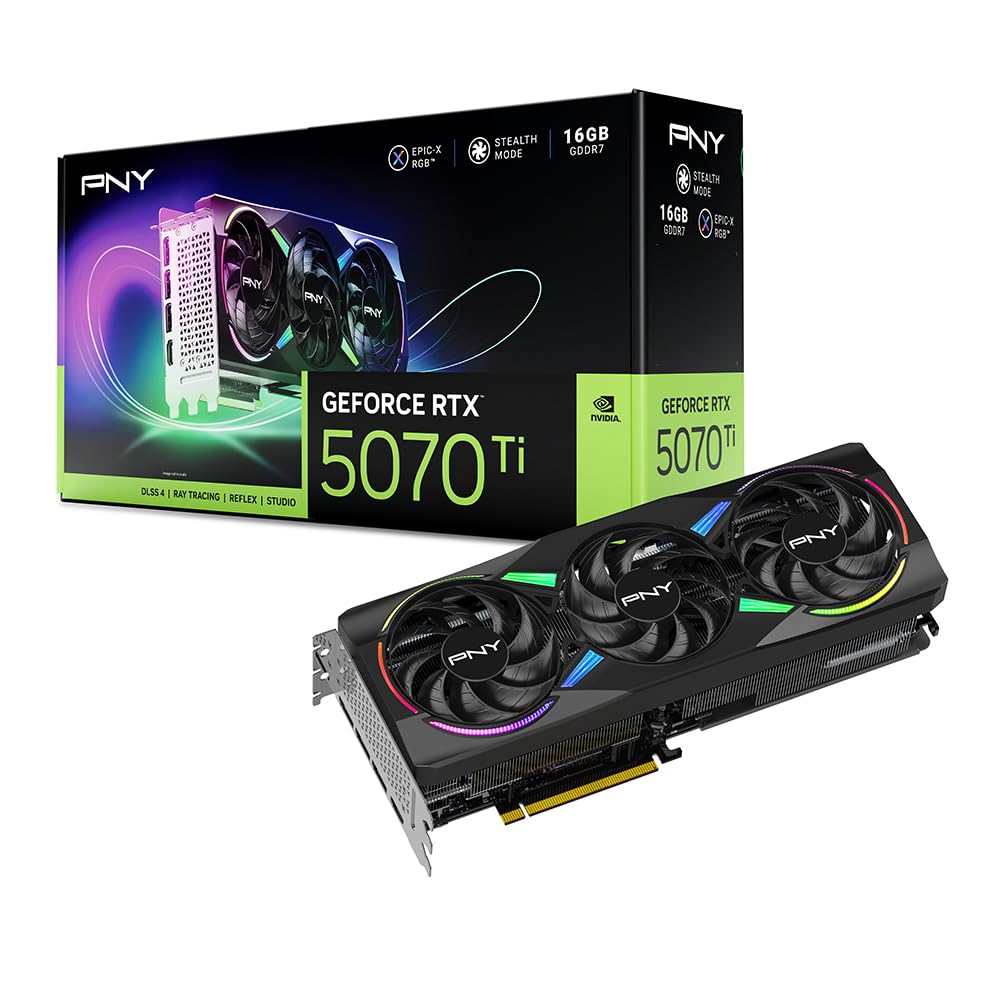
PNY’s RTX 5070 Ti Epic-X stands out for its balance of compute capability and gaming performance. With 16GB of GDDR7 memory and a 256-bit bus, it handles local LLM inference, Blender rendering, and CUDA-accelerated tasks with ease — users report stable operation with Llama 3.1 models and Hashcat workloads. The triple-fan cooler with an extensive fin array keeps power draw under 300W, and the card hits or exceeds reference benchmark averages.
Gaming performance is equally strong: Battlefield 6 at max settings pushes 380 FPS on a Ryzen 7 7800X3D, and DLSS 4 with frame generation delivers over 100 FPS in ray-traced titles. The cooler runs quietly under load with no coil whine reported, and the RGB lighting, while bright, can be controlled through PNY’s software. The card’s thickness (2.98-slot) means it occupies nearly three expansion slots, so mATX and ITX builders will struggle to fit it.
The primary downside is price sensitivity — at its MSRP, this is the best value NVIDIA card under , but any markup above that reduces its appeal. For users who need the VRAM for both gaming and work, the Epic-X delivers a rare combination of speed, capacity, and thermal restraint.
Why it’s great
- Excellent for AI, ML, and creative workloads
- Quiet operation with no coil whine
- 300W power draw with great thermal headroom
Good to know
- 2.98-slot thickness; incompatible with many small cases
- Best value only at or near MSRP
7. ASUS SFF-Ready Prime NVIDIA GeForce RTX 5070 Ti 16GB OC Edition

The ASUS Prime RTX 5070 Ti is an SFF-Ready enthusiast card that squeezes 16GB of GDDR7 memory and Blackwell architecture into a 2.5-slot, 12-inch form factor — a rarity in the premium tier. The axial-tech fans with barrier rings increase downward air pressure, and the phase-change GPU thermal pad keeps core temperatures under 65°C during sustained loads. The dual-BIOS switch allows users to toggle between a quiet and performance profile without software intervention.
Performance is on par with the MSI Ventus 3X, delivering 15-20% higher FPS than the RTX 4070 Ti and maintaining over 100 FPS at 1440p with max ray tracing enabled. The native 12VHPWR cable simplifies power routing, and the card produces no coil whine — a frequent complaint on competing models. The lack of RGB will appeal to minimalist builders, though the required adapter cable (one 12VHPWR to three 8-pin) may complicate cable management.
This card is the best choice for small-form-factor builds that need flagship-level performance without the footprint of a full-size cooler. If you are upgrading from an RTX 20 or 30 series card, the DLSS 4 and frame gen improvements alone justify the jump.
Why it’s great
- SFF-compatible 2.5-slot design with premium cooling
- Silent fans with zero coil whine
- DLSS 4 enables massive FPS gains over previous gen
Good to know
- Requires adapter cable for 3x 8-pin PSU connections
- Premium pricing; verify MSRP availability
8. ASUS Dual NVIDIA GeForce RTX 5060 8GB GDDR7 OC Edition

The ASUS Dual RTX 5060 brings GDDR7 memory to the entry-level segment, offering a tangible bandwidth advantage over the previous generation despite its 8GB frame buffer. The card’s 2565 MHz OC mode clock speed and 623 AI TOPS for neural rendering tasks make it a strong option for 1080p gaming and light 1440p use. The axial-tech fans with smaller hubs and longer blades create higher static pressure, and the 0dB technology stops the fans entirely during low-load scenarios.
In real-world testing, the card delivers around 140 FPS in Fortnite at high settings and handles most AA and indie titles at 1440p with solid frame times. The 150W TDP means it can run on older power supplies without an upgrade, and the 2.5-slot design fits comfortably in most mid-tower and small-form-factor cases. GDDR7’s higher bandwidth reduces stutter in open-world games compared to GDDR6-based competitors.
The 8GB VRAM is the limiting factor — modern titles like Hogwarts Legacy will force texture quality reductions at higher resolutions. This card is best suited for competitive gamers who prioritize high FPS at 1080p and do not plan to play VRAM-heavy simulation games. For that use case, it offers the best performance per dollar in the entry tier.
Why it’s great
- GDDR7 memory for reduced stutter at 1080p
- Compact 2.5-slot design fits most cases
- Low 150W TDP; compatible with older PSUs
Good to know
- 8GB VRAM is the floor for modern titles
- Not suitable for 4K or heavy ray tracing
9. PNY NVIDIA GeForce RTX 5060 Epic-X ARGB OC Triple Fan

PNY’s RTX 5060 Epic-X offers an alternative take on the entry-level segment with a triple-fan cooler that keeps the card quiet and cool even during extended gaming sessions. The 8GB GDDR7 memory and Blackwell architecture support DLSS 4, which can dramatically improve FPS in supported titles. The card delivers over 100 FPS on high settings in most modern games at 1080p and is SFF-Ready, making it a viable option for compact builds.
Users report that the card arrives well-packaged and works reliably after a driver update, which is expected for a new architecture launch. The triple-fan design is overkill for the 5060’s thermal output, but it means the fans rarely need to spin at high RPMs, resulting in very quiet operation. The ARGB lighting adds visual flair for builders who want some bling without paying a premium.
The 8GB VRAM limitation is the same as the ASUS Dual 5060 — texture-dense games at high resolutions will require compromises. This card is a solid choice for budget-conscious gamers who want access to DLSS 4 and plan to stay at 1080p for the lifespan of the card. The PNY warranty and build quality add peace of mind at this price point.
Why it’s great
- Triple-fan cooler runs very quietly
- DLSS 4 boosts FPS in supported titles
- SFF-Ready for compact builds
Good to know
- 8GB VRAM limits texture quality at high resolutions
- Requires driver update for best stability
10. XFX Speedster SWFT210 Radeon RX 7600 8GB

XFX’s Speedster SWFT210 RX 7600 is the entry-level option for gamers on a tight budget. With 8GB of GDDR6 memory and RDNA 3 architecture, it delivers solid 1080p performance in esports and older titles. The dual-fan cooling solution is compact and effective, keeping the card running in the upper 70s Celsius after a driver update resolves early thermal issues. At 9.49 inches long, it fits easily into almost any case, including small HP pre-built systems.
Verified customers report excellent VR performance in Half-Life: Alyx and Project Cars 2 at maximum settings, though Kayak VR introduces some stuttering due to the 8GB VRAM limitation. The card is also a strong performer on Linux — users on Arch Linux report seamless swapping from Nvidia with full display support across three monitors. The boost clock of 2655 MHz provides enough processing power for CAD work and indie game development.
The main concession is longevity: 8GB of VRAM and a 128-bit memory bus will struggle with 1440p textures and future ray-traced titles. If your needs are limited to 1080p gaming and light productivity, this card is a cost-effective entry point. Sit tight for the RX 9060 XT if you plan to keep your next GPU for four or more years.
Why it’s great
- Compact 9.49-inch design fits small cases
- Excellent Linux support with open drivers
- Good 1080p VR performance in most titles
Good to know
- 8GB VRAM and 128-bit bus limit 1440p gaming
- Requires driver update to stabilize temperatures
11. NVIDIA GeForce RTX 5080 Founders Edition

The RTX 5080 Founders Edition is NVIDIA’s enthusiast flagship, built on the Blackwell architecture with 16GB of GDDR7 memory and a boost clock of 2806 MHz. The card is surprisingly compact by modern standards — significantly smaller than most third-party coolers — yet it stays cool under load, with users reporting 120+ FPS at 1440p with max ray tracing enabled and up to 240 FPS in competitive titles. The minimalist dual-slot design does not require a support bracket, simplifying installation.
In practice, the 5080 delivers a massive performance uplift over the RTX 3080 and 4070, with DLSS 4 and Reflex 2 providing lower latency and smoother frame pacing. The card’s power draw is manageable for its class, and the cooler handles 4K gaming without exceeding comfortable thermal limits. The Founders Edition aesthetic is clean and understated, appealing to builders who prefer function over RGB lighting.
The price is the defining factor. At its MSRP, the RTX 5080 is a strong value for those who need maximum gaming performance. At current street prices, it becomes a harder sell against the RTX 5070 Ti. If you have the budget and demand the absolute best framerates in 4K ray-traced titles, the 5080 delivers without compromise.
Why it’s great
- Compact 2-slot design for a flagship card
- Outstanding 4K ray tracing performance
- Stays cool under load with quiet operation
Good to know
- Premium pricing with significant markup over MSRP
- Only 16GB VRAM — some AI workloads benefit from 24GB
FAQ
How much VRAM do I need for 1440p gaming in 2025?
Is GDDR7 worth paying extra for over GDDR6?
Should I buy an NVIDIA RTX 40-series now or wait for 50-series?
Does PCIe 5.0 improve real-world GPU performance?
What PSU wattage do I need for these cards?
Final Thoughts: The Verdict
For most users building a new PC in 2025, the best gfx card winner is the ASUS Prime RX 9070 XT because it delivers 16GB of VRAM, excellent thermal performance, and great Linux compatibility at a mid-range price that does not require selling a kidney. If you want access to DLSS 4 and need better ray tracing for 1440p max-settings gaming, grab the MSI RTX 5070 Ti Ventus 3X. And for competitive 1080p gamers who want the latest architecture on a budget, nothing beats the ASUS Dual RTX 5060.