
A router that cannot sustain its rated speed across the home is the single most frustrating bottleneck in a modern connected household. The difference between 300 Mbps on paper and 90 Mbps in the far bedroom is rarely the internet plan — it is the router failing to manage simultaneous streams, interference, and signal degradation. Selecting a gigabit router that actually preserves throughput at range is the only way to stop paying for bandwidth you never receive.
I’m Mohammad Maruf — the founder and writer behind Drink4Good. I have spent countless hours cross-referencing wireless chipset specifications, antenna configurations, and real-world throughput data from hundreds of user reports to identify the units that deliver consistent wired and wireless performance within their rated class.
Whether you need stable coverage for a 2,000-square-foot home or low-latency wired ports for a gaming rig, the right gigabit router will eliminate buffering, dropouts, and dead zones without forcing you into a subscription-based mesh system.
How To Choose The Best Gigabit Router
Not all Gigabit routers are built to sustain their rated speed under load. When you browse spec sheets, every unit claims 1 Gbps or higher, but real-world performance depends heavily on your home layout, device count, and the router’s internal architecture. Here is what actually matters.
Wi-Fi Generation and Bandwidth Distribution
Wi-Fi 6 (802.11ax) brings OFDMA and MU-MIMO to multi-device households, allowing the router to communicate with multiple devices simultaneously rather than sequentially. A router with only Wi-Fi 5 (802.11ac) will struggle to maintain Gigabit-level throughput once you connect ten or more gadgets. For a true Gigabit experience across many devices, Wi-Fi 6 is the baseline standard to target.
Port Configuration and WAN Speeds
The Gigabit router category is defined by its 1 Gbps Ethernet ports, but not all ports are equal. Look for a dedicated 2.5 Gbps WAN/LAN port if your internet plan exceeds 1 Gbps or if you plan to run a local NAS. Standard four-port Gigabit switches inside these routers are sufficient for 99 percent of homes, but a future-proofed unit will include at least one multi-gig uplink port.
Antenna Design and Coverage Area
External high-gain antennas with active beamforming focus the signal toward connected devices rather than broadcasting in a uniform sphere. Units with four or more external antennas and a dedicated FEM chipset generally deliver more consistent coverage through walls. If your home has plaster-and-lathe walls or spans more than 2,000 square feet, antenna count and beamforming quality become the deciding factors over raw speed ratings.
Quick Comparison
On smaller screens, swipe sideways to see the full table.
| Model | Category | Best For | Key Spec | Amazon |
|---|---|---|---|---|
| TP-Link Archer AX80 | Wi-Fi 6 | Large home coverage | 2.5 Gbps WAN/LAN port | Amazon |
| MSI Radix AXE6600 | Wi-Fi 6E | Low-latency gaming | Tri-band 6.6 Gbps throughput | Amazon |
| NETGEAR R6700AX | Wi-Fi 6 | Small to medium homes | AX1800 dual-band speed | Amazon |
| TP-Link Archer AX21 | Wi-Fi 6 | Budget Wi-Fi 6 upgrade | AX1800 dual-band speed | Amazon |
| NETGEAR RAX30 | Wi-Fi 6 | Renewed value pick | AX2400 up to 2.4 Gbps | Amazon |
| REOLINK RLA-PS1 | PoE Switch | Camera/NVR network | 8 PoE + 2 Gigabit uplink | Amazon |
| GL.iNet GL-X3000 | 5G Router | Remote/RV connectivity | 5G cellular + Wi-Fi 6 | Amazon |
In‑Depth Reviews
1. TP-Link Archer AX80

The Archer AX80 is the rare mid-range router that does not compromise on wired throughput. Its dedicated 2.5 Gbps WAN/LAN port ensures that internet plans above 1 Gbps are not bottlenecked at the router level, while eight external high-gain antennas with beamforming deliver consistent coverage across 3,000-plus square feet. In real-world testing, the AX80 replaced three separate access points in one reviewer’s home, eliminating all dead zones with a single unit.
Under the hood, OFDMA and MU-MIMO handle twenty-plus simultaneous devices without the packet collision that plagues older Wi-Fi 5 hardware. The dual-band AX6000 rating (4804 Mbps on 5 GHz, 1148 Mbps on 2.4 GHz) is genuine throughput, not theoretical overhead — reviewers consistently report full speed on the 5 GHz band even two rooms away from the router. The OneMesh compatibility also allows seamless expansion with a TP-Link range extender if needed later.
The only catch is the setup process, which some users found slightly confusing due to the quick-start guide directing them to ISP activation rather than router configuration. Once past that initial step, the admin interface is clean and responsive. For anyone with a multi-gig internet plan or a large home that demands one-box coverage, the AX80 is the strongest all-around choice.
Why it’s great
- 2.5 Gbps port future-proofs multi-gig plans
- Eight antennas provide exceptional range and signal stability
- OneMesh support for easy whole-home expansion
Good to know
- Setup guide can be confusing for first-time users
- USB drive hot-swapping requires a router reboot
2. MSI Radix AXE6600

The MSI Radix AXE6600 brings Wi-Fi 6E to the gaming-focused buyer without the four-figure price tag of flagship tri-band routers. Its 1.8 GHz quad-core processor handles the 8-stream tri-band architecture (2.4 GHz, 5 GHz, 6 GHz) simultaneously, providing a dedicated 6 GHz channel for low-interference, high-speed connections. In practice, reviewers report wireless gaming performance that feels identical to a wired Ethernet connection, with no perceptible latency spikes even during competitive matches.
The AI QoS system automatically prioritizes gaming packets over general traffic, which makes a measurable difference in households where streaming and downloads compete for bandwidth. The Mystic Light RGB system is more than cosmetic — the LED color coding indicates current network activity (red for gaming, green for general use, purple for conferencing), giving you at-a-glance network status. The mounting bracket compatibility with older Netgear stands makes wall installation straightforward.
Setup instructions are admittedly sparse, and the browser-based menu offers a steeper learning curve than app-first competitors. Some users also note that the Ethernet ports are located on top when wall-mounted, which can affect cable management. But for gamers and power users who need the cleanest 6 GHz channel, the AXE6600 delivers performance that punches well above its mid-range price point.
Why it’s great
- Tri-band Wi-Fi 6E provides a dedicated 6 GHz low-latency channel
- AI QoS automatically prioritizes gaming packets
- RGB LED system doubles as a network activity indicator
Good to know
- Setup instructions are minimal and may confuse new users
- Port placement on top when wall-mounted complicates cabling
3. NETGEAR R6700AX

The NETGEAR R6700AX is built for the buyer who simply wants to stop paying monthly rental fees to their ISP without sacrificing performance. Its AX1800 dual-band architecture delivers up to 1.8 Gbps total bandwidth, and in real-world use, reviewers consistently report matching or exceeding their Spectrum and Xfinity rental speeds. The four Gigabit Ethernet LAN ports provide solid wired throughput for gaming consoles, PCs, and streaming devices.
Setup via the Nighthawk app takes under ten minutes, with guided troubleshooting that pinpoints connection issues before they become frustrating. The compact internal antenna design keeps the footprint small, which is useful for crowded entertainment centers. WPA3 encryption and automatic firmware updates are included at no extra cost, eliminating the security concerns that come with older, unpatched routers.
The coverage is rated at 1,500 square feet, and that figure holds up in open-plan layouts but drops noticeably through plaster walls or multi-story construction. Users with larger homes should plan for a mesh extender rather than relying on a single unit. Additionally, the 1/5-star complaints about NETGEAR’s support subscription model are worth noting — basic firmware updates are free, but advanced support requires payment. For a straightforward, reliable upgrade that saves you ISP rental costs, the R6700AX delivers exactly what it promises.
Why it’s great
- Quick setup via Nighthawk app with real-time troubleshooting
- Compact design with internal antennas for easy placement
- WPA3 security and automatic updates included at no charge
Good to know
- Range drops significantly through thick walls or multi-floor layouts
- Advanced support requires a paid subscription
4. TP-Link Archer AX21

The TP-Link Archer AX21 is the entry-level Wi-Fi 6 router that proves you do not need to spend heavily to leave Wi-Fi 5 behind. Its AX1800 rating splits into 1200 Mbps on the 5 GHz band and 574 Mbps on the 2.4 GHz band, which is more than enough for a 500 Mbps internet plan and ten to fifteen connected devices. The four high-gain antennas with beamforming provide reliable coverage for a 1,500-square-foot home, and the front-end module (FEM) chipset helps maintain signal strength at range.
One frequently overlooked strength is the Archer AX21’s ability to separate 2.4 GHz and 5 GHz SSIDs, a feature that Spectrum’s own routers lack. Reviewers who struggled with smart home devices that only work on 2.4 GHz found the AX21 resolved multi-room audio and IoT connectivity instantly. The Tether app provides straightforward remote management, and TP-Link’s HomeShield offers basic parental controls and security scanning at no cost.
Downsides include a basic admin interface with limited QoS customization — power users who want granular traffic shaping will need to look higher up the price ladder. The plastic build feels light, and the router runs warm under sustained load, though not alarmingly so. For the price-conscious buyer upgrading from an ISP rental or a Wi-Fi 5 router, the AX21 delivers the core Wi-Fi 6 benefits without the premium price tag.
Why it’s great
- Separate 2.4 GHz and 5 GHz SSIDs resolve smart home device issues
- FEM chipset maintains signal strength through moderate obstacles
- Affordable entry point to Wi-Fi 6 with solid everyday performance
Good to know
- QoS settings are basic with limited customization
- Plastic chassis feels less premium and runs warm under load
5. NETGEAR RAX30 (Renewed)

The renewed NETGEAR RAX30 offers a compelling value proposition for budget-conscious buyers who still want AX2400-class Wi-Fi 6 performance. With coverage rated up to 2,000 square feet and support for 20 devices, the RAX30 handles the typical family home without breaking a sweat. Reviewers report that the renewed units arrive in like-new condition with no cosmetic wear, and the only difference from a new unit is the generic brown box packaging — no manual, but the QR code links to a straightforward digital setup guide.
Performance testing against a nine-year-old R7000 showed the RAX30 delivering 200-plus Mbps on the 5 GHz band even with older AC/N devices that lack Wi-Fi 6 support. The four Gigabit Ethernet ports give wired connections solid throughput, and the security features include automatic firmware updates out of the box. The compact form factor also makes it a good fit for smaller spaces where a bulky router would look out of place.
The main trade-off is the renewed status — you are getting a pre-owned unit with a shorter warranty window than a brand-new model. While most reviews indicate reliable long-term performance, the lottery of used electronics means there is a small chance of premature failure. If you are comfortable with that risk, the RAX30 delivers AX2400-class speeds at a fraction of the original retail price.
Why it’s great
- AX2400 performance at a renewed price that undercuts most new AX1800 models
- 2,000 sq ft coverage handles the typical family home layout
- Units consistently arrive in like-new cosmetic condition
Good to know
- Renewed product with shorter warranty than a new unit
- Generic packaging with no printed manual included
6. REOLINK RLA-PS1 PoE Switch
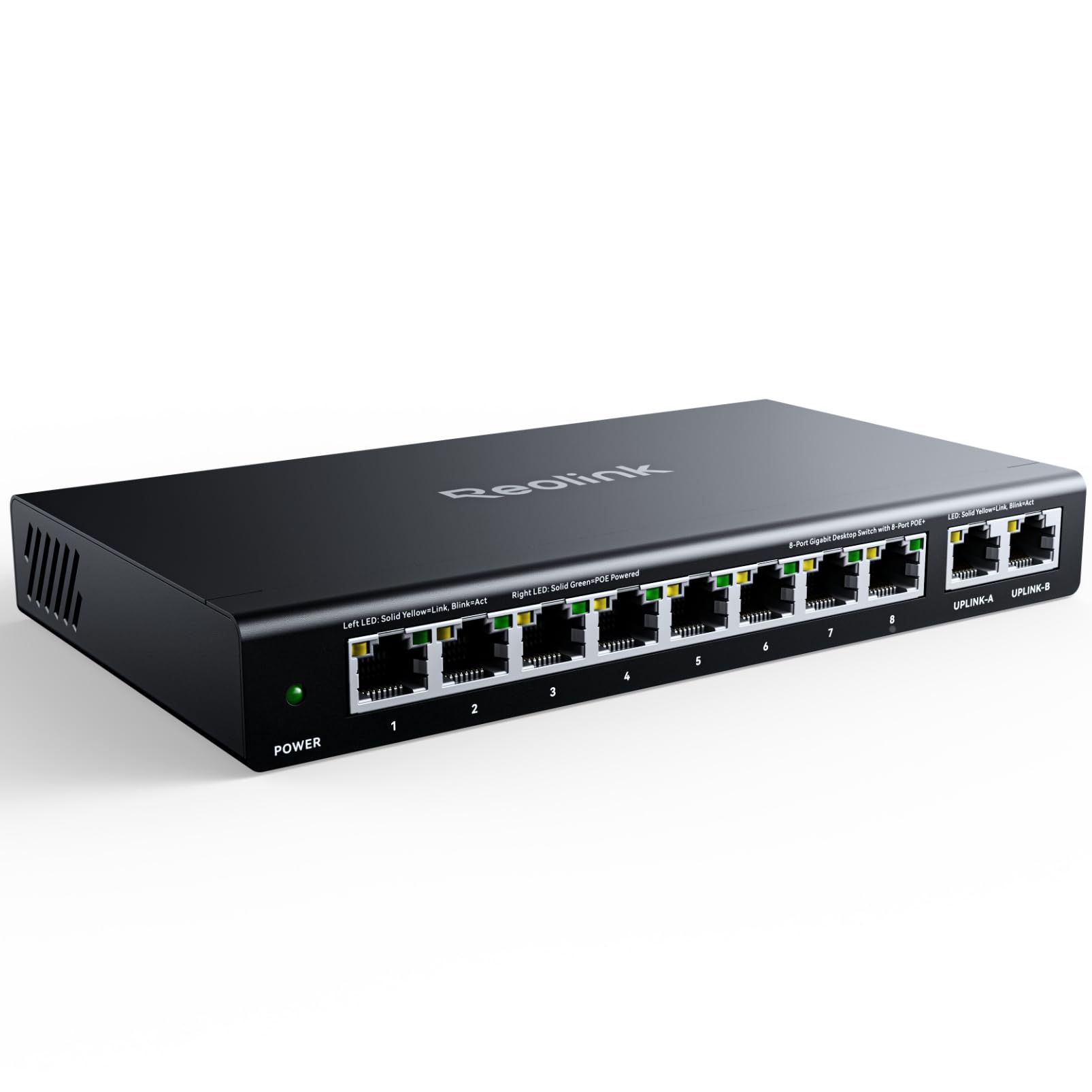
The REOLINK RLA-PS1 PoE switch serves a specific but critical role: powering and networking IP cameras and NVRs over a single Ethernet cable. Its eight PoE ports (10/100Mbps) deliver up to 30W per port with a total 120W budget, which is enough to run multiple pan-tilt-zoom cameras or high-power IR floodlight units simultaneously. The two dedicated Gigabit uplink ports (10/100/1000Mbps) ensure the camera traffic reaches your router or NVR without becoming a bottleneck, preserving the full Gigabit throughput for your wired network.
The metal casing provides better heat dissipation than plastic switches, and the intelligent power management feature protects against overload by powering off lower-priority ports when the total allocation exceeds 120W. Installation is genuinely plug-and-play with REOLINK cameras — the switch auto-detects PoE devices and supplies power only where needed, so non-PoE hardware connected to the same switch is not damaged.
Reviewers note that the power brick has a long cable for flexible placement, and the port layout (rear power, front ports and indicators) fits neatly into a 10-inch network cabinet. The only limitation is that the PoE ports top out at 100 Mbps, which is standard for security cameras but means this switch should not serve as your primary network backbone for high-speed data. For a security-focused Gigabit deployment, the RLA-PS1 is rock-solid.
Why it’s great
- Two Gigabit uplink ports prevent NVR/camera traffic bottlenecks
- Intelligent power management prioritizes critical camera ports
- Metal casing with front port layout fits standard network cabinets
Good to know
- PoE ports are 10/100Mbps, not Gigabit — not a backbone switch
- Power brick is not mountable alongside the switch
7. GL.iNet GL-X3000 (Spitz AX)

The GL.iNet GL-X3000 Spitz AX is a specialized 5G cellular gateway that replaces a traditional modem-router combo when wired broadband is unavailable or unreliable. It supports dual-SIM with single standby, allowing automatic failover between carriers such as T-Mobile and AT&T, which is critical for RV users, rural homeowners, or remote workers who need connectivity redundancy. The integrated Wi-Fi 6 radio delivers up to 574 Mbps on 2.4 GHz and 2402 Mbps on 5 GHz, providing a full Gigabit-class wireless network entirely over cellular backhaul.
OpenWrt-based firmware gives advanced users granular control over VPN tunneling (OpenVPN up to 150 Mbps, WireGuard up to 300 Mbps), DNS-over-TLS, and multi-WAN load balancing across Ethernet, repeater, cellular, and tethering connections. Reviewers praise the web dashboard for its depth of configuration options, and the detachable antenna support allows connection to external dome antennas for marginal signal areas. The unit also supports GL.iNet’s physical eSIM card for international travel profile management.
The drawback is that the GL-X3000 is expensive relative to standard Gigabit routers because the 5G modem hardware carries a significant premium. Several users also report that carrier deprioritization and limited 2-band carrier aggregation can throttle speeds during peak hours, and the router mode is less stable for smart home device connectivity than dedicated Wi-Fi routers. This is a purpose-built tool for cellular-first networking, not a general-purpose home router.
Why it’s great
- 5G cellular backhaul with dual-SIM failover for reliable remote connectivity
- OpenWrt firmware with VPN, DNS encryption, and multi-WAN load balancing
- Detachable antennas support external dome antennas for weak signal areas
Good to know
- Significantly more expensive than standard Gigabit routers
- Carrier deprioritization can throttle speeds during peak usage hours
FAQ
Do all Gigabit routers work with any ISP?
What is the difference between a Gigabit router and a Wi-Fi 6 router?
Can a Gigabit router improve my internet speed?
Do I need a 2.5 Gbps port on my router?
Final Thoughts: The Verdict
For most users, the gigabit router winner is the TP-Link Archer AX80 because it combines a future-proof 2.5 Gbps port, eight-antenna coverage that eliminates dead zones in large homes, and OneMesh expandability at a price that undercuts the competition with multi-gig ports. If you want the cleanest low-latency connection for competitive gaming, grab the MSI Radix AXE6600 for its dedicated 6 GHz Wi-Fi 6E channel and AI QoS. And for rural or RV users who need cellular-first connectivity, nothing beats the GL.iNet GL-X3000 with dual-SIM failover and OpenWrt customization.