
The loud crack of a driver echoing off your garage walls is more than just noise—it’s a sign of energy lost to your screen rather than transferred into your swing analysis. If the fabric puckers, the image distorts, or the grommets start pulling through after a few hundred strikes, the problem isn’t your form—it’s the material you’re hitting into. A golf impact screen must absorb high-speed impact, deliver a crisp projector image, and hold its shape through thousands of shots, all while keeping the noise down to a level your neighbors can tolerate.
I’m Mohammad Maruf — the founder and writer behind Drink4Good. I’ve spent dozens of hours analyzing weave density, layer construction, grommet placement, and real-world durability reports across the most popular golf impact screens on the market to separate the ones that survive a full season from those that fray at the edges.
Whether you’re building a budget garage setup or a dedicated indoor studio, finding the right golf impact screen means balancing weave tightness against noise dampening, and layer count against projection clarity—so you can focus on lowering your handicap instead of patching holes.
How To Choose The Best Golf Impact Screen
Choosing a golf impact screen involves more than picking the biggest size for the lowest price. The material construction, grommet quality, and weave density directly affect how long the screen lasts, how quiet the room stays, and how clear your projected course looks. Here are the three factors that separate a smart buy from a regret.
Layer Construction and Material Density
Single-layer polyester screens are lightweight and affordable, but they transmit more sound and show wear faster around the impact zone. Dual-layer designs add a middle damping layer that reduces noise and spreads the force of each strike. Triple-layer screens—like the poly spacer material used by premium brands—combine an HD outer face, a sound-absorbing core, and a rear impact layer that prevents blow-through even at swing speeds over 170 mph. If you plan to hit driver often, skip single-layer and look for at least a double-layer with a thick (4mm+) total thickness.
Grommet Spacing and Edge Reinforcement
Grommets are the most common failure point on budget screens. Screens with fewer than 20 grommets concentrate tension at each mounting point, causing the fabric to tear around the metal ring after 1,000–2,000 shots. Look for screens with machine-installed grommets every 10–12 inches and reinforced edge stitching. Polyester straps along the perimeter also help distribute tension and prevent the screen from sagging over time. For larger setups (9×7 ft or bigger), screens with corner grommet clusters provide extra stability and reduce the trampoline effect that causes ball bounce-back.
Projection Clarity and Noise Dampening
A screen that stops golf balls but turns your projector image into a blurry mess defeats the purpose of a simulator. Tightly woven polyester (around 300–600 denier) provides the best balance between impact resistance and image sharpness. Avoid screens with a glossy finish, as they create hot spots and glare. For noise, look for manufacturers that specifically claim an internal damping layer—these screens cut impact sound by roughly 50% compared to single-layer equivalents. Read customer reviews about real-world noise levels, especially if your simulator is in a shared wall space or a basement near living areas.
Quick Comparison
On smaller screens, swipe sideways to see the full table.
| Model | Category | Best For | Key Spec | Amazon |
|---|---|---|---|---|
| Diandian Enclosure Kit 10×8 ft | Premium Enclosure | All-in-one studio setup | 75 lbs frame weight | Amazon |
| Anything Sports Enclosure | Complete Kit | Turnkey simulator build | 12-month warranty | Amazon |
| Spectrum Golf Poly Spacer | Premium Material | High-speed durability | Triple-layer poly spacer | Amazon |
| Durbles Triple Layer | Mid-Range | Quiet home practice | Triple-layer damping | Amazon |
| GoSports Elite Screen | Mid-Range | Direct net integration | 108×82.5 inch size | Amazon |
| COALA HOLA 3D Air Mesh | Value | Durable daily training | 4mm three-layer polyester | Amazon |
| ZEALFEEL 9×7 ft | Value | Multi-purpose use | Double-layer 0.6mm | Amazon |
| aikeec Thickened Screen | Budget | Entry-level simulator | 7mm reinforced edges | Amazon |
| aikeec Basic Screen | Budget | Low-cost starter setup | 14 grommet holes | Amazon |
In‑Depth Reviews
1. Diandian Golf Simulator Enclosure Kit 10 x 8 ft
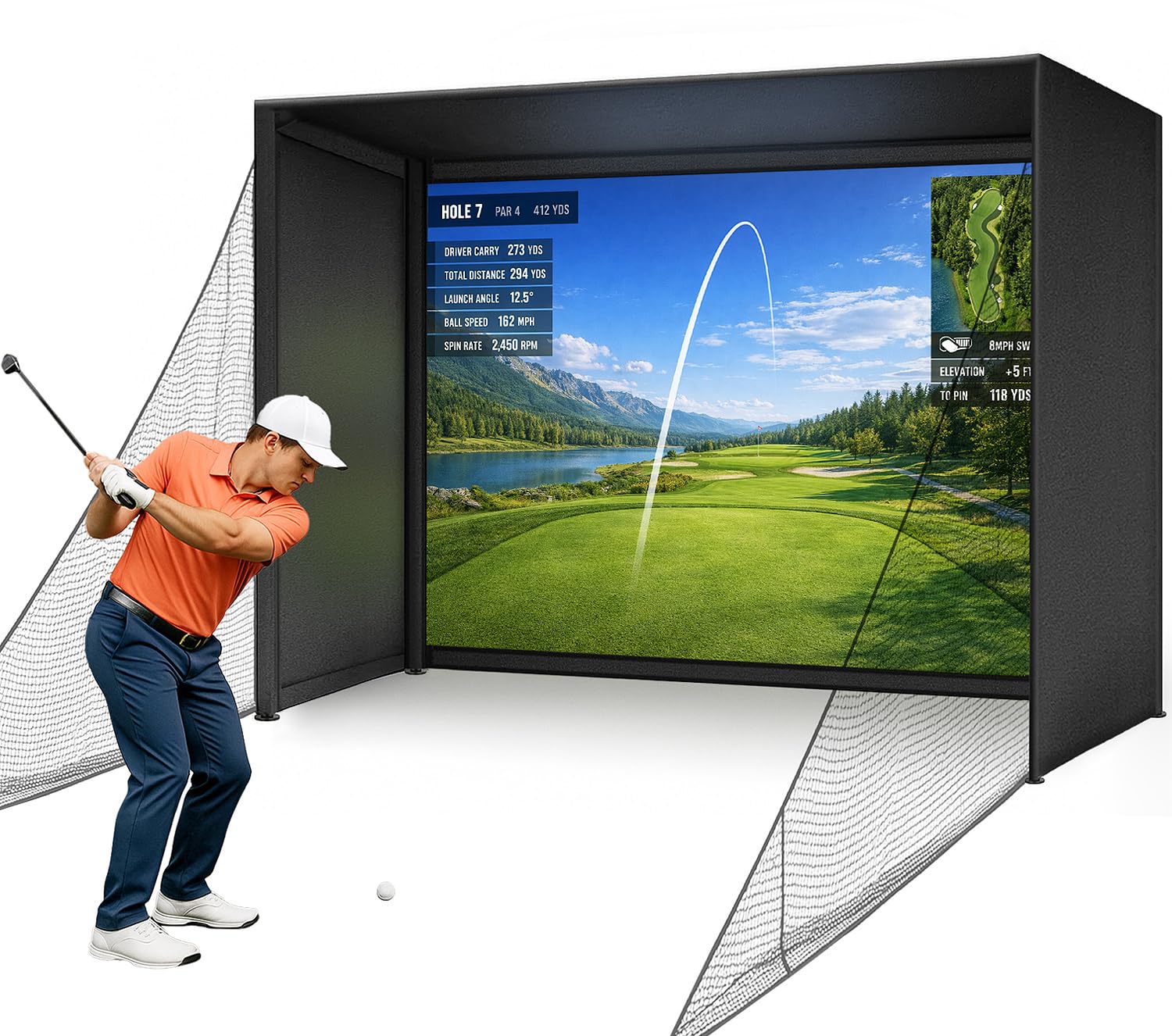
The Diandian enclosure kit is the closest you can get to a turnkey simulator without custom carpentry. Its 75-pound carbon steel frame click-locks together in roughly 30 minutes with no tools, and the 600D Oxford blackout cover wraps the entire top, sides, and back to eliminate ambient light bleed—critical for daytime projection contrast. The dual-layer impact screen combines a smooth 4K-ready front face with a rear absorbing layer that handles real golf ball strikes without tearing.
Owners report that the screen sits quieter than the GoSports Elite, and the included foam edge padding absorbs ricochets from off-center hits. The enclosure requires a minimum 9-foot ceiling height, which is realistic for any full-swing driver practice. Side shank nets extend the catching area beyond the screen’s borders, making this a safer setup for garages where errant shots could damage drywall or tools.
Some users have noted that the screen’s bottom stitching can fray if the tension is set too tight, but this is manageable with moderate bungee tension. The package does not include a projector, launch monitor, or hitting mat, so factor those into your total budget. For anyone building a dedicated indoor bay, this kit delivers professional-grade containment and image quality at roughly half the cost of comparable branded enclosures.
Why it’s great
- Complete all-in-one enclosure with blackout cover
- Tool-free assembly in under 30 minutes
- Foam edge padding and side nets for safety
Good to know
- Requires 9 ft minimum ceiling height
- Bottom stitching may fray if overtightened
2. Anything Sports Complete Golf Simulator Enclosure
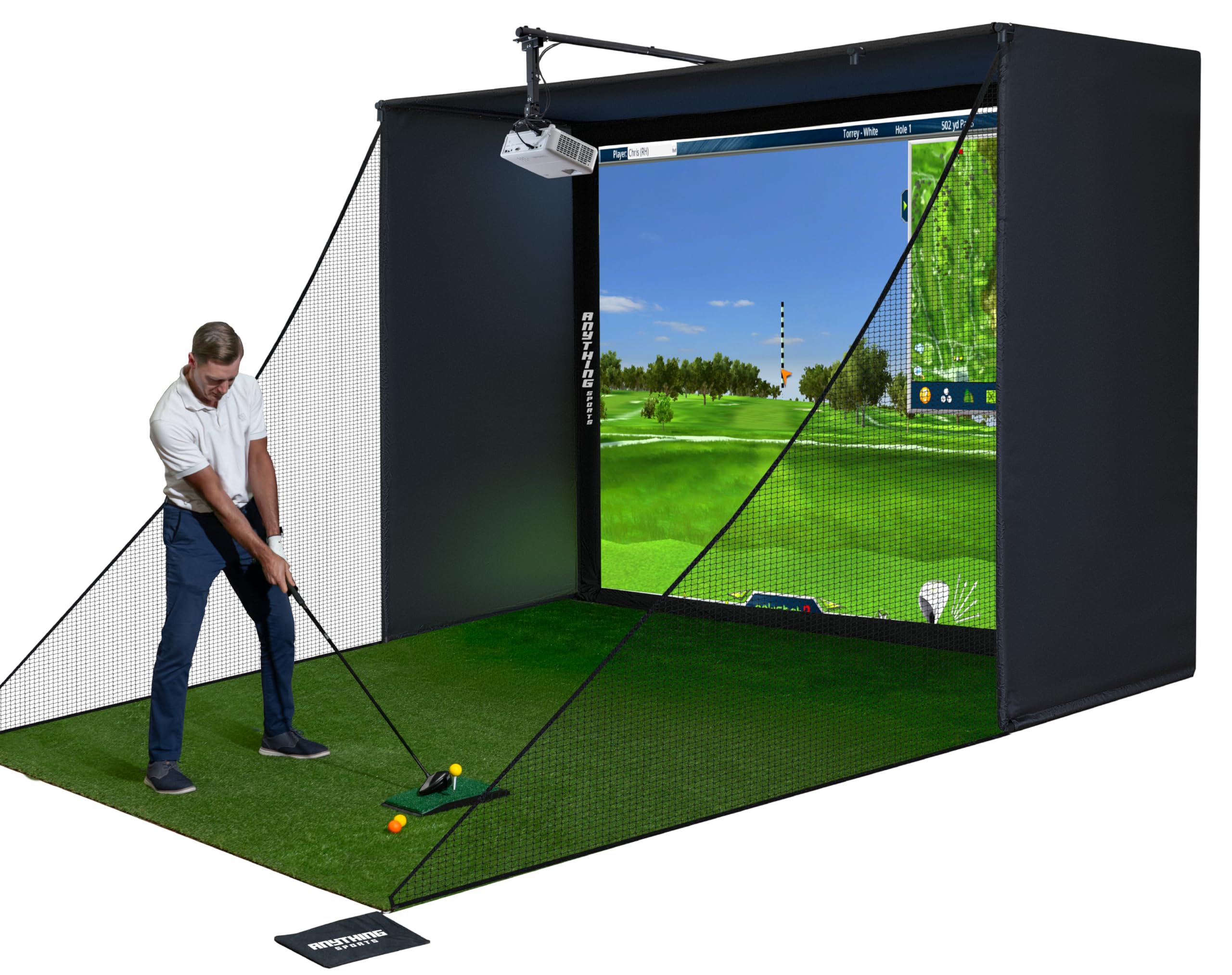
The Anything Sports enclosure is engineered for the golfer who wants all the components in one box—impact screen, metal frame poles, blackout cage, and a projector mount included. The 4K-ready impact screen is cut just 1 inch smaller than the frame, minimizing light bleed around the edges so the projected image stays sharp without adjusting for dark corners. The metal frame uses push-together joints that assemble in under an hour with no special tools or drilling required.
Users report that the screen material feels thick and rubbery rather than thin woven polyester, which helps absorb ball speed without the trampoline bounce-back common on lighter screens. The 12-month no-questions-asked warranty is a strong vote of confidence for a product in this price tier. The kit is available in multiple sizes (11×8 ft and 12×9 ft among them), so you can match it to your garage or basement dimensions.
The included projector mount saves about –80 over buying one separately, but the assembly instructions are sparse—several owners mention relying on the product photos to figure out pole and panel placement. The black tarp back panel is thinner than the screen itself, so if you want total light block, budget for an extra layer behind the cage. For a first-time simulator builder, this kit removes the guesswork and delivers a clean, functional hitting bay.
Why it’s great
- Includes projector mount, saving separate purchase
- 12-month no-questions-asked warranty
- Multiple size options for different room dimensions
Good to know
- Assembly instructions are minimal
- Back tarp is thinner than the impact screen
3. Spectrum Golf Poly Spacer Impact Screen

Spectrum Golf’s Poly Spacer screen is the material choice for builders who want to source the screen separately from the frame and netting. The triple-layer poly spacer construction is visibly thicker than standard woven polyester—it has a padded, almost quilted feel that deadens sound on contact and prevents the ball from pushing through even at 170 mph swing speeds. Machine-installed grommets are spaced every 12 inches around a 3-inch black border, which distributes tension evenly and eliminates the single-point tearing that plagues screens with fewer mounting holes.
One owner reported over 40,000 shots with no degradation to the image area or grommet pullout, which is an exceptional longevity figure for any screen under . The black border helps frame the projected image and reduces light bleed at the edges, making it a strong choice for projector setups with slightly imperfect alignment. The material is heavy (about 60 pounds for a 10×10 ft panel), so plan for a sturdy frame that can support the weight without sagging.
The biggest caveat: Spectrum does not offer a warranty on grommets, so if one does fail after heavy use, replacement is on you. Also, the screen ships without a sleeve option on all sides—some users expected a tube pocket for a bottom bar, and had to rig their own solution. If you want a DIY screen that genuinely feels like commercial-grade material, this is the one to build around.
Why it’s great
- Exceptional 40,000+ shot durability reported
- Triple-layer poly spacer for maximum noise reduction
- Grommets every 12 inches for even tension
Good to know
- No warranty on grommets
- Very heavy—needs a robust frame
4. Durbles Triple Layer Golf Impact Screen
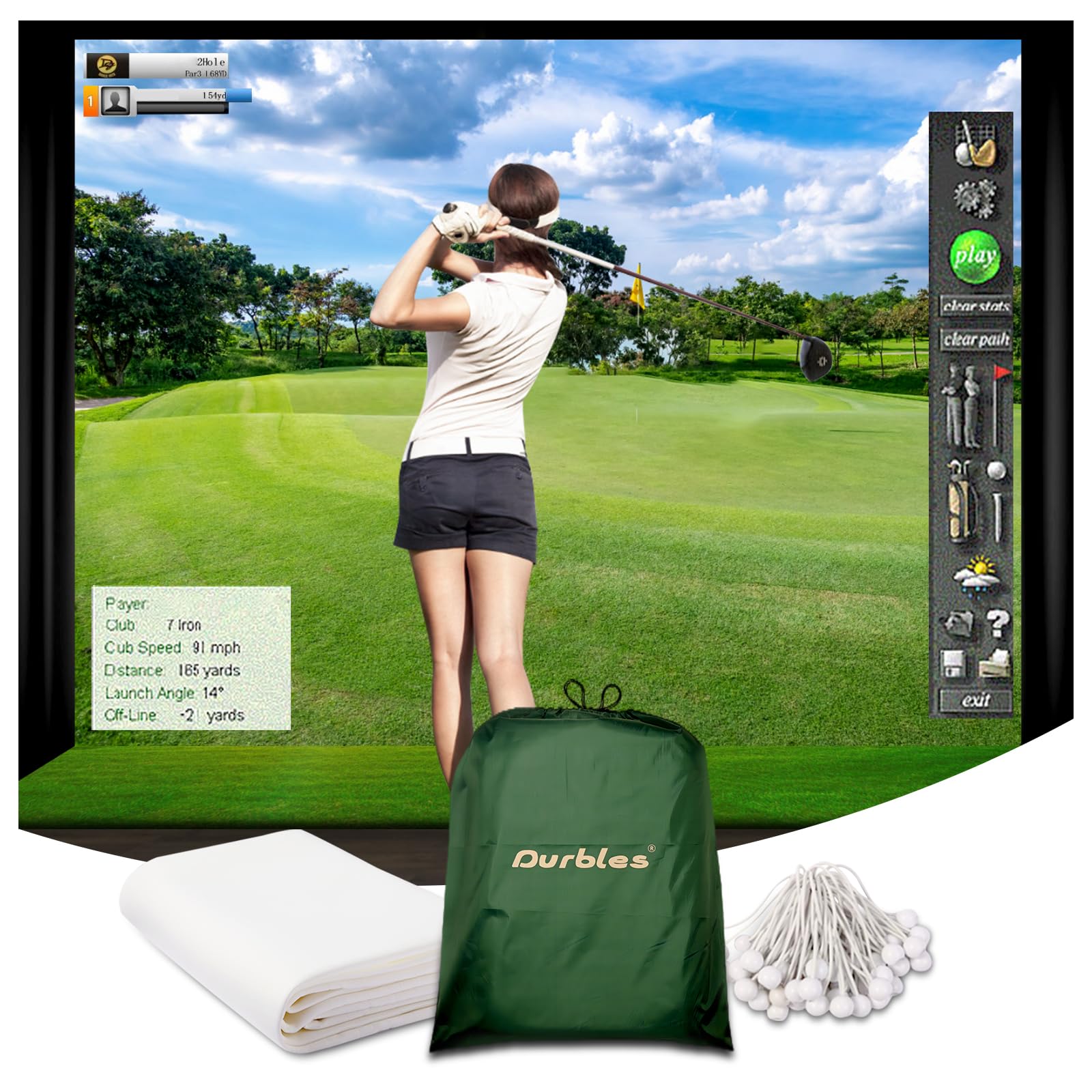
The Durbles screen uses a three-ply sandwich: an HD outer face for projection clarity, a sound-damping middle layer, and an impact-resistant inner layer. The result is a screen that measures noticeably quieter than most single- or dual-layer competitors—owners consistently describe the impact noise as a dull thud rather than a sharp crack. The 8.2 x 8.2 ft size fits standard garage bays well, and the included bungee cords and grommets allow a straightforward DIY frame installation.
After about 10,000 shots, one user reported that the screen showed wear similar to a previously owned premium screen, which puts Durbles’ value proposition into perspective. The fabric is thick enough that creases from shipping require a steamer to fully remove, but the surface becomes smooth and projection-ready once the tension settles. The marking resistance is decent—dirt from balls does show, but it wipes off more easily than some other woven polyester screens.
The 3.72 kg weight is manageable for a single person to hang, and the screen comes folded rather than rolled, so expect fold lines that loosen with use. The triple-layer design slightly reduces the perceived brightness of the projected image compared to a single-layer screen, but the trade-off in noise reduction is worth it for anyone practicing in a shared home environment.
Why it’s great
- Exceptional sound dampening with triple-layer build
- Matches durability of premium screens at lower cost
- Includes bungee cords and reinforced grommets
Good to know
- Creases from folding require steaming to remove
- Slightly dims projected image vs. single-layer screens
5. GoSports Golf Simulator Impact Screen

The GoSports Elite screen is the drop-in partner for the GoSports Elite hitting net, which already has a strong following among home simulator builders. The screen measures 108 x 82.5 inches and attaches to the net via hook-and-loop strips at the top and bungee cords at the bottom, creating a secure mount that eliminates the trampoline effect—the ball drops straight down after impact rather than bouncing back toward you. The high-density woven polyester provides a crisp projection surface that works well with 1080p and 4K projectors even in moderately lit rooms.
Owners who have logged thousands of strikes report that the screen holds up without tearing, though the black border stitching may begin to fray after extended use. The 9.9-pound weight makes it light enough to handle alone, and the included shock cords make installation a 10-minute job. Because the screen integrates directly with the net, you don’t need a separate impact net behind it unless you’re hitting balls at extreme launch angles.
The downsides are that the screen is designed primarily for the GoSports net ecosystem—adapting it to a custom frame requires additional hardware, since the velcro attachment is tailored to that specific net. Also, the screen ships folded, so creases appear until you hit a few hundred balls or apply a gentle steam. For someone who wants a validated, plug-and-play simulator screen that just works, the GoSports is the easiest path.
Why it’s great
- Designed to pair perfectly with GoSports Elite net
- No trampoline effect—ball drops straight down
- Lightweight and quick to install
Good to know
- Best performance with GoSports net ecosystem
- Border stitching may fray with heavy use
6. COALA HOLA 3D Air Mesh Golf Impact Screen

The COALA HOLA screen uses a 4mm three-layer polyester structure that feels substantial without being overly heavy. The 3D air mesh weave is designed to avoid stretching over time, and the double grommets at each mounting point reduce the likelihood of tear-out—a common failure mode on screens with single grommets. With 28 grommet holes on the standard size, tension distributes evenly across the frame, and the white border creates a clean projection frame.
After 5,000 shots over nine months, one owner reported no tearing or visible wear, and the border sewing remained intact. The noise level is noticeably lower than single-layer polyester screens, though not as quiet as the Durbles or Spectrum poly spacer models. The screen also works as a home theater screen for movie nights when you’re not practicing—the tight weave produces a clear image with no visible light leakage.
The main compromise is that the 4mm thickness makes the fabric stiffer, which means shipping creases take longer to settle. Some users recommend hitting 200–300 balls before expecting a perfectly flat surface. The 6-month warranty is shorter than average, so inspect the grommets and stitching immediately upon arrival. For a mid-range screen that splits the difference between budget and premium, the COALA HOLA delivers reliable daily training performance.
Why it’s great
- Thick 4mm three-layer construction resists stretching
- Double grommets reduce tear-out risk
- Clear projection suitable for home theater use
Good to know
- Shipping creases require use to flatten
- Only 6-month warranty period
7. ZEALFEEL 9×7 ft Golf Simulator Impact Screen

The ZEALFEEL screen is a dual-layer polyester panel measuring 112 x 94 inches, designed to withstand ball speeds over 120 mph with a tested lifespan of approximately 10,000 strikes. Each corner includes three extra grommets beyond the 14 standard perimeter holes, reinforcing the highest-stress mounting points and preventing the common failure of fabric tearing away from the frame at the edges. The dual-layer construction is 0.6mm thick and provides enough impact absorption to keep bounce-back to a minimum.
Several owners have used this screen both for golf practice and outdoor movie projection, praising the wrinkle-resistant fabric and clear image even in low-light conditions. The package includes 10 bungee cords, which is generous for a screen in this price tier. The 1-year manufacturer warranty adds peace of mind that shorter-budget options lack.
The fabric surface is susceptible to dirt transfer from marked balls—Sharpie or ball stamp ink can leave visible marks that are difficult to remove completely. The screen also should not be machine washed or soaked, so spot cleaning is the only option for maintenance. For a 9×7 ft hitting area at a budget-friendly price point, the ZEALFEEL offers strong baseline durability and versatile multi-room use.
Why it’s great
- Corner grommet clusters prevent edge tearing
- Works as both golf screen and movie projector screen
- Includes 10 bungee cords for quick setup
Good to know
- Ink from marked balls can stain the fabric
- Spot clean only—no machine washing
8. aikeec Thickened Golf Impact Screen (7mm Edges)

aikeec’s thickened impact screen features 7mm reinforced edges and 40–54 perimeter grommets (depending on size), which is an unusually high grommet count for a screen in the entry-level tier. The polyester body is tested to withstand ball speeds up to 200 mph and over 100,000 strikes—figures that, if accurate, put it on par with screens costing three times as much. The reinforced edges are designed to prevent the sagging and fraying that typically appear after months of use.
Owner reviews highlight the screen lasting 2–3 years with no major failures, even when used with driver swings at 140 mph. The projection clarity is described as solid for the price, with minimal light leakage or pixel blurring. Some users added their own rivets for extra security, and the fabric’s slight stretchiness actually helps reduce bounce-back when tension is set with moderate slack.
While the grommet count is high, some grommets have been reported to wear out over time, particularly if the screen is tensioned too aggressively. The 2 kg weight makes it one of the lightest options, which is convenient for temporary setups but also means the fabric lacks the heft of premium screens. For someone building their first simulator on a strict budget, this screen offers disproportionate durability for the investment.
Why it’s great
- Excellent grommet count (40-54) for tension distribution
- 7mm reinforced edges resist sagging
- Lightweight and easy to install or reposition
Good to know
- Some grommets may wear out over extended use
- Lighter fabric lacks premium feel
9. aikeec Basic Golf Simulator Impact Screen

This basic aikeec screen is the simplest entry point into simulator ownership, featuring 14 grommet holes and a single-layer woven polyester construction. It comes with 16 ball bungee cords, so you have everything needed to mount it to a frame right out of the box. The fabric is soft and wrinkle-resistant, and it takes real golf ball impact well for a single-layer screen. It also doubles as a movie projection screen, making it a versatile addition to a multi-use room.
For the price, the screen offers passable projection quality—tight enough to show clear images in a 4:3 projector setup, though not as sharp as dual-layer or premium screens. Several owners have used it for months with hundreds of strikes before noticing any degradation. The 1-year warranty against human damage is a rarity at this price point and shows the manufacturer’s confidence in basic durability.
The grommets are the weak point: multiple owners report that the fabric tears at the seam next to the grommet after as few as 15 hits, though customer service has replaced units in some cases. The small number of grommets concentrates force at each point, so the screen works best with moderate tension and a backing net to absorb the hardest shots. For someone who is not ready to commit + to a simulator screen, this is a functional starting point.
Why it’s great
- Lowest-cost entry into golf simulator ownership
- Includes 16 bungee cords for immediate setup
- 1-year warranty covers human damage
Good to know
- Grommets may tear from fabric under heavy use
- Single-layer weave transmits more impact noise
FAQ
Can I use a golf impact screen as a regular projector screen?
Why do grommets fail on some golf impact screens?
How much bounce-back is normal from a golf impact screen?
Final Thoughts: The Verdict
For most users, the golf impact screen winner is the Diandian Enclosure Kit 10×8 ft because it combines a dual-layer 4K-ready screen with a full blackout enclosure and tool-free assembly, delivering a professional-grade practice bay without requiring custom carpentry or separate component sourcing. If you want the quietest possible impact noise, grab the Durbles Triple Layer Screen — its sound-damping middle layer turns driver cracks into dull thuds. And for a multi-purpose DIY build that can handle over 40,000 strikes, nothing beats the Spectrum Golf Poly Spacer.