
The line between a weekend range session and a dedicated home golf lab has never been thinner. With a launch monitor that reads spin axis and a hitting surface that rewards a true down-and-through strike, you can build a setup that delivers meaningful feedback without requiring a custom build-out or a second mortgage. The key is knowing which components to prioritize when your spending is capped.
I’m Mohammad Maruf — the founder and writer behind Drink4Good. For this guide, I’ve spent over forty hours cross-referencing launch monitor photometric data, mat fiber density specs, net frame gauge, and impact screen layer construction to isolate the best builds for the budget.
Whether you want a mat that won’t wreck your elbows or a launch monitor that integrates with simulation software, the golf simulator under 1000 market now offers options that genuinely improve your game rather than just collecting dust in the garage.
How To Choose The Best Golf Simulator Under 1000
Building a simulator on a strict cap means every dollar must target a specific piece of the puzzle. The biggest mistake buyers make is blowing half their budget on a flashy enclosure and ignoring the launch monitor, or spending everything on a launch monitor and hitting into a flimsy net that doesn’t catch a shank. The right approach is to silently rank what you actually need for improvement: a reliable launch monitor, a dense mat that protects your joints, and a net or enclosure that can handle real ball speeds without developing holes.
Mat Density vs. Mat Size
A 3×3 mat might fit in a corner, but if its foam compresses completely under foot, you’ll feel every fat shot in your wrists and elbows within fifty swings. Look for a mat with at least 110 ounces of nylon fiber content and a 5/8-inch closed-cell foam layer. The thicker the pile, the more it simulates a real fairway and the less shock transfers to your body. A 4×5 mat gives you enough room to stand comfortably and shift your stance for different lies.
Launch Monitor Technology: Camera vs. Radar
Indoor simulators heavily favor photometric (camera-based) launch monitors because they don’t need the spin-inducing ball flight that radar units rely on. Camera-based units capture the ball at impact and calculate spin from markings on the ball’s surface. Radar units work fine when you have 8-10 feet of ball flight, but they struggle in tight spaces. If your hitting zone is under 10 feet, prioritize a photometric unit. If you have the space, a radar monitor is simpler and doesn’t require special balls.
Net Frame Gauge and Screen Layers
A hitting net needs to survive 240+ MPH ball speeds without collapsing. Look for frames built with powder-coated steel tubing — aircraft-grade aluminum is lighter but pricier. The netting should be a tight weave of thick cord, not the thin nylon that develops holes after a week. For simulator enclosures, a dual-layer impact screen with an offset mounting system reduces bounce-back and prolongs screen life. Single-layer screens tear faster, especially on wedge shots with higher spin.
Software and Subscription Costs
The hardware is only half the equation. Many launch monitors require an annual subscription to unlock course play, target modes, or advanced data sets. Before you buy, factor in that to per year. Some units include a free trial membership that gives you 30 to 45 days of premium features. If your budget is tight, a unit with no annual fee or a free driving range mode can save you hundreds over two years.
Quick Comparison
On smaller screens, swipe sideways to see the full table.
| Model | Category | Best For | Key Spec | Amazon |
|---|---|---|---|---|
| Country Club Elite 4×5 Mat | Hitting Mat | Joint-friendly indoor practice | 110 oz nylon / 5/8″ foam | Amazon |
| Voice Caddie SC4 PRO | Launch Monitor | Portable indoor/outdoor data | Prometrics engine, free 3D range | Amazon |
| YUNIC Golf Driving Cage | Driving Cage | All-in-one backyard practice | 8x8x5 ft steel frame | Amazon |
| Net Return Home/Pro Series | Hitting Net | Durable indoor net with auto return | 240 MPH / 250k shots guarantee | Amazon |
| SkyTrak Launch Monitor | Launch Monitor | Photometric accuracy for small spaces | Camera-based spin axis | Amazon |
| Rapsodo MLM2PRO | Launch Monitor | Indoor/range hybrid data | Dual camera + doppler radar | Amazon |
| GoSports Range Cage Elite | Sim Enclosure | Permanent garage simulator build | Powder-coated steel, 8×8 ft screen | Amazon |
| SkyTrak + Metal Case | Launch Monitor | Protective indoor setup | Camera-based, metal case | Amazon |
| ZEALFEEL 11×8 Enclosure | Sim Enclosure | Full-coverage garage setup | Dual-layer screen, side barriers | Amazon |
| ANYTHING SPORTS Enclosure | Sim Enclosure | All-in-one kit with projector mount | 4K-ready screen, 12-mo warranty | Amazon |
| GoSports Sim Enclosure 10×8 | Sim Enclosure | Commercial-grade heavy use | Blackout panels, HD impact screen | Amazon |
In‑Depth Reviews
1. SkyTrak Launch Monitor

The SkyTrak remains the reference point for photometric launch monitors in this tier. Its high-speed camera captures ball speed, launch angle, spin rates, and shot shape with enough fidelity that you can trust the numbers for club gapping and swing changes. The unit wirelessly connects to iOS, Android, or PC devices, and the built-in rechargeable battery delivers up to four hours of continuous use — plenty for a full practice session.
Out of the box, the SkyTrak gives you a virtual driving range with real-time 3D ball flight visualization. What pushes it ahead of cheaper radar alternatives is its ability to read spin indoors when ball flight is limited to 8-10 feet. It does require a level hitting surface and consistent ball placement about half an inch behind the laser dot, but once dialed in, the read rate is high. A 14-day trial of the game improvement software is included, and the full annual subscription unlocks simulated course play and advanced practice modes.
Some users report occasional misreads and a learning curve for alignment, but the feedback from the majority is that SkyTrak’s accuracy, when set up correctly, is the best value in the category. For golfers who want serious data without moving to four-figure monitors, the base unit is the clear starting point.
Why it’s great
- Accurate spin and launch data in tight indoor spaces
- Wireless with 4-hour battery life
- Large ecosystem of third-party sim software
Good to know
- Requires level setup and practice for consistent reads
- Annual software subscription needed for course play
- Occasional app crashes reported by some users
2. Country Club Elite 4×5 Mat

The Country Club Elite mat solves the single biggest problem with budget simulators: wrist and elbow pain from thin, hard mats. With 110 ounces of nylon fiber packed into a 5/8-inch closed-cell foam pad, this mat is twice as dense as standard practice mats. The fiber system accepts a real wooden tee, so you can practice driver and long iron shots without needing a separate tee holder.
The feedback from fat, thin, and pure shots is unmistakable — you feel the difference in your hands, not in your joints. The urethane backing keeps the mat stable on concrete or carpet, and the higher melting point nylon won’t leave residue on your clubfaces the way softer synthetic fibers do. At 4×5 feet, it offers enough space for a comfortable stance without overwhelming your hitting area.
Reviewers consistently note that this mat eliminates the pain that forced them to cut practice sessions short. It’s not the largest option and doesn’t fold up tiny, but for durability and joint protection, it is the mat to beat. If you pair this with a launch monitor, you get honest strike feedback plus accurate data — the ideal foundation.
Why it’s great
- Eliminates wrist and elbow pain from thin mats
- Accepts real tees for driver and wood practice
- No residue left on clubfaces
Good to know
- Heavy and not easily portable
- May take time to flatten after unboxing
- Premium price for a mat, but justified by durability
3. Voice Caddie SC4 PRO

The Voice Caddie SC4 PRO uses a doppler radar engine to track ball speed, club speed, carry distance, and launch angle. What makes it stand out in the sub-thousand bracket is the included access to a 3D driving range and E6 Connect simulator software — no annual subscription required to access the basic virtual courses and practice modes. The built-in screen shows your data right on the unit, so you don’t need a phone or tablet for every session.
Setup is straightforward: place the unit 6-8 feet behind the ball, pair it with the VOICECADDIE S app for advanced stats like swing speed radar and distance calibration, and start hitting. The SC4 PRO works with standard golf balls indoors or out, which removes the recurring cost of special marked balls. The short profile and lightweight build make it easy to move between garage and backyard.
User reports show that the SC4 PRO delivers reliable carry distance and ball speed numbers for most players. Some shots, especially with wedges or in suboptimal lighting, produce inconsistent direction readings. For the golfer who wants a portable data station without a recurring software fee, the SC4 PRO is a strong contender that stretches your dollar further than most.
Why it’s great
- Free 3D driving range and E6 Connect access included
- Works with standard balls indoors and outdoors
- Built-in screen reduces device dependency
Good to know
- Directional accuracy can be inconsistent in certain conditions
- Radar requires 8+ feet of ball flight for best results
- App connectivity can be finicky on shared Wi-Fi
4. Net Return Home/Pro Series
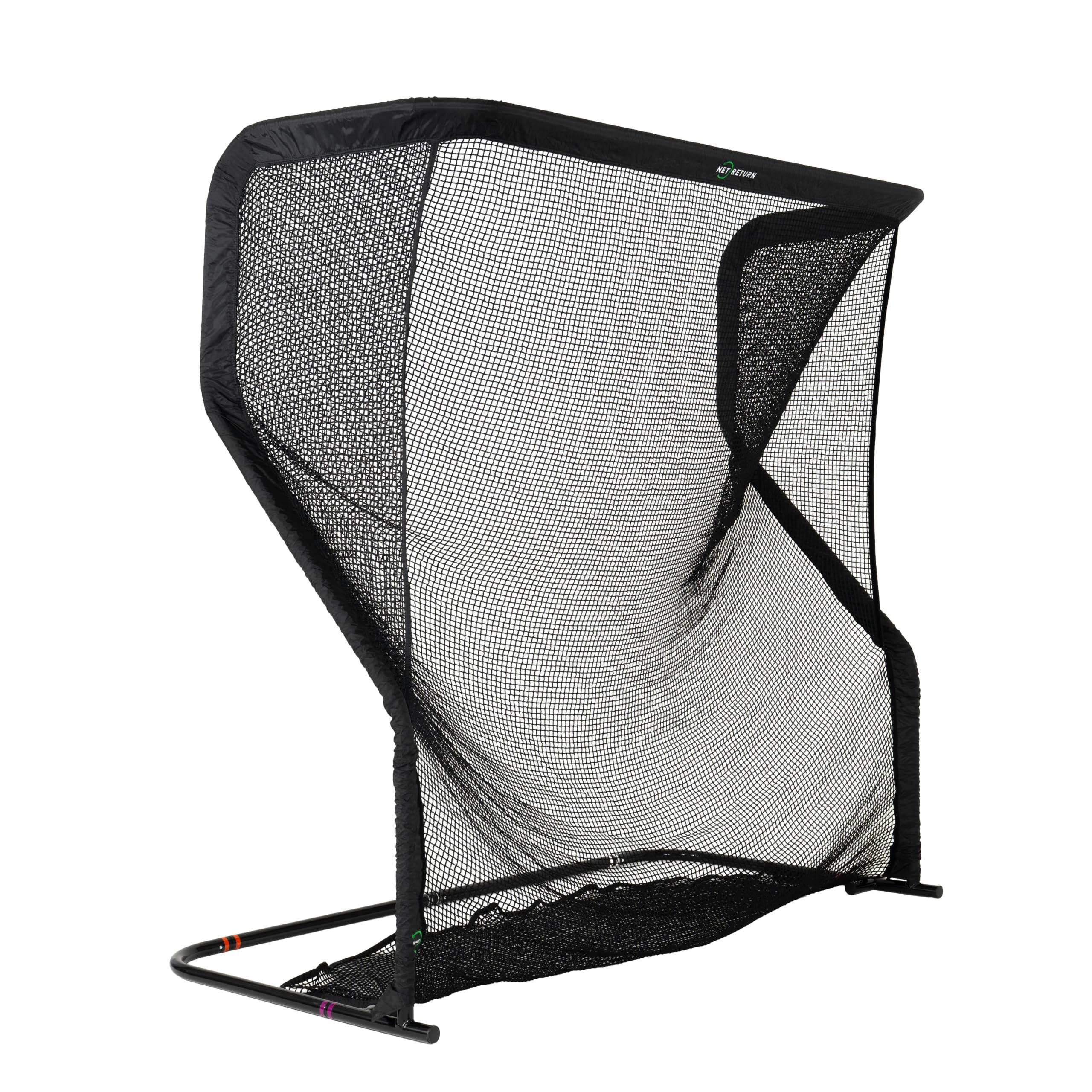
The Net Return Home/Pro Series is the hitting net that professionals trust. It safely handles ball speeds exceeding 240 MPH, which covers everyone from weekend warriors to long drive competitors. The patented S-Shape return system rolls the ball back to your feet on center strikes, reducing the need to chase balls after every shot. The frame is built from aircraft-grade aluminum with a gloss black finish that blends into a garage or home gym setting.
Assembly takes about five minutes using the Quick Color Connect push-button system — no tools. The net’s modular design means you can replace individual components if something wears out, and the 250,000-shot guarantee backs up the durability claim. At 7×7 feet for the Home version, it’s compact enough for a 9-foot ceiling space with only 8.5 feet of hitting distance required.
Reviewers consistently highlight the build quality and the fact that the net doesn’t develop holes even after thousands of strikes. The netting weave is tighter and thicker than budget alternatives, which is critical for indoor use where a tear could send a ball through a drywall. The Net Return is an investment in safety and longevity, and it pairs effortlessly with any launch monitor for a complete simulation setup.
Why it’s great
- 250,000-shot guarantee with replaceable components
- Auto ball return saves time during practice
- 5-minute tool-free assembly
Good to know
- Premium price justified by durability but limits budget for other components
- Off-center shots may not return directly
- No impact screen included — requires separate purchase for projection
5. Rapsodo MLM2PRO

The Rapsodo MLM2PRO combines doppler radar with a dual-camera setup to capture 15 key metrics including spin rate, spin axis, club path, and club speed. This hybrid approach gives it an edge over pure radar units when space is limited, because the cameras can verify impact data that radar alone might miss. The unit comes with three Callaway RPT Chrome Soft X golf balls that provide the marked surface for the camera to read spin.
A 45-day premium trial is included, which unlocks simulated course play, target range modes, and impact vision. After the trial, an annual subscription (roughly ) is required to keep access to the full library of over 30,000 courses. The MLM2PRO works both at the driving range and against a net, making it one of the few units that transitions seamlessly between environments without recalibration.
User feedback is polarized: those who get the setup right report accuracy within 2-3% of a Trackman, while connectivity and server issues frustrate others. The requirement for RPT balls adds a recurring cost, and the unit struggles with short chips under 8 feet. For the golfer who wants a hybrid tool for range and net, the MLM2PRO offers depth of data that justifies its position.
Why it’s great
- Dual-camera and radar for reliable indoor spin data
- Over 30,000 simulated courses with premium subscription
- Portable and works both on range and against net
Good to know
- Requires annual subscription for full functionality
- RPT balls wear quickly and must be replaced
- Struggles with short chip shots under 8 feet
6. GoSports Range Cage Elite
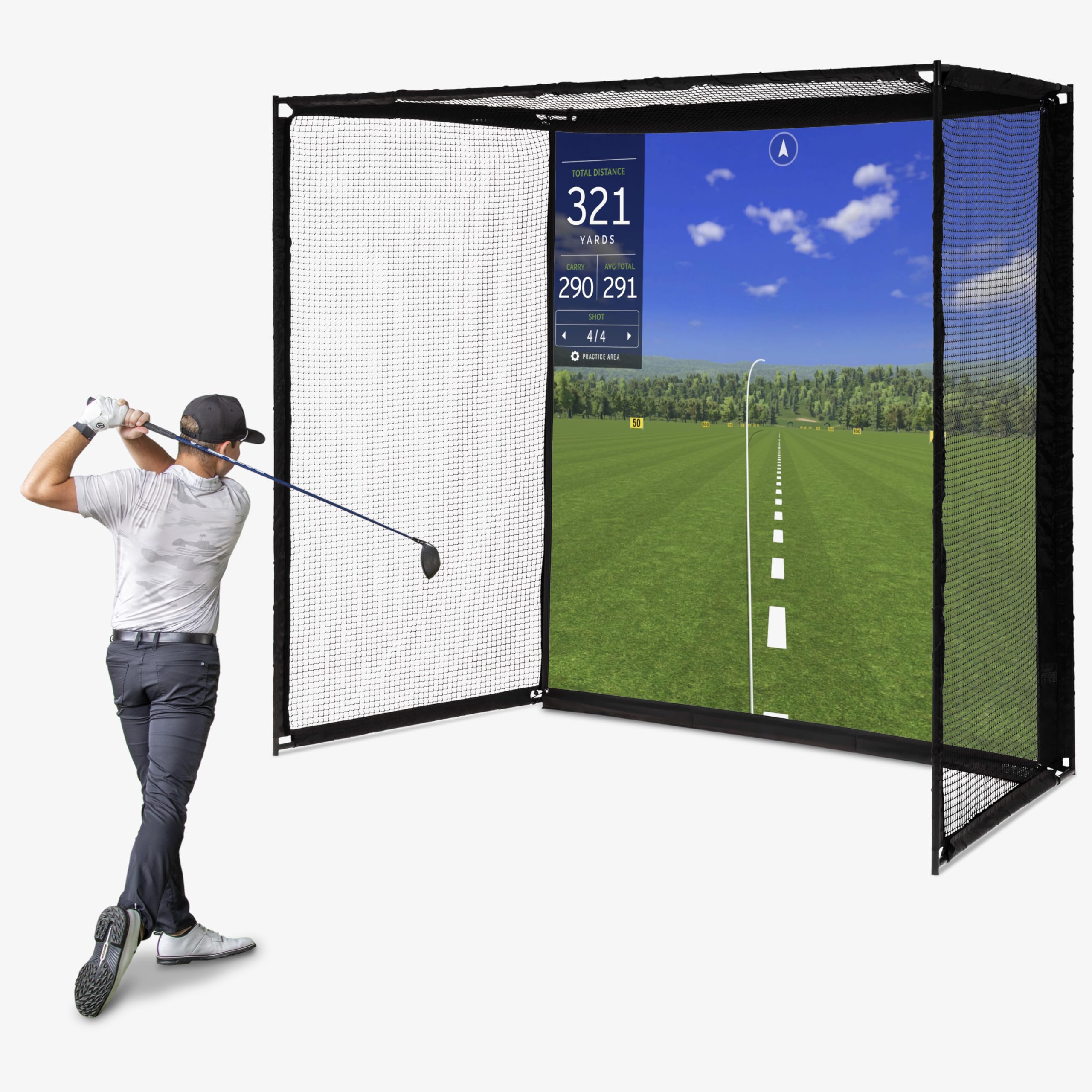
The GoSports Range Cage Elite is a fixed cage-style enclosure designed for permanent placement in a garage or basement. The powder-coated steel frame measures 10 feet long by 8.5 feet high by 5 feet deep, providing a stable structure that doesn’t sag or wobble during high-speed strikes. The key innovation here is the offset impact screen — it attaches in front of the netting rather than directly on it, which minimizes ricochets from mishits.
The HD impact screen is made from high-density woven polyester and measures 95×93 inches. It handles real golf balls without tearing under normal use, though some users have reported screen tearing after several hundred wedge shots. The enclosure includes side and top netting to catch shanks and high-lofted shots, protecting your walls and ceiling. Assembly takes about an hour with clear instructions, and the cage can be disassembled if you need to reclaim the space.
Reviewers highlight how stable the cage feels compared to pop-up nets, especially when used with a launch monitor and projector. The screen offers a clean projection surface that works well with 4:3 aspect ratio projectors. For the golfer ready to build a dedicated simulator bay, the Range Cage Elite provides a sturdy shell that outperforms lighter enclosures in its tier.
Why it’s great
- Sturdy fixed cage with powder-coated steel frame
- Offset impact screen reduces ricochet
- Side and top netting catch shanks safely
Good to know
- Impact screen may tear over time with heavy wedge use
- Assembly requires about an hour
- Not easily portable once set up
7. SkyTrak + Metal Protective Case

This bundle pairs the SkyTrak launch monitor with a metal protective case that includes leveling legs. For anyone setting up a permanent hitting station, the case is an essential addition — it protects the unit from stray ball strikes and keeps the optical window at the correct height relative to your mat. The leveling legs ensure the SkyTrak sits perfectly parallel to the hitting surface, which is critical for accurate spin axis readings.
The SkyTrak unit itself delivers the same photometric measurement as the standalone version: ball speed, launch angle, club speed, and spin rates. The metal case adds a rugged layer that makes it safe to leave the unit set up without worrying about accidental knocks during practice. The bundle simplifies the buying process by giving you everything needed to start tracking data immediately from a mat.
User experience mirrors the standalone SkyTrak with the added benefit of a more reliable physical setup. The case’s built-in bubble level helps new users get the alignment right the first time, reducing the frustration of misreads. For the golfer building a dedicated bay who wants a protected, level launch monitor solution, this bundle removes a common pain point without adding complexity.
Why it’s great
- Metal case protects unit and includes leveling legs
- Simplifies setup with built-in bubble level
- Photometric accuracy ideal for tight indoor spaces
Good to know
- SkyTrak still requires annual software subscription for course play
- Some users report occasional misreads with poor alignment
- Case adds weight and reduces portability
8. YUNIC Golf Driving Cage
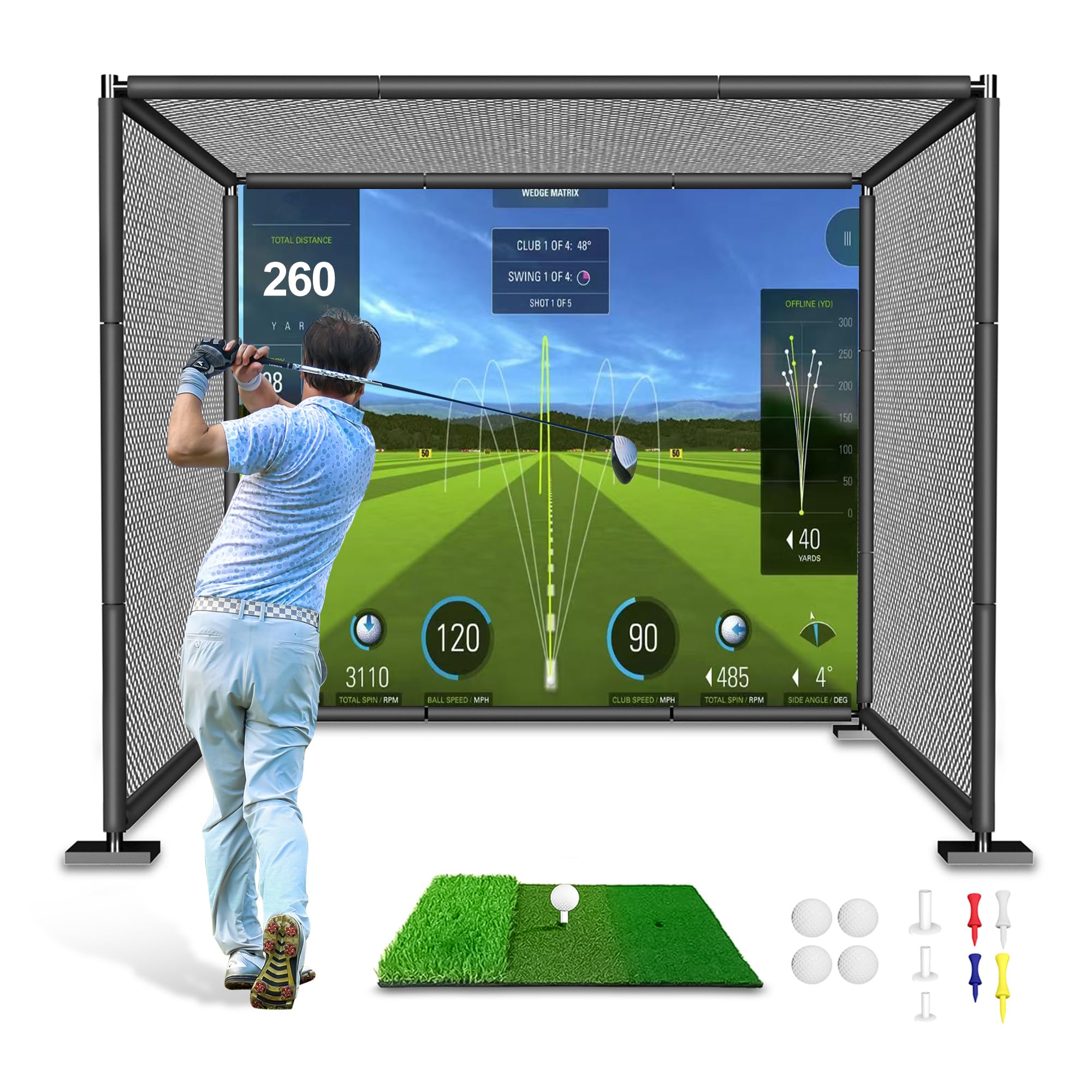
The YUNIC Golf Driving Cage offers an all-in-one steel-frame structure at 8 feet wide by 8 feet high by 5 feet deep. It comes as a kit with your choice of a standard hitting target or a simulator impact screen, plus full-length foam covers for the frame, a tri-turf hitting mat, and multiple layers of netting. The three-layer back wall includes a large outer net, a secondary safety net, and a target cloth to catch and stop balls.
Assembly is straightforward but requires attention because the pipe pieces are not labeled, so you’ll rely on the diagram. Once up, the cage is sturdy enough for full driver swings. The foam frame covers prevent fast ball bounce-back, which is a common safety issue with bare metal frames. The included hitting mat is a value that adds convenience for first-time buyers who don’t already own a mat.
Users report that the cage catches everything from pitches to drives, and the three-layer netting gives peace of mind against escaping balls. The main complaint is the assembly instructions, but the final build quality earns consistent praise. For the budget-conscious buyer who wants a complete cage with a net and mat in one box, the YUNIC delivers a solid starting point.
Why it’s great
- Three-layer netting prevents ball escape
- Includes hitting mat, tees, and foam frame covers
- Sturdy steel frame handles full driver swings
Good to know
- Assembly instructions lack pipe labeling
- Frame may wobble slightly on uneven ground
- Not ideal as a permanent simulator setup — lacks enclosure fabric
9. ZEALFEEL 11×8 Enclosure
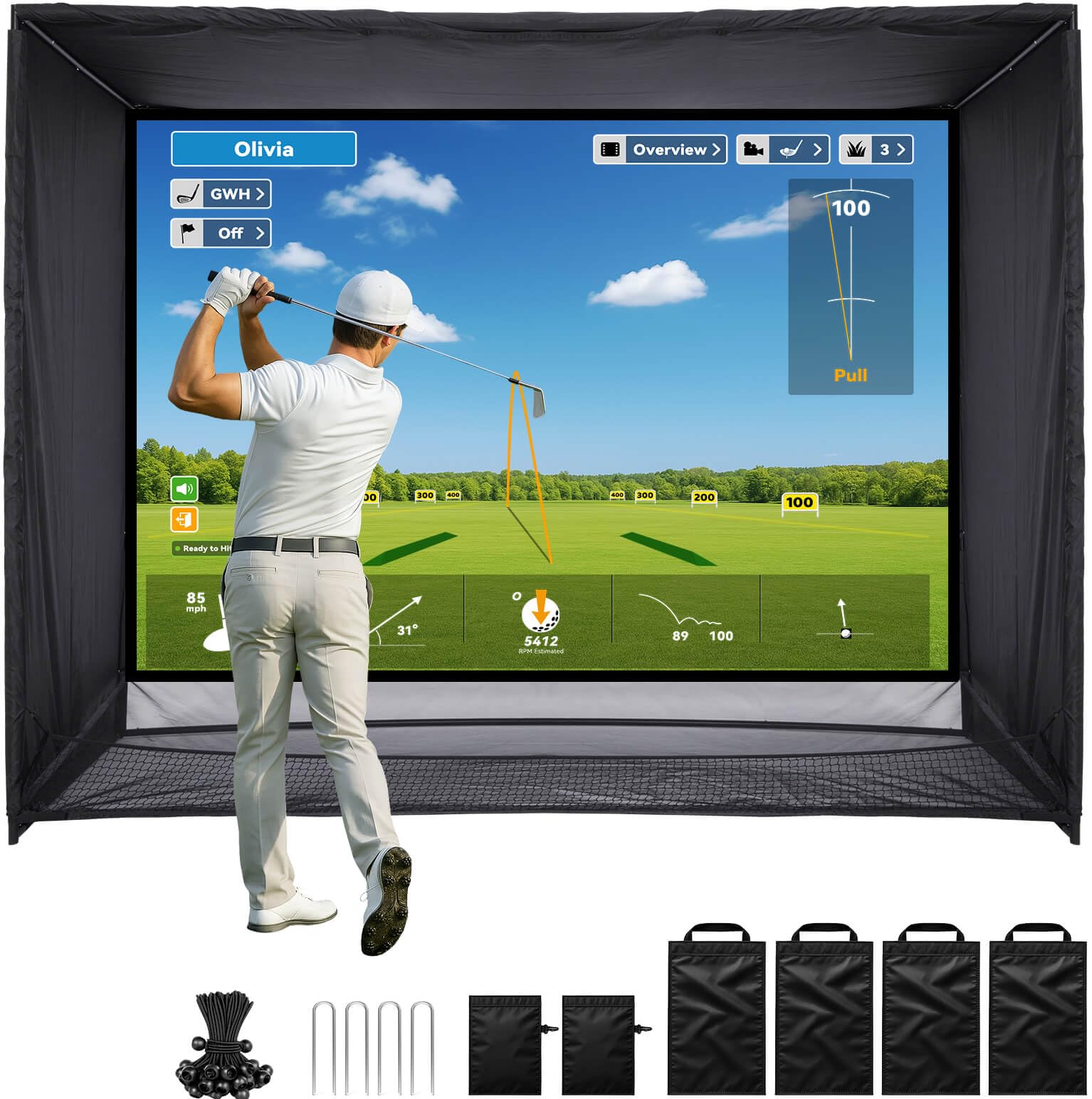
The ZEALFEEL 11×8 Enclosure is a complete simulator package that includes an HD dual-layer impact screen, side barriers, blackout curtains, and a foam-padded powder-coated steel frame. The 118×88 inch screen supports a 4:3 aspect ratio and is designed to work with standard home projectors. The dual-layer construction absorbs ball impact to reduce bounce and noise, and the sloped bottom returns balls to your feet automatically.
The full safety coverage includes side nets and top shields that catch stray shots. The frame is designed for permanent placement in a garage or studio, with a recommended ceiling height of 9 feet for full swing clearance. The package comes with 22 bungee cords, four sandbags, and ground stakes for securing the enclosure. Assembly takes about 30 minutes once you understand the layout.
User feedback is mixed: many praise the durability and the comprehensive coverage, while some report that the netting can tear under mis-hits, especially from inconsistent ball strikers. The seller offers replacement parts under warranty support, but the long-term durability of the netting is a concern for heavy use. For the enthusiast who wants a fully enclosed bay with blackout panels at a reasonable price, the ZEALFEEL provides the coverage without a custom build.
Why it’s great
- Dual-layer impact screen reduces bounce-back
- Full side and top barriers catch all errant shots
- 4:3 screen works with most home projectors
Good to know
- Netting can tear on mis-hits from inconsistent players
- Frame stability suffers in strong wind if used outdoors
- Not the most durable option for high-volume daily practice
10. ANYTHING SPORTS Enclosure
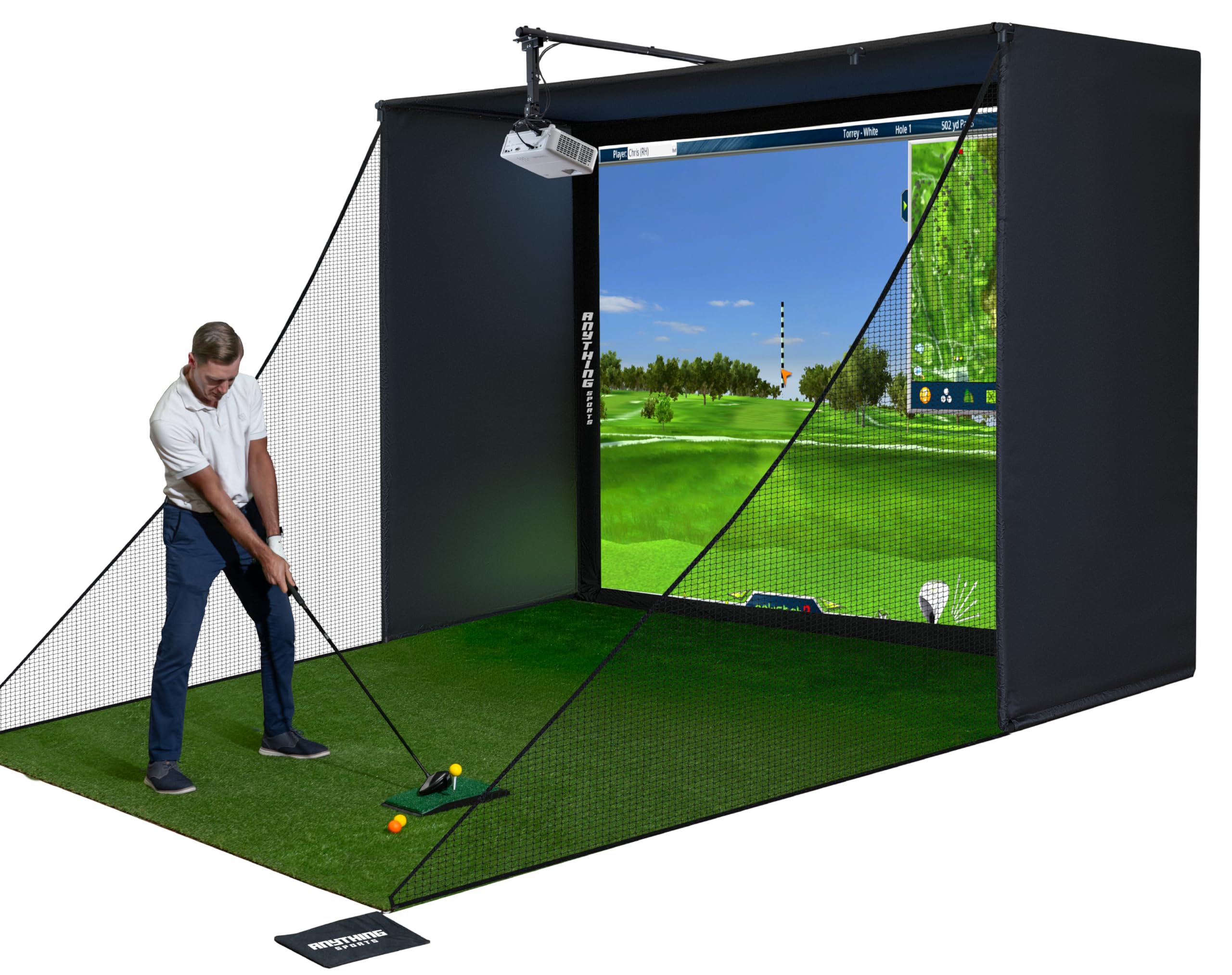
The ANYTHING SPORTS Enclosure is a complete simulator package that includes the cage frame, a 4K-ready impact screen, side shank nets, and a projector mount. The inclusion of the projector mount is a significant time and cost saver — most enclosures in this tier require you to source an adjustable mount separately. The screen is precision-sized just one inch smaller than the frame, minimizing light bleed around the edges for a more immersive projection experience.
The frame uses heavy metal poles with reinforced joints, and the enclosure is available in multiple sizes, with the 11x8ft by 5ft depth option being the most versatile for standard garages. The screen is made from a thick, soft material that withstands repeated ball strikes without immediate tearing. A 12-month no-questions-asked warranty provides a safety net for early defects.
User feedback is overwhelmingly positive, with most assembly completed in under an hour. The main downsides are the sparse instructions — you’ll rely primarily on product photos — and the fact that balls can bounce back off the screen if not padded properly. Adding 2-inch foam to the frame poles is a common DIY fix. For the golfer who wants a near-turnkey enclosure kit with a projector mount included, this is the most complete option in the list.
Why it’s great
- Includes projector mount, saving significant hassle and cost
- 4K-ready screen delivers crisp projection visuals
- 12-month no-questions-asked warranty
Good to know
- Assembly instructions are minimal
- Balls may bounce back hard without additional frame padding
- Bungee cord attachment can be difficult to tension evenly
11. GoSports Sim Enclosure 10×8

The GoSports Simulator Enclosure system is built with commercial-grade materials designed for heavy daily use. The 10×8 foot version features a multi-layer HD impact screen that reduces rebound and provides a smooth projection surface. The enclosure panels undergo a specialized dyeing process to achieve a true blackout effect, blocking ambient light for enhanced projector contrast and immersion.
The frame is constructed from alloy steel with precision joints. Assembly takes about an hour, with numbered poles and a clear diagram making the process straightforward. The frame feels slightly flimsy before the enclosure material is installed, but once the panels are attached, the entire structure tightens into a solid bay. The minimized rebounding feature uses foam padding around the frame to reduce dangerous bounce-back.
User reviews consistently mention the quality of the impact screen — it holds up well against daily use with irons and drivers, and customer service is responsive to any issues. The main limitation is that shank nets are not included, so side protection must be purchased separately. For the golfer building a long-term simulator who prioritizes screen quality and blackout performance, the GoSports enclosure is the most robust option available.
Why it’s great
- True blackout panels eliminate light bleed for projection
- Multi-layer impact screen handles high-speed strikes
- Commercial-grade materials suitable for daily heavy use
Good to know
- Side shank nets not included — must buy separately
- Frame flimsy until enclosure panels are installed
- Premium price pushes the total build past the threshold for some budgets
FAQ
Can I use a regular golf ball with a camera-based launch monitor indoors?
How much floor space do I really need for an indoor golf simulator?
Why do some hitting nets cost twice as much as others?
What hits harder on my joints — a thick mat or a thin mat?
Is a subscription required to use a golf simulator launch monitor?
Final Thoughts: The Verdict
For most users, the golf simulator under 1000 winner is the SkyTrak Launch Monitor because its photometric accuracy works reliably indoors with limited space, and its software ecosystem gives you room to grow as your skills improve. If you want joint-friendly practice that eliminates wrist pain, grab the Country Club Elite 4×5 Mat. And for a durable hitting net that will outlast cheaper alternatives and safely handle your full swing, nothing beats the Net Return Home/Pro Series.