
Building or upgrading a 1440p gaming rig means grappling with a tough needle to thread: you need enough horsepower to push high frame rates at a demanding resolution, but you don’t want to overpay for 4K brute force you’ll never use. The sweet spot requires a card that balances raw compute, VRAM capacity, and thermal efficiency specifically for that 2560×1440 target.
I’m Mohammad Maruf — the founder and writer behind Drink4Good. I’ve spent years analyzing GPU market trends, sifting through benchmark data, and studying real-world thermal and power profiles to separate the cards that genuinely deliver at 1440p from those that just look good on paper.
This guide breaks down the top contenders by raw performance, cooling competence, and VRAM headroom so you can confidently select the best gpu for 1440p that matches your budget and build requirements from the current generation of options.
How To Choose The Best GPU For 1440p
Selecting a card for 1440p is about matching pixel count to shader power and memory bandwidth. A card that crushes 1080p can choke on 1440p if it runs out of VRAM or doesn’t have the raster performance to maintain 60+ fps in modern titles. Here are the three factors that matter most.
VRAM Capacity and Memory Bandwidth
1440p high-texture packs easily consume 10–14GB of VRAM in demanding titles like Cyberpunk 2077 or Hogwarts Legacy. Cards with 8GB frames often hit a wall requiring texture quality drops. A 16GB buffer on a 256-bit bus—or a 12GB buffer on a 192-bit bus with fast GDDR7—provides the breathing room to keep texture detail at Ultra without stuttering. Memory bandwidth (measured in GB/s) directly impacts how fast textures stream from VRAM to the render engine, so a wider bus paired with fast memory is non-negotiable for smooth 1440p.
Cooling Solution and Thermal Acoustics
1440p cards often run at high utilization for extended sessions, making thermal management a top priority. Triple-fan designs with larger heatsinks generally keep noise lower than dual-fan variants under sustained loads. Look for features like vapor chambers, nickel-plated copper baseplates, and fan curves with 0dB modes that let the fans stop completely at low temperatures. A card that runs 70°C under load at 40% fan speed will be significantly quieter than one that hits 85°C at 60% fan speed pushing the same frames.
Upscaling and Ray Tracing Support
DLSS 3/4 and FSR 4 are not just buzzwords; they are performance multipliers that can transform a 60 fps experience into a 100+ fps one at 1440p without sacrificing perceptible image quality. Cards with dedicated Tensor Cores (NVIDIA) or AI Accelerators (AMD) handle these workloads more efficiently. Ray tracing at 1440p demands significant compute power, so if path-traced lighting is a priority, prioritize cards with robust RT core counts—typically found on the mid-range and premium tiers of both architectures.
Quick Comparison
On smaller screens, swipe sideways to see the full table.
| Model | Category | Best For | Key Spec | Amazon |
|---|---|---|---|---|
| ASRock RX 9070 XT Steel Legend | Premium | Maxed-out 1440p with 16GB VRAM | 256-bit bus, 2970 MHz boost | Amazon |
| Sapphire Nitro+ RX 9070 XT | Premium | Whisper-quiet 1440p/4K hybrid | 3060 MHz boost, 16GB GDDR6 | Amazon |
| MSI RTX 5070 Ti Ventus 3X PZ | Premium | DLSS 4 at 1440p with 16GB GDDR7 | 256-bit, 2482 MHz boost | Amazon |
| GIGABYTE RTX 5070 Gaming OC | Mid-Range | High-FPS 1440p without breaking bank | 12GB GDDR7, 2600 MHz boost | Amazon |
| ASUS Prime RTX 5070 | Mid-Range | SFF-ready 1440p competitive gaming | 12GB GDDR7, 2542 MHz boost | Amazon |
| PNY RTX 5070 Epic-X ARGB | Mid-Range | ARGB aesthetics with quiet triple fans | 12GB GDDR7, 2685 MHz boost | Amazon |
| EVGA RTX 3070 XC3 Ultra | Mid-Range | Budget ray tracing with iCX3 cooling | 8GB GDDR6, 1770 MHz boost | Amazon |
| GIGABYTE RX 9060 XT Gaming OC | Mid-Range | Best VALUE 1440p with 16GB VRAM | 2700 MHz boost, 16GB GDDR6 | Amazon |
| PowerColor RX 9060 XT Reaper | Budget | SFF builds and efficient 1440p | 16GB GDDR6, 2620 MHz boost | Amazon |
| XFX Swift RX 9060 XT OC | Budget | Budget 1440p with high boost clock | 16GB GDDR6, 3320 MHz boost | Amazon |
| ASUS Dual RTX 4060 OC | Budget | Entry-level 1440p with DLSS 3 | 8GB GDDR6, 2535 MHz boost | Amazon |
In‑Depth Reviews
1. ASRock Radeon RX 9070 XT Steel Legend 16GB

The ASRock RX 9070 XT Steel Legend sits at the top of the 1440p heap because it packs a full 16GB on a 256-bit bus paired with a factory boost clock of up to 2970 MHz. That combination means you can max out texture settings in games like Cyberpunk 2077 and Hogwarts Legacy without hitting the VRAM ceiling that plagues 12GB cards at this resolution. The triple-fan arrangement with striped ring blades drives air through an ultra-fit heatpipe array that keeps the card well below 75°C under sustained load, even during long sessions.
RDNA 4 brings 3rd Gen Ray Tracing cores and 2nd Gen AI Accelerators, so FSR 4 upscaling looks crisp on a 1440p panel and ray-traced reflections run without the severe frame-rate penalty of earlier AMD generations. The Steel Legend also supports PCIe 5.0, which future-proofs the card for next-gen motherboards. The reinforced metal frame and metal backplate add rigidity that prevents PCB sag in standard ATX cases, and the Polychrome SYNC RGB lighting lets you match the rest of your build’s aesthetic.
Owners consistently report that this card handles 1440p max settings with ease, delivering smooth frame rates in titles like Battlefield 6 and Starfield. A few users noted that the ASRock RGB software can be a little buggy, but the hardware performance itself is rock-solid. If you want a single card that will handle every current 1440p title at Ultra and still have headroom for the next few years, this is it.
Why it’s great
- 16GB VRAM on 256-bit bus prevents texture stutters at 1440p
- Factory boost clock of 2970 MHz means excellent out-of-box performance
- Triple-fan cooler with air-deflecting fins keeps thermals in check quietly
Good to know
- Large 2.9-slot design requires a spacious case and good airflow
- ASRock Polychrome SYNC software can be finicky
2. Sapphire Nitro+ AMD Radeon RX 9070 XT 16GB

The Sapphire Nitro+ RX 9070 XT is the card you choose when acoustic performance is just as important as frame rates. Its vapor-chamber cooler and triple-fan setup keep noise levels exceptionally low even when the GPU is pegged at 100% utilization. The boost clock hits 3060 MHz out of the box, making it one of the fastest 1440p cards available without any manual overclocking. The 16GB GDDR6 on a 256-bit bus provides the same VRAM headroom as the ASRock Steel Legend, so high-resolution texture packs load without hiccups.
Sapphire includes a clean power cable routing system under the backplate that makes for a much tidier build than many competitors. The card also sports dual HDMI outputs (2x HDMI, 2x DisplayPort) which is convenient for multi-monitor setups that include a TV or an older display. The build quality is excellent; the metal frame and backplate eliminate any flex, and the card stays cool enough that the 0dB fan mode actually kicks in during less demanding tasks.
Users upgrading from older cards like the 6750 XT or RTX 2080 Super report a dramatic 60-90% performance uplift at 1440p, with much improved 1% low frame rates that eliminate the micro-stutters that plague slower cards. The main trade-off is physical size—at over 300mm and occupying 3+ slots, you need a roomy case with an 850W power supply to run it comfortably.
Why it’s great
- Vapor-chamber cooler delivers whisper-quiet operation even under load
- 3060 MHz factory boost clock keeps it competitive with premium NVIDIA options
- Clean cable routing system under backplate simplifies build aesthetics
Good to know
- Massive 3+ slot footprint; check case clearance before buying
- Included brace may be insufficient; a separate support bracket is recommended
3. MSI Gaming RTX 5070 Ti Ventus 3X PZ OC 16GB
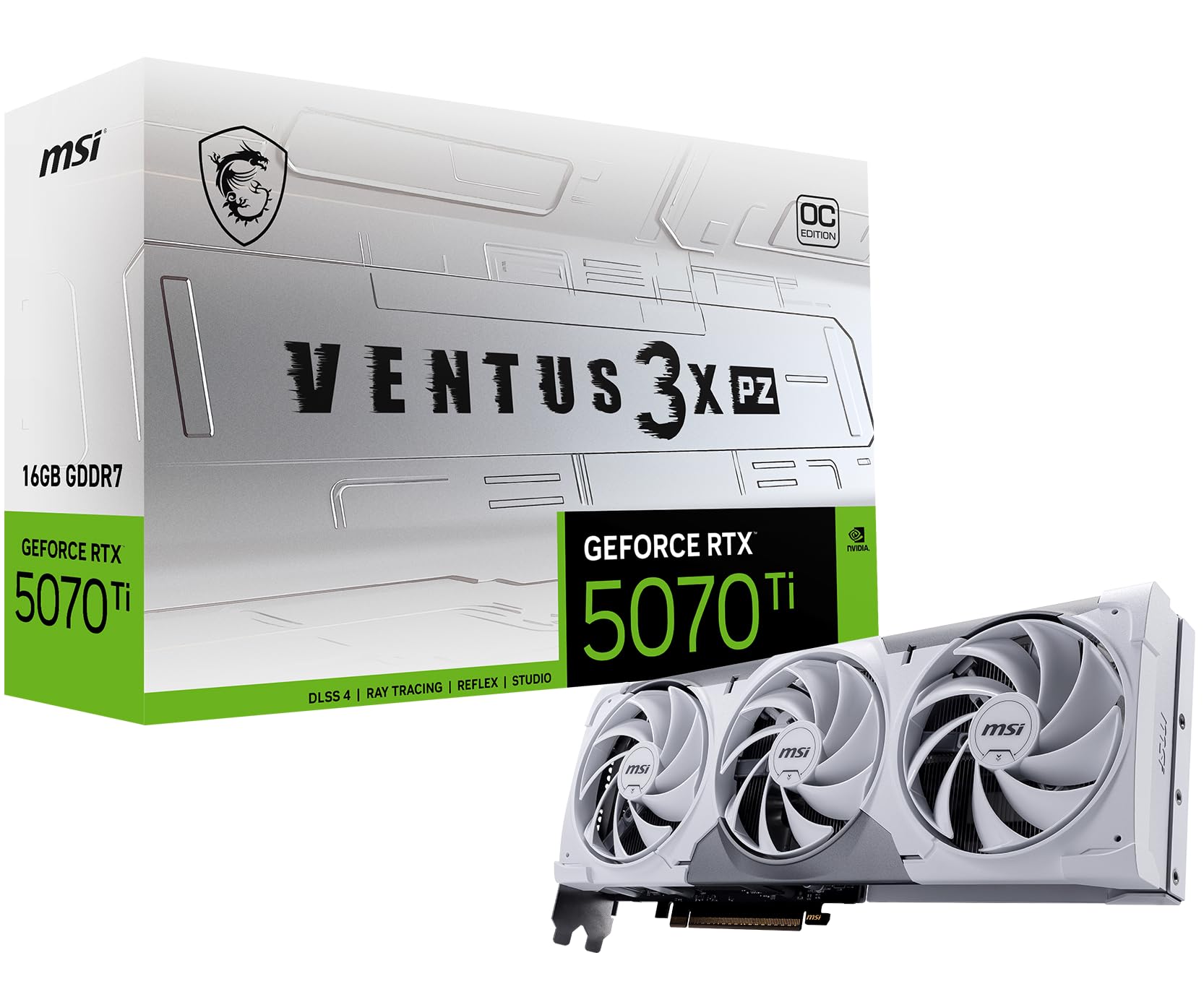
The MSI RTX 5070 Ti Ventus 3X PZ OC brings NVIDIA Blackwell architecture to the 1440p fight with 16GB of ultra-fast GDDR7 memory on a 256-bit bus. That adds up to 672 GB/s of memory bandwidth, which is crucial for high-resolution textures and ray tracing workloads. The card uses Torx Fan 5.0 blades that are linked by ring arcs to stabilize airflow, combined with a nickel-plated copper baseplate that pulls heat away from the GPU die efficiently. MSI rated the extreme performance boost clock at 2482 MHz, but in practice the card comfortably sustains higher clocks under load.
DLSS 4 is the secret weapon here. In games that support the latest frame generation, the 5070 Ti can push well beyond 100 fps at 1440p with maxed settings and ray tracing enabled—performance that would require much more expensive silicon without the AI acceleration. The card also features a hidden power connector that routes cables cleanly, a small but appreciated detail for build quality. It’s also SFF-ready, meaning it fits in smaller cases despite its performance.
Early adopters report outstanding thermal performance, with the card staying under 75°C even during extended gaming sessions. The 12V-2×6 power connector requires an 850W PSU for headroom, and some users note the price has climbed closer to premium territory. Still, for those who want DLSS 4, 16GB of VRAM, and the best ray tracing performance available at 1440p, this card is a beast that will last years.
Why it’s great
- 16GB GDDR7 with 672 GB/s bandwidth handles even heavy ray tracing loads
- DLSS 4 provides a massive performance multiplier at 1440p
- Torx Fan 5.0 with ring arcs keeps noise low while maintaining high static pressure
Good to know
- Requires an 850W PSU and uses a 12V-2×6 power connector
- Premium pricing reflects the 16GB GDDR7 memory and Blackwell architecture
4. GIGABYTE GeForce RTX 5070 Gaming OC 12G

The GIGABYTE RTX 5070 Gaming OC delivers Blackwell performance with a cooler that punches well above its class. The WINDFORCE system uses three fans with alternating blade rotation, composite copper heatpipes, and a large fin stack that keeps the card running below 80°C even when ambient temperatures climb. The factory boost clock of 2600 MHz gives it a solid edge over base RTX 5070 models, and the 12GB of GDDR7 memory on a 192-bit bus is enough for 1440p high-texture gaming as long as you’re not pushing 4K.
DLSS 4 is fully supported, and owners report that the AI-generated frames deliver a meaningful 30-40 fps boost in demanding titles without introducing perceptible latency. The card is large—nearly 13 inches long—so case compatibility is a genuine concern. It also requires a 750W PSU minimum. However, the cooling headroom is so generous that even aggressive overclocking via MSI Afterburner doesn’t push temperatures into uncomfortable territory.
Users upgrading from a 3060 Ti note a dramatic leap in 1440p performance, with games like Oblivion remastered running at 110-120 fps on max settings. The card’s size is its main drawback; confirm your case can handle the length and that you have two PCIe slot widths free. For pure 1440p gaming with excellent cooling, this is a fantastic mid-range pick.
Why it’s great
- WINDFORCE triple-fan cooler keeps temps in check even on hot days
- 12GB GDDR7 with DLSS 4 provides a smooth 1440p frame rate
- Aggressive factory OC at 2600 MHz boosts out-of-box performance
Good to know
- Nearly 13 inches long; verify case clearance before purchase
- 12GB VRAM may limit high-texture 4K gaming, but fine for 1440p
5. ASUS SFF-Ready Prime NVIDIA GeForce RTX 5070 12GB

The ASUS Prime RTX 5070 is engineered specifically for small-form-factor builds that don’t want to compromise on 1440p performance. Its 2.5-slot design and 12-inch length mean it fits into compact cases that would reject larger 3-slot cards, yet it still manages to house a generous heatsink with three Axial-tech fans. ASUS uses a phase-change GPU thermal pad that liquefies under heat to better fill micro-gaps, improving thermal transfer to the heatsink and lowering GPU temperatures by several degrees compared to standard thermal paste.
This card supports DLSS 4 and full Blackwell feature set, including the new Neural Rendering capabilities. The Dual BIOS switch lets you toggle between a quiet mode that optimizes fan curves for minimal noise and a performance mode that prioritizes cooling. Owners report that pairing this card with a 7800X3D or similar CPU results in excellent 1440p competitive gaming performance, with games like Overwatch 2 and Valorant hitting well over 200 fps at high settings.
The card runs at 60-65°C under full load in gaming benchmarks, which is impressive for a form factor this compact. Some users noted that the card runs hot in poorly ventilated SFF cases, so pair it with a good airflow layout. The 12GB GDDR7 VRAM is sufficient for 1440p high-texture gaming, but you may need to dial textures down for titles that push heavy ray caching.
Why it’s great
- SFF-compatible 2.5-slot design fits in compact cases without sacrificing performance
- Phase-change thermal pad improves heat transfer over traditional paste
- Dual BIOS lets you prioritize quiet operation or peak cooling
Good to know
- Requires good case airflow; can run hot in very cramped enclosures
- 12GB VRAM may need texture tweaks for the most demanding path-traced games
6. PNY NVIDIA GeForce RTX 5070 Epic-X ARGB OC Triple Fan 12GB

The PNY RTX 5070 Epic-X ARGB OC focuses on delivering strong 1440p performance with a striking aesthetic. The triple-fan cooler features an ARGB ring on each fan, allowing you to sync the lighting with your motherboard ecosystem. The boost clock hits 2685 MHz out of the box, which is a solid 8% factory overclock over reference specs. The 12GB GDDR7 memory runs at 28 Gbps, providing enough bandwidth for smooth 1440p gaming with ray tracing enabled.
NVIDIA Blackwell architecture brings DLSS 4 and the latest Reflex technologies to this card, meaning you get the lowest possible input latency in competitive titles along with frame generation in single-player games. The card is relatively compact for a triple-fan model, fitting into mid-tower cases without issue. Owners report that the cooling is excellent, with the card running quiet even under sustained load and significantly lowering case temperatures compared to older cards like the 4070 Super.
This card is a great value proposition in the 1440p space, offering performance that frequently surpasses the previous-gen 4070 Super in raw rasterization while adding the Blackwell feature set. The main limitation is the 12GB VRAM, which might require dropping texture quality in VRAM-heavy titles at 1440p. If your priority is max frame rates with great cooling and a RGB build aesthetic, this is a strong candidate.
Why it’s great
- 8% factory overclock gives a tangible performance edge at 1440p
- Triple-fan cooling runs quiet and keeps temperatures low
- ARGB lighting on fans allows full system sync
Good to know
- 12GB VRAM may need texture compromises for very demanding 1440p titles
- Requires a 750W PSU with the included 12-pin adapter
7. EVGA GeForce RTX 3070 XC3 Ultra Gaming 8GB

The EVGA RTX 3070 XC3 Ultra is a previous-generation card that remains relevant for 1440p gaming thanks to its solid raster performance and affordable entry point. The iCX3 cooling system features triple HDB fans that run quietly while keeping the card at 62-65°C under load at just 35-45% fan speed. The real boost clock of 1770 MHz, combined with the 8GB GDDR6 on a 256-bit bus, delivers plenty of performance for 1080p and solid 1440p gaming at high settings.
Ray tracing performance is adequate but not class-leading—you’ll get playable frame rates in Cyberpunk 2077 with RT set to Medium at 1440p, but you’ll need DLSS Quality mode to keep things smooth. The all-metal backplate and adjustable ARGB lighting give it a premium look that still holds up well against modern cards. EVGA’s build quality is legendary, with the card featuring a higher power limit than similarly sized 3070 models, allowing for more overclocking headroom.
Owners note that the card handles 1440p well for esports and older AAA titles, but newer games at max settings may push the 8GB VRAM buffer to its limit. The card also needs a sag bracket in many cases, as the triple-fan cooler is heavy. If you’re building a budget 1440p rig and can find this card at the right price, it’s a reliable workhorse that will serve you well for several more years.
Why it’s great
- iCX3 cooling keeps temperatures low with very quiet fan operation
- Higher power limit than stock 3070s allows more overclocking potential
- All-metal backplate and ARGB lighting provide a premium feel
Good to know
- 8GB VRAM can be a bottleneck in modern high-texture 1440p titles
- Card is heavy; a sag bracket is recommended for most builds
8. GIGABYTE Radeon RX 9060 XT Gaming OC 16GB

The GIGABYTE RX 9060 XT Gaming OC is a standout mid-range option that offers 16GB of VRAM at a price point that undercuts most competitors. That VRAM buffer is the key differentiator here—while many cards in this tier are stuck with 8GB or 12GB, the 9060 XT lets you load ultra texture packs at 1440p without fear of hitting the VRAM ceiling. The WINDFORCE cooling system with Hawk fans keeps the card running quiet, and the server-grade thermal conductive gel improves heat transfer from the die to the heatsink.
RDNA 4 architecture brings FSR 4 upscaling and AV1 encoding support, making this a versatile card for both gaming and streaming. The boost clock of 2700 MHz is competitive, and the card runs stably even when overclocked. Owners report excellent performance at 1440p, with smooth frame rates in titles like Fortnite at 240 fps and strong results in more demanding games like DCS World. The 16GB of VRAM also makes this a compelling option for local LLM workloads.
The card is large, measuring 11 inches, so case compatibility is something to verify. Ray tracing performance is decent but still trails NVIDIA’s RT cores in this class. If your priority is raw 1440p raster performance with plenty of VRAM headroom for the future, this GIGABYTE card delivers outstanding value per dollar.
Why it’s great
- 16GB VRAM at a mid-range price point is hard to beat for 1440p longevity
- WINDFORCE cooling with Hawk fans and server-grade thermal gel keeps temperatures low
- Good FSR 4 upscaling support and AV1 encoding for streamers
Good to know
- Ray tracing performance still trails NVIDIA at this tier
- Card is 11 inches long; check case clearance before purchase
9. PowerColor Reaper AMD Radeon RX 9060 XT 16GB

The PowerColor Reaper RX 9060 XT is remarkably compact at just 200mm long, making it an ideal choice for small-form-factor builds where every millimeter counts. Despite the small footprint, it packs a full 16GB of GDDR6 memory and a boost clock of 2620 MHz. The single 8-pin power connector means it draws less than 225W, so a 500W PSU is sufficient—a major advantage for budget and compact builds where power supply options are limited.
The card runs quiet thanks to its efficient cooler design, and owners report that it handles 1440p gaming with ease, crushing anything below 4K at high settings. It also supports AV1 encoding and FSR 4, making it useful for content creation. The dual-slot design means it doesn’t block adjacent PCIe slots, which is often a problem with larger triple-fan cards in mini-ITX boards.
Users upgrading from older cards like the RX 580 report a dramatic performance uplift, with the 9060 XT running quietly and coolly even under sustained gaming loads. The main limitation is the smaller cooler means it can run warmer than larger cards in poorly ventilated cases, but for well-arranged SFF builds, it’s an excellent choice that doesn’t compromise on VRAM or core performance.
Why it’s great
- Extremely compact at 200mm, perfect for SFF and mini-ITX builds
- 16GB VRAM in a small package with a single 8-pin power connector
- Runs quiet and cool despite the small footprint
Good to know
- Smaller cooler means it runs warmer than larger cards in tight cases
- Ray tracing performance is decent but not class-leading
10. XFX Swift AMD Radeon RX 9060 XT OC Gaming Edition 16GB

The XFX Swift RX 9060 XT OC Gaming Edition punches well above its weight class with a massively overclocked boost clock of 3320 MHz—the highest in this comparison. Combined with 16GB of GDDR6 memory, this card delivers impressive raw performance that rivals cards costing significantly more. The SWFT dual-fan cooling solution keeps temperatures around 60°C under load, and the card runs quiet enough that you won’t hear it over your case fans.
In real-world usage, the card achieves a Timespy score of approximately 17,000, which is excellent for this tier. It handles 1440p gaming easily, and owners report it runs 95% of modern AAA games at max settings with smooth frame rates. The dual DisplayPort and single HDMI configuration provides enough connectivity for most setups, though multi-monitor users may need to use the motherboard output for additional displays.
The card is a solid upgrade for anyone coming from a 6650 XT or similar previous-gen cards, offering a noticeable boost in both raster and compute performance. The 16GB VRAM buffer is a strong future-proofing asset, ensuring you won’t run out of memory for high-resolution texture packs in upcoming games. If you want the best price-to-performance ratio for 1440p gaming, this XFX card is hard to beat.
Why it’s great
- 3320 MHz boost clock is the highest in class for exceptional out-of-box performance
- 16GB VRAM ensures long-term 1440p viability
- Dual-fan cooling runs cool and quiet at around 60°C under load
Good to know
- Only 3 display outputs (2 DP, 1 HDMI) limit multi-monitor setups
- Ray tracing performance lags behind NVIDIA’s RT offerings at this tier
11. ASUS Dual GeForce RTX 4060 EVO OC Edition 8GB

The ASUS Dual RTX 4060 EVO OC Edition is an entry-level card that still delivers solid 1440p performance thanks to the efficiency of the Ada Lovelace architecture and the magic of DLSS 3. The boost clock reaches 2535 MHz, and the 8GB GDDR6 memory is supported by 4th-gen Tensor Cores that enable DLSS 3 frame generation. That means you can play at 1440p with settings tuned to High rather than Ultra and still get smooth 60+ fps in most titles.
The Axial-tech fan design uses a smaller hub to allow longer blades, which increases downward air pressure while keeping noise low. The card also features 0dB technology that stops the fans entirely at low temperatures, making for a completely silent desktop experience during light workloads. At just 8.94 inches long, it fits easily into most cases and doesn’t require a high-wattage PSU, making it an excellent drop-in upgrade for pre-built systems.
Owners report that the card works well for 1440p gaming, though you’ll need to rely on DLSS Quality/Fidelity modes for the most demanding AAA titles. The 8GB VRAM is the primary limiting factor for high-resolution texture packs, and the card can run warmer than its triple-fan siblings due to the smaller heatsink. Still, for budget-conscious builders who want access to RTX features and solid 1440p performance, this is a capable and reliable option.
Why it’s great
- DLSS 3 frame generation provides smooth 1440p gaming from a compact card
- Compact 8.94-inch length fits easily in most cases
- 0dB fan mode ensures silent operation during light loads
Good to know
- 8GB VRAM requires texture compromises in demanding 1440p titles
- Dual-fan cooler runs warmer than larger triple-fan alternatives
FAQ
Is 12GB of VRAM enough for 1440p gaming in 2025 and beyond?
Which is better for 1440p ray tracing, AMD or NVIDIA?
What is DLSS and how much does it help at 1440p?
Final Thoughts: The Verdict
For most users, the best gpu for 1440p winner is the ASRock Radeon RX 9070 XT Steel Legend because it combines 16GB of VRAM on a 256-bit bus with a high 2970 MHz boost clock, delivering uncompromising 1440p Ultra performance at a price that undercuts the competition. If you want whisper-quiet operation and a premium build, grab the Sapphire Nitro+ RX 9070 XT. And for the best value per dollar with 16GB VRAM, nothing beats the XFX Swift RX 9060 XT OC.