
Training a large language model or running local inference on a diffusion model is the ultimate test of a graphics card’s compute architecture, memory bandwidth, and tensor core throughput. The right GPU determines whether your batch size fits in VRAM and whether your training loop finishes in hours versus days.
I’m Mohammad Maruf — the founder and writer behind Drink4Good. My analysis of AI accelerators focuses on VRAM capacity, memory bandwidth in GB/s, FP16/TF32 tensor core performance, and PCIe bandwidth for multi-GPU scaling.
This guide breaks down the real-world tradeoffs between CUDA core count, GDDR7 speed, and FP8 transformer engine support across a range of price tiers so you can find the best gpu for ai that matches your specific model size and training workflow.
How To Choose The Best GPU For AI
Selecting an AI-focused GPU requires a shift from gaming benchmarks to metrics like batch size, matrix multiplication throughput, and memory bus width. The architecture that crushes rasterization may fall short on mixed-precision training loops.
VRAM Capacity Determines Model Bounds
Every AI framework loads the entire model weights, optimizer states, and activations into GPU memory. A 7B parameter model in FP16 consumes roughly 14 GB of VRAM, leaving no room for context windows or gradient accumulation. Cards with 12 GB may fit smaller LoRA fine-tuning, but 16 GB or 24 GB is the floor for modern transformer models without CPU offloading that kills iteration speed.
Memory Bandwidth Controls Inference Speed
Once the model fits, token generation rate is gated by how fast the GPU can feed weights to tensor cores. GDDR6 at 19 Gbps on a 192-bit bus delivers roughly 456 GB/s, while GDDR7 at 28 Gbps on a 512-bit bus pushes nearly 1.8 TB/s. The same model may produce 20 tokens per second on a bandwidth-limited card and over 80 tokens per second on a wide-memory card.
Tensor Core Generation and Mixed Precision
NVIDIA’s tensor cores handle the fused multiply-add operations that power training and inference. Ada Lovelace fourth-gen cores add FP8 transformer engine support, halving memory usage compared to FP16. Blackwell fifth-gen cores extend that to FP4, enabling even larger effective batch sizes within the same VRAM budget. Older architectures without dedicated transformer engines waste memory bandwidth on higher precision formats.
Quick Comparison
On smaller screens, swipe sideways to see the full table.
| Model | Category | Best For | Key Spec | Amazon |
|---|---|---|---|---|
| PNY RTX 5090 OC | Flagship | Large model training and inference | 32 GB GDDR7, 512-bit | Amazon |
| ASUS ROG Strix RTX 4090 White | High-End | Fine-tuning 7B-13B models | 24 GB GDDR6X, 384-bit | Amazon |
| VIPERA RTX 4090 FE | High-End | Stable Diffusion and LLM inference | 24 GB GDDR6X, 384-bit | Amazon |
| ASUS TUF RTX 5080 OC | Premium Mid | FP8 training and inference | 16 GB GDDR7, 256-bit | Amazon |
| GIGABYTE RTX 5080 Gaming OC | Premium Mid | Multi-GPU scaling on Blackwell | 16 GB GDDR7, 256-bit | Amazon |
| NVIDIA RTX 5080 Founders Edition | Premium Mid | Compact FP8 workstation | 16 GB GDDR7, 256-bit | Amazon |
| PNY RTX 5080 Epic-X ARGB OC | Premium Mid | DLSS 4 AI upscaling workloads | 16 GB GDDR7, 256-bit | Amazon |
| MSI RTX 4080 Super Ventus 3X OC | Mid-Range | LoRA fine-tuning and small models | 16 GB GDDR6X, 256-bit | Amazon |
| GIGABYTE RTX 5070 Windforce OC | Mid-Range | Entry-level FP8 inference | 12 GB GDDR7, 192-bit | Amazon |
| GEEKOM IT15 Mini PC | Integrated | Portable AI prototyping | Arc 140T, 99 TOPS | Amazon |
| ASRock Intel Arc B580 Challenger | Budget | XMX-accelerated inference | 12 GB GDDR6, 192-bit | Amazon |
In‑Depth Reviews
1. PNY NVIDIA GeForce RTX 5090 OC Triple Fan

The PNY RTX 5090 OC brings 32 GB of GDDR7 memory across a 512-bit interface, delivering roughly 1.8 TB/s of memory bandwidth — enough to load a full 13B parameter model in FP16 without any offloading. Blackwell fifth-gen tensor cores add FP4 transformer engine support, effectively doubling the batch size you can fit within that 32 GB pool compared to FP16 training.
Under sustained matrix multiplication loads, the triple-fan cooler keeps junction temperatures in the mid-60°C range, and fan-stop behavior at idle means zero noise when the card is not under compute pressure. PCIe 5.0 x16 ensures maximum transfer speed for data pipelines that stream training samples from NVMe storage into VRAM.
Reviewers report 25,400 on 3DMark Time Spy Extreme and stable overclocks of +180 MHz core and +1200 MHz memory, which translates directly to faster iteration on large diffusion model training runs. The 600 W power draw requires four 8-pin PCIe cables and a high-wattage PSU.
Why it’s great
- 32GB VRAM fits large models without offloading
- Blackwell FP4 tensor cores double effective batch size
- 1.8 TB/s memory bandwidth enables fast inference
Good to know
- 600W power draw demands a robust PSU
- Large 3.5-slot footprint may limit small cases
2. ASUS ROG Strix GeForce RTX 4090 White OC Edition

The RTX 4090 remains a dominant force for AI workloads thanks to 24 GB of GDDR6X memory on a 384-bit bus delivering 1.0 TB/s of bandwidth. Fourth-gen tensor cores with FP8 transformer engine support let you train a 7B parameter model in FP8 using roughly 7 GB of VRAM, leaving room for gradient accumulation and large batch sizes in fine-tuning scripts.
The ASUS ROG Strix variant adds a vapor chamber with a milled heatspreader and three Axial-tech fans that push 23% more airflow than previous-gen coolers. During reinforcement learning training runs, the card stays under 60°C at full load while maintaining quiet fan profiles — essential for overnight training loops in a shared workspace.
Digital power control with high-current stages and 15K capacitors provides stable voltage delivery during sustained matrix multiply operations. The 3.5-slot design is large, but the included GPU support bracket prevents PCB sag in vertical mounts.
Why it’s great
- 24GB VRAM handles 13B models with CPU offloading
- FP8 tensor cores cut memory use in half
- Vapor chamber cooling for 24/7 training loads
Good to know
- Large card requires spacious case
- Premium-priced tier
3. VIPERA NVIDIA GeForce RTX 4090 Founders Edition

The Founders Edition RTX 4090 by NVIDIA offers a compact dual-slot design that makes multi-GPU builds feasible for distributed training. With 24 GB of GDDR6X and a 384-bit bus, it matches the memory bandwidth of custom-board partners in a smaller physical footprint, allowing two or three cards in a single workstation for model parallelism.
Ada Lovelace’s fourth-gen tensor cores deliver up to 2x AI performance over Ampere, and the FP8 transformer engine allows inference on large models at half the memory footprint. The card runs LLMs like Llama 3 70B in 4-bit quantized format entirely in VRAM with a single card, producing high token-per-second throughput for local inference.
Reviewers note quiet operation and easy installation with no coil whine under load. The card powers three monitors for development dashboards while running training loops in the background. Competitive pricing relative to custom-board 4090s makes this a strong choice for budget-conscious AI developers.
Why it’s great
- Compact dual-slot fits multi-GPU builds
- 24GB VRAM runs large quantized models locally
- Silent operation under compute load
Good to know
- Limited availability may drive up pricing
- No factory overclock for extra tensor throughput
4. ASUS TUF Gaming GeForce RTX 5080 OC Edition

The ASUS TUF RTX 5080 OC strikes a strong balance between VRAM capacity and next-gen tensor core performance. Its 16 GB of GDDR7 memory on a 256-bit bus provides roughly 960 GB/s of bandwidth — enough for FP8 training on 7B models with LoRA adapters, and sufficient for inference on 13B models in 4-bit quantization.
The TUF’s 3.6-slot cooling solution with phase-change GPU thermal pads maintains consistent temperatures under sustained compute loads, outlasting traditional thermal paste in long training sessions. Military-grade components and a protective PCB coating against moisture and dust make this card resilient in less-than-pristine lab environments.
Reviewers note idle temperatures around 25°C and gaming loads under 60°C, which correlates to excellent thermal headroom for AI workloads that push the GPU to 100% utilization for hours. The card is quiet even under full load, with fans staying below 60% RPM.
Why it’s great
- 16GB GDDR7 fits 7B FP8 models easily
- Phase-change thermal pads excel in long training runs
- Durable build with PCB coating
Good to know
- Large 3.6-slot design needs case clearance
- Premium pricing tier
5. GIGABYTE GeForce RTX 5080 Gaming OC

The GIGABYTE RTX 5080 Gaming OC uses NVIDIA’s Blackwell architecture with fifth-gen tensor cores that support FP4 precision, allowing you to fit a 13B parameter model in roughly 6.5 GB of VRAM when using 4-bit quantization. The 16 GB GDDR7 buffer at 256-bit offers enough capacity for LoRA fine-tuning with large context windows.
The WINDFORCE cooling system includes alternate-spinning fans and composite copper heat pipes that maintain steady thermal performance even when multiple cards are stacked in an NVLink configuration. The included VGA holder provides sag support for long-term multi-GPU setups.
Reviewers report stable overclocks reaching 3150 MHz core and 3000 MHz memory, which directly accelerates tensor core throughput. The card runs at 60-65°C under full load without an AIO cooler, making it a reliable choice for 24/7 compute nodes.
Why it’s great
- FP4 support doubles effective VRAM capacity
- Solid cooling for multi-GPU clusters
- Easy overclocking for extra compute
Good to know
- RGB software may need tweaking for headless setups
- Requires good case airflow for stacked cards
6. NVIDIA GeForce RTX 5080 Founders Edition

The RTX 5080 Founders Edition packs Blackwell architecture into a compact dual-slot form factor that fits smaller workstations without sacrificing tensor core density. The 16 GB of GDDR7 memory on a 256-bit bus delivers strong FP8 inference performance for models up to 13B parameters in 4-bit format.
NVIDIA’s dual-axial flow-through cooler moves air efficiently through the card’s fin stack, keeping temperatures manageable even under sustained inference loads. No support bracket is needed, which simplifies installation in tight cases that prioritize desk space over expandability.
Reviewers achieve 120-240+ FPS at 1440p with ray tracing enabled, which indicates ample compute headroom for real-time AI applications like upscaling models or neural rendering. The card stays cool under heavy GPU load and plans to undervolt further for extended longevity in compute environments.
Why it’s great
- Compact dual-slot design for small builds
- FP4 transformer engine support
- Lightweight, no sag bracket needed
Good to know
- Limited availability at MSRP
- No factory overclock for tensor boost
7. PNY NVIDIA GeForce RTX 5080 Epic-X ARGB OC
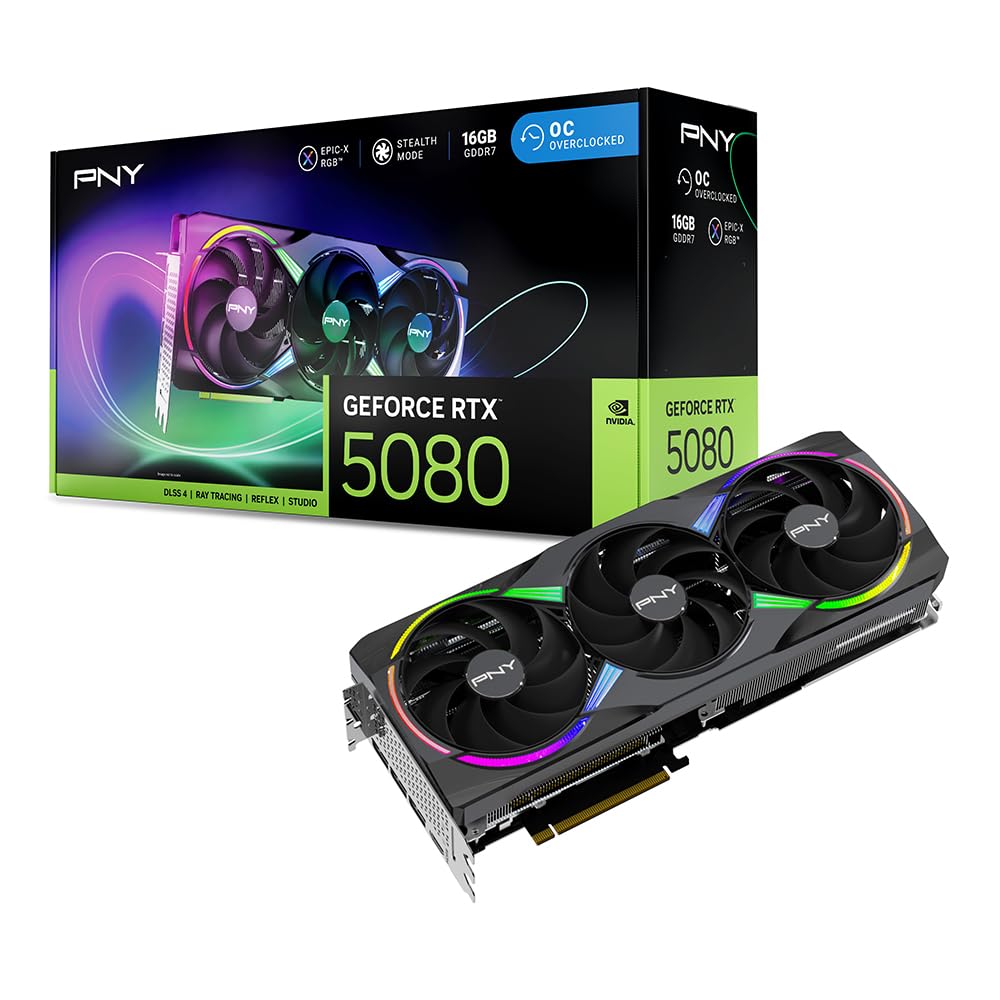
The PNY RTX 5080 Epic-X ARGB OC provides a factory overclock to 2775 MHz boost clock, giving a modest but consistent lift in matrix multiplication throughput compared to reference clocks. The 16 GB GDDR7 buffer on a 256-bit interface handles FP8 training for 7B models with room for gradient checkpoints.
NVIDIA’s DLSS 4 Multi Frame Generation leverages the fifth-gen tensor cores for AI frame synthesis, but the same tensor hardware accelerates your own neural network training loops. The triple-fan design includes an anti-sag holder and runs quietly during long training sessions.
Reviewers highlight the card’s ability to run Cyberpunk 2077 at max settings with 187-212 FPS, which correlates to strong raw compute that benefits both gaming and AI workloads. The included support bracket and power adapter simplify the physical installation process.
Why it’s great
- Factory OC boosts tensor core throughput
- Triple fans run quiet under load
- Includes anti-sag bracket and power adapter
Good to know
- ARGB may be unnecessary for headless AI systems
- Large size may crowd adjacent PCIe slots
8. MSI Gaming RTX 4080 Super Ventus 3X OC

The MSI RTX 4080 Super Ventus 3X OC offers 16 GB of GDDR6X memory on a 256-bit bus with 23 Gbps memory speed, delivering around 736 GB/s of bandwidth. Ada Lovelace’s fourth-gen tensor cores with FP8 transformer engine support allow efficient LoRA fine-tuning of 7B parameter models within the VRAM budget.
The Ventus 3X design focuses on function over flash with a triple-fan array that keeps temperatures around 60°C under full compute load. The card is quiet enough for office environments, and the included support arm prevents sag in vertical mounts — though some reviewers note the arm could be more effective.
Pairing this card with a Ryzen 7800X3D and 64 GB of DDR5 creates a capable local AI workstation that can run large models with CPU offloading when VRAM is exceeded. The 4080 Super represents a strong value for developers who prioritize tensor core performance over raw VRAM capacity.
Why it’s great
- 16GB GDDR6X fits 7B FP8 models
- 23 Gbps memory speed boosts bandwidth
- Quiet and cool under compute loads
Good to know
- Support arm is less effective than expected
- GDDR6X slower than GDDR7 in bandwidth
9. GIGABYTE GeForce RTX 5070 Windforce OC SFF

The RTX 5070 brings Blackwell’s fifth-gen tensor cores and FP4 support to a more accessible price point, with 12 GB of GDDR7 memory on a 192-bit bus. This capacity is sufficient for running 7B parameter LLMs in 4-bit quantization for inference, and for small-scale LoRA fine-tuning with limited batch sizes.
The compact SFF-ready design fits into small form factor cases, making it an option for portable AI workstations or secondary compute nodes. The triple-fan cooling system runs quietly, with temperatures staying barely above 75°C under full load — acceptable for the power envelope.
Reviewers note the card works well as a dedicated video encoder for high bit-rate streams, leveraging the same NVDEC/NVENC engines that accelerate video processing pipelines in AI data preparation workflows. The 12 GB VRAM limits full fine-tuning of large models but provides a cost-effective entry point to Blackwell’s tensor architecture.
Why it’s great
- Blackwell FP4 tensor cores for efficient inference
- Compact SFF design fits portable builds
- GDDR7 memory with fast clock speeds
Good to know
- 12GB VRAM limits full fine-tuning
- 192-bit bus may bottleneck large batch inference
10. GEEKOM IT15 Mini PC

The GEEKOM IT15 is not a discrete GPU but a complete mini PC with an integrated Intel Arc 140T GPU and a dedicated NPU delivering 99 TOPS of AI performance. The NPU handles lightweight inference tasks like real-time object detection or voice recognition while the Arc GPU accelerates transformer models via Intel XMX engines.
The Intel Ultra 9 285H processor with 32 GB of DDR5 RAM (upgradeable to 128 GB) and 2 TB NVMe Gen 4 SSD provides enough system memory and storage for large model weights and datasets. The system can run local AI LLMs reasonably well, though the integrated GPU’s memory bandwidth is limited compared to discrete cards.
eGPU expansion via two USB4 Type-C ports allows connecting external GPUs for heavier workloads, making this a flexible platform that can serve as a portable development station and scale up later. The fan stays below 35 dB even under load, suitable for quiet office environments.
Why it’s great
- 99 TOPS with NPU and Arc GPU combined
- eGPU support for future scaling
- Compact, quiet, and upgradeable RAM
Good to know
- Integrated GPU bandwidth limits large model training
- Not a direct replacement for discrete GPU compute
11. ASRock Intel Arc B580 Challenger 12GB

The ASRock Arc B580 uses Intel’s Xe2-HPG architecture with 160 Xe Matrix Engines (XMX) that accelerate matrix operations for AI inference. The 12 GB of GDDR6 memory on a 192-bit bus at 19 Gbps delivers around 456 GB/s bandwidth — sufficient for running smaller quantized LLMs and image generation models.
The dual-fan cooling with 0dB Silent Technology stops fans completely during low loads, making it an energy-efficient option for always-on inference servers. Intel’s XeSS 2 upscaling technology uses AI to enhance image quality, and the same XMX hardware can accelerate ONNX model inference through Intel’s OpenVINO toolkit.
Reviewers note that the card requires Resizable BAR enabled on a 10th-gen Intel CPU or newer to unlock full performance, and that driver maturity has improved significantly. The low power draw under 150 W at full load makes it a viable option for budget AI workstations where power efficiency is prioritized over absolute compute.
Why it’s great
- 12GB GDDR6 fits small quantized models
- Low power draw under 150W
- 0dB fan-stop for silent inference
Good to know
- Requires ReBAR for full performance
- XMX support limited compared to CUDA ecosystem
FAQ
How much VRAM do I need for running a 7B parameter LLM locally?
What is the difference between CUDA cores and tensor cores for AI workloads?
Final Thoughts: The Verdict
For most users, the best gpu for ai winner is the ASUS TUF Gaming GeForce RTX 5080 OC because it combines 16GB of fast GDDR7 memory with Blackwell FP4 tensor cores at a price that balances VRAM capacity and compute efficiency for fine-tuning and inference. If you need maximum VRAM for large model training, grab the PNY NVIDIA GeForce RTX 5090 OC. And for a compact, multi-GPU-capable solution for inference workloads, nothing beats the NVIDIA GeForce RTX 5080 Founders Edition.