
Finding a dedicated graphics card under a hundred dollars used to mean sifting through decade-old parts with spotty driver support. Today’s market still rewards caution, but it also offers genuine upgrades for office PCs, home theaters, and light gaming rigs that can breathe new life into a system without breaking the bank.
I’m Mohammad Maruf — the founder and writer behind Drink4Good. I’ve spent the last three years analyzing the budget GPU space, tracking which chipsets actually get driver updates, which memory types handle modern codecs, and where the real value hides among dozens of near-identical sub- models.
After comparing output options, bus widths, memory types, and OS compatibility across seven current-gen cards, I’ve narrowed the field to the contenders that earn a spot on any list of the best gpu under 100.
How To Choose The Best GPU Under 100
A sub- GPU is a compromise by definition, but the compromises are not all equal. The wrong pick leaves you with a card that stutters on 1080p video, lacks driver support for your OS, or physically does not fit in your case. Here are the three decisions that make or break the purchase.
Memory Type: GDDR5 vs GDDR3
GDDR5 offers roughly double the bandwidth per clock cycle compared to GDDR3. For a card in this price range, that bandwidth directly affects how smoothly textures load in light games and how snappy multi-monitor desktop rendering feels. A 2GB GDDR5 card almost always outperforms a 4GB GDDR3 card in real-world use because the slower memory becomes the bottleneck first. Always prioritize memory type over total VRAM capacity when shopping in this tier.
Form Factor and Power Requirements
Most sub- GPUs draw all their power from the PCIe slot, eliminating the need for a separate power connector — a major advantage for upgrading older office desktops with small power supplies. However, the physical size varies wildly. Low-profile cards come with a separate bracket for slim cases, while full-height cards may not fit a Dell Optiplex SFF. Measure your case’s expansion slot clearance before buying, and check whether the card ships with both standard and low-profile brackets.
Driver and OS Compatibility
NVIDIA and AMD have ended driver support for several chipsets commonly found on budget cards. The GT 730 and HD 6570, for example, top out at older drivers that may not install cleanly on Windows 11 without manual workarounds. The GT 1030 and GT 740 retain broader driver support. If you are building for a modern OS, prioritize a card whose chipset appears on the manufacturer’s current driver download page before you buy.
Quick Comparison
On smaller screens, swipe sideways to see the full table.
| Model | Category | Best For | Key Spec | Amazon |
|---|---|---|---|---|
| ASUS GT 1030 | Premium | Silent HTPC & casual 1080p gaming | Pascal, 2GB GDDR5, passive cooling | Amazon |
| Glorto GT 730 GDDR5 | Mid-Range | Optiplex SFF & Windows 11 compatibility | 4GB GDDR5, low profile, 64-bit bus | Amazon |
| SAPLOS GT 730 (4-port) | Mid-Range | Four-monitor workstation | 4GB GDDR3, dual HDMI + DP + VGA | Amazon |
| SOYO GT 740 | Mid-Range | Windows 11 upgrade fix | 4GB GDDR3, 128-bit bus | Amazon |
| maxsun GT 730 | Budget | Triple monitor & light Minecraft | 4GB GDDR3, ITX form factor | Amazon |
| PowerColor RX 550 | Budget | Low-power, quiet multimedia PC | 2GB GDDR5, 512 stream processors | Amazon |
| SAPLOS HD 6570 | Entry-Level | Office PC with dual HDMI monitors | 1GB GDDR3, 60W, no external power | Amazon |
In‑Depth Reviews
1. ASUS GT 1030 2GB GDDR5

The ASUS GT 1030 stands alone in this price tier as the only card built on NVIDIA’s Pascal architecture, which brings modern feature support including hardware-accelerated 4K video decoding and DirectX 12_1. Its 1506 MHz boost clock and 2GB of GDDR5 memory give it a measurable performance lead over any GDDR3-based competitor in the same budget bracket, particularly in games like Fortnite and CS where frame rates jump from the 30s to well over 60 FPS at 1080p low settings.
A zero-decibel passive heatsink replaces the typical budget-card fan, making this the quietest option for a home theater PC. The card draws only 30 watts from the PCIe slot and ships with both a standard bracket and a low-profile bracket, so it fits everything from a full-tower workstation to a slim Optiplex. Auto-Extreme manufacturing adds aerospace-grade Super Alloy Power II components that improve long-term reliability over lesser-branded alternatives.
The 2GB VRAM ceiling does limit texture-heavy titles, and the passive cooler can reach 80°C inside a case with poor airflow — buyers should ensure their case has at least one exhaust fan nearby. Despite these constraints, this ASUS model remains the most versatile sub- GPU for users who want genuine 1080p gaming capability alongside silent HTPC operation.
Why it’s great
- GDDR5 memory delivers real 1080p gaming between 60-120 FPS
- Completely silent passive cooling
- Dual-slot low-profile bracket included
Good to know
- Passive cooler gets hot in restricted cases
- 2GB VRAM limits high-texture gaming
2. Glorto GT 730 4GB GDDR5

Glorto’s GT 730 is one of the few budget cards that pairs 4GB of VRAM with GDDR5 memory, giving it a bandwidth advantage over the more common GDDR3 versions of the same chipset. The 902 MHz core clock and 64-bit bus keep it within the power envelope of a PCIe 2.0 slot, making it a straightforward drop-in for Dell Optiplex 3050 and similar SFF desktops where the motherboard has no extra power headers.
The card supports triple-screen output via HDMI, DVI, and VGA, and it ships with two low-profile brackets so it fits virtually any slim tower without modification. Owners reported auto-detection on Windows 11 after downloading the driver from NVIDIA’s site manually, a process that takes under five minutes. The 28nm GK208 chipset also supports DirectX 12, OpenGL 4.6, and NVIDIA PhysX for light gaming sessions.
Buyers should note that the card uses a PCIe 2.0 x8 interface rather than the full x16 lane width, which does not bottleneck performance at this tier but could confuse anyone checking the slot specification. Some units produce a faint fan hum that is audible in a silent room, though it blends into normal case noise easily.
Why it’s great
- GDDR5 memory outperforms 4GB GDDR3 cards in the same class
- Includes two low-profile brackets for SFF cases
- Works with Windows 11 after manual driver install
Good to know
- PCIe 2.0 x8 interface may confuse spec checkers
- Faint fan noise at idle
3. SAPLOS GT 730 4GB (4-Port)
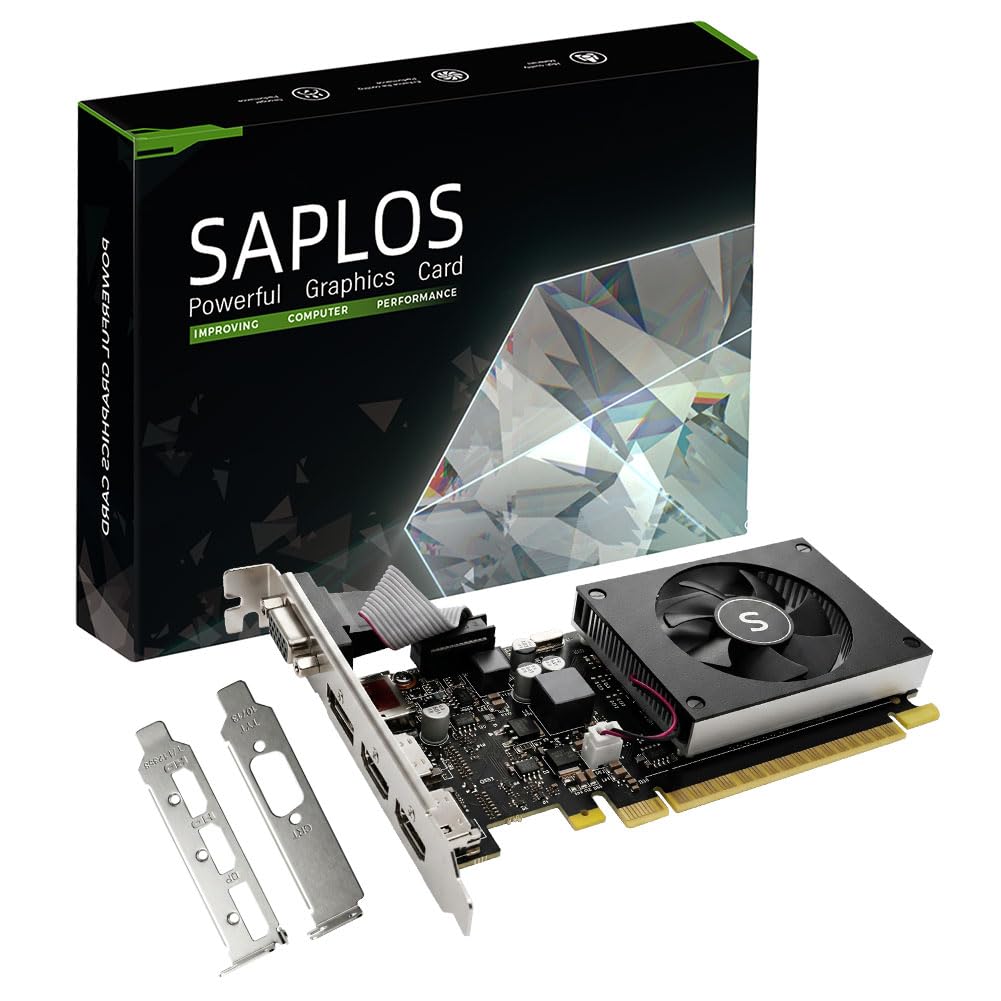
The SAPLOS GT 730 distinguishes itself with four physical display outputs — dual HDMI, one DisplayPort, and one VGA — supporting up to four simultaneous monitors at resolutions up to 2560×1600. For anyone running a trading desk, a CAD workstation, or a video surveillance setup, this port selection eliminates the need for display adapters and allows native connections to mixed-vintage monitors.
Built on NVIDIA’s Kepler architecture with 384 CUDA cores, the card delivers 4GB of GDDR3 memory at a 902 MHz engine clock. It draws under 30 watts from the PCIe slot and uses a single-slot, low-profile design that fits small form factor cases without blocking adjacent slots. Multiple verified reviews confirm plug-and-play operation on Windows 11 once the NVIDIA driver is fetched from the official site, with no BIOS fiddling required for most Dell and HP office machines.
The trade-off is that GDDR3 memory and a 64-bit bus cap its gaming potential — this is strictly a productivity and media card. Users attempting to game at 1080p will experience stutter in anything beyond very lightweight titles. The included low-profile bracket is removable for standard cases, but the VGA port must be unscrewed separately when switching to the slim bracket.
Why it’s great
- Native four-display support with dual HDMI
- Very low power draw, no external connector needed
- Single-slot design fits tight cases
Good to know
- GDDR3 memory limits gaming and 4K streaming
- VGA bracket removal required for low-profile installation
4. SOYO GT 740 4GB GDDR3
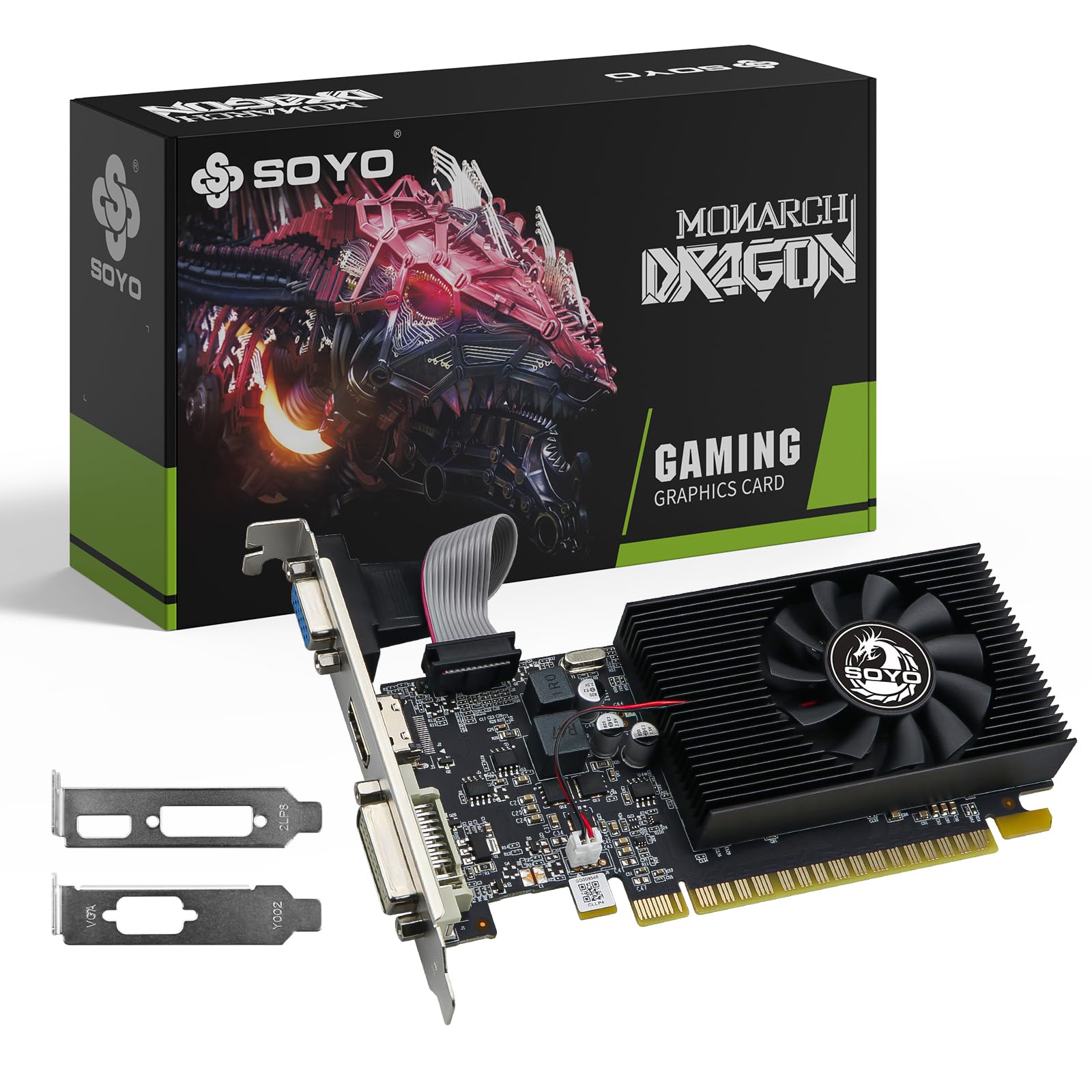
SOYO’s GT 740 is built around a 128-bit memory bus — double the width of most other cards at this price — which gives its 4GB of GDDR3 memory significantly more throughput for multi-tasking and multi-monitor office workflows than the typical 64-bit budget card. The engine clock sits at 993 MHz, and the 384 CUDA cores support DirectX 12 and OpenGL 4.6, making this one of the few sub- cards that runs a modern version of Windows 11 without driver workarounds.
The low-profile design ships with a standard bracket already attached, and the included low-profile bracket swaps in without tools. No external power connector is required — the card draws everything from the PCIe x16 slot. Verified buyers used it successfully to upgrade older motherboards that lacked onboard video, instantly satisfying the Windows 11 system requirement for a DirectX 12 capable GPU and enabling 1080p playback across up to three displays.
Despite the wider bus, the GDDR3 memory type keeps this card in office-and-light-gaming territory. It runs older titles like Battlefield 2 and War Thunder at playable frame rates on low settings, but anything from the last three years will struggle. The fan is audible under load, and the card height exceeds some true SFF chassis limits, requiring a case modification for the tightest Dell Optiplex models.
Why it’s great
- 128-bit memory bus improves multi-tasking performance
- No external power needed, easy legacy PC upgrade
- Works with Windows 11 out of the box
Good to know
- GDDR3 memory bottlenecks modern gaming
- Height may not fit some SFF cases without modification
5. maxsun GT 730 4GB GDDR3

The maxsun GT 730 carves out a niche with its ITX-friendly dimensions — 7.3 inches long and 4.4 inches wide — that slip into the tightest Mini-ITX cases where full-height cards would require a case swap. The 4GB of GDDR3 memory (64-bit bus) and 902 MHz engine clock are standard for the GT 730 platform, but the silver-plated PCB and all-solid capacitor build promise lower temperatures and higher electrical stability than the cheapest bare-board alternatives.
Triple simultaneous display support comes through HDMI, DVI, and VGA ports, with a maximum resolution of 3840×2160 at 30Hz over HDMI. The card is powered entirely by the PCIe 2.0 x16 slot and requires a 250-watt or greater power supply. Verified reviews note that it runs Minecraft and Warcraft on high settings smoothly and handles medium Steam gaming at 50-60 FPS, though it hesitates during heavy action sequences in more demanding titles.
The 8cm fan with an Eagle radiator system is quieter than many single-fan budget cards, but it is not silent — the whir is apparent in a quiet room. Some users reported needing to update the BIOS to set the video mode to Legacy on older motherboards before the card would output a signal. The GDDR3 memory and 64-bit bus also cap its 4K potential, as 3840×2160 output is limited to 30Hz.
Why it’s great
- Compact ITX size fits the smallest cases
- Triple display support with 4K HDMI output
- Silver-plated PCB and solid capacitors for stability
Good to know
- 4K limited to 30Hz over HDMI
- Driver may need Legacy BIOS mode for some motherboards
6. PowerColor RX 550 2GB GDDR5

The PowerColor RX 550 is the only AMD option in this lineup, using 512 stream processors on a 14nm Polaris core that boosts up to 1071 MHz. Its 2GB of GDDR5 memory on a 64-bit bus delivers memory bandwidth that surpasses any GDDR3-based card here, and the 6.0 Gbps memory clock pulls ahead in lightweight gaming and 4K video playback. The card draws well under 50 watts and runs nearly silent, with a compact 7.1-inch length that slides into most mid-tower and SFF cases.
Natively supports 4096×2160 output over HDMI, making it the strongest candidate in this price band for a home theater PC that needs 4K desktop resolution at 60Hz. The modern codec support (VP9, H.264, and partial HEVC hardware decode) means streaming services like YouTube and Netflix offload decoding from the CPU. Installation is a true plug-and-play experience on Windows 10 and 11, with AMD’s Adrenalin software handling driver detection automatically.
The major caveat is that this particular RX 550 variant uses a 64-bit memory bus rather than the standard 128-bit bus found on other RX 550 cards. That halves the memory bandwidth compared to a full-spec RX 550, which limits performance in games that rely on texture streaming. Also, the card requires that the system’s BIOS is set to UEFI mode rather than Legacy for stable boot on some older motherboards.
Why it’s great
- GDDR5 memory outperforms GDDR3 cards in the same tier
- Native 4K output at 60Hz over HDMI
- Near-silent operation and low power draw
Good to know
- Uses 64-bit memory bus (not the standard 128-bit)
- May require UEFI BIOS setting for stable boot
7. SAPLOS HD 6570 1GB GDDR3

The SAPLOS HD 6570 is the entry-level anchor of this list, targeting the lowest possible cost for adding a dedicated GPU to a very old office PC. Its 1GB of GDDR3 memory on a 64-bit bus and 650 MHz core clock are modest even by 2012 standards, but the card draws only 60 watts and requires no external power, making it a viable upgrade for decade-old systems like the Lenovo M93p and Dell Optiplex 3020 that lack any video output or have dying onboard graphics.
Dual HDMI outputs are a standout feature at this price point, allowing two modern monitors to connect without adapters. The maximum resolution is 1920×1080 per display, which matches the native resolution of most legacy office monitors. Verified buyers report that the card works immediately on Windows 7, 8, and 10, though the driver (Catalyst 15.7.1 or Crimson 16.2.1 Beta) is no longer officially supported by AMD. Windows 11 compatibility is not guaranteed.
The largest limitation is the discontinued driver support — any OS beyond Windows 10 loses AMD’s official security updates and bug fixes. The 1GB VRAM also prevents any meaningful gaming or 4K video playback. Some users reported color distortion when driving two monitors simultaneously, and the card’s performance in dual-monitor office use can be inconsistent. This is strictly a screen-output fix for a machine that otherwise works fine but has broken or absent video output.
Why it’s great
- Dual HDMI out for modern monitors without adapters
- Very low power draw ideal for old office PCs
- Works with legacy operating systems
Good to know
- Driver support discontinued — not recommended for Windows 11
- 1GB VRAM insufficient for any gaming or 4K video
FAQ
Can a GPU under run Windows 11 smoothly?
Which memory type is better for a budget GPU: 4GB GDDR3 or 2GB GDDR5?
Will a low-profile GPU fit in any small form factor case?
How many monitors can a sub- GPU drive simultaneously?
Can a GPU under handle 4K video playback?
Final Thoughts: The Verdict
For most users, the best gpu under 100 winner is the ASUS GT 1030 because it combines modern Pascal architecture, silent passive cooling, and genuine 1080p gaming capability in a package that fits almost any case and works with Windows 11 drivers from day one. If you need a four-monitor productivity setup, grab the SAPLOS GT 730 for its unmatched port selection. And for reviving a cramped SFF office PC, nothing beats the compact fit and driver support of the Glorto GT 730 GDDR5.