
Finding a graphics card that delivers smooth 1080p gaming with modern features like ray tracing and DLSS, all while staying within a strict budget, is the central challenge for most PC builders today. The market is flooded with options that either skimp on VRAM or require a power supply upgrade, making the selection process more about avoiding pitfalls than picking a winner.
I’m Mohammad Maruf — the founder and writer behind Drink4Good. I’ve spent countless hours analyzing hardware specifications, poring over thermal benchmarks, and reading through thousands of user experiences to separate the cards that genuinely deliver 1080p value from those that just look good on paper.
This guide cuts through the noise to present the most dependable options for a gpu under 300, focusing on real-world performance in the titles that matter most to budget-minded gamers.
How To Choose The Best GPU Under 300
Selecting the right graphics card at this price point is less about raw horsepower and more about balancing specific hardware requirements with your actual monitor resolution and game library. Three key areas demand your attention before you click “buy.”
VRAM: The 6GB vs 8GB Threshold
Video RAM is the single most limiting factor for longevity at this budget level. 6GB cards can handle most current titles at medium settings, but they will struggle with texture-heavy open-world games and are already hitting their ceiling. An 8GB card provides a meaningful safety buffer for the next generation of titles and allows for higher texture quality settings without stuttering.
Form Factor and Power Constraints
Not all cards fit all cases. If you are building in a small form factor (SFF) or upgrading a pre-built office PC like a Dell Optiplex, you need a low-profile card that does not require auxiliary power connectors. Standard dual-slot cards with a single 8-pin connector are the most common, but always measure your case clearance and check your power supply’s available wattage and cables.
Upscaling and Ray Tracing Priorities
NVIDIA’s DLSS and AMD’s FSR are image reconstruction technologies that boost frame rates with minimal quality loss. DLSS, especially version 4 on the newer RTX 5060 cards, offers a noticeable image quality advantage over FSR in supported titles. However, ray tracing at this budget level is still a performance-heavy feature — you will need to enable upscaling to maintain playable frame rates with ray tracing turned on.
Quick Comparison
On smaller screens, swipe sideways to see the full table.
| Model | Category | Best For | Key Spec | Amazon |
|---|---|---|---|---|
| ASUS Dual RTX 5060 OC | Premium | DLSS 4 and 1080p Ray Tracing | 8GB GDDR7, 2565 MHz OC | Amazon |
| GIGABYTE RTX 5060 Gaming OC | Premium | Thermal Performance and Quiet Operation | 8GB GDDR7, WINDFORCE Cooling | Amazon |
| PNY RTX 5060 Epic-X ARGB | Premium | Aesthetics and Triple-Fan Cooling | 8GB GDDR7, ARGB Lighting | Amazon |
| XFX Speedster SWFT210 RX 7600 | Mid-Range | VR and Linux Compatibility | 8GB GDDR6, 2655 MHz Boost | Amazon |
| ASRock Intel Arc B570 Challenger | Mid-Range | 1440p Gaming and Content Creation | 10GB GDDR6, 2600 MHz | Amazon |
| MSI RTX 3050 Ventus 2X OC | Mid-Range | Low-Profile Upgrades | 6GB GDDR6X, 1.49 GHz | Amazon |
| MSI Gaming RTX 3050 LP 6G | Mid-Range | Small Form Factor (SFF) Builds | 6GB GDDR6, Low Profile | Amazon |
| GIGABYTE RTX 3050 WINDFORCE OC | Value | Entry-Level 1080p and Office PCs | 6GB GDDR6, 96-bit Interface | Amazon |
| Maxsun GeForce RTX 3050 | Budget | Ultra-Compact SFF and 3D Design | 6GB GDDR6, Low Profile | Amazon |
In‑Depth Reviews
1. ASUS Dual NVIDIA GeForce RTX 5060 8GB GDDR7 OC Edition

The ASUS Dual RTX 5060 redefines what is possible at the upper boundary of this budget, bringing the Blackwell architecture and DLSS 4 to a price point previously reserved for last-gen hardware. The 8GB of GDDR7 memory on a 128-bit bus is a significant leap over the 6GB cards, providing the headroom needed for modern textures and higher resolutions. With an OC mode clock speed of 2565 MHz and a 150W TDP that often runs closer to 100W under typical gaming loads, it delivers performance that rivals the RTX 2080 Ti in rasterization while sipping power.
Users report exceptional 1080p performance, handling Fortnite at over 140 FPS and maintaining smooth frame rates in demanding titles with ray tracing enabled thanks to the AI-powered DLSS 4. The axial-tech fan design with 0dB technology ensures the card remains silent during lighter workloads, and its SFF-Ready status makes it a versatile choice for both compact and standard builds. The card includes two HDMI 2.1b and two DisplayPort 2.1b outputs, supporting up to four displays at 8K resolution.
The only caveat is the 8GB VRAM limit, which becomes apparent when pushing ray tracing in the most demanding AAA titles at 1440p. However, for the core 1080p gamer, this card is a masterclass in value, offering features and performance that were unthinkable at this tier just a year ago. It is the clear champion for anyone wanting the most future-proofed experience without crossing the price barrier.
Why it’s great
- GDDR7 memory and PCIe 5.0 provide massive bandwidth improvements over the RTX 4060
- DLSS 4 offers the best image upscaling technology for maintaining high FPS with ray tracing
- Excellent power efficiency with a typical gaming draw around 100W
Good to know
- 8GB VRAM can be limiting for heavy ray tracing at 1440p
- No RGB lighting for those who prefer a minimal aesthetic
2. GIGABYTE GeForce RTX 5060 Gaming OC 8G
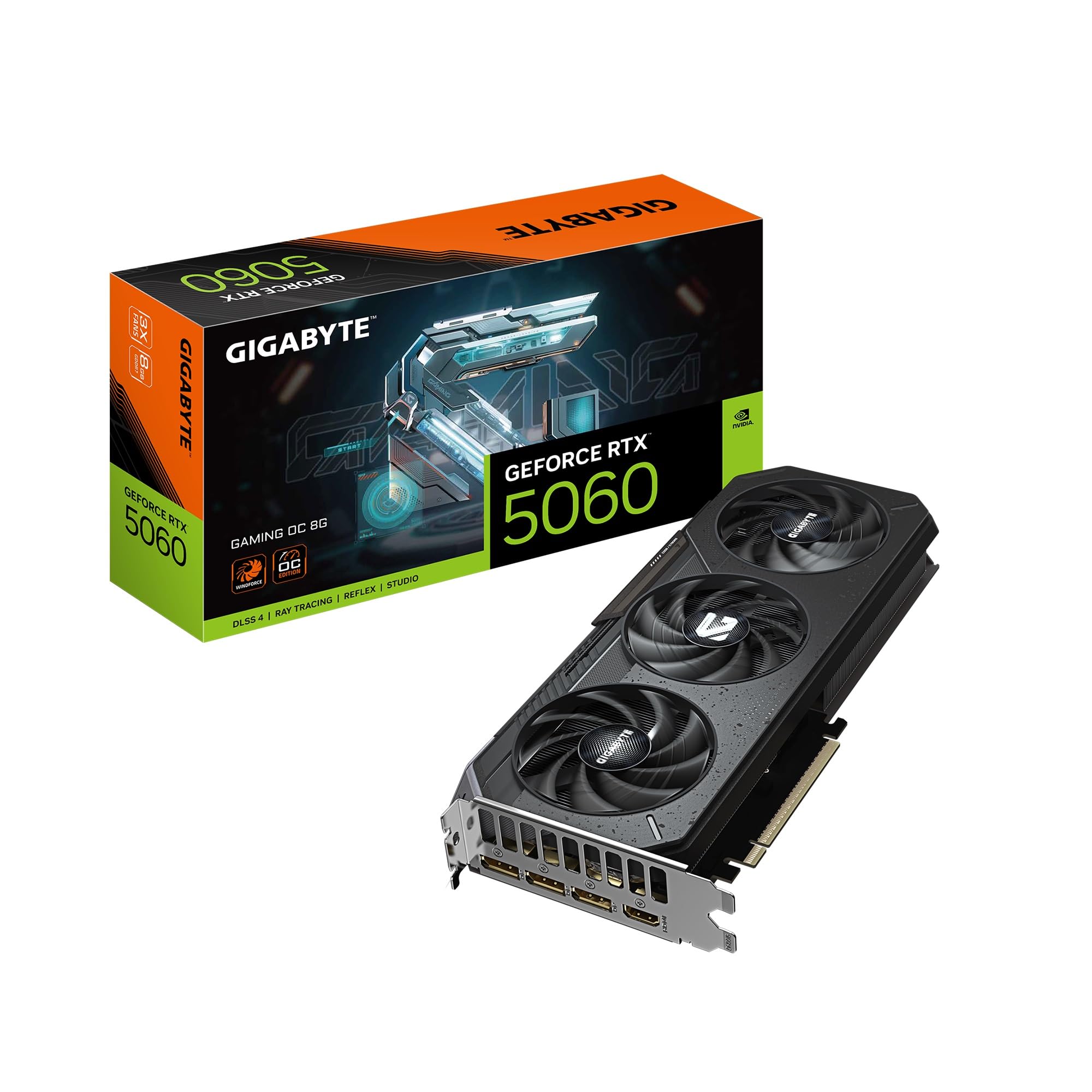
The GIGABYTE RTX 5060 Gaming OC distinguishes itself with a triple-fan WINDFORCE cooling system that keeps temperatures dramatically low, even under sustained load. Users consistently report the card staying under 60°C while running intensive titles like Cyberpunk 2077 with ray tracing and path tracing enabled. The 8GB of GDDR7 memory paired with a 2595 MHz boost clock ensures that 1080p gaming with ultra settings is not just possible but buttery smooth, with DLSS 4 providing the extra frame rate headroom for ray tracing.
One of the standout features is the physical design — at 11.06 inches long, it is compact for a three-fan card and includes a metal backplate that prevents GPU sag. The dual BIOS mode offers a silent profile for those who prioritize a quiet experience over absolute peak performance. Reviewers note that it is roughly 30% faster than an RTX 2070, making it a substantial upgrade for anyone coming from the GTX 10-series or earlier RTX 20-series cards.
The primary trade-off is the PCIe interface, which is listed as x8 rather than x16. While this has minimal impact on gaming performance with a modern CPU, it may slightly limit bandwidth in specific compute or professional workloads. For the pure gamer focused on 1080p, this card offers the best thermal performance and quietest operation in its class, backed by GIGABYTE’s reliable build quality.
Why it’s great
- Triple-fan WINDFORCE cooler keeps temperatures exceptionally low and fans near-silent
- DLSS 4 provides a significant performance uplift in supported titles
- Compact design with metal backplate prevents GPU sag in standard cases
Good to know
- PCIe interface is x8, which may slightly impact performance with very old CPUs
- 8GB VRAM is sufficient for 1080p but may require texture compromises at 1440p
3. PNY NVIDIA GeForce RTX 5060 Epic-X ARGB OC Triple Fan

The PNY RTX 5060 Epic-X ARGB is the card for builders who refuse to sacrifice aesthetics for performance. The triple-fan design with addressable RGB lighting allows full customization through the PNY software, syncing with your existing setup to create a cohesive look. Under the hood, it packs the same Blackwell architecture and 8GB of GDDR7 as its ASUS and GIGABYTE counterparts, delivering consistent 100+ FPS on high settings in most modern titles.
User feedback highlights the card’s reliability and ease of installation, with one reviewer noting a quick 24-hour delivery and seamless compatibility with an AMD Ryzen 5 9600X. The 2-slot design is a boon for mid-tower builds, leaving ample room for airflow. The included NVIDIA Reflex technology reduces system latency, which competitive gamers will appreciate for faster response times in shooters. The card supports up to four displays, including DisplayPort 2.1 and HDMI 2.1b, making it suitable for multi-monitor productivity setups as well.
The primary consideration is that the ARGB lighting adds a slight premium over non-RGB cards. Additionally, the card’s length is standard for a triple-fan design, so it will not fit in the smallest ITX cases. For those building a visually striking mid-range rig, the PNY Epic-X ARGB offers the perfect blend of modern features and customizable flair without compromising on the core gaming experience.
Why it’s great
- Customizable ARGB lighting adds visual appeal to any build
- Triple-fan cooling maintains low temperatures and quiet operation
- SFF-Ready 2-slot design fits in most mid-tower cases
Good to know
- ARGB premium may not appeal to users with no-window cases
- Standard triple-fan length will not fit in ultra-compact SFF cases
4. XFX Speedster SWFT210 Radeon RX 7600 8GB

The XFX Speedster SWFT210 RX 7600 is the definitive choice for AMD loyalists and users who require seamless Linux or VR compatibility. The RDNA 3 architecture delivers impressive 1080p and capable 1440p performance, with a boost clock reaching 2655 MHz. The 8GB of GDDR6 memory on a 128-bit bus ensures that modern games run smoothly at high settings, and the dual-fan cooling solution is both compact and effective, maintaining temperatures in the upper 70s°C under load without excessive fan noise.
A major advantage of this card is its out-of-the-box performance in Linux environments, where AMD’s open-source drivers provide a superior experience compared to NVIDIA’s proprietary counterparts. Users report easy transitions from older NVIDIA cards, with all displays working immediately after driver installation. The card’s performance in VR is particularly noteworthy, handling titles like Half-Life Alyx and Kayak VR Mirage at the highest settings with only minor stuttering in the most demanding scenes.
The XFX card lacks the AI-driven upscaling finesse of DLSS 4. Its FSR 3 technology is good but does not match the image quality of NVIDIA’s latest solution. Additionally, the card’s length at 9.49 inches may be tight for some smaller cases. For the value-conscious gamer who values open-source driver support and VR performance, the RX 7600 remains a formidable contender.
Why it’s great
- Excellent Linux compatibility with out-of-the-box open-source drivers
- Solid VR performance in the latest titles
- Compact dual-fan design with efficient cooling
Good to know
- FSR 3 upscaling is not as visually refined as DLSS 4
- May require driver updates to resolve initial system crashes
5. ASRock Intel Arc B570 Challenger 10GB OC

The ASRock Intel Arc B570 Challenger is the wild card in this segment, offering a compelling 10GB of GDDR6 memory on a 160-bit bus — a VRAM configuration that outclasses every other card in this guide. The Xe2-HPG architecture with Xe Matrix Extensions (XMX) powers Intel’s XeSS 2 upscaling technology, which is rapidly improving and closing the gap with DLSS. The GPU clock of 2600 MHz and memory speed of 19 Gbps make it a strong performer at 1440p, especially in modern titles that can leverage its architectural strengths.
Users report solid performance in games like Palworld and VRChat, as well as in productivity tasks like video editing with CapCut and music production with FL Studio. The dual striped axial fans with 0dB silent cooling technology keep the card quiet during light workloads, and the metal backplate adds structural rigidity to prevent sag. The inclusion of three DisplayPort 2.1 ports is a future-proofing feature that most competitors lack, supporting the highest refresh rates on upcoming monitors.
The caveat is that Intel Arc cards are sensitive to motherboard BIOS settings. Enabling Resizable BAR (ReBAR) and Above 4G Decoding is mandatory for optimal performance. Some users have reported driver-related blue screens that were resolved by clearing CMOS. For the tinkerer willing to adjust BIOS settings, the B570 offers unmatched VRAM capacity and strong 1440p potential at an aggressive price point.
Why it’s great
- 10GB VRAM is ideal for modern texture-heavy titles and 1440p gaming
- Three DisplayPort 2.1 ports offer state-of-the-art display connectivity
- Strong performance in content creation and productivity workloads
Good to know
- Requires Resizable BAR and Above 4G Decoding enabled in BIOS for full performance
- Driver maturity is still behind NVIDIA and AMD, with occasional software quirks
6. MSI GeForce RTX 3050 Ventus 2X 6G OC
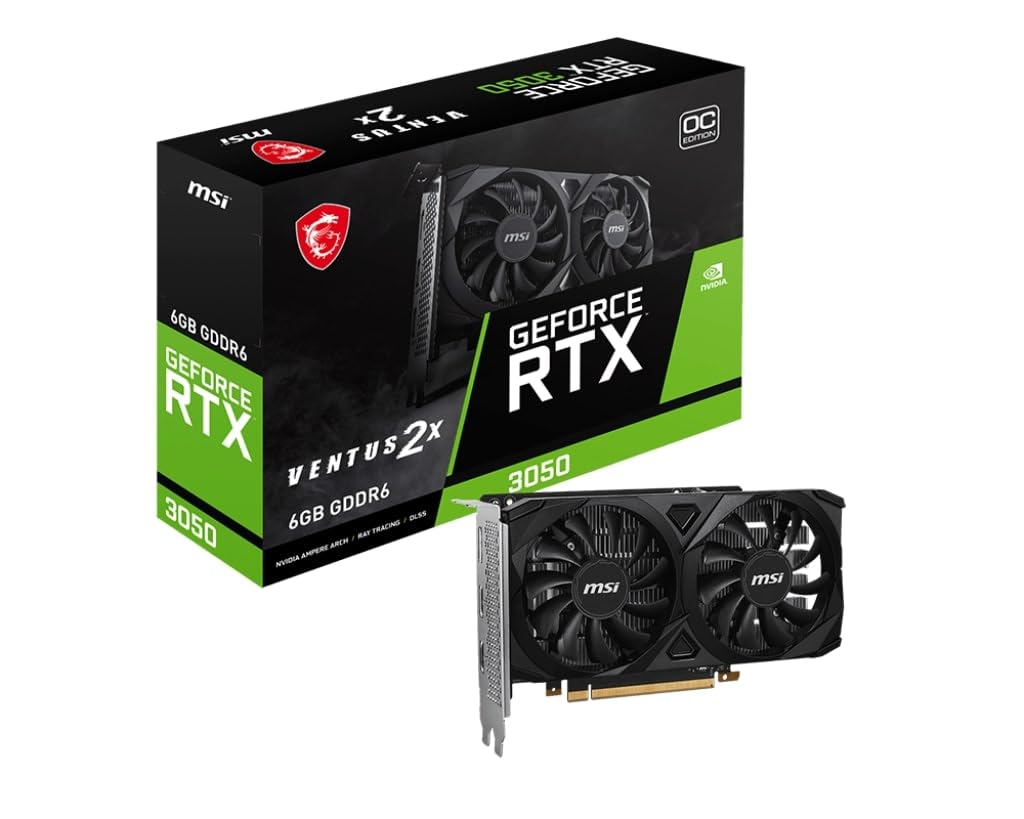
The MSI RTX 3050 Ventus 2X 6G OC is the go-to option for upgrading older office PCs or building a compact system where space and power constraints are the primary concern. Its low-profile form factor allows it to fit into HP Pavilion, Dell Optiplex, and other SFF cases without any modification, while its low power draw means it can run on the existing power supply without additional PCIe power cables in many configurations. The 6GB of GDDR6X memory offers a slight bandwidth advantage over standard GDDR6, and the 1.49 GHz boost clock delivers solid 1080p performance for esports and less demanding titles.
Users consistently praise the card’s plug-and-play nature, with many describing it as a transformative upgrade for decade-old machines, bringing new life to older computers for a fraction of the cost of a full system replacement. The MSI Twin Frozr cooling is remarkably quiet, with zero RPM mode keeping fans off during idle. The card even supports basic machine learning tasks and small AI model inference, making it a versatile option for light productivity work.
The 6GB VRAM is the primary bottleneck, limiting texture quality in newer AAA releases and making ray tracing a performance-heavy proposition. The PCIe x16 interface runs at x4 electrically on some older motherboards, which can impact performance. For the user with a pre-built desktop who wants a reliable, hassle-free graphics upgrade for 1080p gaming and general use, this card is an excellent fit.
Why it’s great
- Low-profile design fits in virtually any SFF or office PC case
- No additional power connector needed, works with existing PSU
- Near-silent operation with zero RPM fan mode
Good to know
- 6GB VRAM is the minimum for modern gaming and will require reduced textures
- Performance may be limited on older motherboards with x4 PCIe lanes
7. MSI Gaming RTX 3050 LP 6G OC

The MSI Gaming RTX 3050 LP 6G OC is purpose-built for the enthusiast who needs a compact card that does not compromise on output options. It features a low-profile bracket in the box and fits seamlessly into small form factor cases like the Dell Inspiron 3471 SFF without any physical modifications. The inclusion of two HDMI 2.1a ports and a single DisplayPort 1.4a output is a standout feature, allowing for easy connection to modern high-refresh-rate monitors and TVs. The boost clock of 1492 MHz with 14 Gbps memory ensures entry-level 1080p gaming is smooth, handling demanding titles at medium to high settings with DLSS enabled.
Users highlight the card’s compatibility with older business-class machines, with one reviewer successfully upgrading an HP desktop that significantly improved graphics and system speed. The MSI Twin Frozr cooling is reported to be quiet and efficient, with GPU temperatures around 78°C under load and a zero RPM idle mode. The card requires no additional power cables, drawing all its power from the PCIe slot, which is a critical feature when upgrading a pre-built system with a limited power supply.
The 6GB VRAM is the card’s main limitation, and a small number of users have reported a brief fan clattering noise on startup, which resolves within seconds. The included low-profile bracket is a major plus, but the card’s standard-height bracket is not included for users who might switch to a larger case later. For the SFF builder who needs the most connectivity options and a guaranteed fit, this is the optimal choice.
Why it’s great
- Includes low-profile bracket and fits most SFF cases without modification
- Two HDMI 2.1a ports provide excellent display connectivity
- No external power connector needed, runs entirely on PCIe slot power
Good to know
- 6GB VRAM limits texture quality in modern AAA titles
- Occasional fan noise reported on cold startup
8. GIGABYTE GeForce RTX 3050 WINDFORCE OC V2 6G

The GIGABYTE RTX 3050 WINDFORCE OC V2 is the entry-level champion, providing the most accessible path to the RTX ecosystem for users on a strict budget. This card excels in its simplicity — it requires no external PCIe power connection, drawing all necessary power from the motherboard slot, making it a drop-in upgrade for almost any desktop. The 6GB of GDDR6 memory on a 96-bit interface is enough for basic 1080p gaming, and the 2nd generation RT Cores allow for a taste of ray tracing in less demanding titles like Minecraft.
Users consistently describe the card as easy to install, with several first-time builders noting that a simple YouTube guide was all they needed to get it running. The performance uplift from integrated graphics or very old discrete cards (like a 2GB model) is described as transformative. The WINDFORCE dual-fan cooling keeps the card at reasonable temperatures even during extended gaming sessions, and the compact 7.5-inch length ensures it fits in nearly any case.
The 6GB VRAM is the card’s clear limitation, and the 96-bit memory interface is narrower than other RTX 3050 variants, which can impact performance in memory-intensive scenarios. The boost clock of 1477 MHz is also on the lower side. This card is best viewed as a reliable, no-fuss upgrade for general computing, light gaming, and breathing new life into an older PC, rather than a high-performance gaming solution.
Why it’s great
- Truly plug-and-play with no external power cables required
- Excellent for upgrading old office PCs or entry-level gaming systems
- Compact size fits in tight cases without issue
Good to know
- 96-bit memory interface is narrower than other 3050 cards, slightly reducing bandwidth
- 6GB VRAM is already feeling the strain from modern game textures
9. Maxsun GeForce RTX 3050 6GB Low Profile

The Maxsun GeForce RTX 3050 is the smallest and most power-efficient card in this roundup, designed specifically for the tightest of spaces. With dimensions of just 6.65 x 2.71 inches and a TDP of only 77W, it is the perfect candidate for ultra-compact ITX builds, Dell Optiplex SFF systems, and even specialized applications like 3D printer controllers. The card manages to pack the NV Ampere architecture, 6GB of GDDR6 memory, and support for DLSS into this minuscule form factor without requiring any external power connectors.
Users are impressed with its performance in small builds, reporting 80+ FPS in Fortnite and Warzone at 1080p. Solidworks users note excellent performance for 3D design work after a simple registry tweak to enable RealView. The card includes both standard and low-profile brackets, ensuring compatibility across case types. A Furmark score of over 3000 at a maximum of 77W demonstrates the card’s efficiency.
The Maxsun brand is less established than MSI or GIGABYTE, which may concern some buyers regarding long-term support and warranty. The fans are reported to be loud under load due to their small size, and the card runs hot, often requiring a fan speed tweak or case airflow optimization. It includes a 1-year warranty, which is shorter than the industry standard. For the builder who needs the absolute smallest footprint possible, this card is unmatched, but it requires acceptance of these trade-offs.
Why it’s great
- Ultra-compact form factor fits in the smallest SFF cases on the market
- Extremely low 77W TDP requires no additional power cables
- Delivers surprisingly good 1080p gaming performance for its size
Good to know
- Fans are loud under load due to the small, high-RPM design
- Less established brand with only a 1-year warranty
FAQ
Is 6GB of VRAM enough for gaming in 2025?
Can I use an RTX 5060 with an older power supply?
What is the Intel Arc B570’s biggest requirement to work properly?
Final Thoughts: The Verdict
For most users, the gpu under 300 winner is the ASUS Dual RTX 5060 OC because it delivers the most modern feature set including GDDR7 memory and the transformative DLSS 4 upscaling, future-proofing your build for years. If you need the smallest possible footprint for a compact SFF build, grab the Maxsun RTX 3050 for its unmatched size and modest power needs. And for a mix of VRAM capacity and 1440p potential, nothing at this price beats the ASRock Intel Arc B570 Challenger with its generous 10GB of memory.