
Greeting cards remain a deeply personal way to connect. But the gap between a store-bought card and the sentiment inside your head often feels impossible to bridge. A dedicated printer changes that — letting you control every detail from paper stock to ink saturation, ensuring the final piece communicates exactly what you intended.
I’m Mohammad Maruf — the founder and writer behind Drink4Good. I’ve spent years analyzing print hardware specifications, ink chemistry, and paper compatibility to identify which machines stand up to the demands of card-making without frustrating their owner.
The market now offers serious options for crafters at every level. This review breaks down the physical specs, real-world print behavior, and maintenance realities of each machine so you can choose the right greeting card printer for your specific project needs and budget.
How To Choose The Best Greeting Card Printer
Selecting a printer for greeting cards involves more than comparing page-per-minute speeds. The physical demands of card stock — its thickness, stiffness, and coating — require specific paper paths and roller designs. A printer that handles 20-pound bond paper flawlessly may jam repeatedly on 80-pound card stock. Understanding the mechanical and chemical factors below will prevent a costly mismatch.
Paper Handling and Media Path
The single biggest frustration with card-making printers is the paper path. Machines designed for flimsy office paper often struggle with card stock. Look for a rear straight-through feed or a dedicated photo tray that minimizes the paper’s turning radius. A straight path reduces curling and jams, especially when printing thick, double-sided cards. Entry-level units with only a U-turn paper path will force you to manually coax each sheet through.
Ink System and Color Gamut
Ink architecture determines whether your card’s colors appear vibrant or dull. Standard CMYK (cyan, magenta, yellow, black) systems produce acceptable results, but printers with additional ink channels — light cyan, light magenta, gray, or photo black — reproduce the subtle gradients found in photographs and watercolor-style artwork far better. Dye-based inks offer more brilliant colors, while pigment-based inks provide greater longevity and water resistance. For greeting cards, dye-based systems usually deliver the pop you want, but pigment systems are worth considering for keepsake quality.
Borderless Printing Capability
A full-bleed design with color running edge-to-edge is a hallmark of professional-looking cards. Not all printers that claim borderless support actually deliver it reliably on thick paper. Verify the maximum paper weight the printer can feed borderlessly. Many compact photo printers handle borderless 4×6-inch prints easily but struggle with larger sizes like 5×7 or A5. If you plan to print cards larger than standard photo sizes, borderless capability on card stock is a non-negotiable spec.
Quick Comparison
On smaller screens, swipe sideways to see the full table.
| Model | Category | Best For | Key Spec | Amazon |
|---|---|---|---|---|
| HP Envy Photo 7975 | All-in-One | Daily card making at home | Separate photo tray, 15 ppm black | Amazon |
| Epson XP-8800 | All-in-One | Lab-quality photo cards | 6-color Claria Photo HD ink system | Amazon |
| Canon PIXMA PRO-200S | Professional | Pro-level 13×19″ cards | 8-color dye-based ink system | Amazon |
| Canon Selphy CP1500 | Compact | Portable 4×6″ card printing | Dye-sublimation, 300×300 dpi | Amazon |
| Epson Artisan 1430 | Wide-Format | Large-format artisanal cards | 6-color Claria ink, 13×19″ borderless | Amazon |
| Cricut Joy Xtra | Cutting/Print | Die-cut card projects | Print-then-Cut with home inkjet | Amazon |
| HP Sprocket 2nd Ed. | Instant 2×3″ sticky card accents | Bluetooth 5.0, Zink zero-ink tech | Amazon | |
| Yoton Photo Printer | Portable | AR-enhanced 4×6″ cards | Dye-sublimation, Wi-Fi direct | Amazon |
| Bodno Seaory S25 | ID Card | Business/event card printing | YMCKO ribbon, single-card manual feed | Amazon |
In‑Depth Reviews
1. HP Envy Photo 7975

The HP Envy Photo 7975 is a mid-range all-in-one that balances photo quality and daily utility better than almost any other machine in this review. Its separate photo tray means you can load standard card stock without swapping out your plain paper, a small convenience that saves significant time during a card-making session. The auto-duplexing feature also lets you print the inside message and outside design in one go, reducing the chance of misalignment between sides.
The 7975 uses HP’s 64-series ink platform, which offers both standard and XL cartridges. Print speeds reach 15 pages per minute in black and 10 in color, though card-stock printing will run slower due to the thicker media. The 4.3-inch color touchscreen makes navigating card templates and print settings intuitive, and the built-in AI helps trim web-page content when you pull designs from online sources.
Photo quality is genuinely impressive for a sub-premium printer. Colors appear saturated without being oversaturated, and skin tones maintain natural warmth. The three-month Instant Ink trial included in the box gives you a buffer to gauge your monthly print volume before committing to a subscription. Just note that genuine HP cartridges carry a higher cost per page than some third-party alternatives.
Why it’s great
- Separate photo tray for card stock
- Automatic two-sided printing
- AI-assisted web print cleanup
- Fast setup and reliable Wi-Fi
Good to know
- Proprietary ink is expensive per page
- Some units report paper jam errors falsely
- No rear straight-through feed for heavy card stock
2. Epson Expression Photo XP-8800

The Epson XP-8800 uses a six-color Claria Photo HD ink system — adding light cyan and light magenta to the standard CMYK set. This extra ink architecture produces smoother gradients and more accurate skin tones than four-color machines, making it ideal for cards featuring portrait photography or watercolor washes. The printer also has two separate paper trays: one for plain paper and one for photo paper, letting you keep card stock loaded and ready.
Borderless 4×6-inch prints emerge in about 10 seconds, a pace that makes batch card production feel fluid. The 4.3-inch color touchscreen uses Epson’s Easy Mode, which enlarges buttons and simplifies navigation for less tech-oriented users. The flatbed scanner and copier are genuinely useful for digitizing hand-drawn card elements or reproducing vintage artwork.
Print quality approaches lab-grade results. Heavy card stock feeds cleanly from the rear specialty paper slot, and the printer handles weights up to about 300 gsm without complaining. The Epson Smart Panel app provides remote control and ink-level monitoring, but the printer also offers Wi-Fi Direct, so you can print without a router. The main trade-off is ink economy: the included cartridges are starter-size, so you will need to purchase full replacements sooner than expected.
Why it’s great
- Six-color ink for superior photo gradients
- Dual paper trays for card stock and plain paper
- Fast 10-second borderless 4×6 prints
- Rear feed for heavy media
Good to know
- Starter ink cartridges are low capacity
- Setup can be finicky with phone connection
- Black text on plain paper is just average
3. Canon PIXMA PRO-200S

The Canon PIXMA PRO-200S is a dedicated photo printer designed for users who need gallery-quality results on large card formats. Its eight-color dye-based ink system includes gray and photo blue in addition to the typical CMYK plus light cyan and light magenta. This palette allows the PRO-200S to render subtle tonal transitions and desaturated colors that standard printers muddy. The maximum media width of 13 inches supports 13×19-inch borderless prints, covering oversized card bases and envelope liners.
Print speed is reasonable for a pro machine — about 53 seconds for a bordered 8×10 and 90 seconds for an A3+ print. The 3.0-inch color LCD monitor provides ink level checks and status updates, though the interface is more utilitarian than the touchscreens on all-in-one units. The printer connects via USB and Ethernet, with wireless as a secondary option. It does not scan or copy; this is a single-purpose device for output only.
Ink consumption is the primary tension point for semi-regular users. The PRO-200S uses eight individual ink tanks, and while they do not run out as fast as some reviews claim, the cost of replacing all eight simultaneously is significant. The machine also weighs 32 pounds, so it is not intended to be moved frequently. For card makers who produce high-margin artisanal goods or premium wedding stationery, the print fidelity justifies the investment.
Why it’s great
- Eight-color system for unmatched color depth
- Borderless up to 13×19 inches
- Quiet operation during long print runs
- Consistent pro-level output
Good to know
- High ink replacement cost
- No scanner or copier built in
- Heavy and large footprint
4. Canon Selphy CP1500 Bundle

The Canon Selphy CP1500 uses dye-sublimation technology, which heats solid dyes into a gas that bonds to the paper’s coating. This process produces continuous-tone prints with no visible dot pattern, giving your card photos a smooth, professional look. The bundle includes the KP-108IN ink and paper set, providing 108 sheets of 4×6-inch postcard-sized paper and three matching ink cartridges. It also comes with a six-slot memory card holder, a pack of screen protectors, and a screen cloth.
The printer supports four paper sizes, including 2.1×3.4-inch adhesive stickers, which work perfectly for card embellishments. Connection options include built-in Wi-Fi for use with the SELPHY Layout app and direct USB input from a flash drive or memory card. The app lets you assign gloss, semi-gloss, or satin finishes per print, adding a customizable texture element to your cards. The optional battery pack makes this printer portable enough for craft fairs or workshops.
Print resolution is 300×300 dpi with 16.7 million colors. While the resolution is lower than what many inkjet printers claim, the continuous-tone nature of dye-sublimation makes the output appear smoother than a dot-based inkjet of similar spec. The paper is thick and glossy, with a protective laminate layer that makes prints water- and fingerprint-resistant. The trade-off is the per-print cost, which runs higher than inkjet equivalents, and the limitation to standard photo sizes rather than custom card dimensions.
Why it’s great
- Smooth continuous-tone prints with no dots
- Water- and fingerprint-resistant finish
- Portable with optional battery pack
- Multiple paper sizes including adhesive stickers
Good to know
- Higher cost per print than inkjet
- Limited to 4×6-inch maximum
- Slower print speed for single prints
5. Epson Artisan 1430

The Epson Artisan 1430 remains a cult favorite among scrapbookers and card makers for its ability to print borderless images up to 13×19 inches on a six-color Claria ink system. The wide-format capability means you can print two A5-sized greeting cards on a single sheet, then cut them apart, effectively doubling your output per print cycle. The printer also handles CD and DVD printing, a niche feature for creating custom card packaging or disc-based photo gifts.
Print quality is vibrant and consistent, especially when using Epson’s advanced paper profiles. Colors match screen previews closely when configured correctly, which is essential for reproducing logo colors or brand-specific palettes for business cards. The Artisan 1430 also works well with third-party continuous ink supply systems (CISS), dramatically reducing the per-print cost for high-volume card producers. Many experienced users report running thousands of prints through CISS-equipped units without issues.
The major drawback is age: this model launched years ago, so you will not find modern features like wireless direct printing from phones without a computer. Setup requires a USB cable (not included) and software installation from a CD-ROM. The printer also lacks automatic duplexing, so double-sided cards require manual intervention. For card makers who prioritize print area and color fidelity over convenience features, the Artisan 1430 still competes.
Why it’s great
- Borderless 13×19-inch prints
- Works reliably with CISS ink systems
- Excellent color matching with proper profiles
- CD/DVD printing capability
Good to know
- No wireless direct phone printing
- No automatic duplex for double-sided cards
- Requires USB cable for initial setup
6. Cricut Joy Xtra Bundle
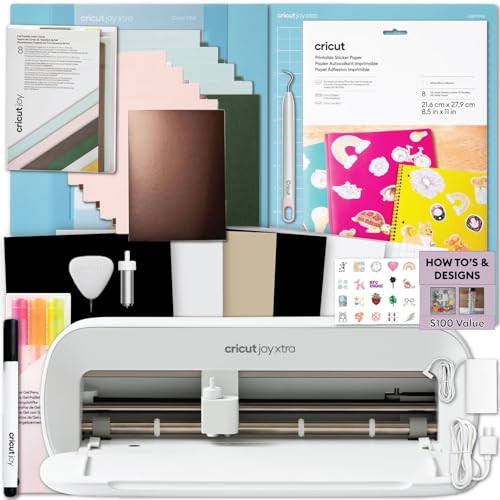
The Cricut Joy Xtra is not a printer — it is a cutting machine that works in tandem with your existing home inkjet printer to produce full-color stickers, card cutouts, and shaped cards. The Print-then-Cut workflow lets you design multicolored artwork in Cricut Design Space, print it on your inkjet using the included printable sticker paper, then load the printed sheet into the Joy Xtra, which precisely cuts around your designs. This combination is ideal for cards with custom die-cut shapes, layered paper elements, or stickers that decorate the envelope.
The bundle includes the Joy Xtra machine, a pack of printable sticker paper, a card kit with envelopes, a pen set for writing and drawing, and two cutting mats (standard grip and card mat). The machine cuts over 50 materials, including card stock, vinyl, and HTV. The Bluetooth-only connectivity works with the free Design Space app on your phone or computer, and the cutting area measures 12 inches by 6 inches — enough for most standard card faces.
The key limitation is that you still need a separate inkjet printer for the color printing step. The Joy Xtra handles only the cutting, scoring, and drawing. If you want to print and cut cards entirely in one device, this is not the solution. But for card makers who already own a decent inkjet and want to add precise die-cutting capability, the Joy Xtra unlocks design possibilities that no standalone printer can match.
Why it’s great
- Creates custom die-cut cards and stickers
- Writes, draws, and foils with tool swaps
- Compact size fits small craft spaces
- Large design library in Design Space app
Good to know
- Requires a separate inkjet printer for color prints
- Bluetooth-only connection limits placement range
- Not compatible with all printer brands for registration marks
7. HP Sprocket Portable Photo Printer 2nd Edition
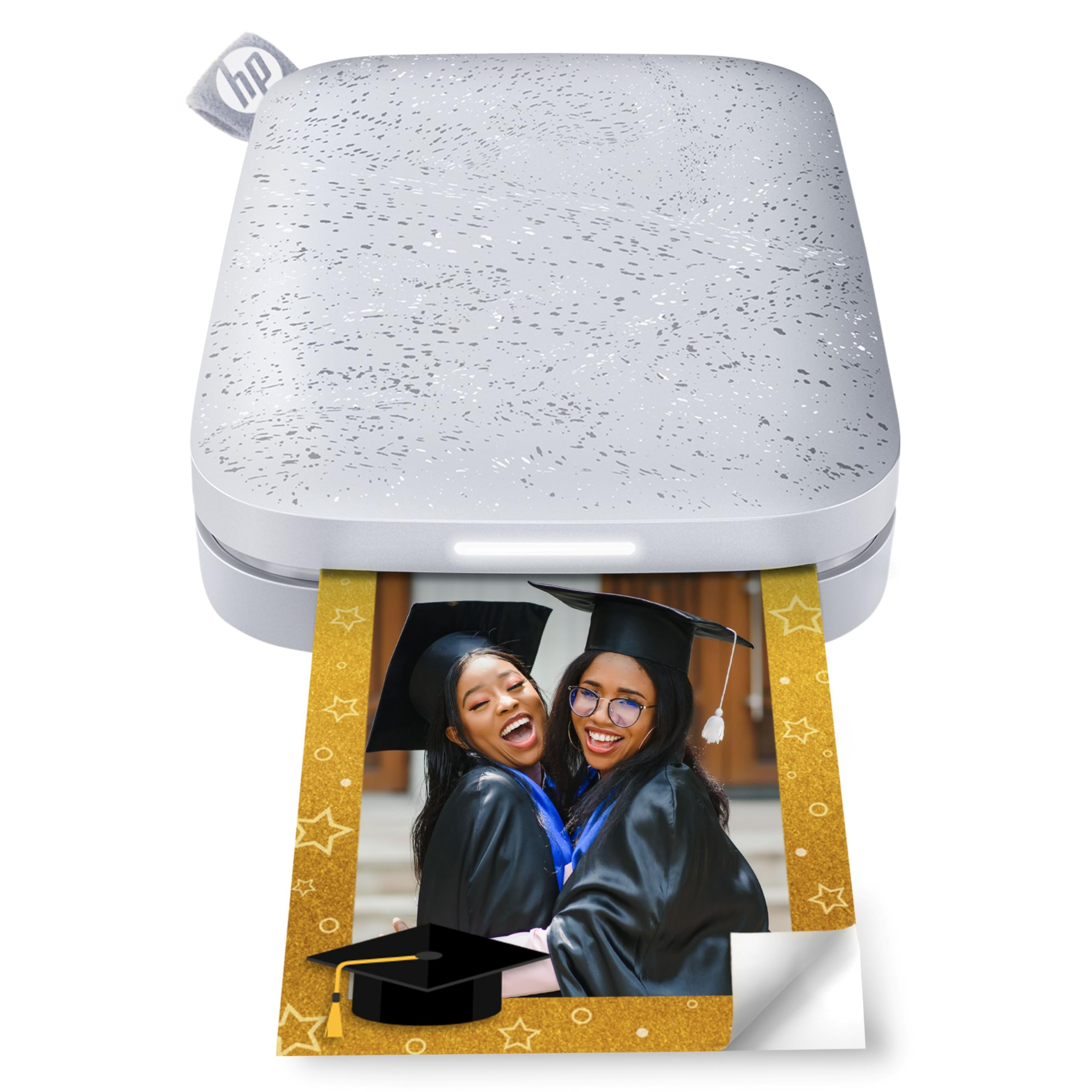
The HP Sprocket is a pocket-sized printer that uses Zink (zero-ink) technology, embedding color crystals in the paper that activate when heated. The result is a smudge-proof 2×3-inch print with a peel-and-stick backing, turning every photo into a sticker. This form factor is perfect for adding small photo accents to greeting cards — a tiny portrait of the recipient, a snapshot of a shared memory, or a decorative sticker that seals the envelope flap.
The second edition adds Bluetooth 5.0 for better connection stability and a sleep mode that preserves battery life. The app supports multi-device printing with personalized LED light indicators, showing whose photo is currently printing. The augmented reality feature lets you scan a printed photo with your phone to access a virtual queue of print jobs, but the core value remains the instant, portable printing experience. The included 10-sheet Zink paper pack gives you immediate starter material.
Print quality is decent for the 2×3-inch size but not comparable to larger inkjet prints. Colors tend toward a slight magenta or blue cast, and you will need to edit your photos within the app — adjusting tint, brightness, and contrast — to achieve balanced results. The cost per print runs higher than bulk inkjet options. For card makers attending craft fairs or events, the Sprocket works as a live printing station where guests receive custom 2×3 stickers to attach to their purchased cards.
Why it’s great
- Fits in a pocket or purse for on-the-go printing
- Peel-and-stick prints double as card decorations
- Zink technology means no ink cartridges to replace
- Multi-device connection for group use
Good to know
- Small 2×3-inch print size only
- Color cast requires photo editing in the app
- High per-print cost compared to bulk inkjet
8. Yoton Photo Printer

The Yoton Photo Printer brings dye-sublimation printing to a budget-friendly price point, producing 4×6-inch prints that rival the smudge-proof, water-resistant quality of the Canon Selphy line. It includes 54 sheets of paper and one ink ribbon in the box, giving you immediate starter material. The compact body measures 7.1 by 4.9 by 2.2 inches, small enough to slip into a backpack alongside your card-making supplies.
The standout feature is AR video printing: you can capture up to 15 seconds of video and print a still image linked to that footage. When scanned with the Yoton app, the printed photo plays the video on your phone screen. For birthday or anniversary cards, this transforms a static photo into a kinetic memory. The built-in Wi-Fi creates a direct connection between your phone and the printer, removing the need for an external network connection during use.
The biggest friction point is setup reliability. Several users report difficulty connecting to the printer’s Wi-Fi, especially on iPhones, and the app requests precise location tracking and extensive permissions during configuration. The printer body itself feels somewhat lightweight and less robust than comparable Canon units. When the connection works, print quality is genuinely excellent — vibrant colors and sharp detail that matches full-size office printers. For patient users willing to work through setup quirks, the Yoton delivers impressive output for its price class.
Why it’s great
- AR video printing adds interactive card elements
- Dye-sublimation output is water and smudge resistant
- Comes with 54 sheets of paper and one ink ribbon
- Built-in Wi-Fi works without router
Good to know
- Frustrating Wi-Fi and app setup process
- Lightweight build feels less durable
- App requires extensive permissions
9. Bodno Seaory S25 ID Card Printer

The Bodno Seaory S25 is a dedicated ID card printer that uses YMCKO ribbon technology to print full-color images, text, barcodes, and QR codes onto blank PVC cards. While not designed for traditional paper greeting cards, it serves a distinct niche: printing personalized event badges, membership cards, or premium business cards that double as keepsakes. The manual feed system processes one card at a time, which reduces waste and allows precise positioning.
The all-inclusive Bronze Edition bundle includes the printer, a Seaory 11011 color ribbon good for 100 prints, and Bodno’s Bronze Edition software with a lifetime license. The software offers pre-made templates and drag-and-drop design functionality, uploading images and text directly to the card layout. The printer is compatible with Windows, Mac, and Linux, and comes with a two-year hardware warranty plus lifetime software support.
Print quality is consistently professional, with crisp text, vivid colors, and clear photo reproduction. The YMCKO ribbon applies a protective overlay that makes cards durable and resistant to scratches. Speed is competitive for single-card production, with a color card printing in about 18 seconds. The main limitation for card makers is the specialized media: you are confined to PVC card stock in credit-card dimensions, not flexible paper or envelopes. For event planners creating VIP access cards or wedding favor tags, this dedicated tool outperforms any general-purpose printer.
Why it’s great
- Professional ID-card quality with protective overlay
- Manual feed control reduces media waste
- Lifetime software license with template library
- Two-year hardware warranty with responsive support
Good to know
- Only prints on rigid PVC card stock in credit-card size
- Not suitable for paper greeting cards or envelopes
- Single-card manual feed not for high-volume batch runs
FAQ
Can I print greeting cards on any home printer?
What paper weight is best for greeting card printing?
Is dye-sublimation better than inkjet for greeting cards?
Final Thoughts: The Verdict
For most users, the greeting card printer winner is the HP Envy Photo 7975 because it offers the best balance of photo quality, paper handling versatility, and all-in-one functionality for the typical home card maker. If you want lab-grade color accuracy and borderless prints up to 13×19 inches, grab the Epson Expression Photo XP-8800. And for maximum creative control with die-cut shapes and layered card elements, nothing beats the Cricut Joy Xtra paired with a capable inkjet.