
A gaming PC build lives or dies by its chassis. The wrong case chokes your components with stagnant air, turns cable management into a nightmare, and traps dust inside a hot glass box. The right case delivers directed airflow paths, tool-less component access, and enough fan mounting points to keep a high-wattage GPU and CPU running cool even under sustained load.
I’m Mohammad Maruf — the founder and writer behind Drink4Good. I’ve spent years analyzing case schematics, fan static pressure specs, radiator clearance charts, and real-world thermal tests to separate showpieces from genuinely functional chassis.
Whether you want a tempered-glass showcase or a high-airflow workhorse, the best gaming pc case balances pre-installed fan quantity, GPU clearance, cable routing depth, and material gauge to match your specific build priorities without wasting space or budget.
How To Choose The Best Gaming PC Case
Choosing a chassis is about matching your hardware dimensions to the case’s internal volume and airflow design. A case with great aesthetics but tight GPU clearance will force you to compromise on cooling solutions. You need to evaluate clearance, fan configuration, and build quality in that order.
GPU and Cooler Clearance
Measure your graphics card length and CPU cooler height before selecting a case. Modern high-end GPUs routinely exceed 340mm, and large air coolers like the Noctua NH-D15 reach 165mm tall. Cases that support 400mm+ GPUs and 175mm+ coolers give you the freedom to upgrade without swapping chassis later. Ignoring these two dimensions is the most common reason builds that look good on paper fail to fit in reality.
Fan Configuration and Airflow Path
The number of pre-installed fans matters less than their orientation and speed control. Reverse-blade fans mounted on the side or bottom draw fresh air directly onto the GPU shroud, while standard rear/top fans exhaust. Look for cases with at least three intake positions and one exhaust position, all supporting PWM control so you can tune the fan curve for noise or performance. Dust filters on all intake panels are non-negotiable for keeping internal components clean over years of use.
Build Quality and Material Gauge
The thickness of the steel frame directly affects rigidity and vibration transfer. Cases using 0.8mm or thicker steel panels (some premium models reach 1.2mm) resist flexing when transporting the system and dampen fan vibrations better than thinner panels. Tempered glass side panels should use reinforced mounting points or grommets to avoid cracking from over-tightened screws. Seek out cases that use tool-less panel removal for both side panels to simplify future component swaps.
Quick Comparison
On smaller screens, swipe sideways to see the full table.
| Model | Category | Best For | Key Spec | Amazon |
|---|---|---|---|---|
| CORSAIR 4000D RS Frame | Mid-Tower | Modular builds with high airflow | InfiniRail fan mounting, 360mm rad support | Amazon |
| Geometric Future M5 | Mid-Tower | Enthusiast E-ATX builds with 420mm rads | 1.2mm steel, 5x 140mm fans pre-installed | Amazon |
| MONTECH King 95 PRO | Mid-Tower | Curved glass showpiece with six fans | Dual-chamber, curved tempered glass front | Amazon |
| Lian Li LANCOOL 217 | Mid-Tower | Quiet builds with large 170mm front fans | Two 170x30mm PWM fans, wood accents | Amazon |
| Lian Li V100 | Mini-Tower | Compact builds with display platform | 4x 120mm ARGB fans, 420mm GPU support | Amazon |
| MUSETEX Y6 | Mid-Tower | Value builds with six RGB fans | 6x PWM ARGB fans, 270° glass view | Amazon |
| MONTECH XR-B | Mid-Tower | Budget-friendly builds with wood grain IO | 3x 120mm ARGB fans, 360mm rad support | Amazon |
In‑Depth Reviews
1. CORSAIR 4000D RS Frame Modular

The CORSAIR 4000D RS Frame redefines modularity with its FRAME system, allowing you to swap the motherboard tray for billet aluminum or upgrade the front I/O panel for more USB ports as your needs evolve. The 3D Y-pattern steel front panel maximizes airflow while maintaining structural rigidity, and the InfiniRail mounting system lets you slide fans up to 200mm along the front or 140mm along the roof without fixed mounting constraints.
Three pre-installed CORSAIR RS PWM fans support daisy-chainable 4-pin connections and Zero RPM mode for near-silent operation at low loads. The internal side panel can function as a cable cover for a clean look or be removed entirely to mount fans for increased cooling potential. GPU clearance is generous enough to fit modern high-end cards, and the chassis supports multiple 360mm radiator configurations.
Builders report excellent airflow with no dead zones, quiet operation when fan curves are tuned, and consistent long-term temperatures. Minor trade-offs include a tight PSU area when the HDD cage is installed, and the glass side panel removal process requires care to avoid breakage. Overall, this is the most adaptable chassis in its class for users who want future-proofing without switching cases.
Why it’s great
- InfiniRail system allows unlimited fan positioning
- Ample clearance for 360mm AIOs and large GPUs
- Quiet RS fans with Zero RPM mode at low load
Good to know
- Glass panel removal can be tricky and fragile
- PSU area gets tight with HDD cage in place
- No rubber grommets on cable routing holes
2. Geometric Future M5 Tempered Glass Mid Tower

The Geometric Future M5 uses 0.8–1.2mm thick steel for exceptional rigidity, preventing chassis flex during transport and dampening fan vibrations effectively. It ships with five 140mm ARGB PWM fans pre-installed, delivering high static pressure at lower RPMs compared to 120mm fan configurations. The tool-less tempered glass panels feature a screwless design that makes component access fast without sacrificing panel security.
Extreme cooling headroom is the M5’s defining strength — it supports radiators up to 420mm and can accommodate up to ten 120mm fans. The case fits E-ATX motherboards, GPUs up to 460mm, and modular PSUs up to 160mm, making it one of the most spacious mid-tower chassis on the market. A unique PSU shroud with a display window lets you showcase custom sleeved cables or the PSU itself.
Builders praise the straight-edge aesthetic, excellent airflow, and comprehensive cable management accessories included in the box. The main caveat is that the PSU cage limits space for larger power supplies, so a smaller modular PSU is recommended for a clean build. Some users note that the open design can be louder than fully enclosed cases, and the bottom intake is the only filtered panel.
Why it’s great
- Thick 1.2mm steel frame resists flex and vibration
- Five 140mm PWM fans provide high airflow at low noise
- Supports up to 420mm radiators and E-ATX boards
Good to know
- PSU cage limits large power supply options
- Open design can produce audible fan noise
- Only bottom intake is dust filtered
3. MONTECH King 95 PRO Dual-Chamber
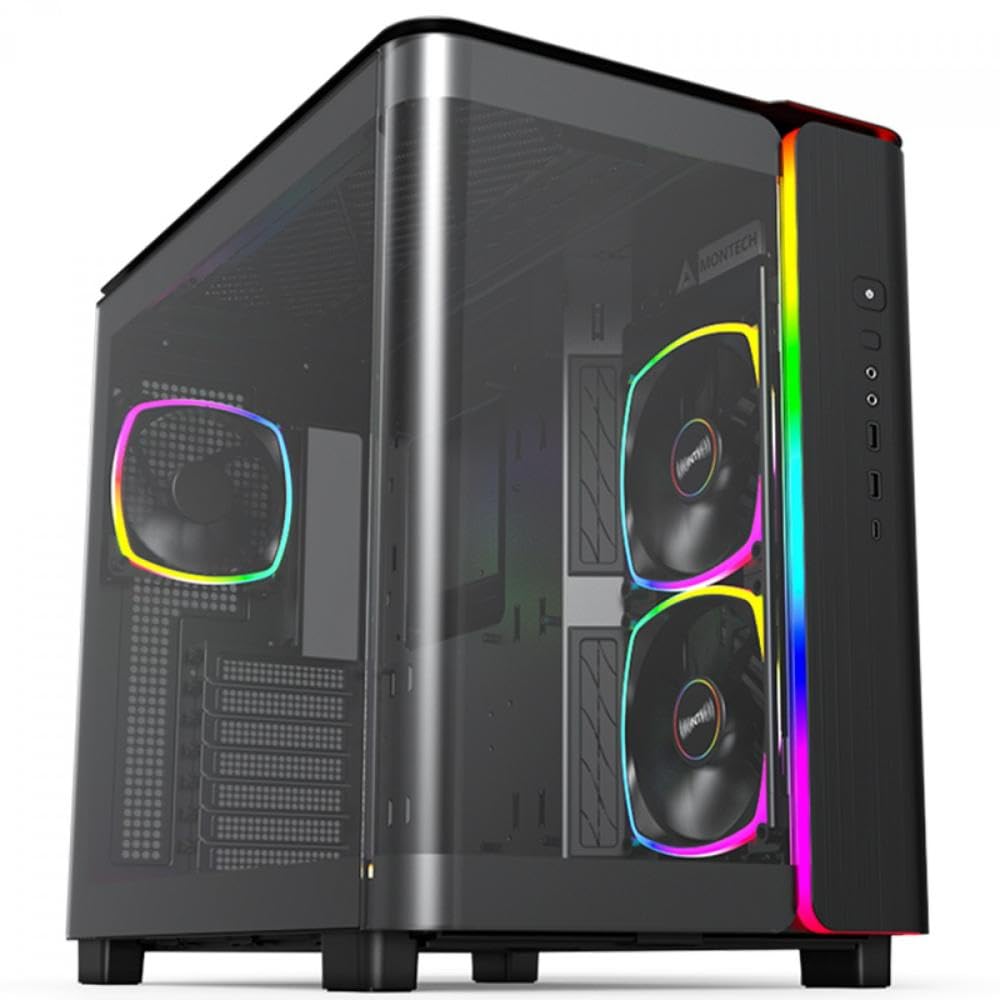
The MONTECH King 95 PRO uses a dual-chamber layout to separate the motherboard, GPU, and cooling from the PSU and cable routing area, creating a clean front-facing aesthetic with minimal visible wiring. Its standout feature is the curved tempered glass front panel that wraps around the chassis, providing a panoramic view of your components without sharp edges. The case comes with six ARGB PWM fans (two 140mm and four 120mm) connected to a pre-installed fan hub for centralized control.
The dual-chamber design also improves airflow by directing cool intake air directly onto the GPU and exhausting hot air through the rear and top without mixing with the PSU’s heat output. GPU clearance is generous enough for the latest high-end cards, and the removable front and side panels make component access straightforward. The included mesh panel offers an alternative front option for users who prioritize airflow over glass aesthetics.
Users consistently report excellent CPU and GPU temperatures under full load, with the fan hub handling speed control via PWM sync. The main downsides are the case’s significant weight (over 26 pounds) and large footprint, which requires extra desk space. Under heavy load, the fans can become audible, though this is manageable with custom fan curves. The build quality feels premium, with flush panel gaps and a sturdy frame.
Why it’s great
- Dual-chamber design hides cables and separates heat zones
- Curved tempered glass front offers panoramic component view
- Six pre-installed ARGB fans with included fan hub
Good to know
- Heavy chassis at 26 pounds needs robust support
- Larger than most mid-towers, measure your space
- Fans can get noisy under sustained high load
4. Lian Li LANCOOL 217

The Lian Li LANCOOL 217 sets itself apart with genuine walnut wood accents integrated into the front panel and I/O area, creating a modern aesthetic that blends natural materials with high-performance PC hardware. It ships with five PWM fans: two massive 170x30mm front fans, two 120mm reverse-blade side fans, and a 140mm rear exhaust. The 170mm front fans can be repositioned vertically — raising them directs airflow toward the CPU, while the default position balances GPU and CPU cooling.
The chassis supports back-connect motherboards (ASUS BTF, MSI Project Zero) for completely hidden cable routing, with dual PSU mounting options that let you install the PSU facing front or rotated for easier cable management. The tool-less glass panels snap on securely with alignment pins, eliminating the need for screws. GPU clearance is generous, and an adjustable GPU support bracket prevents sag on heavy cards.
Builders praise the exceptional airflow from the 170mm fans, which move large volumes of air at lower RPMs, keeping noise levels inaudible under typical loads. The wood accents add a warm, premium touch that stands out from the all-metal competition. The only real compromise is that the stock fans lack RGB lighting, but the chassis includes channel for adding your own strips if desired.
Why it’s great
- Two 170x30mm fans provide massive airflow at low noise
- Genuine walnut wood accents for premium look
- Tool-less glass panels and toolless fan relocation
Good to know
- Stock fans are non-RGB, no lighting included
- Dual PSU mounting requires planning for cable routing
- Large chassis may not fit on smaller desks
5. Lian Li V100 ATX Mid-Tower

The Lian Li V100 packs a unique display platform into a compact chassis: a slanted front PSU shroud with a dedicated surface for figures or collectibles, keeping the case streamlined when not in use. It comes with four pre-installed PWM 120mm ARGB fans that reach 1800 RPM and deliver CFM ratings between 60.4 and 61.47, paired with an integrated 26-LED ARGB strip for customizable lighting effects that sync with motherboard software.
Despite its classification as a mini-tower, the V100 supports ATX and Micro-ATX back-connect motherboards, GPUs up to 420mm, CPU coolers up to 178mm, and 360mm radiators. The tool-less panel removal system uses lock-in panels with thumb screws, making access to internal components fast. An included GPU sag bracket prevents droop on heavy cards, and the daisy-chain fan cabling simplifies wiring significantly.
Users consistently describe the V100 as a dream to build in, with pre-managed cables, spacious interior, and excellent airflow from the four fans. The display platform is a conversation starter for anyone who wants to showcase a figure or collectible alongside their hardware. Minor concerns include fan wobble at high RPMs for some units, and the single 2.5-inch drive bay may be limiting for users with many SSDs.
Why it’s great
- Unique display platform for figurines or collectibles
- Compact size supports full ATX and 420mm GPUs
- Tool-less panels and daisy-chain fan cabling simplify builds
Good to know
- Only one 2.5-inch drive bay included
- Some fans exhibit wobble at maximum RPM
- Cable management can be tight with bulky cables
6. MUSETEX ATX PC Case Y6

The MUSETEX Y6 comes with six pre-installed PWM ARGB fans, including two reverse-blade side fans that draw air directly onto the GPU while maintaining a clean visual from the 270-degree dual tempered glass panels. The chassis uses an innovative air duct design with side panel openings to channel cool air to the hottest components. The top and bottom magnetic dust filters reduce maintenance frequency while maintaining thermal efficiency.
Internal layout supports GPU up to 400mm, CPU coolers up to 176mm, and top-mounted 360mm liquid coolers. The PSU compartment accepts units up to 200mm long. The front I/O includes USB 3.2 Type-C, USB 3.0, and HD audio. The rectangular mid-tower form factor keeps desk space usage efficient, and the two glass panels are tempered for durability and sound insulation.
Builders appreciate the quiet fan operation at default speeds and the excellent airflow that keeps even high-wattage components cool. The main caveat reported by users is that the 6-pin fan cables are short, requiring careful cable management planning before installing the motherboard. Using a Micro ATX board instead of full ATX frees up more space for tidy wiring. The overall build quality feels solid for its price.
Why it’s great
- Six PWM ARGB fans included with reverse-blade intakes
- 270-degree glass panels provide panoramic component view
- Magnetic dust filters on top and bottom intakes
Good to know
- Short fan cables require careful pre-mobo wiring
- Full ATX board leaves limited cable management space
- Ribbon fan cabling limits individual fan color control
7. MONTECH XR-B ATX Mid-Tower

The MONTECH XR-B brings an elegant wood-grain design to its front I/O interface, blending natural textures with modern PC hardware. It ships with three pre-installed ARGB fans (two reverse-blade side fans and one regular rear fan) each spinning up to 1500 RPM, and supports up to nine fans total for users who want to expand cooling. The full-view dual tempered glass panels provide a clear view of the entire interior without obstructing airflow.
Despite its compact dimensions, the XR-B fits a top-mounted 360mm radiator and accommodates GPUs up to the 40 series class. Cable management benefits from rubber-gasketed routing holes and generous space behind the motherboard tray. Top, bottom, and side dust filters cover every intake angle, ensuring long-term cleanliness. The case includes zip ties, screws, and mounts for immediate building.
Users consistently praise the spacious interior and easy component installation, with particular emphasis on the excellent cable management and bright ARGB lighting. A unified front panel connector speeds up the build process significantly. The main criticism is that the tempered glass panels can arrive scratched or dirty in some units, and the push-in glass panel is prone to fingerprints. Overall, it offers outstanding value for budget-conscious builders.
Why it’s great
- Wood-grain I/O panel adds unique aesthetic touch
- Excellent cable management with rubber gaskets and space
- Triple dust filtration on all intake panels
Good to know
- Glass panels may arrive scratched or dirty
- Push-in glass panel design attracts fingerprints
- Side panel fit can be tight during reassembly
FAQ
What is the difference between a dual-chamber and single-chamber PC case?
How many fans do I actually need for a high-end gaming PC?
Final Thoughts: The Verdict
For most users, the best gaming pc case winner is the CORSAIR 4000D RS Frame because its InfiniRail mounting system and FRAME modularity let you adapt the chassis to future hardware changes without buying a new case. If you want the quietest airflow and a premium wood aesthetic, grab the Lian Li LANCOOL 217. And for a curved-glass showpiece with six pre-installed fans and dual-chamber cable management, nothing beats the MONTECH King 95 PRO.