
The moment you strap on a pair of FPV goggles, your world shrinks to a single high-definition rectangle — and any flicker, blur, or latency spike breaks the illusion instantly. Finding a set that delivers crisp visuals, stable signal reception, and all-day comfort without fogging or pressure points is the defining challenge for every pilot.
I’m Mohammad Maruf — the founder and writer behind Drink4Good. I have spent years analyzing FPV hardware, cross-referencing transmission protocols, panel types, lens optics, and battery endurance to separate genuine performance from marketing claims.
Whether you are upgrading from a phone clip or buying your first dedicated headset, this guide walks you through the nine best models competing to be your window into the sky. After extensive research and spec analysis, I have narrowed the field to the best fpv glasses that balance clarity, latency, and real-world usability across every budget tier.
How To Choose The Best FPV Glasses
Selecting your first pair of FPV goggles can feel overwhelming because the specs — resolution, field of view, receiver type, DVR capability — all interact in ways that directly affect your flight experience. The wrong choice can mean washed-out video on sunny days, premature battery drain, or a headache after ten minutes of flying.
Display Technology: Analog vs. HD Digital
Analog goggles use an LCD or OLED panel to show a standard-definition feed from your VTX. They are lighter, cheaper, and universally compatible with any 5.8 GHz analog VTX. HD digital goggles — like the DJI Goggles 3 — receive a compressed digital stream and display it at 1080p or higher, with dramatically less noise and better color depth. The trade-off is compatibility: HD goggles only work with their own ecosystem (DJI O3/O4, Walksnail Avatar, HDZero). If you plan to fly multiple quads with different VTX types, analog goggles or a hybrid module bay is the safer bet.
Receiver Diversity and Antenna System
Rapid signal fade happens when your quad banks or flies behind an obstacle. True diversity receivers sample two separate antennas and select the stronger feed, which dramatically reduces static dropout. Many budget goggles advertise “diversity” but use a single receiver chip with two antenna ports — this is not real diversity. Look for models with two discrete receiver modules (like the EV800D) or a module bay that lets you install a high-quality aftermarket receiver.
IPD and Diopter Adjustment
Interpupillary distance (IPD) is the space between your pupils. Goggles with fixed IPD force you to align your eyes perfectly or suffer blur. Diopter adjustment corrects nearsightedness or farsightedness directly in the optics — the DJI Goggles 3 offers a -6.0 D to +2.0 D range. If you wear glasses, look for goggles with a sufficiently deep foam faceplate or built-in diopters, or plan to buy aftermarket prescription lens inserts.
Battery Life and Power Source
Most FPV goggles use a separate LiPo pack or built-in battery. A 2000 mAh internal cell typically delivers 90 to 120 minutes of flight time — enough for three to four battery packs on a quad. Premium goggles like the DJI Goggles 3 integrate the battery into the headband for better balance. Some high-end models (Walksnail Avatar Goggles L) accept a wide voltage range (6–25.2 V) so you can power them from a 2S to 6S LiPo you already own, reducing the number of batteries you need to pack.
Quick Comparison
On smaller screens, swipe sideways to see the full table.
| Model | Category | Best For | Key Spec | Amazon |
|---|---|---|---|---|
| DJI Goggles 3 | HD Digital | Immersive cinewhoop flights | 1080p Micro-OLED, 100 Hz refresh | Amazon |
| DJI Avata Pro-View Combo | HD Digital | All-in-one starter kit | Goggles 2, 155° FOV camera | Amazon |
| CADDXFPV Walksnail Avatar Goggles L | HD Digital | Budget HD with head tracking | 1080p 4.5-inch LCD, PPM output | Amazon |
| DroneMask 2 | Phone-based | Smartphone FPV with GPS drones | Unibody lens, 4x resolution | Amazon |
| SoloGood EV800D | Analog | Entry-level box goggles | 5-inch 800×480 LCD, true diversity | Amazon |
| Tinyhawk 3 RTF Kit | Analog | Full beginner RTF bundle | 5.8 GHz goggles, FrSky protocol | Amazon |
| EMAX Tiny Hawk RTF Kit | Analog | Micro indoor training kit | Goggles, controller & drone included | Amazon |
| PowerPlay DVR Recorder | Accessory DVR | External DVR for older goggles | 60 fps AV to MP4 conversion | Amazon |
| BETAFPV VR03 | Analog | Budget box with DVR | 4.3-inch 800×480 LCD, 48 CH | Amazon |
In‑Depth Reviews
1. DJI Goggles 3

The DJI Goggles 3 set a new benchmark for consumer FPV immersion. Two 1080p Micro-OLED panels deliver a 100 Hz refresh rate that feels buttery smooth during aggressive freestyle maneuvers, and the O4 video transmission holds a 60 Mbps bitrate at just 24 ms of latency. The real breakthrough is the Real View PiP feature: a small picture-in-picture window lets you see your surroundings without removing the goggles — a safety upgrade that no other consumer goggle offers at this price tier.
Comfort is excellent thanks to the battery-integrated headband that balances weight evenly across your skull. Diopter adjustment spans -6.0 D to +2.0 D, eliminating the need for prescription lens inserts for most users. The one-tap defogging system works quickly when transitioning from cool to warm environments, a common annoyance during winter flying. Battery life clocks in at three hours of continuous use, which covers an entire field session on a single charge.
Compatibility is the main limitation: the Goggles 3 only work with DJI O3/O4 Air Units and DJI drones (Neo, Avata 2, Mini 4 Pro, Air 3). There is no analog input and no HDMI port, so you cannot use them with non-DJI VTXs or as a general-purpose monitor. The price also puts them firmly in the premium bracket, but the visual clarity and latency performance are unmatched for pilots already invested in the DJI ecosystem.
Why it’s great
- Silky 1080p Micro‑OLED with 100 Hz refresh
- Real View PiP for situational awareness
- Broad diopter range eliminates glasses
- Three-hour battery life in integrated headband
Good to know
- DJI ecosystem only — no analog or HDMI
- Premium price point
- No head tracking out of the box
2. DJI Avata Pro-View Combo (Goggles 2)

The Avata Pro-View Combo is DJI’s answer to the pilot who wants a complete, ready-to-fly cinematic FPV package. The included Goggles 2 use two 1080p Micro-OLED screens with a 155° field of view camera on the Avata drone itself, which gives you a genuinely wide peripheral view that makes proximity flying feel more natural. The DJI O3+ transmission system pushes a clear HD feed up to 10 km, with latency low enough for confident racing-style turns.
The Motion Controller transforms the flying experience — squeezing the trigger accelerates, and twisting your wrist banks the drone. It is far more intuitive than a traditional stick radio for beginners, though it lacks the precision of a dedicated transmitter for advanced maneuvers. The Avata’s 4K/60 fps stabilization with RockSteady makes the footage usable straight out of the camera, and Gyroflow support lets you polish it further in post.
The Goggles 2 are not cross-compatible with non-DJI systems, and the Avata’s 14-minute flight time means you will want at least two extra batteries for a proper outing. The charger supplied in the box is slow — expect four to five hours for a full charge cycle. Still, for anyone who wants to start flying cinematic FPV without building a quad from scratch, this combo is the most cohesive entry point available.
Why it’s great
- Complete RTF kit with drone, goggles, and controller
- 155° FOV from the Avata camera is genuinely wide
- RockSteady stabilization delivers silky 4K footage
- Motion Controller makes flying intuitive for beginners
Good to know
- 14‑minute flight time requires multiple spare batteries
- Included charger is very slow (4‑5 hours)
- Goggles 2 locked to DJI ecosystem
3. CADDXFPV Walksnail Avatar HD Goggles L
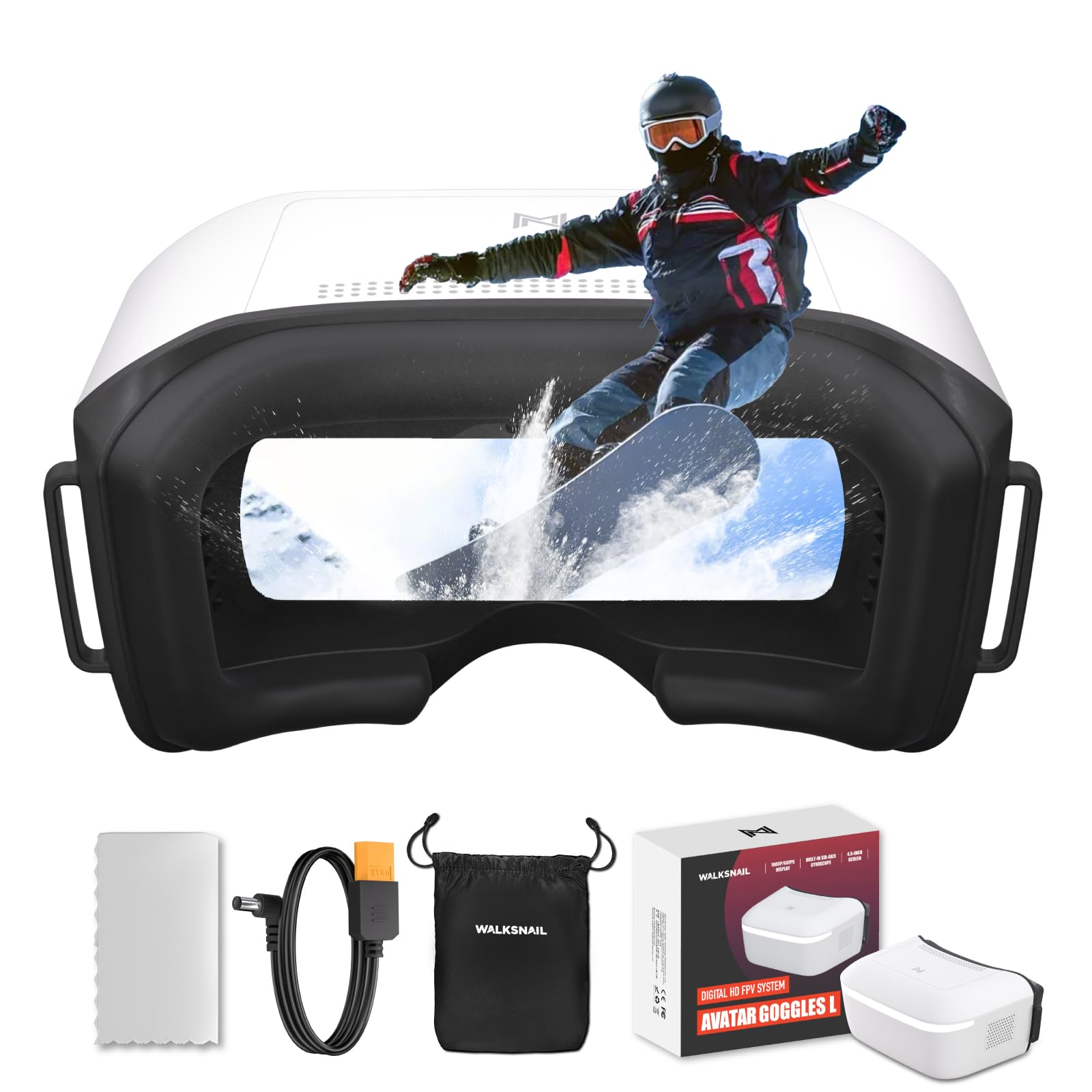
The Walksnail Avatar Goggles L bring 1080p HD performance to a price point that undercuts every other dedicated HD goggle on the market. The 4.5-inch LCD panel is sharp and distortion-free, with a 4.9 dBi directional antenna that locks onto the Walksnail VTX signal with surprising stability even in environments with moderate interference. The built-in head tracking — PPM output through a 3.5 mm jack — pairs naturally with gimbals or pan/tilt camera mounts for a cockpit-like feel.
Physical comfort is a strong point: the soft polyurethane faceplate blocks all ambient light and the foam conforms well to different face shapes. The swappable lens system allows basic vision correction without wearing glasses underneath. Power flexibility is another advantage — the goggles accept 6–25.2 V input, meaning you can run them off a standard 4S LiPo flight pack, reducing the number of batteries you need to carry.
Compatibility is limited exclusively to the Walksnail Avatar HD system; there is no HDMI input and no analog receiver built in. Some users with larger faces report the goggles feel slightly tight, and the internal antenna range is not as long as an external patch setup. The DVR records directly to micro SD at HD resolution, though the recorded quality is decent rather than spectacular. For the price, this is the most affordable way to experience low-latency HD FPV.
Why it’s great
- Sharp 1080p HD display at a budget HD price
- Built-in head tracking via PPM output
- Wide voltage input (6‑25.2 V) for flexible power
- Comfortable light‑blocking faceplate
Good to know
- Walksnail system only — no analog or HDMI
- Feels tight on larger faces
- Internal antenna range is modest
4. DroneMask 2

The DroneMask 2 solves a specific and common problem: turning your smartphone into a proper FPV headset without the fisheye distortion of cheap VR-style clips. Its patented unibody lens system delivers significantly sharper center-to-edge clarity than split-screen adapters, and the foam face padding is thick enough to block glare on sunny days. The adjustable focal length accommodates most prescription glasses and the head strap distributes the weight of the phone evenly, so you do not end up with neck fatigue after ten minutes.
Compatibility is the DroneMask 2’s biggest advantage — it works with any drone that streams to a phone: DJI Mini and Mavic series, Autel, Potensic, Fimi, and nearly every GPS drone that uses a standard controller. No third-party app or module is required, and the included cables (USB-C to USB-C, Lightning to USB-C) cover both Android and Apple users. The screen-access holes let you tap your phone’s touchscreen without removing the goggles, which is handy for changing camera settings mid-flight.
Lens fogging is a known issue in humid conditions — the foam traps warmth and moisture, causing condensation within about five minutes. An anti-fog spray or small ventilation fans are needed for consistent use in damp climates. The unit also creates a blind spot when worn: you cannot quickly glance at your surroundings the way you can with box goggles that have flip-up capability. For phone-based FPV pilots who want real optics rather than cheap plastic lenses, the DroneMask 2 is the best option available.
Why it’s great
- Sharp unibody optics eliminate fisheye distortion
- Works with any drone that streams to a smartphone
- Adjustable focal length fits glasses well
- Screen‑access holes for touchscreen control
Good to know
- Lenses fog in humid conditions within minutes
- Cannot see surroundings without removing the mask
- Large phone sizes add noticeable weight
5. SoloGood EV800D

The EV800D has become a de facto standard for budget analog FPV for good reason: it delivers a bright, crisp 5-inch 800×480 LCD panel with dual antenna ports that genuinely improve reception compared to single-antenna box goggles. The wide 82-degree viewing angle fills your peripheral vision nicely, and the detachable monitor can be unclipped and used as a standalone ground station screen — a nice bonus for people who fly with a spotter or want to record from the monitor side.
The built-in DVR records at 720×576 resolution, which is acceptable for reviewing flights but not sharp enough for cinematic replays. The auto-search function scans all 40 channels in under three seconds, making it easy to find your quad’s frequency without scrolling through a menu. The 1200 mAh battery provides about two hours of runtime, which comfortably covers a few packs of flying.
The faceplate foam is thin compared to aftermarket pads, and the goggles do not accommodate glasses well — users with larger frames will likely need to buy a third-party foam pad or focus fix. The micro USB charging port is dated, and the menu navigation buttons are easy to press accidentally during flight. Despite these ergonomic compromises, the EV800D offers the best analog picture quality and reception for the price, making it the top pick for pilots who want to learn FPV on a budget.
Why it’s great
- Bright 5‑inch LCD with 82° FOV
- Detachable monitor doubles as ground station
- True dual‑antenna diversity improves reception
- Fast auto‑search channel scanning
Good to know
- Thin foam pad uncomfortable for glasses
- Micro USB charging is dated
- Easy accidental button presses during flight
6. Tinyhawk 3 RTF Kit

The Tinyhawk 3 RTF Kit bundles everything a beginner needs: an analog FPV headset, a FrSky controller, and the Tinyhawk 3 drone itself — a 1S whoop that is durable enough to survive repeated crashes into walls and floors. The goggles provide a standard 5.8 GHz analog feed with acceptable clarity for the price, and the rubber duck antenna gives decent range inside a typical house. The drone itself is configurable via Betaflight, letting you adjust rates, power limits, and accelerometer settings as your skills improve.
The flight experience is beginner-friendly out of the box, but the included goggles and controller feel noticeably lower quality than a separate purchase would be. The goggle image can be staticky at ranges beyond 100 feet indoors, and the controller’s gimbals lack the smooth centering of a premium radio. The drone is genuinely tough — users report it surviving falls from two stories — but the camera lens scratches easily if it lands on rough surfaces.
Battery life on the Tinyhawk 3 is around three to four minutes per pack, and the kit does not include spare batteries, so you will need to buy extra packs and a better charger immediately. Some units arrive with loose motor wires that require soldering to fix. For a complete, ready-to-fly package that gets you in the air the same day, this kit is hard to beat, but upgrading the goggles and controller should be your first priority after learning basic flight orientation.
Why it’s great
- Complete ready‑to‑fly kit with drone, goggles, and controller
- Drone is extremely durable for indoor crashes
- Betaflight configurable as skills progress
Good to know
- Included goggles and controller feel budget‑grade
- Drone camera lens scratches easily
- No spare batteries included
7. EMAX Tiny Hawk RTF Micro Indoor Racing Drone

This original Tiny Hawk RTF kit remains a popular choice for first-time FPV pilots because it includes analog goggles, a controller, and a 1S micro drone that hits 35 mph right out of the box. The goggles provide a real-time analog feed with noticeably lower lag than Wi-Fi-based alternatives, and the 200-foot range through obstacles is solid for indoor flying. The drone itself is remarkably durable — I have seen reports of it surviving full water submersion and hundreds of hard crashes with only minor scratches.
The controller is basic but functional, with three difficulty modes that let you gradually transition from stabilized to full acro flight. The goggles are lightweight and the strap holds them securely, though the foam face pad is on the thinner side and can leave red marks after extended sessions. The image clarity is typical of budget analog — fine for gate flying but not sharp enough to spot small obstacles at distance.
Battery life sits around four minutes per pack, and the single charger included in the kit works but is slow. The camera angle is fixed slightly upward, which means you need to fly at speed to keep the view straight — beginners may find this disorienting when hovering. Some units have quality control issues with motor connections. For the price, the kit is a phenomenal value for anyone who wants to experience real analog FPV without assembling a quad or buying separate components.
Why it’s great
- Real analog FPV with noticeably low latency
- Extremely durable drone design
- Three difficulty modes for skill progression
- 200‑foot range through indoor obstacles
Good to know
- Camera angle fixed slightly upward
- Face foam can mark skin after long use
- Quality control can be inconsistent
8. PowerPlay DVR Video Recorder
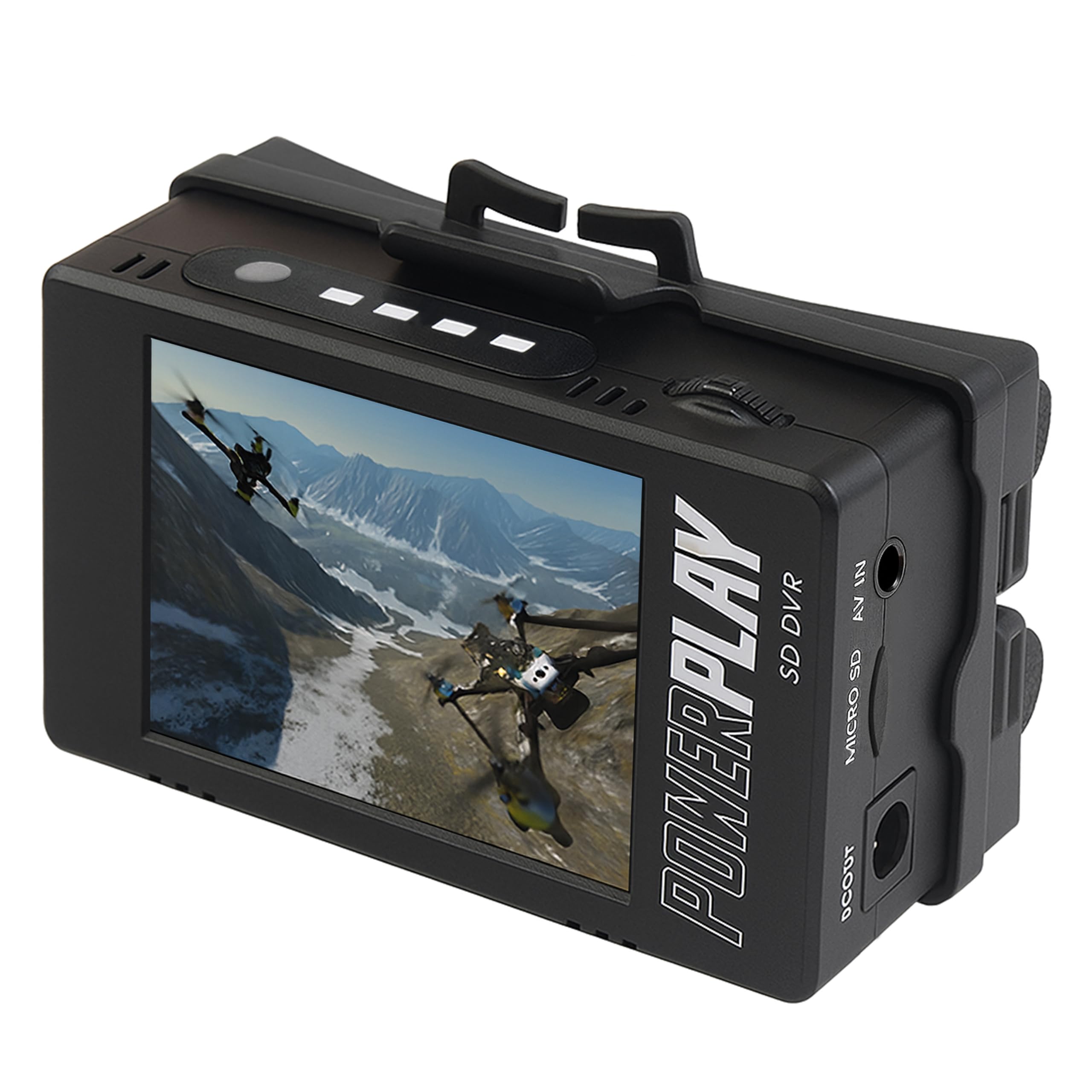
The PowerPlay DVR is not a pair of goggles — it is an external recorder that plugs into the AV output of older analog goggles (like the original FatShark Attitude or Dominator series) to capture 60 fps MP4 footage. This is a niche but useful device for pilots who own quality analog goggles with a poor or non-existent onboard DVR. The 2.4-inch LCD preview screen lets you see what is being recorded, and the clip mount attaches to a goggle strap or belt for field use.
The recording quality at 720×480 (NTSC) or 720×576 (PAL) at 60 fps is noticeably better than the blocky, artifact-ridden DVR recordings common on budget analog goggles. For pilots who want to review their race lines or share flight videos without buying a whole new goggle set, this is a cost-effective upgrade. The device runs on two user-supplied 18500 Li-Ion cells, which are not included — a detail that has caused confusion and frustration (including reports of melting AA batteries that clearly did not belong in the bay).
The AV cable selection is poor, and you will likely need to buy or solder the correct 3.5 mm TRRS pinout for your specific goggle model. Some units have reliability issues with the 3.5 mm jack connection. The price approaches what a basic goggle upgrade costs, so weigh whether improving your onboard DVR or buying a newer goggle set with a better built-in recorder makes more sense for your specific setup.
Why it’s great
- Captures 60 fps footage from any analog AV source
- Significantly better quality than budget onboard DVRs
- Compact clip‑mount design for field recording
Good to know
- Requires 18500 cells — not included
- AV cable pinout may need custom soldering
- Price is close to a basic goggle upgrade
9. BETAFPV VR03

The BETAFPV VR03 is an ultra-low-cost 4.3-inch box goggle that trades premium ergonomics for a functional way to get into analog FPV. The 800×480 LCD panel offers decent brightness and contrast for the money, and the replaceable RP-SMA antenna means you can upgrade to a patch or directional antenna for better range. The built-in DVR records to a micro SD card, though the video quality is heavily compressed with blocky JPEG artifacts — fine for orientation review but not for publication or race analysis.
The ergonomic design includes a foam sponge faceplate and a three-sided adjustable headband that fits average adult heads comfortably. The integrated 2000 mAh battery delivers about two hours of flight time, and the USB-C charging port is a welcome upgrade over the micro USB ports found on most budget goggles. The auto-frequency search takes about three seconds to scan all 48 channels, making it easy to lock onto your quad’s feed quickly.
Real-world reports highlight two consistent issues: the focal distance is too short to read OSD text clearly, and the DVR has an unreliable start — it takes roughly ten seconds to begin recording and often stops without user input. Light bleed around the nose area is common, and the build quality feels inexpensive in the hand. If your budget is tight and you just need a way to fly, the VR03 works; but the extra money for an EV800D will buy you a significantly better viewing experience and recording capability.
Why it’s great
- Affordable entry point into analog FPV
- Replaceable RP‑SMA antenna for easy upgrades
- 2000 mAh battery with USB‑C charging
- Quick 3‑second auto‑frequency scan
Good to know
- Focal distance too short for clear OSD text
- DVR recording is unreliable and heavily compressed
- Light bleed around nose area
- Build quality feels inexpensive
FAQ
Can I use DJI Goggles 3 with a non-DJI FPV drone?
What does true receiver diversity do for analog FPV goggles?
Are phone‑based FPV goggles like the DroneMask 2 better than dedicated analog goggles?
How do I fix lens fogging in my FPV goggles?
Can I wear prescription glasses under FPV goggles?
Final Thoughts: The Verdict
For most users, the best fpv glasses winner is the DJI Goggles 3 because it delivers the sharpest Micro-OLED picture, the lowest latency HD transmission, and the most comfortable integrated battery headband available today. If you want an affordable HD entry point with built-in head tracking, grab the CADDXFPV Walksnail Avatar Goggles L. And for a budget-friendly analog starter that works with any 5.8 GHz VTX, nothing beats the SoloGood EV800D for picture quality and signal reception at its price tier.