
You’re hunting for a battle station that can handle a triple-monitor setup, a full tower PC, and a late-night snack without groaning under the weight. The problem is that the market is flooded with particleboard specials that sag after six months and leave you with a permanent hunch. You need a desk that delivers real engineering—thick desktops, reinforced steel frames, and cable-routing smarts—without crossing the three-hundred-dollar line. That narrow window is exactly where the smart money lives.
I’m Mohammad Maruf — the founder and writer behind Drink4Good. I’ve spent years analyzing desk construction, from carbon-fiber laminate durability to the weight ratings of welded steel legs, so you get a recommendation that holds up to your actual gear.
Whether you need corner real estate, built-in power, or RGB that syncs to your music, the right gaming desks for under $300 combine thick MDF, stable crossbars, and smart storage to keep your rig organized and your posture intact.
How To Choose The Best Gaming Desk For Under $300
In this price tier, you’re competing against desks that cut corners on frame thickness, particleboard density, and power delivery. The key is knowing which specs to prioritize so you don’t end up with a wobbling shelf that looks good in photos but fails under your rig.
Desktop Thickness & Frame Construction
A 0.6-inch desktop is the bare minimum for a monitor, keyboard, and mouse. Look for boards at least 0.8 inches thick—the Huuger 63-inch L-Shaped desk uses a 0.95-inch panel that resists sagging and supports peripherals without flex. The frame should include a steel crossbar or X-brace under the main span; this is what kills wobble during intense gaming sessions or when you lean on the desk for a long workday.
Power Delivery & Cable Management
Desks in this range commonly include a charging station with AC outlets and USB-A ports. Verify the outlet is clamped or mounted to the frame rather than dangling loose—integrated units like the SEDETA and AODK models secure the power strip under the desktop via a bracket. USB-C ports are still rare at this price, but the Huuger 63-inch includes one, which is a genuine advantage for modern laptops and fast-charging peripherals.
Reversible L-Shape & Layout Flexibility
An L-shaped desk that can be reversed to face left or right gives you the most placement options. The best designs, such as the AODK 66-inch and the ODK 66-inch, also allow the desk to be configured as a long straight desk for two monitors or a two-person workstation. This modularity extends the desk’s lifespan because it adapts to a new room layout without requiring a replacement.
Quick Comparison
On smaller screens, swipe sideways to see the full table.
| Model | Category | Best For | Key Spec | Amazon |
|---|---|---|---|---|
| AODK 66″ L-Shaped | L-Shape | Maximum storage & dual layout | Fits 113″ straight or L-shape | Amazon |
| ODK 66″ L-Shaped | L-Shape | Carbon fiber surface & RGB | Carbon fiber textured desktop | Amazon |
| AODK 61″ L-Shaped | L-Shape | Storage drawers & monitor stand | 4 fabric drawers + file drawer | Amazon |
| SEDETA L-Shaped Grey | L-Shape | Fabric drawers & hutch storage | 2 file drawers + storage cabinet | Amazon |
| Huuger 63″ L-Shaped | L-Shape | Thick desktop & USB-C port | 0.95″ thick, 220 lbs capacity | Amazon |
| Huuger Carbon Fiber L-Shaped | L-Shape | Tactile surface & app-controlled LEDs | Carbon fiber laminate top | Amazon |
| EnHomee 56.5″ Desk | Straight | Built-in monitor stand & file cabinet | 40″ monitor stand shelf | Amazon |
| SEDETA 70.8″ White Desk | Straight | Large straight desk with storage shelf | 70.8″ long x 21.6″ deep | Amazon |
| Aheaplus L-Shaped Small | L-Shape | Compact corner & music-sync LEDs | 48.82″ wide, reversible hutch | Amazon |
In‑Depth Reviews
1. AODK 66″ L-Shaped Computer Desk

The AODK 66-inch desk is the most versatile build in this list because it can be assembled as a 66-inch L-shaped corner desk or a 113-inch straight two-person workstation. That flexibility alone makes it the top pick for anyone who might rearrange their room or share the space with a partner. The desktop surface is a warm vintage laminate that resists scratches and wipes clean easily, and the metal frame feels solid—no wobble even when you lean into the corner.
Storage is the standout feature here. You get a two-drawer file cabinet that handles letter, legal, and A4-size documents, plus a 4-tier fabric drawer set under the desk for cables, notebooks, and small peripherals. The 47.2-inch monitor shelf holds two 27-inch monitors comfortably, and the CPU stand keeps your tower off the floor. The built-in charging station includes 3 AC outlets and 2 USB ports, and the LED strip uses a milky diffuser for even light spread.
Assembly takes two people about an hour for the L-shape configuration. The instructions are clear, and all parts are labeled. Some users noted that the surface sits slightly higher than average, so if you’re on the shorter side, measure your chair height. The file cabinet drawers glide on metal tracks—a quality touch at this price point.
Why it’s great
- Two assembly modes (L-shape or 113″ straight) for maximum flexibility
- Includes file cabinet and 4 fabric drawers for serious under-desk storage
- Long monitor shelf holds dual 27-inch monitors
Good to know
- Surface height is slightly above average—check chair compatibility
- LED remote is wired, not wireless
- Clamp-on monitor mounts may need a wood spacer due to metal frame
2. ODK 66″ L-Shaped Gaming Desk

The ODK 66-inch desk upgrades the surface game with a carbon fiber texture laminate that feels more premium than standard MDF finishes. The texture reduces glare and provides a tactile surface that gives your mouse pad a bit more grip during fast flick shots. The reversible design works as a left or right corner layout, and the main desktop center section measures 36 inches wide—10 inches longer than the typical L-shape center—giving you comfortable room for a monitor arm mount and peripherals.
Under the hood, the ODK includes a built-in power station with 3 AC plug outlets and 2 USB ports. The LED strip offers 10 colors and 10 modes with a memory function that remembers your last setting. Storage is handled by a 2-tier bookshelf, a computer tower stand, and a 4-tier adjustable shelf. The monitor riser is full-length, so your screens sit at eye level without you needing separate stands.
Assembly runs 2-3 hours solo, and the instructions include orientation diagrams for both left and right setups. A few users reported that the LED strip is bright when placed per the instructions—dimming via the remote is recommended for nighttime sessions. The carbon fiber surface is easy to clean but shows fingerprints more readily than matte finishes.
Why it’s great
- Carbon fiber textured laminate is durable and reduces glare
- Center desktop section is 36″ wide for comfortable monitor arm placement
- Memory function on LED strip remembers last mode
Good to know
- Actual long side measures ~58″, shorter than advertised 66″
- LED lights can be overly bright at default setting
- Some screw holes may strip if overtightened
3. AODK 61″ L-Shaped Desk

If drawer storage is your priority, the AODK 61-inch desk delivers more compartments than any other build in this range. It comes with a 4-tier fabric drawer set and a separate file drawer, giving you six distinct storage zones for cables, controllers, documents, and office supplies. The fabric drawers are best for lighter items—notebooks, chargers, and small gear—while the metal-track file drawer handles heavier paperwork.
The desk includes a full monitor shelf that elevates screens to reduce neck strain, plus an open CPU stand and a headphone hook. The power station has 3 outlets and 2 USB ports, and the LED strip cycles through 7 colors and 20 lighting modes with memory retention. The alloy steel frame uses X-cross bars for lateral stability, and the adjustable leg pads compensate for uneven floors.
Assembly is the most time-consuming of the group—plan for about 3 hours solo or 2 with a helper. The instructions are detailed, and parts are labeled, but the drawer assembly requires careful alignment. The fabric drawers feel less rigid than the metal file drawer, but for the price, the sheer volume of storage is unmatched.
Why it’s great
- Six total storage compartments (4 fabric + 1 file + 1 CPU stand)
- LED lights with memory function retain your last setting
- Alloy steel frame with X-cross bars for stability
Good to know
- Assembly takes 3 hours solo due to drawer complexity
- Fabric drawers best for lightweight items only
- Under-shelf depth is less than expected for large PC towers
4. SEDETA L-Shaped Gaming Desk, Grey

The SEDETA L-shaped desk balances storage and footprint better than most corner models. It includes 2 fabric file drawers, a storage cabinet door, and a top hutch that adds vertical stack space for books or collectibles. The desktop is made from FSC-certified wood, and the reversible design lets you choose a left or right return. When you don’t need the corner configuration, the desk can be assembled as an 86.6-inch straight two-person workstation.
Power delivery comes from 4 AC outlets and 2 USB ports with a dedicated on-off switch—a safety detail that’s rare in this price band. The RGB LED strip works with an app for over 60,000 colors and music sync, though many users skip the lights entirely and still rate the desk highly for its solid build. The steel legs and crossbars keep the surface stable even when both sides are occupied.
Assembly runs about 1.5 to 2 hours with a second person. The instructions are clear, and all tools are included. A few users noted that the desk height is slightly low for taller users—if you’re above 5’10”, pair it with a taller chair or monitor riser. The file drawers slide smoothly on metal tracks.
Why it’s great
- Hutch + fabric drawers + cabinet door provide exceptional vertical storage
- On-off switch for the power station enhances electrical safety
- Converts to 86.6″ straight desk for two-person use
Good to know
- Desk height is on the low side—taller users may want a riser
- Assembly takes ~2 hours with a partner
- White top surface may need a desk pad to prevent staining
5. Huuger 63″ L-Shaped Desk

The Huuger 63-inch desk stands out for its 0.95-inch thick desktop—significantly thicker than the 0.6-inch panels found on most entry-level models. That extra mass translates to a 220-pound weight capacity and near-zero flex under dual monitors plus a tower. The high-density MDF board is waterproof and scratch-resistant, so spills and heavy peripherals won’t leave permanent marks.
The built-in power station includes 4 AC outlets plus the only USB-C port in this lineup—a critical detail if you charge a modern laptop or tablet. The reversible L-shape can be configured left or right, and the reinforced steel frame with thickened legs eliminates wobble on carpet or hardwood. The legroom is generous enough for a full-size PC tower underneath the return.
Assembly is the easiest in the group at about 30 minutes with a drill and a helper. The instructions are minimal but clear, and the numbered parts line up without forcing. A few users pointed out the lack of built-in drawers, but the open design gives you flexibility to add your own storage bins or a CPU caddy underneath.
Why it’s great
- 0.95″ thick desktop supports up to 220 lbs with no sag
- Includes a USB-C port fast-charging modern devices
- 30-minute assembly with numbered parts and included tools
Good to know
- No integrated storage drawers or shelves
- Desktop depth is 20.5″, which may be tight for deep monitor mounts
- Finish is rustic brown—may not match all room aesthetics
6. Huuger L-Shaped Gaming Desk (Carbon Fiber)

The Huuger carbon fiber desk brings a tactile surface that feels more like a high-end racing machine than a budget L-shape. The laminate is embossed with a woven pattern that resists scratches and provides a non-slip surface for your mouse and keyboard. The desk includes a full monitor shelf and two metal hooks for headsets, and the recessed shelf is narrow enough to save space while still holding a laptop or small monitor.
The LED strip offers 20 colors, 22 modes, 5 brightness levels, and 10 flicker frequencies—all controllable via a phone app. The power station has 4 AC outlets and 2 USB ports mounted on the desktop for easy access. The steel frame uses a powder-coated finish that resists rust, and the adjustable leg pads handle uneven floors without rocking.
Assembly is slightly more fiddly than the regular Huuger—plan on an hour solo, and a second pair of hands helps for aligning the monitor shelf brackets. A few reviewers noted that the included LED adhesive isn’t the strongest, but the strip stays put if you press it firmly into the pre-marked groove. The carbon fiber texture is a fingerprint magnet, but a quick wipe keeps it clean.
Why it’s great
- Carbon fiber laminate with woven texture adds grip and durability
- App-controlled LED with 22 modes and 5 brightness levels
- Desktop-mounted power station for easy cable access
Good to know
- No integrated storage drawers
- LED strip adhesive may require extra pressure to stick permanently
- Shipping can be delayed for certain regional warehouses
7. EnHomee 56.5″ Office Desk
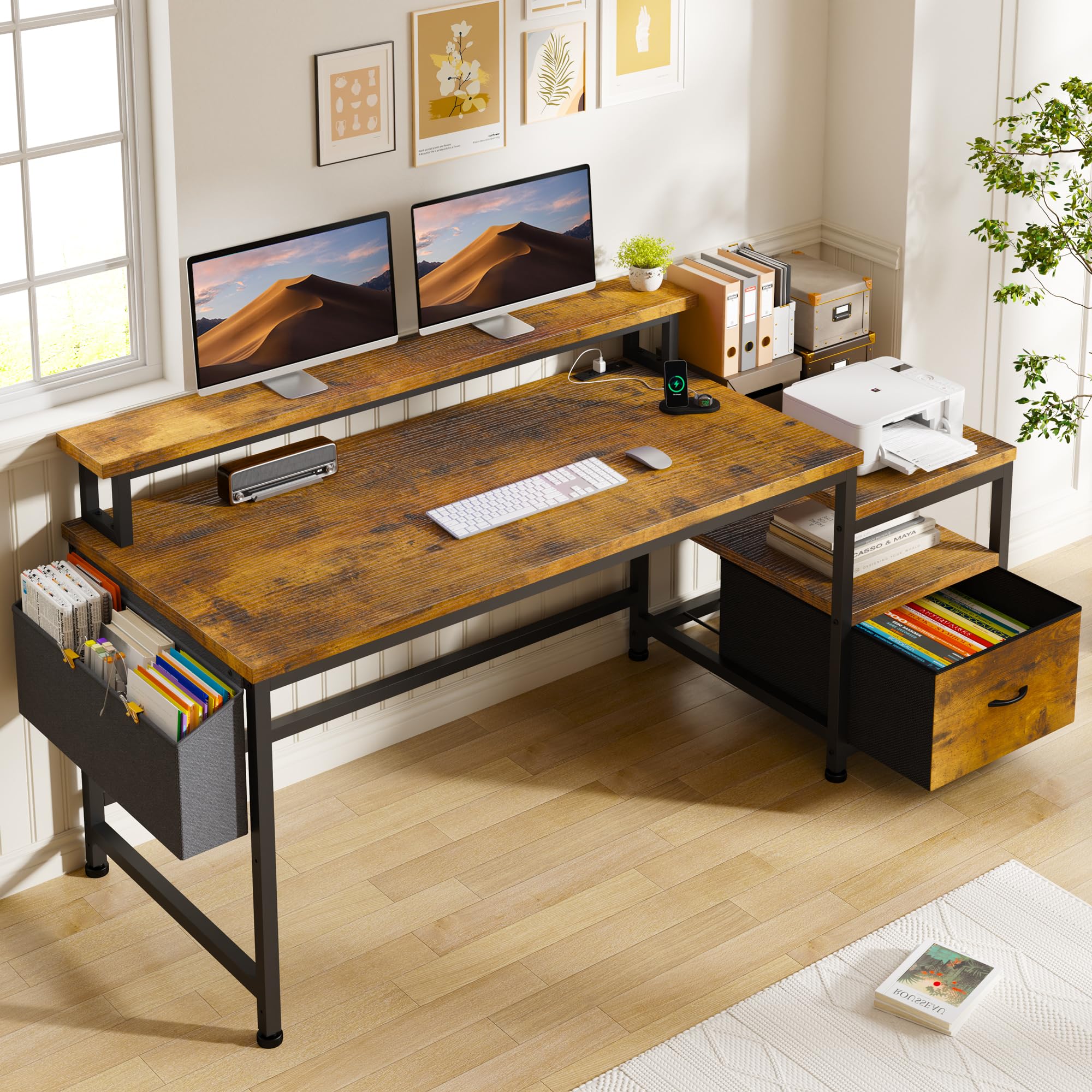
The EnHomee 56.5-inch desk is a budget-friendly option that doesn’t cut the storage essentials. It features a 40-inch long monitor stand that elevates dual screens, plus a side cabinet with a fabric file drawer that holds letter-size documents. The open shelf beneath the cabinet provides space for a printer or gaming console, making it a strong pick for students or remote workers who need organization without a corner footprint.
The charging station includes 3 AC outlets and 2 USB ports, and the metal frame with wooden desktop keeps the structure stable during typing sessions. The monitor stand doubles as a shelf for secondary gear, and the side pockets on the file cabinet can store cables or small accessories. Assembly is straightforward—most users complete it in under an hour with the included hex tool.
The key trade-off is the desktop surface area: at 56.5 inches wide, it’s shorter than most L-shape desks, so you’ll need to be deliberate about monitor placement. The file drawer is fabric rather than metal, so it’s best for lightweight filing. But for the price, the combination of a monitor stand, file cabinet, and power station is tough to beat.
Why it’s great
- 40″ monitor stand fits two monitors and reduces neck strain
- Fabric file cabinet with side pockets for organized storage
- Includes power station with 3 AC outlets and 2 USB ports
Good to know
- Desktop width is 56.5″, which may be tight for a full triple-monitor rig
- File drawer is fabric-based, not suitable for heavy contents
- No LED lighting—gear up separately for a lit gaming setup
8. SEDETA 70.8″ White Gaming Desk

The SEDETA 70.8-inch straight desk offers the most uninterrupted surface area in the budget tier, making it ideal for gamers who run a triple-monitor setup or need room for a streaming deck alongside their keyboard. The 3-tier storage shelf on the right side holds a full-size PC tower, books, and a console, while the monitor shelf frees up the main desktop for mouse movement and peripherals.
The LED strip is app-controlled with 60,000 colors and 29 modes, including music sync via a built-in sensitivity-adjustable microphone. The charging station provides 2 outlets and 2 USB ports. The monitor shelf elevates your screens to eye level, which reduces forward head posture during long sessions. The white glossy finish keeps the desk looking clean and modern, though it shows dust more readily than darker surfaces.
Assembly takes about an hour with a second person, and the pre-drilled holes align well. The cup holder and headphone hook are welcome extras that keep the desktop uncluttered. A few users noted that the glossy surface scratches easily if you slide metal objects across it, so a desk mat is recommended.
Why it’s great
- 70.8″ wide desktop provides room for triple monitors
- 3-tier shelf stores PC tower, console, and accessories
- App-controlled RGB with 60,000 colors and music sync
Good to know
- White glossy finish shows dust and scratches easily
- Power station has only 2 AC outlets
- LED strip brightness cannot be adjusted independently of color
9. Aheaplus L-Shaped Gaming Desk with Power Outlets & LED Lights

The Aheaplus L-shaped desk is built for smaller rooms where a 60-inch corner wouldn’t fit. With a 48.82-inch width, it tucks neatly into compact corners while still offering a reversible hutch that can swing left or right. The 4-tier open shelves provide vertical storage for games, figures, or a small library, and the included storage bag and headphone hook add organization without taking up desk space.
The LED strip is app-controlled with 60,000 colors and music sync, and the power station includes 3 outlets and 2 USB ports. The monitor stand is movable, so you can place it exactly where your sightline lands. The metal frame uses an X crossbar for stability, and the adjustable leg pads keep the desk level on carpet.
Assembly is manageable solo—some users reported completing it in about 45 minutes. The main caveat is that the desk is smaller than it appears in product photos; the depth is just 18.9 inches on the return, which may not fit a deep monitor base and keyboard simultaneously. If you have a compact monitor or can mount it, the Aheaplus is a solid space-saving solution.
Why it’s great
- Compact 48″ width fits small corners without crowding the room
- Reversible hutch and movable monitor stand for flexible layout
- App-controlled RGB with 60,000 colors and music sync
Good to know
- Return depth is 18.9″—tight for deep monitor bases
- LED strip adhesive may be weak; supplemental tape recommended
- Desk color options are limited to black and pink
FAQ
Can a gaming desk under $300 support a monitor arm or mount?
How does the weight capacity of an L-shaped desk compare to a straight desk at this price?
Should I prioritize a larger desktop or more storage features on a desk under $300?
How does the carbon fiber surface on the Huuger and ODK desks compare to standard MDF?
What cable management solutions come with desks in the to range?
Final Thoughts: The Verdict
For most users, the gaming desks for under $300 winner is the AODK 66″ L-Shaped Computer Desk because it delivers the most storage per dollar with a file cabinet and 4 fabric drawers, plus the ability to reconfigure as a 113-inch straight desk. If you want the thickest desktop and the only USB-C port in this group, grab the Huuger 63″ L-Shaped Desk. And for a compact corner footprint with app-controlled RGB, nothing beats the Aheaplus L-Shaped Desk.