
Turning a modern flat-screen into a retro arcade usually means clunky towers, tangled cables, and a messy entertainment center. A game stick for TV solves that by plugging directly into the HDMI port—no console footprint, no complicated setup, just a flash drive-sized device that unlocks thousands of classic titles.
I’m Mohammad Maruf — the founder and writer behind Drink4Good. I’ve spent weeks analyzing game stick hardware, from processor chipsets and controller latency to emulator compatibility and library curation, to understand which options deliver genuine retro gaming without the frustration.
Before you spend money on a bulky emulation rig, consider how much simpler a dedicated game stick for tv can make your game room — instant access to classic libraries, dual wireless controllers, and a clean setup that tucks behind the screen.
How To Choose The Best Game Stick For TV
A game stick looks simple, but the internal components define whether you get smooth gameplay or choppy emulation. Focus on three things: the pre-loaded game library size and emulator count, the controller connection stability, and the HDMI output resolution.
Game Library and Emulator Support
Most sticks ship with a microSD card holding between 7,000 and 20,000 games. The number alone doesn’t tell the full story — what matters is the variety of emulated systems (NES, SNES, Sega Genesis, PlayStation, Nintendo 64, etc.) and whether duplicates pad the count. Look for sticks with at least 20 emulators to cover multiple generations.
Controller Quality and Range
Included wireless controllers typically use 2.4GHz radio, not Bluetooth. This gives lower latency and a stable connection up to 40 feet, but requires a USB dongle hidden in the stick or receiver. Check that the controllers feel responsive in fighting games — cheap membranes cause missed inputs. Battery compartment or rechargeable? Most budget pairs use AA or AAA batteries; premium units have internal lithium cells.
HDMI Output and 4K Compatibility
Modern game sticks output 1080p or upscale to 4K via HDMI. Native 4K scaling matters less for pixel-art games, but the HDMI chipset must handle stable signal handshake with your TV. A stick that auto-detects resolution prevents black-screen issues. Some sticks also support AV output for older secondary displays.
Quick Comparison
On smaller screens, swipe sideways to see the full table.
| Model | Category | Best For | Key Spec | Amazon |
|---|---|---|---|---|
| 2026 Upgraded Retro Gaming Console Stick | Stick Console | Family retro nights | 64GB / 20,000+ games | Amazon |
| ANGFA Wireless Retro Gaming Console | Stick Console | Budget-friendly library | 64GB / 23 emulators | Amazon |
| Carlinkit FireDrive Link Pro | Car Adapter | In-car Fire Stick gaming | 2K HD / 30 FPS | Amazon |
| Tiny Arcade TV 3.5″ | Mini Console | Portable + TV play | 3.5″ screen / 700+ games | Amazon |
| Anbernic RG35XXSP | Handheld + TV | Custom firmware users | 3300mAh / HD output | Amazon |
| Xiaomi TV Stick 4K (2nd Gen) | Streamer + Games | Cloud gaming + streaming | Wi-Fi 6 / Dolby Atmos | Amazon |
| Saitake Wireless Arcade Fight Stick | Arcade Controller | Fighting game precision | Multi-platform / Macro | Amazon |
In‑Depth Reviews
1. 2026 Upgraded Retro Gaming Console Stick
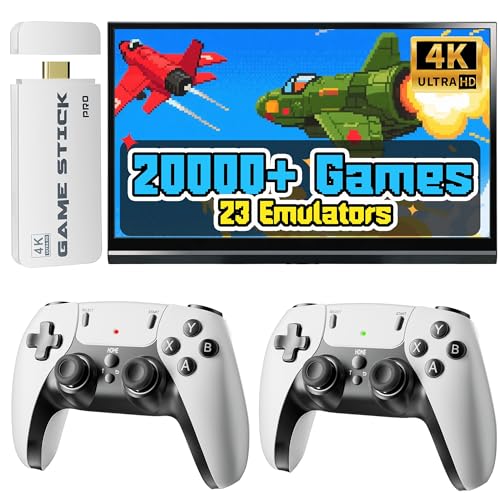
This RMOKA stick houses a 64GB microSD pre-loaded with over 20,000 games spanning 23 emulated systems — from NES and SNES through PlayStation and Nintendo 64. The real draw is the broad generational coverage: one device lets you jump from 8-bit platformers to early 3D racing without swapping carts or downloading ROMs. Setup is genuinely three steps: power via USB, plug into HDMI, select input.
The two included 2.4GHz wireless controllers claim a 40-foot range with interference-free operation. In practice, that means sofa play from across a medium-sized living room without sync drops. Each controller requires two AA batteries (not included), so keep spares handy for extended sessions. The HDMI output supports 4K upscaling with 1080p native clarity, which sharpens pixel art without introducing visible smoothing artifacts on larger screens.
Customer feedback consistently highlights the intuitive menu system and the sheer volume of playable titles — several reviews mention three generations enjoying the same stick on game night. The only recurring note: the controller build feels mid-range but holds up after weeks of use.
Why it’s great
- 20,000+ games across 23 emulators on 64GB card
- Truly plug-and-play — no internet required after setup
- Dual 2.4GHz controllers work reliably at sofa distance
Good to know
- Controllers require AA batteries (not included)
- 4K upscaling improves clarity but isn’t native 4K rendering
- Some duplicate titles inflate the game count
2. ANGFA Wireless Retro Gaming Console

ANGFA’s offering mirrors the RMOKA in core specs — 20,000+ built-in titles, 23 emulators, 4K HDMI output, dual 2.4GHz wireless controllers — but adds a crucial feature missing from many budget sticks: in-game save states. Press SELECT + START simultaneously during gameplay to access the save/load menu. This makes a real difference when grinding through longer RPGs or trying to beat a tough boss without restarting the entire level.
The hardware design uses a white plastic housing with the TF card stored in a side slot. Setup requires inserting the card (it ships pre-installed loosely), connecting HDMI, and powering via USB. The controllers use 2.4GHz with a 40-foot range, and early customer reports indicate smooth performance on most emulators, though some mention slight lag on specific titles like Super Mario Bros while others run perfectly.
Where this stick stands out is the price-to-feature ratio — save states and a vast emulator library at an aggressive price point. Buyer reviews consistently praise the ease of setup and the sheer number of playable systems. The minor trade-off is that not every game runs at full speed; certain demanding titles may exhibit frame drops. For casual players who want broad retro access and the convenience of saving progress, this is a strong mid-range contender.
Why it’s great
- Save-state functionality for RPGs and tough levels
- 23 emulators covering multiple console generations
- Plug-and-play with no internet dependency
Good to know
- Emulation performance varies per title
- Controllers require AAA batteries (not included)
- Game library has some duplicate entries
3. Carlinkit FireDrive Link Pro
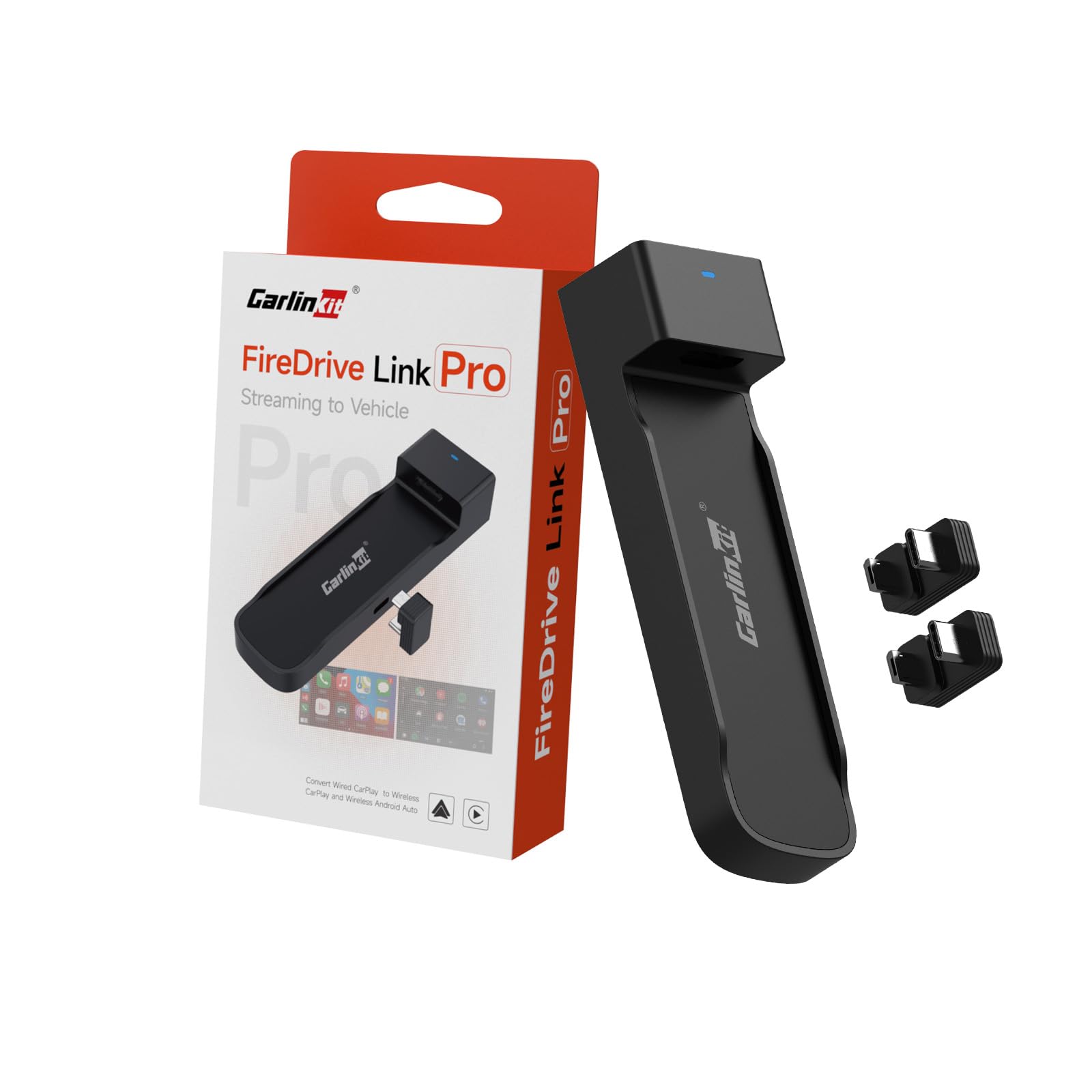
This device breaks the game stick mold entirely — it’s an HDMI adapter that converts a Fire TV Stick into an in-car entertainment system. Plug the Carlinkit into your car’s USB CarPlay port and HDMI output device, and the Fire Stick’s interface appears on your vehicle’s screen. You can run game streaming apps (via cloud services), watch Netflix, or use wireless CarPlay/Android Auto simultaneously through a hidden menu.
The adapter outputs 2K HD at a 30 FPS refresh rate, which is sufficient for streaming video and casual cloud gaming but not for fast-twitch local emulation. It supports iPhone 6+ on iOS 10+ and Android 11+ devices. Setup involves a specific Y-type cable: one end to car power, the other to the USB CarPlay port, with HDMI bridging to the Fire Stick. Some cars with low-power USB-A ports may need an external 12V adapter for stable operation.
Customer feedback is mixed but informative — the device works brilliantly when properly powered, with clear video and minimal audio delay. Several users resolved early connection issues by switching to a higher-current power source. The main drawback is long-term reliability: a few reports mention random resets after a month and choppy call audio via CarPlay. If you specifically want gaming content in the car using a Fire Stick, this adapter is the only purpose-built solution on the list.
Why it’s great
- Converts Fire Stick into car gaming/streaming system
- 2K HD output with 30 FPS stable playback
- Keeps wireless CarPlay/Android Auto active
Good to know
- Power-sensitive — some car USB ports insufficient
- 30 FPS not ideal for fast-paced local games
- Long-term reliability concerns reported
4. Tiny Arcade TV 3.5″ Mini Retro Game
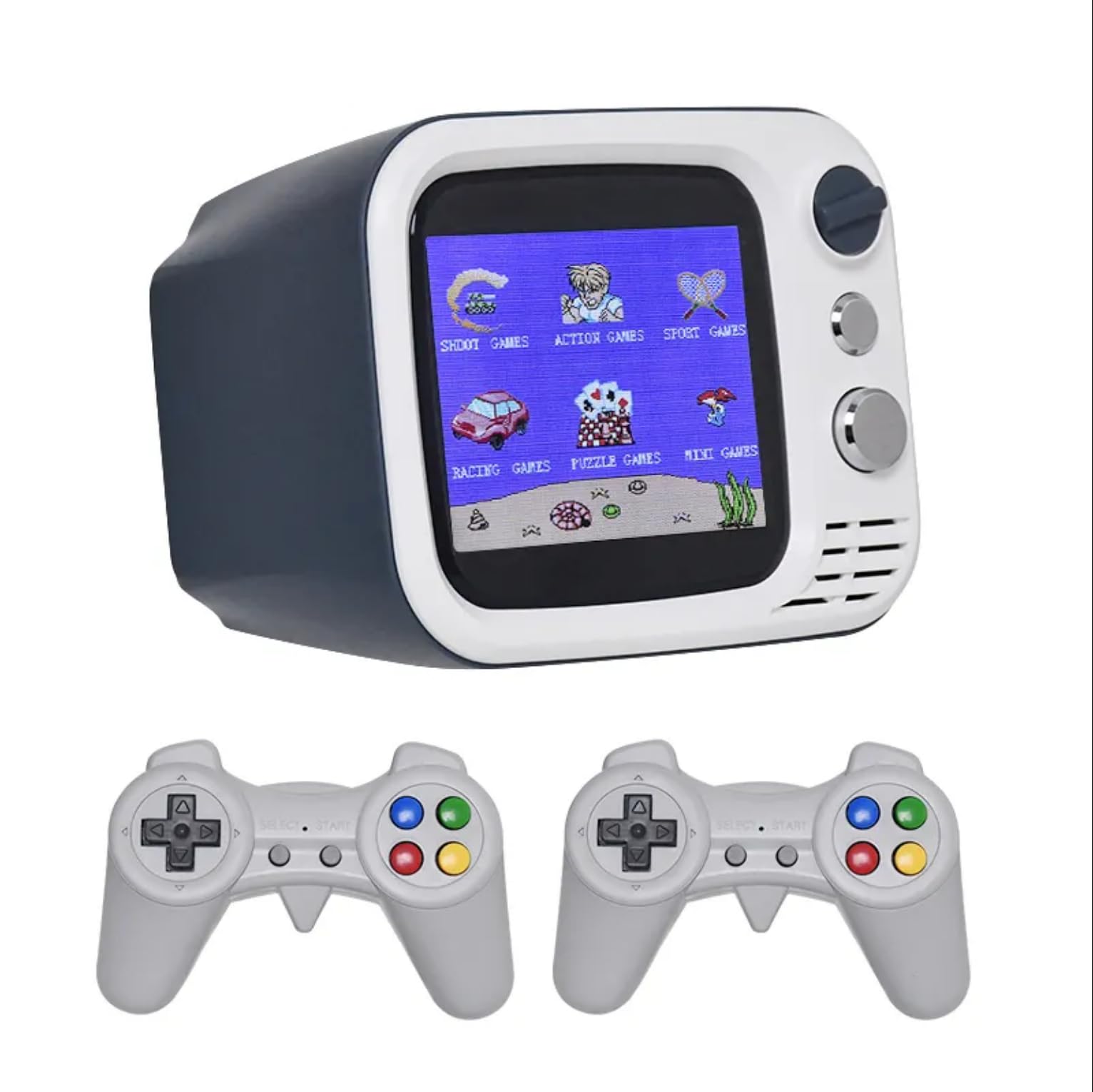
This isn’t a stick — it’s a mini console that mimics a retro TV, complete with a 3.5-inch HD color screen and two 2.4GHz wireless controllers. The built-in library holds 700+ FC-era (Famicom) games, which is smaller than the 20K sticks but curated without the obvious duplicates. The real differentiator is the internal 1000mAh battery offering up to 5 hours of portable play, plus AV and USB outputs for connecting to an actual television.
The form factor is deliberately nostalgic: a tiny gray TV-shaped console that looks like a shelf decoration when not in use. The included wireless controllers feel inexpensive but have held up in long-term use according to buyer reports. The HD display is crisp for the size, and the advanced processor keeps gameplay smooth across the pre-loaded library. One trade-off: charging takes roughly 10 hours for a full battery, so overnight charging is mandatory.
Customer reviews consistently mention the novelty factor — kids gravitate toward it immediately, and adults appreciate the portable aspect for road trips. The ability to switch between the built-in screen and a larger TV via AV cable makes it flexible for solo play or group sessions. If you want a game stick that also works away from the TV and prioritizes portability over a massive library, this miniature console delivers that dual use in a charming package.
Why it’s great
- Portable 3.5-inch screen plus TV output via AV
- 5-hour battery for on-the-go play
- Compact, nostalgic design that appeals to all ages
Good to know
- Only 700+ games — smaller library than 20K sticks
- 10-hour charge time from empty
- Controller build feels cheap despite durability
5. Anbernic RG35XXSP Clamshell Handheld

The RG35XXSP is a premium clamshell handheld — think Game Boy Advance SP for grown-ups — but it also outputs to a TV via the included USB-C to HDMI adapter. The H700 quad-core processor handles Dreamcast, PSP, and earlier systems with ease, and the 3.5-inch IPS screen (640×480) uses OCA lamination and tempered glass for scratch resistance. The magnetic clamshell activates auto-sleep when closed, a feature that feels luxury-level compared to budget sticks.
It ships with a 64GB TF card pre-loaded with games, though the stock firmware’s UI and game selection are mediocre — the real power comes from flashing custom firmware like Knulli or MuOS, which dramatically improve boot speed, battery life (3300mAh / up to 8 hours), and interface quality. The 5GHz WiFi and Bluetooth 4.2 support wireless controller pairing, and the HD output works via a simple cable connection, effectively turning the handheld into a TV console.
Customer reception is enthusiastic among emulation enthusiasts but cautious for newcomers. The device requires effort to set up custom firmware and source ROMs, and the stock experience out of the box is underwhelming. The D-pad lacks a pivot point, which may cause missed directional inputs in fighting games. For users willing to invest a few hours in configuration, the RG35XXSP offers the best emulation accuracy and build quality in this list — but it demands more from the owner than a plug-and-play stick.
Why it’s great
- H700 chip handles Dreamcast/PSP smoothly
- 8-hour battery with magnetic clamshell auto-sleep
- HD TV output via USB-C to HDMI adapter
Good to know
- Stock firmware is weak — custom firmware recommended
- D-pad may miss inputs in center presses
- Requires manual ROM sourcing for best library
6. Xiaomi TV Stick 4K (2nd Gen)
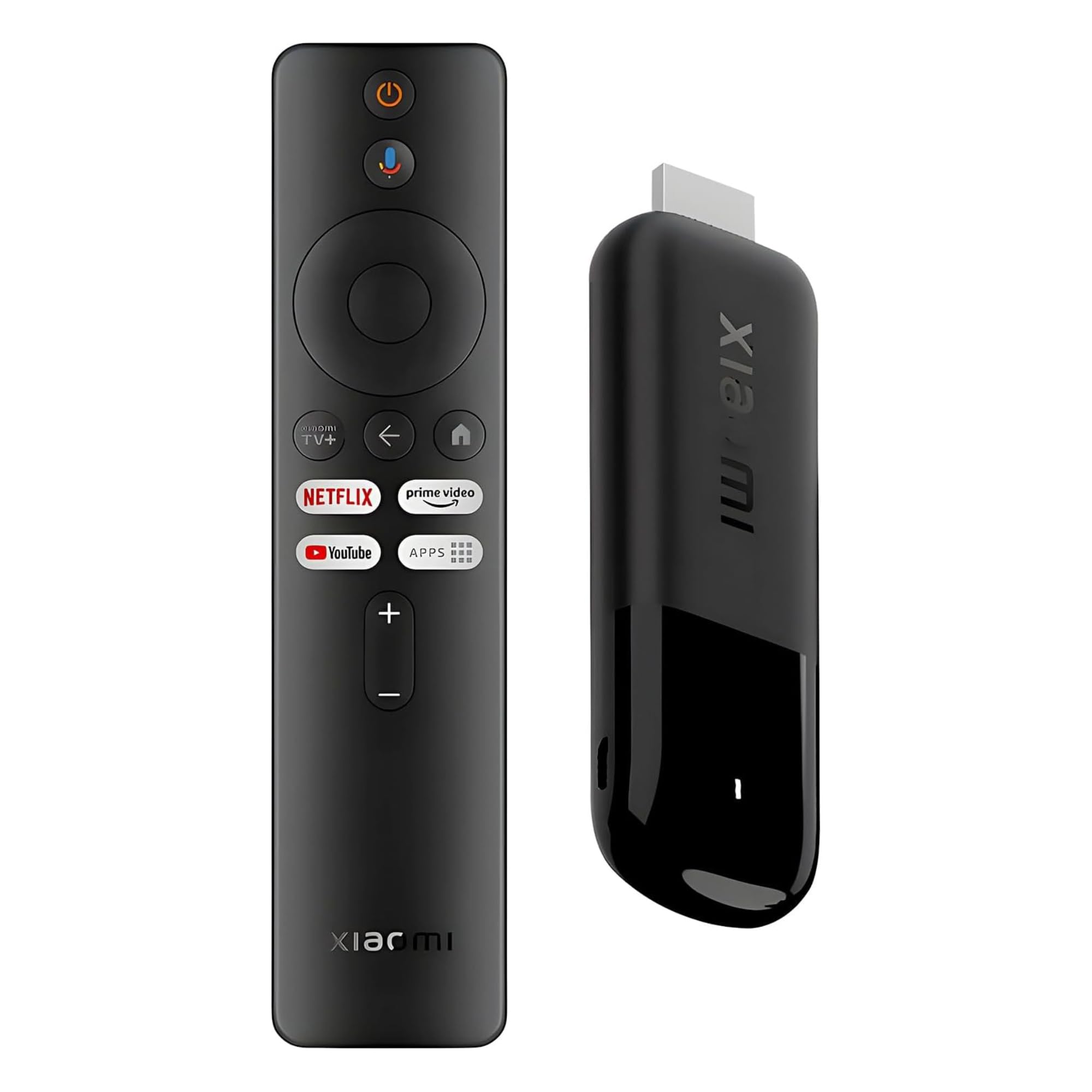
The Xiaomi TV Stick 4K (2nd Gen) is first a streaming media player and secondarily a game stick — it runs Google TV with access to cloud gaming services like Xbox Game Pass and NVIDIA GeForce NOW. The 6nm quad-core A55 processor (2.5GHz) with 2GB RAM and Wi-Fi 6 delivers smooth 4K streaming and responsive cloud gaming, but it cannot run local emulators without sideloading apps like RetroArch, which requires technical comfort.
The included 360-degree Bluetooth voice remote with Google Assistant makes navigation effortless, and the Dolby Vision + Dolby Atmos support provides a cinema-grade experience for both streaming and cloud gaming. The stick itself is ultra-slim at 28 grams, fitting flush into the HDMI port. It supports Chromecast built-in, so you can cast mobile games to the TV, though latency will depend on your home network quality.
Customer feedback in English is limited, with most reviews in Spanish praising the ease of setup and performance. For a buyer who wants a smart TV upgrade that also enables game streaming — but not a dedicated retro emulation stick — this is the premium pick. The trade-off is clear: you lose the pre-loaded 20K game library and simple plug-and-play of dedicated retro sticks, but you gain modern streaming ecosystem access and voice-controlled convenience.
Why it’s great
- Wi-Fi 6 and 6nm processor for smooth 4K streaming
- Dolby Vision + Atmos for cinematic cloud gaming
- Ultra-slim, portable design with voice remote
Good to know
- No pre-loaded retro games — requires sideloading
- Cloud gaming latency depends on internet speed
- 8GB storage limits large game installations
7. Saitake Wireless Arcade Fight Stick
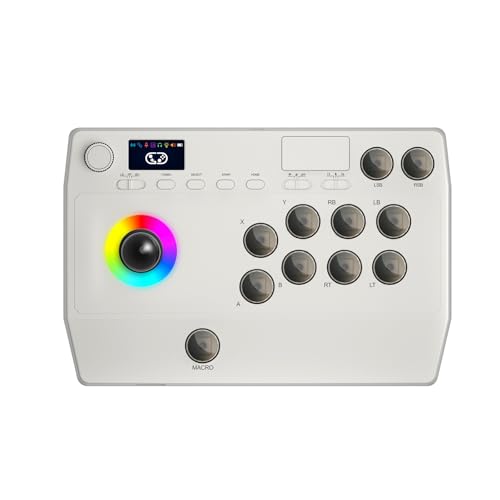
The Saitake T01 is not a game stick — it’s an arcade fight stick that pairs with existing game sticks, PCs, consoles, or smart TVs to deliver a dedicated fighting game experience. It connects via Bluetooth, 2.4GHz wireless (with hidden receiver compartment), or wired USB, and works across Windows PC, Android, iOS, Nintendo Switch, PS3, and PS4. The 1000mAh rechargeable battery provides extended play time, and the 3.5mm headphone jack routes audio through the stick.
What sets this apart for TV gaming is the macro and turbo functionality. You can record up to 18 keystrokes into a single button press, automate rapid-fire inputs at adjustable speeds, and customize button mapping through the on-board display. This makes complex combos in fighting games accessible — particularly useful for players who struggle with traditional controller dexterity. The display screen also supports volume, lighting effects, and brightness adjustments.
Customer feedback highlights the cross-platform compatibility and the accessibility value — one reviewer specifically mentions it for a partner born without hands. The joystick ball top has a tendency to unscrew during aggressive play, and the battery life is described as middle-of-the-road. For anyone building a TV game setup around retro consoles or PC emulation and wanting authentic arcade controls, this fight stick adds the tactile precision that standard game stick controllers lack.
Why it’s great
- Macro recording up to 18 keystrokes per button
- Bluetooth, 2.4GHz, and wired connection options
- 3.5mm headphone jack and on-board display screen
Good to know
- Joystick top may unscrew during intense play
- Battery life is moderate, not exceptional
- No arcade buttons feel premium but may require adaption
FAQ
Can I add my own ROMs to a game stick?
Why does my game stick show black screen on my TV?
Are the 20,000 games on these sticks all unique?
Will a game stick work on a projector or monitor?
Can I use my own wireless controller with a game stick?
Final Thoughts: The Verdict
For most users, the game stick for tv winner is the 2026 Upgraded Retro Gaming Console Stick because it combines a 64GB library of 20,000+ games, 23 emulators, and reliable 2.4GHz controllers at a price that undercuts any dedicated console build. If you want save-state functionality for RPGs and tougher titles, grab the ANGFA Wireless Retro Gaming Console. And for portable use plus TV output in a charming mini console form, nothing beats the Tiny Arcade TV 3.5″.