
The ceiling for a serious gaming keyboard under $350 is no longer about membrane versus mechanical — it is about the arrival of Hall Effect magnetic switches and hyper-polling that redefine input speed. Every millisecond in a competitive title matters, and the latest generation of keyboards now offers per-key actuation adjustment, Rapid Trigger, and 8,000 Hz polling rates that were once reserved for esports professionals. The market has shifted so dramatically that even entry-level options now include hot-swappable sockets and custom sound dampening, forcing buyers to weigh raw tactile feel against software ecosystems and build materials.
I’m Mohammad Maruf — the founder and writer behind Drink4Good. I have logged hundreds of hours poring over switch specifications, polling rate benchmarks, and frame construction data to separate the contenders from the pretenders in this crowded field.
After analyzing the mechanical architectures, connectivity options, and real-world typing acoustics of nine models, I have assembled a definitive guide to the gaming keyboard under $350 that balances performance, durability, and customization for every playstyle.
How To Choose The Best Gaming Keyboard Under $350
Selecting a keyboard in this price bracket requires understanding the interplay between switch technology, build quality, and connectivity. A premium price does not automatically guarantee a superior gaming experience if the switch type contradicts your preferred genre or if the software ecosystem is clunky. Below are the critical factors to evaluate before making your decision.
Switch Technology: Optical, Hall Effect, or Mechanical
Traditional mechanical switches rely on physical metal contacts that wear over time. Optical switches use light beams for near-instant actuation with less friction. Hall Effect magnetic switches represent the newest frontier: they detect keypresses through magnetic field changes, allowing per-key actuation adjustments as fine as 0.1 mm. This granular control is a game-changer for competitive players who want shallow actuation for speed but deep actuation to prevent accidental presses during typing. Hall Effect switches also eliminate physical contact degradation, giving them a theoretical lifespan well beyond 100 million keystrokes.
Build Materials and Keycaps: Longevity Under Fire
The difference between a keyboard that feels solid after three years and one that creaks after six months often comes down to the frame. Aluminum top plates and full CNC-machined aluminum cases provide rigidity and weight that prevent sliding during intense gameplay. Keycap material matters equally: double-shot PBT keycaps resist the shine and wear that plague cheaper ABS caps, while side-printed or front-printed legends dodge the fading issue entirely. Many premium options in this range also include integrated sound-dampening foam to eliminate the hollow ping that cheap frames produce.
Polling Rate and Rapid Trigger Features
A standard gaming keyboard polls at 1,000 Hz, meaning it reports input to your PC every millisecond. High-end contenders now push to 4,000 Hz or even 8,000 Hz, reducing input lag to fractions of a millisecond. While the difference may be imperceptible in slow games, it matters in fast-twitch scenarios where every frame matters. Rapid Trigger technology dynamically resets the actuation point based on how far you release the key, allowing you to spam inputs faster without fully lifting your finger. Combined with Snap Tap or SOCD (simultaneous opposing cardinal directions), these features let you change direction instantly in FPS titles without releasing the previous key.
Quick Comparison
On smaller screens, swipe sideways to see the full table.
| Model | Category | Best For | Key Spec | Amazon |
|---|---|---|---|---|
| Razer Huntsman V3 Pro 8KHz | Premium | Competitive FPS & Esports | 8000 Hz polling / 0.1–4.0 mm actuation | Amazon |
| SteelSeries Apex Pro Gen 3 | Premium | Low-Latency All-Rounder | OmniPoint 3.0 / 0.1 mm adjustment steps | Amazon |
| Glorious GMMK 3 PRO | Premium | Custom Build Enthusiasts | CNC Aluminum / 9-point modularity | Amazon |
| Corsair K70 PRO TKL | Mid-Range | Rapid Trigger & Compact Desk Space | MGX Hyperdrive / 0.4–3.6 mm actuation | Amazon |
| Keychron K10 HE | Mid-Range | Full-Size Office & Gaming Hybrid | Hall Effect / Aluminum + Wood Frame | Amazon |
| Keychron K2 HE | Mid-Range | 75% Layout with Magnetic Precision | Gateron Double-Rail / 0.1 mm sensitivity | Amazon |
| ASUS ROG Strix Scope II X | Mid-Range | Wired Stability & Hot-Swap | Pre-lubed NX Snow V2 Linear / Foam Dampening | Amazon |
| Razer Huntsman V2 Analog | Mid-Range | Analog Control for Racing & Flight Sims | Analog Optical / 1.5–3.6 mm actuation range | Amazon |
| AULA F108 PRO | Budget | Feature-Rich Entry-Level Board | 8000 mAh battery / TFT Screen / Pre-lubed Switches | Amazon |
In‑Depth Reviews
1. Razer Huntsman V3 Pro 8KHz

The Razer Huntsman V3 Pro 8KHz pushes the competitive envelope with second-generation Analog Optical Switches that offer a 0.1 to 4.0 mm adjustable actuation range — the widest sweep in this comparison. Combined with a true 8,000 Hz polling rate, input lag drops to 0.125 ms, which is eight times faster than the standard 1,000 Hz baseline. The Snap Tap feature prioritizes the last key pressed between two selected keys, making directional changes in shooters feel nearly instantaneous.
Build quality is anchored by an aluminum top plate and textured double-shot PBT keycaps that resist shine over long sessions. The magnetic leatherette wrist rest snaps into place firmly and provides solid ergonomic support. Onboard adjustments via an LED array let you tweak actuation and Rapid Trigger sensitivity without opening Razer Synapse, which is useful for tournament settings where software is banned.
Some users report that the linear optical switches produce a louder, clackier sound compared to the Huntsman V2 Pro’s deeper acoustics. The lack of per-key RGB memory on certain profiles has also been noted, though the overall responsiveness and durability make this the most performance-focused pick in the lineup.
Why it’s great
- Industry-leading 8000 Hz polling for minimal input delay
- Widest 0.1–4.0 mm actuation range with 0.1 mm steps
- Razer Snap Tap enables instant directional changes in FPS games
Good to know
- Keystroke acoustics are louder and clackier than the V2 Pro
- Synapse 4 software has had profile reset bugs reported
2. SteelSeries Apex Pro Gen 3
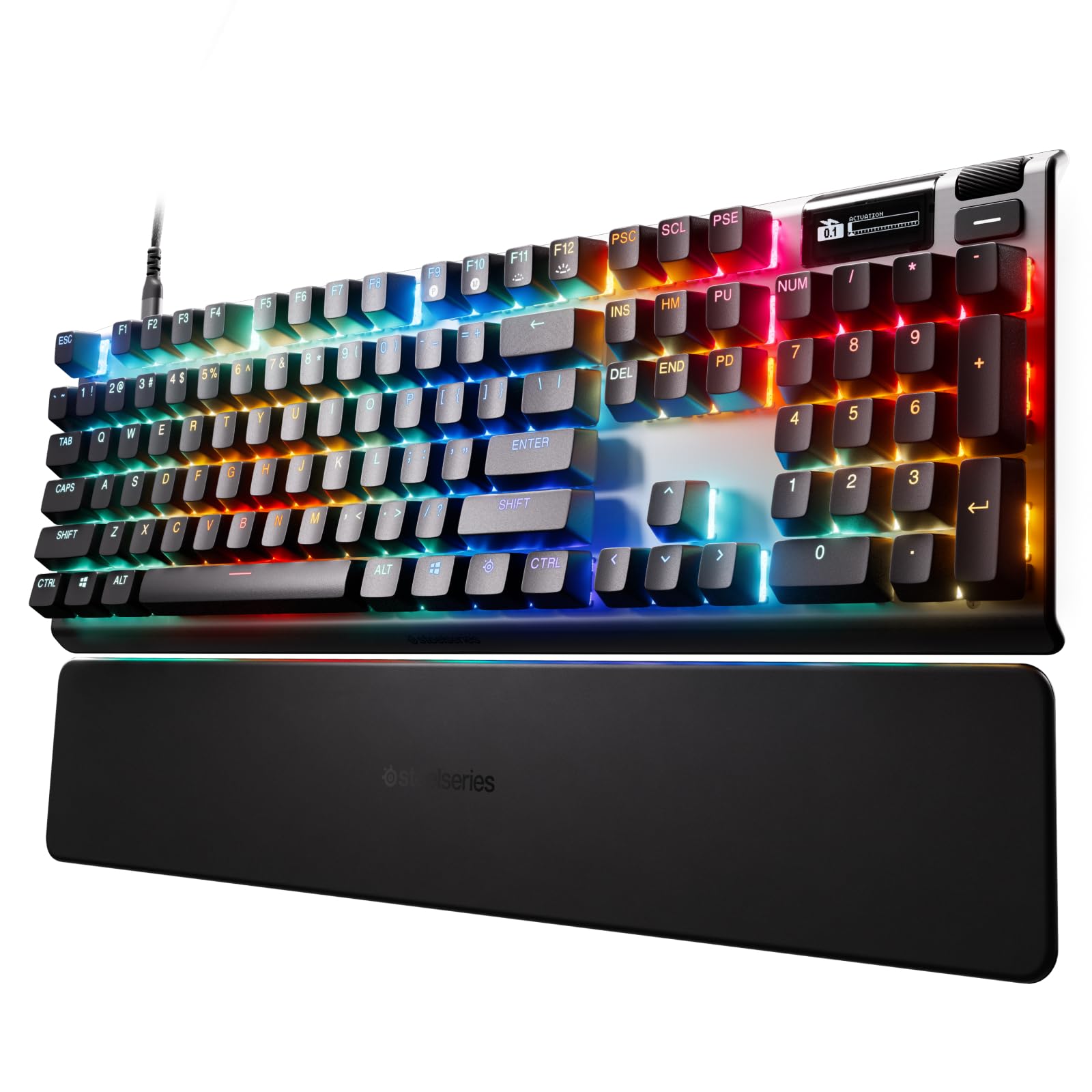
The SteelSeries Apex Pro Gen 3 features the third generation of OmniPoint Hall Effect switches, which boast 20 times faster actuation and 11 times quicker response times compared to the original OmniPoint design. The 0.1 mm adjustment granularity across 40 levels lets you fine-tune every key independently. Rapid Trigger and Rapid Tap work together to reduce latency during rapid key spamming, and the exclusive Protection Mode reduces sensitivity of surrounding keys to prevent accidental inputs.
The alloy steel frame gives this board a dense, premium heft that sits firmly on any desk. The OLED Smart Display provides a digital command center for profile switching and live adjustments without alt-tabbing. PBT keycaps and individually lubricated switches contribute to a creamy typing sound that many users describe as satisfyingly quiet.
A common critique is the lack of onboard per-key RGB storage, meaning your lighting customizations require the SteelSeries GG software to be running. The media button has been described as mushy compared to the crisp tactile feedback of the keys themselves. Still, for raw Hall Effect performance and feature depth, this board justifies its premium price point.
Why it’s great
- OmniPoint 3.0 provides the fastest magnetic actuation in this class
- Protection Mode prevents accidental key presses during high-speed gameplay
- OLED display enables on-the-fly settings without software
Good to know
- No onboard per-key RGB storage; software required for lighting
- Media button lacks satisfying tactile feedback
3. Glorious GMMK 3 PRO

The Glorious GMMK 3 PRO stands apart with a full CNC-machined aluminum case that gives it a tank-like 5.5-pound weight and an anodized finish that resists scratches. Its nine points of modularity — including a modular gasket system (MGS) — let you swap out internal gaskets to tune the typing feel from firm to flexible. Two layers of dense sound-dampening foam eliminate unwanted resonance, producing a clean, muted acoustic profile that enthusiasts love.
Hot-swap 5-pin MX sockets allow you to experiment with any Cherry- or Glorious-compatible switch without soldering, which is ideal if you like to switch between linear and tactile depending on the game. The included accessories — braided cable, keycap puller, switch puller, and extra screws — make this feel like a complete build kit out of the box. The rotary knob offers intuitive volume and lighting control.
The main trade-off is the absence of magnetic or optical switch technology, meaning you don’t get adjustable actuation or Rapid Trigger. The backlighting is also slightly dimmer compared to competitors like Razer. For the pure custom mechanical experience, however, the GMMK 3 PRO delivers unmatched rigidity and personalization.
Why it’s great
- Full CNC aluminum body provides superior rigidity and weight
- 9-point modular system allows deep customization of sound and feel
- 5-pin hot-swap sockets enable easy switch experimentation
Good to know
- Does not include Hall Effect or optical switch technology
- Backlight brightness is slightly lower than competing RGB boards
4. Corsair K70 PRO TKL

The Corsair K70 PRO TKL is a tenkeyless board built around pre-lubricated MGX Hyperdrive magnetic switches that offer per-key actuation from 0.4 mm to 3.6 mm in 0.1 mm steps. The space-saving layout frees up mouse room, which is a tangible advantage for low-sensitivity FPS players. Rapid Trigger dynamically adjusts actuation and reset points based on real-time key travel, giving you faster repeat inputs without fully releasing the key.
The aluminum chassis gives it a sturdy 2.13-pound weight that resists flex during heavy play. The RGB lighting is vivid and complements the included volume roller and media keys. Game Mode disables the Windows key and auto-sets the highest polling rate, which is a thoughtful touch for uninterrupted sessions. The double-shot ABS keycaps are durable, though not as long-lasting as PBT alternatives.
The iCue software is powerful but can be clunky to navigate, and some users find the volume knob placement too close to the navigation cluster. The lack of a full-size numpad may be a dealbreaker for productivity users, but the Hall Effect performance and compact footprint make this a strong mid-range contender.
Why it’s great
- MGX Hyperdrive Hall Effect switches with per-key actuation tuning
- Tenkeyless layout maximizes mouse space for competitive play
- Rapid Trigger improves speed for repeated key inputs
Good to know
- iCue software has a steep learning curve and occasional bugs
- Volume knob placement can interfere with navigation keys
5. Keychron K10 HE

The Keychron K10 HE delivers a full 100% layout with Hall Effect Gateron Double-Rail Nebula magnetic switches, combining a classic mechanical typing feel with modern adjustable actuation from 0.2 mm to 3.8 mm. The aluminum frame with natural rosewood side panels gives it a refined, furniture-grade aesthetic that stands out from the typical all-black gaming boards. The tri-mode connectivity — Bluetooth 5.2, 2.4 GHz wireless, and USB-C — supports seamless switching between a PC, Mac, tablet, and smartphone.
The web-based Launcher allows for key remapping, macro creation, and actuation tuning without installing bloated software. The double-shot PBT keycaps resist shine and wear, and the south-facing RGB illuminates the legends clearly. The inclusion of Snap Action (SOCD) and Rapid Trigger makes this full-size board viable for competitive play despite its office-friendly appearance.
Battery life is a weak point: heavy users report needing daily charging to sustain eight-hour sessions with RGB on. The absence of a dedicated volume knob requires FN-key combos for media control, and the RGB brightness is modest even at maximum settings. For gamers who want a full numpad with Hall Effect performance, however, this is a compelling hybrid.
Why it’s great
- Full 100% layout with Hall Effect switches and adjustable actuation
- Premium aluminum and rosewood frame with triple connectivity
- Web-based customization eliminates need for heavy software
Good to know
- Battery life is limited; requires frequent charging with RGB active
- No dedicated volume knob; RGB brightness is moderate
6. Keychron K2 HE

The Keychron K2 HE packs a 75% layout with 84 keys and Hall Effect Gateron Double-Rail magnetic switches that offer 0.1 mm sensitivity and a 0.2 mm to 3.8 mm actuation range. The compact form factor saves significant desk space while retaining the function row, making it a favorite among gamers who also type frequently. The aluminum frame with rosewood siding delivers a premium feel that rivals boards costing twice as much.
Tri-mode connectivity (2.4 GHz wireless, Bluetooth 5.2, USB-C) with a 1000 Hz polling rate ensures low latency in wireless mode. The web-based Launcher provides full customization of actuation, macros, and Rapid Trigger settings, with profiles stored onboard so your preferences travel with the keyboard. The pre-lubed switches and integrated foam produce a deep, thocky sound that reviewers consistently praise.
Keycaps are non-shine-through PBT, which means legends are difficult to see in low-light conditions — a notable drawback for gamers who play in dark rooms. The battery lasts about two days of moderate use, which is average for a wireless Hall Effect board. For those who prioritize a compact footprint and magnetic switch precision, the K2 HE is a top-tier value.
Why it’s great
- 75% layout with Hall Effect switches and 0.1 mm sensitivity
- Premium aluminum and wood frame with triple wireless modes
- Web configurator with onboard profile storage for portability
Good to know
- Non-shine-through keycaps are hard to read in low light
- Battery life averages two days with moderate usage
7. ASUS ROG Strix Scope II X

The ASUS ROG Strix Scope II X is a wired full-size keyboard built around pre-lubed ROG NX Snow V2 linear switches, which deliver a smooth, thocky keystroke with an integrated LED lens for enhanced RGB illumination. The aluminum top plate and double-shot PBT keycaps give it a weighty 2.1-pound build that resists flex. Integrated sound-dampening foam and switch-dampening pads effectively absorb pinging and echo, resulting in a clean acoustic profile that suits both gaming and typing.
Hot-swappable sockets support both 3-pin and 5-pin switches, so you can swap in your preferred tactile or clicky options without soldering. Pre-programmed F1-F5 hotkeys provide quick access to Xbox Game Bar and recording functions, and the multi-function wheel offers intuitive media and lighting adjustments. The detachable wrist rest offers three tilt angles for ergonomic positioning.
The wired-only connectivity may be a limitation for those seeking a clutter-free desk, and the ASUS software (Armoury Crate) is required for full RGB and macro customization. Some users note that the space bar and left shift key can feel slightly sticky out of the box, though this often resolves after a break-in period. For a reliable, great-sounding wired board with hot-swap convenience, this is a solid mid-range pick.
Why it’s great
- Pre-lubed NX Snow V2 linear switches with smooth, thocky sound
- Integrated foam layers eliminate pinging for clean acoustics
- Hot-swap sockets support 3-pin and 5-pin switches
Good to know
- Wired-only design limits desk cable management options
- Armoury Crate software required for advanced customization
8. Razer Huntsman V2 Analog

The Razer Huntsman V2 Analog uses analog optical switches that detect how far you press each key, enabling variable input control similar to an analog stick. This makes it uniquely suited for racing games where you need partial throttle, or flight sims where subtle rudder adjustments matter. The adjustable actuation range (from 1.5 mm to 3.6 mm) and Rapid Trigger Mode let you tailor responsiveness per key, and the double-shot PBT keycaps ensure long-term durability.
The magnetic leatherette wrist rest provides plush support with built-in underglow lighting that syncs with the Razer Chroma ecosystem. The 5-pound weight gives it a substantial desk presence, and the dedicated media keys and volume dial make in-game adjustments seamless. The aluminum construction and textured keycaps contribute to a premium feel that has kept this model relevant for years.
Some users find the analog feature gimmicky in standard FPS games where binary input is sufficient, and the space bar can be noticeably louder than the rest of the keys. The lack of hot-swap capability and wired-only USB-C connectivity may feel outdated compared to newer Hall Effect competitors. For analog-specific genres, however, this remains a distinct and capable option.
Why it’s great
- Analog optical switches enable variable input for sim racing and flight
- PBT keycaps and aluminum construction ensure lasting durability
- Magnetic wrist rest with Chroma underglow adds premium comfort
Good to know
- Analog feature offers limited utility in standard FPS titles
- No hot-swap support; wired-only connectivity
9. AULA F108 PRO

The AULA F108 PRO punches far above its price class with a built-in TFT color display that can show custom GIFs, battery status, and connection mode. The full-size layout includes a multi-function knob for volume and settings, and the five-layer sound-dampening structure produces a creamy, thocky sound that rivals boards costing three times as much. The 8000 mAh battery is the largest in this comparison, offering extended wireless use even with RGB active.
Hot-swap support for 3- or 5-pin switches, pre-lubed linear switches, and side-printed PBT keycaps deliver a tactile experience that reviewers consistently call “amazing for the money.” Tri-mode connectivity (Bluetooth 5.0, 2.4 GHz, USB-C) with a 1000 Hz polling rate provides solid wireless performance, and the south-facing RGB ensures clear legend illumination in dark conditions.
The software is the weak link: the driver only runs on Windows in wired mode, and some settings default to Chinese characters out of the box. The side light bars are not individually customizable, and battery life drops to 4-5 hours with full RGB brightness. For budget-conscious buyers who want a feature-packed wireless board with a screen and hot-swap flexibility, however, this is an exceptional find.
Why it’s great
- TFT screen with custom GIF support and multi-function knob
- Massive 8000 mAh battery for extended wireless gaming
- Five-layer sound dampening produces creamy, thocky acoustics
Good to know
- Software is Windows-only and has some localization bugs
- Side light bars are not individually customizable
FAQ
What is the difference between Hall Effect and optical switches for gaming?
Does a higher polling rate really improve my gameplay?
Can I use a Hall Effect keyboard for typing and daily work?
What does hot-swappable mean and why does it matter?
Is wireless gaming keyboard latency still an issue at this price point?
Final Thoughts: The Verdict
For most users, the gaming keyboard under $350 winner is the Razer Huntsman V3 Pro 8KHz because its 8000 Hz polling, Gen-2 analog optical switches, and Snap Tap feature provide the most competitive edge for FPS and esports play. If you want a quieter, Hall Effect-driven all-rounder with excellent software integration, grab the SteelSeries Apex Pro Gen 3. And for the best value with a full-size layout and swappable switches, nothing beats the AULA F108 PRO.